
[ACL 2025] Agentic Knowledgeable Self-awareness



Table of Contents
- 🌻Acknowledgement
- 🌟Overview
- 🔧Installation
- 🚀QuickStart
- 📚Knowledge-System-Construction
- 📝Training-Data-Construction
- 📉Training
- 🧐Evaluation
- 🚩Citation
- 🎉Contributors
🌻Acknowledgement
Our code of the training module is referenced from self-rag, while the code of the inference module is implemented based on ETO and IPR. And our code of the knowledge generation and consolidation module is referenced and adapted from AutoManual. The templator module of models is referenced from OneGen. Various baseline codes are sourced from ReAct, Reflexion, ExpeL, ETO, KnowAgent, WKM. We use LLaMA-Factory to deploy our models. Thanks for their great contributions!
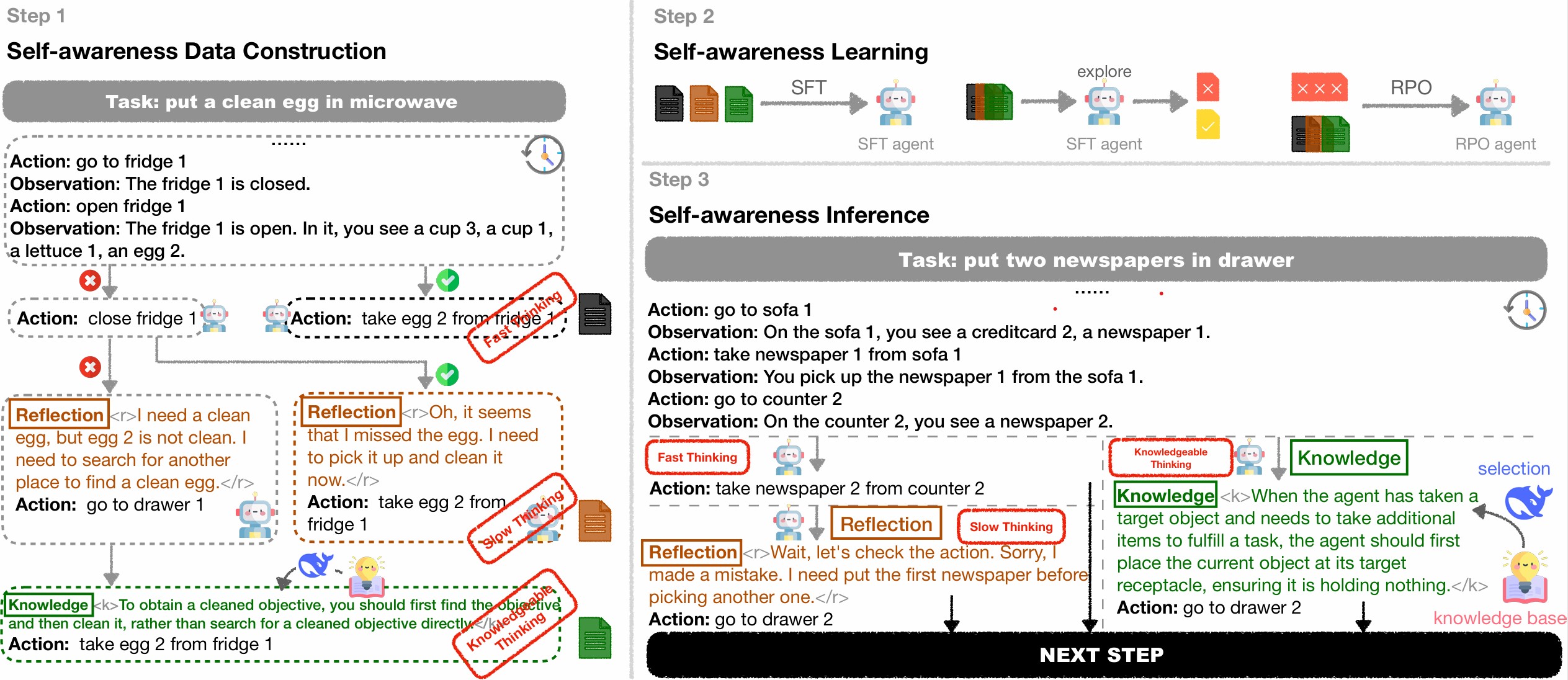
🌟Overview
Large Language Models (LLMs) have achieved considerable performance across various agentic planning tasks. However, traditional approaches adopt a ''flood irrigation'' methodology that indiscriminately injects gold trajectories, external feedback, and domain knowledge into agent models. This practice overlooks the fundamental human cognitive principle of self-awareness - the ability to dynamically assess situational demands and strategically employ resources during decision-making. We propose agentic knowledgeable self-awareness to address this gap, a novel paradigm enabling LLM-based agents to autonomously regulate knowledge utilization.
Specifically, we propose KnowSelf, a data-centric approach that applies agents with knowledgeable self-awareness like humans. Concretely, we devise a heuristic situation judgement criterion to mark special tokens on the agent's self-explored trajectories for collecting training data. Through a two-stage training process, the agent model can switch between different situations by generating specific special tokens, achieving optimal planning effects with minimal costs. Our experiments demonstrate that KnowSelf can outperform various strong baselines on different tasks and models with minimal use of external knowledge.
🔧Installation
We recommend that you create a new conda environment to run our project.conda create -n knowself python=3.10
conda activate knowself
git clone https://github.com/zjunlp/KnowSelf
cd KnowSelf
bash setup.sh🚀QuickStart
Our train datasets are saved attrain/knowselftraindata. You can use the following command to train the model and evaluate it.
# You should modify the path in the script before running it.
train the stage 1 model
bash train_stage1.sh
train the stage 2 model
bash train_stage2.sh
evaluate the model
bash eval_knowself.sh📚Knowledge-System-Construction
In the section on knowledge system construction, we construct a knowledge system. Before starting the knowledge system construction, please ensure that you have openai api key and modify the fileevalagent/configs/model/openai.json to set the apikey and api_base. And set the global variable.
export OPENAIAPIKEY=<youropenaiapi_key>
export OPENAIBASEURL=<youropenaibase_url>
export OPENAIAPIBASE=<youropenaibase_url>
The bash script constructknowledgesystem.sh implements the knowledge system construction process. You can run the following command.
bash constructknowledgesystem.shThe script performs the pipeline of knowledge system construction, including the following steps:
- Step-level Trajectory Pair Generation. We generate step-level trajectory pairs by using gpt-4o-2024-08-06. For ALFWorld, we generate 36 trajectory pairs, which include 6 pairs for each of task type. For WebShop, we generate 20 trajectory pairs.
- Knowledge Generation and Consolidation. We follow AutoManual to generate and consolidate knowledge. We use gpt-4o-2024-08-06 to generate and consolidate knowledge. We limit the knowledge base to 24 entries for ALFWorld and 10 for WebShop.
📑Training-Data-Construction
In the section on training data construction, we generate personalized training data for each model. Before starting the training data construction, please ensure that you have deployed the model using LLaMA-Factory. And modify the file evalagent/configs/model/llama_factory.json to set the url.
The bash script constructtrainingdata.sh implements the training data construction process. You can run the following command.
bash constructtrainingdata.shThe script performs the pipeline of training data construction, including the following steps:
- Step-level Trajectory Pair Sampling. We first sample step-level trajectory pairs for each model to prepare for constructing the data for slow thinking and knowledgeable thinking.
- Reflection for Pair Data. We then allow the model to reflect on the pair data. If the model fails to reflect on the pair data, we will select knowledge for the failed reflection data. If the model can reflect on the pair data, we will format the data for slow thinking.
- Select Knowledge for Failed Reflection Data. We select knowledge for the failed reflection data. We use DeepSeek-V3 to select knowledge for the failed reflection data. After selecting knowledge, we will format the data for knowledgeable thinking.
- Format Training Data. We format the training data for slow thinking and knowledgeable thinking. And merge with the normal data (fast thinking) to form the final training data. The data will be saved at
train/train_data.
📉Training
Training Stage 1 Model
Use the following command to train for the stage 1. Or you can use the scripttrain_stage1.sh to train the stage 1 model.
MODEL_NAME=llama3-8b-alfworld
MODEL_TYPE=llama3
NUM_GPUS=8
BATCHSIZEPER_GPU=1
TOTALBATCHSIZE=8
TRAIN_TYPE=knowself
GRADIENTACCSTEPS=$(($TOTALBATCHSIZE/$NUMGPUS/$BATCHSIZEPERGPU))
export LOCAL_RANK=0 echo "Training model ${MODELNAME} using $NUMGPUS GPUs, $BATCHSIZEPERGPU batch size per GPU, $GRADIENTACC_STEPS gradient accumulation steps"
CUDAVISIBLEDEVICES=0,1,2,3,4,5,6,7 accelerate launch \     --mixed_precision fp16 \     --num_machines 1 \     --numprocesses $NUMGPUS \     --use_deepspeed \     --deepspeedconfigfile stage3nooffloading_accelerate.conf \     train/finetune.py \     --modelnameor_path <path/to/llama-3.1-8b-instruct> \     --modeltype ${MODELTYPE} \     --tokenizer_name <path/to/llama-3.1-8b-instruct> \     --useslowtokenizer \     --trainfile <path/to/traindata> \     --maxseqlength 3072 \     --preprocessingnumworkers 16 \     --perdevicetrainbatchsize $BATCHSIZEPER_GPU \     --gradientaccumulationsteps $GRADIENTACCSTEPS \     --learning_rate 2e-5 \     --lrschedulertype cosine \     --weight_decay 0. \     --numtrainepochs 3 \     --outputdir train/output/${TRAINTYPE}${MODELNAME}/ \     --with_tracking \     --report_to tensorboard \     --logging_steps 1 \     --usespecialtokens
Construct RPO Training Data
The bash script constructrpodata.sh implements the RPO training data construction process. You can run the following command.
bash constructrpodata.sh- Failed Trajectories Sampling. We first sample failed trajectories for each model trained in stage 1 to prepare for constructing the data for RPO training.
- Format RPO Training Data. We format the RPO training data using the failed trajectories and the corresponding golden trajectories.
Training Stage 2 Model
Use the following command to train for the stage 2. Or you can use the scripttrain_stage2.sh to train the stage 2 model. MODEL_NAME=llama3-8b-alfworld-rpo MODEL_TYPE=llama3 NUM_GPUS=8 BATCHSIZEPER_GPU=1 TOTALBATCHSIZE=8 GRADIENTACCSTEPS=$(($TOTALBATCHSIZE/$NUMGPUS/$BATCHSIZEPERGPU))
export LOCAL_RANK=0 echo "Training model ${MODELNAME} using $NUMGPUS GPUs, $BATCHSIZEPERGPU batch size per GPU, $GRADIENTACC_STEPS gradient accumulation steps"
CUDAVISIBLEDEVICES=0,1,2,3,4,5,6,7 accelerate launch \ --mixed_precision fp16 \ --num_machines 1 \ --numprocesses $NUMGPUS \ --use_deepspeed \ --deepspeedconfigfile stage3nooffloading_accelerate.conf \ train_dpo.py \ --modelnameorpath <path/to/stage1model> \ --modeltype ${MODELTYPE} \ --tokenizername <path/to/stage1model> \ --useslowtokenizer \ --trainfile <path/to/rpotrain_data> \ --maxseqlength 3072 \ --preprocessingnumworkers 16 \ --perdevicetrainbatchsize $BATCHSIZEPER_GPU \ --gradientaccumulationsteps $GRADIENTACCSTEPS \ --beta 0.5 \ --learning_rate 5e-7 \ --lrschedulertype constantwithwarmup \ --weight_decay 0. \ --warmup_ratio 0.1 \ --numtrainepochs 1 \ --outputdir output/knowself${MODEL_NAME}/ \ --with_tracking \ --report_to tensorboard \ --logging_steps 5 \ --usespecialtokens \
🧐Evaluation
You can use the following command to evaluate the model. Or you can use the scriptevalknowself.sh to evaluate the model. knowselfevalvllm.py uses vllm to load the model, while knowselfeval.py uses transformers to load the model.
task=alfworld
model_name=llama3-8b-stage2
model_type=llama3
train_type=knowself
split=test
expname=${split}${traintype}-${modelname}-${task}
outputpath=outputs/${expname}
modelnameorpath=<path/to/stage2model>
VLLMWORKERMULTIPROCMETHOD=spawn CUDAVISIBLEDEVICES=0,1,2,3 python -m evalagent.knowselfevalvllm \     --gpu_num 4 \     --exp_config ${task} \     --outputpath ${outputpath} \     --selectagentconfig deepseek \     --selectagentname deepseek-chat \     --modelnameorpath ${modelnameorpath} \     --selectknowledgeinst evalagent/prompt/instructions/selectknowledge_${task}.txt\     --knowledgebasepath knowledgesystemconstruction/automanual${task}/autobuildlogs/rule_manager.json\     --modeltype ${modeltype} \     --split ${split} \     --debug \     --override
🚩Citation
Please cite our repository if you use KnowSelf in your work. Thanks!
@misc{qiao2025agenticknowledgeableselfawareness,
      title={Agentic Knowledgeable Self-awareness},
      author={Shuofei Qiao and Zhisong Qiu and Baochang Ren and Xiaobin Wang and Xiangyuan Ru and Ningyu Zhang and Xiang Chen and Yong Jiang and Pengjun Xie and Fei Huang and Huajun Chen},
      year={2025},
      eprint={2504.03553},
      archivePrefix={arXiv},
      primaryClass={cs.CL},
      url={https://arxiv.org/abs/2504.03553},
}
🎉Contributors
We will offer long-term maintenance to fix bug


