
Mask sensitive values in config files during screen sharing. Supports .env, JSON, YAML, TOML, XML, Terraform/HCL, Dockerfile, and more. Zero file modification - uses Neovim extmarks.
camouflage.nvim
Hide sensitive values in configuration files during screen sharing.
A Neovim plugin that visually masks secrets in .env, .json, .yaml, .toml, .properties, .netrc, .xml, .http, Terraform/HCL (.tf, .tfvars, .hcl), and Dockerfile files using extmarks - without modifying the actual file content.





Demo
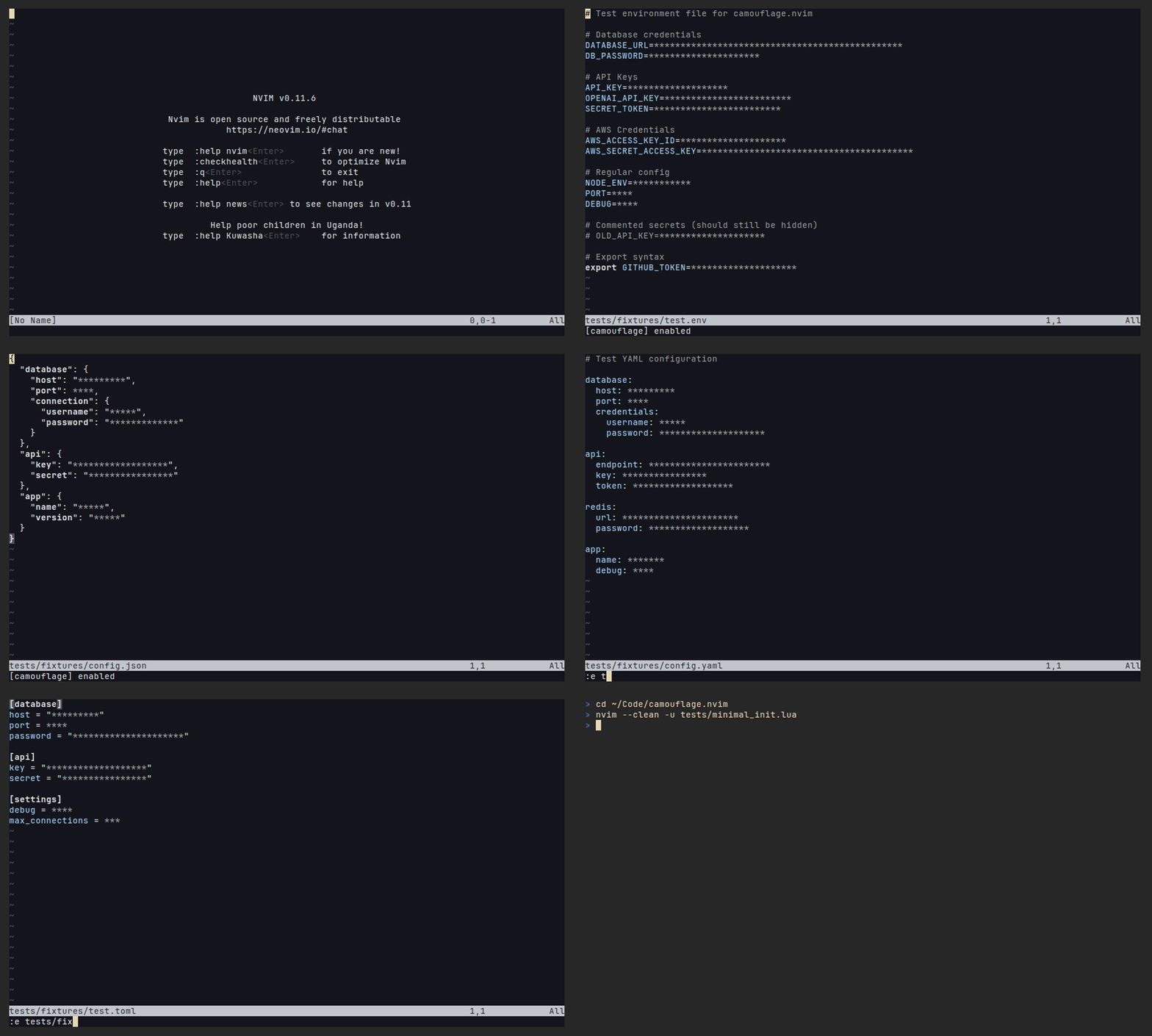
Features
- Multi-format support:
.env,.json,.yaml,.yml,.toml,.properties,.ini,.conf,.sh,.netrc,.xml,.http,.tf,.tfvars,.hcl,Dockerfile,Containerfile - Nested key support: Handles
database.connection.passwordin JSON/YAML/XML - All value types: Masks strings, numbers, and booleans
- Multiple styles:
stars,dotted,text,scramble - Reveal & Yank: Temporarily reveal or copy masked values
- Follow Cursor Mode: Auto-reveal current line as you navigate
- Workspace Audit: Scan supported files into quickfix/location list without exposing values
- Rule-Based Policy: Data-only ignore/force-mask rules for paths, parsers, keys, metadata, and safe value shapes
- Weak Secret Check: Offline badges for obvious defaults, placeholders, short values, repeated values, and low-entropy tokens
- Custom Check API: Register trusted Lua checks that render through the shared badge pipeline
- Have I Been Pwned: Manually check passwords against the breach database (network checks are opt-in; Neovim 0.10+ with
vim.system, pluscurl) - JWT Expiry Hints: Decode
expclaim and show "expires in 2h" badges - Hot Reload: Config changes apply immediately
- Event System: Hooks for extending functionality
- TreeSitter Support: Enhanced parsing for JSON/YAML/TOML/XML/HTTP/HCL/Dockerfile
- Telescope/Snacks Integration: Mask values in preview buffers
- Zero file modification: All masking is purely visual
- Extensible: Register custom parsers for unsupported formats via a public API
- Programmable Checks: Add local or async value checks with
register_check
Security Model
camouflage hides sensitive values visually, by drawing over them with virtual text. It does not change the file, and it does not encrypt or remove anything.
It protects against casual exposure of secrets on screen: shoulder-surfing, screen sharing, pair programming, screenshots, and demos.
It does not protect against anything that reads the buffer or file contents directly, because the real text is still there underneath the mask:
- search results and grep tools, including Telescope
live_grepresult lines
- LSP servers, completion sources, and AI assistants
:%print,:substitutepreviews,:w/:saveas, and yanking withyy/"+y- the
+/*clipboard registers (use:CamouflageYank, which copies the real
For per-repo .camouflage.yaml files, masking config is applied as data only (no code execution). If you don't trust the repositories you open, set project_config.secure = true to gate the file behind Neovim's vim.secure/:trust mechanism.
Have I Been Pwned checks use the network. They are manual/opt-in by default: the :CamouflagePwnedCheck* commands remain available, but automatic checks on buffer enter, save, or text change are disabled unless you set the corresponding pwned option to true. The HIBP integration uses k-anonymity and sends only the first 5 characters of a SHA-1 hash, but this is still a deliberate network request.
The scramble style is cosmetic, not protective: the mask is a shuffle of the real characters, so it leaks the value's length and character set.
Installation
lazy.nvim
{
  'zeybek/camouflage.nvim',
  event = { 'BufReadPre', 'BufNewFile' },
  opts = {},
  keys = {
    { '<leader>ct', '<cmd>CamouflageToggle<cr>', desc = 'Toggle Camouflage' },
    { '<leader>cr', '<cmd>CamouflageReveal<cr>', desc = 'Reveal Line' },
    { '<leader>cy', '<cmd>CamouflageYank<cr>', desc = 'Yank Value' },
    { '<leader>cf', '<cmd>CamouflageFollowCursor<cr>', desc = 'Follow Cursor' },
  },
}
Use BufReadPre/BufNewFile when you want masking available as files are opened. VeryLazy is also usable if you prefer deferred startup loading, but it can let a buffer appear before the first masking pass runs. camouflage only masks visually; it does not encrypt, remove, or otherwise secure the real buffer text.
Other package managers
packer.nvim
use {
  'zeybek/camouflage.nvim',
  config = function()
    require('camouflage').setup()
  end
}
vim-plug
Plug 'zeybek/camouflage.nvim'
" In your init.lua or after/plugin/camouflage.lua: lua require('camouflage').setup()
mini.deps
local add = MiniDeps.add
add({
  source = 'zeybek/camouflage.nvim',
})
require('camouflage').setup()
Manual Installation
git clone https://github.com/zeybek/camouflage.nvim.git \
  ~/.local/share/nvim/site/pack/plugins/start/camouflage.nvim
Then add to your init.lua:
require('camouflage').setup()Configuration
The plugin works with zero configuration. Here's a quick overview of common options:
require('camouflage').setup({
  enabled = true,
  auto_enable = true,
  style = 'stars',           -- 'text' | 'dotted' | 'stars' | 'scramble'
  mask_char = '*',
  debounce_ms = 150,
  max_lines = 5000,
audit = {     ignorepatterns = { '.git/', 'nodemodules/' },     destination = 'quickfix', -- 'quickfix' | 'loclist'   },
policy = {     enabled = true,     default_action = 'mask',     terminalpathignores = { 'node_modules/', '.git/' },     rules = {       {         id = 'ignore-debug-flags',         action = 'ignore',         key = { '^DEBUG$', '^PORT$' },         parser = { 'env', 'json', 'yaml' },       },       {         id = 'force-client-secrets',         action = 'mask',         allow_force = true,         key = { 'client[%.%-]?secret', 'private[%.%-]?key' },       },     },   },
checks = {     weak_secret = {       enabled = true,       minsensitivelength = 12,       entropy_threshold = 3.0,       ignoredkeypatterns = {},       ignoredvaluepatterns = {},     },   },
pwned = {     enabled = true,          -- Manual HIBP commands are available     auto_check = false,      -- Network check on BufEnter (opt in)     checkonsave = false,   -- Network check on BufWritePost (opt in)     checkonchange = false, -- Network check on TextChanged (opt in)   },
reveal = {     follow_cursor = false,   -- Auto-reveal current line   },
yank = {     confirm = true,          -- Require confirmation before copying     autoclearseconds = 30, -- Auto-clear clipboard   },
integrations = {     telescope = true,     cmp = { disableinmasked = true },   }, })
Full configuration reference on the wiki.
Commands
| Command | Description | |---------|-------------| | :CamouflageToggle | Toggle camouflage on/off | | :CamouflageReveal | Reveal masked values on current line | | :CamouflageYank | Copy unmasked value at cursor to clipboard | | :CamouflageFollowCursor | Toggle follow cursor mode | | :CamouflageStatus | Show status and masked count | | :CamouflageRefresh | Refresh decorations | | :CamouflageAudit [path] | Scan workspace/path and populate quickfix | | :CamouflageAudit! [path] | Scan workspace/path and populate location list | | :CamouflageWeakSecretToggle | Toggle offline weak-secret badges | | :CamouflagePwnedCheck | Check if value under cursor is pwned | | :CamouflagePwnedCheckLine | Check all values on current line | | :CamouflagePwnedCheckBuffer | Check all values in buffer | | :CamouflagePwnedClear | Clear pwned indicators from buffer | | :CamouflagePwnedClearCache | Clear local pwned check cache | | :CamouflageExpiryToggle | Toggle JWT expiry check on/off | | :CamouflageInit | Create .camouflage.yaml in project root | | :CamouflageParsers | List registered parsers (debug) |
Full commands list on the wiki.
Workspace Audit
:CamouflageAudit [path] scans supported files under the current project root or optional path using the same parser registry as live masking. Results are written to quickfix by default; :CamouflageAudit! [path] writes to the current window's location list.
Audit results include file, line, column, parser, key, value length, and policy decision metadata, but never the plaintext value. The audit engine does not run HIBP or any other network check.
Rule-Based Policy
policy lets you declare data-only rules in setup() or .camouflage.yaml. Rules only filter values already found by supported parsers; a mask rule does not make unsupported files parseable.
Policy precedence is deterministic:
terminalpathignoresignore a root-relative path first.- An
action = 'mask'rule withallow_force = truecan override that path
- Otherwise, ordered rules are evaluated in order and the first match wins.
- Unmatched variables use
default_action, which defaults tomask.
path, basename, parser, key, nested,
commented, valuelength, valueshape, valueprefix, and valuesuffix.
Value predicates never log or display the plaintext value.
Example .camouflage.yaml:
version: 1
policy:
  terminalpathignores: ['tests/fixtures/**']
  rules:
    - id: ignore-debug
      action: ignore
      key: ['^DEBUG$', '^PORT$']
    - id: force-client-secrets
      action: mask
      allow_force: true
      key: ['client[%.%-]?secret', 'private[%.%-]?key']
Weak Secret Check
The weak-secret check runs locally during masking and flags high-confidence weak values such as password, placeholders, repeated characters, short sensitive values, simple sequences, and low-entropy token-like strings. It uses key context, so benign values like PORT=5432 are not treated like passwords.
Badges render through the same central badge pipeline as HIBP and JWT expiry. The result text and metadata include the reason, key, and value length, but never the plaintext value. Use checks.weaksecret.ignoredkeypatterns or checks.weaksecret.ignoredvaluepatterns to suppress noisy project-specific cases.
Custom Check API
Register trusted Lua checks to inspect parsed variables and render redacted badges through the same pipeline used by weak-secret, HIBP, and JWT expiry checks.
require('camouflage').register_check({
  name = 'local_policy',
  priority = 60,
  run = function(ctx)
    if ctx.var.key:match('TOKEN') and ctx.var.value == 'changeme' then
      return {
        severity = 'warning',
        text = '[policy]',
        hl_group = 'DiagnosticWarn',
        data = { reason = 'placeholder', key = ctx.var.key },
      }
    end
  end,
})
Checks receive plaintext values in ctx.var.value, so only register code you trust. Badge text and data should stay redacted; camouflage drops results that directly include the exact plaintext value.
Async checks must opt in with async = true and call done(result). Old async completions are ignored after buffer edits, unregister, buffer deletion, or a newer decoration run.
require('camouflage').register_check({
  name = 'remote_policy',
  async = true,
  run = function(ctx, done)
    vim.defer_fn(function()
      done({ severity = 'info', text = '[checked]' })
    end, 10)
  end,
})
Configure registered checks with data under checks.<name>:
require('camouflage').setup({
  checks = {
    local_policy = {
      enabled = false,
      label = 'team',
    },
  },
})
Project config can set those data options but cannot register executable check code.
With debug = true, custom check logs include check names, run counts, failures, and elapsed time without logging plaintext values.
Supported File Formats
| Format | Extensions | Nested Keys | |--------|-----------|-------------| | Environment | .env, .env.*, .envrc, .sh | No | | JSON | .json | Yes | | YAML | .yaml, .yml | Yes | | TOML | .toml | Yes (sections) | | Properties | .properties, .ini, .conf, credentials | Yes (sections) | | Netrc | .netrc, _netrc | No | | XML | .xml | Yes | | HTTP | .http | No | | HCL / Terraform | .tf, .tfvars, .hcl | Yes | | Dockerfile | Dockerfile, Containerfile, *.dockerfile | No |
For unsupported formats, you can define custom patterns. These are opt-in; a fixture such as test.myconfig will not be masked until you map that filename pattern:
require('camouflage').setup({
  custom_patterns = {
    {
      file_pattern = { '*.myconfig' },
      pattern = '^%s@([%w_]+)%s=%s*(.+)',
      key_capture = 1,
      value_capture = 2,
    },
  },
})
Runtime parser registrations with file_patterns are picked up by automatic masking immediately after registration.
When TreeSitter is available, JSON/YAML/XML nested keys are reported with their full path. XML attributes use parent.path@attribute so attributes and child elements with the same name stay distinct.
Documentation
For detailed documentation, visit the Wiki:
- Getting Started — Installation and first steps
- Configuration — Full configuration reference
- Commands & Keymaps — All commands and suggested keybindings
- API Reference — Lua API for programmatic control
- Events & Hooks — Extend functionality with event listeners
- Have I Been Pwned — Password breach checking
- Integrations — Telescope, Snacks.nvim, nvim-cmp, Lualine
- Project Config — Repo-level
.camouflage.yaml - TreeSitter — Custom TreeSitter queries
- Architecture — Internal design and code flow
- Troubleshooting — Common issues and solutions
:help camouflage within Neovim.
Also Available
- Camouflage for VS Code - The original VS Code extension
License
MIT License - see LICENSE for details.


