
pdf reader app with note taking, annotations, collaboration, ai features (chat, flashcards generation w. ai-feedbacks), tts and ocr.
Uxie
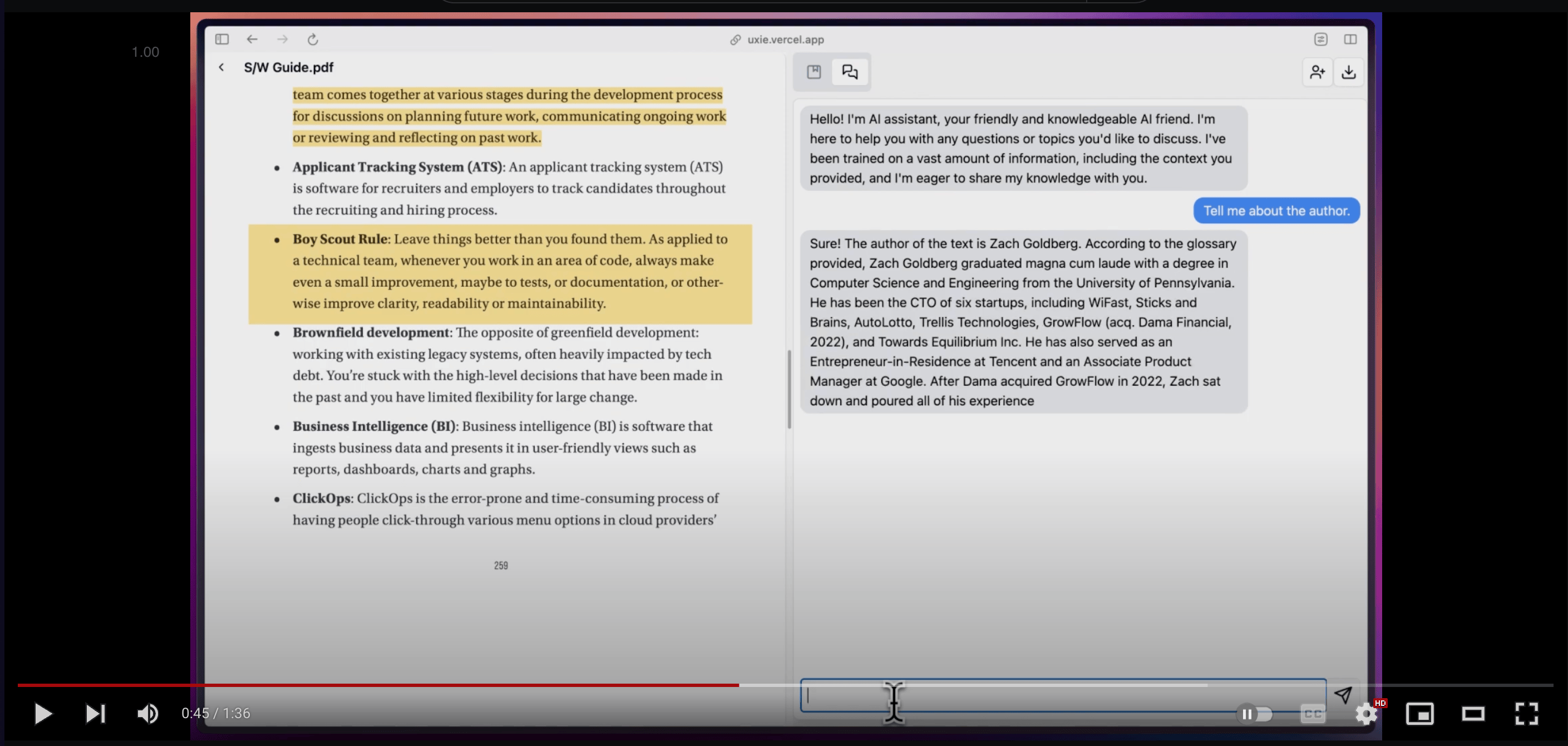
PDF reader app designed to revolutionise your learning experience!
🚀 Developed with features like:
- 📝 Annotation, note-taking, and collaboration tools
- 📚 Integrates with LLM for enhanced learning
- 💡 Generates flashcards with LLM feedback
Uxie has since evolved with even more exciting features.
I'd love for you to give Uxie a try and share your valuable feedback.
Built using
- Nextjs Frontend and Serverless api routes
- tRPC For typesafe apis
- Zod For validation
- Typescript For type safety
- Tailwind CSS For CSS
- React Query for data fetching, optimistic updates
- React Hook Form for form handling
- Shadcn UI + Radix UI For UI components
- Supabase As the database
- Prisma As the ORM
- Blocknote for note taking
- Uploadthing for storing pdfs
- Next Auth for authentication
- React-pdf-highlighter for pdf rendering,highlighting
- Vercel AI SDK, Langchain for AI responses and streaming, generating flashcards + evaluating them
- Pinecone DB for storing embeddings of pdfs
- Fireworks AI for LLM
- Huggingface Model for generating Embeddings
- Liveblocks for realtime collaboration
- Nuqs for type-safe search params
Features:
- Note taking, later download the note as markdown
- Summarise, ask questions about the PDFs
- Chat and collab with other (collaboration disabled for now-hit free tier limits :'(
- Custom blocks in editor
- Highlights block which on click takes you to that highlight on the doc.
- AI-powered text autocompletion, and text enhancement
- PDF text-to-speech (local ai models & browser inbuilt) with sentence-by-sentence highlighting. (spent insane amt of hours on this, and super happy with how it turned out :)
- PDF OCR support (English only)
- Craft simple flashcards to test your knowledge, answer questions, and receive instant feedback through AI evaluation.
- Bionic reading mode, RSVP reading mode disable hyperlinks, read-along mode (helping people read), full-screen pdf view.
- SOON => Semantic search, improved RAG (with better results & listing sources -> w intuitive ui), pdf summary, & more :)
Bugs
- [ ] add proper prompts for each item in custom/ai/popover.tsx
- [ ] build a category/tags system for documents => doesn't matter if ui is bad, just build it
- [ ] implement ratelimit (esp for everything ai related) using redis kv => checkout upstash
- [ ] better error,loading pages
- [ ] fix
.tippy-arrowappearing on screen at all times => added a temp fix. still appears when hovered over the pdf reader
New ideas
- [ ] use background runner with long-polling for vectorisation / flashcard gen
- [ ] For area-highlight
- [ ] send page number whenever tool-calling is used, then display it under the text. (which takes to that page on click)
- [ ] store the content of text-highlight and make it available for search (from a cmd+k window, along w separate tab, and maybe also from /f) => prob not useful for image-highlights (or maybe run ocr on image highlights (using tesseract, (scribe is overkill here)) and store that) => prob not useful, since everything gets added to notes already, then searching that is a simple cmd+f.
- [ ] store highlighted images in uploadthing.
🚀 Getting Started
Once you have the application running, you can start using it by following these steps:
- Sign up or log in: Create a new account or log in with your existing credentials.
- Upload a PDF: Click the "Upload" button to upload a PDF file from your computer.
- Start learning: Once the PDF is uploaded, you can start reading, annotating, and using the AI-powered features to enhance your learning experience.
Prerequisites
- Node.js (v18 or later)
- pnpm
- A Supabase account
- A Pinecone account
- An Uploadthing account
Installation
- Clone the repository:
git clone https://github.com/zeus-12/uxie.git
cd uxie- Install dependencies:
pnpm install- Set up environment variables:
.env.example file to a new file named .env and fill in the required values.
cp .env.example .envYou will need to provide API keys and other configuration details for the following services:
- DATABASE_URL: Your Supabase database connection string. - NEXTAUTH_SECRET: A secret key for NextAuth.js. You can generate one using openssl rand -base64 32. - NEXTAUTH_URL: The URL of your application (e.g., http://localhost:3000). - GOOGLECLIENTID: Your Google OAuth client ID. - GOOGLECLIENTSECRET: Your Google OAuth client secret. - UPLOADTHING_SECRET: Your Uploadthing API key. - UPLOADTHINGAPPID: Your Uploadthing app ID. - PINECONEAPIKEY: Your Pinecone API key. - PINECONE_ENVIRONMENT: Your Pinecone environment. - PINECONEINDEXNAME: The name of your Pinecone index. - FIREWORKSAPIKEY: Your Fireworks AI API key.
- Set up the database:
.env file.
- Run the following command to apply the database migrations:
pnpm prisma db push- Set up Pinecone:
768 and the metric to cosine.
- Get your API key and environment from the project settings and add them to your .env file.
- Start the development server:
pnpm devThe application should now be running at http://localhost:3000.
🤝 Contributing
Contributions are welcome! We appreciate your help in making Uxie even better.
If you have any ideas, suggestions, or bug reports, please open an issue on the GitHub repository.
If you want to contribute code, please follow these steps:
- Fork the repository.
- Create a new branch for your feature or bug fix.
- Make your changes and commit them with a clear and descriptive message.
- Push your changes to your forked repository.
- Open a pull request to the
mainbranch of the original repository.


