
Version Notifier is a modern solution for the "being notified" aspect of each Techy's day-to-day work. By using it, you'll be notified for any new global GitHub repository release you choose, directly to your Slack / Telegram channel.
Version Notifier 


 🕷 Version Notifier - your Friendly Neighborhood Spiderman, only geekier 🤓
Version Notifier is a modern solution for the "being notified" aspect of each Techy's day-to-day work. By using it, you'll be notified for any new global GitHub repository release or tag you choose, directly to your Slack / Telegram channel. 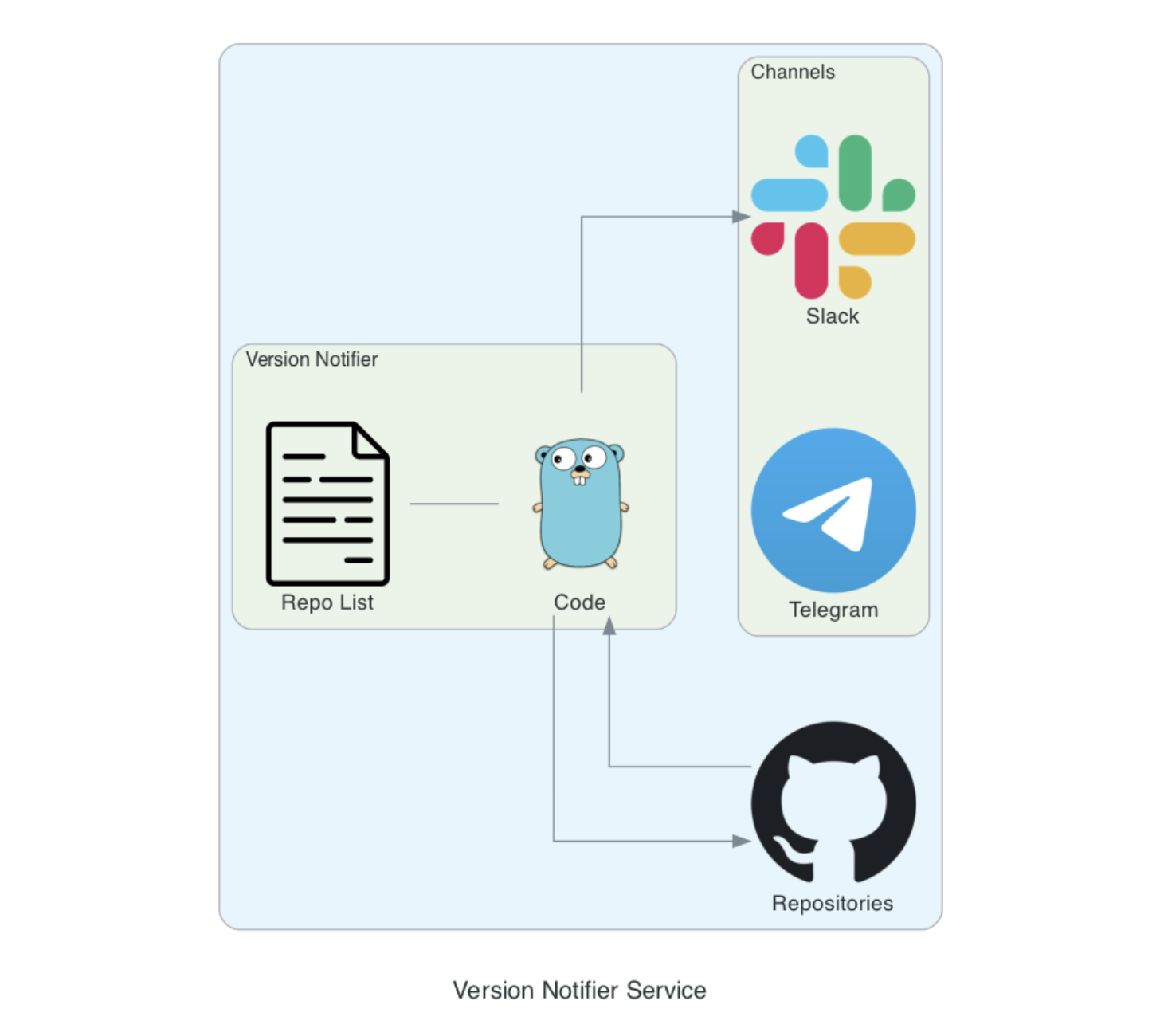
NOTE ⚠️
Starting from image version 1.0.0, a use of the GitHub API is made. As a result, a GitHub OAuth token is needed to perform requests. This is because the last used method (site scraping) caused receiving theYou have triggered an abuse detection mechanism error from the GitHub servers.
The GitHub API have a rate limit, which is different depends on the type of GitHub account you own.
- Personal: 60 requests per hour per repository
- Organization: 5000 requests per hour
- Enterprise: 5000 requests per hour
Getting Started 🏁
You can deploy the application in one of two ways:HELM
Download the latest release and deploy it to your Kubernetes clusterhelm repo add vnotifier https://yuvalpress.github.io/version-notifier
kubectl create ns notifier
helm install version-notifier vnotifier/version-notifier -n notifier --set secret.values.SLACKTOKEN="dmFsdWU=" --set secret.values.SLACKCHANNEL="dmFsdWU="Docker Image
Create a dockerfile from the Version-Notifier base image and deploy it as a standalone container:# Name this file Dockerfile
FROM yuvalpress/version-notifier:latest
# NOTE - Set only one method - slack or telegram - not both
# You MUST Set this environment variables for the application to send notification to slack
ENV NOTIFICATION_METHOD slack
ENV SLACK_CHANNEL {{ value }}
ENV SLACK_TOKEN {{ value }}
# You MUST Set this environment variables for the application to send notification to telegram
ENV NOTIFICATION_METHOD telegram
ENV TELEGRAM_TOKEN {{ value }}
ENV TELEGRAMCHATID {{ value }}
# Optional ENV NOTIFY {{ value }} ENV SENDFULLCHANGELOG {{ value }} ENV INTERVAL {{ value }}
# Run this command from the Dockerfile dir docker build -t {{ value }} . docker run --name {{ value }}Configuration Options 🕹
NOTIFY
List represented as string with the following possible keywords:major, minor, patch, all This value can be set in both HELM values.yaml file under application.notify and as environment variable in your custom Dockerfile. Possible combinations: * "all" - all must be set alone * "major, patch" - only notify for major and patch version changes * "minor" - only notify about minor version changes
If not set, NOTIFY will be automatically set to all
SENDFULLCHANGELOG
Boolean value represented as a string:true or false
This environment variable is responsible for the form of the message to be sent.
INTERVAL
Integer value represented as a string. This environment variable is responsible for the requests rate and is defaulted to 20 minutes. This environment variable is being treated as minutes. Example:INTERVAL=30 -> 30 minutesconfig.yaml
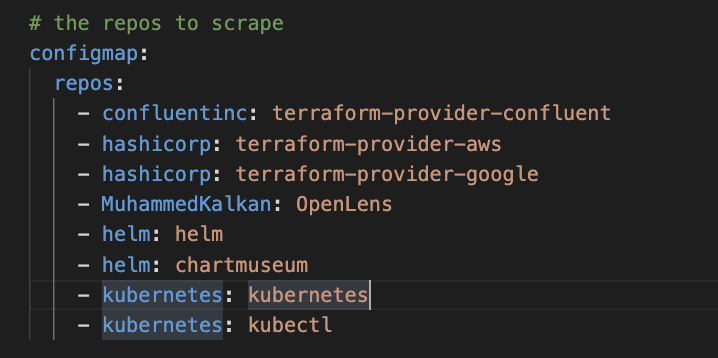
The config.yaml file holds the repositories to be scraped by Version-Notifier.Example repo template: <github-user>: <repository>
Edit with HELM:
Add to custom Dockerfile:
- Create a file called config.yaml, place it under the same folder as the Dockerfile and populate it like such:
repos:
    - confluentinc: terraform-provider-confluent
    - hashicorp: terraform-provider-aws
- hashicorp: terraform-provider-google- Add it to your custom Dockerfile:
# Name this file Dockerfile
    FROM yuvalpress/version-notifier:latest
# add custom config.yaml file     COPY config.yaml ./config.yaml          # NOTE - Set only one method - slack or telegram - not both     # You MUST Set this environment variables for the application to send notification to slack     ENV NOTIFICATION_METHOD slack     ENV SLACK_CHANNEL {{ value }}     ENV SLACK_TOKEN {{ value }}          # You MUST Set this environment variables for the application to send notification to telegram     ENV NOTIFICATION_METHOD telegram     ENV TELEGRAM_TOKEN {{ value }}     ENV TELEGRAMCHATID {{ value }}
Verification of Success 🎯
If the deployment was successful, you'll see the logs rolling out of your container:Using Docker
If you executed Version Notifier using Docker, you'll see the logs roll after you run the container.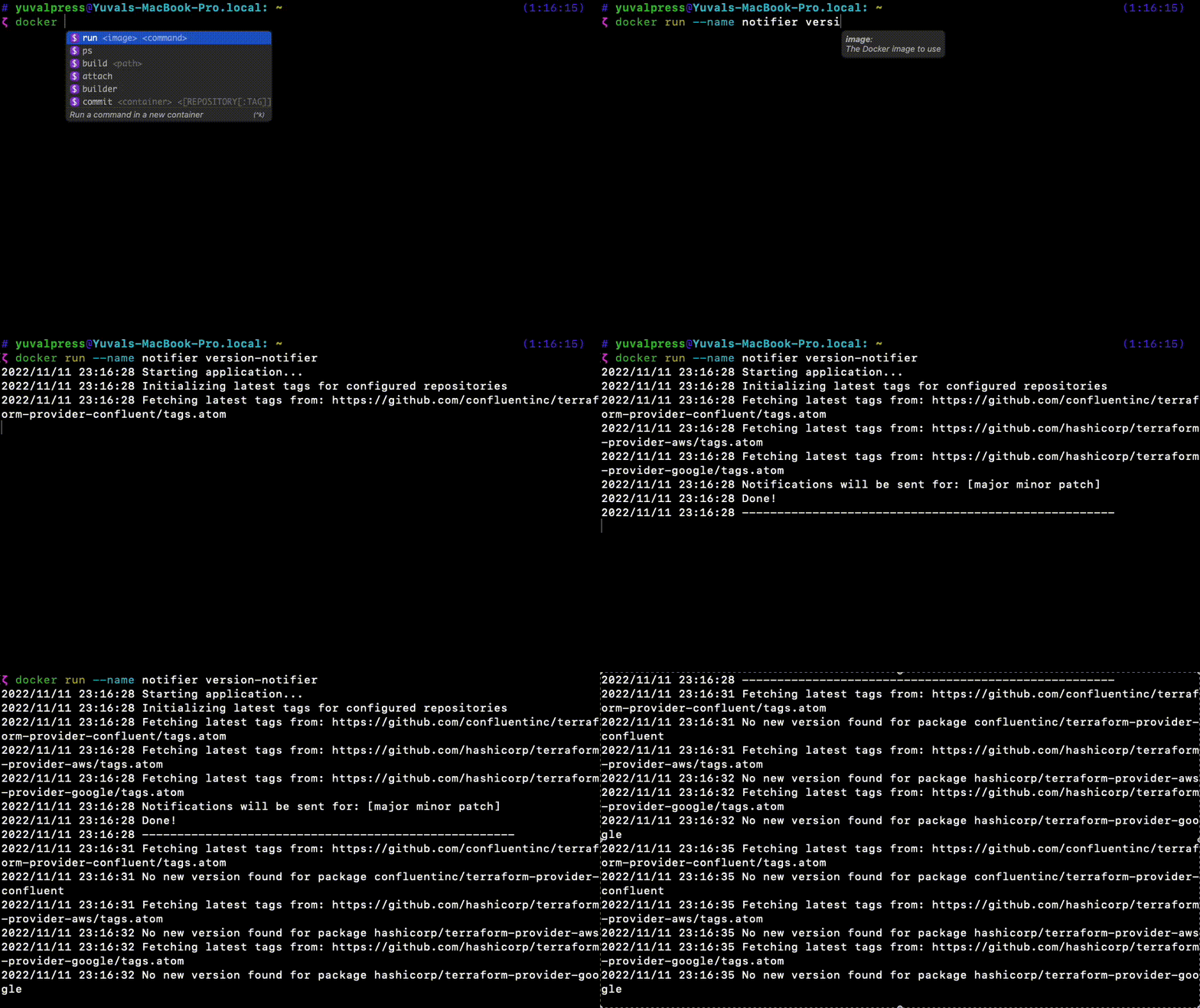
Watch logs with kubernetes
pod=$(kubectl get pods -n notifier -l app=version-notifier -o yaml | yq '.items[0].metadata.name') && kubectl logs $pod -n notifier -fUpcoming Features ✨
- Support more than one notification method at a time.
- Add support for Pypi repositories
- Add support for Docker Images in Dockerhub
Want to contribute? 💻
PR's are more than welcome!Steps:
- Open a branch in the following form:
feature/<feature_name>. - Make sure to bump the Docker Image version by incrementing the version inside the docker.version file.
- Open PR!


