
[CVPR 2025 Highlight] Official code for "Olympus: A Universal Task Router for Computer Vision Tasks"

Olympus: A Universal Task Router for Computer Vision Tasks
CVPR 2025 (Highlight)






Yuanze Lin · Yunsheng Li · Dongdong Chen · Weijian Xu · Ronald Clark · Philip H. S. Torr
Installation · Models & Data · Inference · Training · Evaluation · Citation
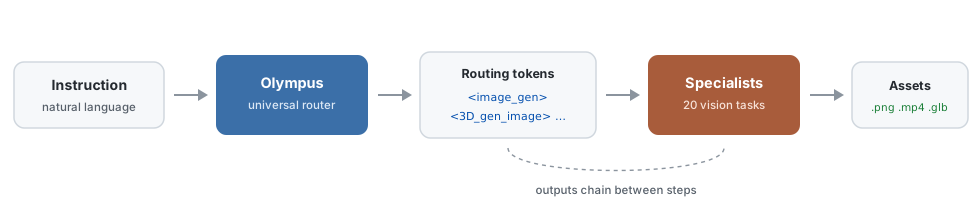
Olympus routes a single natural-language instruction across 20 vision tasks, dispatches each to a specialist model, and chains their outputs. One prompt in, finished .png, .mp4 and .glb files out.
:hearts: If you find our project is helpful for your research, please kindly give us a :star2: and cite our paper :bookmark_tabs: : )
:mega: News
- [x] Prompt-to-Assets: A single instruction now returns finished assets,
.png/.mp4/.glb. - [x] Release the code for integration with task-specific models.
- [x] Release the training & inference code.
- [x] Release Olympus datasets.
- [x] Release the model of Olympus.
:low_brightness: Overview

:hammerandwrench: Installation
To establish the environment, just run this code in the shell:
git clone https://github.com/yuanze-lin/Olympus.git
cd Olympus
conda create -n olympus python==3.10 -y
conda activate olympus
pip install -r requirements.txt
That will create the environment
That is all you need to run the router on its own. To also execute the routed tasks and generate real images, videos and 3D models with run_tools.py, install the specialist stack into the same environment:
pip install torch==2.6.0 torchvision==0.21.0 --index-url https://download.pytorch.org/whl/cu124
pip install -r requirements_tools.txt
bash scripts/install_specialists.sh
The router and every specialist share this one environment; there is no per-tool environment to manage.
3D backends
<3Dgenimage> uses TRELLIS.2-4B and <3Dgentext> uses TRELLIS-text-base, both producing textured meshes with PBR materials. They compile several CUDA extensions, so they install separately:
bash scripts/install_3d.shThat builds both, plus Hunyuan3D-2 as an ungated fallback for <3Dgenimage>. Each step is independent, so a failure in one does not block the others, and any 3D token whose backend is missing falls back automatically rather than erroring. See the 3D fallbacks.
TRELLIS.2-4B needs two gated Hugging Face repos at runtime:
facebook/dinov3-vitl16-pretrain-lvd1689m(image conditioning) and briaai/RMBG-2.0
(background removal). Accept both licenses on the Hub while logged in
(huggingface-cli login) and nothing else is needed.
>
If your request is rejected, obtain the weights locally (see
microsoft/TRELLIS.2#38) and
point at the folders:
> SEGMODELPATH=/path/to/RMBG-2.0 \ > python run_tools.py --prompt "..." --input-image assets/room.jpg >> DINOMODELPATH=/path/to/dinov3-vitl16-pretrain-lvd1689m \
The Hub call is tried first; these apply only if it fails. Or skip TRELLIS.2 and
let <3Dgenimage> fall back to Hunyuan3D-2, which is ungated.
:floppy_disk: Models & Data
We share our collected Olympus dataset as follows:
| Instruction | Link | |---------|------| | Olympus Dataset | Olympusdataset | | Olympus Fine-tuning Data | Olympus.json |
: There are 20 JSON files under
folder, each corresponding to a specific task. You can refer to the routing token definitions in our paper to identify the task associated with each JSON file, along with the chain-of-action data provided inindividual tasks
. Each of these 21 JSON files includes both training and test data..json
and.json
contain the collected OlympusInstruct and OlympusBench datasets, respectively..json
: The final instruction data for fine-tuning..json
python download_olympus.pyIt will save the
(2) Download the Olympus data for fine-tuning:
python downloadolympusdataset.pyIt saves the fine-tuning instruction data
.json.json.jsonIf you want to merge the data manually, download llavav15_mix665k.json into the
python scripts/merge_data.pyYou can specify which tasks to merge by referring to the script
/merge_tasks.py(3) Download the Mipha-3B model for fine-tuning:
python downloadmipha3b.pyIt will save the
-3B:rocket: Inference
A single instruction becomes finished files. Olympus parses it into routing tokens, dispatches each to its specialist, and resolves the dependencies between them, so no step has to be wired up by hand.
Quick start
python run_tools.py \
  --prompt "Generate an image of a fluffy orange cat lounging on a windowsill, \
with sunlight streaming through the glass and casting soft shadows to create a cozy atmosphere. \
Next, would it be possible to change the cat's color to white? This change will make it more eye-catching. \
In the following step, produce a high-resolution 3D model based on the modified image. \
At the next point, please show a video of a cat running through a sunlit forest." \
  --model-path ckpts/Olympus --output-dir outputs/cat
The plan is printed before anything loads. <- step N is a resolved dependency: the edit runs on the generated image, and the mesh is built from the edited one.
Execution plan:
  [0] <imagegen> via qwenimage
        "a fluffy orange cat lounging on a windowsill, ..."
  [1] <imageedit> via qwenimage_edit  <- step 0
        "change the cat's color to white."
  [2] <3Dgenimage> via trellis2  <- step 1
        "produce a high-resolution 3D model based on the modified image."
  [3] <videogen> via wanvideo
        "a cat running through a sunlit forest."
outputs/cat/
├── step0imagegen.png # Qwen-Image
├── step1imageedit.png # Qwen-Image-Edit-2511, edits step 0
├── step23Dgen_image.glb # TRELLIS.2-4B, built from step 1
├── step23Dgen_image.mp4 # turntable render of the mesh
├── step23Dgenimagepbr.mp4 # same turntable, PBR channels tiled
├── step3videogen.mp4 # Wan2.2-TI2V-5B
├── plan.json # parsed routing tokens + dataflow
└── manifest.json # model, timing and inputs per stepMeasured on a single 48 GB GPU:
| Step | Specialist | Time | |:--|:--|--:| | <image_gen> | Qwen-Image | 127 s | | <image_edit> | Qwen-Image-Edit-2511 | 182 s | | <3Dgenimage> | TRELLIS.2-4B | 150-880 s | | <video_gen> | Wan2.2-TI2V-5B | 187 s |
The three generation steps are stable run to run. <3Dgenimage> is not: mesh extraction and remeshing run on CPU, so the time depends on the mesh and on what else the machine is doing. The range above is what we measured across four runs of the same input.
Specialists load one at a time and each is freed before the next, so peak memory is roughly a single model rather than the sum. A step that fails is recorded in manifest.json and the rest still run.
Working from your own image
Tasks that analyse or edit an image take one directly:
python run_tools.py --prompt "Segment everything in this photo, then estimate its depth map." \
  --input-image assets/room.jpg --output-dir outputs/room
Options
| Flag | Purpose | |:--|:--| | --dry-run | print the plan, no GPU needed | | --list-tokens | all 30 tokens and their backends | | --input-image path.png | seed image for edit/analysis tasks | | --router-output "<imagegen>...</imagegen>" | skip the router, run tokens directly | | --plan outputs/cat/plan.json | re-run a saved plan | | --legacy-backends | use the paper's Table 9 specialists | | --backend-model image_gen=<hf-id> | swap a single checkpoint | | --step-option videogen.numframes=25 | per-token knobs |
Weights stream from the Hub on first use, ~200 GB across every token, so set HFHOME to a large disk. python scripts/prefetchspecialists.py fetches them ahead of time, and python scripts/smoketesttokens.py --fast exercises all 30 tokens to verify an install.
All 30 tokens, their specialists, the 3D fallbacks, licensing and dependency pins are listed in docs/SPECIALISTS.md.
:books: Training
Please refer here to prepare the instruction tuning data. Especially, store the images from different datasets under
Run the following code to fine-tune the model:
bash scripts/mipha/finetune.sh:bar_chart: Evaluation
To evaluate the model's performance on different benchmarks, see Evaluation.md.
Please place the evaluation data under the
/mipha/eval/bash scripts/mipha/eval/vqav2.sh:crystal_ball: Supported Capacities (Covering 20 tasks)

:snowboarder: Diverse Applications

:bookmark_tabs: Citation
If you find Olympus useful for your research and applications, please cite using this BibTeX:
@article{lin2024olympus,
  title={Olympus: A Universal Task Router for Computer Vision Tasks},
  author={Lin, Yuanze and Li, Yunsheng and Chen, Dongdong and Xu, Weijian and Clark, Ronald and Torr, Philip HS},
  journal={arXiv preprint arXiv:2412.09612},
  year={2024}
}
:pray: Acknowledgement
Our project is built upon the following foundations:


