
A Golang Tool to discover unused Kubernetes Resources







Kor - Kubernetes Orphaned Resources Finder

Kor is a tool to discover unused Kubernetes resources. Currently, Kor can identify and list unused:
- ConfigMaps
- Secrets
- Services
- ServiceAccounts
- Deployments
- StatefulSets
- Roles
- ClusterRoles
- ClusterRoleBindings
- HPAs
- PVCs
- Ingresses
- PDBs
- CRDs
- PVs
- Pods
- Jobs
- ReplicaSets
- DaemonSets
- StorageClasses
- NetworkPolicies
- RoleBindings
- VolumeAttachments
- PriorityClasses
Looking for cost analysis and multi-cluster management? Check out KorPro, our cloud-based platform built on top of Kor.

Installation
Download the binary for your operating system from the releases page and add it to your system's PATH.
Homebrew
For macOS users, you can install Kor using Homebrew:
brew install korBuild from development branch
Install the binary to your $GOBIN or $GOPATH/bin:
go install github.com/yonahd/kor@latestBuild from source
Build the locally cloned source code:
go build main.goDocker
Run a container with your kubeconfig mounted:
docker run --rm -i yonahdissen/kor
docker run --rm -i -v "/path/to/.kube/config:/root/.kube/config" yonahdissen/kor all
Kubectl plugin ( )
)
kubectl krew install korHelm
helm repo add kor https://yonahd.github.io/korRun as a cronjob in your Cluster (with an option for sending slack updates)
helm upgrade -i kor \
    --namespace kor \
    --create-namespace \
    --set cronJob.enabled=true
    ./charts/kor
Run as a deployment in your Cluster exposing prometheus metrics
helm upgrade -i kor \
    --namespace kor \
    --create-namespace \
    ./charts/kor
For more information see in cluster usage
Usage
Kor provides various subcommands to identify and list unused resources. The available commands are:
all- Gets all unused resources for the specified namespace or all namespaces.configmap- Gets unused ConfigMaps for the specified namespace or all namespaces.secret- Gets unused Secrets for the specified namespace or all namespaces.service- Gets unused Services for the specified namespace or all namespaces.serviceaccount- Gets unused ServiceAccounts for the specified namespace or all namespaces.deployment- Gets unused Deployments for the specified namespace or all namespaces.statefulset- Gets unused StatefulSets for the specified namespace or all namespaces.role- Gets unused Roles for the specified namespace or all namespaces.clusterrole- Gets unused ClusterRoles for the specified namespace or all namespaces (namespace refers to RoleBinding).clusterrolebinding- Gets unused ClusterRoleBindings in the cluster (non namespaced resource).rolebinding- Gets unused RoleBindings for the specified namespace or all namespaces.hpa- Gets unused HPAs for the specified namespace or all namespaces.pod- Gets unused Pods for the specified namespace or all namespaces.pvc- Gets unused PVCs for the specified namespace or all namespaces.pv- Gets unused PVs in the cluster (non namespaced resource).storageclass- Gets unused StorageClasses in the cluster (non namespaced resource).ingress- Gets unused Ingresses for the specified namespace or all namespaces.pdb- Gets unused PDBs for the specified namespace or all namespaces.crd- Gets unused CRDs in the cluster (non namespaced resource).job- Gets unused jobs for the specified namespace or all namespaces.replicaset- Gets unused replicaSets for the specified namespace or all namespaces.daemonset- Gets unused DaemonSets for the specified namespace or all namespaces.volumeattachment- Gets unused VolumeAttachments in the cluster (non-namespaced resource).priorityclass- Gets unused PriorityClasses in the cluster (non-namespaced resource).finalizer- Gets unused pending deletion resources for the specified namespace or all namespaces.networkpolicy- Gets unused NetworkPolicies for the specified namespace or all namespaces.exporter- Export Prometheus metrics.version- Print kor version information.
Supported Flags
--delete                       Delete unused resources
  -l, --exclude-labels strings       Selector to filter out, Example: --exclude-labels key1=value1,key2=value2. If --include-labels is set, --exclude-labels will be ignored
  -e, --exclude-namespaces strings   Namespaces to be excluded, split by commas. Example: --exclude-namespaces ns1,ns2,ns3. If --include-namespaces is set, --exclude-namespaces will be ignored
      --group-by string              Group output by (namespace, resource) (default "namespace")
  -h, --help                         help for kor
      --include-labels string        Selector to filter in, Example: --include-labels key1=value1 (currently supports one label)
  -n, --include-namespaces strings   Namespaces to run on, split by commas. Example: --include-namespaces ns1,ns2,ns3. If set, non-namespaced resources will be ignored
  -k, --kubeconfig string            Path to kubeconfig file (optional)
      --newer-than string            The maximum age of the resources to be considered unused. This flag cannot be used together with older-than flag. Example: --newer-than=1h2m
      --no-interactive               Do not prompt for confirmation when deleting resources. Be careful when using this flag!
      --older-than string            The minimum age of the resources to be considered unused. This flag cannot be used together with newer-than flag. Example: --older-than=1h2m
  -o, --output string                Output format (table, json or yaml) (default "table")
      --show-reason                  Print reason resource is considered unused
      --ignore-owner-references      Skip resources that have ownerReferences set (for all resource types)
      --slack-auth-token string      Slack auth token to send notifications to, requires --slack-channel to be set
      --slack-channel string         Slack channel to send notifications to, requires --slack-auth-token to be set
      --slack-webhook-url string     Slack webhook URL to send notifications to
  -v, --verbose                      Verbose output (print empty namespaces)
To use a specific subcommand, run kor [subcommand] [flags].
kor all --include-namespaces my-namespaceFor more information about each subcommand and its available flags, you can use the --help flag.
kor [subcommand] --helpSupported resources and limitations
| Resource | What it looks for | Known False Positives ⚠️ | | --------------- |-----------------------------------------------------------------------------------------------------------------------------------------------------------------------------------------------------------------------------------| --------------------------------------------------------------------------------------------------------------------------------------------------------------------- | | ConfigMaps | ConfigMaps not used in the following places:
- Pods
- Containers
- ConfigMaps used through Volumes
- ConfigMaps used through environment variables | ConfigMaps used by resources which don't explicitly state them in the config.
e.g Grafana dashboards loaded dynamically OPA policies fluentd configs CRD configs | | CRDs | CRDs not used the cluster | | | ClusterRoleBindings | ClusterRoleBindings referencing invalid ClusterRole or ServiceAccounts | | | ClusterRoles | ClusterRoles not used in RoleBinding or ClusterRoleBinding
ClusterRoles not used in ClusterRole aggregation | | | DaemonSets | DaemonSets not scheduled on any nodes | | | Deployments | Deployments with no replicas | | | HPAs | HPAs not used in Deployments
HPAs not used in StatefulSets | | | Ingresses | Ingresses not pointing at any Service | | | Jobs | Jobs status is completed
Jobs status is suspended
Jobs failed with backoff limit exceeded (including indexed jobs)
Jobs failed with dedaline exceeded | | | NetworkPolicies | NetworkPolicies with no Pods selected by podSelector or Ingress / Egress rules | | PDBs | PDBs not used in Deployments / StatefulSets (templates) or in arbitrary Pods
PDBs with empty selectors (match every pod) but no running pods in namespace | | | Pods | Pods in Failed phase with reason Evicted (i.e., evicted pods)
Pods in Crashloopbackoff | | | PVs | PVs not bound to a PVC | | | PVCs | PVCs not used in Pods | | | PriorityClasses | PriorityClasses not used by any Pods | | | ReplicaSets | ReplicaSets that specify replicas to 0 and has already completed it's work | | | RoleBindings | RoleBindings referencing invalid Role, ClusterRole, or ServiceAccounts | | | Roles | Roles not used in RoleBinding | | | Secrets | Secrets not used in the following places:
- Pods
- Containers
- Secrets used through volumes
- Secrets used through environment variables
- Secrets used by Ingress TLS
- Secrets used by ServiceAccounts | Secrets used by resources which don't explicitly state them in the config e.g. secrets used by CRDs | | ServiceAccounts | ServiceAccounts unused by Pods
ServiceAccounts unused by RoleBinding or ClusterRoleBinding | | | Services | Services with no endpoints | | | StatefulSets | StatefulSets with no replicas | | | StorageClasses | StorageClasses not used by any PVs / PVCs | | | VolumeAttachments | VolumeAttachments referencing a non-existent Node, PV, or CSIDriver |
Deleting Unused resources
If you want to delete resources in an interactive way using Kor you can run:
kor configmap --include-namespaces my-namespace --deleteYou will be prompted with:
Do you want to delete ConfigMap test-configmap in namespace my-namespace? (Y/N):To delete with no prompt (⚠️ use with caution):
kor configmap --include-namespaces my-namespace --delete --no-interactiveIgnore Resources
The resources labeled with:
kor/used=trueWill be ignored by kor even if they are unused. You can add this label to resources you want to ignore.
Force clean Resources
The resources labeled with:
kor/used=falseWill be cleaned always. This is a good way to mark resources for later cleanup.
Output Formats
Kor supports three output formats: table, json, and yaml. The default output format is table. Additionally, you can use the --group-by flag to group the output by namespace or resource.
Show reason
kor all -n test --show-reasonUnused resources in namespace: "test"
+---+----------------+----------------------------------------------+--------------------------------------------------------+
| # | RESOURCE TYPE | RESOURCE NAME | REASON |
+---+----------------+----------------------------------------------+--------------------------------------------------------+
| 1 | Service | do-not-delete | Marked with unused label |
| 2 | Ingress | example-ingress | Ingress does not have a valid backend service |
| 3 | Ingress | example-ingress2 | Ingress does not have a valid backend service |
| 4 | ConfigMap | prober-blackbox-config | ConfigMap is not used in any pod or container |
| 5 | ConfigMap | release-name-prober-operator-blackbox-config | ConfigMap is not used in any pod or container |
| 6 | ConfigMap | unused-cm | ConfigMap is not used in any pod or container |
| 7 | ServiceAccount | my-service-account2 | ServiceAccount is not in use |
| 8 | Pdb | my-pdb | Pdb is not referencing any deployments or statefulsets |
+---+----------------+----------------------------------------------+--------------------------------------------------------+Group by resource
kor all --group-by=resource --output=tableUnused ConfigMaps:
+---+-----------+---------------+
| # | NAMESPACE | RESOURCE NAME |
+---+-----------+---------------+
| 1 | ns1 | cm1 |
| 2 | ns1 | cm2 |
| 3 | ns2 | cm3 |
+---+-----------+---------------+
Unused Deployments:
+---+-----------+---------------+
| # | NAMESPACE | RESOURCE NAME |
+---+-----------+---------------+
| 1 | ns1 | deploy1 |
| 2 | ns2 | deploy2 |
+---+-----------+---------------+
Unused ReplicaSets:
+---+-----------+--------------------+
| # | NAMESPACE | RESOURCE NAME |
+---+-----------+--------------------+
| 1 | ns1 | deploy1-654d48b75f |
| 2 | ns2 | deploy2-79f48888c6 |
+---+-----------+--------------------+Group by namespace
kor all --group-by=namespace --output=tableUnused resources in namespace: "ns1"
+---+---------------+--------------------+
| # | RESOURCE TYPE | RESOURCE NAME |
+---+---------------+--------------------+
| 1 | ConfigMap | cm1 |
| 2 | ConfigMap | cm2 |
| 3 | ReplicaSet | deploy1-654d48b75f |
| 4 | Deployment | deploy1 |
+---+---------------+--------------------+
Unused resources in namespace: "ns2"
+---+---------------+--------------------+
| # | RESOURCE TYPE | RESOURCE NAME |
+---+---------------+--------------------+
| 1 | ReplicaSet | deploy2-79f48888c6 |
| 2 | ConfigMap | cm3 |
| 3 | Deployment | deploy2 |
+---+---------------+--------------------+In Cluster Usage
To use this tool inside the cluster running as a CronJob and sending the results to a Slack Webhook as raw text (has characters limits of 4000) or to a Slack channel by uploading a file (recommended), you can use the following commands:
# Send to a Slack webhook as raw text
helm upgrade -i kor \
    --namespace kor \
    --create-namespace \
    --set cronJob.slackWebhookUrl=<slack-webhook-url> \
    ./charts/kor
# Send to a Slack channel by uploading a file
helm upgrade -i kor \
--namespace kor \
--create-namespace \
--set cronJob.slackChannel=<slack-channel> \
--set cronJob.slackToken=<slack-token> \
./charts/korNote: To send it to Slack as a file it's required to set theslackTokenandslackChannelvalues.
It's set to run every Monday at 1 a.m. by default. You can change the schedule by setting the cronJob.schedule value.
helm upgrade -i kor \
    --namespace kor \
    --create-namespace \
    --set cronJob.slackChannel=<slack-channel> \
    --set cronJob.slackToken=<slack-token> \
    --set cronJob.schedule="0 1   1" \
    ./charts/kor
Grafana Dashboard
Dashboard can be found here. 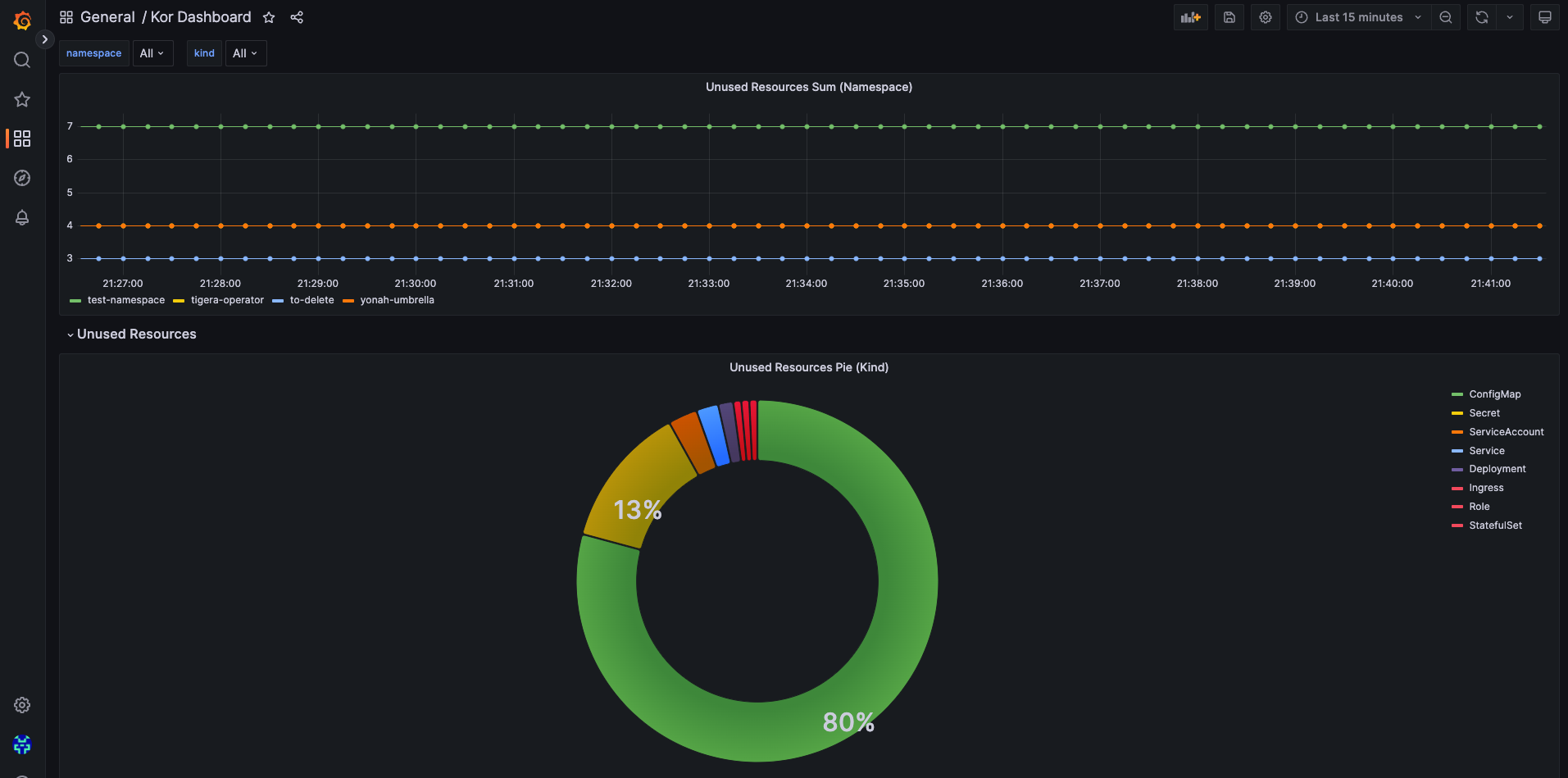
KorPro

Kor is available as an open-source CLI tool. For organizations requiring multi-cloud management, cost analysis, and advanced analytics, KorPro offers a cloud-based platform built on top of Kor.
Contributing
Contributions are welcome! If you encounter any bugs or have suggestions for improvements, please open an issue in the issue tracker.
Follow CONTRIBUTING.md for more.
License
This open-source project is available under the MIT License. Feel free to use, modify, and distribute it as per the terms of the license.


