
Free, open-source CleanMyMac alternative for macOS that frees disk space without deleting anything it shouldn't.
Dusty
A free, open-source CleanMyMac alternative for macOS that frees up disk space, without deleting anything it shouldn't.


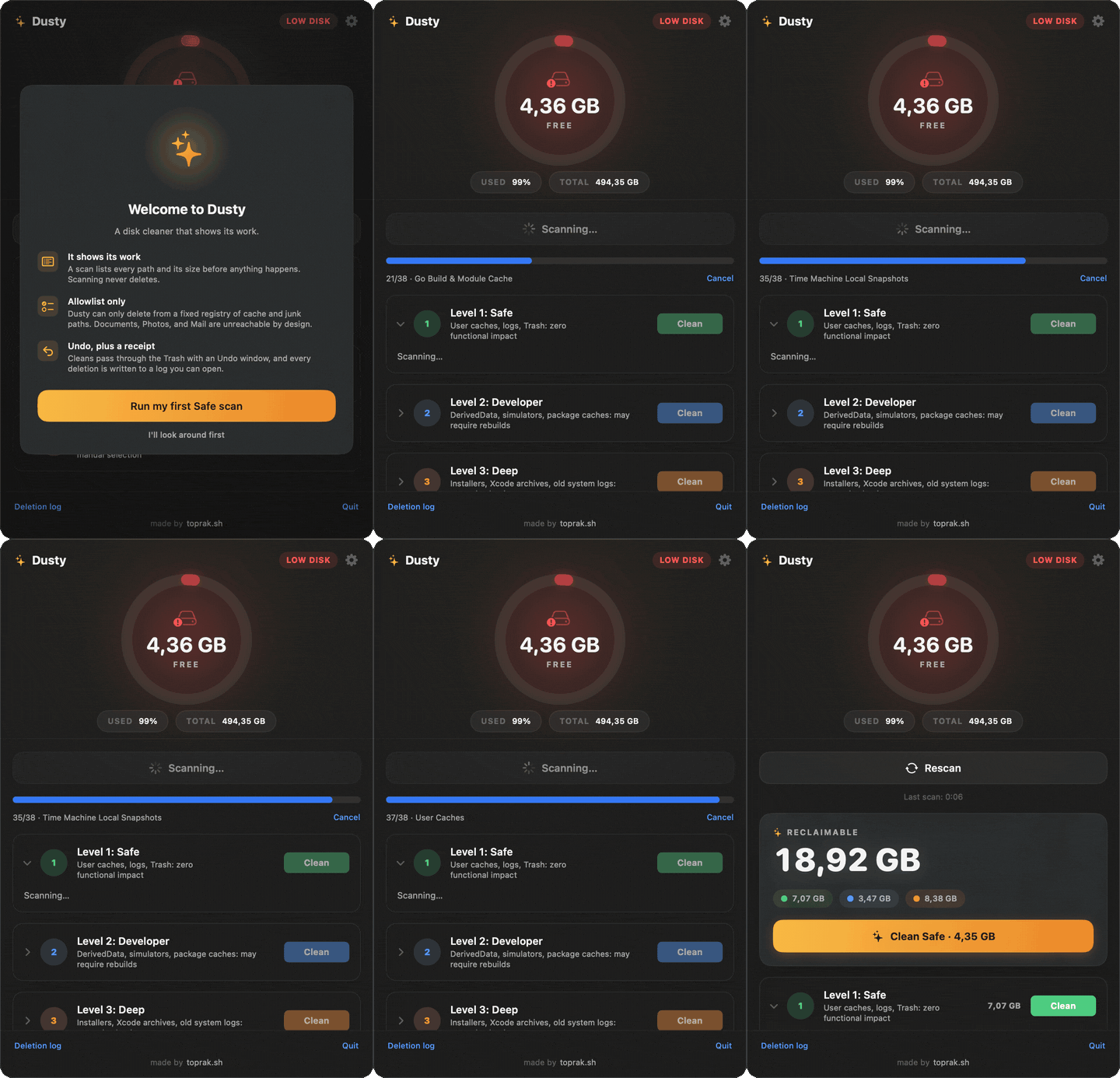
One scan, and the gigabytes hiding in caches and developer junk are laid out by size.
If Dusty saves you space, a GitHub star helps more Mac users find a safer cleaner.
Share your scan result or missing cache target in Discussions.
Dusty lives in your menu bar and shows how much disk you have free. It can scan quietly in the background, so the moment space gets tight it already knows how much you can reclaim: caches, logs, Xcode DerivedData, simulators, package manager folders, app caches, and local Time Machine snapshots. It shows you every path and its size first, and it only ever deletes from a fixed allowlist. No "clean everything" button, no surprises.
It is free, open source, and a calmer alternative to paid cleaners like CleanMyMac.
Install
The easy way, signed and notarized by Apple:
brew install --cask yagcioglutoprak/tap/dustyOr download the latest Dusty.dmg from the releases page, drag it to Applications, and open it.
Dusty appears in your menu bar as a disk icon with your free space next to it. Prefer to build it yourself instead of downloading? See Build from source at the bottom.
Command line
The same engine, allowlist, and safety rules, scriptable. The dusty CLI ships inside the app bundle and the Homebrew cask links it into your PATH:
dusty scan                      # measure all three levels, deletes nothing
dusty scan --json               # the same, machine-readable
dusty clean                     # print the full deletion plan for the Safe level
dusty clean --yes               # actually delete it
dusty clean --level developer --trash --yes   # park dev caches in the Trash
dusty targets                   # print the entire allowlist
clean never touches anything without --yes, only ever deletes the items the app would auto-select (installers, Xcode archives, simulators, Docker, and AI models stay manual-pick only), and skips any target whose app is open. Installed from the DMG instead of brew? Link it once:
ln -s /Applications/Dusty.app/Contents/Helpers/dusty /usr/local/bin/dustyThere are also two Shortcuts actions, "Clean Safe Items" and "Get Reclaimable Space", so Dusty can sit in any macOS automation.
What it cleans
Three levels, from "do this anytime" to "look before you leap."
| Level | What it clears | Why it is safe | | --- | --- | --- | | Safe | User caches, app logs, Trash, browser caches (Safari, Chrome, Firefox, Edge, Brave, Arc), and app caches (Slack, Discord, Notion, Spotify, VS Code, Cursor, Signal, Obsidian, Microsoft Teams, Zoom update installers, Telegram media cache) | Regenerates on its own, zero functional impact | | Developer | Xcode DerivedData, old DeviceSupport, unavailable simulators, package manager caches (npm, yarn, pnpm, pip, uv, Bun, Deno, Cargo, Go, Homebrew, Composer, Gradle, CocoaPods, SwiftPM, Dart/Flutter pub), Cypress binary cache, dev tool caches in ~/.cache, JetBrains and Unity caches, opt-in Maven local repository, optional docker system prune | Rebuilds or re-downloads next time you need it | | Deep | Old .dmg / .pkg installers in Downloads, Xcode archives, unused simulators, local Time Machine snapshots, aged diagnostic logs, opt-in Ollama models, stale project artifacts (the node_modules, Cargo target dir, or virtualenv of a project untouched for a month) | Per-file checklist, nothing goes without a tick |
Every scan is concurrent, shows live progress, and reports the exact bytes per target before you commit to anything. It is quick, too: a full three-level scan of a working dev machine (M3, ~18 GB of junk across 866 paths) takes about 5 seconds.
Every target folds open into its individual items, each with a checkbox, so you can keep one specific cache out of a clean without skipping the whole target.
Every clean can be undone for a few seconds afterwards, at every level. Items pass through the Trash first, so a misclick costs you nothing. The panel keeps a running total of what Dusty has reclaimed on your Mac since you installed it.
The Deep level also looks where cleaners never do: inside your projects. A node_modules from an app you shipped last year, a Cargo target dir from an abandoned experiment, a virtualenv for a script that already did its job. The rules are strict on purpose. The tool's manifest has to sit right next to the artifact (a folder you happened to name target is never offered), activity is judged by your files and your git history rather than by the artifact itself, and everything is a per-item checkbox. If you touch a project between the scan and the clean, its artifacts are refused at delete time.
After a scan, the panel points out what a person would spot: 12 GB of DerivedData with no Xcode installed anymore, a cache nothing has written to since spring, a disk on course to fill up in three weeks. Insights only point; they never select or delete anything.
Prefer it hands-off? An opt-in schedule (off by default) runs the Safe level daily, weekly, or every two weeks, skips anything whose app is open, and sends a notification with the result. Everything still lands in the deletion log.
How it compares
The honest version, set against the paid cleaners (CleanMyMac and the like):
| | Dusty | CleanMyMac and similar | | --- | --- | --- | | Price | Free, MIT licensed | Paid license or subscription | | Source code | Open, every deletion rule is readable | Closed | | What it can delete | A fixed allowlist, nothing outside it | Broad categories, not all of them visible | | Sizes shown before deleting | Always, per path | Varies | | Undo and a written deletion log | Yes | Varies | | CLI and Shortcuts automation | Yes | Rare | | Account or telemetry | None | Often |
Why you can trust it
Most of the reason Dusty exists is that "Mac cleaner" usually means "app that deletes things you cannot see." Dusty is built the other way around. The deletion logic is a separate, fully tested Swift package (CleanerEngine) with no UI, and a single component, SafetyValidator, is the only thing that can authorize a delete. It enforces:
- Allowlist only. A path is deletable only if it descends from an explicit
CleanupTargetRegistry.
There is no "delete everything except" logic anywhere in the codebase.
- Protected folders are off limits. Documents, Desktop, Pictures, Photos
- No symlink escapes. Symlinks are never followed, including a symlinked
- Boot volume only. Operations are confined to the volume your home folder
sudo. The only paths outside
your home folder are the Deep level's system diagnostic logs under
/Library/Logs, which need Full Disk Access. Nothing SIP-protected is touched.
- Dry run. Flip one toggle to scan and report without removing a thing.
- Undo at every level. Cleans park items in the Trash and offer Undo for a
- A written record. Every action (timestamp, path, bytes) is appended to
~/Library/Application Support/Dusty/deletion-log.jsonl.
If a permission error hits one file, that file is skipped and the run continues.
For the longer design writeup with code, see How Dusty is built to avoid deleting the wrong thing.
Found a way to make it delete something outside the allowlist? Please report it privately: see SECURITY.md.
Full Disk Access
Dusty is not sandboxed, because a sandboxed app cannot reach the caches and logs it is meant to clean. User level paths under ~/Library work out of the box. For a couple of system diagnostic paths in the Deep level, macOS may ask for Full Disk Access:
System Settings>Privacy & Security>Full Disk Access- Add
Dusty - Reopen the app
Settings
- Menu bar refresh interval (default 30s), and free space as GB or a percentage
- Show or hide the "N GB to clean" suffix in the menu bar
- Background auto-scan and how often it runs (default every 4h), or turn it off
- Scheduled auto-clean of the Safe level (opt-in, off by default)
- Dry run by default
- Keep Developer and Deep items in the Trash instead of purging after Undo
- Age threshold for Deep level logs (default 30 days)
- Lifetime statistics and a recent-cleans history
How it is put together
For a one-screen map of the app, engine, and safety boundary, see docs/architecture.md.
CleanerEngine/    Swift package: scan, size, delete, safety. No SwiftUI. Unit tested.
Dusty/            SwiftUI menu bar app (MenuBarExtra) that renders the engine.
Keeping the engine UI free means the rules that matter are testable in isolation and the app stays a thin layer on top. The engine compiles in Swift 6 language mode with strict concurrency checking, and CI treats warnings as errors, so a data race or a quiet regression fails the build. Run the tests with:
cd CleanerEngine && swift testAdd a cleanup target
Targets are data, not code. One entry in CleanupTargetRegistry.swift and the scanner, the UI, and the safety checks all pick it up:
CleanupTarget(
    id: "dart-pub-cache",
    displayName: "Dart and Flutter pub cache",
    level: .developer,
    pathTemplates: ["~/.pub-cache"],
    category: "Package Manager",
    deletesContentsNotDirectory: true,
    regenerates: true
)
Pull requests for new targets are welcome. See CONTRIBUTING.md.
Build from source
If you would rather build it yourself, this one line clones the repo, builds it locally, and installs it to /Applications. Because the build happens on your machine, macOS trusts it with no Gatekeeper prompts:
curl -fsSL https://raw.githubusercontent.com/yagcioglutoprak/dusty/main/scripts/install.sh | bashIt needs Xcode 16 or later (not just the Command Line Tools). To do it by hand:
git clone https://github.com/yagcioglutoprak/dusty.git
cd dusty/Dusty
open Dusty.xcodeproj   # then run the Dusty scheme, or:
xcodebuild -scheme Dusty -configuration Release build
Maintainers: cutting a notarized release is documented in docs/SIGNING.md.
FAQ
Is it actually free? Yes, MIT licensed. No trial, no upsell.
Will it delete my projects or documents? It cannot. Those folders are rejected by the validator before anything is touched, and only allowlisted cache and artifact paths are ever in scope.
Why not the Mac App Store? The App Store requires sandboxing, and a sandboxed app cannot reach the caches Dusty cleans. The trade off would defeat the point.
How is this different from rm -rf ~/Library/Caches? It sizes everything first, skips paths that are in use, gives every clean an undo window, logs what it did, and refuses anything outside the allowlist.
License
MIT. See LICENSE.


