
Universal command-line interface for SQL databases

usql is a universal command-line interface for PostgreSQL, MySQL, Oracle Database, SQLite3, Microsoft SQL Server, [and many other databases][databases] including NoSQL and non-relational databases!
usql provides a simple way to work with [SQL and NoSQL databases][databases] via a command-line inspired by PostgreSQL's psql. usql supports most of the core psql features, such as [variables][variables], [backticks][backticks], [backslash commands][commands] and has additional features that psql does not, such as [multiple database support][databases], [copying between databases][copying], [syntax highlighting][highlighting], [context-based completion][completion], and [terminal graphics][termgraphics].
Database administrators and developers that would prefer to work with a tool like psql with non-PostgreSQL databases, will find usql intuitive, easy-to-use, and a great replacement for the command-line clients/tools for other databases.
[![Unit Tests][usql-ci-status]][usql-ci] [![Go Reference][goref-usql-status]][goref-usql] [![Releases][release-status]][Releases] [![Discord Discussion][discord-status]][discord]
[usql-ci]: https://github.com/xo/usql/actions/workflows/test.yml "Test CI" [usql-ci-status]: https://github.com/xo/usql/actions/workflows/test.yml/badge.svg "Test CI" [goref-usql]: https://pkg.go.dev/github.com/xo/usql "Go Reference" [goref-usql-status]: https://pkg.go.dev/badge/github.com/xo/usql.svg "Go Reference" [release-status]: https://img.shields.io/github/v/release/xo/usql?display_name=tag&sort=semver "Latest Release" [discord]: https://discord.gg/WDWAgXwJqN "Discord Discussion" [discord-status]: https://img.shields.io/discord/829150509658013727.svg?label=Discord&logo=Discord&colorB=7289da&style=flat-square "Discord Discussion" [installing]: #installing "Installing" [databases]: #database-support "Database Support" [releases]: https://github.com/xo/usql/releases "Releases"
Installing
usql can be installed [via Release][], [via Homebrew][], [via AUR][], [via Scoop][], [via Go][], or [via Docker][]:
[via Release]: #installing-via-release [via Homebrew]: #installing-via-homebrew-macos-and-linux [via AUR]: #installing-via-aur-arch-linux [via Scoop]: #installing-via-scoop-windows [via Go]: #installing-via-go [via Docker]: #installing-via-docker
Installing via Release
- [Download a release for your platform][releases]
- Extract the
usqlorusql.exefile from the.tar.bz2or.zipfile - Move the extracted executable to somewhere on your
$PATH(Linux/macOS) or
%PATH% (Windows)
Installing via Homebrew (macOS and Linux)
Install usql from the [xo/xo tap][xo-tap] in the usual way with the [brew command][homebrew]:
# install usql with most drivers
$ brew install xo/xo/usql
Support for [ODBC databases][databases] is available through the --with-odbc install flag:
# add xo tap
$ brew tap xo/xo
install usql with odbc support
$ brew install --with-odbc usql
Installing via AUR (Arch Linux)
Install usql from the [Arch Linux AUR][aur] in the usual way with the [yay command][yay]:
# install usql with most drivers
$ yay -S usql
Alternately, build and [install using makepkg][arch-makepkg]:
$ git clone https://aur.archlinux.org/usql.git && cd usql
$ makepkg -si
==> Making package: usql 0.12.10-1 (Fri 26 Aug 2022 05:56:09 AM WIB)
==> Checking runtime dependencies...
==> Checking buildtime dependencies...
==> Retrieving sources...
  -> Downloading usql-0.12.10.tar.gz...
...
Installing via Scoop (Windows)
Install usql using Scoop:
# Optional: Needed to run a remote script the first time
> Set-ExecutionPolicy RemoteSigned -Scope CurrentUser
install scoop if not already installed
> irm get.scoop.sh | iex
install usql with scoop
> scoop install usql
Installing via Go
Install usql in the usual Go fashion:
# install latest usql version with base drivers
$ go install github.com/xo/usql@latest
alternately, install usql with most drivers (see below for info about build tags)
$ go install -tags most github.com/xo/usql@latest
See below for information on usql build tags.
Installing via Docker
An [official container image (docker.io/usql/usql)][docker-hub] is maintained by the usql team, and can be used with Docker, Podman, or other container runtime.
[docker-hub]: https://hub.docker.com/r/usql/usql
Install usql with Docker, Podman, or other container runtime:
# run interactive shell and mount the $PWD/data directory as a volume for use
within the container
$ docker run --rm -it --volume $(pwd)/data:/data docker.io/usql/usql:latest sqlite3://data/test.db
Trying to pull docker.io/usql/usql:latest...
Getting image source signatures
Copying blob af48168d69d8 done   |
Copying blob efc2b5ad9eec skipped: already exists
Copying config 917ceb411d done   |
Writing manifest to image destination
Connected with driver sqlite3 (SQLite3 3.45.1)
Type "help" for help.
sq:data/test.db=> \q
run postgres locally
$ docker run --detach --rm --name=postgres --publish=5432:5432 --env=POSTGRES_PASSWORD=P4ssw0rd docker.io/usql/postgres
connect to local postgres instance
$ docker run --rm --network host -it docker.io/usql/usql:latest postgres://postgres:P4ssw0rd@localhost
Connected with driver postgres (PostgreSQL 16.3 (Debian 16.3-1.pgdg120+1))
Type "help" for help.
pg:postgres@localhost=> \q
run specific usql version
$ docker run --rm -it docker.io/usql/usql:0.19.3
Building
When building usql out-of-the-box with go build or go install, only the [base drivers][databases] for PostgreSQL, MySQL, SQLite3, Microsoft SQL Server, Oracle, CSVQ will be included in the build:
# build/install with base drivers (PostgreSQL, MySQL, SQLite3, Microsoft SQL Server,
Oracle, CSVQ)
$ go install github.com/xo/usql@main
Other databases can be enabled by specifying the [build tag for their database driver][databases].
# build/install with base, Avatica, and ODBC drivers
$ go install -tags 'avatica odbc' github.com/xo/usql@main
For every build tag <driver>, there is also a no_<driver> build tag that will disable the driver:
# build/install most drivers, excluding Avatica, Couchbase, and PostgreSQL
$ go install -tags 'most noavatica nocouchbase no_postgres' github.com/xo/usql@main
By specifying the build tags most or all, the build will include most, and all SQL drivers, respectively:
# build/install with most drivers (excludes CGO drivers and problematic drivers)
$ go install -tags most github.com/xo/usql@main
build/install all drivers (includes CGO drivers and problematic drivers)
$ go install -tags all github.com/xo/usql@main
Database Support
usql works with all Go standard library compatible SQL drivers supported by [github.com/xo/dburl][dburl].
The list of drivers that usql was built with can be displayed with the [\drivers command][commands]:
$ cd $GOPATH/src/github.com/xo/usql
build excluding the base drivers, and including cassandra and moderncsqlite
$ go build -tags 'nopostgres nooracle nosqlserver nosqlite3 cassandra moderncsqlite'
show built driver support
$ ./usql -c '\drivers'
Available Drivers:
  cql [ca, scy, scylla, datastax, cassandra]
  memsql (mysql) [me]
  moderncsqlite [mq, sq, file, sqlite, sqlite3, modernsqlite]
  mysql [my, maria, aurora, mariadb, percona]
  tidb (mysql) [ti]
  vitess (mysql) [vt]
The above shows that usql was built with only the mysql, cassandra (ie, cql), and moderncsqlite drivers. The output above reflects information about the drivers available to usql, specifically the internal driver name, its primary URL scheme, the driver's available scheme aliases (shown in [...]), and the real/underlying driver (shown in (...)) for wire compatible drivers.
Supported Database Schemes and Aliases
The following are the [Go SQL drivers][go-sql] that usql supports, the associated database, scheme / build tag, and scheme aliases:
| Database | Scheme / Tag | Scheme Aliases | Driver Package / Notes | | -------------------- | --------------- | ----------------------------------------------- | --------------------------------------------------------------------------- | | PostgreSQL | postgres | pg, pgsql, postgresql | [github.com/lib/pq][d-postgres] | | MySQL | mysql | my, maria, aurora, mariadb, percona | [github.com/go-sql-driver/mysql][d-mysql] | | Microsoft SQL Server | sqlserver | ms, mssql, azuresql | [github.com/microsoft/go-mssqldb][d-sqlserver] | | Oracle Database | oracle | or, ora, oci, oci8, odpi, odpi-c | [github.com/sijms/go-ora/v2][d-oracle] | | SQLite3 | sqlite3 | sq, sqlite, file | [github.com/mattn/go-sqlite3][d-sqlite3] [†][f-cgo] | | ClickHouse | clickhouse | ch | [github.com/ClickHouse/clickhouse-go/v2][d-clickhouse] | | CSVQ | csvq | cs, csv, tsv, json | [github.com/mithrandie/csvq-driver][d-csvq] | | | | | | | Alibaba MaxCompute | maxcompute | mc | [sqlflow.org/gomaxcompute][d-maxcompute] | | Alibaba Tablestore | ots | ot, tablestore | [github.com/aliyun/aliyun-tablestore-go-sql-driver][d-ots] | | Apache Avatica | avatica | av, phoenix | [github.com/apache/calcite-avatica-go/v5][d-avatica] | | Apache H2 | h2 | | [github.com/jmrobles/h2go][d-h2] | | Apache Hive | hive | hi, hive2 | [sqlflow.org/gohive][d-hive] | | Apache Ignite | ignite | ig, gridgain | [github.com/amsokol/ignite-go-client/sql][d-ignite] | | Apache Impala | impala | im | [github.com/sclgo/impala-go][d-impala] | | AWS Athena | athena | s3, aws, awsathena | [github.com/uber/athenadriver/go][d-athena] | | Azure CosmosDB | cosmos | cm, gocosmos | [github.com/btnguyen2k/gocosmos][d-cosmos] | | Cassandra | cassandra | ca, scy, scylla, datastax, cql | [github.com/MichaelS11/go-cql-driver][d-cassandra] | | ChaiSQL | chai | ci, genji, chaisql | [github.com/chaisql/chai][d-chai] | | Couchbase | couchbase | n1, n1ql | [github.com/couchbase/go_n1ql][d-couchbase] | | Cznic QL | ql | cznic, cznicql | [modernc.org/ql][d-ql] | | Databend | databend | dd, bend | [github.com/datafuselabs/databend-go][d-databend] | | Databricks | databricks | br, brick, bricks, databrick | [github.com/databricks/databricks-sql-go][d-databricks] | | DuckDB | duckdb | dk, ddb, duck, file | [github.com/duckdb/duckdb-go/v2][d-duckdb] [†][f-cgo] | | DynamoDb | dynamodb | dy, dyn, dynamo, dynamodb | [github.com/btnguyen2k/godynamo][d-dynamodb] | | Exasol | exasol | ex, exa | [github.com/exasol/exasol-driver-go][d-exasol] | | Firebird | firebird | fb, firebirdsql | [github.com/nakagami/firebirdsql][d-firebird] | | FlightSQL | flightsql | fl, flight | [github.com/apache/arrow/go/v17/arrow/flight/flightsql/driver][d-flightsql] | | Google BigQuery | bigquery | bq | [gorm.io/driver/bigquery/driver][d-bigquery] | | Google Spanner | spanner | sp | [github.com/googleapis/go-sql-spanner][d-spanner] | | Microsoft ADODB | adodb | ad, ado | [github.com/mattn/go-adodb][d-adodb] | | ModernC SQLite3 | moderncsqlite | mq, modernsqlite | [modernc.org/sqlite][d-moderncsqlite] | | MySQL MyMySQL | mymysql | zm, mymy | [github.com/ziutek/mymysql/godrv][d-mymysql] | | Netezza | netezza | nz, nzgo | [github.com/IBM/nzgo/v12][d-netezza] | | PostgreSQL PGX | pgx | px | [github.com/jackc/pgx/v5/stdlib][d-pgx] | | Presto | presto | pr, prs, prestos, prestodb, prestodbs | [github.com/prestodb/presto-go-client/presto][d-presto] | | RamSQL | ramsql | rm, ram | [github.com/proullon/ramsql/driver][d-ramsql] | | SAP ASE | sapase | ax, ase, tds | [github.com/thda/tds][d-sapase] | | SAP HANA | saphana | sa, sap, hana, hdb | [github.com/SAP/go-hdb/driver][d-saphana] | | Snowflake | snowflake | sf | [github.com/snowflakedb/gosnowflake][d-snowflake] | | Trino | trino | tr, trs, trinos | [github.com/trinodb/trino-go-client/trino][d-trino] | | Vertica | vertica | ve | [github.com/vertica/vertica-sql-go][d-vertica] | | VoltDB | voltdb | vo, vdb, volt | [github.com/VoltDB/voltdb-client-go/voltdbclient][d-voltdb] | | YDB | ydb | yd, yds, ydbs | [github.com/ydb-platform/ydb-go-sdk/v3][d-ydb] | | | | | | | GO DRiver for ORacle | godror | gr | [github.com/godror/godror][d-godror] [†][f-cgo] | | ODBC | odbc | od | [github.com/alexbrainman/odbc][d-odbc] [†][f-cgo] | | | | | | | Amazon Redshift | postgres | rs, redshift | [github.com/lib/pq][d-postgres] [‡][f-wire] | | CockroachDB | postgres | cr, cdb, crdb, cockroach, cockroachdb | [github.com/lib/pq][d-postgres] [‡][f-wire] | | OLE ODBC | adodb | oo, ole, oleodbc | [github.com/mattn/go-adodb][d-adodb] [‡][f-wire] | | SingleStore MemSQL | mysql | me, memsql | [github.com/go-sql-driver/mysql][d-mysql] [‡][f-wire] | | TiDB | mysql | ti, tidb | [github.com/go-sql-driver/mysql][d-mysql] [‡][f-wire] | | Vitess Database | mysql | vt, vitess | [github.com/go-sql-driver/mysql][d-mysql] [‡][f-wire] | | | | | | | | | | | | | | | | | NO DRIVERS | nobase | | no base drivers (useful for development)_ | | MOST DRIVERS | most | | all stable drivers | | ALL DRIVERS | all | | all drivers, excluding bad drivers | | BAD DRIVERS | bad | | bad drivers (broken/non-working drivers) | | NO <TAG> | no<tag> | | exclude driver with <tag>_ |
[d-adodb]: https://github.com/mattn/go-adodb [d-athena]: https://github.com/uber/athenadriver [d-avatica]: https://github.com/apache/calcite-avatica-go [d-bigquery]: https://github.com/go-gorm/bigquery [d-cassandra]: https://github.com/MichaelS11/go-cql-driver [d-chai]: https://github.com/chaisql/chai [d-clickhouse]: https://github.com/ClickHouse/clickhouse-go [d-cosmos]: https://github.com/btnguyen2k/gocosmos [d-couchbase]: https://github.com/couchbase/go_n1ql [d-csvq]: https://github.com/mithrandie/csvq-driver [d-databend]: https://github.com/datafuselabs/databend-go [d-databricks]: https://github.com/databricks/databricks-sql-go [d-duckdb]: https://github.com/duckdb/duckdb-go [d-dynamodb]: https://github.com/btnguyen2k/godynamo [d-exasol]: https://github.com/exasol/exasol-driver-go [d-firebird]: https://github.com/nakagami/firebirdsql [d-flightsql]: https://github.com/apache/arrow/tree/main/go/arrow/flight/flightsql/driver [d-godror]: https://github.com/godror/godror [d-h2]: https://github.com/jmrobles/h2go [d-hive]: https://github.com/sql-machine-learning/gohive [d-ignite]: https://github.com/amsokol/ignite-go-client [d-impala]: https://github.com/sclgo/impala-go [d-maxcompute]: https://github.com/sql-machine-learning/gomaxcompute [d-moderncsqlite]: https://gitlab.com/cznic/sqlite [d-mymysql]: https://github.com/ziutek/mymysql [d-mysql]: https://github.com/go-sql-driver/mysql [d-netezza]: https://github.com/IBM/nzgo [d-odbc]: https://github.com/alexbrainman/odbc [d-oracle]: https://github.com/sijms/go-ora [d-ots]: https://github.com/aliyun/aliyun-tablestore-go-sql-driver [d-pgx]: https://github.com/jackc/pgx [d-postgres]: https://github.com/lib/pq [d-presto]: https://github.com/prestodb/presto-go-client [d-ql]: https://gitlab.com/cznic/ql [d-ramsql]: https://github.com/proullon/ramsql [d-sapase]: https://github.com/thda/tds [d-saphana]: https://github.com/SAP/go-hdb [d-snowflake]: https://github.com/snowflakedb/gosnowflake [d-spanner]: https://github.com/googleapis/go-sql-spanner [d-sqlite3]: https://github.com/mattn/go-sqlite3 [d-sqlserver]: https://github.com/microsoft/go-mssqldb [d-trino]: https://github.com/trinodb/trino-go-client [d-vertica]: https://github.com/vertica/vertica-sql-go [d-voltdb]: https://github.com/VoltDB/voltdb-client-go [d-ydb]: https://github.com/ydb-platform/ydb-go-sdk
[f-cgo]: #f-cgo "Requires CGO" [f-wire]: #f-wire "Wire compatible"
† Requires CGO
‡ Wire compatible (see respective driver)
Any of the protocol schemes/aliases above can be used in conjunction when connecting to a database via the command-line or with the [\connect and \copy commands][commands]:
# connect to a vitess database:
$ usql vt://user:pass@host:3306/mydatabase
$ usql (not connected)=> \c vitess://user:pass@host:3306/mydatabase
$ usql (not connected)=> \copy csvq://. pg://localhost/ 'select * ....' 'myTable'
See [the section below on connecting to databases][connecting] for further details building DSNs/URLs for use with usql.
Using
After [installing][], usql can be used similarly to the following:
# connect to a postgres database
$ usql postgres://booktest@localhost/booktest
connect to an oracle database
$ usql oracle://user:pass@host/oracle.sid
connect to a postgres database and run the commands contained in script.sql
$ usql pg://localhost/ -f script.sql
Command-line Options
Supported command-line options:
$ usql --help
usql, the universal command-line interface for SQL databases
Usage:   usql [flags]... [DSN]
Arguments:   DSN   database url or connection name
Flags:   -c, --command COMMAND                     run only single command (SQL or internal) and exit   -f, --file FILE                           execute commands from file and exit   -w, --no-password                         never prompt for password   -X, --no-init                             do not execute initialization scripts (aliases: --no-rc --no-psqlrc --no-usqlrc)   -o, --out FILE                            output file   -W, --password                            force password prompt (should happen automatically)   -1, --single-transaction                  execute as a single transaction (if non-interactive)   -v, --set NAME=VALUE                      set variable NAME to VALUE (see \set command, aliases: --var --variable)   -N, --cset NAME=DSN                       set named connection NAME to DSN (see \cset command)   -P, --pset VAR=ARG                        set printing option VAR to ARG (see \pset command)   -F, --field-separator FIELD-SEPARATOR     field separator for unaligned and CSV output (default "|" and ",")   -R, --record-separator RECORD-SEPARATOR   record separator for unaligned and CSV output (default \n)   -T, --table-attr TABLE-ATTR               set HTML table tag attributes (e.g., width, border)   -A, --no-align                            unaligned table output mode   -H, --html                                HTML table output mode   -t, --tuples-only                         print rows only   -x, --expanded                            turn on expanded table output   -z, --field-separator-zero                set field separator for unaligned and CSV output to zero byte   -0, --record-separator-zero               set record separator for unaligned and CSV output to zero byte   -J, --json                                JSON output mode   -C, --csv                                 CSV output mode   -G, --vertical                            vertical output mode   -q, --quiet                               run quietly (no messages, only query output)       --config string                       config file   -V, --version                             output version information, then exit   -?, --help                                show this help, then exit
Connecting to Databases
usql opens a database connection by [parsing a URL][dburl] and passing the resulting connection string to [a database driver][databases]. Database connection strings (aka "data source name" or DSNs) have the same parsing rules as URLs, and can be passed to usql via command-line, or to the [\connect, \c, and \copy commands][commands].
Database connections can be defined with [the \cset command][connection-vars] or in [the config.yaml configuration file][config].
Database Connection Strings
Database connection strings look like the following:
driver+transport://user:pass@host/dbname?opt1=a&opt2=b
  driver:/path/to/file
  /path/to/file
  name
Where the above are:
| Component | Description | | ------------------------------- | ------------------------------------------------------------------------------------ | | driver | driver scheme name or scheme alias | | transport | tcp, udp, unix or driver name (for ODBC and ADODB) | | user | username | | pass | password | | host | hostname | | dbname [±][f-path] | database name, instance, or service name/ID | | ?opt1=a&... | additional database driver options (see respective SQL driver for available options) | | /path/to/file | a path on disk | | name | a connection name set by [\cset][connection-vars] or in [config.yaml][config] |
[f-path]: #f-path "URL Paths for Databases"
Driver Aliases
usql supports the same driver names and aliases as [the dburl package][dburl]. Databases have at least one or more aliases. See [dburl's scheme documentation][dburl-schemes] for a list of all supported aliases.
Short Aliases
All database drivers have a two character short form that is usually the first two letters of the database driver. For example, pg for postgres, my for mysql, ms for sqlserver, or for oracle, or sq for sqlite3.
Passing Driver Options
Driver options are specified as standard URL query options in the form of ?opt1=a&opt2=b. Refer to the [relevant database driver's documentation][databases] for available options.
Paths on Disk
If a URL does not have a driver: scheme, usql will check if it is a path on disk. If the path exists, usql will attempt to use an appropriate database driver to open the path.
When the path is a Unix Domain Socket, usql will attempt to open it with the MySQL driver. When the path is a directory, usql will attempt to open it using the PostgreSQL driver. And, lastly, when the path is a regular file, usql will attempt to open the file using the SQLite3 or DuckDB drivers.
Driver Defaults
As with URLs, most components in the URL are optional and many components can be left out. usql will attempt connecting using defaults where possible:
# connect to postgres using the local $USER and the unix domain socket in /var/run/postgresql
$ usql pg://
See the relevant documentation [on database drivers][databases] for more information.
Connection Examples
The following are example connection strings and additional ways to connect to databases using usql:
# connect to a postgres database
$ usql pg://user:pass@host/dbname
$ usql pgsql://user:pass@host/dbname
$ usql postgres://user:pass@host:port/dbname
$ usql pg://
$ usql /var/run/postgresql
$ usql pg://user:pass@host/dbname?sslmode=disable # Connect without SSL
connect to a mysql database
$ usql my://user:pass@host/dbname
$ usql mysql://user:pass@host:port/dbname
$ usql my://
$ usql /var/run/mysqld/mysqld.sock
connect to a sqlserver database
$ usql sqlserver://user:pass@host/instancename/dbname
$ usql ms://user:pass@host/dbname
$ usql ms://user:pass@host/instancename/dbname
$ usql mssql://user:pass@host:port/dbname
$ usql ms://
connect to a sqlserver database using Windows domain authentication
$ runas /user:ACME\wiley /netonly "usql mssql://host/dbname/"
connect to a oracle database
$ usql or://user:pass@host/sid
$ usql oracle://user:pass@host:port/sid
$ usql or://
connect to a cassandra database
$ usql ca://user:pass@host/keyspace
$ usql cassandra://host/keyspace
$ usql cql://host/
$ usql ca://
connect to a sqlite database that exists on disk
$ usql dbname.sqlite3
Note: when connecting to a SQLite database, if the "driver://" or
"driver:" scheme/alias is omitted, the file must already exist on disk.
#
if the file does not yet exist, the URL must incorporate file:, sq:, sqlite3:,
or any other recognized sqlite3 driver alias to force usql to create a new,
empty database at the specified path:
$ usql sq://path/to/dbname.sqlite3
$ usql sqlite3://path/to/dbname.sqlite3
$ usql file:/path/to/dbname.sqlite3
connect to a adodb ole resource (windows only)
$ usql adodb://Microsoft.Jet.OLEDB.4.0/myfile.mdb
$ usql "adodb://Microsoft.ACE.OLEDB.12.0/?Extended+Properties=\"Text;HDR=NO;FMT=Delimited\""
connect to a named connection in $HOME/.config/usql/config.yaml
$ cat $HOME/.config/usql/config.yaml
connections:
  mynamedconnection: sqlserver://user:pass@localhost/
$ usql mynamedconnection
connect with ODBC driver (requires building with odbc tag)
$ cat /etc/odbcinst.ini
[DB2]
Description=DB2 driver
Driver=/opt/db2/clidriver/lib/libdb2.so
FileUsage = 1
DontDLClose = 1
[PostgreSQL ANSI] Description=PostgreSQL ODBC driver (ANSI version) Driver=psqlodbca.so Setup=libodbcpsqlS.so Debug=0 CommLog=1 UsageCount=1
connect to db2, postgres databases using odbc config above
$ usql odbc+DB2://user:pass@localhost/dbname
$ usql odbc+PostgreSQL+ANSI://user:pass@localhost/dbname?TraceFile=/path/to/trace.log
See the [section on connection variables][connection-vars] for information on defining connection names.
Executing Queries and Commands
The interactive interpreter reads queries and [backslash meta (\) commands][commands], sending the query to the connected database:
$ usql sqlite://example.sqlite3
Connected with driver sqlite3 (SQLite3 3.17.0)
Type "help" for help.
sq:example.sqlite3=> create table test (test_id int, name string); CREATE TABLE sq:example.sqlite3=> insert into test (test_id, name) values (1, 'hello'); INSERT 1 sq:example.sqlite3=> select * from test;   test_id | name +---------+-------+         1 | hello (1 rows)
sq:example.sqlite3=> select * from test sq:example.sqlite3-> \p select * from test sq:example.sqlite3-> \g   test_id | name +---------+-------+         1 | hello (1 rows)
sq:example.sqlite3=> \c postgres://booktest@localhost error: pq: 28P01: password authentication failed for user "booktest" Enter password: Connected with driver postgres (PostgreSQL 9.6.6) pg:booktest@localhost=> select * from authors;   author_id |      name +-----------+----------------+           1 | Unknown Master           2 | blah           3 | foobar (3 rows)
pg:booktest@localhost=>
Commands may accept one or more parameter, and can be quoted using either ' or ". Command parameters [may also be backticked][backticks].
Backslash Commands
usql supports interleaved backslash (\) meta commands to modify or alter the way that usql interprets queries, formats its output, and changes the resulting interactive flow.
(not connected)=> \c postgres://user:pass@localhost
pg:user@localhost=> select * from my_table \G
Available backslash meta commands can be displayed with \?:
$ usql
Type "help" for help.
(not connected)=> \? General   \q                                quit usql   \quit                             alias for \q   \copyright                        show usage and distribution terms for usql   \drivers                          show database drivers available to usql
Help   \? [commands]                     show help on usql's meta (backslash) commands   \? options                        show help on usql command-line options   \? variables                      show help on special usql variables
Connection   \c DSN or \c NAME                 connect to dsn or named database connection   \c DRIVER PARAMS...               connect to database with driver and parameters   \connect                          alias for \c   \Z                                close (disconnect) database connection   \disconnect                       alias for \Z   \password [USER]                  change password for user   \passwd                           alias for \password   \conninfo                         display information about the current database connection
Query Execute   \g [(OPTIONS)] [FILE] or ;        execute query (and send results to file or |pipe)   \go                               alias for \g   \G [(OPTIONS)] [FILE]             as \g, but forces vertical output mode   \ego                              alias for \G   \gx [(OPTIONS)] [FILE]            as \g, but forces expanded output mode   \gexec                            execute query and execute each value of the result   \gset [PREFIX]                    execute query and store results in usql variables   \bind [PARAM]...                  set query parameters   \timing [on|off]                  toggle timing of commands
Query View   \crosstab [(OPTIONS)] [COLUMNS]   execute query and display results in crosstab   \crosstabview                     alias for \crosstab   \xtab                             alias for \crosstab   \chart CHART [(OPTIONS)]          execute query and display results as a chart   \watch [(OPTIONS)] [INTERVAL]     execute query every specified interval
Query Buffer   \e [-raw|-exec] [FILE] [LINE]     edit the query buffer, raw (non-interpolated) buffer, the                                     exec buffer, or a file with external editor   \edit                             alias for \e   \p [-raw|-exec]                   show the contents of the query buffer, the raw                                     (non-interpolated) buffer or the exec buffer   \print                            alias for \p   \raw                              alias for \p   \exec                             alias for \p   \w [-raw|-exec] FILE              write the contents of the query buffer, raw                                     (non-interpolated) buffer, or exec buffer to file   \write                            alias for \w   \r                                reset (clear) the query buffer   \reset                            alias for \r
Informational   \d[S+] [NAME]                     list tables, views, and sequences or describe table, view,                                     sequence, or index   \da[S+] [PATTERN]                 list aggregates   \df[S+] [PATTERN]                 list functions   \di[S+] [PATTERN]                 list indexes   \dm[S+] [PATTERN]                 list materialized views   \dn[S+] [PATTERN]                 list schemas   \dp[S] [PATTERN]                  list table, view, and sequence access privileges   \ds[S+] [PATTERN]                 list sequences   \dt[S+] [PATTERN]                 list tables   \dv[S+] [PATTERN]                 list views   \l[+]                             list databases   \ss[+] [TABLE|QUERY] [k]          show stats for a table or a query
Variables   \set [NAME [VALUE]]               set usql application variable, or show all usql application                                     variables if no parameters   \unset NAME                       unset (delete) usql application variable   \pset [NAME [VALUE]]              set table print formatting option, or show all print                                     formatting options if no parameters   \a                                toggle between unaligned and aligned output mode   \C [TITLE]                        set table title, or unset if none   \f [SEPARATOR]                    show or set field separator for unaligned query output   \H                                toggle HTML output mode   \T [ATTRIBUTES]                   set HTML <table> tag attributes, or unset if none   \t [on|off]                       show only rows   \x [on|off|auto]                  toggle expanded output   \cset [NAME [URL]]                set named connection, or show all named connections if no                                     parameters   \cset NAME DRIVER PARAMS...       set named connection for driver and parameters   \prompt [-TYPE] VAR [PROMPT]      prompt user to set application variable
Input/Output   \echo [-n] [MESSAGE]...           write message to standard output (-n for no newline)   \qecho [-n] [MESSAGE]...          write message to \o output stream (-n for no newline)   \warn [-n] [MESSAGE]...           write message to standard error (-n for no newline)   \o [FILE]                         send all query results to file or |pipe   \out                              alias for \o   \copy SRC DST QUERY TABLE         copy results of query from source database into table on                                     destination database   \copy SRC DST QUERY TABLE(A,...)  copy results of query from source database into table's                                     columns on destination database
Control/Conditional   \i FILE                           execute commands from file   \include                          alias for \i   \ir FILE                          as \i, but relative to location of current script   \include_relative                 alias for \ir   \if EXPR                          begin conditional block   \elif EXPR                        alternative within current conditional block   \else                             final alternative within current conditional block   \endif                            end conditional block
Transaction   \begin [-read-only [ISOLATION]]   begin transaction, with optional isolation level   \commit                           commit current transaction   \rollback                         rollback (abort) current transaction   \abort                            alias for \rollback
Operating System/Environment   \! [COMMAND]                      execute command in shell or start interactive shell   \cd [DIR]                         change the current working directory   \getenv VARNAME ENVVAR            fetch environment variable   \setenv NAME [VALUE]              set or unset environment variable
Parameters passed to commands [can be backticked][backticks].
Features and Compatibility
An overview of usql's features, functionality, and compatibility with psql:
- [Configuration][config]
- [Variables][variables]
- [Backticks][backticks]
- [Copying Between Databases][copying]
- [Syntax Highlighting][highlighting]
- [Time Formatting][timefmt]
- [Context Completion][completion]
- Host Connection Information
- [Passwords][usqlpass]
- [Runtime Configuration (RC) File][usqlrc]
usql project's goal is to support as much of psql's core features and
functionality, and aims to be as compatible as possible - [contributions are
always appreciated][contributing]!
Configuration
During its initialization phase, usql reads a standard [YAML configuration][yaml] file config.yaml. On Windows this is %AppData%/usql/config.yaml, on macOS this is $HOME/Library/Application Support/usql/config.yaml, and on Linux and other Unix systems this is normally $HOME/.config/usql/config.yaml.
connections:
[Named connection DSNs][connecting] can be defined under connections: as a string or as a map:
connections:
  mycouchbaseconn: couchbase://Administrator:P4ssw0rd@localhost
  myclickhouseconn: clickhouse://clickhouse:P4ssw0rd@localhost
  mygodrorconn:
    protocol: godror
    username: system
    password: P4ssw0rd
    hostname: localhost
    port: 1521
    database: free
Defined connections: can be used on the command-line with \connect, \c, \copy, and [other commands][commands]:
$ usql mygodrorconn
Connected with driver godror (Oracle Database 23.0.0.0.0)
Type "help" for help.
gr:system@localhost/free=>
init:
An initialization script can be defined as init: as a string:
init: |
  \echo welcome to the jungle date
  \set SYNTAXHLSTYLE paraiso-dark
  \set PROMPT1 '\033[32m%S%M%/%R%#\033[0m '
The init: script is commonly used to set [environment variables][variables] or other configuration, and can be disabled on the command-line using the --no-init / -X flag. The script will be executed prior to any -c / --command / -f / --file flag and before starting the interactive interpreter.
Other Options
Please see contrib/config.yaml for an overview of available configuration options.
Variables
usql supports [runtime][runtime-vars], [connection][connection-vars], and [display formatting][print-vars] variables that can be \set, \cset, or \pset respectively.
Runtime Variables
Runtime variables are managed with the \set and \unset [commands][commands]:
(not connected)=> \unset FOO
(not connected)=> \set FOO bar
Runtime variables can be displayed with \set:
(not connected)=> \set
FOO = 'bar'
Variable Interpolation
When a runtime variable NAME has been \set, then :NAME, :'NAME', and :"NAME" will be interpolated into the query buffer:
pg:booktest@localhost=> \set FOO bar
pg:booktest@localhost=> select * from authors where name = :'FOO';
  author_id | name
+-----------+------+
          7 | bar
(1 rows)
Where a runtime variable is used as :'NAME' or :"NAME" the interpolated value will be quoted using ' or " respectively:
pg:booktest@localhost=> \set TBLNAME authors
pg:booktest@localhost=> \set COLNAME name
pg:booktest@localhost=> \set FOO bar
pg:booktest@localhost=> select * from :TBLNAME where :"COLNAME" = :'FOO'
The query buffer and interpolated values can be displayed with \p and \print, or the raw query buffer can be displayed with \raw:
pg:booktest@localhost-> \p
select * from authors where "name" = 'bar'
pg:booktest@localhost-> \raw
select * from :TBLNAME where :"COLNAME" = :'FOO'Note>
Variables contained within other strings will not be interpolated:
pg:booktest@localhost=> select ':FOO';
  ?column?
+----------+
  :FOO
(1 rows)
pg:booktest@localhost=> \p select ':FOO';
Connection Variables
Connection variables work similarly to runtime variables, and are managed with \cset. Connection variables can be used with the \c, \connect, \copy, or [other commands][commands]:
(not connected)=> \cset my_conn postgres://user:pass@localhost
(not connected)=> \c my_conn
Connected with driver postgres (PostgreSQL 16.2 (Debian 16.2-1.pgdg120+2))
pg:postgres@localhost=>
Connection variables are not interpolated into queries. See the [configuration section for information on defining persistent connection variables][config].
Connection variables can be displayed with \cset:
(not connected)=> \cset
my_conn = 'postgres://user:pass@localhost'
Display Formatting (Print) Variables
Display formatting variables can be set using \pset and [other commands][commands]:
(not connected)=> \pset time Kitchen
Time display is "Kitchen" ("3:04PM").
(not connected)=> \a
Output format is unaligned.
Display formatting variables can be displayed with \pset:
(not connected)=> \pset
time                     Kitchen
Other Variables
Runtime behavior, such as [enabling or disabling syntax highlighting][highlighting] can be modified through special variables like [SYNTAX_HL][highlighting].
Use the \? variables [command][commands] to display variable help information and to list special variables recognized by usql:
(not connected)=> \? variablesBackticks
[Backslash (\) meta commands][commands] support backticks on parameters:
(not connected)=> \echo Welcome echo $USER -- 'currently:' "(" date ")"
Welcome ken -- currently: ( Wed Jun 13 12:10:27 WIB 2018 )
(not connected)=>
Backticked parameters will be passed to the user's SHELL, exactly as written, and can be combined with \set:
pg:booktest@localhost=> \set MYVAR date
pg:booktest@localhost=> \set
MYVAR = 'Wed Jun 13 12:17:11 WIB 2018'
pg:booktest@localhost=> \echo :MYVAR
Wed Jun 13 12:17:11 WIB 2018
pg:booktest@localhost=>
Copying Between Databases
usql provides a \copy command that reads data from a source database DSN and writes to a destination database DSN:
(not connected)=> \cset PGDSN postgres://user:pass@localhost
(not connected)=> \cset MYDSN mysql://user:pass@localhost
(not connected)=> \copy PGDSN MYDSN 'select bookid, authorid from books' 'books(id, author_id)'
As demonstrated above, the \copy command does not require being connected to a database, and will not modify or change the current open database connection or state.
Any valid URL or DSN name maybe used for the source and destination database:
(not connected)=> \cset MYDSN mysql://user:pass@localhost
(not connected)=> \copy postgres://user:pass@localhost MYDSN 'select bookid, authorid from books' 'books(id, author_id)'Note>
usql's\copyis distinct from and does not function like
psql's\copy.
Copy Parameters
The \copy command has two parameter forms:
\copy SRC DST QUERY TABLE
\copy SRC DST QUERY TABLE(COL1, COL2, ..., COLN)
Where:
SRC- is the [source database URL][connecting] to connect to, and where the
QUERY will be executed
DST- is the [destination database URL][connecting] to connect to, and where
TABLE resides
QUERY- is the query to execute on theSRCconnection, the results of which
TABLE
TABLE- is the destination table name, followed by an optional SQL-like column
(COL1, COL2, ..., COLN)
(COL1, COL2, ..., COLN)- a list of the destination column names, 1-to-N
\copy's parameters.
Quoting
QUERY and TABLE must be quoted when containing spaces:
$ usql
(not connected)=> echo :SOURCEDSN :DESTINATIONDSN
pg://postgres:P4ssw0rd@localhost/ mysql://localhost
(not connected)=> \copy :SOURCEDSN :DESTINATIONDSN 'select * from mySourceTable' 'myDestination(colA, colB)'
COPY 2
Column Counts
The QUERY must return the same number of columns as defined by the TABLE expression:
$ usql
(not connected)=> \copy csvq:. sq:test.db 'select * from authors' authors
error: failed to prepare insert query: 2 values for 1 columns
(not connected)=> \copy csvq:. sq:test.db 'select name from authors' authors(name)
COPY 2
Datatype Compatibility and Casting
The \copy command does not attempt to perform any kind of datatype conversion.
If a QUERY returns columns with different datatypes than expected by the TABLE's column, the QUERY can use the source database's conversion/casting functionality to cast columns to a datatype that will work for TABLE's columns:
$ usql
(not connected)=> \copy postgres://user:pass@localhost mysql://user:pass@localhost 'SELECT uuid_column::TEXT FROM myPgTable' myMyTable
COPY 1
Importing Data from CSV
The \copy command is capable of importing data from CSV's (or any other database!) using the csvq driver:
$ cat authors.csv
author_id,name
1,Isaac Asimov
2,Stephen King
$ cat books.csv
bookid,authorid,title
1,1,I Robot
2,2,Carrie
3,2,Cujo
$ usql
(not connected)=> -- setting variables to make connections easier
(not connected)=> \set SOURCE_DSN csvq://.
(not connected)=> \set DESTINATION_DSN sqlite3:booktest.db
(not connected)=> -- connecting to the destination and creating the schema
(not connected)=> \c :DESTINATION_DSN
Connected with driver sqlite3 (SQLite3 3.38.5)
(sq:booktest.db)=> create table authors (author_id integer, name text);
CREATE TABLE
(sq:booktest.db)=> create table books (bookid integer not null primary key autoincrement, authorid integer, title text);
CREATE TABLE
(sq:booktest.db)=> -- adding an extra row to books prior to copying
(sq:booktest.db)=> insert into books (author_id, title) values (1, 'Foundation');
INSERT 1
(sq:booktest.db)=> -- disconnecting to demonstrate that \copy opens new database connections
(sq:booktest.db)=> \disconnect
(not connected)=> -- copying data from SOURCE -> DESTINATION
(not connected)=> \copy :SOURCEDSN :DESTINATIONDSN 'select * from authors' authors
COPY 2
(not connected)=> \copy :SOURCEDSN :DESTINATIONDSN 'select authorid, title from books' 'books(authorid, title)'
COPY 3
(not connected)=> \c :DESTINATION_DSN
Connected with driver sqlite3 (SQLite3 3.38.5)
(sq:booktest.db)=> select * from authors;
 author_id |     name
-----------+--------------
         1 | Isaac Asimov
         2 | Stephen King
(2 rows)
sq:booktest.db=> select * from books;  bookid | authorid |   title ---------+-----------+------------        1 |         1 | Foundation        2 |         1 | I Robot        3 |         2 | Carrie        4 |         2 | Cujo (4 rows)
Note>
When importing large datasets (> 1GiB) from one database to another, it is
better to use a database's native clients and tools.
Reusing Connections with Copy
The \copy command (and all usql commands) [works with variables][variables]. When scripting, or when needing to perform multiple \copy operations from/to multiple sources/destinations, the best practice is to \set connection variables either in a script or in [the $HOME/.usqlrc RC script][usqlrc].
Similarly, passwords can be stored for easy reuse (and kept out of scripts) by storing in [the $HOME/.usqlpass password file][usqlpass].
For example:
$ cat $HOME/.usqlpass
postgres:::*:postgres:P4ssw0rd
godror:::*:system:P4ssw0rd
$ usql
Type "help" for help.
(not connected)=> \set pglocal postgres://postgres@localhost:49153?sslmode=disable (not connected)=> \set orlocal godror://system@localhost:1521/orasid (not connected)=> \copy :pglocal :orlocal 'select staffid, firstname from staff' 'staff(staffid, firstname)' COPY 18
Syntax Highlighting
Interactive queries will be syntax highlighted by default, using [Chroma][chroma]. There are a number of [variables][] that control syntax highlighting:
| Variable | Default | Values | Description | | ----------------------- | ------------------------------- | ----------------- | ------------------------------------------------------------ | | SYNTAX_HL | true | true or false | enables syntax highlighting | | SYNTAXHLFORMAT | dependent on terminal support | formatter name | [Chroma formatter name][chroma-formatter] | | SYNTAXHLOVERRIDE_BG | true | true or false | enables overriding the background color of the chroma styles | | SYNTAXHLSTYLE | monokai | style name | [Chroma style name][chroma-style] |
The SYNTAX_* variables are regular usql variables, and can be \set and \unset:
$ usql
(not connected)=> \set SYNTAXHLSTYLE dracula
(not connected)=> \unset SYNTAXHLOVERRIDE_BG
Context Completion
When using the interactive shell, context completion is available in usql by hitting the <Tab> key. For example, hitting <Tab> can complete some parts of SELECT queries on a PostgreSQL databases:
$ usql
Connected with driver postgres (PostgreSQL 14.4 (Debian 14.4-1.pgdg110+1))
Type "help" for help.
pg:postgres@=> select * f<Tab> fetch            from             full outer join
Or, for example completing [backslash commands][commands] while connected to a database:
$ usql my://
Connected with driver mysql (10.8.3-MariaDB-1:10.8.3+maria~jammy)
Type "help" for help.
my:root@=> \g<Tab> \g     \gexec \gset  \gx
Not all commands, contexts, or databases support completion. If you're interested in helping to make usql's completion better, see [the section below on contributing][contributing].
Command completion can be canceled with <Control-C>.
Time Formatting
Some databases support time/date columns that [support formatting][go-time]. By default, usql formats time/date columns as [RFC3339Nano][go-time], and can be set using \pset time FORMAT:
$ usql pg://
Connected with driver postgres (PostgreSQL 13.2 (Debian 13.2-1.pgdg100+1))
Type "help" for help.
pg:postgres@=> \pset time                     RFC3339Nano pg:postgres@=> select now();              now   2021-05-01T22:21:44.710385Z (1 row)
pg:postgres@=> \pset time Kitchen Time display is "Kitchen" ("3:04PM"). pg:postgres@=> select now();    now   10:22PM (1 row)
pg:postgres@=>
usql's time format supports any [Go supported time format][go-time], or can be any standard Go const name, such as Kitchen above. See below for an overview of the available time constants.
Time Constants
The following are the time constant names available in usql, corresponding time format value, and example display output:
| Constant | Format | Display [↓][f-ts] | | ----------- | ------------------------------------: | ----------------------------------: | | ANSIC | Mon Jan _2 15:04:05 2006 | Wed Aug 3 20:12:48 2022 | | UnixDate | Mon Jan _2 15:04:05 MST 2006 | Wed Aug 3 20:12:48 UTC 2022 | | RubyDate | Mon Jan 02 15:04:05 -0700 2006 | Wed Aug 03 20:12:48 +0000 2022 | | RFC822 | 02 Jan 06 15:04 MST | 03 Aug 22 20:12 UTC | | RFC822Z | 02 Jan 06 15:04 -0700 | 03 Aug 22 20:12 +0000 | | RFC850 | Monday, 02-Jan-06 15:04:05 MST | Wednesday, 03-Aug-22 20:12:48 UTC | | RFC1123 | Mon, 02 Jan 2006 15:04:05 MST | Wed, 03 Aug 2022 20:12:48 UTC | | RFC1123Z | Mon, 02 Jan 2006 15:04:05 -0700 | Wed, 03 Aug 2022 20:12:48 +0000 | | RFC3339 | 2006-01-02T15:04:05Z07:00 | 2022-08-03T20:12:48Z | | RFC3339Nano | 2006-01-02T15:04:05.999999999Z07:00 | 2022-08-03T20:12:48.693257Z | | Kitchen | 3:04PM | 8:12PM | | Stamp | Jan _2 15:04:05 | Aug 3 20:12:48 | | StampMilli | Jan _2 15:04:05.000 | Aug 3 20:12:48.693 | | StampMicro | Jan _2 15:04:05.000000 | Aug 3 20:12:48.693257 | | StampNano | Jan _2 15:04:05.000000000 | Aug 3 20:12:48.693257000 |
[f-ts]: #f-ts "Timestamp Value"
↓ Generated using timestamp 2022-08-03T20:12:48.693257Z
Host Connection Information
By default, usql displays connection information when connecting to a database. This might cause problems with some databases or connections. This can be disabled by setting the system environment variable USQLSHOWHOST_INFORMATION to false:
$ export USQLSHOWHOST_INFORMATION=false
$ usql pg://booktest@localhost
Type "help" for help.
pg:booktest@=>
SHOWHOSTINFORMATION is a standard [usql variable][variables], and can be \set or \unset. Additionally, it can be passed via the command-line using -v or --set:
$ usql --set SHOWHOSTINFORMATION=false pg://
Type "help" for help.
pg:booktest@=> \set SHOWHOSTINFORMATION true pg:booktest@=> \connect pg:// Connected with driver postgres (PostgreSQL 9.6.9) pg:booktest@=>
Terminal Graphics
usql supports terminal graphics for [Kitty][kitty-graphics], [iTerm][iterm-graphics], and [Sixel][sixel-graphics] enabled terminals using the [github.com/kenshaw/rasterm package][rasterm]. Terminal graphics are only available when using the interactive shell.
Detection and Support
usql will attempt to detect when terminal graphics support is available using the USQLTERMGRAPHICS, TERM_GRAPHICS and other environment variables unique to various terminals.
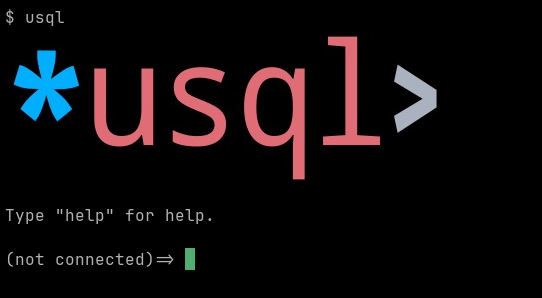
When support is available, the logo will be displayed at the start of an interactive session:
Charts and Graphs
The [\chart command][chart-command] can be used to display a chart directly in the terminal:

See [the section on the \chart meta command][chart-command] for details.
Enabling/Disabling Terminal Graphics
Terminal graphics can be forced enabled or disabled by setting the USQLTERMGRAPHICS or the TERM_GRAPHICS environment variable
README truncated. View on GitHub


