
Automatic search for papers and auto read paper. Utilize AI to obtain the latest research direction papers every day, summarize and generalize each paper, and automatically send several of the most valuable papers to the email.

📚 Auto-Read-Paper
[ ]() [
]() [


Your personal AI paper-reading assistant — automatically fetches fresh arXiv papers daily, runs a multi-agent read-and-review pipeline, remembers unsent high-scoring papers across days, and delivers a bilingual digest with AI commentary straight to your inbox.
Runs entirely on GitHub Actions — no server, free infra on public repos. You only pay for the LLM API tokens your chosen provider bills (typically $0.01–$0.10 / day with gpt-4o-mini / DeepSeek-class models).
🌟 Highlights · 🚀 Usage · 📖 How it works
🌟 Highlights
Not just a paper crawler — an AI that reads, grades, picks, summarizes, and remembers for you.
🤖 Multi-Agent Collaboration (core feature)
Unlike the common "score each paper in isolation" approach, Auto-Read-Paper ships with a Reader + Reviewer two-agent pipeline by default:
| Role | Responsibility | Output | |---|---|---| | 🧑🔬 Reader | Reads each paper's title, abstract, and a preview of the main body; extracts structured notes (task / method / contributions / results / limitations) | Compact JSON notes per paper | | 🧐 Reviewer | Receives all Reader notes in a single batch, ranks papers globally on a multi-dimensional rubric (novelty / soundness / effectiveness / completeness / reproducibility / trending), produces a single 0-10 holistic score | Globally consistent ranking + scores |
Why is this better than a single agent?
- ✅ Global calibration — the Reviewer sees every candidate side-by-side, so scores don't drift the way they do when each paper is graded in isolation.
- ✅ Token-efficient — Reader does a light read per paper; Reviewer does one batched call. Far cheaper than per-paper scoring.
- ✅ Sharper ranking — structured notes let the grader focus on real technical differentiation instead of abstract wording.
executor.reranker: readerreviewer (default, multi-agent) or keywordllm (single-agent, per-paper scoring).
📖 Automatic deep-reading & localized AI commentary
Each Top-N paper is deep-read — the full TeX / HTML / PDF is pulled and fed to the LLM to produce a structured summary in the language you configured (llm.language in YAML, default Chinese):
- 🎯 Core work — 1-2 sentences on the problem and approach
- 💡 Key innovation — 2-3 sentences on the pain point, the core idea, and how it differs from / improves on prior work
- 🚀 Potential value — 1-2 sentences on real-world impact and research value
🧠 Long-term memory · 7-day rolling digest
High-scoring papers are never buried:
- 📥 Papers scored today but not sent → roll forward into the candidate pool
- 🔄 They re-compete tomorrow: on a quiet day, yesterday's "4th place" gets its turn
- 💾 State persists in
state/score_history.json, auto-committed back to the repo after each run - ⏰ Entries older than
retention_days(default 7) are pruned to prevent backlog
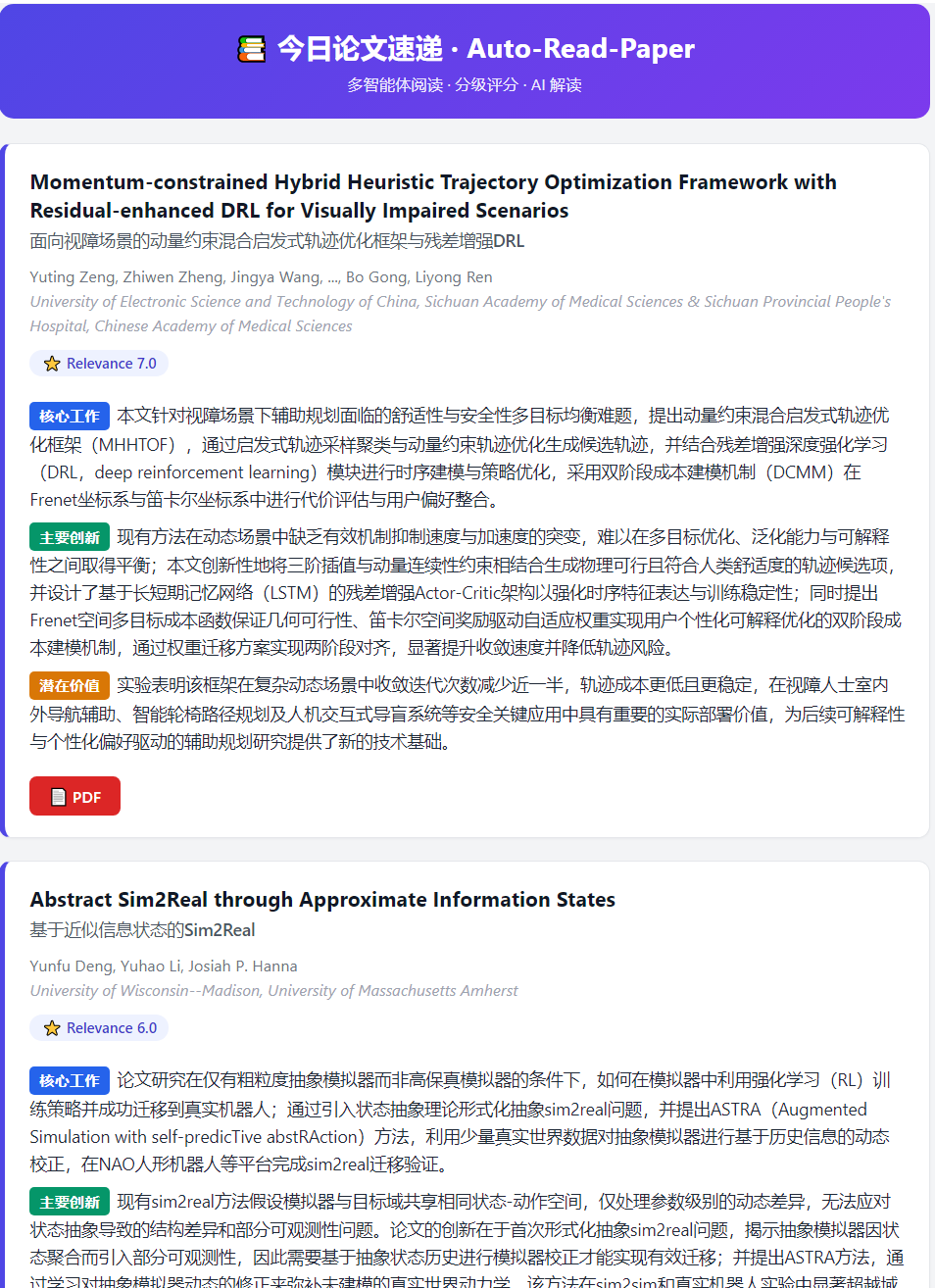
📧 Carefully designed email cards
- 📑 Bilingual titles (auto) — English original on top, plus a translation into
llm.languageunderneath (smaller, subtle). Whenllm.languageis set toEnglish, the title stays single-line English only — no redundant translation. - 🏷️ Color-coded section pills — the three summary sections are tagged in blue / green / orange
- ⭐ Relevance score badge — AI score visible at a glance
- 🎨 Card layout — accented left border, rounded corners, soft shadows; looks clean on both mobile and desktop
✨ Full feature list
- 🤖 Single/multi-agent switchable — multi-agent by default (Reader + Reviewer): token-efficient with global scoring
- 🧭 Six-dimension scoring rubric — Reviewer evaluates every paper on novelty / soundness / effectiveness / completeness / reproducibility / trending, then folds them into a calibrated 0-10 score
- 🧠 7-day long-term memory — rolling candidate pool ensures high-scoring papers aren't lost
- 📖 Automatic full-text reading — pulls TeX/HTML/PDF, not just abstracts
- 🌐 Localized AI commentary — three-section structured summary in the language you choose (
llm.language); technical acronyms preserved - 📑 Smart bilingual titles — English + translation in
llm.language; automatically collapses to single-line English when language is set to English - 🎨 Beautiful email template — colored tags, card layout, score badges
- ⏰ Minute-accurate scheduling — driven by an external cron service (free, minute-precision) instead of GitHub's best-effort cron; re-triggerable at any time for debugging via the scheduler's "Test run" button
- 🔍 Keyword pre-filter — papers not matching your keywords are dropped before any LLM call (saves tokens)
- 💰 Free infra on public repos — GitHub Actions minutes are unlimited for public repos; you only pay the LLM provider for tokens
- 🫀 Pause-proof — external-scheduler trigger sidesteps GitHub's 60-day idle-schedule pause entirely (no keep-alive workflow needed); history fallback + arXiv heartbeat keeps the daily pulse alive even on quiet days
- 🔧 Hydra + OmegaConf — every behavior is configurable via YAML with hot env-var interpolation
🚀 Usage
Quick Start
8 steps, ~15 minutes on a fresh fork. Each step is self-contained — finish one, verify, move on. The most common failure points are flagged with ⚠.
1️⃣ Fork the repo & enable Actions
Click Fork on the upstream repo, pick your account as the owner, keep the default name.
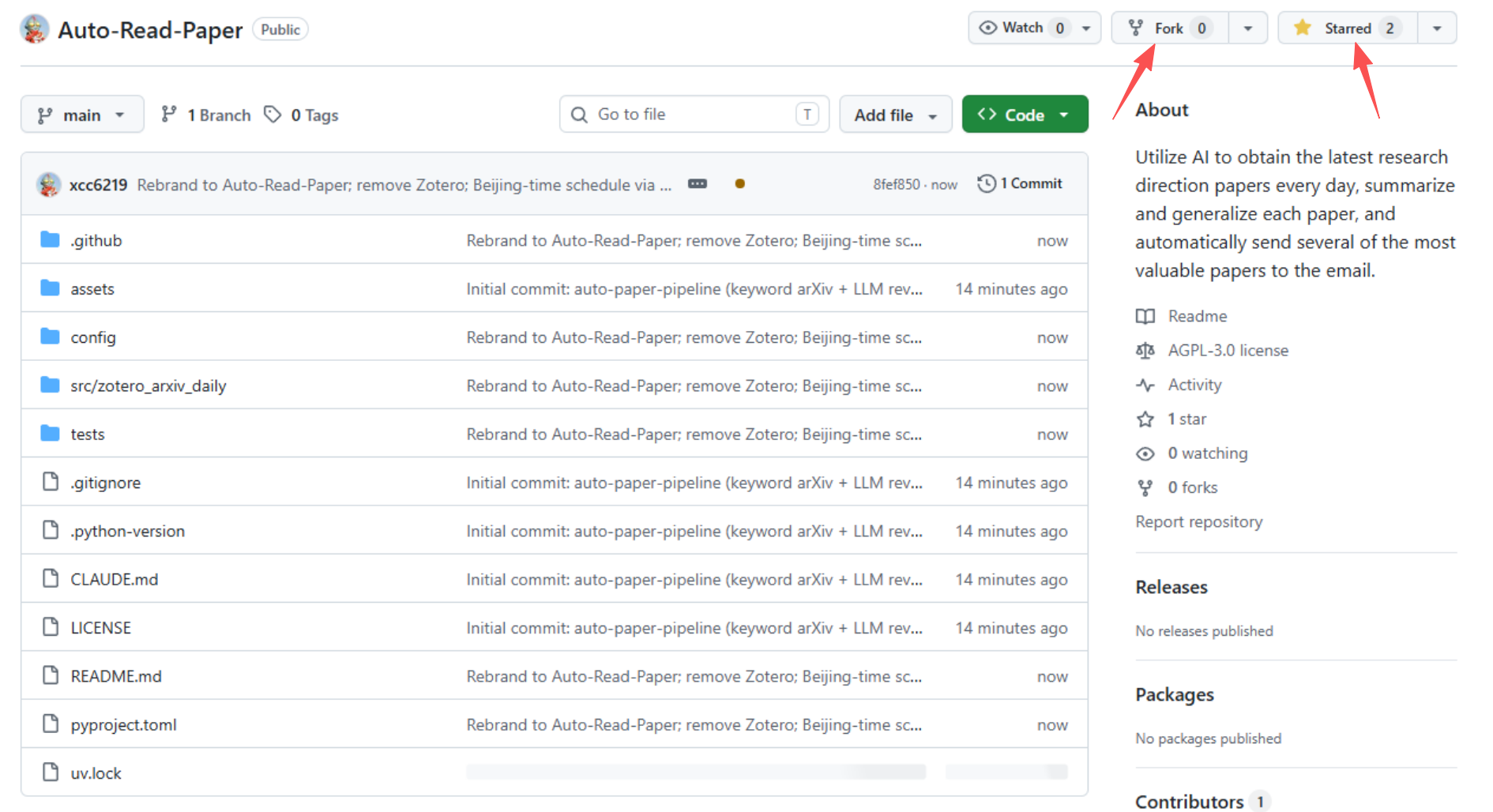
⚠ Enable Actions on your fork — required, one-click, silent failure otherwise.>
GitHub disables every workflow on every fork as an anti-abuse measure. Open the Actions tab — you'll see a yellow banner "Workflows aren't being run on this forked repository". Click "I understand my workflows, go ahead and enable them". Until you do, neitherTestnorSend paper dailycan be triggered — manually or via cron-job.org API.
2️⃣ Set repository Secrets (sensitive values)
> About Secrets vs Variables. GitHub Actions exposes two kinds of repo-level configuration: > - Secrets (${{ secrets.X }}): encrypted, masked as in logs, never readable after save. Use these for anything sensitive* — passwords, API keys, SMTP auth codes. > - Variables (${{ vars.X }}): plain-text, visible in logs, editable any time. Use these for non-sensitive config — model id, token budget, feature toggles. > > Both live under repo Settings → Secrets and variables → Actions but in separate tabs. Neither is inherited when someone forks — every fork must set its own.
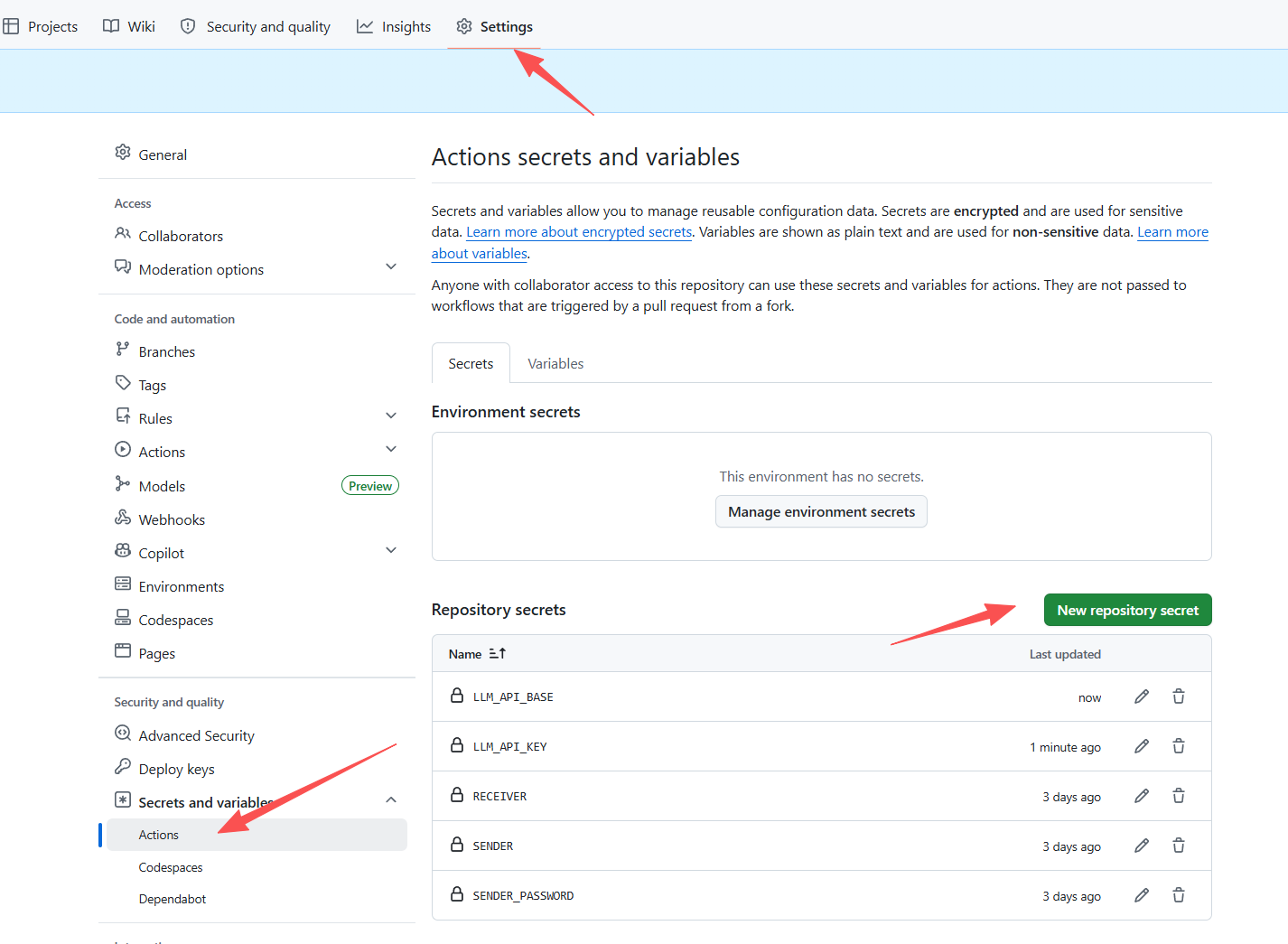
| Key | Description | Example | | :--- | :--- | :--- | | SENDER | The email account that SENDS the digest (outbox). Needs SMTP access — usually the same as your login email. | abc@qq.com | | SENDER_PASSWORD | SMTP auth code for SENDER — a special password issued by the email provider for third-party SMTP clients. NOT your webmail login password. See "SMTP auth code how-to" below. | abcdefghijklmn | | RECEIVER | The email account that RECEIVES the digest (inbox). Can be any address, same provider or different, no SMTP setup needed. | abc@outlook.com | | LLMAPIKEY | Unified API key for your LLM provider — OpenAI, Anthropic, Gemini, DeepSeek, Qwen, Kimi, MiniMax, Ollama, vLLM, OpenRouter, Groq, SiliconFlow, … all share this single secret. No provider-specific ANTHROPICAPIKEY / GEMINIAPIKEY needed. | sk-xxx, sk-ant-xxx, AIza… | | LLMAPIBASE | Unified base URL. Leave empty for native providers (openai/…, anthropic/…, gemini/…, groq/…) — LiteLLM uses each vendor's official endpoint. Set it for OpenAI-compatible third-parties (DeepSeek, Qwen, Kimi, Ollama, vLLM, …). | https://api.minimaxi.com/v1, https://api.deepseek.com/v1 |
📋 Never registered an LLM API before? Click here for a step-by-step MiniMax signup tutorial — MiniMax offers free-tier credits and works out-of-the-box with this project.
> If you've never used an LLM API provider, MiniMax is one of the easiest starting points — signup is quick, the free tier is generous enough to run this project daily, and it's OpenAI-compatible so no extra setup is needed. > > 1. Register — open https://platform.minimaxi.com/ and sign up with your phone number or email. Verify the account. > 2. Create an API key — after login, go to 账户管理 → API密钥管理 (Account → API Keys) → click 新建密钥 (Create Key) → give it a name → copy the generated sk-... string immediately (you won't be able to see it again). > 3. Paste it into GitHub — in your fork's Settings → Secrets and variables → Actions → Secrets tab, set: > - LLMAPIKEY = the sk-... string you just copied > - LLMAPIBASE = https://api.minimaxi.com/v1 > 4. Pick a model — in the Variables tab, set LLM_MODEL to a MiniMax model id, e.g. MiniMax-M2.7. (See the model list below for alternatives.) > 5. Top up if needed — the free tier usually covers weeks of daily digests. If you hit a quota error, go to 账户管理 → 充值 (Recharge) and add a few RMB. > > Other beginner-friendly providers with similar flows: DeepSeek (https://platform.deepseek.com/), Kimi / Moonshot (https://platform.moonshot.cn/), Qwen / DashScope (https://dashscope.console.aliyun.com/). All are OpenAI-compatible — just swap the LLMAPIBASE and LLM_MODEL accordingly.
> Quick mental model — there are three email-related values, don't mix them up: > - SENDER = outbox address (sends the mail). Needs a matching SENDERPASSWORD auth code and a matching smtpserver / smtp_port in the YAML config below. > - SENDER_PASSWORD = SMTP auth code of the SENDER (not your regular password). Generated in the SENDER account's web settings. > - RECEIVER = inbox address (reads the mail). No credentials needed; just tells the SENDER where to deliver. > > SENDER and RECEIVER can be the same address (send-to-self is fine) or different providers (e.g. send via QQ, receive on Gmail). Only the SENDER side has SMTP credentials to set up.
> SMTP auth code how-to — most providers disable plain-password SMTP for security. You must enable SMTP/IMAP in your email account's web settings, which then hands you a ~16-char auth code to paste into SENDER_PASSWORD: > - QQ Mail (smtp.qq.com:465): Settings → Account → POP3/IMAP/SMTP → enable "IMAP/SMTP服务" → send the verification SMS → copy the 16-char 授权码. > - 163 / NetEase (smtp.163.com:465): 设置 → POP3/SMTP/IMAP → 开启 "IMAP/SMTP服务" → 授权码. > - Gmail (smtp.gmail.com:465): enable 2-Step Verification → myaccount.google.com/apppasswords → create "App password" → copy the 16-char code (remove spaces). > - Outlook / Office 365 (smtp.office365.com:587): enable 2FA → account.microsoft.com → Security → App passwords → generate. Note port 587 + STARTTLS differs from 465. > > If SMTP auth fails (535 authentication failed in the workflow log), nine times out of ten the auth code is wrong, expired, or contains pasted-in spaces. Re-issue and re-paste. The SENDER address and smtpserver must both belong to the same provider — SENDER=abc@qq.com + smtpserver=smtp.163.com will not work.
3️⃣ Set repository Variables (non-sensitive config)
Same page as Secrets — just switch to the Variables tab.
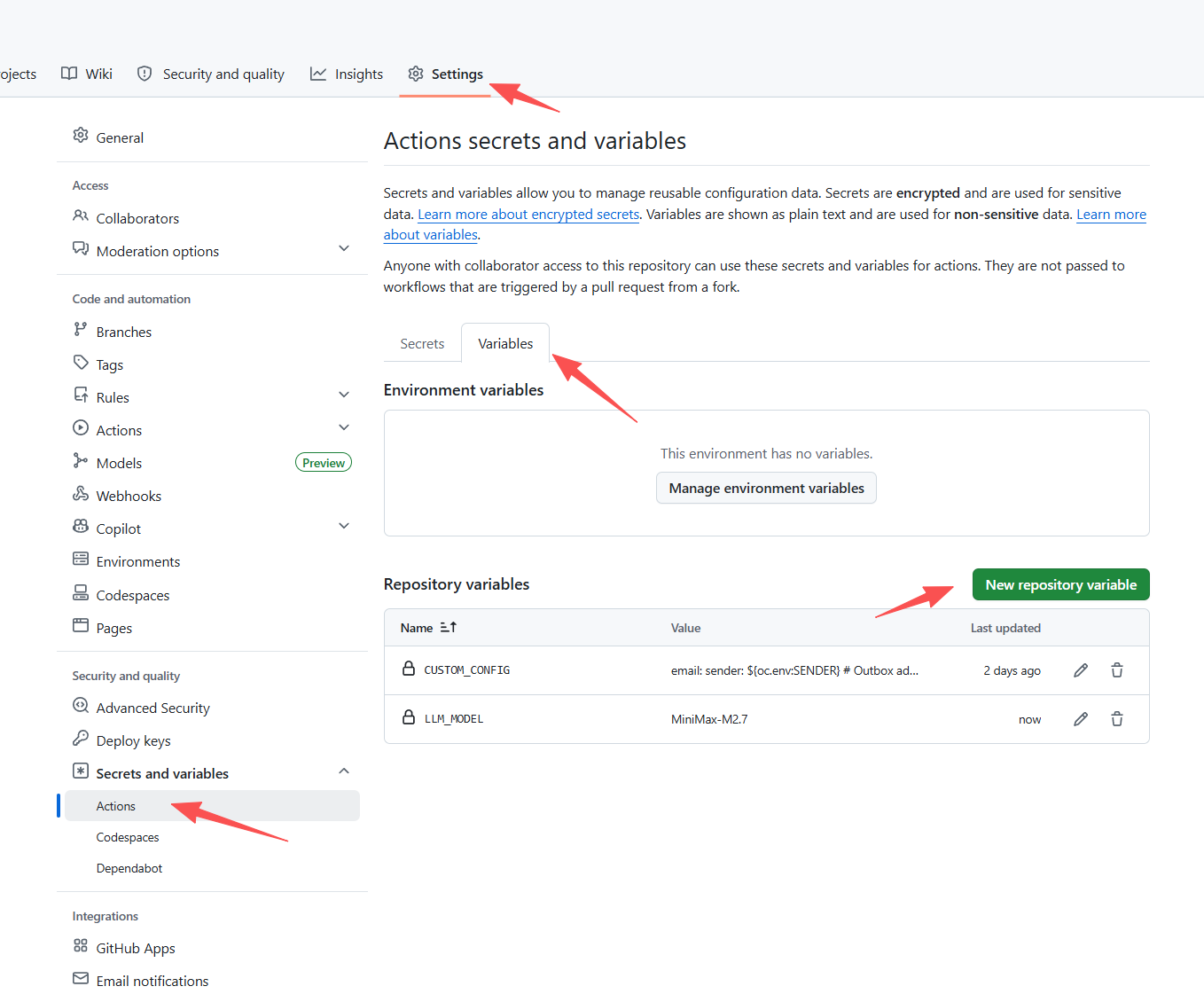
Where does the daily send time live? Not here — the workflow has no built-in schedule, it only runs when an external service (cron-job.org) invokes it. Send time is set in the cron-job.org dashboard (step 6️⃣ below), so this variables table contains no time-related knobs.
| Variable | Description | Example | | :--- | :--- | :--- | | LLM_MODEL | LiteLLM-style model id used for both scoring and the deep-read summary. See the provider matrix below. Default gpt-4o-mini. | MiniMax-M2.7, openai/gpt-4o-mini, anthropic/claude-sonnet-4-6, gemini/gemini-2.0-flash, deepseek/deepseek-chat | | LLMMAXTOKENS | Per-request output token cap. Default 4096. Auto-renamed to maxcompletiontokens for reasoning models (o1/o3/o4/gpt-5). Must be ≤ your model's context window. | 4096, 8192 | | CUSTOM_CONFIG | The full YAML configuration (see below). Must be edited to match your own research keywords / categories / language — not optional. | (multi-line YAML) |

⚠️ You MUST setCUSTOMCONFIGyourself after forking. GitHub does NOT copy Variables (or Secrets) from the upstream repo when you fork — on a fresh fork,CUSTOMCONFIGis empty, and the workflow falls back to the committedconfig/custom.yaml, which ships a generic 3-keyword template (reinforcement learning/model predictive control/residual policy). That template is NOT tailored to you — unless your research actually matches those exact keywords, editkeywords/category/model/languagein the sample below to match your own field before pasting intoCUSTOMCONFIG.
📋 Click to expand the full
CUSTOM_CONFIG YAML template — paste this into the Variable value box, then edit keywords / category / model / language to match your own research.
email:
     sender: ${oc.env:SENDER}              # Outbox address (same as SENDER secret)
     receiver: ${oc.env:RECEIVER}          # Inbox address (same as RECEIVER secret)
     smtp_server: smtp.qq.com              # SMTP host of the SENDER's provider. MUST match SENDER:
                                           #   abc@qq.com      → smtp.qq.com
                                           #   abc@163.com     → smtp.163.com
                                           #   abc@gmail.com   → smtp.gmail.com
                                           #   abc@outlook.com → smtp.office365.com (port 587)
     smtp_port: 465                        # 465 for SSL (qq/163/gmail); 587 for STARTTLS (outlook)
     senderpassword: ${oc.env:SENDERPASSWORD}   # SMTP auth code, NOT the webmail login password
llm:      api:        key: ${oc.env:LLMAPIKEY}        baseurl: ${oc.env:LLMAPI_BASE}      model: ${oc.env:LLM_MODEL,gpt-4o-mini}         # LiteLLM-style id. See the provider matrix below for values like openai/gpt-4o-mini, anthropic/claude-sonnet-4-6, gemini/gemini-2.0-flash, deepseek/deepseek-chat, ollama/qwen2.5:7b-instruct.      maxtokens: ${oc.env:LLMMAXTOKENS,4096}      # Per-request OUTPUT token cap. Default 4096. Auto-renamed to maxcompletion_tokens for o-series / gpt-5. MUST be <= model context window. Raise this (e.g. 16384) if your daily candidate pool is large, or if you use a reasoning model (MiniMax-M2.7, deepseek-reasoner, o-series) — reasoning tokens eat the budget before the JSON is emitted, causing truncated/unparseable output.      temperature: 0.3                                                  # 0.0 = deterministic, 1.0 = creative. Ignored for reasoning models (o-series / gpt-5).      timeout: 180                                                      # Per-request timeout in seconds. Default 180. Raise this (e.g. 600) if your daily candidate pool is large, or if you use a slow reasoning model — the Reviewer batch call can otherwise time out and fall back to keyword-hit scoring.      max_retries: 3                                                    # LiteLLM-level retry count on 429/5xx.      language: Chinese                                                 # Output language for the deep-read summary. Examples: Chinese, English, Japanese. If set to English, the email drops the bilingual title row.
source:      arxiv:        category: ["cs.AI","cs.LG","cs.RO"] # Coarse arXiv category filter        includecrosslist: true        keywords:                            # Fine-grained keyword filter (case-insensitive)          - "reinforcement learning"          - "model predictive control"          - "residual policy"
executor:      debug: ${oc.env:DEBUG,null}      send_empty: false      maxpapernum: 10                     # Top-N papers shown in the email      source: ['arxiv']      # reader_reviewer = multi-agent (Reader + Reviewer, default, recommended: global calibration + token-efficient)      # keyword_llm     = single-agent (per-paper LLM scoring; simpler, more API calls)      reranker: reader_reviewer
${oc.env:XXX,yyy}resolves to environment variableXXX, falling back toyyywhen unset.
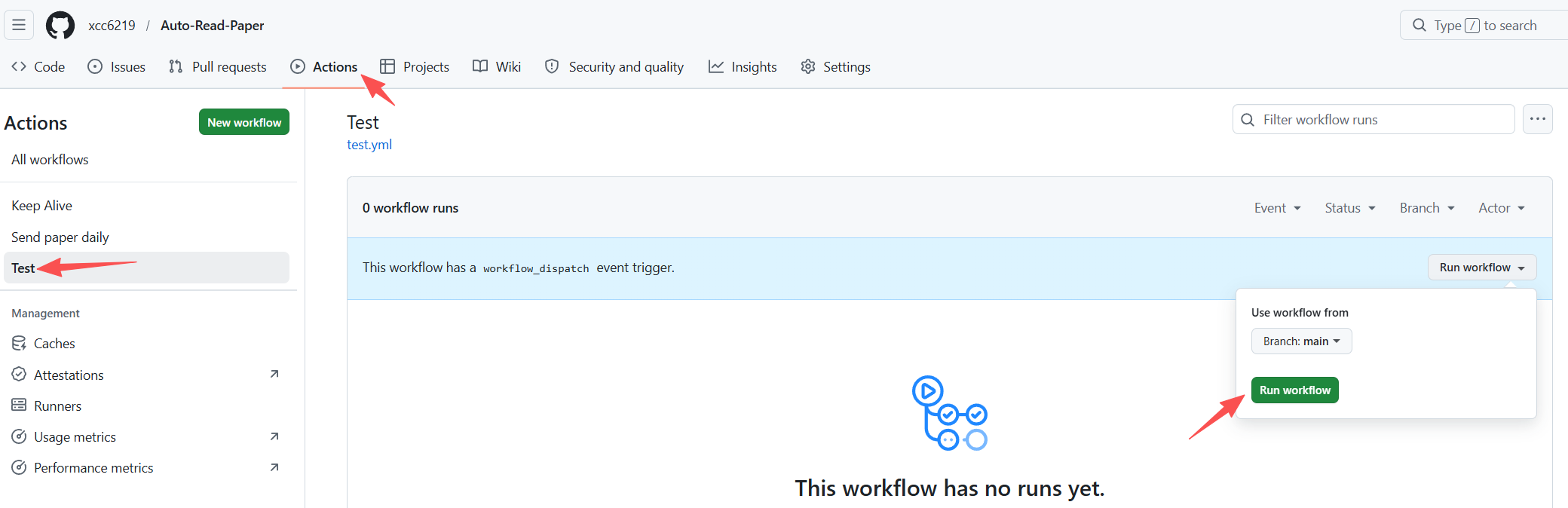
4️⃣ Smoke test — run the Test workflow
Actions → Test → Run workflow. This verifies your Secrets + Variables load cleanly and all dependencies build. Finishes in ~1 minute.
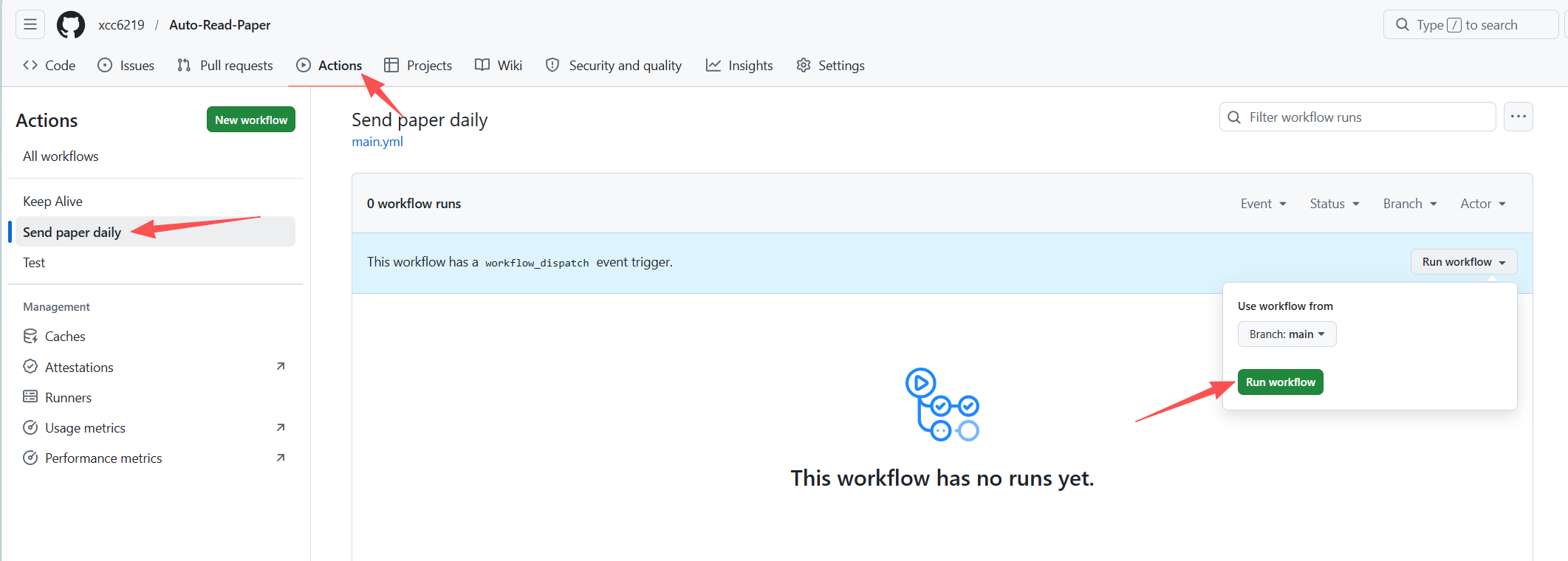
5️⃣ Live dry-run — manually trigger Send paper daily
Once Test is green, fire Send paper daily once by hand. Check the workflow log and your inbox — if the digest email arrives, the pipeline itself is fully working and only the schedule remains.
6️⃣ Automate the daily send via cron-job.org
This is the schedule. The repo deliberately ships no schedule: cron (GitHub's built-in cron drifts 5–15 min and frequently drops fires), so until you finish this step the workflow only runs when you click Run workflow manually.
6.1 Register a cron-job.org account. cron-job.org → Signup → verify email → log in. Free, no credit card. Then Account → Settings → Timezone = Asia/Shanghai (or whatever timezone you want the "Every day at HH:MM" picker to interpret).
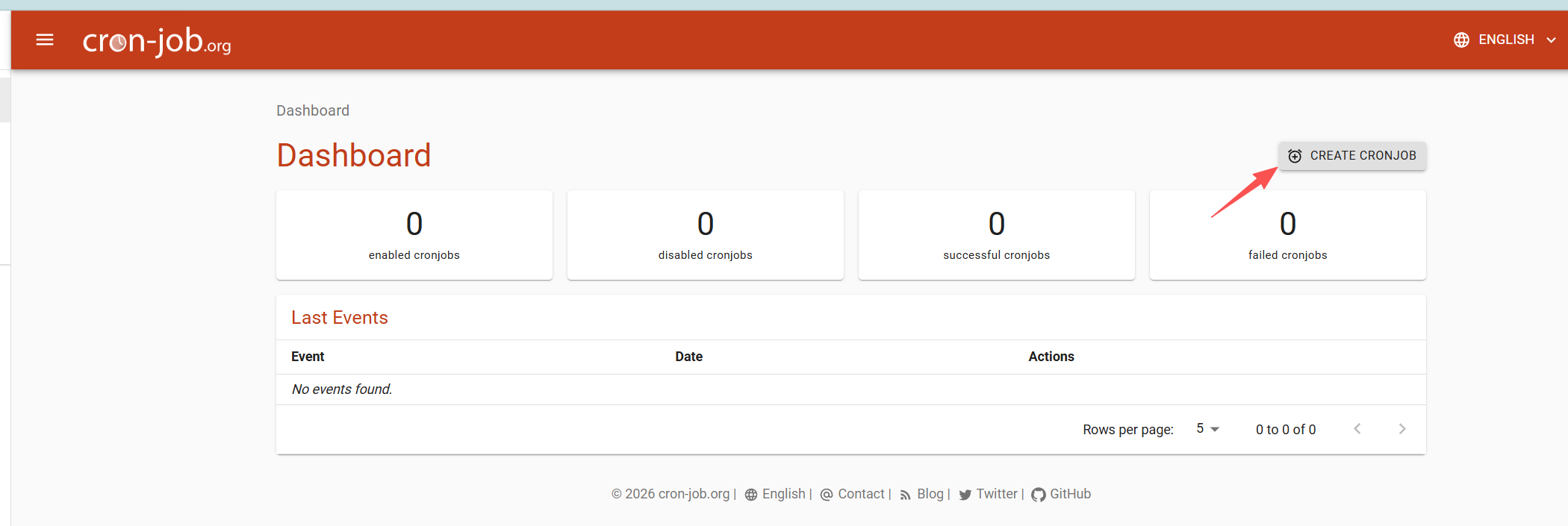
6.2 Create the cron job.
On the cron-job.org dashboard click CREATE CRONJOB.
6.3 Fill in the "Common" tab (screenshot below is the target state):
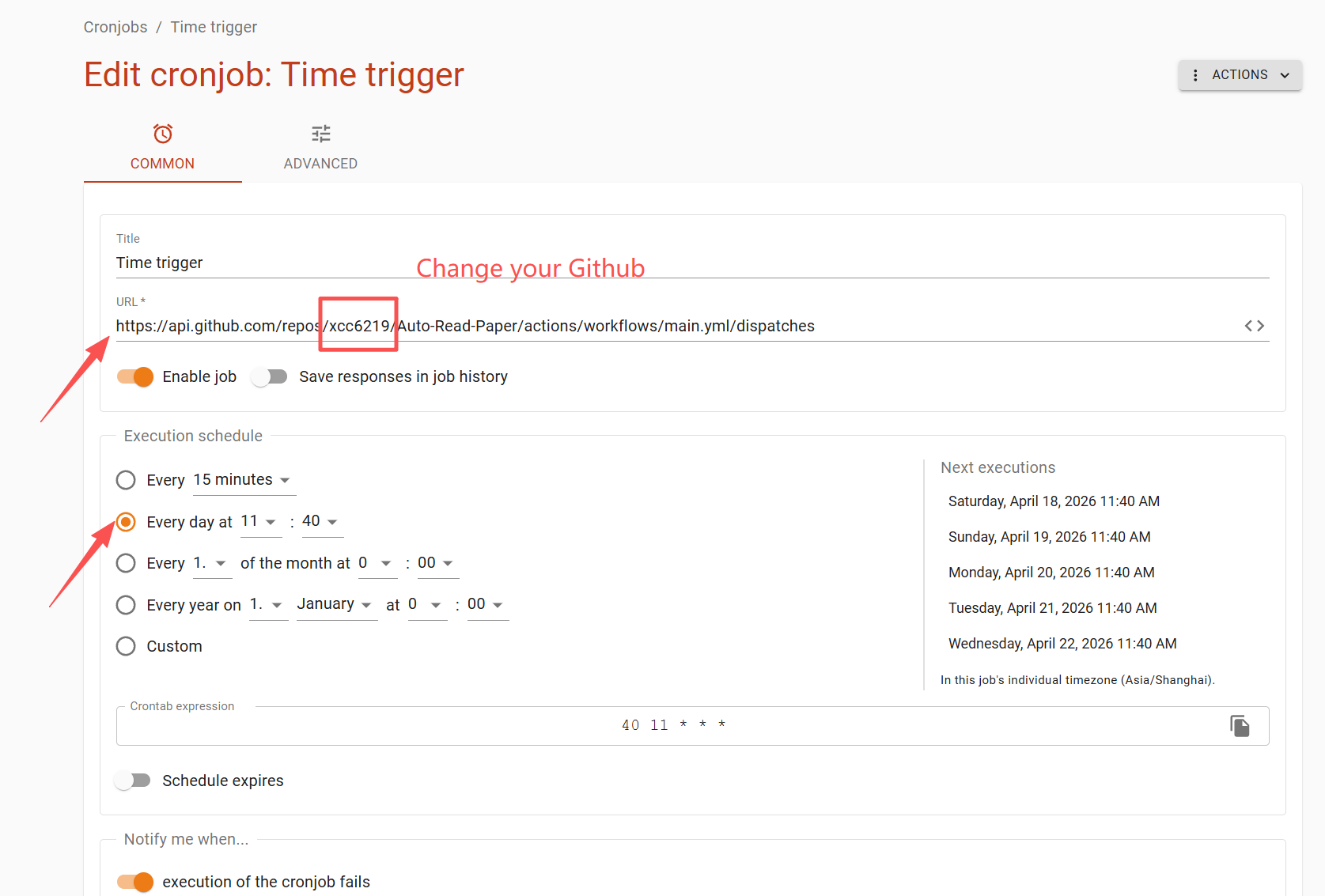
| Field | Value | | :--- | :--- | | Title | Anything descriptive, e.g. Auto-Read-Paper daily. | | URL | https://api.github.com/repos/<your-github-username>/Auto-Read-Paper/actions/workflows/main.yml/dispatches
⚠ Replace <your-github-username> with YOUR username — the screenshot shows xcc6219 (the upstream owner) as an example. Leaving it unchanged POSTs to someone else's repo and silently 404s. If you also renamed your fork, update the Auto-Read-Paper segment. | | Enable job | ON (orange toggle). | | Save responses in job history | OFF is fine (keeps dashboard tidy). | | Execution schedule → "Every day at" | Pick the HH:MM you want the email to land. The right-hand preview must say In this job's individual timezone (Asia/Shanghai) — if it doesn't, fix the timezone in step 6.1. Screenshot example: 11:40 every day. |
6.4 Switch to the "Advanced" tab and fill the HTTP details (except the Authorization token value — we'll get that in the next step):
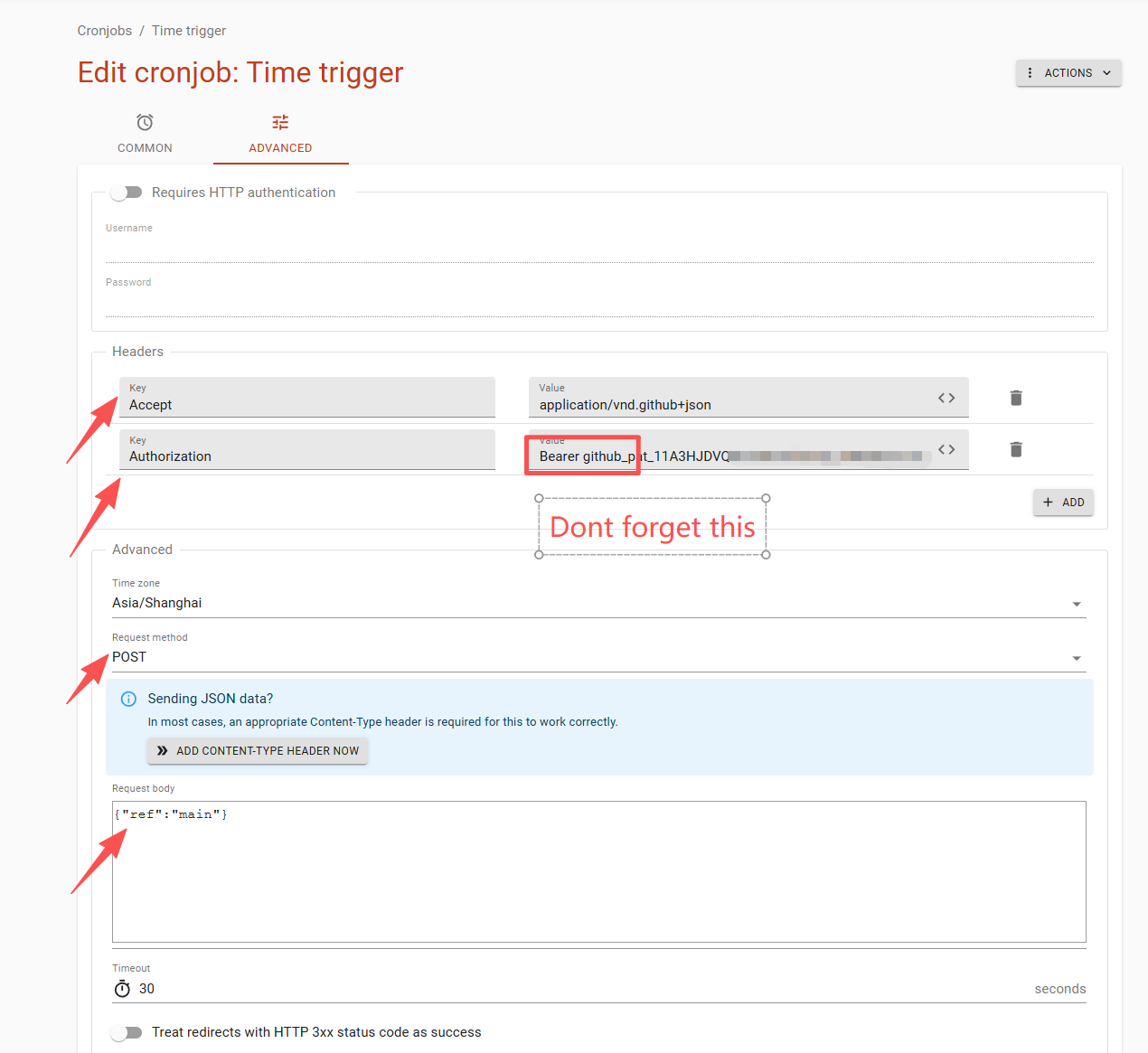
| Field | Value | | :--- | :--- | | Request method | POST | | Header 1 → Key | Accept | | Header 1 → Value | application/vnd.github+json | | Header 2 → Key | Authorization | | Header 2 → Value | ⏳ Leave blank for now. You'll paste Bearer <token> here in step 6.6. | | Request body | {"ref":"main"}
⚠ Do not leave the body empty — GitHub returns 422 Unprocessable Entity without it. |
⚠ DO NOT close or navigate away from this cron-job.org tab. In the next step you'll open GitHub in a new browser tab to generate the PAT, then come back to this exact form to paste the token. If you close this tab, all values above are lost.
6.5 Open a NEW browser tab → generate a GitHub Personal Access Token (PAT).
🟠 Keep the cron-job.org tab open in the background — open GitHub in a separate tab (Ctrl-click the link, or right-click → Open in new tab).
Navigate: GitHub avatar (top-right) → Settings → Developer settings (left sidebar, bottom) → Personal access tokens → Fine-grained tokens → Generate new token.
⚠ "Developer settings" lives under your account Settings, NOT the repo's Settings. If you only see Deploy keys / Secrets / Actions, you're in the wrong Settings page — click your avatar in the top-right first.
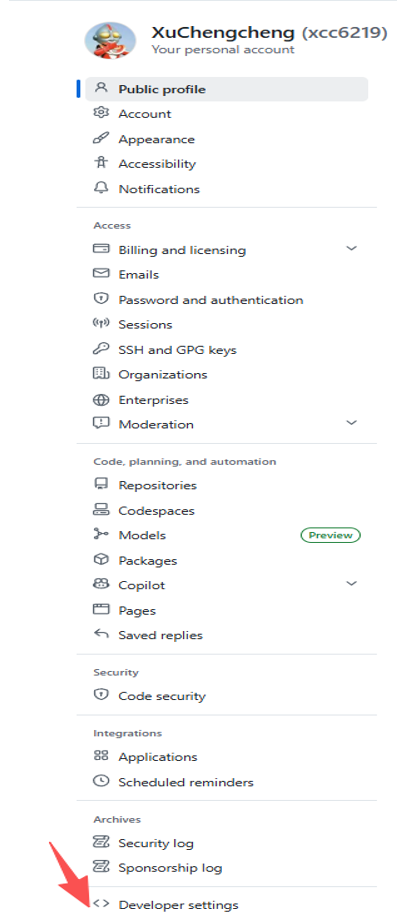
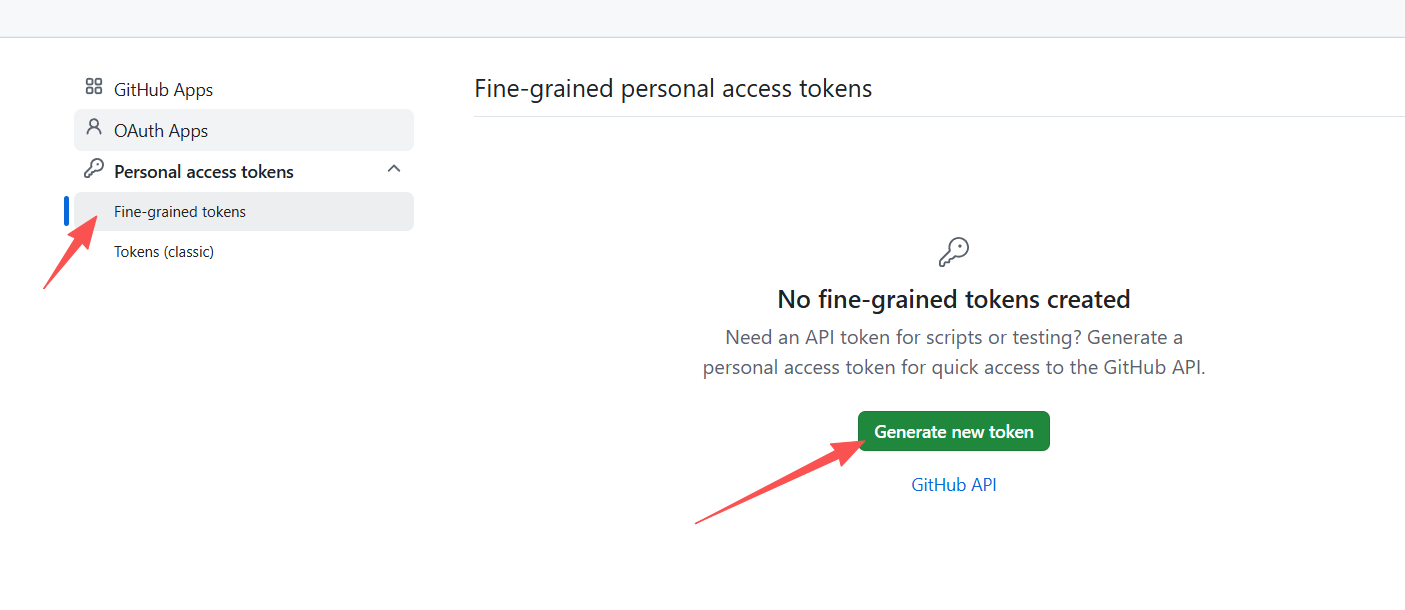
Fill the token form to match the screenshot exactly — every red-arrow field matters:
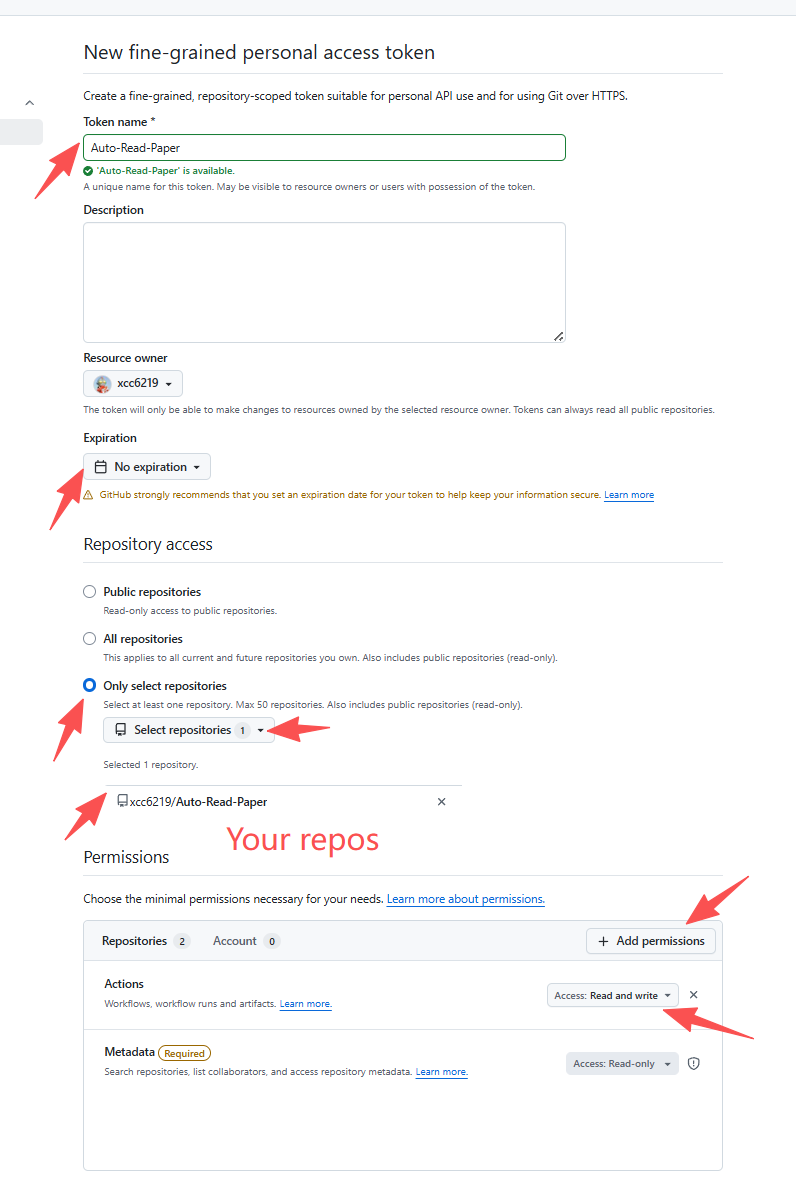
| Field | Value | Notes | | :--- | :--- | :--- | | Token name | Auto-Read-Paper (or anything descriptive) | — | | Resource owner | Yourself (your own username) | — | | Expiration | No expiration (recommended) or 1 year with a calendar reminder to rotate | A 90-day default will silently break the cron after 3 months. | | Repository access | Only select repositories → click Select repositories → pick only your fork of Auto-Read-Paper | ❌ Do not pick Public repositories (read-only, cannot dispatch → 403) or All repositories (over-privileged). | | Repository permissions → Actions | Read and write | Click "+ Add permissions" to reveal the Actions row, then set its dropdown to Read and write. This is the most commonly-missed step → symptom is 403 Forbidden. | | Repository permissions → Metadata | Read-only (auto-set, required) | GitHub adds this automatically — you cannot turn it off. | | Account permissions | Leave all on No access | — |
Click Generate token at the bottom → copy the githubpat... string immediately. GitHub shows it exactly once; losing it means generating a new one.
6.6 Switch back to the cron-job.org tab → paste the token.
In the Authorization Value field you left blank in step 6.4, paste:
Bearer <your githubpat... token>⚠ The word Bearer (with a trailing space) must come before the token — without it GitHub returns 401 Unauthorized. Example: Bearer githubpat11ABCDEF...xyz (whole line goes into the Value box).
Click Create at the bottom of the page. Done — the job appears on your dashboard with enabled cronjobs: 1.
6.7 Verify it works.
On the job's detail page click Test run (or Execute now). Within a few seconds the response panel shows the HTTP status. Expected: 204 No Content. Then open your GitHub repo's Actions tab — a new Send paper daily run should appear within ~10 s.
Troubleshooting the test-run HTTP status:
| Status | Meaning | Fix | | :---: | :--- | :--- | | 204 | ✅ Success — workflow dispatched | Nothing to do. | | 401 | Unauthorized — missing/malformed token | Header value must start with Bearer (with trailing space), followed by the full githubpat... string. | | 403 | Forbidden — token lacks permission | PAT was created with Public repositories access. Regenerate with Only select repositories + Actions: Read and write. | | 404 | Not found — wrong URL | Username in URL is not your account, repo was renamed, or fork doesn't exist. | | 422 | Unprocessable entity — bad body | Request body must be exactly {"ref":"main"}. |
Want to re-send for testing? No special flag needed — every trigger runs the pipeline end-to-end. On cron-job.org click Test run (or edit the job's schedule to any near-future time); on GitHub click Actions → Send paper daily → Run workflow. Both send a fresh digest immediately.
7️⃣ (Optional) Subscribe to failure emails
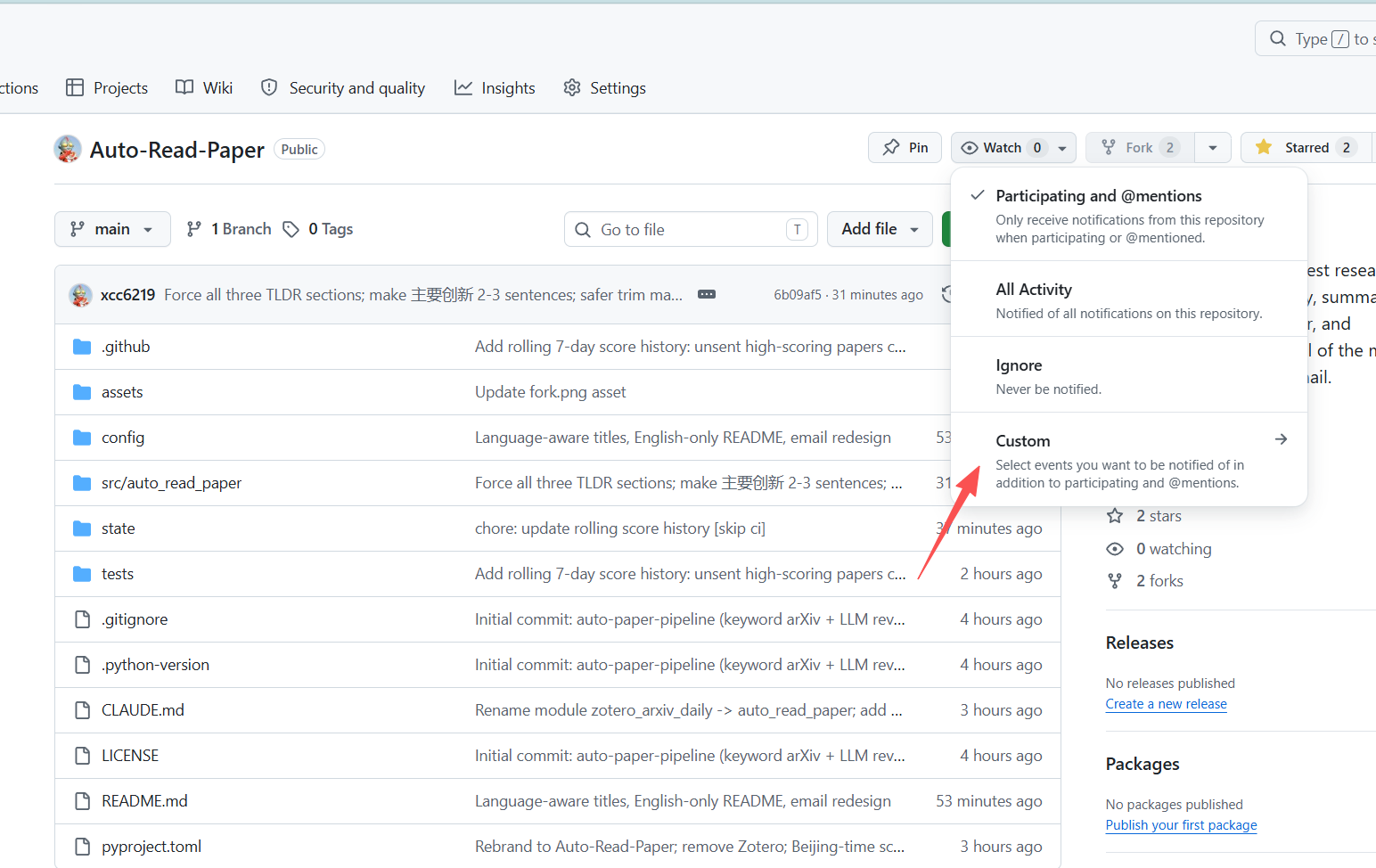
Click the repo's Watch → Custom → tick Actions. GitHub will email you only when a workflow fails, so you catch an expired API key or SMTP rejection within minutes instead of noticing a silent empty inbox days later.
🔌 Use a different LLM provider
This project routes every LLM call through LiteLLM, so any of its 100+ providers works by flipping a few env vars. One unified pair of secrets — LLMAPIKEY + LLMAPI_BASE — covers every provider, including Anthropic and Gemini. No provider-specific secrets required.
| Provider | LLMMODEL | LLMAPIBASE | LLMAPI_KEY | | :--- | :--- | :--- | :--- | | OpenAI — chat | openai/gpt-4o-mini, openai/gpt-4o | (blank) | your OpenAI key (sk-…) | | OpenAI — reasoning (o1/o3/o4/gpt-5) | openai/o3-mini, openai/gpt-5 | (blank) | your OpenAI key — maxtokens auto-renamed to maxcompletion_tokens, temperature auto-dropped | | Anthropic — native API | anthropic/claude-sonnet-4-6, anthropic/claude-haiku-4-5-20251001 | (blank) | your Anthropic key (sk-ant-…) | | Google Gemini — native API | gemini/gemini-2.0-flash, gemini/gemini-2.5-pro | (blank) | your Gemini key (AIza…) | | DeepSeek | deepseek/deepseek-chat, deepseek/deepseek-reasoner | https://api.deepseek.com/v1 | your DeepSeek key | | Qwen (DashScope, OpenAI-compat) | openai/qwen-plus, openai/qwen-max | https://dashscope.aliyuncs.com/compatible-mode/v1 | your DashScope key | | Kimi / Moonshot | openai/moonshot-v1-32k, openai/moonshot-v1-128k | https://api.moonshot.cn/v1 | your Moonshot key | | MiniMax (OpenAI-compat) | openai/MiniMax-Text-01, openai/abab6.5s-chat | https://api.minimax.chat/v1 | your MiniMax key | | OpenRouter (anything, one key) | openrouter/anthropic/claude-sonnet-4-6, openrouter/openai/gpt-4o-mini | (blank) | your OpenRouter key | | Ollama (local self-host) | ollama/qwen2.5:7b-instruct, ollama/llama3.1:70b | http://127.0.0.1:11434/v1 | any non-empty string (Ollama ignores it) | | vLLM (self-host, OpenAI-compat) | openai/<served-model-name> | http://<host>:8000/v1 | whatever vLLM is configured with | | Groq | groq/llama-3.3-70b-versatile | (blank) | your Groq key | | SiliconFlow | openai/Qwen/Qwen2.5-72B-Instruct | https://api.siliconflow.cn/v1 | your SiliconFlow key |
Switching providers is a 3-step operation, no workflow edits required:
- Update the repo secret
LLMAPIKEYwith the new provider's key. - Update / clear the repo secret
LLMAPIBASEper the table above. - Update the repo variable
LLM_MODELto the matching LiteLLM-style id.
- Native vs OpenAI-compatible:
anthropic/…,gemini/…,groq/…,openrouter/…call each vendor's native API through LiteLLM — leaveLLMAPIBASEblank. Everything else uses OpenAI-compatible endpoints — setLLMAPIBASEto the provider's URL. - Small-model tolerance: the client auto-strips
<think>…</think>blocks, Markdown</code></pre>json <pre><code class="lang-">fences, and Python-style single-quoted dicts from JSON responses — so DeepSeek, Qwen, and local Ollama runs don't fall back silently on malformed output. - Reasoning-model quirks:
o1/o3/o4/gpt-5requiremaxcompletiontokens(notmax_tokens) and rejecttemperature— the client rewrites both for you automatically. - Timeouts & retries:
llm.timeout(default 180 s) andllm.max_retries(default 3) are forwarded to LiteLLM so a wedged endpoint can't hang the whole Actions job.
See config/base.yaml for every available knob, including:
executor.reranker— pickkeywordllm(per-paper LLM scoring, simple) orreaderreviewer(two-agent: Reader takes structured notes per paper, Reviewer batch-ranks them in one call).reranker.keyword_llm.weights— reweight innovation/relevance/potential.reranker.keywordllm.threshold/reranker.readerreviewer.threshold— drop papers below a minimum score.reranker.keywordllm.concurrency/reranker.readerreviewer.concurrency— parallel LLM requests.reranker.readerreviewer.reviewermax_papers— cap how many papers go into the single Reviewer batch call.source.arxiv.includecrosslist— include cross-listed papers.executor.send_empty— still send the email even when no paper matched.history.enabled/history.retention_days— keep a rolling pool of scored-but-unsent papers for N days so the highest-scoring backlog gets surfaced.
Local Running
Powered by uv:bash
export SENDER=... SENDER_PASSWORD=... RECEIVER=...
export LLMAPIKEY=... LLMAPIBASE=...
cd Auto-Read-Paper uv sync DEBUG=true uv run src/autoreadpaper/main.py## 📖 How it works1. Retrieve — pull newly-announced papers in the configured categories from arXiv RSS every day - Keyword pre-filter — drop papers whose title/abstract doesn't match any keyword (before any LLM call)
- Multi-agent rerank (default) —
- 🧑🔬 Reader: reads title + abstract + main-body preview per paper, emits structured JSON notes - 🧐 Reviewer: compares all candidates side-by-side in a single call and scores each 0-10 on innovation / relevance / impact - History merge — today's scored papers merge with the past-7-days unsent pool; everything is re-sorted by score
- Deep read — the Top-N go back to the LLM to produce the three-section summary (in the language set via
llm.language) and, when that language differs from English, a translated title - Render & send — HTML template renders colored cards and sends via SMTP; papers are only marked as sent after SMTP succeeds
📌 Limitations
- arXiv RSS is the only source. Google Scholar has no stable API and would not survive on GitHub Actions runners.
- The LLM scoring is only as good as the prompt + model; for niche domains, expect some noise. Raise
maxpapernum or tune weights to taste.
- Runs free and unmetered on a public fork; private forks use ~30 Actions min/month (well inside the Free tier's 2000).
- Daily scheduling requires a free external account at cron-job.org (step 6 of the setup). The workflow no longer embeds a GitHub
schedule: cron because GitHub's built-in cron drifts 5–15 min and frequently drops fires.
🗑️ Manually clear the 7-day paper history
Your fork accumulates a rolling 7-day memory so high-scoring papers aren't buried. The pipeline stores it in two places:
| Where | What lives there | Scope | | :--- | :--- | :--- | | GitHub Actions cache (score-history-*) | state/scorehistory.json — scored papers + sentat marks | Every cloud run | | Local repo (state/scorehistory.json) | Same file, when you run uv run src/autoread_paper/main.py on your machine | Local dev only |
You may want to wipe one or both when:
- You changed
keywords / category / language and want the next run to start from a clean slate - The history file got corrupted for any reason
Note: there is no per-day or content-hash send guard. The candidate pool is just unsent papers — trigger the workflow as many times as you want per day; each push only ever picks from papers you have not yet received, and the pool naturally shrinks as papers get marked sent.
Option A — GitHub web UI (easiest, recommended)
- Open your fork → Actions tab
- Left sidebar → Caches (under "Management")
- Find every entry whose key starts with
score-history- and click the 🗑️ icon to delete
- The next
Send paper daily run starts with an empty history
![If you don't see a Caches link, scroll the sidebar — it's below the workflow list.]
Option B — GitHub CLI (scripted / bulk)
list every score-history cache key on your fork
gh cache list --repodelete them all in one shot
gh cache list --repoReplace <your-user> with your GitHub username. Requires gh auth login once.
Option C — GitHub REST API (no CLI needed)
Needs a fine-grained PAT with Actions: Read and write (same one cron-job.org uses)
TOKEN=githubpatxxx OWNER=1. List cache ids whose key starts with score-history-
curl -s -H "Authorization: Bearer $TOKEN" \ "https://api.github.com/repos/$OWNER/$REPO/actions/caches?key=score-history-&per_page=100" \ | jq -r '.actions_caches[].id'2. Delete each id
curl -s -X DELETE -H "Authorization: Bearer $TOKEN" \ "https://api.github.com/repos/$OWNER/$REPO/actions/caches/### Option D — local dev (uv run)
If you're running the pipeline on your own machine, the history file is just a plain JSON file:
nuke everything (papers + sent marks)
rm state/score_history.jsonOR keep the file but reset it to empty
printf '{"papers": []}\n' > state/score_history.json ``
Next local run starts fresh.
What gets wiped vs kept
| Wiped | Kept | | :--- | :--- | | List of scored papers from the last 7 days | Your Secrets / Variables /
CUSTOM_CONFIG | | Paper→sent_at marks | Your cron-job.org schedule | | | Your PAT / SMTP auth code |
After wiping, the very next run may re-surface papers you already saw earlier in the week (because they're no longer in the "already scored" set). That's expected — it's the cost of a full reset.
📃 License
Distributed under the AGPLv3 License. See
LICENSE` for detail.
❤️ Acknowledgement
This project stands on the shoulders of two open-source projects:
- TideDra/zotero-arxiv-daily — the GitHub Actions + SMTP + HTML email foundation that this repo forks and extends.
- ReadPaperEveryday — inspired the keyword-based arXiv workflow and Chinese deep-read summarization style.


