
ViaStitching action-plugin for KiCAD
Last updated Jul 3, 2026
99
Stars
14
Forks
14
Issues
+2
Stars/day
Attention Score
37
Language breakdown
No language data available.
▸ Files
click to expand
README
ViaStitching
Via Stitching action-plugin for use with KiCAD 6.0+. Fill a selected copper area with a pattern of vias.When to use this tool
Whenever you need to fill a copper area with vias to improve thermal or current conduction this tool is the answer (yet not the best one probably). The plugin is based on pre-existing areas so you have to define and select one before invoking the plugin.Install
As any other KiCAD plugin - ViaStitching must be installed into one of the allowed path, my personal advice is to install it as a user plugin. To install it as user plugin on Windows systems (KiCAD 7.0) you should put plugins files into: C:\Users\How it works
The workflow is pretty simple: select the area you want to fill, click on->External Plugins->ViaStitching toolbar icon: a dilaog like the one below should appear:
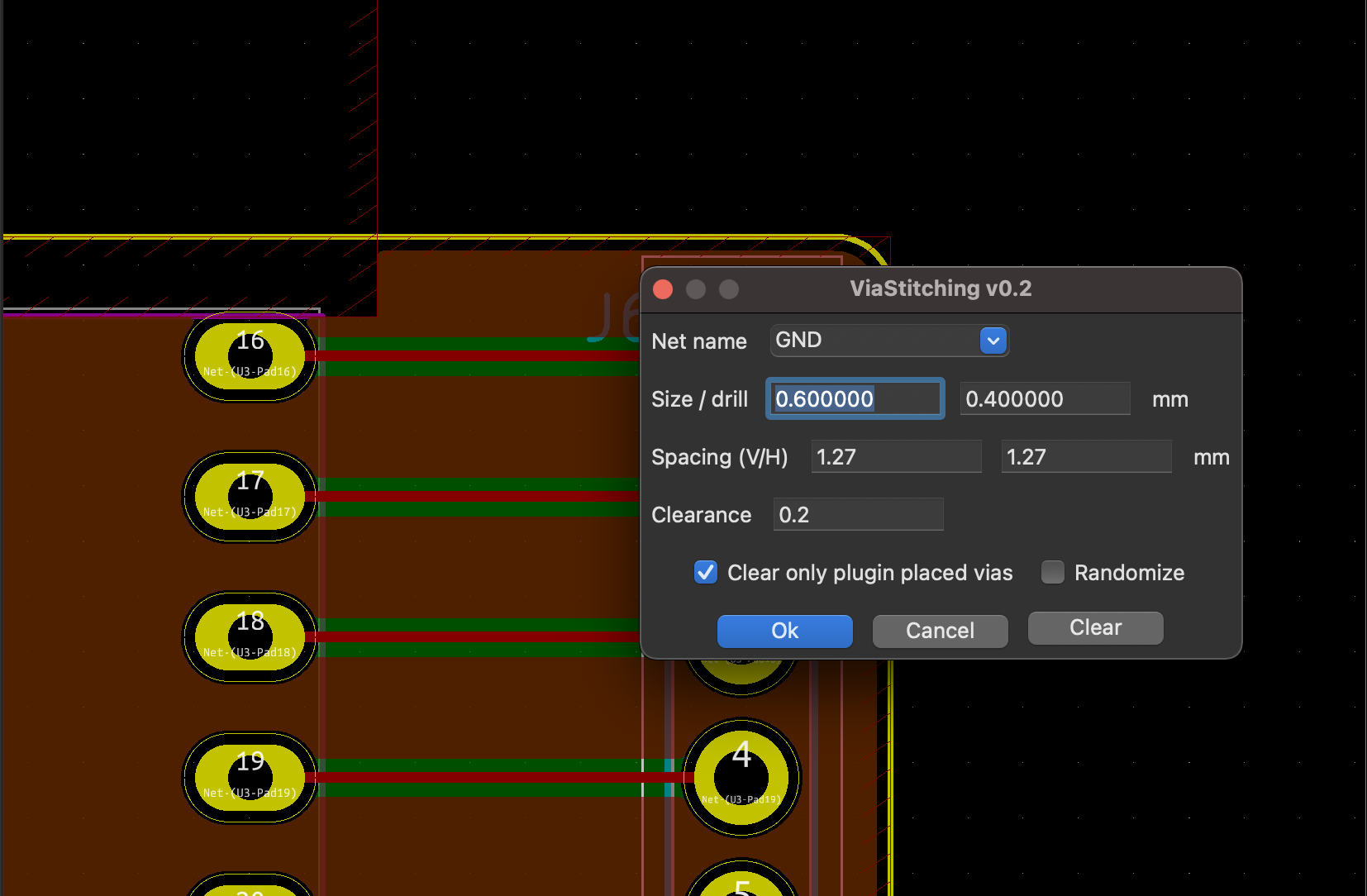 The vias you're going to create needs to be assigned a net usually this's the net of the target area for this reason the plugin pre-select this net for you; of course you're free to select another net if you like.
The plugin dialog let you also specify the parameters for the via creation (via size and drill size), such values are taken from board configuration, you can change them but beware to use values that will not conflict with DRC rules; you can customize also: vertical and horizontal spacing between vias and edge clearance (insert 0 will disable check).
When you're satisfied with your settings you have just to press Ok and the fillup will begin (I'm assuming Fill action is checked).
If everything goes fine you'll get something like this:
The vias you're going to create needs to be assigned a net usually this's the net of the target area for this reason the plugin pre-select this net for you; of course you're free to select another net if you like.
The plugin dialog let you also specify the parameters for the via creation (via size and drill size), such values are taken from board configuration, you can change them but beware to use values that will not conflict with DRC rules; you can customize also: vertical and horizontal spacing between vias and edge clearance (insert 0 will disable check).
When you're satisfied with your settings you have just to press Ok and the fillup will begin (I'm assuming Fill action is checked).
If everything goes fine you'll get something like this:
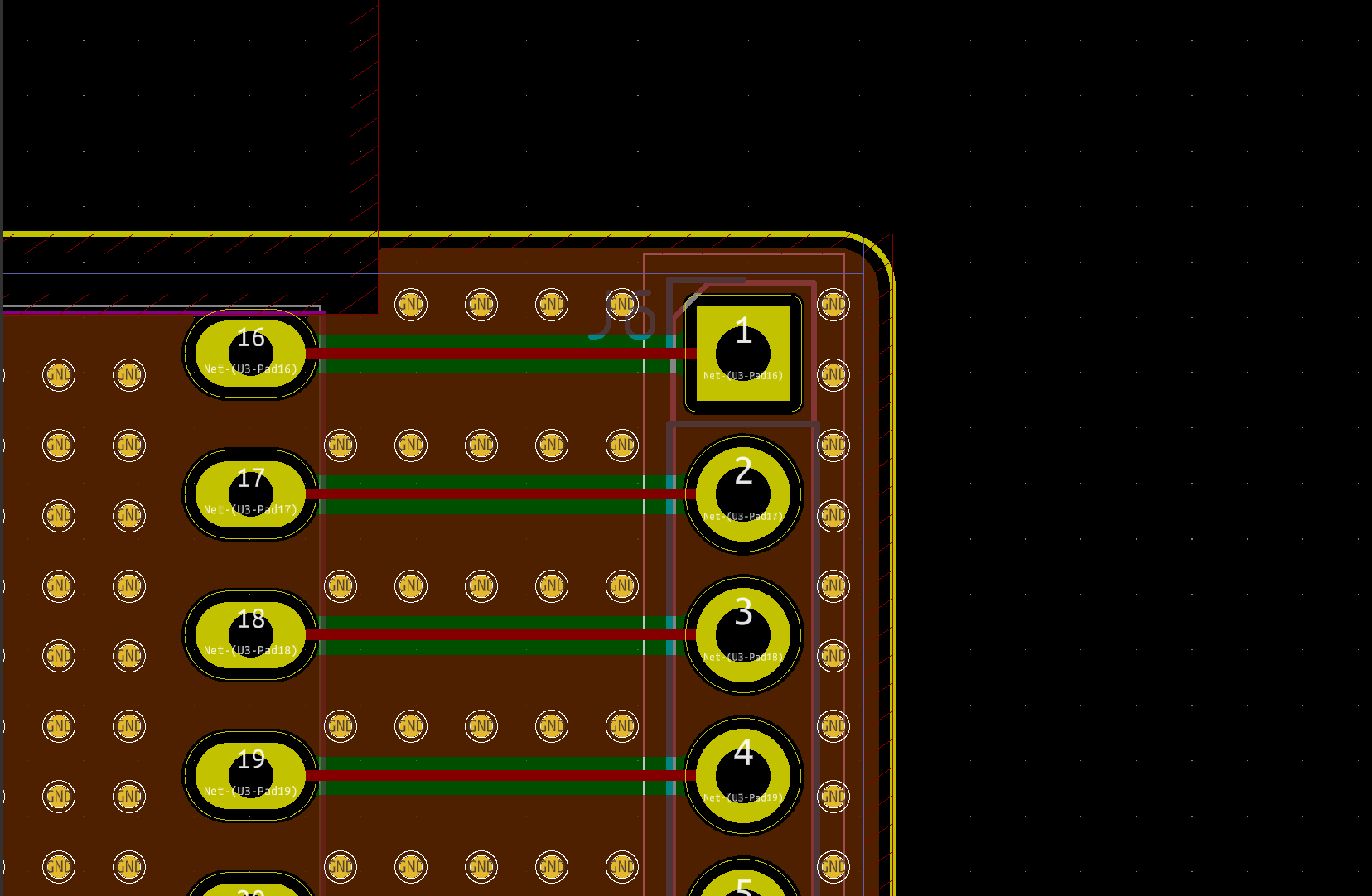 After stitching is always a good practice to perform a DRC.
As you can see some implanted vias may still overlap with some other PCB elements (tracks,
After stitching is always a good practice to perform a DRC.
As you can see some implanted vias may still overlap with some other PCB elements (tracks, TODO
Some features still to code:- [x] Match user units (mm/inches).
- [x] Add clear area function.
- [ ] Draw a better UI (if anyone is willing to contribute please read the following section).
- [x] Collision between new vias and underlying objects:
- [ ] Different fillup patterns/modes (bounding box, centered spiral).
- [x] Avoid placing vias near area edges (define clearance).
- [ ] History management (board commit).
- [ ] Localization.
- [x] Support for multiple zones
- [x] Storage of stitching configuration for each individual zone as JSON string in a user layer.
- [ ] Any request?
Coding notes
If you are willing to make any modification to the GUI (you're welcome) trough wxFormBuilder (.fbp.pyself.SetSizeHints( wx.DefaultSize, wx.DefaultSize )if sys.version_info[0] == 2:
self.SetSizeHintsSz( wx.DefaultSize, wx.DefaultSize )
else:
self.SetSizeHints( wx.DefaultSize, wx.DefaultSize )syskicad-action-scripts - ViaStitching plugin similarity
Yes my plugin is pretty similar to this plugin but I'm using a radically different approach in coding. At the time I wrote the first release of my plugin unluckly jsreynaud plugin wasn't working but I bet he will fix it.References
Some useful references that helped me coding this plugin:- https://sourceforge.net/projects/wxformbuilder/
- https://wxpython.org/
- http://docs.kicad-pcb.org/doxygen-python/namespacepcbnew.html
- https://forum.kicad.info/c/external-plugins
- https://github.com/KiCad/kicad-source-mirror/blob/master/Documentation/development/pcbnew-plugins.md
- https://kicad.mmccoo.com/
- http://docs.kicad-pcb.org/5.1.4/en/pcbnew/pcbnew.html#kicadscriptingreference
- Altium Via Stitching feature!
- https://github.com/jsreynaud/kicad-action-scripts


