
Your browser's reference manager: automatic paper detection (Arxiv, OpenReview & more), publication venue matching and code repository discovery! Also enhances ArXiv: BibTex citation, Markdown link, direct download and more!
PaperMemory ⚡
🏪 Official stores
Chrome & Brave & Edge • Firefox
📑 Documentation
PaperMemory.org




Supported Venues • Customization • Keyboard Shortcuts • User Guide • Install from source • About preprints • Discovering code Repositories • FAQ
An automated, web-based and minimalist reference manager that also finds code repositories and published versions of preprints.
It is not meant to replace, rather complete more standard reference managers as Zotero etc.
This browser extension allows you to automatically store research papers you read, find a code repository and much more:
- 🏬 Automatically record papers you open, without clicking anywhere. You can then search them, tag them, comment them and link a code repository.
- 💻 Automatically find code repositories using PapersWithCode's API
- 🤝 Match pre-prints to publications using 4 different databases
- 🎬 Change a pdf's webpage title to the article's title, because who cares about that saved bookmark
1812.10889.pdfwhen it could beInstaGAN Instance-aware Image-to-Image Translation.pdf - 🎫 BibTex citation, because citing papers should not be a hassle you can copy a BibTex citation to your clipboard or export the Memory itself as a
.bibfile - 🔗 Markdown link,
titlebecause it's the little things that make sharing a paper easier (to be used in issues, PRs, Readme, HackMD.io etc.) - 🗂 Direct download button with a nice name including the paper's title, so that you don't have to open the pdf's webpage and then download it from your browser.
- 📄 Go back from a pdf to its abstract page. For instance: from
https://arxiv.org/pdf/1703.06907.pdftohttps://arxiv.org/abs/1703.06907in a click. - 🏛️ Export your data as a
.jsonfile or a.bibfull BibTex export
Share ideas 💡 in issues and love with stars ⭐️:)


Supported venues
- Arxiv
note to the paper (see preprints)
- Also detects and matches papers from huggingface.co/papers, AlphaXiv, ar5iv.org and scirate.com/
- BioRxiv
- NeurIPS
- Open Review (ICLR etc.)
- Computer Vision Foundation (I/ECCV, CVPR etc.)
- Proceedings of Machine Learning Research (PMLR) (AISTATS, ICML, CoRL, CoLT, ALT, UAI etc.)
- Association for Computational Linguistics (ACL) (EMNLP, ACL, CoNLL, NAACL etc.)
- Proceedings of the National Academy of Sciences (PNAS)
- SciRate
- Nature (Nature, Nature Communications, Nature Machine Intelligence etc.)
- American Chemical Society (ACS)
- IOPscience
- PubMed Central
- International Joint Conferences on Artificial Intelligence (IJCAI)
- Association for Computing Machinery (ACM)
- IEEE
- Springer (books, chapters and, of course, articles)
- American Physical Society (APS)
- Wiley (Advanced Materials, InfoMat etc.)
- Science Direct
- Science (Science, Science Immunology, Science Robotics etc.)
- FrontiersIn (Frontiers in Neuroscience, Frontiers in Neuroscience, Frontiers in Microbiology etc.)
- PLOS
- MDPI
- Oxford University Press
- HAL Archives ouvertes
- Royal Society of Chemistry
- Sci-Hub
- Add more
Privacy
All the data collected is stored locally on your computer and you can export it to json it from the options page.
Feature requests
I'm regularly adding feature ideas in the issues. Feel free to go upvote the ones you'd like to see happen or submit your own requests.
Customization
Checkout 📑—All configuration options. Here's a quick overview:
a. Customize features in the menu:

b. Switch between Light and Dark mode

c. Advanced options
In the extension's 📑—options (right click on the icon or in the popup's menu) you will find advanced customization features:
- Auto-tagging: add tags to papers based on regexs matched on authors and titles
- Source filtering: filter out some paper sources you don't want to record papers from
- Custom title function: provide Javascript code to generate your own web page titles and pdf filenames based on a paper's attributes
- Data management: export/load your memory data and export the bibliography as a
.bibfile - Online Synchronization: use Github Gists to sync your papers across devices

Keyboard Shortcuts
Use cmd/ctrl+shift+e to open PaperMemory.
See other 📑—other keyboard shortcuts and how to customize them, and 📑—keyboard navigation.
User Guides

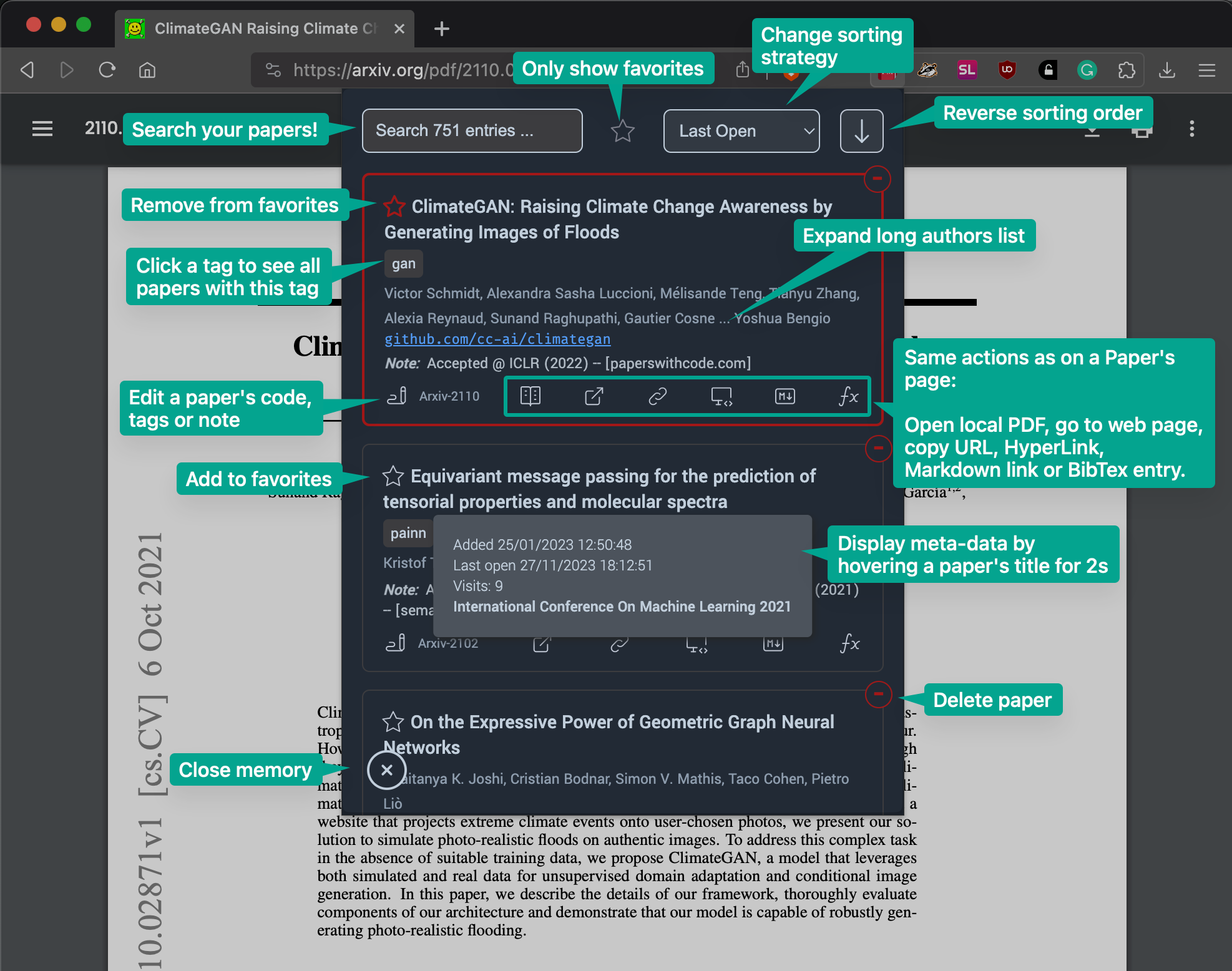
Install from source
Refer to 📑—the documentation.
Preprints
There currently exists, to my knowledge, no centralized source for matching a preprint to its subsequent published article. This makes it really hard to try and implement best practices in terms of citing published papers rather than their preprint.
My approach with PaperMemory is to try and notify you that a publication likely exists by utilizing the note field. You will occasionally notice Accepted @ X in a Paper's notes. This will be added automatically if you are on a known published venue's website (as Nature, PMLR or NeurIPS) but also from DBLB, CrossRef.org, SemanticScholar.org, Unpaywall.org or Google Scholar.
There's room for improvement here^, please contact me (an issue will do) if you want to help.
More on preprint matching 📑—in the documentation.
Discovering Code repositories
PaperMemory uses the PapersWithCode API in order to discover code repositories 🖥️
See 📑—how it works.
FAQ
Todo
- [ ] Improve
Contributing.md - [ ] Write many more tests! Help is wanted (it's not so hard to write unittests 😄) (see
Contributing.md)


