
lightweight, dependency-free bash script for security, performance auditing and infrastructure monitoring of Linux servers.
VPS Security Audit Script
A comprehensive Bash script for auditing the security and performance of your VPS (Virtual Private Server). This tool performs various security checks and provides a detailed report with recommendations for improvements.
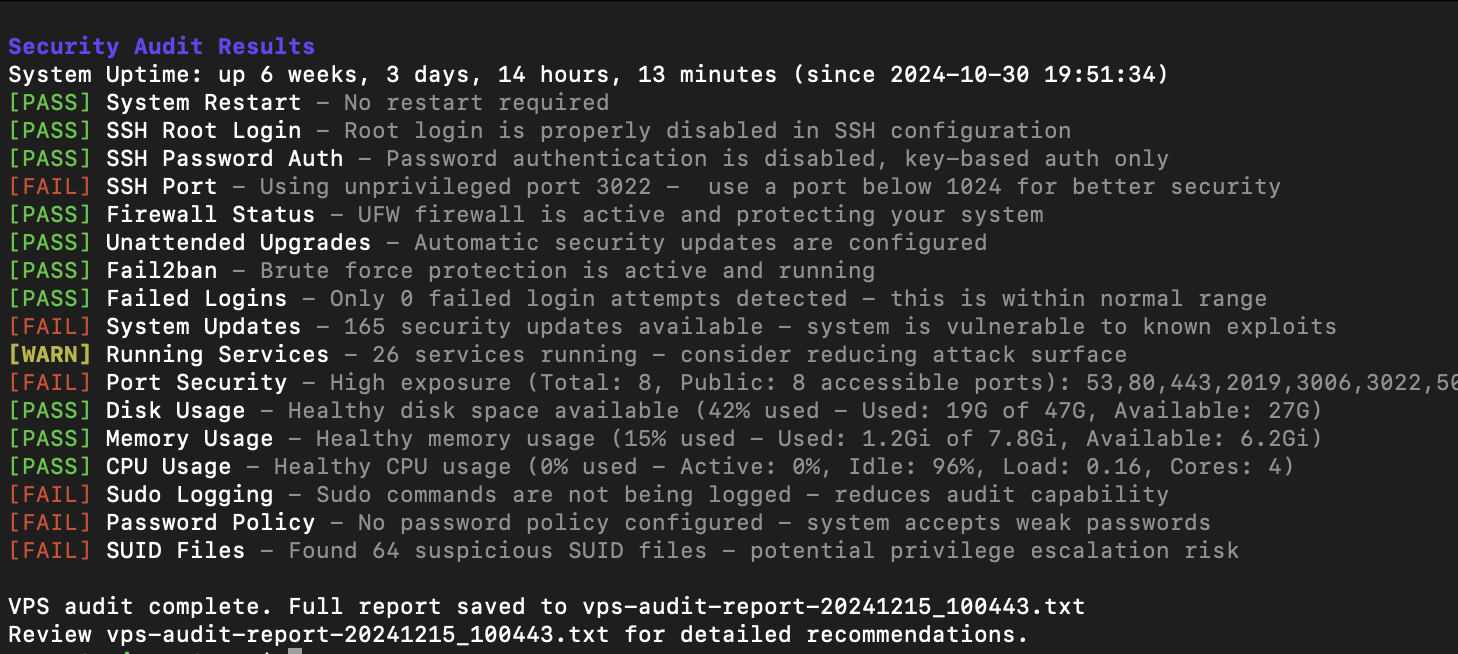
Features
Security Checks
- SSH Configuration
- Firewall Status (UFW)
- Fail2ban Configuration
- Failed Login Attempts
- System Updates Status
- Running Services Analysis
- Open Ports Detection
- Sudo Logging Configuration
- Password Policy Enforcement
- SUID Files Detection
Performance Monitoring
- Disk Space Usage
- Memory Usage
- CPU Usage
- Active Internet Connections
Requirements
- Ubuntu/Debian-based Linux system
- Root access or sudo privileges
- Basic packages (most are pre-installed):
Installation
- Download the script:
wget https://raw.githubusercontent.com/vernu/vps-audit/main/vps-audit.sh
or
curl -O https://raw.githubusercontent.com/vernu/vps-audit/main/vps-audit.sh- Make the script executable:
chmod +x vps-audit.shUsage
Run the script with sudo privileges:
sudo ./vps-audit.shThe script will:
- Perform all security checks
- Display results in real-time with color coding:
- Generate a detailed report file:
vps-audit-report-[TIMESTAMP].txt
Output Format
The script provides two types of output:
- Real-time console output with color coding:
[PASS] SSH Root Login - Root login is properly disabled in SSH configuration
[WARN] SSH Port - Using default port 22 - consider changing to a non-standard port
[FAIL] Firewall Status - UFW firewall is not active - your system is exposed- A detailed report file containing:
Thresholds
Resource Usage Thresholds
- PASS: < 50% usage
- WARN: 50-80% usage
- FAIL: > 80% usage
Security Thresholds
- Failed Logins:
- Running Services:
- Open Ports:
Customization
You can modify the thresholds by editing the following variables in the script:
- Resource usage thresholds
- Failed login attempt thresholds
- Service count thresholds
- Open port thresholds
Best Practices
- Run the audit regularly (e.g., weekly) to maintain security
- Review the generated report thoroughly
- Address any FAIL status immediately
- Investigate WARN status during maintenance
- Keep the script updated with your security policies
Limitations
- Designed for Debian/Ubuntu-based systems
- Requires root/sudo access
- Some checks may need customization for specific environments
- Not a replacement for professional security audit
Contributing
Feel free to submit issues and enhancement requests!
License
This project is licensed under the MIT License - see the LICENSE file for details.
Security Notice
While this script helps identify common security issues, it should not be your only security measure. Always:
- Keep your system updated
- Monitor logs regularly
- Follow security best practices
- Consider professional security audits for critical systems
Support
For support, please:
- Check the existing issues
- Create a new issue with detailed information
- Provide the output of the script and your system information


