
High-performance distributed rate limiter service with Redis backend. Supports token bucket and sliding window algorithms, dynamic configuration, and real-time metrics. Built for microservices architectures.

🚀 Distributed Rate Limiter
High-performance, Redis-backed rate limiter service with multiple algorithms and REST API




🎯 Overview
A production-ready distributed rate limiter supporting five algorithms (Token Bucket, Sliding Window, Fixed Window, Leaky Bucket, and Composite) with Redis backing for high-performance API protection. Perfect for microservices, SaaS platforms, and any application requiring sophisticated rate limiting with algorithm flexibility, multi-dimensional limits, and traffic shaping capabilities.
✨ Key Features
- 🏃♂️ High Performance: 50,000+ requests/second with <2ms P95 latency
- 🎯 Five Algorithms: Token Bucket, Sliding Window, Fixed Window, Leaky Bucket, and Composite for multi-algorithm traffic shaping
- 🤖 Adaptive Rate Limiting: ML-driven automatic limit optimization based on traffic patterns and system health (NEW!)
- 🌍 Geographic Rate Limiting: Location-aware rate limits with CDN header support and compliance zone management
- 🌐 Distributed: Redis-backed for multi-instance deployments
- ⚡ Production Ready: Comprehensive monitoring, health checks, and observability
- 🛡️ Thread Safe: Concurrent request handling with atomic operations
- 📊 Rich Metrics: Built-in Prometheus metrics and performance monitoring
- 🧪 Thoroughly Tested: 511+ tests including integration and load testing
- 🐳 Container Ready: Docker support with multi-stage builds
- 🔧 Flexible Configuration: Per-key limits, burst handling, and dynamic rules
📊 Performance Characteristics
| Metric | Value | |--------|--------| | Throughput | 50,000+ RPS | | Latency P95 | <2ms | | Memory Usage | ~200MB baseline + buckets | | Redis Ops | 2-3 per rate limit check | | CPU Usage | <5% at 10K RPS |
📚 Documentation
API Documentation
- Interactive API Documentation - Swagger UI (when running)
- OpenAPI Specification - Machine-readable API spec (when running)
- Complete API Reference - Comprehensive API documentation with examples
Note: The API provides 18 endpoints covering rate limiting, configuration management, administrative operations, performance monitoring, benchmarking, and system metrics.
🎨 Interactive Web Dashboard
A modern, real-time React-based dashboard for monitoring and managing your distributed rate limiter.
Features:
- 📊 Real-time Monitoring - Live metrics with 5-second updates from backend
- 🎯 Algorithm Comparison - Interactive simulation of Token Bucket, Sliding Window, Fixed Window, and Leaky Bucket
- 📈 Load Testing - Production-grade benchmarking via backend API
- ⚙️ Configuration Management - CRUD operations for global, per-key, and pattern-based limits
- 🔑 API Key Management - Active keys tracking with statistics and admin controls
- 📉 Analytics - Historical performance trends (demo/preview feature)
Quick Start:
# Terminal 1: Start backend ./mvnw spring-boot:run
Terminal 2: Start dashboard
cd examples/web-dashboard
npm install && npm run dev
Open http://localhost:5173
See Dashboard README for complete setup instructions and architecture details.
Usage Examples
- Java/Spring Boot Integration - Complete integration example
- Python Client - Flask/FastAPI integration
- Node.js Client - Express.js middleware
- Go Client - Native HTTP client with middleware
- cURL Examples - Command-line testing
Architecture & Design
- Architecture Decision Records - Design decisions and rationale
- Rate Limiting Algorithms - Algorithm comparison and selection
- Fixed Window Algorithm - Fixed Window implementation details
- Redis Integration - Distributed state design
- Adaptive Rate Limiting - ML-driven automatic optimization (NEW!)
Advanced Features
- Adaptive Rate Limiting Guide - Automatic limit optimization with machine learning (NEW!)
- Geographic Rate Limiting - Location-aware rate limits
Deployment & Operations
- Deployment Guide - Docker, Kubernetes, and production deployment
- Configuration Guide - Detailed configuration options
- Docker Usage - Container deployment instructions
- Performance Guide - Optimization and tuning
- Load Testing Guide - Benchmarking and performance testing
📸 Dashboard Screenshots
The web dashboard provides a comprehensive interface for monitoring and managing the rate limiter. Below are the key pages:
📊 Live Monitoring Dashboard
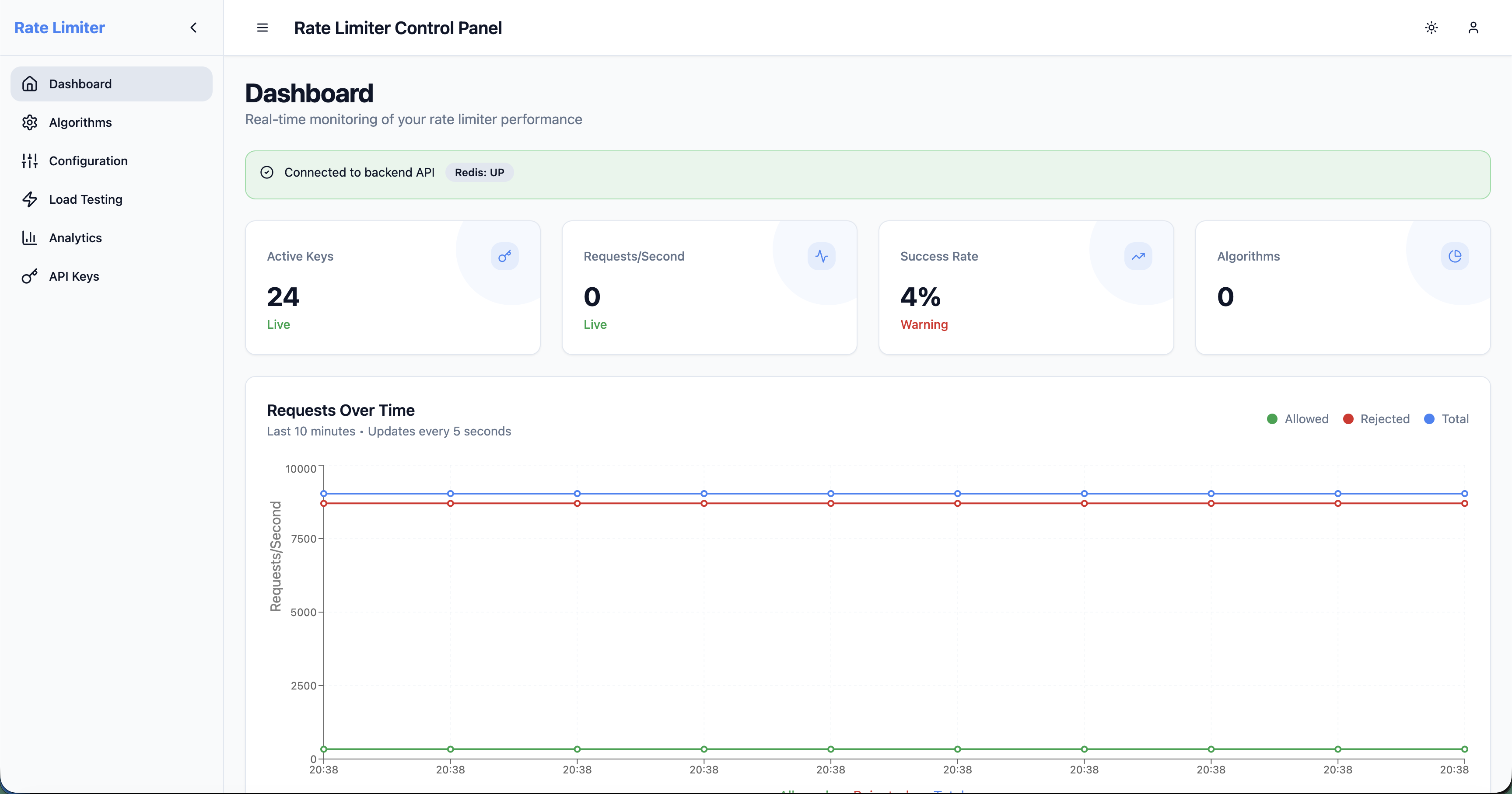
Real-time visualization of rate limiting activity:
- System Metrics: Current requests/second, token usage, active keys
- Algorithm Distribution: Visual breakdown of Token Bucket, Sliding Window, Fixed Window, Leaky Bucket, Composite usage
- Recent Activity Feed: Current per-key snapshot on page load plus live allow/deny updates
- Trend Charts: Request rate and token consumption over time
🧪 Load Testing Interface
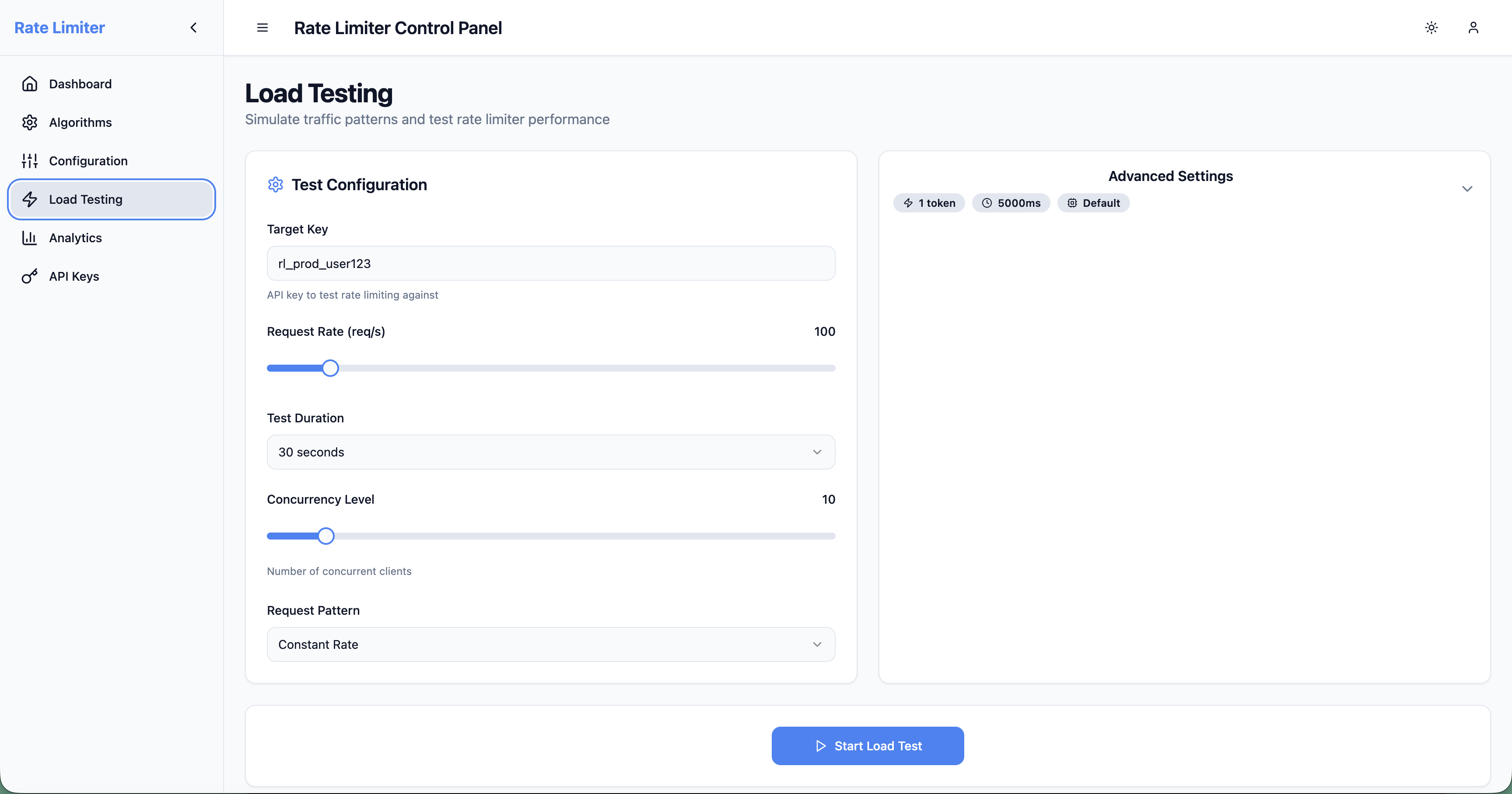
Execute and analyze load tests against the backend:
- Test Configuration: Concurrent requests, duration, key patterns
- Real-time Progress: Requests per second, allow/deny rates, and throughput summaries
- Results Dashboard: Comprehensive statistics from backend
/api/benchmark/runendpoint - Historical Comparison: Compare test runs to detect performance regressions
Note: The current benchmark API does not expose response-time percentile data, so the dashboard reports throughput and rate-limit outcomes but marks latency metrics as unavailable.
⚙️ Configuration Management
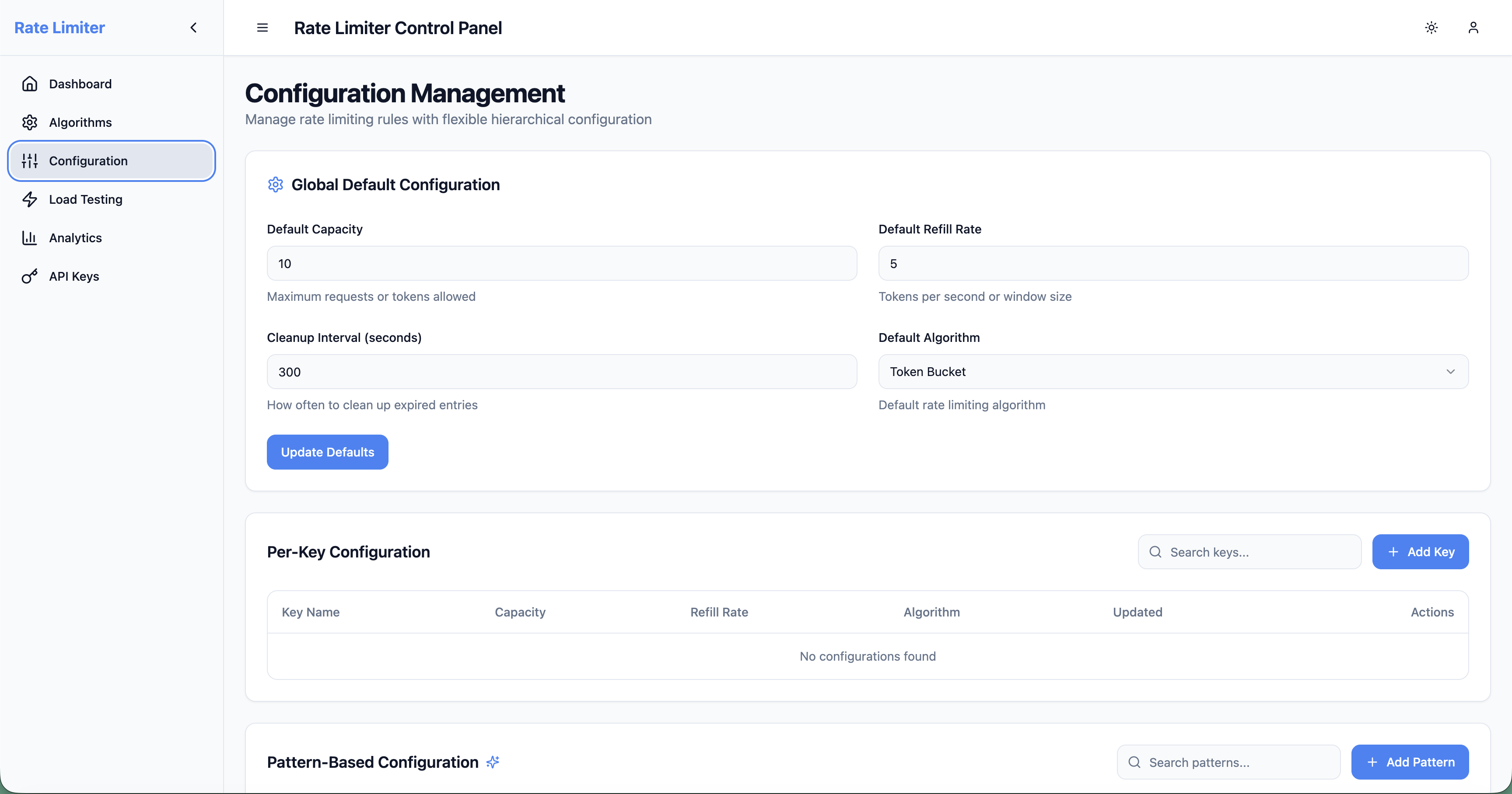
Manage rate limiter configurations dynamically:
- Key-based Configs: Per-key limits with exact matching
- Pattern-based Configs: Wildcard patterns (e.g.,
user:,api:) - Algorithm Selection: Switch between Token Bucket, Sliding Window, Fixed Window, Leaky Bucket, Composite
- Live Updates: Changes reflected immediately via
/api/ratelimit/configendpoints
🔑 API Keys Management
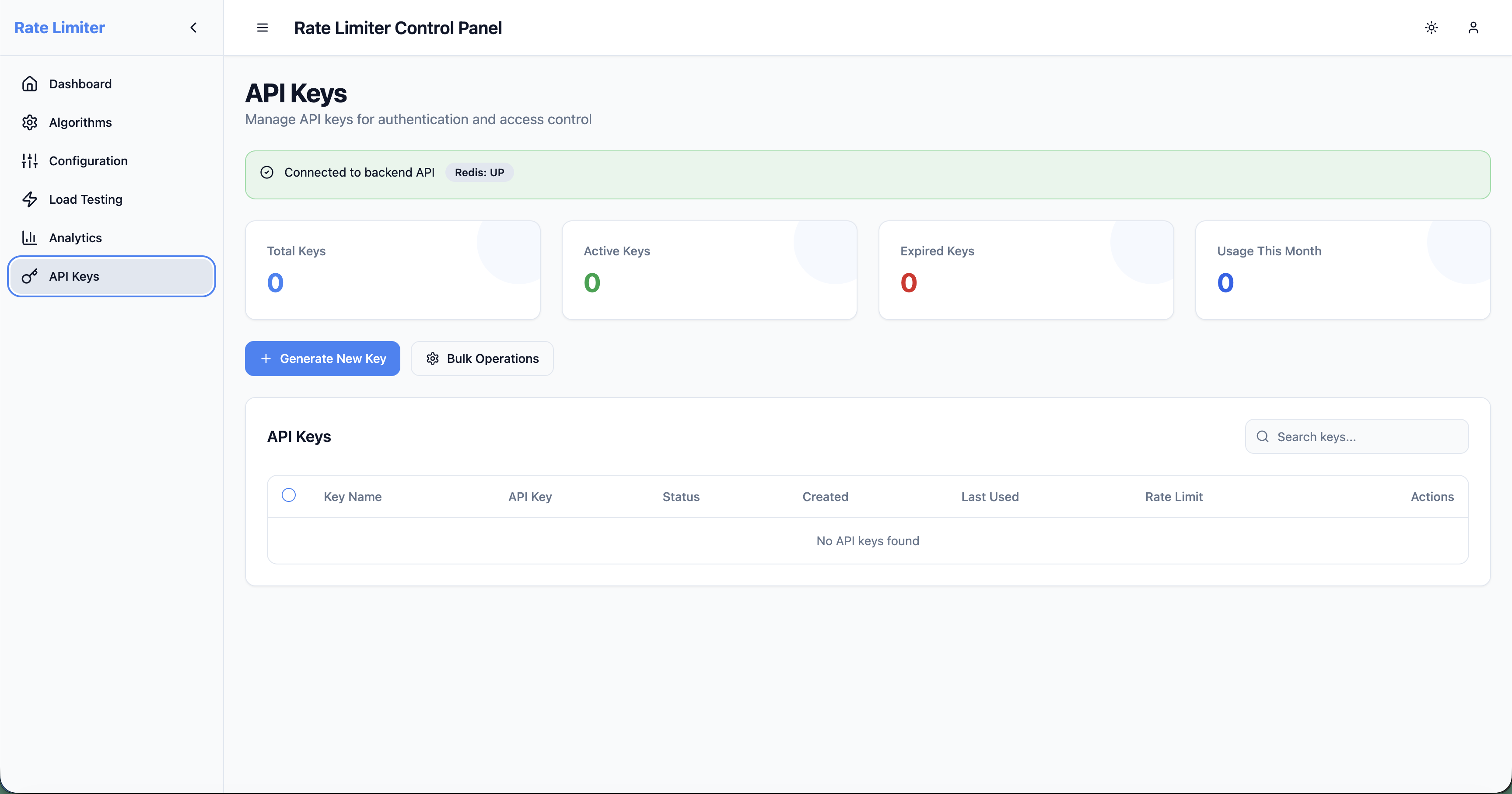
Centralized view of active rate limit keys:
- Key Discovery: Automatically fetches active keys from
/admin/keysendpoint - Status Monitoring: See token counts, capacity, refill rates
- Reset Operations: Clear individual keys or bulk reset via admin API
- Algorithm Assignment: View which algorithm each key uses
📈 Analytics & Trends (Demo Preview)
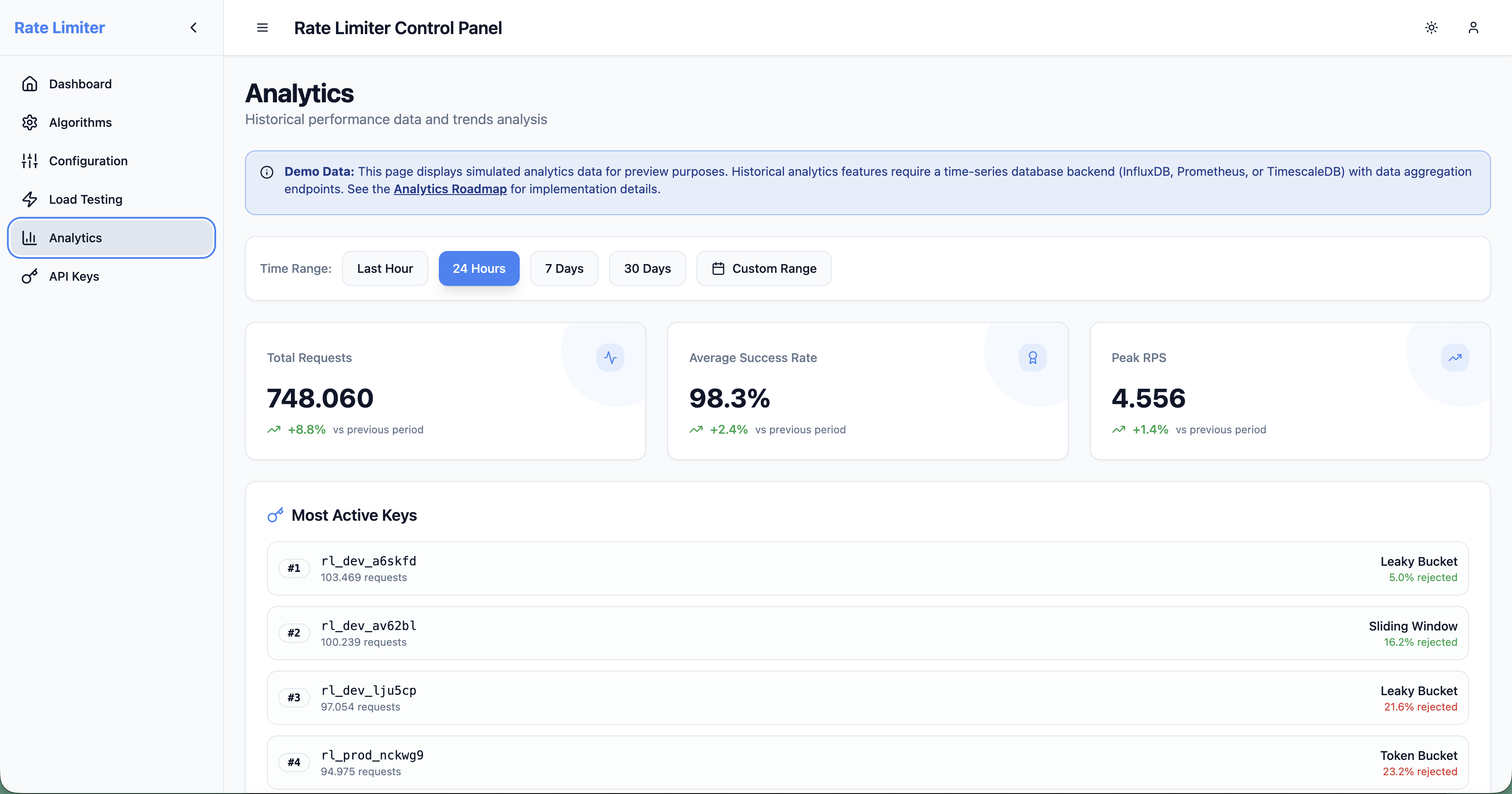
Historical analytics and insights (displays simulated data for preview purposes):
- Time-series Visualization: Request volume, block rate, latency trends
- Top Keys Analysis: Most active endpoints and users
- Geographic Distribution: Request origins by region
- Compliance Reporting: Rate limit violations and threshold breaches
Note: This page displays simulated analytics data for preview purposes. Historical analytics features require a time-series database backend (InfluxDB, Prometheus, or TimescaleDB) with data aggregation endpoints. See the Analytics Roadmap for implementation details.
🧮 Algorithm Comparison
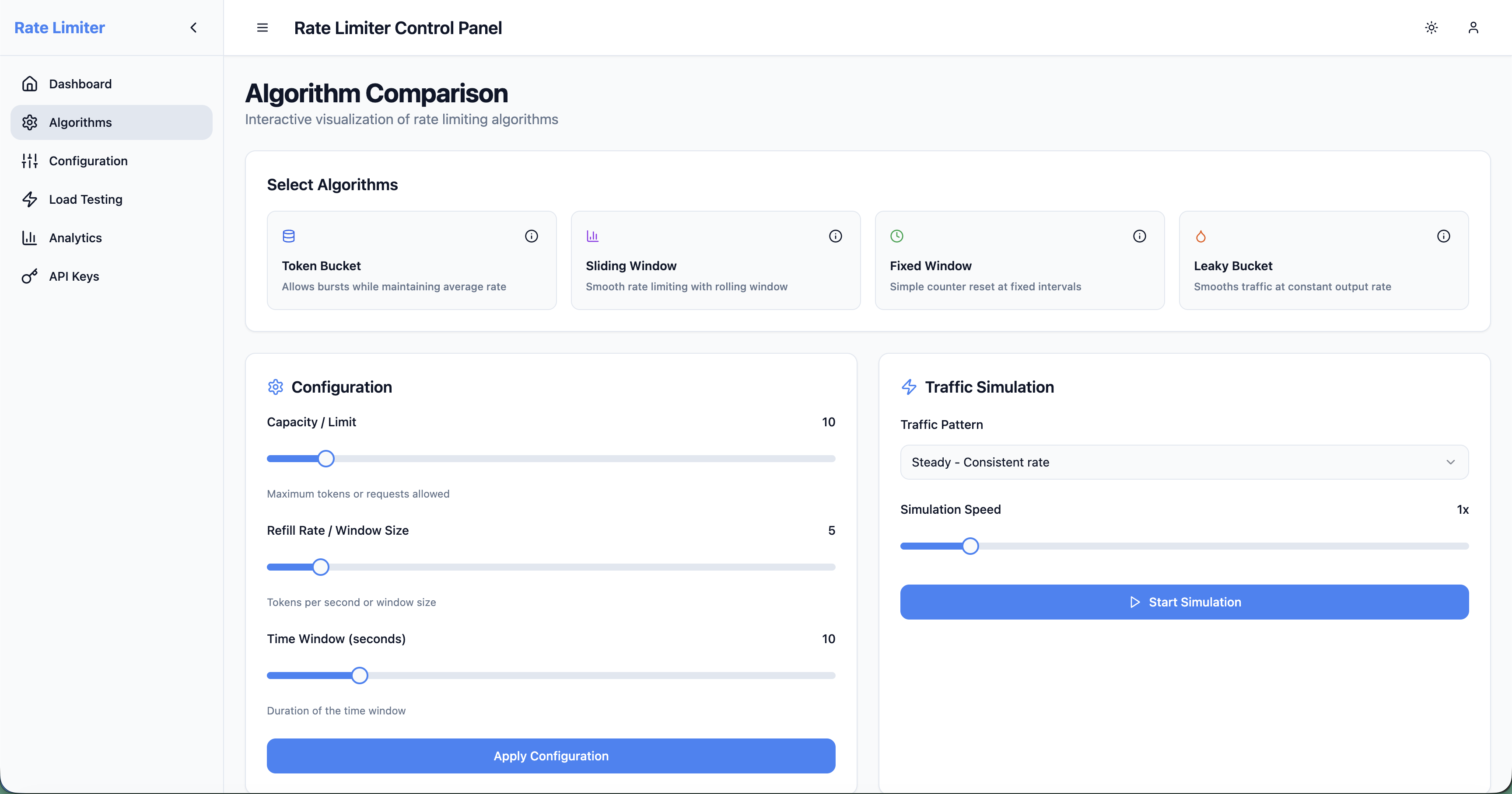
Educational page for understanding rate limiting algorithms:
- Interactive Visualizations: See how Token Bucket, Sliding Window, Fixed Window, Leaky Bucket, Composite work
- Real-time Simulation: Adjust parameters and observe behavior changes
- Use Case Guidance: When to use each algorithm (burst tolerance, strict enforcement, memory efficiency, traffic shaping, multi-algorithm composition)
- Performance Comparison: Memory usage, accuracy, implementation complexity
📦 Installation
Option 1: Download JAR (Recommended)
# Download the latest release
wget https://github.com/uppnrise/distributed-rate-limiter/releases/download/v1.3.2/distributed-rate-limiter-1.3.2.jar
Verify checksum (optional)
wget https://github.com/uppnrise/distributed-rate-limiter/releases/download/v1.3.2/distributed-rate-limiter-1.3.2.jar.sha256
sha256sum -c distributed-rate-limiter-1.3.2.jar.sha256
Option 2: Docker
# Run the image directly
docker run -p 8080:8080 ghcr.io/uppnrise/distributed-rate-limiter:1.3.2
Or use the compose file from the repository
curl -O https://raw.githubusercontent.com/uppnrise/distributed-rate-limiter/v1.3.2/docker-compose.yml
docker compose up -d
Option 3: Build from Source
git clone https://github.com/uppnrise/distributed-rate-limiter.git
cd distributed-rate-limiter
./mvnw clean install
java -jar target/distributed-rate-limiter-1.3.2.jar
🚀 Quick Start
Prerequisites
- Java 21+ (OpenJDK or Oracle JDK)
- Redis server (local or remote)
- 2GB RAM minimum for production usage
1. Start the Application
# Simple startup (embedded configuration)
java -jar distributed-rate-limiter-1.3.2.jar
With external Redis
java -jar distributed-rate-limiter-1.3.2.jar \
  --spring.data.redis.host=your-redis-server \
  --spring.data.redis.port=6379
2. Verify Health
curl http://localhost:8080/actuator/healthExpected Response (default profile):
{ "status": "UP" }When health details are enabled, the same endpoint can also include component-level entries such as redis and rateLimiter.
3. Test Rate Limiting
Option A: Using the Web Dashboard (Recommended)
# Start the backend (if not already running)
java -jar distributed-rate-limiter-1.3.2.jar
In a new terminal, start the dashboard
cd examples/web-dashboard
npm install && npm run dev
Dashboard available at http://localhost:5173
The dashboard provides:
- 📊 Real-time monitoring and metrics
- 🔧 Interactive algorithm testing
- ⚙️ Visual configuration management
- 🧪 Built-in load testing suite
Option B: Using cURL
# Check rate limit for a key
curl -X POST http://localhost:8080/api/ratelimit/check \
  -H "Content-Type: application/json" \
  -d '{"key": "user:123", "tokens": 1}'
Response:
{ "allowed": true, "remainingTokens": 9, "resetTimeSeconds": 1694532000, "retryAfterSeconds": null }🌐 Access Points
The application will be available at:
- API: http://localhost:8080
- Web Dashboard: http://localhost:5173 (when running
npm run devinexamples/web-dashboard/) - Swagger UI: http://localhost:8080/swagger-ui/index.html
- Health Check: http://localhost:8080/actuator/health
- Metrics: http://localhost:8080/actuator/prometheus
💡 Examples
Basic Rate Limiting
# Check if request is allowed
curl -X POST http://localhost:8080/api/ratelimit/check \
  -H "Content-Type: application/json" \
  -d '{
    "key": "api:user123",
    "tokens": 1
  }'
Batch Operations
# Check multiple keys at once
curl -X POST http://localhost:8080/api/ratelimit/batch \
  -H "Content-Type: application/json" \
  -d '{
    "requests": [
      {"key": "user:123", "tokens": 1},
      {"key": "user:456", "tokens": 2}
    ]
  }'
Configuration Management
# Set custom rate limit for a key
curl -X POST http://localhost:8080/admin/config \
  -H "Content-Type: application/json" \
  -d '{
    "key": "premium:user123",
    "capacity": 1000,
    "refillRate": 100,
    "refillPeriodSeconds": 60
  }'
Get current configuration
curl http://localhost:8080/admin/config/premium:user123
E-commerce Flash Sale Protection
# High-capacity bucket for flash sale endpoint
curl -X POST http://localhost:8080/admin/config \
  -H "Content-Type: application/json" \
  -d '{
    "key": "flash-sale:product123",
    "capacity": 10000,
    "refillRate": 500,
    "refillPeriodSeconds": 1
  }'
API Tier-based Limiting
# Free tier: 100 requests/hour
curl -X POST http://localhost:8080/admin/config \
  -H "Content-Type: application/json" \
  -d '{
    "key": "api:free:*",
    "capacity": 100,
    "refillRate": 100,
    "refillPeriodSeconds": 3600
  }'
Premium tier: 10,000 requests/hour
curl -X POST http://localhost:8080/admin/config \
  -H "Content-Type: application/json" \
  -d '{
    "key": "api:premium:*",
    "capacity": 10000,
    "refillRate": 10000,
    "refillPeriodSeconds": 3600
  }'
Traffic Shaping with Leaky Bucket
# Configure leaky bucket for downstream service protection
curl -X POST http://localhost:8080/api/ratelimit/config/patterns/gateway:* \
  -H "Content-Type: application/json" \
  -d '{
    "capacity": 50,
    "refillRate": 10,
    "algorithm": "LEAKY_BUCKET"
  }'
Process exactly 10 requests per second, queue up to 50 requests
curl -X POST http://localhost:8080/api/ratelimit/check \
  -H "Content-Type: application/json" \
  -d '{
    "key": "gateway:payment_service",
    "tokens": 1
  }'
Database connection pool protection
curl -X POST http://localhost:8080/api/ratelimit/config/keys/db:connection_pool \
  -H "Content-Type: application/json" \
  -d '{
    "capacity": 20,
    "refillRate": 5,
    "algorithm": "LEAKY_BUCKET"
  }'
Composite Rate Limiting (NEW)
# Enterprise SaaS with multiple limit types
curl -X POST http://localhost:8080/api/ratelimit/check \
  -H "Content-Type: application/json" \
  -d '{
    "key": "enterprise:customer:123",
    "tokens": 1,
    "algorithm": "COMPOSITE",
    "compositeConfig": {
      "limits": [
        {
          "name": "api_calls",
          "algorithm": "TOKEN_BUCKET",
          "capacity": 10000,
          "refillRate": 1000,
          "scope": "API",
          "weight": 1.0,
          "priority": 1
        },
        {
          "name": "bandwidth",
          "algorithm": "LEAKY_BUCKET",
          "capacity": 100,
          "refillRate": 50,
          "scope": "BANDWIDTH",
          "weight": 1.0,
          "priority": 2
        }
      ],
      "combinationLogic": "ALLMUSTPASS"
    }
  }'
Hierarchical user/tenant limits
curl -X POST http://localhost:8080/api/ratelimit/check \
  -H "Content-Type: application/json" \
  -d '{
    "key": "user:john_doe",
    "tokens": 5,
    "algorithm": "COMPOSITE",
    "compositeConfig": {
      "limits": [
        {
          "name": "user_limit",
          "algorithm": "TOKEN_BUCKET",
          "scope": "USER",
          "capacity": 100,
          "refillRate": 10,
          "priority": 1
        },
        {
          "name": "tenant_limit",
          "algorithm": "SLIDING_WINDOW",
          "scope": "TENANT",
          "capacity": 5000,
          "refillRate": 500,
          "priority": 2
        }
      ],
      "combinationLogic": "HIERARCHICAL_AND"
    }
  }'
Geographic Rate Limiting (NEW)
Location-aware rate limiting with support for CDN headers and compliance zones:
# CloudFlare CDN headers - automatic GDPR compliance
curl -X POST http://localhost:8080/api/ratelimit/check \
  -H "CF-IPCountry: DE" \
  -H "CF-IPContinent: EU" \
  -H "Content-Type: application/json" \
  -d '{
    "key": "api:user:123",
    "tokens": 1
  }'
Response includes geographic info
{
  "allowed": true,
  "geoInfo": {
    "detectedCountry": "Germany",
    "complianceZone": "GDPR",
    "appliedRule": "geo:DE:GDPR",
    "appliedLimits": {"capacity": 500, "refillRate": 50}
  }
}
AWS CloudFront headers - US premium tier
curl -X POST http://localhost:8080/api/ratelimit/check \
  -H "CloudFront-Viewer-Country: US" \
  -H "Content-Type: application/json" \
  -d '{
    "key": "api:user:456",
    "tokens": 1
  }'
Add geographic rules via REST API
curl -X POST http://localhost:8080/api/ratelimit/geographic/rules \
  -H "Content-Type: application/json" \
  -d '{
    "name": "eu-gdpr-compliance",
    "complianceZone": "GDPR",
    "keyPattern": "api:*",
    "limits": {"capacity": 500, "refillRate": 50},
    "priority": 100
  }'
Manage geographic rules
curl http://localhost:8080/api/ratelimit/geographic/rules
curl http://localhost:8080/api/ratelimit/geographic/detect
curl http://localhost:8080/api/ratelimit/geographic/stats
Geographic Features:
- Multi-CDN Support: CloudFlare, AWS CloudFront, Azure CDN headers
- Compliance Zones: Automatic GDPR, CCPA, PIPEDA zone detection
- Country/Region Rules: Flexible geographic rule configuration
- Fallback Logic: Graceful degradation when location cannot be determined
- Performance: <2ms additional latency for geolocation
Spring Boot Integration
// Integration example with Spring Boot
@RestController
public class ProtectedController {

    @Autowired
    private RateLimitService rateLimitService;

    @GetMapping("/api/data")
    public ResponseEntity<?> getData(HttpServletRequest request) {
        String userId = extractUserId(request);

        RateLimitResponse response = rateLimitService.checkLimit(
            "api:user:" + userId, 1
        );

        if (!response.isAllowed()) {
            return ResponseEntity.status(429)
                .header("X-RateLimit-Remaining", "0")
                .header("X-RateLimit-Reset", response.getResetTimeSeconds().toString())
                .body("Rate limit exceeded");
        }

        return ResponseEntity.ok(fetchData(userId));
    }
}
🏗️ Architecture
System Architecture
┌─────────────────┐    ┌─────────────────┐    ┌─────────────────┐
│   Client App    │───▶│  Rate Limiter   │───▶│     Redis       │
│                 │    │   (Port 8080)   │    │   (Distributed  │
│                 │    │                 │    │     State)      │
└─────────────────┘    └─────────────────┘    └─────────────────┘
                                │
                                ▼
                       ┌─────────────────┐
                       │   Monitoring    │
                       │   & Metrics     │
                       │  (Prometheus)   │
                       └─────────────────┘
Rate Limiting Algorithms
The rate limiter supports five different algorithms optimized for different use cases:
🪣 Token Bucket (Default)
- Best for: APIs requiring burst handling with smooth long-term rates
- Characteristics: Allows bursts up to capacity, gradual token refill
- Use cases: General API rate limiting, user-facing applications
🌊 Sliding Window
- Best for: Consistent rate enforcement with precise timing
- Characteristics: Tracks requests within a sliding time window
- Use cases: Critical APIs requiring strict rate adherence
🕐 Fixed Window
- Best for: Memory-efficient rate limiting with predictable resets
- Characteristics: Counter resets at fixed intervals, low memory usage
- Use cases: High-scale scenarios, simple rate limiting needs
🚰 Leaky Bucket
- Best for: Traffic shaping and consistent output rates
- Characteristics: Queue-based processing at constant rate, no bursts allowed
- Use cases: Downstream service protection, SLA compliance, network-like behavior
🔄 Composite (NEW)
- Best for: Enterprise scenarios requiring multiple simultaneous limits
- Characteristics: Combines multiple algorithms with configurable combination logic
- Use cases: SaaS platforms (API + bandwidth + compliance), Financial systems (rate + volume + velocity), Multi-tenant hierarchical limits
- Combination Logic: ALLMUSTPASS, ANYCANPASS, WEIGHTEDAVERAGE, HIERARCHICALAND, PRIORITY_BASED
🔧 Configuration
Basic Configuration
The rate limiter supports hierarchical configuration:
- Per-key configuration (highest priority)
- Pattern-based configuration (e.g.,
user:,api:v1:) - Default configuration (fallback)
Application Properties
# Redis Configuration
spring.data.redis.host=localhost
spring.data.redis.port=6379
spring.data.redis.password=
spring.data.redis.database=0
Rate Limiter Defaults
ratelimiter.capacity=10
ratelimiter.refillRate=2
ratelimiter.cleanupIntervalMs=60000
Performance Tuning
spring.data.redis.lettuce.pool.max-active=20
spring.data.redis.lettuce.pool.max-idle=10
spring.data.redis.lettuce.pool.min-idle=5
Server Configuration
server.port=8080
management.endpoints.web.exposure.include=health,metrics,info
Environment Variables
# Production deployment
export SPRINGDATAREDIS_HOST=redis.production.com
export SPRINGDATAREDIS_PASSWORD=your-redis-password
export RATELIMITER_CAPACITY=100
export RATELIMITERREFILLRATE=50
export SERVER_PORT=8080
CORS Configuration
Frontend origins are now configured centrally through application properties or environment variables instead of controller annotations.
ratelimiter.cors.allowed-origins=https://app.example.com,https://admin.example.com
ratelimiter.cors.allowed-origin-patterns=https://*.internal.example.com
ratelimiter.cors.allowed-methods=GET,POST,PUT,DELETE,OPTIONS,PATCH
ratelimiter.cors.allow-credentials=true
export RATELIMITERCORSALLOWED_ORIGINS=https://app.example.com,https://admin.example.com
export RATELIMITERCORSALLOWEDORIGINPATTERNS=https://*.internal.example.comDynamic Configuration
Update configuration at runtime via REST API:
# Update default limits
curl -X POST http://localhost:8080/api/ratelimit/config/default \
  -H "Content-Type: application/json" \
  -d '{"capacity":20,"refillRate":5}'
Set limits for specific keys
curl -X POST http://localhost:8080/api/ratelimit/config/keys/vip_user \
  -H "Content-Type: application/json" \
  -d '{"capacity":200,"refillRate":50}'
🛡️ API Endpoints
The application provides a comprehensive REST API with the following endpoints:
Rate Limiting Operations
POST /api/ratelimit/check- Check if request is allowed for a keyGET /api/ratelimit/config- Get current rate limiter configurationPOST /api/ratelimit/config/default- Update default configurationPOST /api/ratelimit/config/keys/{key}- Set configuration for specific keyPOST /api/ratelimit/config/patterns/{pattern}- Set configuration for key patternDELETE /api/ratelimit/config/keys/{key}- Remove key-specific configurationDELETE /api/ratelimit/config/patterns/{pattern}- Remove pattern configurationPOST /api/ratelimit/config/reload- Reload configuration and clear cachesGET /api/ratelimit/config/stats- Get configuration statistics
Administrative Operations
GET /admin/keys- List all active rate limiting keys with statisticsGET /admin/limits/{key}- Get current limits for a specific keyPUT /admin/limits/{key}- Update limits for a specific keyDELETE /admin/limits/{key}- Remove limits for a specific key
Performance Monitoring
POST /api/performance/baseline- Store performance baselinePOST /api/performance/regression/analyze- Analyze performance regressionPOST /api/performance/baseline/store-and-analyze- Store baseline and analyzeGET /api/performance/baseline/{testName}- Get historical baselinesGET /api/performance/trend/{testName}- Get performance trend dataGET /api/performance/health- Performance monitoring health check
Benchmarking
POST /api/benchmark/run- Run performance benchmarkGET /api/benchmark/health- Benchmark service health check
Metrics and Monitoring
GET /metrics- Get system metricsGET /actuator/health- Application health statusGET /actuator/metrics- Detailed application metricsGET /actuator/prometheus- Prometheus-compatible metrics
API Documentation
GET /swagger-ui/index.html- Interactive API documentationGET /v3/api-docs- OpenAPI specification (JSON)
📊 Monitoring & Observability
Built-in Metrics
The application exposes comprehensive metrics via /metrics endpoint:
# Key performance indicators
curl http://localhost:8080/metrics | grep rate_limit
Example metrics:
ratelimitrequests_total{key="user:123",result="allowed"} 1250
ratelimitrequests_total{key="user:123",result="denied"} 15
ratelimitresponsetimeseconds{quantile="0.95"} 0.002
ratelimitactivebucketstotal 5420
Health Checks
# Detailed health information
curl http://localhost:8080/actuator/health/rateLimiter
Response includes:
- Redis connectivity status
- Active bucket count
- Performance metrics
- System resource usage
Key Metrics
rate.limiter.requests.total- Total rate limit checksrate.limiter.requests.allowed- Allowed requestsrate.limiter.requests.denied- Denied requestsredis.connection.pool.active- Active Redis connections
🛡️ Security
API Key Authentication
curl -X POST http://localhost:8080/api/ratelimit/check \
  -H "Content-Type: application/json" \
  -d '{
    "key": "user:123",
    "tokens": 1,
    "apiKey": "your-api-key"
  }'
IP Address Filtering
Configure IP whitelist/blacklist in application.properties:
ratelimiter.security.ip.whitelist=192.168.1.0/24,10.0.0.0/8
ratelimiter.security.ip.blacklist=192.168.1.100
🚀 Production Deployment
Docker Environment
# docker-compose.yml
version: '3.8'
services:
  rate-limiter:
    image: ghcr.io/uppnrise/distributed-rate-limiter:1.3.2
    ports:
      - "8080:8080"
    environment:
      - SPRINGDATAREDIS_HOST=redis
      - RATELIMITERDEFAULTCAPACITY=100
    depends_on:
      - redis

  redis:
    image: redis:8-alpine
    ports:
      - "6379:6379"
Kubernetes Deployment
# k8s-deployment.yaml
apiVersion: apps/v1
kind: Deployment
metadata:
  name: rate-limiter
spec:
  replicas: 3
  selector:
    matchLabels:
      app: rate-limiter
  template:
    metadata:
      labels:
        app: rate-limiter
    spec:
      containers:
      - name: rate-limiter
        image: ghcr.io/uppnrise/distributed-rate-limiter:1.3.2
        ports:
        - containerPort: 8080
        env:
        - name: SPRINGDATAREDIS_HOST
          value: "redis-service"
        resources:
          requests:
            memory: "512Mi"
            cpu: "250m"
          limits:
            memory: "1Gi"
            cpu: "500m"
        livenessProbe:
          httpGet:
            path: /actuator/health
            port: 8080
          initialDelaySeconds: 30
          periodSeconds: 10
Performance Recommendations
- Memory: Allocate 512MB-1GB depending on bucket count
- CPU: 1-2 cores recommended for high-throughput scenarios
- Redis: Use dedicated Redis instance with persistence enabled
- Load Balancing: Multiple instances share state via Redis
- Monitoring: Set up alerts for P95 latency >5ms and error rate >1%
📈 Performance Benchmarks
Throughput Benchmarks
| Scenario | RPS | Latency P95 | CPU Usage | Memory Usage | |----------|-----|-------------|-----------|--------------| | Single Key | 52,000 | 1.8ms | 45% | 250MB | | 1K Keys | 48,000 | 2.1ms | 52% | 380MB | | 10K Keys | 45,000 | 2.8ms | 58% | 650MB | | 100K Keys | 40,000 | 3.2ms | 65% | 1.2GB |
Scaling Characteristics
- Horizontal Scaling: Linear scaling with Redis cluster
- Memory Usage: ~8KB per active bucket
- Redis Operations: 2-3 operations per rate limit check
- Network Overhead: <1KB per request/response
🧪 Testing
Running Tests
# Run all tests (includes integration tests with Testcontainers)
./mvnw test
Run specific test suites
./mvnw test -Dtest=TokenBucketTest
./mvnw test -Dtest=RateLimitControllerIntegrationTest
Run load tests
./mvnw test -Dtest=PerformanceTest
Load Testing
# Using included load test scripts
./scripts/load-test.sh
Expected results:
- 50,000+ RPS sustained
- <2ms P95 response time
- 0% error rate under normal load
- Graceful degradation under overload
Integration Testing
The project includes comprehensive integration tests using Testcontainers:
- Redis Integration: Automatic Redis container startup
- API Testing: Full REST API validation
- Concurrency Testing: Multi-threaded rate limit verification
- Performance Testing: Latency and throughput validation
🏗️ Development
Building from Source
# Build JAR
./mvnw clean package
Run tests (requires Docker for integration tests)
./mvnw test
Check code style
./mvnw checkstyle:check
Development Setup
# Clone the repository
git clone https://github.com/uppnrise/distributed-rate-limiter.git
cd distributed-rate-limiter
Install Java 21 (required)
sudo apt update && sudo apt install -y openjdk-21-jdk
Verify Java version
java -version  # Should show OpenJDK 21.x.x
Run tests to verify setup
./mvnw clean test
Code Quality
- Code Style: Run
./mvnw checkstyle:checkbefore committing - Test Coverage: Maintain >80% coverage (currently >85%)
- Performance: Load test critical paths before major changes
- Documentation: Update README and JavaDoc for public APIs
🤝 Contributing
We welcome contributions! Please see our Contributing Guide for details.
- Fork the repository
- Create a feature branch
- Add tests for new functionality
- Ensure all tests pass
- Update documentation
- Submit a pull request
📚 Resources
- API Documentation - Complete REST API reference
- Configuration Guide - Detailed configuration options
- Performance Tuning - Optimization guidelines
- Troubleshooting - Common issues and solutions
- Blog Post - Detailed technical walkthrough
🤖 Development with AI
This project was developed with assistance from GitHub Copilot, which helped accelerate development while maintaining high standards for code quality, testing, and documentation.
📄 License
This project is licensed under the MIT License - see the LICENSE.md file for details.
🙏 Acknowledgments
- Spring Boot Team - For the excellent framework
- Redis Labs - For the high-performance data store
- Testcontainers - For making integration testing seamless
- Open Source Community - For inspiration and feedback
🆘 Support
- Documentation: Check the docs/ directory for comprehensive guides
- Issues: Report bugs and request features via GitHub Issues
- Examples: See docs/examples/ for integration examples
Built with ❤️ for the developer community
⭐ Star this project if you find it useful!


