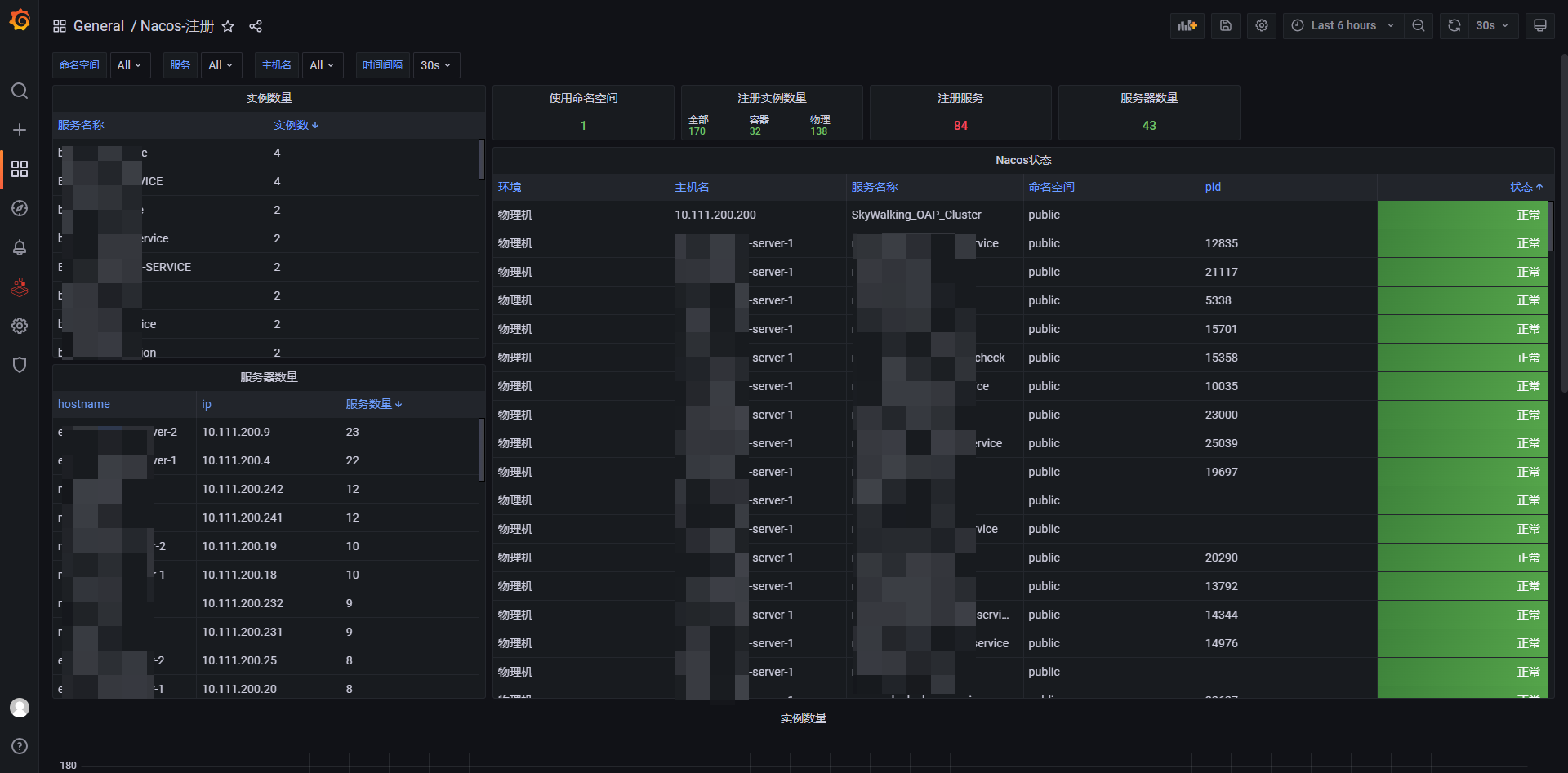
Nacos运维工具,快速查找注册服务,查看Nacos集群状态,导出json,Prometheus自动发现http_sd file_sd支持,Nacos注册支持,配置文件修改同步本地,nacos快速注册测试
Nacos 运维便携命令行检查工具
方便运维查看nacos注册服务,快速查找服务,同时生成prometheus自动发现所需要的json文件。 golang 运维萌新,学习项目... 😊
首先我并不是一个专业的开发人员,我只是一个小运维,此工具只为方便工作开发,代码水平一般,大佬勿喷..........
- 支持Nacos v1 v2版本,支持集群模式
- 快速查找注册服务,支持匹配名称,命名空间,端口,ip,机房集群 多个服务模糊匹配
- 支持指定命名空间,默认全部
- 支持命令行导出json
- 支持自定义Prometheus label
- 支持Prometheus自动发现,
filesd和httpsd_configs - 查看集群状态,以及v1升级v2接口详情
- 支持注册本身到Nacos集群
- 支持本地配置文件使用
- 支持Nacos用户名密码鉴权
- 支持自定义contextpath
- 支持Table和Markdown格式输出
- 支持实时同步nacos配置信息到本地文件
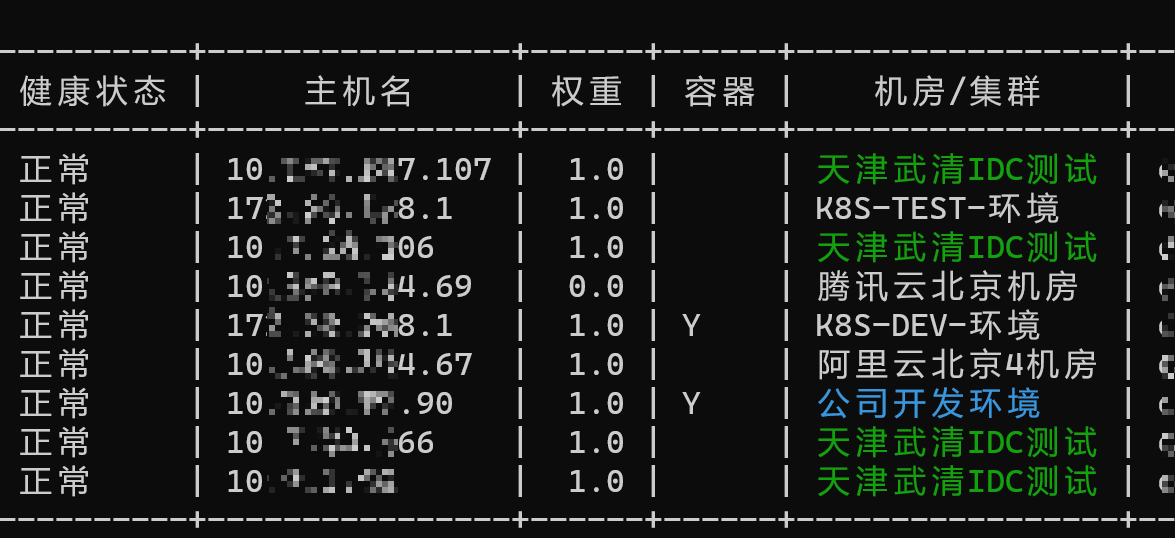
- 支持定义机房集群网段显示服务机房位置
安装
curl  -L https://github.com/typ431127/Nacoscheck/releases/download/2.0/nacos-checkLinuxx8664.tar.gz -o nacos-checkLinuxx86_64.tar.gz
tar xvf nacos-checkLinuxx86_64.tar.gz
chmod +x nacos-check
./nacos-check --url https://nacos地址使用帮助
Nacos
Usage:   nacos-check [flags]   nacos-check [command]
Available Commands:   cluster     集群状态   completion  Generate the autocompletion script for the specified shell   config      查看本地配置文件路径   config-sync 实时同步nacos配置到本地   help        Help about any command   register    注册本实例到Nacos并开启webapi   version     查看版本   web         开启web api Prometheus httpsdconfigs
Flags:       --cluster                全集群查找       --config string          指定配置文件路径       --contextpath string     server.servlet.contextPath (default "/nacos")   -f, --find string            查找服务       --group string           指定分组 多个分组 group1,group2 (default "DEFAULT_GROUP")   -h, --help                   help for nacos-check   -i, --ipfile string          ip解析文件 (default "salt_ip.json")       --json                   输出json   -l, --lable stringToString   添加标签 -l env=dev,pro=java (default [])       --namespace string       指定命名空间ID 多个: id1,id2,id3       --password string        密码   -s, --second duration        监控服务间隔刷新时间 (default 5s)       --stdout string          输出类型 table / markdown (default "table")   -u, --url string             Nacos地址 (default "http://dev-k8s-nacos:8848")       --username string        账户 (default "nacos")   -w, --watch                  监控服务   -o, --write string           导出json文件, prometheus 自动发现文件路径
Use "nacos-check [command] --help" for more information about a command.
显示所有实例注册信息
./nacos_check-linux-amd64 --url http://nacos-0:8848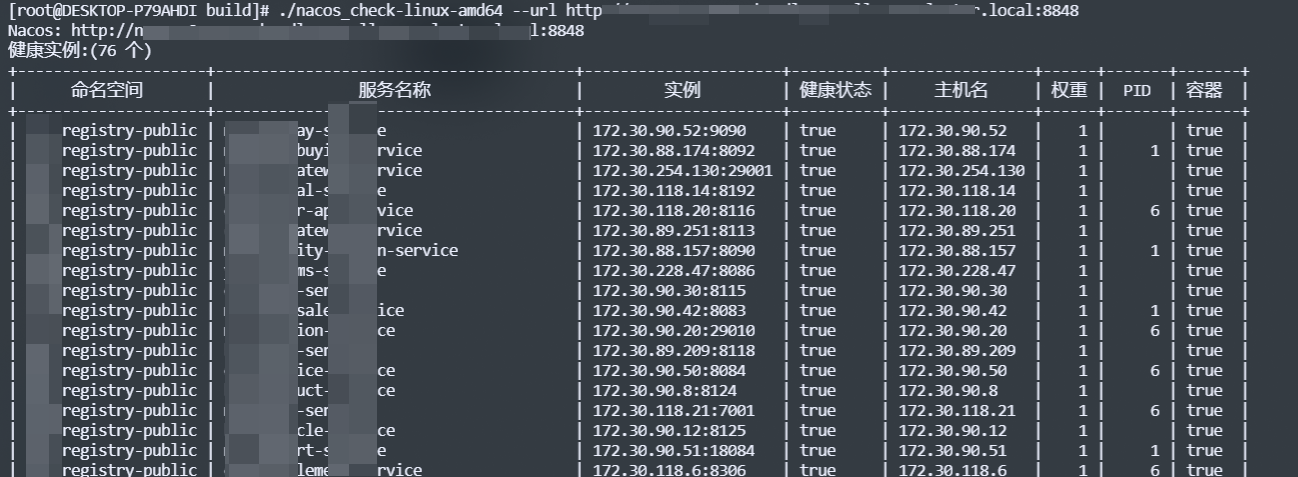
查看Nacos集群状态
./nacos_check-linux-amd64 --url http://nacos-0:8848 cluster --v2upgrade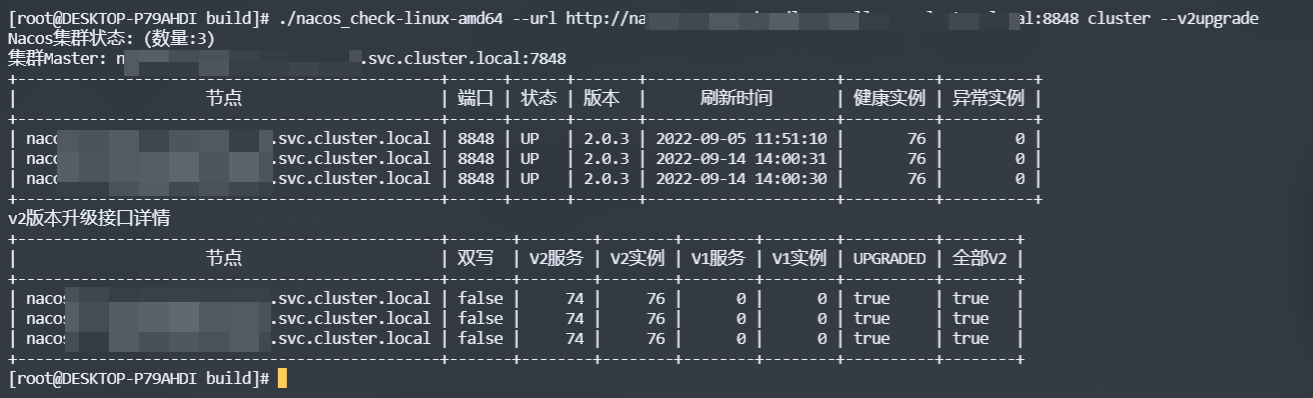
机房集群支持
查找注册服务
./nacos_check-linux-amd64 --url http://nacos-0:8848 -f gateway
./nacos_check-linux-amd64 --url http://nacos-0:8848 -f 8080
./nacos_check-linux-amd64 --url http://nacos-0:8848 -f 172.30
多个服务匹配,分割
./nacos_check-linux-amd64 --url http://nacos-0:8848 -f gateway,user,order
指定命名空间和group
./nacoscheck-linux-amd64 --url http://nacos-0:8848 --namespace df7bee71-33ff-49ae-9adc-d9412b3d2ddb,dc7bca41-5aeb-417e-9876-488dcfb5b911 --group ddn,DEFAULTGROUP -f xxx- 支持查找服务名,ip,端口,命名空间
查找注册服务,每10秒刷新一次
./nacos_check-linux-amd64 --url http://nacos-0:8848 -f gateway -w -s 10sPrometheus自动发现支持
写入自动发现json文件
./nacos_check-linux-amd64 --url http://nacos-0:8848 -o discovery.json控制台输出json
./nacos_check-linux-amd64 --url http://nacos-0:8848 --json
添加自定义label
./nacos_check-linux-amd64 --url http://nacos-0:8848  -l env=dev,pro=test-pro,k8s=true --json
prometheus 可以结合blackbox_exporter使用
filesdconfigs:
  - files:
      - '/data/work/prometheus/discovery/*.json'
      refresh_interval: 3m
prometheus-file-sd 自动发现
./nacos_check-linux-amd64 --url http://nacos-0.xxxxx:8848 -o discovery.json
httpsdconfigs 自动发现 开启webapi ./nacos_check-linux-amd64 web --url http://nacos-0.xxxx:8848
开启webapi并添加自定义label ./nacos_check-linux-amd64 web --url http://nacos-0.xxxx:8848 -l env=dev,pro=test-pro,k8s=true
注意鉴权模式下Token有过期时间,开启鉴权后默认1小时刷新一次token,nacos默认配置token过期时间为5小时,根据需要可调整web模式下--refresh参数
基于httpsdconfigs的自动发现
scrape_configs: - job_name: 'nacos' scrape_interval: 10s metrics_path: /probe params: module: [tcp_connect] httpsdconfigs: - url: http://localhost:8099 relabel_configs: - source_labels: [address] targetlabel: paramtarget - sourcelabels: [paramtarget] target_label: instance - target_label: address replacement: 127.0.0.1:9115find 快速查找服务,支持以下👇匹配
- 匹配命名空间
- 匹配服务名
- 匹配IP端口
# 模糊匹配命名空间
./nacos_check-linux-amd64 -f registry
模糊匹配服务
./nacos_check-linux-amd64 -f gateway
匹配端口
./nacos_check-linux-amd64 -f 8080
模糊匹配IP
./nacos_check-linux-amd64 -f 172.30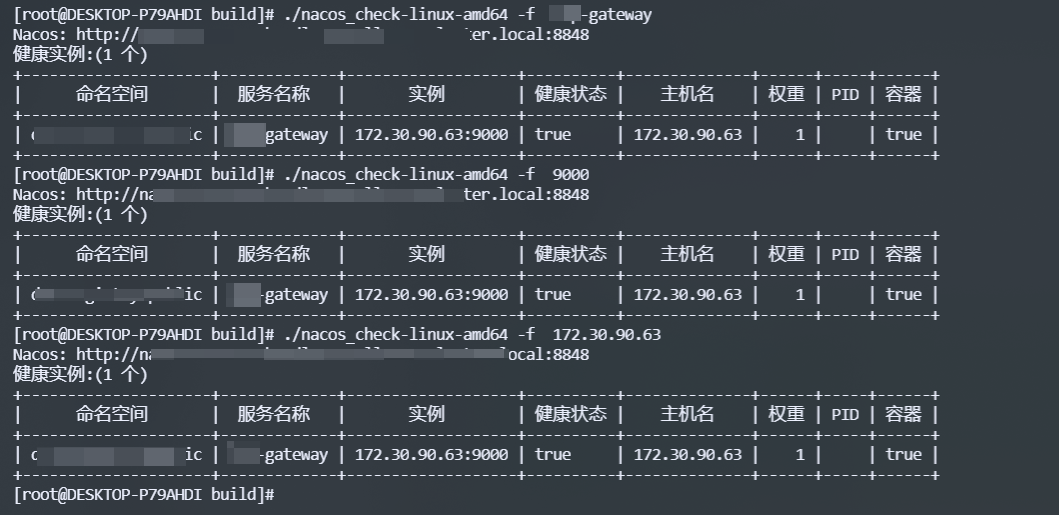
加载本地配置
每次运行工具都需要指定url很麻烦,可以在本地写一个配置文件,这样默认情况下就会加载配置文件里面的url,就不需要每次都指定了。 查看配置文件路径./nacos_check-linux-amd64 config
本地配置文件路径: /root/.nacos_conf.toml
指定配置文件
./nacos_check-linux-amd64 --config k8s.toml/root/.nacos_conf.toml 示例
# nacos url地址
url = "http://nacos-0:8848,http://nacos-1:8848"
定义容器网段
container_network = ["172.30.0.0/16","172.16.0.0/16","192.168.0.0/16"]
账号密码  https://nacos.io/zh-cn/docs/auth.html
#username = ""
#password = ""
定义指定的namespaceid (可选,默认所有)
等同命令行 --namespace id1,id2
namespace = ["df7bee71-33ff-49ae-9adc-d9412b3d2ddb","dc7bca41-5aeb-417e-9876-488dcfb5b911"]
定义group组 等同命令行 --group ddn1,ddn2, (可选,默认DEFAULT_GROUP)
group = ["ddn","ddn","ddn2","DEFAULT_GROUP"]
设置默认导出json和web服务附加标签
label = [
    {name = "env",value = "dev"},
    {name = "os",value = "linux"}
]
ip主机名解析文件(可选)
ipfile = "/mnt/cxxxx/ip.json"
主机cidr网段机房配置文件
networkfile = "network.json"
nacos同步
nacos_sync = [
    {namespace = "dc7bca41-5xxx",dataId = "java1.yml",group = "DEFAULT_GROUP",dest = "ymlconfig/java1.yml"},
    {namespace = "dc7bca41-5xxx",dataId = "java2.yml",group = "DEFAULT_GROUP",dest = "ymlconfig/java2.yml"},
    {namespace = "dc7bca41-5xxx",dataId = "java3.yml",group = "DEFAULT_GROUP",dest = "ymlconfig/java3.yml"}
]
默认优先加载本地配置文件
config-sync
此功能可以将nacos上面的配置信息实时同步到本地文件(试验阶段可能不稳定)首先在配置文件加入配置信息
# nacos-sync配置使用 nacos_sync = [ {namespace = "dc7bca41-5xxx",dataId = "java1.yml",group = "DEFAULT_GROUP",dest = "ymlconfig/java1.yml"}, {namespace = "dc7bca41-5xxx",dataId = "java2.yml",group = "DEFAULT_GROUP",dest = "ymlconfig/java2.yml"}, {namespace = "dc7bca41-5xxx",dataId = "java3.yml",group = "DEFAULT_GROUP",dest = "ymlconfig/java3.yml"} ]- namespace 命名空间
- dest 为要写入的本地文件
./nacos-check config-sync建议使用systemctl开启进程守护
docker启动web服务 Prometheus httpdsdconfig 使用
docker run -itd -e nacos_url=http://nacos-xx.com:8848 -p 8099:8099 typ431127/nacos-check:0.6
访问 http://localhost:8099
工具注册到Nacos
./nacos_check-linux-amd64 register -i 192.168.1.4 -p ":8048" -n ddn-test1 --url http://192.16
8.100.132:8848
 ./nacos_check-linux-amd64 register -i 192.168.1.4 -p ":8048" -n ddn-test1 --url \
 http://192.168.100.132:8848,http://192.168.100.133:8848,http://192.168.100.134:8848

./nacos_check-linux-amd64 register -n ops-test --namespace dc7bca41-5aeb-417e-9876-488dcfb5b911 -g ddn- -i 指定注册到Nacos的IP地址
- --namespace 指定命名空间
- -g 指定组
- -p 指定开启端口
- --url 指定Nacos服务地址,多个地址,号分开
- -n 指定注册到Nacos的服务名称


>注意: 仅注册功能支持多个nacos地址写法
主机名解析
因为默认只获取到主机ip,获取不到主机名,可以指定ipfile解析主机名,有条件可以二次开发对接自己cmdb, 文件格式如下 (可选){
"test1": "10.x.x.x",
"test2": "10.x.x.x",
}./nacos_check-linux-amd64 -i ../ip.json机房/集群显示
配置机房对应的ip网段信息,对应大规模跨机房网络注册联调调试
{
  "公司办公环境":[
    "192.168.31.0/24",
    "192.168.30.0/24"
  ],
  "公司办公WIFI": [
    "192.168.200.0/24"
  ],
  "办公楼机房":[
    "192.168.100.0/24"
  ],
  "办公楼机房K8S开发环境": [
    "172.16.0.0/16"
  ],
  "渡渡鸟的专属物理机":[
    "192.168.10.120/32"
  ]
}{
"公司办公环境|color:Red":[
"192.168.31.0/24",
"192.168.30.0/24"
],
"公司办公WIFI": [
"192.168.200.0/24"
],
"办公楼机房":[
"192.168.100.0/24"
],
"办公楼机房K8S开发环境": [
"172.16.0.0/16"
],
"渡渡鸟的专属物理机":[
"192.168.10.120/32"
]
}|color:<颜色参数>
<颜色参数>
- Red 红色
- Green 绿色
- Blue 蓝色
- Yellow 黄色
- Purple 紫色
- Cyan 青色
配置文件中配置路径
注意windows路径为/
networkfile = "C:/Users/xxxxx/ddn_network.json"
networkfile = "ddn_network.json"
效果

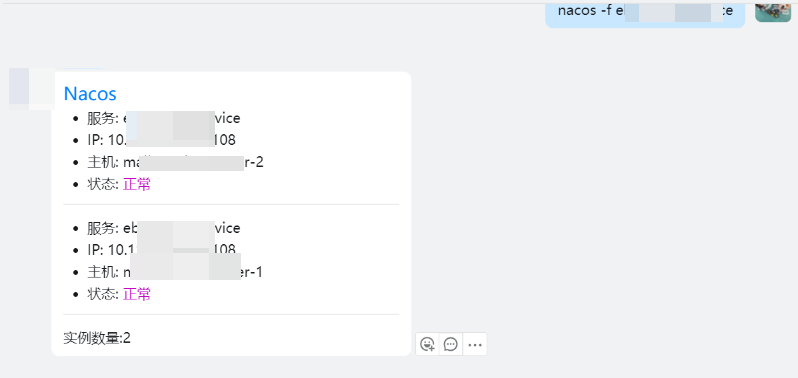
对接机器人执行命令查询
常见问题
访问403
请检查url 用户名密码以及namespace参数,namespace不正确也会403认证失败
一些服务查询不到
- 如果服务使用非DEFAULT_GROUP注册就会出现查询不到的情况,可以在命令行携带group参数
nacos-check --group common,DEFAULT_GROUP- 配置文件定义group
group = ["common","DEFAULT_GROUP"]grafana 展示出图
grafana控制台导入grafana.json 此模板默认匹配blackbox_exporter