
Lightweight search automation daemon for Radarr, Sonarr, and Lidarr
Triggarr


Radarr, Sonarr, and Lidarr never auto-search for missing or upgrade-eligible media — Triggarr does. Scheduled searches, closed-loop grab tracking, runs in Docker.
Quick Start
# docker-compose.yml
services:
  triggarr:
    image: ghcr.io/thejuran/triggarr:latest
    container_name: triggarr
    environment:
      - PUID=1000
      - PGID=1000
    volumes:
      - triggarr_config:/config
    ports:
      - "127.0.0.1:8484:8484"
    restart: unless-stopped
volumes:   triggarr_config:
Run docker compose up -d, then visit http://localhost:8484 to complete setup.
Features
- Radarr, Sonarr, and Lidarr — movies, TV shows, and music albums
- Scheduled searches for missing and upgrade-eligible media
- Multi-instance support — run multiple instances of each app with independent schedules
- Tag-based filtering — scope searches to specific tags per instance; if a configured tag cannot be resolved or tag fetch fails, Triggarr logs a warning and searches all items for that queue (fail-open)
- Closed-loop tracking — polls *arr history to confirm what was actually grabbed
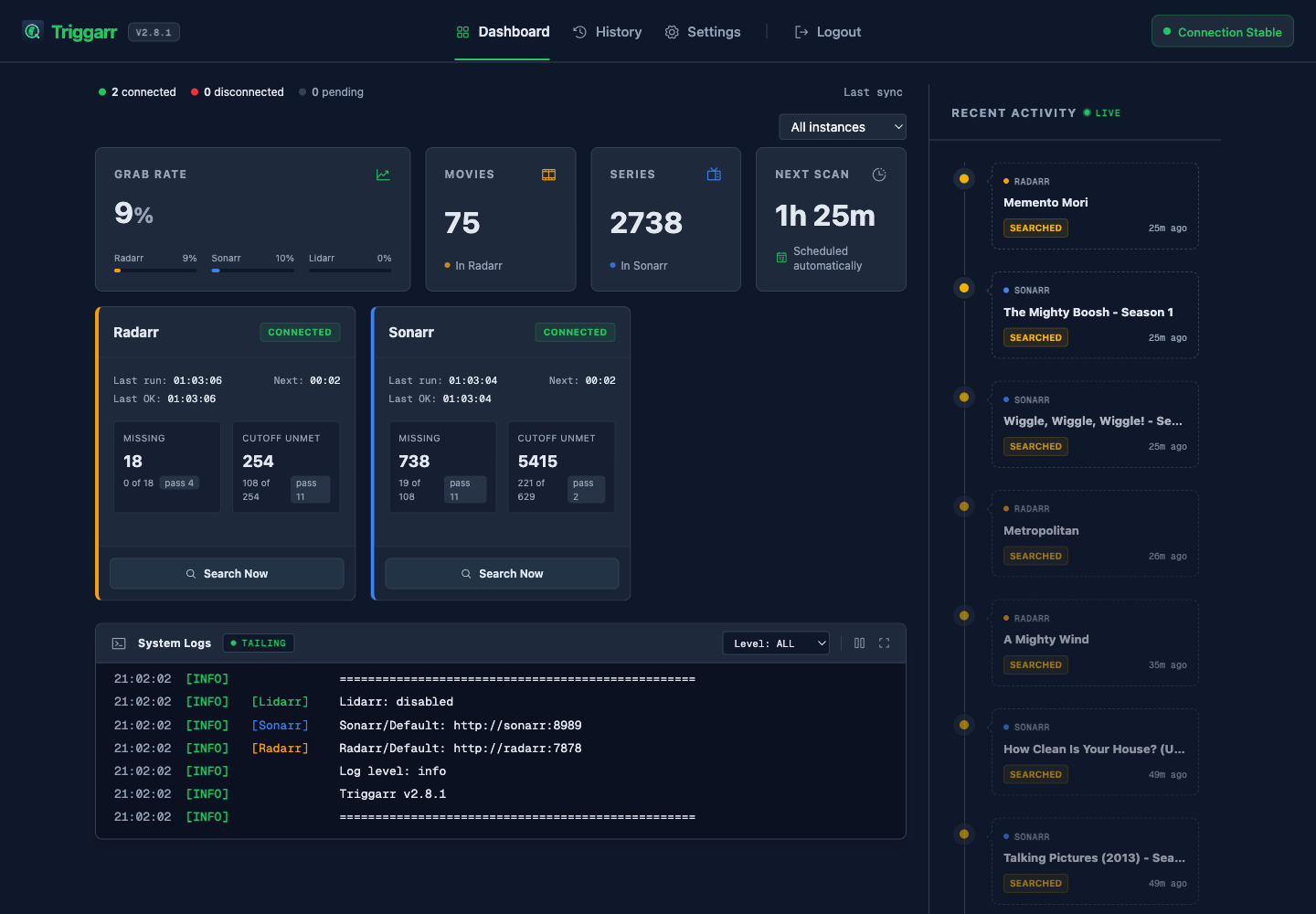
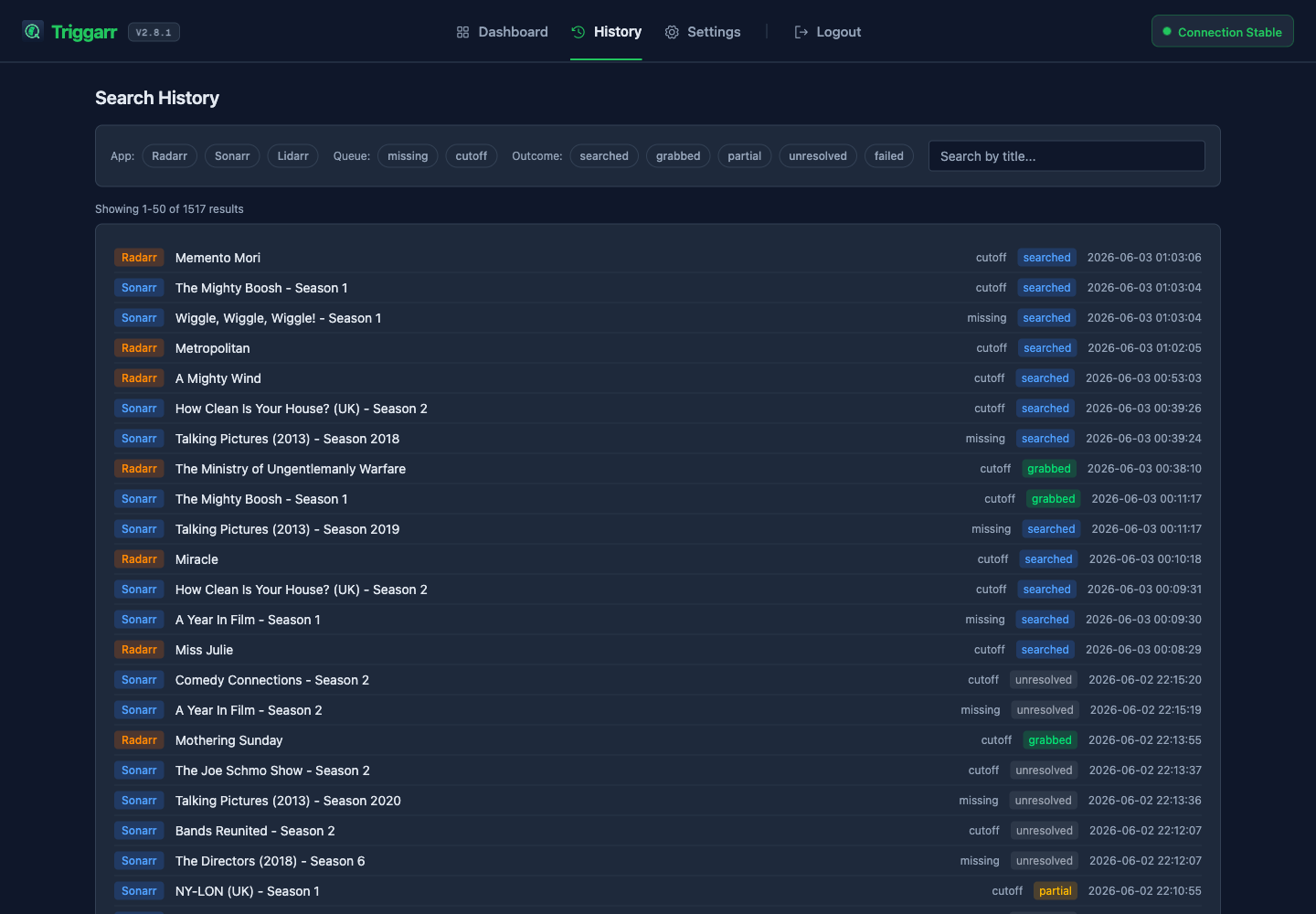
- Web dashboard with real-time connection status, grab effectiveness stats, and search history
- In-app changelog — see what's new without leaving the UI
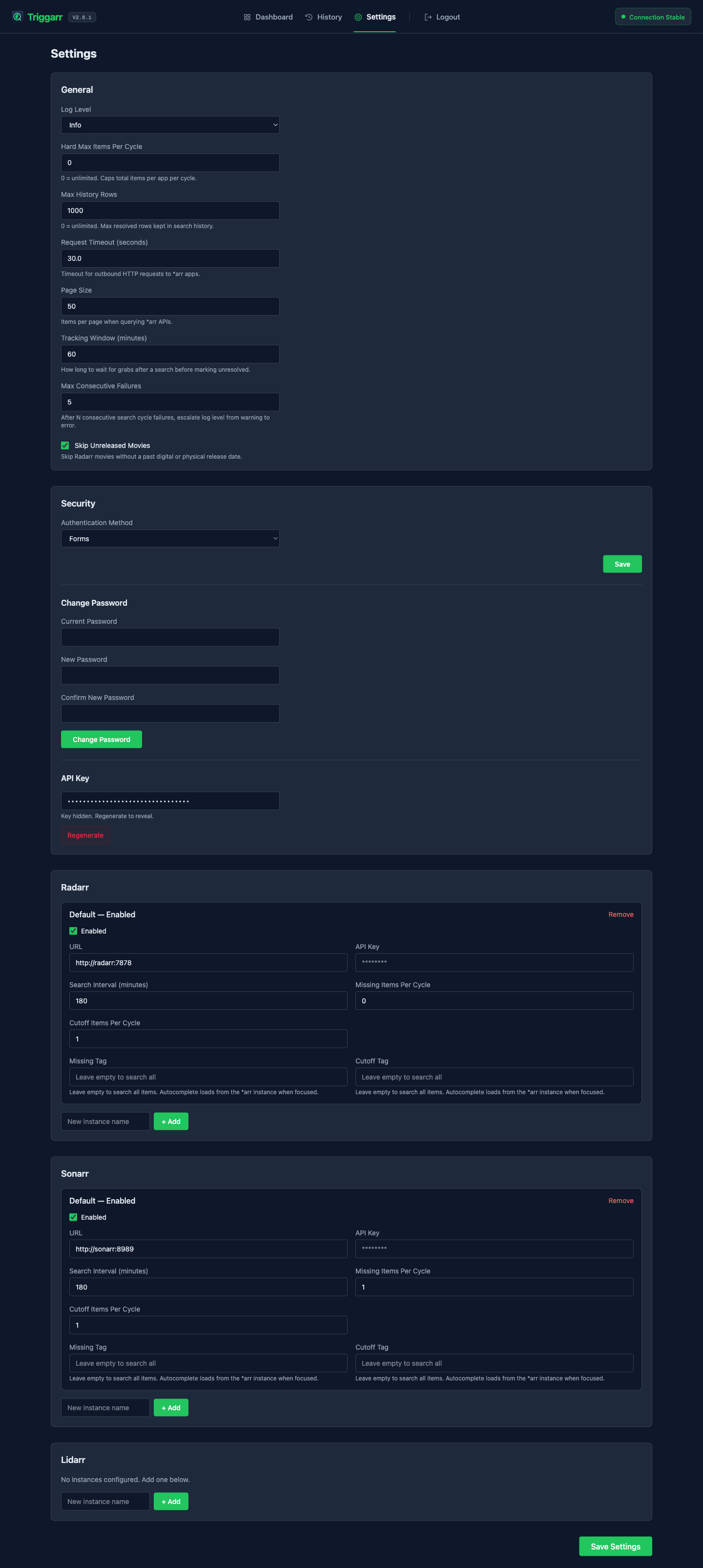
- Browser-based config editor — no manual TOML editing needed
- Hard max limit to cap searches per cycle (safety ceiling)
- Persistent SQLite search history (survives restarts)
- Docker-first with PUID/PGID support, or standalone pip install
How It Works
- Triggarr reads
triggarr.tomlat startup and builds a schedule per instance - On each cycle, it queries the configured *arr app for missing and upgrade-eligible items
- It triggers a search command for a configurable batch of those items
- It polls *arr's history to track which searches resulted in a grabbed release (closed-loop)
- Results appear on the web dashboard in real time; history is persisted in SQLite
Install
Docker (recommended)
# docker-compose.yml
services:
  triggarr:
    image: ghcr.io/thejuran/triggarr:latest
    container_name: triggarr
    environment:
      - PUID=1000    # Your user ID (run id -u to find)
      - PGID=1000    # Your group ID (run id -g to find)
    volumes:
      - triggarr_config:/config
    ports:
      - "127.0.0.1:8484:8484"  # Localhost only -- use Tailscale or reverse proxy for remote access
    cap_drop:
      - ALL
    cap_add:
      - CHOWN
      - DAC_OVERRIDE
      - FOWNER
      - SETUID
      - SETGID
    stopgraceperiod: 90s  # > TRIGGARRSHUTDOWNDRAIN_TIMEOUT (default 60s)
    restart: unless-stopped
volumes:   triggarr_config:
Run docker compose up -d, then visit http://localhost:8484 to complete first-run account setup and configure your Radarr, Sonarr, and/or Lidarr connections.
The stopgraceperiod: 90s setting gives the in-process search-cycle drain (default 60s, configurable via the TRIGGARRSHUTDOWNDRAIN_TIMEOUT environment variable) time to complete before Docker sends SIGKILL. If you run Triggarr with docker run directly (no compose), pass --stop-timeout 90.
The drain timeout is also a persisted config field (general.shutdowndraintimeout, settable in the Settings UI, default 60 s, minimum 1 s). The TRIGGARRSHUTDOWNDRAINTIMEOUT environment variable overrides the configured value when set — the config field is the default, the env var wins. Keep stopgrace_period (or --stop-timeout) greater than the effective drain timeout so Docker does not SIGKILL mid-drain.
When TRIGGARRCONFIGDIR is unset, Triggarr uses /config, so triggarr.toml, state.json, and triggarr.db live on the mounted volume. On an empty volume, the first run exits with code 1 after writing a default triggarr.toml — this is expected, not a crash. Docker's restart: unless-stopped brings the container back up automatically. Edit the config at /config/triggarr.toml, then visit http://localhost:8484 to complete setup.
Standalone (pip)
Requires Python 3.11+. Go to the latest release page, download the .whl asset, and install it:
pip install /path/to/triggarr-<version>-py3-none-any.whlOr derive the download URL at runtime using the GitHub releases API (requires curl and Python 3.11+):
pip install "$(curl -s https://api.github.com/repos/thejuran/triggarr/releases/latest \
  | python3 -c 'import sys,json; print(next(a["browserdownloadurl"] for a in json.load(sys.stdin)["assets"] if a["name"].endswith(".whl")))')"
Set an absolute config directory before starting Triggarr:
export TRIGGARR_C
mkdir -p "$TRIGGARRCONFIGDIR"
triggarr
Standalone installs store triggarr.toml, state.json, and triggarr.db in TRIGGARRCONFIGDIR. If the config file does not exist yet, the first triggarr run writes a default template and exits; run triggarr again, then visit http://localhost:8484 to complete setup and configure apps.
To run in the background, use a process manager like systemd, launchd, or supervisor. A minimal systemd unit:
# /etc/systemd/system/triggarr.service
[Unit]
Description=Triggarr
After=network.target
[Service] Type=simple User=triggarr Environment=TRIGGARRCONFIGDIR=/var/lib/triggarr StateDirectory=triggarr ExecStart=/usr/local/bin/triggarr Restart=on-failure RestartSec=10 Give the in-process search-cycle drain (default 60s, set via TRIGGARRSHUTDOWNDRAIN_TIMEOUT) time to complete before SIGKILL. TimeoutStopSec=90s
[Install] WantedBy=multi-user.target
StateDirectory=triggarr instructs systemd to create and own /var/lib/triggarr before the service starts, so the first boot does not fail with a missing config directory.
Configuration Reference
Runtime config lives in ${TRIGGARRCONFIGDIR}/triggarr.toml; when TRIGGARRCONFIGDIR is unset, Triggarr uses /config/triggarr.toml for Docker compatibility. The config directory must be an absolute path and must be set before the Triggarr process starts.
You can edit settings from the web UI at http://localhost:8484/settings — changes are written to the TOML file and take effect immediately without restart. Each app type is a table of named instances, so use nested tables such as [radarr.Default] or [sonarr.Anime] rather than putting connection fields directly under the app name.
# Triggarr Configuration
[general] Log level: debug, info, warning, error log_level = "info"
Hard max items searched per app per cycle. 0 = unlimited.
When set, the limit is split proportionally between missing and cutoff searches.
hardmaxper_cycle = 0
Optional scheduler/API tuning defaults:
request_timeout = 30.0
page_size = 50
maxhistoryrows = 1000
trackingwindowminutes = 60
skip_unreleased = true
The web setup flow creates auth.username, auth.password_hash,
auth.apikey, and auth.sessionsecret. Do not copy example secrets.
[auth]
method = "Forms"                   # Forms, Basic, External, or Disabled
[radarr.Default] url = "http://radarr:7878"          # Radarr base URL enabled = true api_key = "<radarr-api-key>"        # From Radarr > Settings > General > API Key search_interval = 30                # minutes between search cycles searchmissingcount = 5            # missing movies to search per cycle searchcutoffcount = 5             # cutoff/upgrade movies to search per cycle missing_tag = ""                    # optional tag filter; empty = all items cutoff_tag = ""                     # optional tag filter; empty = all items
[radarr."4K"] url = "http://radarr-4k:7878" enabled = false api_key = "<radarr-4k-api-key>" search_interval = 60 searchmissingcount = 3 searchcutoffcount = 3
[sonarr.Default] url = "http://sonarr:8989" enabled = true api_key = "<sonarr-api-key>" search_interval = 30 searchmissingcount = 5 searchcutoffcount = 5 missing_tag = "" cutoff_tag = ""
[lidarr.Default] url = "http://lidarr:8686" enabled = false api_key = "<lidarr-api-key>" search_interval = 30 searchmissingcount = 5            # missing albums to search per cycle searchcutoffcount = 5             # cutoff/upgrade albums to search per cycle
Startup-level environment variables such as TRIGGARRCONFIGDIR, TRUSTEDPROXYIPS, and ROOT_PATH are read by the process before the TOML settings are loaded; they are not stored in triggarr.toml.
Screenshots
Security Model
Triggarr includes application authentication by default. A fresh config starts in setup mode; the first browser visit redirects to /setup, where you create the local username/password and receive a generated API key. After setup, protected browser routes require either a signed triggarr_session cookie or another configured auth method.
Authentication modes
Configured in [auth] as method:
Forms(default) — browser login page, bcrypt password hash, signed 30-day session cookie, logout, password change, and login rate limiting. Changing your password rotates the session secret, which signs you out of every other browser/device while keeping the current session active.Basic— HTTP Basic credentials are accepted and can establish the same signed session cookie.External— Triggarr bypasses local authentication because an upstream reverse proxy or SSO layer has already authenticated and authorized the user; enable it only after direct access to port 8484 is blocked and the proxy is the sole path to Triggarr. Upstream authentication and authorization must both be enforced by the proxy — do not enable External mode unless direct access to port 8484 is also blocked.Disabled— all routes are accessible without Triggarr auth and a warning is logged periodically. PreferExternalfor reverse-proxy deployments.
X-Api-Key when auth.api_key is set. The setup flow and security settings page generate API keys; do not paste real keys into examples or logs.
What IS protected
- Application routes are deny-by-default after setup unless auth is
ExternalorDisabled - API keys and auth secrets are stored as
SecretStr, redacted from logs, and not exposed in normal settings HTML - Password hashes use bcrypt, and session cookies are signed with a generated session secret that is rotated on password change (invalidating all other sessions)
- Login attempts are rate-limited per client IP
- Config file is written with
0600permissions (owner-read/write only) - Config secrets in
triggarr.tomlare plaintext on disk; protect them with file permissions and volume security - Docker container drops all capabilities except CHOWN, DAC_OVERRIDE, FOWNER, SETUID, SETGID
- CSRF protection via Origin/Referer checking on mutating requests
- Security headers include frame denial, MIME-sniffing prevention, same-origin referrer policy, and a restrictive Content Security Policy with a per-request
script-srcnonce (nounsafe-inline) - URL validation rejects non-HTTP schemes and blocks SSRF attempts (see below)
- Security hardening via
no-new-privilegesapplied after privilege setup in entrypoint when the host supports it
URL validation and SSRF protection
URL inputs are validated against an allow-list of schemes (http and https) and a block-list of cloud-metadata endpoints and link-local IP literals. This validation runs both at config load (triggarr.toml at startup) and via the web settings form.
The precise net behavior, per the implementation in triggarr/web/validation.py and triggarr/models/config.py:
"Link-local / unspecified / multicast IP literals, and known cloud-metadata hostnames/IPs are blocked BOTH at config load (triggarr.toml at startup) AND via the web settings form. Loopback IP literals (127.0.0.1, ::1) are PERMITTED at config load (relaxed variant for same-host \*arr) and blocked ONLY by the web settings form. The DNS name localhost is a hostname, not an IP literal, so it is NOT resolved at validation time and is PERMITTED in BOTH paths (config load and web form) — like any other unresolved DNS hostname. Arbitrary DNS hostnames are NOT resolved at validation time and remain an accepted residual risk (DNS rebinding); network-layer egress controls are the mitigation. Config-load validation applies regardless of enabled — no loopback/private-LAN/localhost deployment breaks, but a configured-but-unsafe URL (link-local/metadata/non-http/malformed) will now fail at startup even if the instance is disabled."
Recommendation
Keep the compose example's localhost bind (127.0.0.1:8484:8484) unless Triggarr is behind Tailscale, a VPN, or a reverse proxy. For proxy/SSO deployments, set auth.method = "External" only after confirming the proxy enforces authentication and authorization and is the sole path to Triggarr; keep port 8484 bound to localhost or firewalled from direct clients.
Reverse Proxy
When running Triggarr behind a reverse proxy (Nginx, Caddy, Traefik, etc.), configure TRUSTEDPROXYIPS so Uvicorn accepts forwarded client and scheme headers only from that proxy. Accepted X-Forwarded-For values set the client IP; accepted X-Forwarded-Proto values become the ASGI request scheme used by scheme-aware behavior such as Secure cookie emission. Without this, Triggarr sees the proxy/default client and protocol. Keep direct access to port 8484 blocked so clients cannot send proxy headers straight to Triggarr.
These are startup-level environment variables read directly by the process — they are not part oftriggarr.tomland do not use theTRIGGARR_prefix.
| Environment Variable | Default | Description | |---|---|---| | TRUSTEDPROXYIPS | 127.0.0.1 | Comma-separated list of trusted proxy IPs or CIDR subnets. Set this to the IP address or subnet of your reverse proxy. Do not use * — it allows any client to forge its apparent IP address. | | ROOTPATH | (empty) | URL path prefix when Triggarr is served under a subpath (e.g. /triggarr). Sets the ASGI rootpath so links and assets resolve correctly. |
Example: Nginx reverse proxy on the same Docker network
services:
  triggarr:
    image: ghcr.io/thejuran/triggarr:latest
    container_name: triggarr
    environment:
      - PUID=1000
      - PGID=1000
      - TRUSTEDPROXYIPS=172.18.0.1       # Prefer the specific proxy IP; use a CIDR only on fully trusted Docker networks
    volumes:
      - triggarr_config:/config
    ports:
      - "127.0.0.1:8484:8484"
    restart: unless-stopped
If your proxy runs on the Docker host (e.g. host-networked Nginx), set TRUSTEDPROXYIPS=172.17.0.1 (the default Docker gateway) or the specific IP your proxy uses to reach Triggarr.
Example: subpath behind a reverse proxy
environment:
      - TRUSTEDPROXYIPS=172.18.0.1
      - ROOT_PATH=/triggarr
Then configure your proxy to forward /triggarr to Triggarr's port 8484.
When no proxy is configured, the default trust list (127.0.0.1) ensures forwarded headers are only honored from localhost.
Synology NAS
Synology DSM ships a stripped-down setpriv that doesn't support --no-new-privileges. Triggarr detects this automatically and skips the flag — no configuration changes needed.
Related Projects
- SeedSyncarr — sync files from your seedbox to your local media server, integrated with Sonarr and Radarr. SeedSyncarr handles the download-to-sync side; Triggarr handles the search-to-trigger side.
Contributing / Development
uv sync --extra dev                    # Install dependencies
uv run pytest tests/ -x -q             # Run tests
uv run ruff check triggarr/ tests/     # Lint
TAILWINDCSS_VERSION=v4.2.2 uv run tailwindcss -i triggarr/static/css/input.css -o triggarr/static/css/output.css --watch  # CSS dev
docker build -t triggarr:local .       # Local Docker build
See CONTRIBUTING.md for branch conventions, commit style, and PR checklist.


