
Unbreakable secure KMS (key management system) integrated to Tatum blockchain infrastructure
Tatum Key Management System (KMS)
Tatum Key Management System (KMS) is a comprehensive solution for Tatum-powered applications.Warning>
Important notice about using KMS with ETH and CELO: Please upgrade to version 6.2.3 or newer (all previous versions depend on https://ethgasstation.info which will stop working from 12.12.2022)
KMS securely stores private keys and mnemonics of blockchain wallets. KMS periodically pulls pending transactions to sign from Tatum, signs them locally using the stored private keys and mnemonics, and broadcasts them to the blockchain.
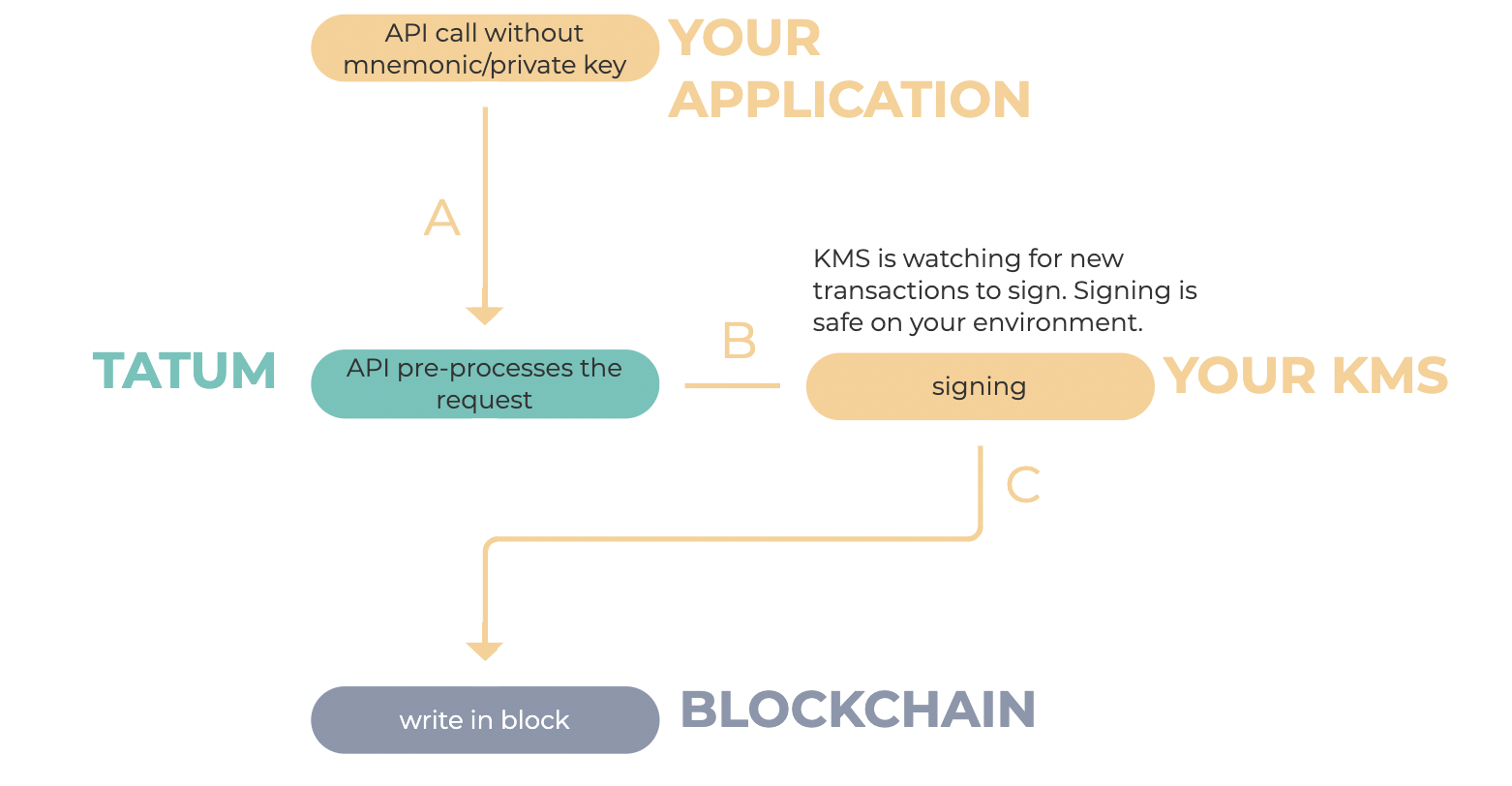
KMS supports the following blockchains:
- Algorand (ALGO)
- Bitcoin (BTC)
- Bitcoin Cash (BCH)
- BNB Beacon Chain (BSC)
- BNB Smart Chain (BNB)
- Celo (CELO)
- Dogecoin (DOGE)
- Elrond (EGLD)
- Ethereum (ETH) including ERC-20 tokens
- Harmony (ONE)
- Klaytn (KLAY)
- KuCoin Community Chain (KCS)
- Litecoin (LTC)
- Polygon (MATIC)
- Solana (SOL)
- Stellar (XLM)
- TRON (TRON)
- VeChain (VET)
- XinFin (XDC)
- XRP (XRP)
Secure storage
KMS generates and stores the private keys and mnemonic in an encrypted file,wallet.dat, in the local file system. This wallet storage file is encrypted using the AES-GCM-256 cipher.
The password that is used to encrypt the wallet storage file is the most sensitive asset in this architecture. The password is never passed as a parameter.
You can enter the password into KMS using either of the following methods:
- Enter the password manually at KMS start. The password is stored in the memory only during the daemon runtime.
- Store the password in VGS Vault, Microsoft Azure Key Vault, or AWS Secrets Manager. The password is obtained during KMS start and is stored in the memory only during the daemon runtime.
Signature IDs vs. Private keys and mnemonics
Every wallet that is stored inside KMS has a unique identifier called signature ID. The signature ID is used in communication with the Tatum API and represents the wallet used by the specific operation.
>NOTE: You can have up to 25,000 signature IDs per one blockchain and one Tatum API key. If you exceed this limit, you get an error message, and KMS stops signing your transactions until you adjust your data to respect the limit.
The Tatum API accepts the following representations of the signature ID in requests:
- A signature ID that represents the private key type of a wallet
signatureId in the request represents the private key type of the wallet.
bash:$ tatum-kms storemanagedprivatekey BTC
    {
      "signatureId": "e3015fc0-2112-4c8a-b8bf-353b86f63ba5"
}- A signature ID that represents the mnemonic type of a wallet
signatureId in the request represents the mnemonic type of the wallet.
bash:$ tatum-kms generatemanagedwallet BTC
    {
      "signatureId": "e3015fc0-2112-4c8a-b8bf-353b86f63ba5",
      "xpub": "xpub6EsCk1uU6cJzqvP9CdsTiJwT2rF748YkPnhv5Qo8q44DG7nn2vbyt48YRsNSUYS44jFCW9gwvD9kLQu9AuqXpTpM1c5hgg9PsuBLdeNncid"
}- A signature ID that represents the mnemonic/index type of a wallet
signatureId.
bash:$ tatum-kms generatemanagedwallet BTC
    {
      "signatureId": "e3015fc0-2112-4c8a-b8bf-353b86f63ba5",
      "xpub": "xpub6EsCk1uU6cJzqvP9CdsTiJwT2rF748YkPnhv5Qo8q44DG7nn2vbyt48YRsNSUYS44jFCW9gwvD9kLQu9AuqXpTpM1c5hgg9PsuBLdeNncid"
    }
Set up and use KMS on your site
To get KMS up and running on your site on the mainnet, complete the following steps:- Install KMS on your local environment.
- Store the existing mnemonics and private keys in KMS, or generate new mnemonics and private keys using KMS.
- Implement the four-eye principle by setting up a service to store the IDs of the transactions that need to be signed.
- Run KMS in daemon mode so it can periodically check for transactions to sign.
- When performing operations that must be signed with the private key or mnemonic (such as transferring funds, minting NFT, and so on), use the KMS schemas to build the body of the API requests as specified in the API Reference.
Install KMS
Supported operating systems
You can run KMS on the following operating systems: We recommend that you run KMS from the Docker image regardless of the operating system used.Environment variables
Create file.env file with the following parameters and replace the placeholders with your values:
# required
TATUMAPIKEY=XXXXX-YOUR-API-KEY
one of the following setups is required: password, VGS, Azure, or AWS
password setup
TATUMKMSPASSWORD=XXXXPASSWORD
VGS setup
TATUMKMSVGS_USERNAME=XXXXUSERNAME
TATUMKMSVGS_PASSWORD=XXXXPASSWORDVGS
TATUMKMSVGS_ALIAS=XXXVSGALIAS
Azure setup
TATUMKMSAZURE_SECRETVERSION=XXVERSION
TATUMKMSAZURE_SECRETNAME=XXSECRETNAME
TATUMKMSAZURE_VAULTURL=XXXXVAULTURL
AWS setup
TATUMKMSAWS_REGION=us-east-1
TATUMKMSAWSSECRETNAME=YOURKMSSECRET_NAME
TATUMKMSAWSACCESSKEY_ID=AKIAYWGKDBVRGMCASWIE
TATUMKMSAWSSECRETACCESS_KEY=ZxDq62BZGyGe2CzwnVjL/IH8NnJG5Fu0isN7wev9
TATUMKMSAWSSECRETKEY=pwd
Debug mode. if true/1, it will expose data from signEthKMSTransaction() method to the console
TATUMKMSDEBUG_MODE=true/false/1/0
Install KMS from npm
- Install KMS globally:
npm i -g @tatumio/tatum-kmsyarn global add @tatumio/tatum-kms- Use
file to configure Tatum KMS.env
--envFile=/path/to/.envtatum-kms --envFile=/path/to/.env getaddress 11111111-1111-1111-1111-111111111111 0TATUMAPIKEY=XXXXX-YOUR-API-KEY tatum-kms --helpexport TATUMAPIKEY=XXXXX-YOUR-API-KEY
tatum-kms --help>IMPORTANT! NodeJS >=18.0 are required. KMS does not work on older versions.
Install KMS via Docker
- Pull the
tatum-kmsimage:
docker pull tatumio/tatum-kms- Navigate to the home directory:
cd $HOME- Use pre-created
file to configure Tatum KMS via.env
:--env-file .env - Map the Docker volume to the local storage (your home folder).
Once you have mapped the Docker volume, KMS is ready to be run as a Docker container.
To interactively communicate with KMS and run various KMS commands, use the docker run command:
docker run -it --env-file .env -v $HOME/.tatumrc:/home/node/.tatumrc tatumio/tatum-kms --help docker run -it --env-file .env -v $HOME/.tatumrc:/home/node/.tatumrc tatumio/tatum-kms generatemanagedwallet BTC docker run -it --env-file .env -v $HOME/.tatumrc:/home/node/.tatumrc tatumio/tatum-kms storemanagedprivatekey BTC>NOTE: You can shorten the command syntax and use it as follows:
docker run ${COMMON_PARAMS} tatumio/tatum-kms generatemanagedwallet BTCCOMMON_PARAMS can be exported as all the flags necessary for running the container.
Implement the four-eye principle
To verify whether a transaction to sign with KMS is indeed yours, implement the four-eye-principle (also referred to as "4-eye principle"). This principle ensures that pending transactions are controlled in Tatum and in your system.Every time a transaction from Tatum is fetched to be signed, it is validated against an external trusted server using a simple HTTP GET operation:
yourexternalurl/transaction_id
If the response is 2xx, KMS signs the transaction. Otherwise, the transaction is skipped and is not signed, and you should take the appropriate steps on your end to fix the situation.
>NOTE: Implementing the four-eye-principle is mandatory on the mainnet to make the production environment more secure.
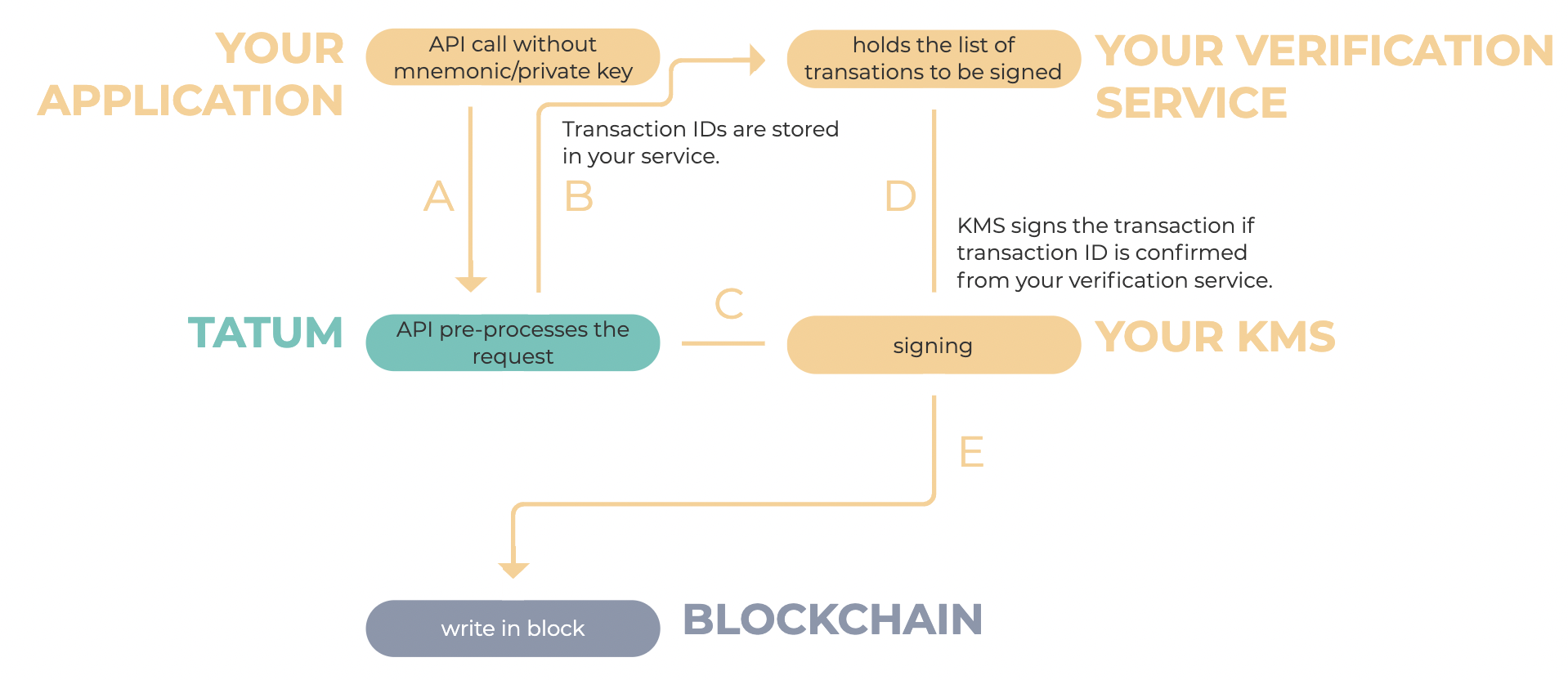
To enable the four-eye-principle:
- Set up an application server that will hold the list of valid transactions to sign.
- Add the
externalUrlparameter to KMS and set it to your application server:
tatum-kms daemon --externalUrl=http://192.168.57.63Run KMS in daemon mode
tatum-kms daemondocker run -d --env-file .env -v $HOME:/root/.tatumrc tatumio/tatum-kms daemonAfter successful startup, the daemon requires the password to the wallet storage file. The file and the data in the file are encrypted, and the password is stored in the memory only during the daemon runtime.
bash:$ tatum-kms daemon Enter password to decrypt wallet store:Alternatively, you can provide the password via an environment variable:
TATUMKMSPASSWORD=passwordChange the frequency of checking for the pending transactions
Checking for the pending transactions consumes credits from the monthly credit allowance associated with your API key: 1 credit for every 500 signature IDs per API call. For more information about the credits, see Plans and Limits.By default, KMS checks for the pending transactions to sign every 5 seconds.
To change the frequency of the check, use the --period parameter and set it the required number of seconds:
tatum-kms daemon --period=15Change the path to the wallet storage file
By default, the wallet storage file is saved under the.tatumrc folder in your home directory (for example, /home/admin/.tatumrc/wallet.dat).
To change the path to the wallet storage file, use the --path parameter and set it to the new path:
tatum-kms daemon --path=/path/to/wallet/storage/file/wallet.datCheck for the pending transactions only on some blockchains
By default, KMS checks for the pending transaction on all supported blockchains.To check for the transactions only on some blockchains, use the --chain parameter and set it to the list of the blockchains to check separated with a comma (,):
tatum-kms daemon --chain=BTC,LTC,ETHKMS commands
To see all available KMS commands, refer to the KMS help:tatum-kms --helpWhen KMS runs in daemon mode, use the following commands to communicate with the daemon and modify it:
generatewallet chaingenerates a wallet on the specified blockchain (chain) and echos it to the output.
bash:$ tatum-kms generatewallet BTC
    {
      "mnemonic": "urge pulp usage sister evidence arrest palm math please chief egg abuse",
      "xpub": "xpub6EsCk1uU6cJzqvP9CdsTiJwT2rF748YkPnhv5Qo8q44DG7nn2vbyt48YRsNSUYS44jFCW9gwvD9kLQu9AuqXpTpM1c5hgg9PsuBLdeNncid"
    }
generatemanagedwallet chaingenerates a wallet on the specified blockchain (chain) and adds it to the managed wallets.
bash:$ tatum-kms generatemanagedwallet BTC
    {
      "signatureId": "e3015fc0-2112-4c8a-b8bf-353b86f63ba5",
      "xpub": "xpub6EsCk1uU6cJzqvP9CdsTiJwT2rF748YkPnhv5Qo8q44DG7nn2vbyt48YRsNSUYS44jFCW9gwvD9kLQu9AuqXpTpM1c5hgg9PsuBLdeNncid"
    }
storemanagedwallet chainstores a mnemonic-based wallet on the specified blockchain (chain) and adds it to the managed wallets.
bash:$ tatum-kms storemanagedwallet BTC
    {
      "signatureId": "e3015fc0-2112-4c8a-b8bf-353b86f63ba5",
      "xpub": "xpub6EsCk1uU6cJzqvP9CdsTiJwT2rF748YkPnhv5Qo8q44DG7nn2vbyt48YRsNSUYS44jFCW9gwvD9kLQu9AuqXpTpM1c5hgg9PsuBLdeNncid"
    }
storemanagedprivatekey chainstores the private key of the wallet on the specified blockchain (chain) and adds it to the managed wallets.
bash:$ tatum-kms storemanagedprivatekey BTC
    {
      "signatureId": "e3015fc0-2112-4c8a-b8bf-353b86f63ba5"
    }
generatemanagedprivatekeybatch chain countgenerates and stores the specified number of private keys (count) on the specified blockchain (chain).
bash:$ tatum-kms generatemanagedprivatekeybatch BTC 100getmanagedwallet signatureIdobtains the mnemonic or the private key from the wallet storage file for the wallet associated with the specified signature ID (signatureId).
bash:$ tatum-kms getmanagedwallet e3015fc0-2112-4c8a-b8bf-353b86f63ba5
    {
      "mnemonic": "urge pulp usage sister evidence arrest palm math please chief egg abuse",
      "xpub": "xpub6EsCk1uU6cJzqvP9CdsTiJwT2rF748YkPnhv5Qo8q44DG7nn2vbyt48YRsNSUYS44jFCW9gwvD9kLQu9AuqXpTpM1c5hgg9PsuBLdeNncid",
      "testnet": false,
      "chain": "BTC"
    }
removewallet signatureIdremoves the managed wallet associated with the specified signature ID (signatureId) from the wallet storage file.
bash:$ tatum-kms removewallet e3015fc0-2112-4c8a-b8bf-353b86f63ba5getprivatekey signatureId iobtains the managed wallet associated with the specified signature ID (signatureId) from the wallet storage file and generates a private key for the specified derivation index (i).
bash:$ tatum-kms getprivatekey e3015fc0-2112-4c8a-b8bf-353b86f63ba5 3
    {
      "privateKey": "L4TUX4PP4X5R9JqotwmHbEYXz3WLrw4FR7FfVmZJoSdMovCV2mEe"
    }
getaddress signatureId iobtains the managed wallet associated with the specified signature ID (signatureId) from the wallet storage file and generates an address for the specified derivation index (i).
bash:$ tatum-kms getaddress e3015fc0-2112-4c8a-b8bf-353b86f63ba5 3
    {
      "address": "13KvuMxDNT7jDffgSp7QtuLJq6fjpq1Ah7"
}exportexports all managed wallets.
bash:$ tatum-kms export
    {
      "e3015fc0-2112-4c8a-b8bf-353b86f63ba5": {
        "mnemonic": "urge pulp usage sister evidence arrest palm math please chief egg abuse",
        "xpub": "xpub6EsCk1uU6cJzqvP9CdsTiJwT2rF748YkPnhv5Qo8q44DG7nn2vbyt48YRsNSUYS44jFCW9gwvD9kLQu9AuqXpTpM1c5hgg9PsuBLdeNncid",
        "testnet": false,
        "chain": "BTC"
      }
}checkconfig(for debugging) shows environment variables for Tatum KMS.
bash:$ tatum-kms checkconfig
    Version                          : 6.4.0
    Wallet file path                 : ~/.tatumrc/wallet.dat
    Wallet exists                    : true
    Wallet store type                : LOCAL
    Env file                         : .env
    TATUMAPIKEY                    : d2eb5c**
...report(for debugging) shows report of system and requested wallets (+ warnings if they were found)
bash:$ tatum-kms report e3015fc0-2112-4c8a-b8bf-353b86f63ba5,11115fc0-2112-4c8a-b8bf-353b86f63111
    {
      "system": {
        "kmsVersion": "7.0.6",
        "nodeVersion": "v18.18.2",
        "store": {
          "type": "LOCAL",
          "exists": true
        }
      },
      "wallets": {
        "e3015fc0-2112-4c8a-b8bf-353b86f63ba5": {
          "type": "PRIVATE_KEY",
          "chain": "BTC",
          "testnet": true
        },
        "11115fc0-2112-4c8a-b8bf-353b86f63111": {
          "type": "MNEMONIC",
          "chain": "ETH",
          "testnet": true,
          "warnings": [
            "No xpub found"
          ]
        }
      },
      "apiKey": "t-6111*222222",
      "warnings": [
        "Wallets file was is not accessible"
      ]
    }
Common issues
Mnemonic-related error
error:: TypeError: Cannot read property 'mnemonic' of undefinedPossible reasons:
- You used a mnemonic-based signature ID but the operation requires a signature ID based on the private key.
- You correctly used the mnemonic-based signature ID but you did not specify the index of the private key.
KMSFAILEDTX for confirmed transaction
Successful transaction in block returned failed notification in KMS.
Possible reason:
KMS waits for the transaction to be processed on-chain, but a timeout is set on the core API side (usually 10 seconds, though this can vary by chain). If the transaction isn’t confirmed within that window—perhaps due to a high network load—a notification about a failed transaction is issued.
However, the transaction may still be confirmed later and developers can implement additional logic to detect such delayed confirmations.


