
List of 300 Angular Interview Questions and answers
Angular Interview Questions & Answers
Click :star: if you like the project and follow @SudheerJonna for technical updates.

I recommend this Angular course to become top 10% at Angular (and build enterprise-level apps) and this coding interview bootcamp to ace your coding interview and actually get hired.
Table of Contents
| No. | Questions | |---- | --------- |1 | What is Angular Framework?| |2 | What is the difference between AngularJS and Angular?| |3 | What is TypeScript?| |4 | Write a pictorial diagram of Angular architecture?| |5 | What are the key components of Angular?| |6 | What are directives?| |7 | What are components?| |8 | What are the differences between Component and Directive?| |9 | What is a template?| |10| What is a module?| |11| What are lifecycle hooks available?| |12| What is a data binding?| |13| What is metadata?| |14| What is Angular CLI?| |15| What is the difference between constructor and ngOnInit?| |16| What is a service| |17| What is dependency injection in Angular?| |18| How is Dependency Hierarchy formed?| |19| What is the purpose of async pipe?| |20| What is the option to choose between inline and external template file?| |21| What is the purpose of *ngFor directive?| |22| What is the purpose of ngIf directive?| |23| What happens if you use script tag inside template?| |24| What is interpolation?| |25| What are template expressions?| |26| What are template statements?| |27| How do you categorize data binding types?| |28| What are pipes?| |29| What is a parameterized pipe?| |30| How do you chain pipes?| |31| What is a custom pipe?| |32| Give an example of custom pipe?| |33| What is the difference between pure and impure pipe?| |34| What is a bootstrapping module?| |35| What are observables?| |36| What is HttpClient and its benefits?| |37| Explain on how to use HttpClient with an example?| |38| How can you read full response?| |39| How do you perform Error handling?| |40| What is RxJS?| |41| What is subscribing?| |42| What is an observable?| |43| What is an observer?| |44| What is the difference between promise and observable?| |45| What is multicasting?| |46| How do you perform error handling in observables?| |47| What is the shorthand notation for subscribe method?| |48| What are the utility functions provided by RxJS?| |49| What are observable creation functions?| |50| What will happen if you do not supply handler for the observer?| |51| What are Angular elements?| |52| What is the browser support of Angular Elements?| |53| What are custom elements?| |54| Do I need to bootstrap custom elements?| |55| Explain how custom elements works internally?| |56| How to transfer components to custom elements?| |57| What are the mapping rules between Angular component and custom element?| |58| How do you define typings for custom elements?| |59| What are dynamic components?| |60| What are the various kinds of directives?| |61| How do you create directives using CLI?| |62| Give an example for attribute directives?| |63| What is Angular Router?| |64| What is the purpose of base href tag?| |65| What are the router imports?| |66| What is router outlet?| |67| What are router links?| |68| What are active router links?| |69| What is router state?| |70| What are router events?| |71| What is activated route?| |72| How do you define routes?| |73| What is the purpose of Wildcard route?| |74| Do I need a Routing Module always?| |75| What is Angular Universal?| |76| What are different types of compilation in Angular?| |77| What is JIT?| |78| What is AOT?| |79| Why do we need compilation process?| |80| What are the advantages with AOT?| |81| What are the ways to control AOT compilation?| |82| What are the restrictions of metadata?| |83| What are the three phases of AOT?| |84| Can I use arrow functions in AOT?| |85| What is the purpose of metadata json files?| |86| Can I use any javascript feature for expression syntax in AOT?| |87| What is folding?| |88| What are macros?| |89| Give an example of few metadata errors?| |90| What is metadata rewriting?| |91| How do you provide configuration inheritance?| |92| How do you specify angular template compiler options?| |93| How do you enable binding expression validation?| |94| What is the purpose of any type cast function?| |95| What is Non null type assertion operator?| |96| What is type narrowing?| |97| How do you describe various dependencies in angular application?| |98| What is zone?| |99| What is the purpose of common module?| |100| What is codelyzer?| |101| What is angular animation?| |102| What are the steps to use animation module?| |103| What is State function?| |104| What is Style function?| |105| What is the purpose of animate function?| |106| What is transition function?| |107| How to inject the dynamic script in angular?| |108| What is a service worker and its role in Angular?| |109| What are the design goals of service workers?| |110| What are the differences between AngularJS and Angular with respect to dependency injection?| |111| What is Angular Ivy?| |112| What are the features included in ivy preview?| |113| Can I use AOT compilation with Ivy?| |114| What is Angular Language Service?| |115| How do you install angular language service in the project?| |116| Is there any editor support for Angular Language Service?| |117| Explain the features provided by Angular Language Service?| |118| How do you add web workers in your application?| |119| What are the limitations with web workers?| |120| What is Angular CLI Builder?| |121| What is a builder?| |122| How do you invoke a builder?| |123| How do you create app shell in Angular?| |124| What are the case types in Angular?| |125| What are the class decorators in Angular?| |126| What are class field decorators?| |127| What is declarable in Angular?| |128| What are the restrictions on declarable classes?| |129| What is a DI token?| |130| What is Angular DSL?| |131| What is an rxjs Subject?| |132| What is Bazel tool?| |133| What are the advantages of Bazel tool?| |134| How do you use Bazel with Angular CLI?| |135| How do you run Bazel directly?| |136| What is platform in Angular?| |137| What happens if I import the same module twice?| |138| How do you select an element with in a component template?| |139| How do you detect route change in Angular?| |140| How do you pass headers for HTTP client?| |141| What is the purpose of differential loading in CLI?| |142| Does Angular support dynamic imports?| |143| What is lazy loading?| |144| What are workspace APIs?| |145| How do you upgrade angular version?| |146| What is Angular Material?| |147| How do you upgrade location service of angularjs?| |148| What is NgUpgrade?| |149| How do you test Angular application using CLI?| |150| How to use polyfills in Angular application?| |151| What are the ways to trigger change detection in Angular?| |152| What are the differences of various versions of Angular?| |153| What are the security principles in angular?| |154| What is the reason to deprecate Web Tracing Framework?| |155| What is the reason to deprecate web worker packages?| |156| How do you find angular CLI version?| |157| What is the browser support for Angular?| |158| What is schematic| |159| What is rule in Schematics?| |160| What is Schematics CLI?| |161| What are the best practices for security in angular?| |162| What is Angular security model for preventing XSS attacks?| |163| What is the role of template compiler for prevention of XSS attacks?| |164| What are the various security contexts in Angular?| |165| What is Sanitization? Does Angular support it?| |166| What is the purpose of innerHTML?| |167| What is the difference between interpolated content and innerHTML?| |168| How do you prevent automatic sanitization?| |169| Is it safe to use direct DOM API methods in terms of security?| |170| What is DOM sanitizer?| |171| How do you support server side XSS protection in Angular application? |172| Does Angular prevent HTTP level vulnerabilities?| |173| What are Http Interceptors?| |174| What are the applications of HTTP interceptors?| |175| Are multiple interceptors supported in Angular?| |176| How can I use interceptor for an entire application?| |177| How does Angular simplify Internationalization?| |178| How do you manually register locale data?| |179| What are the four phases of template translation?| |180| What is the purpose of i18n attribute?| |181| What is the purpose of custom id?| |182| What happens if the custom id is not unique?| |183| Can I translate text without creating an element?| |184| How can I translate attribute?| |185| List down the pluralization categories?| |186| What is select ICU expression?| |187| How do you report missing translations?| |188| How do you provide build configuration for multiple locales?| |189| What is an angular library?| |190| What is AOT compiler?| |191| How do you select an element in component template?| |192| What is TestBed?| |193| What is protractor?| |194| What is collection?| |195| How do you create schematics for libraries?| |196| How do you use jquery in Angular?| |197| What is the reason for No provider for HTTP exception?| |198| What is router state?| |199| How can I use SASS in angular project?| |200| What is the purpose of hidden property?| |201| What is the difference between ngIf and hidden property?| |202| What is slice pipe?| |203| What is index property in ngFor directive?| |204| What is the purpose of ngFor trackBy?| |205| What is the purpose of ngSwitch directive?| |206| Is it possible to do aliasing for inputs and outputs?| |207| What is safe navigation operator?| |208| Is any special configuration required for Angular9?| |209| What are type safe TestBed API changes in Angular9?| |210| Is mandatory to pass static flag for ViewChild?| |211| What are the list of template expression operators? |212| What is the precedence between pipe and ternary operators? |213| What is an entry component?| |214| What is a bootstrapped component?| |215| How do you manually bootstrap an application?| |216| Is it necessary for bootstrapped component to be entry component?| |217| What is a routed entry component?| |218| Why is not necessary to use entryComponents array every time?| |219| Do I still need to use entryComponents array in Angular9?| |220| Is it all components generated in production build?| |221| What is Angular compiler?| |222| What is the role of ngModule metadata in compilation process?| |223| How does angular finds components, directives and pipes?| |224| Give few examples for NgModules?| |225| What are feature modules?| |226| What are the imported modules in CLI generated feature modules?| |227| What are the differences between ngmodule and javascript module?| |228| What are the possible errors with declarations?| |229| What are the steps to use declaration elements?| |230| What happens if browserModule used in feature module?| |231| What are the types of feature modules?| |232| What is a provider?| |233| What is the recommendation for provider scope?| |234| How do you restrict provider scope to a module?| |235| How do you provide a singleton service?| |236| What are the different ways to remove duplicate service registration?| |237| How does forRoot method helpful to avoid duplicate router instances?| |238| What is a shared module?| |239| Can I share services using modules?| |240| How do you get current direction for locales??| |241| What is ngcc?| |242| What classes should not be added to declarations?| |243| What is ngzone?| |244| What is NoopZone?| |245| How do you create displayBlock components?| |246| What are the possible data change scenarios for change detection?| |247| What is a zone context?| |248| What are the lifecycle hooks of a zone?| |249| Which are the methods of NgZone used to control change detection?| |250| How do you change the settings of zonejs?| |251| How do you trigger an animation?| |252| How do you configure injectors with providers at different levels?| |253| Is it mandatory to use injectable on every service class?| |254| What is an optional dependency?| |255| What are the types of injector hierarchies?| |256| What are reactive forms?| |257| What are dynamic forms?| |258| What are template driven forms?| |259| What are the differences between reactive forms and template driven forms?| |260| What are the different ways to group form controls?| |261| How do you update specific properties of a form model?| |262| What is the purpose of FormBuilder?| |263| How do you verify the model changes in forms?| |264| What are the state CSS classes provided by ngModel?| |265| How do you reset the form?| |266| What are the types of validator functions?| |267| Can you give an example of built-in validators?| |268| How do you optimize the performance of async validators?| |269| How to set ngFor and ngIf on the same element?| |270| What is host property in css?| |271| How do you get the current route?| |272| What is Component Test Harnesses?| |273| What is the benefit of Automatic Inlining of Fonts?| |274| What is content projection?| |275| What is ng-content and its purpose?| |276| What is standalone component?| |277| How to create a standalone component uing CLI command? |278| How to create a standalone component manually? |279| What is hydration ? |280| What are Angular Signals? |281| Explain Angular Signals with an example |282| What are the Route Parameters? Could you explain each of them? |283| What is NgRx?
- ### What is Angular Framework?
- ### What is the difference between AngularJS and Angular?
Here are some of the major differences in tabular format:-
| AngularJS | Angular | |---- | --------- | It is based on MVC architecture| This is based on Service/Controller| | It uses JavaScript to build the application| Uses TypeScript to build the application| | Based on controllers concept| This is a component based UI approach| | No support for mobile platforms| Fully supports mobile platforms| | Difficult to build SEO friendly application| Ease to build SEO friendly applications|
- ### What is TypeScript?
npm install -g typescriptfunction greeter(person: string) {
return "Hello, " + person;
}
let user = "Sudheer";
document.body.innerHTML = greeter(user);
- ### Write a pictorial diagram of Angular architecture?
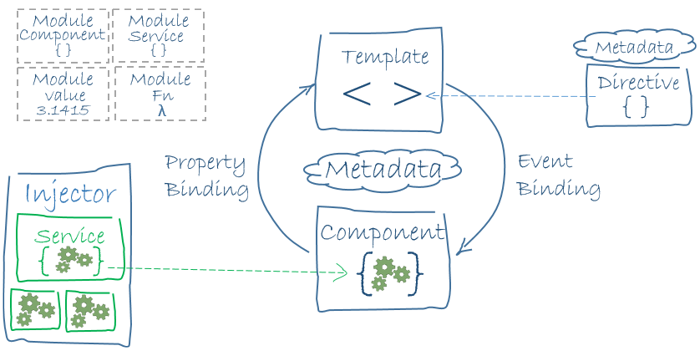
- ### What are the key components of Angular?
- ### What are directives?
import { Directive, ElementRef, Input } from '@angular/core';
@Directive({ selector: '[myHighlight]' })     export class HighlightDirective {         constructor(el: ElementRef) {            el.nativeElement.style.backgroundColor = 'yellow';         }     }
Now this directive extends HTML element behavior with a yellow background as below
<p myHighlight>Highlight me!</p>- ### What are components?
import { Component } from '@angular/core';
@Component ({        selector: 'my-app',        template:  <div>           <h1>{{title}}</h1>           <div>Learn Angular6 with examples</div>        </div> ,     })
export class AppComponent {        title: string = 'Welcome to Angular world';     }
- ### What are the differences between Component and Directive?
Some of the major differences are mentioned in a tabular form
| Component | Directive | |---- | --------- | To register a component we use @Component meta-data annotation | To register a directive we use @Directive meta-data annotation | | Components are typically used to create UI widgets| Directives are used to add behavior to an existing DOM element | | Component is used to break down the application into smaller components| Directive is used to design re-usable components| | Only one component can be present per DOM element | Many directives can be used per DOM element | | @View decorator or templateurl/template are mandatory | Directive doesn't use View|
- ### What is a template?
Using inline template with template syntax,
import { Component } from '@angular/core';
@Component ({        selector: 'my-app',        template: '           <div>              <h1>{{title}}</h1>              <div>Learn Angular</div>           </div>        '     })
export class AppComponent {        title: string = 'Hello World';     }
import { Component } from '@angular/core';
@Component ({        selector: 'my-app',        templateUrl: 'app/app.component.html'     })
export class AppComponent {        title: string = 'Hello World';     }
- ### What is a module?
import { NgModule }      from '@angular/core';
    import { BrowserModule } from '@angular/platform-browser';
    import { AppComponent }  from './app.component';
@NgModule ({        imports:      [ BrowserModule ],        declarations: [ AppComponent ],        bootstrap:    [ AppComponent ],        providers: []     })     export class AppModule { }
- ### What are lifecycle hooks available?
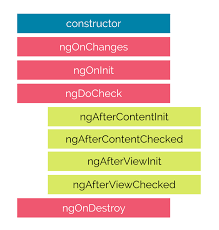
The description of each lifecycle method is as below, 1. ngOnChanges: When the value of a data bound property changes, then this method is called. 2. ngOnInit: This is called whenever the initialization of the directive/component after Angular first displays the data-bound properties happens. 3. ngDoCheck: This is for the detection and to act on changes that Angular can't or won't detect on its own. 4. ngAfterContentInit: This is called in response after Angular projects external content into the component's view. 5. ngAfterContentChecked: This is called in response after Angular checks the content projected into the component. 6. ngAfterViewInit: This is called in response after Angular initializes the component's views and child views. 7. ngAfterViewChecked: This is called in response after Angular checks the component's views and child views. 8. ngOnDestroy: This is the cleanup phase just before Angular destroys the directive/component.
- ### What is a data binding?
Interpolation: {{ value }}: Adds the value of a property from the component
<li>Name: {{ user.name }}</li> <li>Address: {{ user.address }}</li><input type="email" [value]="user.email"><button (click)="logout()"></button><input type="email" [(ngModel)]="user.email">- ### What is metadata?
import { NgModule, Component } from '@angular/core';
@Component({           selector: 'my-component',           template: '<div>Class decorator</div>',         })         export class MyComponent {           constructor() {             console.log('Hey I am a component!');           }         }
@NgModule({           imports: [],           declarations: [],         })         export class MyModule {           constructor() {             console.log('Hey I am a module!');           }         }
import { Component, Input } from '@angular/core';
@Component({             selector: 'my-component',             template: '<div>Property decorator</div>'         })
export class MyComponent {             @Input()             title: string;         }
import { Component, HostListener } from '@angular/core';
@Component({             selector: 'my-component',             template: '<div>Method decorator</div>'         })         export class MyComponent {             @HostListener('click', ['$event'])             onHostClick(event: Event) {                 // clicked, event available             }         }
import { Component, Inject } from '@angular/core';         import { MyService } from './my-service';
@Component({             selector: 'my-component',             template: '<div>Parameter decorator</div>'         })         export class MyComponent {             constructor(@Inject(MyService) myService) {                 console.log(myService); // MyService             }         }
// Angular v18 and above
import { Component, inject } from '@angular/core';         import { MyService } from './my-service';
@Component({             selector: 'my-component',             template: '<div>Parameter decorator</div>'         })         export class MyComponent {         myService: MyService = inject(MyService)             constructor() {                 console.log(myService); // MyService             }         }
- ### What is angular CLI?
npm install @angular/cli@latest2. Generating Components, Directives & Services: ng generate/g
3. Running the Project: ng serve
- ### What is the difference between constructor and ngOnInit?
export class App implements OnInit{
      constructor(private myService: MyService){
         //called first time before the ngOnInit()
      }
ngOnInit(){          //called after the constructor and called  after the first ngOnChanges()          //e.g. http call...       }     }
- ### What is a service?
Let's create a repoService which can be used across components,
import { Injectable } from '@angular/core';
    import { Http } from '@angular/http';
@Injectable({ // The Injectable decorator is required for dependency injection to work       // providedIn option registers the service with a specific NgModule       providedIn: 'root',  // This declares the service with the root app (AppModule)     })     export class RepoService{       constructor(private http: Http){       }
fetchAll(){         return this.http.get('https://api.github.com/repositories');       }     }
- ### What is dependency injection in Angular?
- ### How is Dependency Hierarchy formed?
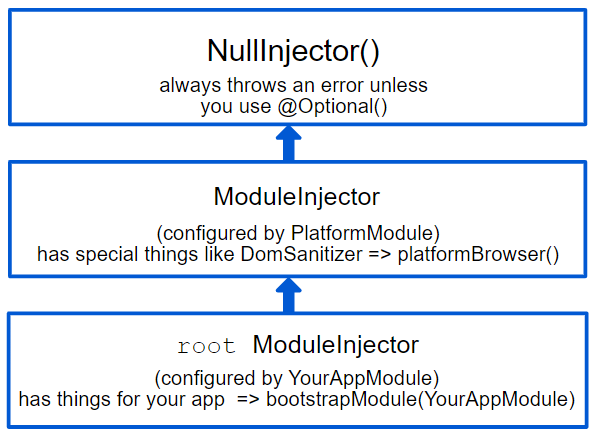
#### Angular has two injector hierarchies: 
#### Module injector When angular starts, it creates a root injector where the services will be registered, these are provided via injectable annotation. All services provided in the ng-model property are called providers (if those modules are not lazy-loaded).
Angular recursively goes through all models which are being used in the application and creates instances for provided services in the root injector. If you provide some service in an eagerly-loaded model, the service will be added to the root injector, which makes it available across the whole application.
#### Platform Module During application bootstrapping angular creates a few more injectors, above the root injector goes the platform injector, this one is created by the platform browser dynamic function inside the main.ts file, and it provides some platform-specific features like DomSanitizer.
#### NullInjector() At the very top, the next parent injector in the hierarchy is the NullInjector().The responsibility of this injector is to throw the error if something tries to find dependencies there, unless you've used @Optional() because ultimately, everything ends at the NullInjector() and it returns an error or, in the case of @Optional(), null.
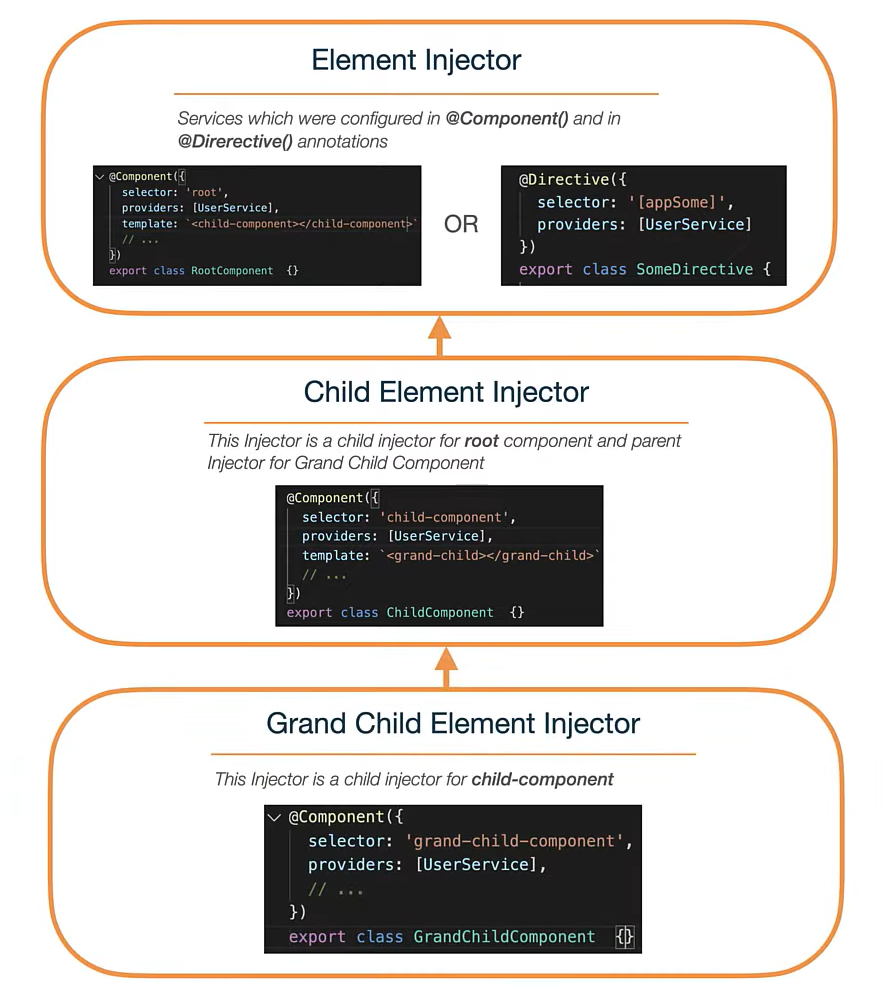
#### ElementInjector Angular creates ElementInjector hierarchies implicitly for each DOM element. ElementInjector injector is being created for any tag that matches the angular component, or any tag on which directive is applied, and you can configure it in component and directive annotations inside the provider's property, thus, it creates its own hierarchy likewise the upper one.
- ### What is the purpose of async pipe?
Let's take a time observable which continuously updates the view for every 2 seconds with the current time.
@Component({ selector: 'async-observable-pipe', template: <div><code>observable|async</code>: Time: {{ time | async }}</div> }) export class AsyncObservablePipeComponent { time: Observable<string>; constructor() { this.time = new Observable((observer) => { setInterval(() => { observer.next(new Date().toString()); }, 2000); }); } }- ### What is the option to choose between inline and external template file?
The choice between inline and separate HTML is a matter of taste, circumstances, and organization policy. But normally we use inline template for small portion of code and external template file for bigger views. By default, the Angular CLI generates components with a template file. But you can override that with the below command,
ng generate component hero -it- ### What is the purpose of
*ngFordirective?
*ngFor directive in the template to display each item in the list. For example, here we can iterate over a list of users:
<li *ngFor="let user of users">
      {{ user }}
</li>*ngFor double-quoted instruction is a template input variable.
- ### What is the purpose of
*ngIfdirective?
*ngIf directive inserts or removes an element based on a truthy/falsy condition. Let's take an example to display a message if the user age is more than 18:
<p *ngIf="user.age > 18">You are not eligible for student pass!</p>- ### What happens if you use script tag inside template?
script tag but keeps safe content such as the text content of the script tag. This way it eliminates the risk of script injection attacks. If you still use it then it will be ignored and a warning appears in the browser console.
Let's take an example of innerHtml property binding which causes XSS vulnerability,
export class InnerHtmlBindingComponent { // For example, a user/attacker-controlled value from a URL. htmlSnippet = 'Template <b>Syntax</b>'; }- ### What is interpolation?
Let's take an example,
<h3> {{title}} <img src="{{url}}" style="height:30px"> </h3>- ### What are template expressions?
[property]="expression".
In interpolation syntax, the template expression is surrounded by double curly braces. For example, in the below interpolation, the template expression is {{username}},
<h3>{{username}}, welcome to Angular</h3>The below javascript expressions are prohibited in template expression 1. assignments (=, +=, -=, ...) 2. new 3. chaining expressions with ; or , 4. increment and decrement operators (++ and --) ----------------------------------
- ### What are template statements?
(event)="statement".
Let's take an example of button click event's statement
<button (click)="editProfile()">Edit Profile</button>- ### How do you categorize data binding types?
The possible binding syntax can be tabularized as below,
| Data direction | Syntax | Type | |---- | --------- | ---- | | From the source-to-view(One-way) | 1. {{expression}} 2. [target]="expression" 3. bind-target="expression" | Interpolation, Property, Attribute, Class, Style| | From view-to-source(One-way) | 1. (target)="statement" 2. on-target="statement" | Event | | View-to-source-to-view(Two-way)| 1. [(target)]="expression" 2. bindon-target="expression"| Two-way |
- ### What are pipes?
import { Component } from '@angular/core';
@Component({       selector: 'app-birthday',       template: <p>Birthday is {{ birthday | date }}</p>     })     export class BirthdayComponent {       birthday = new Date(1987, 6, 18); // June 18, 1987     }
- ### What is a parameterized pipe?
import { Component } from '@angular/core';
@Component({           selector: 'app-birthday',           template: <p>Birthday is {{ birthday | date:'dd/MM/yyyy'}}</p> // 18/06/1987         })         export class BirthdayComponent {           birthday = new Date(1987, 6, 18);         }
- ### How do you chain pipes?
import { Component } from '@angular/core';
@Component({               selector: 'app-birthday',               template: <p>Birthday is {{  birthday | date:'fullDate' | uppercase}} </p> // THURSDAY, JUNE 18, 1987             })             export class BirthdayComponent {               birthday = new Date(1987, 6, 18);             }
- ### What is a custom pipe?
@Pipe decorator, which you import from the core Angular library
For example,
@Pipe({name: 'myCustomPipe'})PipeTransform would be as below,
interface PipeTransform {
          transform(value: any, ...args: any[]): any
}@Pipe decorator allows you to define the pipe name that you'll use within template expressions. It must be a valid JavaScript identifier.
template: {{someInputValue | myCustomPipe: someOtherValue}}- ### Give an example of custom pipe?
import { Pipe, PipeTransform } from '@angular/core';
@Pipe({name: 'customFileSizePipe'})         export class FileSizePipe implements PipeTransform {           transform(size: number, extension: string = 'MB'): string {             return (size / (1024 * 1024)).toFixed(2) + extension;           }         }
template: <h2>Find the size of a file</h2> <p>Size: {{288966 | customFileSizePipe: 'GB'}}</p> - ### What is the difference between pure and impure pipe?
- ### What is a bootstrapping module?
AppModule. The default structure of AppModule generated by AngularCLI would be as follows:
import { BrowserModule } from '@angular/platform-browser';
        import { NgModule } from '@angular/core';
        import { FormsModule } from '@angular/forms';
        import { HttpClientModule } from '@angular/common/http';
import { AppComponent } from './app.component';
/ the AppModule class with the @NgModule decorator /         @NgModule({           declarations: [             AppComponent           ],           imports: [             BrowserModule,             FormsModule,             HttpClientModule           ],           providers: [],           bootstrap: [AppComponent]         })         export class AppModule { }
- ### What are observables?
- ### What is HttpClient and its benefits?
HTTP protocol using either XMLHttpRequest interface or the fetch() API. Angular provides a simplified client HTTP API known as HttpClient which is based on top of XMLHttpRequest interface. This client is available from @angular/common/http package.
You can import in your root module as below:
import { HttpClientModule } from '@angular/common/http';The major advantages of HttpClient can be listed as below, 1. Contains testability features 2. Provides typed request and response objects 3. Intercept request and response 4. Supports Observable APIs 5. Supports streamlined error handling
- ### Explain on how to use
HttpClientwith an example?
HttpClient.
1. Import HttpClient into root module:
import { HttpClientModule } from '@angular/common/http';
        @NgModule({
          imports: [
            BrowserModule,
            // import HttpClientModule after BrowserModule.
            HttpClientModule,
          ],
          ......
          })
export class AppModule {}HttpClient into the application:
Let's create a userProfileService(userprofile.service.ts) as an example. It also defines get method of HttpClient:
```javascript
import { Injectable } from '@angular/core';
import { HttpClient } from '@angular/common/http';
const userProfileUrl
README truncated. View on GitHub


