
Kubernetes context manager for macOS
KSwitch





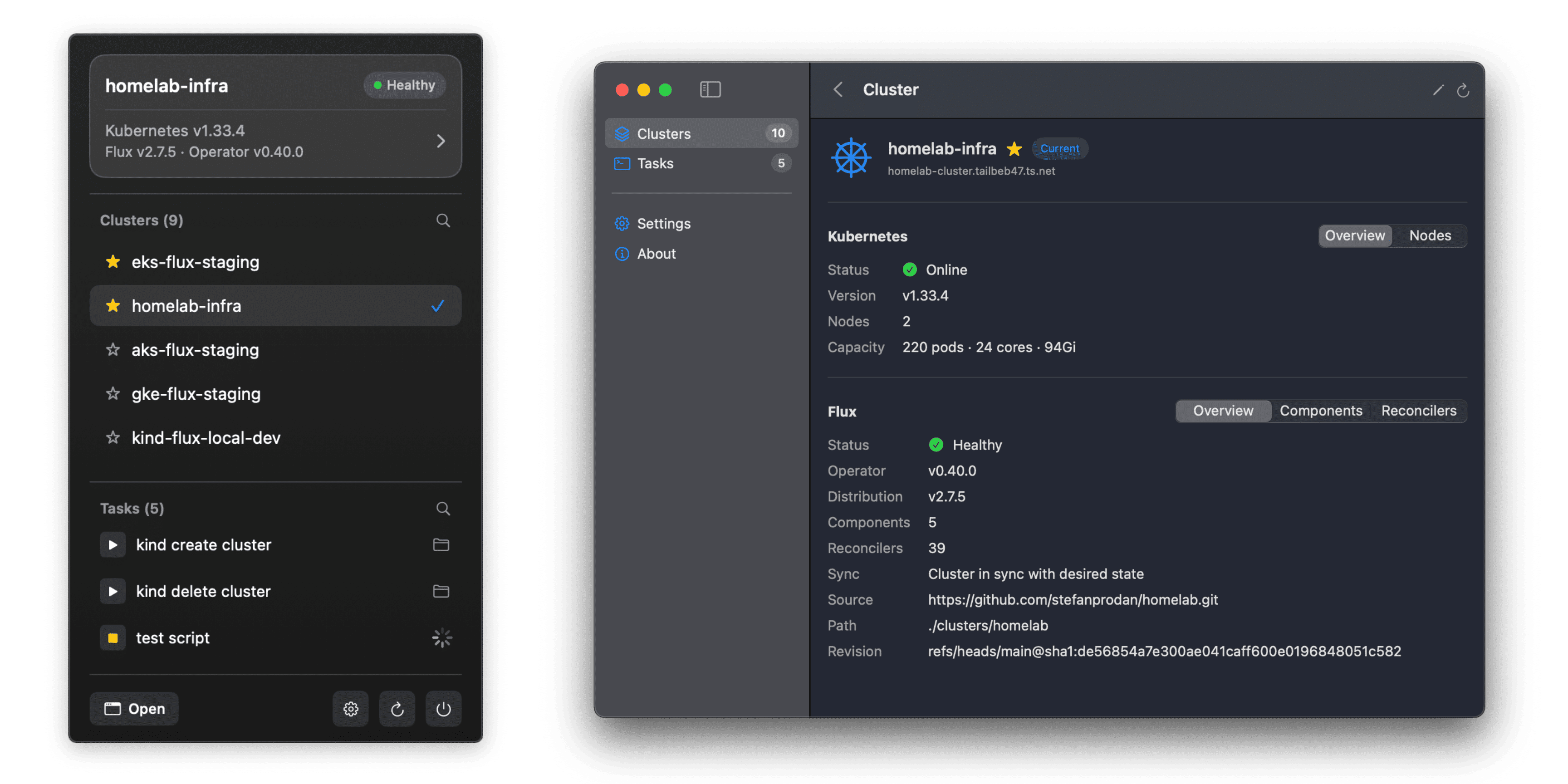
KSwitch is a native macOS app for managing Kubernetes contexts and monitoring Flux Operator GitOps clusters directly from the menu bar. It also provides a task runner for automating common Kubernetes workflows with shell scripts, input parameters, and real-time output.
Features
- Quick Context Switching - Switch between Kubernetes contexts from the menu bar
- Cluster Status - Shows Kubernetes version, node health, and cluster capacity
- GitOps Monitoring - Displays Flux Operator version, cluster sync status, and reconciler status
- Organization - Mark clusters as favorites, hide unused ones, customize display names and colors
- Notifications - Get notified when clusters become degraded or Flux reconcilers fail
- Automation - Run shell scripts from the menu bar with input parameters and real-time output
Installation
Requirements
- macOS 15.0 (Sequoia) or later
- kubectl installed and in
PATH
Download (Recommended)
Download KSwitch.dmg, open it, and drag KSwitch.app to your Applications folder.
A ZIP archive with the app bundle is also available on the GitHub releases page. Both formats are code-signed and notarized for Gatekeeper.
While the app is running, it will check for new versions automatically and update itself if allowed.
Build from Source
Clone, build, and launch:
git clone https://github.com/stefanprodan/kswitch.git
cd kswitch
make dev
Building the app requires the macOS SDK and Swift 6.2+ toolchain which comes with Xcode 26.2 or later.
Usage
Launch KSwitch from Applications and allow it to access your kubeconfig file when prompted. The app will appear in the menu bar where you can switch Kubernetes contexts and open the main dashboard.
Configuration
By default, KSwitch uses ~/.kube/config and auto-detects kubectl from your shell PATH.
In the Settings view, you can customize:
- Kubeconfig file path, including support for multiple files delimited by
:(e.g.~/.kube/config:~/.kube/other) - Kubectl binary path
- Auto-refresh interval for clusters and Flux status
- Tasks directory path (e.g.
~/.kswitch/tasks/) - Notification preferences
- Auto-start on login and auto-update options
~/Library/Application Support/KSwitch/settings.json.
Cluster Management
KSwitch lists all available Kubernetes contexts from your kubeconfig file. It watches for changes to the kubeconfig file and updates the context list automatically.
In the Cluster list view, you can:
- Mark clusters as favorites for quick access
- Hide unused clusters from the menu bar selector
- Search clusters by name
- Navigate to the cluster details view
- View Kubernetes version, health, and cluster capacity (CPU, memory, pods)
- View the list of nodes and their status
- View Flux Operator version and sync status
- View the list of Flux components and reconcilers including their status
- Change the display name
- Set a custom color for the cluster icon
- Mark the cluster as favorite or hidden
The cluster customizations are persisted at ~/Library/Application Support/KSwitch/clusters.json.
Task Runner
KSwitch can run shell scripts directly from the menu bar and main window, making it easy to automate common Kubernetes workflows without switching to the terminal.
Use cases:
- Create and delete local Kind clusters with a single click
- Trigger Flux reconciliations for GitOps deployments
- Run kubectl commands with predefined parameters
- Execute any custom automation task you need
For task development and examples, see the KSwitch Tasks documentation.
Notifications
KSwitch can send macOS notifications to alert you of cluster state changes. Enable notifications in Settings and allow KSwitch to send alerts when prompted.
You will be notified when:
- A cluster goes offline or comes back online
- Flux reconciliation failures increase
Logs
KSwitch logs events using Apple's unified logging system. To stream logs in real-time, open Terminal and run:
log stream --predicate 'subsystem == "com.stefanprodan.kswitch"' --level debugLogs can also be viewed in Console.app by filtering for the com.stefanprodan.kswitch subsystem.
License
KSwitch is an open-source project licensed under the Apache-2.0 license.


