
Sorty: free open-source AI folder organizer for macOS
Sorty  - Smart Folder Organizer for macOS


A native macOS SwiftUI application that helps organize directory contents into relevant, semantically-named folders.
|  |
| 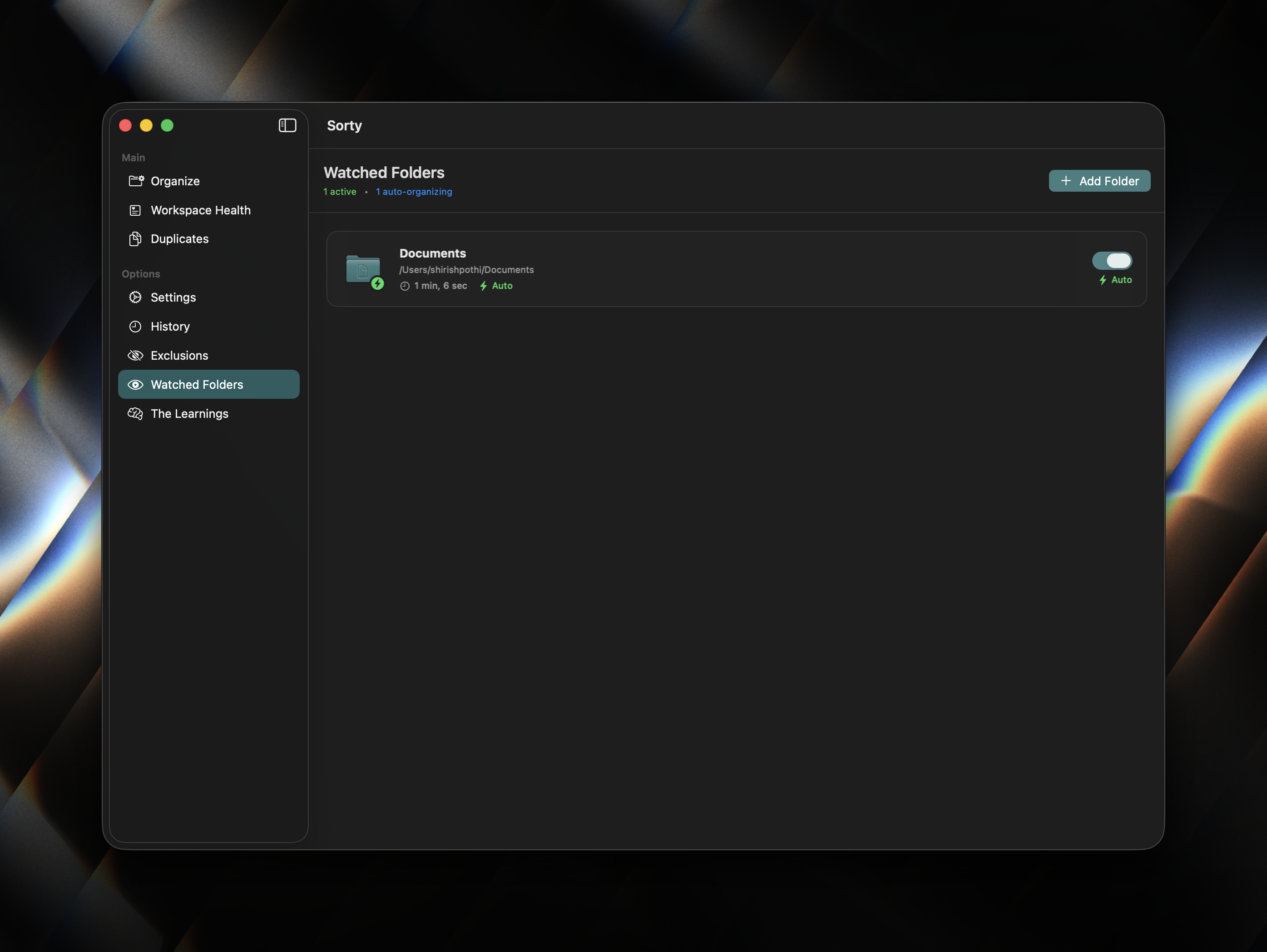 |
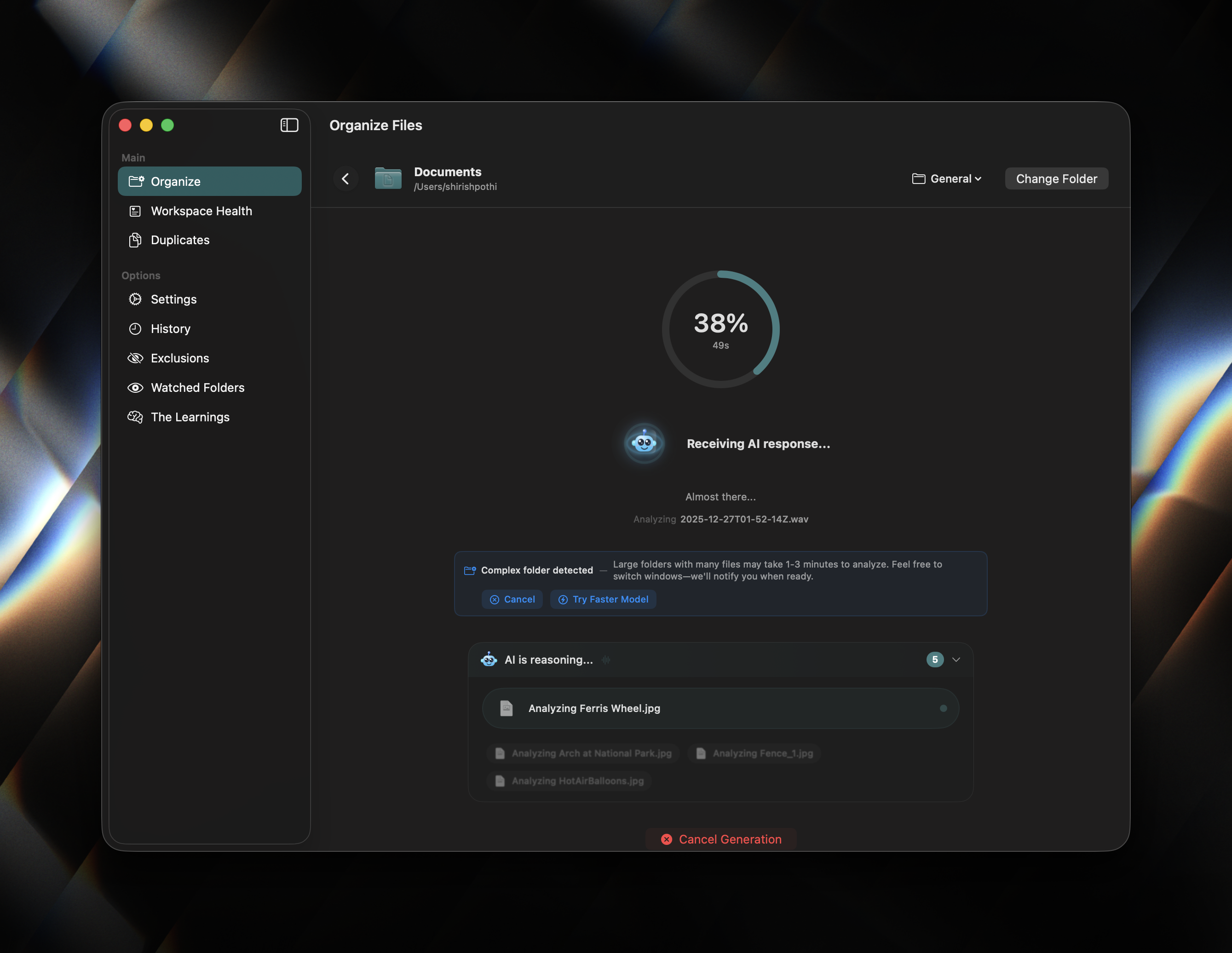
| 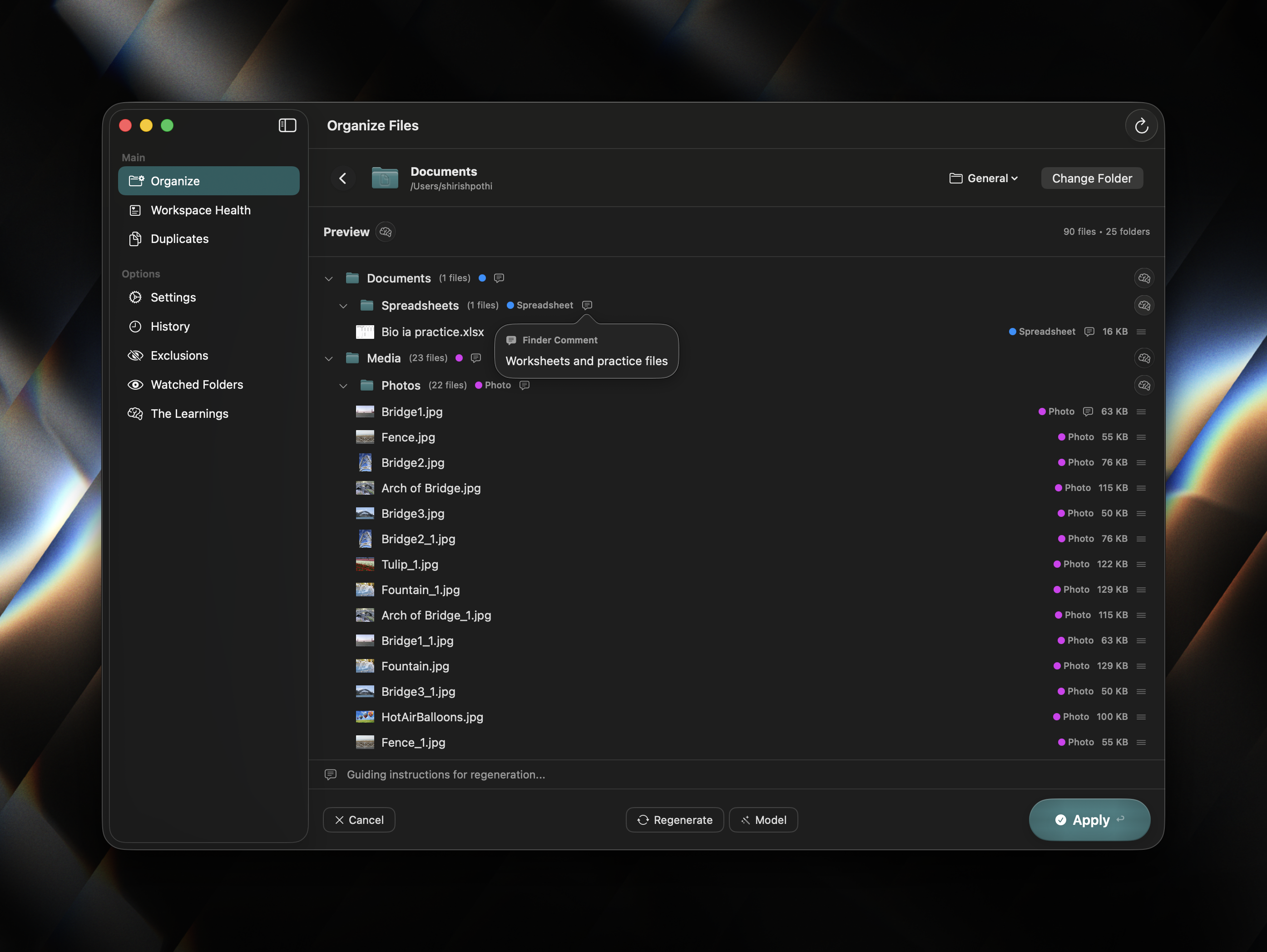 | | :---: | :---: | :---: | | Streaming Sorty Organisation, with Live Insights | Watched Folders | Interactive preview |
Features
- Intelligent Organization: Sorty understands file content and context for accurate categorization.
- The Learnings Profile: A passive learning system that trains from your existing folder structures, manual corrections, and even cancelled organizations to continuously improve future suggestions.
- Custom Personas: Create and edit specialized profiles for different workflows (e.g., Developer, Photographer, Student).
- Multiple AI Providers:
- Vision Support: Multimodal analysis for providers that support it to understand image content when organizing.
- Finder Extension: Right-click any folder in Finder to instantly start the organization process.
- Workspace Health Monitoring: Monitor and analyze the health of your directories with actionable insights and quick actions.
- App-Wide Deeplinks: Control the app externally via
sorty://URL schemes for automation and shortcuts. - Menu Bar Controls: Quick access with keyboard shortcuts for common actions.
- Interactive Preview: Review and tweak suggested organization before any files are moved.
- Organization History: Track all operations with detailed analytics, reasoning, and rollback support.
- Automatic Updates: Background update checking on app launch (once per 24 hours) with manual check available via menu.
- Storage Locations: Define custom storage destinations for organized files.
- HUD & Toast Notifications: Non-intrusive visual feedback for operations and status updates.
- Cleanup Preview: Preview and confirm cleanup actions before execution.
- Safe by Design: Includes dry-run modes, comprehensive validation, duplicate protection settings, and exclusion rules.
Quick Start
Prerequisites
- macOS 15.1 or later
- Xcode 16.0 or later
- (Optional) API key for OpenAI or compatible provider
Installation
Option 1: Download Pre-Built Release (Easiest)
- Download the latest
.zipfrom the Releases page. - Unzip and drag
Sorty.appto your/Applicationsfolder.
/Applications is highly recommended. It ensures that security bookmarks for "Watched Folders" persist reliably across app restarts.
- Important: Since the app is not notarized (no Apple Developer certificate), you need to remove the quarantine attribute:
xattr -cr /Applications/Sorty.app- Double-click to launch.
[!NOTE]
The xattr -cr command removes macOS's quarantine flag that blocks unsigned apps. This is safe for apps you trust and have downloaded from a known source.
Option 2: Build from Source
Using Make (Recommended):
git clone https://github.com/sorty-organizer/Sorty.git cd Sorty make runUsing Xcode:
- Open
Sorty.xcodeprojin Xcode. - Select the
Sortyscheme and your Mac as the destination. - Press
⌘Rto build and run.
Configuration
1. AI Provider Setup
- Navigate to the Settings tab in the app.
- Configure your preferred provider:
2. Finder Integration
Sorty includes Finder Integration as a core app feature:- Open Settings -> Finder Integration.
- Use Activate or Repair if the Finder extension needs attention.
- Use Open Extensions and confirm SortyFinderSync is enabled in macOS Extensions settings.
[!IMPORTANT]
The Finder extension requires App Groups to be configured in both the main app and extension targets using the identifier group.com.sorty.app.
3. Watched Folders
- Add folders to the "Watched" list in the sidebar to enable automatic background monitoring.
- Note: The "Auto-Organize" feature will remain disabled until a valid provider is configured in Settings.
Security Considerations
Sorty is designed with security and privacy in mind:
Data Handling:
- File analysis happens via your chosen AI provider (OpenAI, Anthropic, Ollama, Apple Intelligence)
- File contents are NOT uploaded unless you explicitly enable Deep Scan
- API keys are stored in the macOS Keychain
- The Learnings profile is encrypted with AES-256 and protected by Touch ID/Face ID
- Privacy Mode: Enabled by default, blurs sensitive handles until hover and hides API keys with a manual reveal toggle.
Best Practices:
- Use Ollama or Apple Foundation Models for on-device processing. (However, for remotely large directories small local model likely won't suffice)
- Review which files are being sent to cloud AI providers
- Enable Safe Deletion for duplicate management
- Regularly backup important directories
Troubleshooting
"Watched Folders" Access Lost
If you see an error indicating that access to a watched folder has been lost (e.g., "Permission Denied" or missing bookmarks):- This is often due to macOS App Sandbox restrictions.
- Ensure the app is running from the
/Applicationsfolder. - Remove the folder from the Watched list and add it again to refresh the security bookmark.
Provider Not Configured / Auto-Organize Disabled
- If "Auto-Organize" is grayed out or not functioning, check Settings -> AI Provider.
- A valid API configuration (or Apple Intelligence setup) is required for the app to analyze and sort files.
Update Check Issues
- If update checks fail, verify you have an active internet connection.
- Check if you can access GitHub Releases in your browser.
- Rate limiting may occur if too many requests are made; wait a few minutes and try again.
Verifying App is Up to Date
- Open Settings and click Check for Updates.
- If the app shows "Up to date", you have the latest version.
- Alternatively, compare the version in About with the latest release.
Project Structure
Sources/SortyLib/: Core implementation including AI, FileSystem, Models, and Views.Sources/SortyApp/: Main macOS application entry and navigation.Tests/: Unit and UI test suites organized by component.Assets/: App icons and screenshots.scripts/: Build and automation scripts.
Architecture
flowchart LR
    subgraph EntryPoints["Entry Points"]
        User["User"]
        Finder["Finder right-click<br/>SortyFinderSync"]
        Shortcuts["Shortcuts and App Intents<br/>sorty:// deeplinks"]
        WatchEvents["Watched folders<br/>FSEvents and schedules"]
        MenuBar["Menu bar extra<br/>global shortcuts"]
        Widgets["Widgets<br/>SortyWidgetSnapshotStore"]
    end
subgraph AppShell["App Shell - Sources/SortyApp"]         SortyApp["SortyApp<br/>SwiftUI scenes"]         MainWindow["MainWindowRootView<br/>ContentView navigation"]         Coordinator["AppCoordinator<br/>background automation"]         ExtensionListener["ExtensionListener"]         DeeplinkHandler["DeeplinkHandler"]         WidgetSync["SortyWidgetSyncManager"]     end
subgraph StateAndSettings["Shared State and Managers"]         AppState["AppState"]         Settings["SettingsViewModel<br/>AIConfig"]         Personas["PersonaManager<br/>CustomPersonaStore"]         WatchedFolders["WatchedFoldersManager"]         Storage["StorageLocationsManager"]         Exclusions["ExclusionRulesManager"]         Notifications["NotificationManager<br/>HUD and native alerts"]         ModelCatalog["ModelCatalog"]         Auth["Keychain and auth managers<br/>ProviderAuthResolver"]     end
subgraph OrganizePipeline["Organization Pipeline - Sources/SortyLib"]         FolderOrganizer["FolderOrganizer<br/>idle -> scanning -> organizing -> ready -> applying -> completed"]         Scanner["DirectoryScanner"]         Content["ContentAnalyzer"]         Vision["VisionAnalyzer<br/>ImageVisionAnalyzer"]         PromptContext["PromptContextHelper<br/>directory and folder context"]         PromptBuilder["PromptBuilder<br/>system and user prompts"]         AIClientFactory["AIClientFactory"]         AIClient["AIClientProtocol"]         ResponseParser["ResponseParser"]         Plan["OrganizationPlan"]         Preview["PreviewManager<br/>PreviewView"]     end
subgraph AIProviders["AI Providers"]         OpenAI["OpenAI-compatible<br/>OpenAI, Groq, OpenRouter, Gemini, Ollama"]         Anthropic["Anthropic"]         Copilot["GitHub Copilot"]         Codex["Codex subscription"]         AppleFM["Apple Foundation Models"]     end
subgraph ApplyAndSafety["Apply, Safety, and Recovery"]         Normalizer["StorageDestinationNormalizer"]         Validator["FileOrganizationValidator"]         Duplicates["DuplicateDetector<br/>SemanticDuplicateDetector"]         FileSystem["FileSystemManager<br/>create, move, tag, restore"]         History["OrganizationHistory<br/>analytics and rollback"]         Conflicts["Conflict resolution<br/>cleanup preview"]     end
subgraph Learning["Learnings System"]         LearningsManager["LearningsManager"]         ContinuousLearning["ContinuousLearningObserver"]         FSMonitor["LearningsFSMonitor"]         RuleEngines["RuleInducer<br/>LocalRuleInferenceEngine<br/>LLMRuleInducer"]         LearningsProfile["LearningsProfile<br/>rules, examples, corrections"]     end
subgraph Persistence["Persistence and System Integration"]         Defaults["UserDefaults and AppStorage"]         AppGroup["App group IPC<br/>group.com.sorty.app"]         Bookmarks["Security-scoped bookmarks"]         Keychain["Keychain"]         Sparkle["SparkleUpdateManager"]     end
subgraph FeatureSurfaces["Feature Surfaces"]         OrganizeView["Organize and preview"]         WatchedFoldersView["Watched folders"]         WorkspaceHealth["WorkspaceHealthView"]         DuplicatesView["DuplicatesView"]         LearningsView["LearningsView"]         SettingsView["Settings"]         HistoryView["History"]     end
User --> SortyApp     Finder --> ExtensionListener     ExtensionListener --> MainWindow     Shortcuts --> DeeplinkHandler     DeeplinkHandler --> MainWindow     WatchEvents --> Coordinator     MenuBar --> MainWindow     Widgets --> WidgetSync
SortyApp --> MainWindow     SortyApp --> Coordinator     MainWindow --> AppState     MainWindow --> FeatureSurfaces     FeatureSurfaces --> FolderOrganizer     FeatureSurfaces --> StateAndSettings
Coordinator --> WatchedFolders     Coordinator --> FolderOrganizer     Coordinator --> Notifications     WidgetSync --> AppGroup
FolderOrganizer --> Scanner     Scanner --> Content     Content --> Vision     FolderOrganizer --> PromptContext     FolderOrganizer --> PromptBuilder     PromptBuilder --> LearningsProfile     PromptBuilder --> AIClientFactory     AIClientFactory --> Settings     AIClientFactory --> Auth     AIClientFactory --> ModelCatalog     AIClientFactory --> AIClient     AIClient --> OpenAI     AIClient --> Anthropic     AIClient --> Copilot     AIClient --> Codex     AIClient --> AppleFM     AIClient --> ResponseParser     ResponseParser --> Plan     Plan --> Normalizer     Normalizer --> Validator     Validator --> Preview     Preview --> FileSystem     FileSystem --> Duplicates     FileSystem --> History     FileSystem --> Conflicts
History --> ContinuousLearning     Coordinator --> ContinuousLearning     FSMonitor --> ContinuousLearning     ContinuousLearning --> LearningsManager     LearningsManager --> RuleEngines     RuleEngines --> LearningsProfile     LearningsProfile --> PromptBuilder
Settings --> Defaults     Personas --> Defaults     WatchedFolders --> Defaults     Storage --> Defaults     Exclusions --> Defaults     WatchedFolders --> Bookmarks     Auth --> Keychain     ExtensionListener --> AppGroup     Sparkle --> SortyApp
Contributing
We welcome contributions. See CONTRIBUTING.md for:
- Detailed development environment setup
- Architecture overview and code style guidelines
- How to add new AI providers
- Testing requirements and PR process
Testing
Blacksmith-backed GitHub Actions are the source of truth for commit, push, PR, and release confidence. The default Swift CI workflow runs security checks on Blacksmith Ubuntu and builds/tests/packages on Blacksmith macOS.
Prefer frequent small commits and pushes. Push each coherent change to the branch so Blacksmith validates the real PR state early; continue with follow-up commits when more work remains.
Local Diagnostics
Use local commands only for fast diagnosis before pushing:
make dev # Fast debug build, no tests make now # Fast debug build + launch, no tests swift test --disable-sandbox --filter SortyTests.TestClass/testMethodmake ci, make test, and make test-full still exist for local troubleshooting, but they do not replace Blacksmith checks.
Blacksmith Validation
For PRs and releases, rely on the GitHub Actions checks:
- Swift CI: security scan, SPM build, current test inventory, parallel unit tests, app bundle build.
- Release: changelog preparation, current test inventory, parallel unit tests, universal app build, Sparkle appcast generation, release artifact upload.
Test Coverage
Tests are located in Tests/SortyTests/ and cover the following areas:
- Unit Tests: Core functionality including file organization, duplicate detection, exclusion rules, response parsing, and utility functions.
- Integration Tests: End-to-end workflows for AI providers, file system operations, history management, and workspace health monitoring.
- Component Tests: Individual modules such as personas, learnings manager, deeplinks, and security.
SortyTests.swift- Core organization logicWorkspaceHealthTests.swift- Health monitoring featuresLearningsManagerTests.swift- Passive learning systemFinderIntegrationStatusTests.swift- Finder Sync diagnostics, registration parsing, and auto-repairStorageDestinationNormalizerTests.swift- Storage location path resolution and normalizationStorageLocationsReliabilityTests.swift- Storage validation and reliabilityPrivacyPathMaskerTests.swift- Privacy-sensitive path redactionCustomPersonaTests.swift- Persona managementDeeplinkTests.swift- URL scheme handling
Deeplinks Reference
Sorty supports the sorty:// URL scheme for automation and external control:
| Deeplink | Description | |----------|-------------| | sorty://organize?path=<path>&persona=<id>&autostart=true | Start organization | | sorty://duplicates?path=<path>&autostart=true | Scan for duplicates | | sorty://learnings?action=honing | Open Learnings with specific action | | sorty://settings?section=ai | Open specific settings section | | sorty://health | Open Workspace Health | | sorty://history | Open organization history | | sorty://persona?generate=true&prompt=<text> | Generate a persona | | sorty://watched?action=add&path=<path> | Add watched folder | | sorty://rules?action=add&pattern=<pattern> | Add exclusion rule | | sorty://help?section=<topic> | Open help section |
License
This project is licensed under the GNU General Public License v3.0 - see the LICENSE file for details.
Support
- Documentation: See HELP.md for detailed usage guides
- Bug Reports: Use the Bug Report template
- Feature Requests: Use the Feature Request template
- Security Issues: Use GitHub private vulnerability reporting (do not open public issues)
- Questions: Open a GitHub Discussion

Sorty: The FOSS File Organiser


