
Simple kanban-style task organiser
![progress-logo] Progress
Simple Kanban board manager
[![GitHub Release][github-release-badge]][github-release] [![Flathub Downloads][flatpak-release-badge]][progress-flathub] [![GitHub License][github-licence]](LICENSE) ![Build Status][build-status]
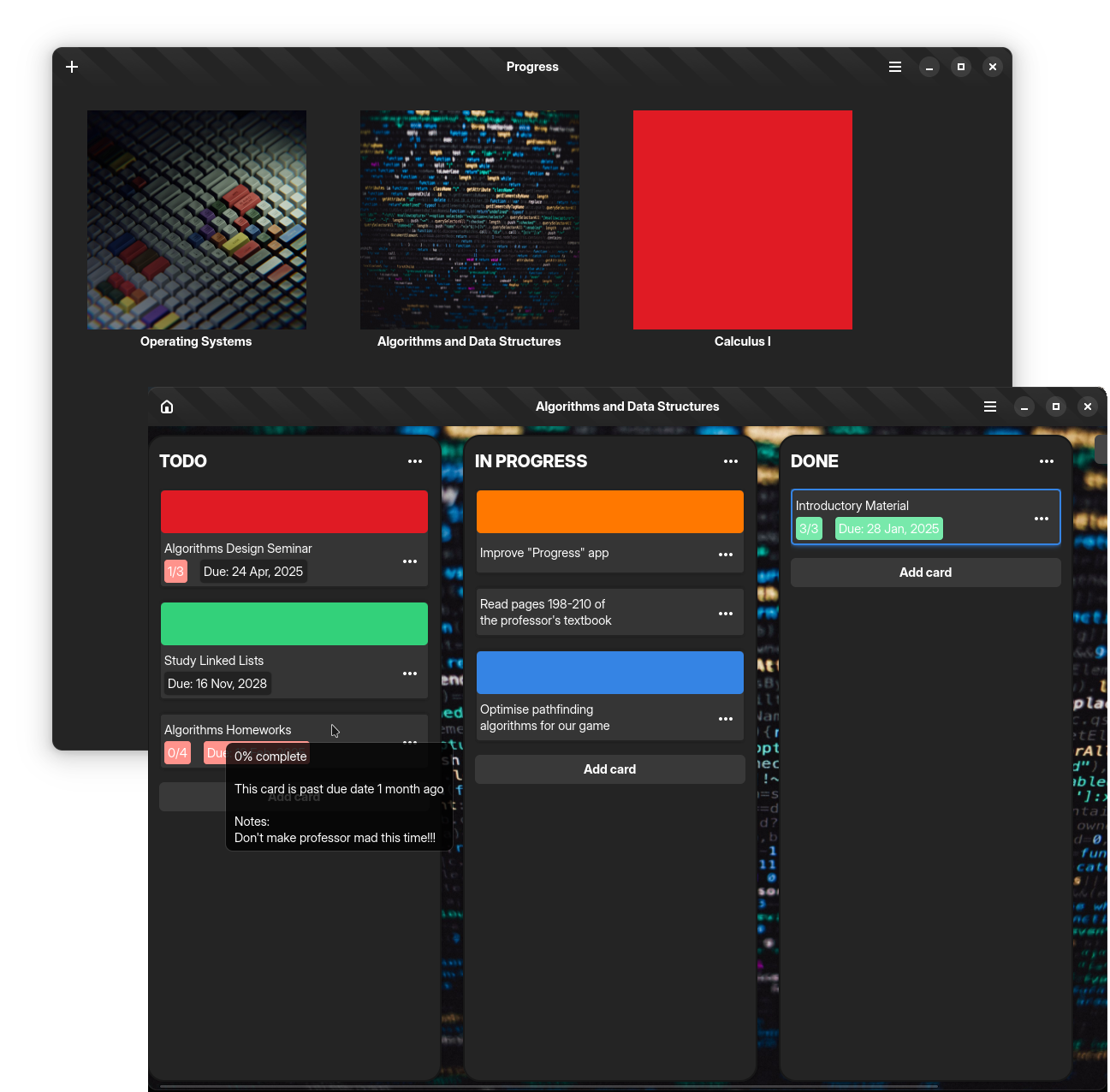
Progress is a Kanban board management app designed to be simple yet flexible for most workflows. Whether you're managing software projects or organsing daily tasks, Progress keeps things straightforward. Built with C++ with GTK4 and LibAdwaita.
Dependencies
- gtkmm-4 (>= 4.10.0)
- libadwaita1 (>= 1.5)
- tinyxml2 (>= 10.0.0)
- spdlog (>= 1.12)
- crossguid (built-in)
Installation
Flatpak
[![flathub-badge]][progress-flathub]
flatpak install flathub io.github.smolblackcat.ProgressDebian-based
Progress is available for installation on Debian/Ubuntu based systems. Note that the package is built on Ubuntu 24.04 and might not work on every Debian-based system. For instance, this package may or may not work on Debian Stable.
Arch Linux (AUR)
Progress is available on the AUR (Arch User Repository). You can install it using the yay command-line application:
yay -S progress-trackerWindows
For Windows systems, Progress is available as a standard Windows installer executable or as a compressed file containing the application's binary and its dependencies. These builds target 64-bit systems, so make sure the host operating system is also 64-bit.
Building From Source
Alternative for those who want to contribute to the project somehow or want a custom build. Ensure all dependencies are installed beforehand and verify whether the system's C++ compiler is C++20 compliant.
Linux
- Install the dependencies
# Catch2 is not necessary if you're not going to build tests
   sudo apt install cmake libgtkmm-4.0-dev libadwaita-1-dev libtinyxml2-dev \
libspdlog-dev gettext catch2- Clone the project's repository
git clone https://github.com/smolBlackCat/progress-tracker.git --recursive- Configure and compile the project.
cd progress-tracker/
cmake -S . -B build/ -DCMAKEINSTALLPREFIX=/usr -DDEVELOPMENT=OFF    cmake --build build/
- Install the project
# There's no need for sudo if you set to a local install prefix
   # (e.g. ~/.local/)
   sudo ninja install -C build/
   sudo glib-compile-schemas /usr/share/glib-2.0/schemas/
Windows
[MSYS2][msys-download] is a build platform utilised by the project for porting Progress to Windows operating systems. Ensure that the platform is installed before proceeding.
- Install the dependencies
# This snippet assumes you're running on the UCRT64 environment
pacman -Syu mingw-w64-ucrt-x8664-cmake mingw-w64-ucrt-x8664-python mingw-w64-ucrt-x8664-gtkmm-4.0 mingw-w64-ucrt-x8664-libadwaita mingw-w64-ucrt-x8664-tinyxml2 mingw-w64-ucrt-x8664-gettext mingw-w64-ucrt-x8664-catch mingw-w64-ucrt-x8664-spdlog mingw-w64-ucrt-x86_64-nsis git- Clone the project's repository
git clone https://github.com/smolBlackCat/progress-tracker.git --recursive- Configure and compile project
cd progress-tracker/
   cmake -S . -B build/ -DDEVELOPMENT=OFF
cmake --build build/- Build the Progress installer and ZIP file
cd build/
# Builds a Windows installer executable    cpack
Consider Supporting the Project

[progress-logo]: data/io.github.smolblackcat.Progress.svg [progress-flathub]: https://flathub.org/apps/io.github.smolblackcat.Progress [github-release]: https://github.com/smolBlackCat/progress-tracker/releases [flathub-badge]: https://flathub.org/assets/badges/flathub-badge-i-en.png [github-release-badge]: https://img.shields.io/github/v/release/smolBlackCat/progress-tracker?logo=github [flatpak-release-badge]: https://img.shields.io/flathub/downloads/io.github.smolblackcat.Progress?logo=flathub [github-licence]: https://img.shields.io/github/license/smolBlackCat/progress-tracker [build-status]: https://img.shields.io/github/actions/workflow/status/smolBlackCat/progress-tracker/progress-ci.yml [msys-download]: https://www.msys2.org/


