
Burp extension to evade TLS fingerprinting. Bypass WAF, spoof any browser.
Awesome TLS
This extension hijacks Burp's HTTP and TLS stack, allowing you to spoof any browser TLS fingerprint (JA3). It boosts the power of Burp Suite while reducing the likelihood of fingerprinting by various WAFs like CloudFlare, PerimeterX, Akamai, DataDome, etc.
This extension works without resorting to ugly hacks, reflection or forked Burp Suite Community code.
Sponsors
Maintenance of this project is made possible by all the lovely contributors and sponsors.
If you'd like to sponsor this project and have your avatar or company logo appear in this section,
click here. 💖
Showcase


This is just one example. If you tested with another dedicated bot detection site, let me know your results!
How it works
Unfortunately Burp's API is very limited for more advanced use cases like this, so I had to play around with it to make this work.
Once a request comes in, the extension intercepts it and forwards it to a local HTTPS server that started in the background (once the extension loaded). This server works like a proxy; it forwards the request to the destination, while persisting the original header order and applying a customizable TLS configuration. Then, the local server forwards the response back to Burp.
Configuration settings and other necessary information like the destination server address and protocol are sent to the local server per request by a magic header. This magic header is stripped from the request before it's forwarded to the destination server.
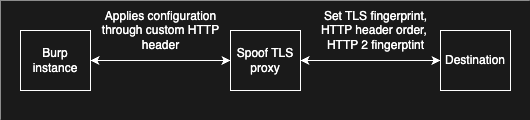
:information_source: Another option would've been to code an upstream proxy server and connect burp to it, but I
personally needed an extension for customization and portability.
Installation
- Download the jar file for your operating system
- Open burp (pro or community), go to Extender > Extensions and click on 'Add'. Then, select
Javaas the extension
- Check your new 'Awesome TLS' tab in Burp for configuration settings and start hacking!
Configuration
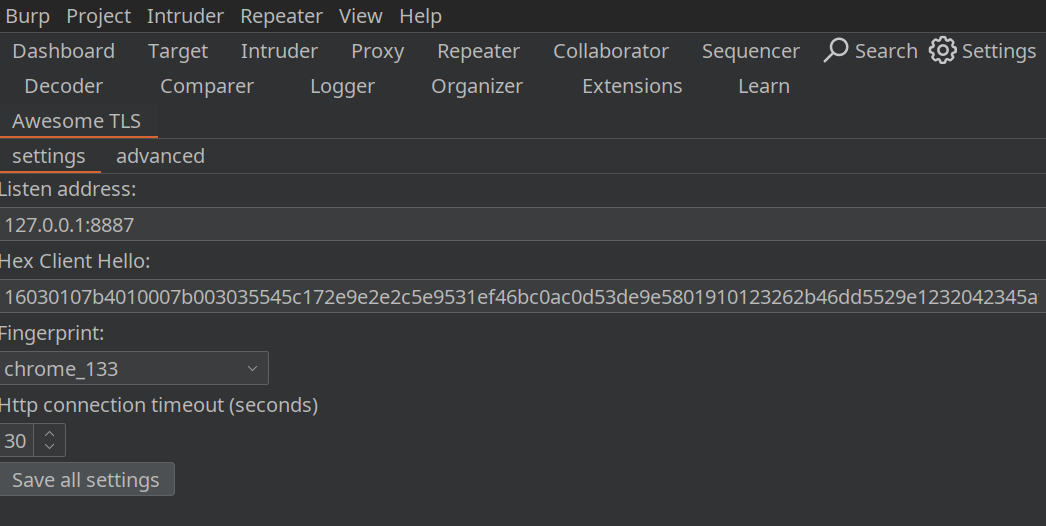
This extension is 'plug and play' and should speak for itself. You can hover with your mouse over each field in the ' Awesome TLS' tab for more information about each field.
To load your custom Client Hello from WireShark, you can copy the client hello record as hex stream and paste it into the field "Hex Client Hello". 
Advanced usage
In the 'advanced' tab, you can enable an additional proxy listener that will automatically apply the current fingerprint from the request:
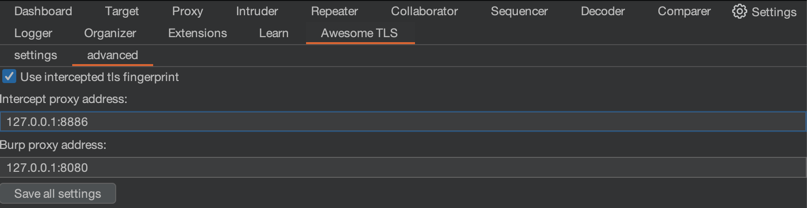
When enabled, the diagram changes to this:

Manual build Instructions
This extension was developed with JetBrains IntelliJ (and GoLand) IDE. The build instructions below assume you're using the same tools to build. See workflows for the target programming language versions.
- Compile the go package within
./src-go/. Run
cd ./src-go/server && go build -o ../../src/main/resources/{OS}-{ARCH}/server.{EXT} -buildmode=c-shared ./cmd/main.go,
replacing {OS}-{ARCH} with your OS and CPU architecture and {EXT} with your platform's preferred extension for
dynamic C libraries. For example: linux-x86-64/server.so. See
the JNA docs for more info about
supported platforms.
- Compile the GUI form
SettingsTab.forminto Java code viaBuild > Build project. - Build the jar with Gradle:
gradle buildJar.
./build/libs) that works with Burp on your operating system.
Credits
Special thanks to the maintainers of the following repositories:
And the creators of the following websites:- https://tlsfingerprint.io/
- https://kawayiyi.com/tls
- https://tls.peet.ws/
- https://cloudflare.manfredi.io/en/tools/connection
- https://scrapfly.io/web-scraping-tools/http2-fingerprint


