
A web proxy in Golang with amazing features.
Shuttle
Shuttle is a cross-platform network proxy tool based on Go. Feel free to join our Slack or Telegram. (logo created by @不二)

(Translated by wao1201, reviewed by Joe Hill.)
Introduction
Shuttle is a cross-platform network proxy tool based on Go.
-
SOCKS5、SOCKS5 over TLS、shadowsocksprotocols supported. - Proxying via rules: domain, IP CIDR and GEO-IP.
- Customized policy: direct, reject and proxy.
- Multiple proxy servers selection and grouping management. The policy of servers selection can be RTT(Round-trip time) or manual select.
- HTTP/HTTPS traffic capture, reverse proxy, request head modification, response head modification and fake return value supported.
- DNS parsing types: static, direct, remote.

Screenshots:
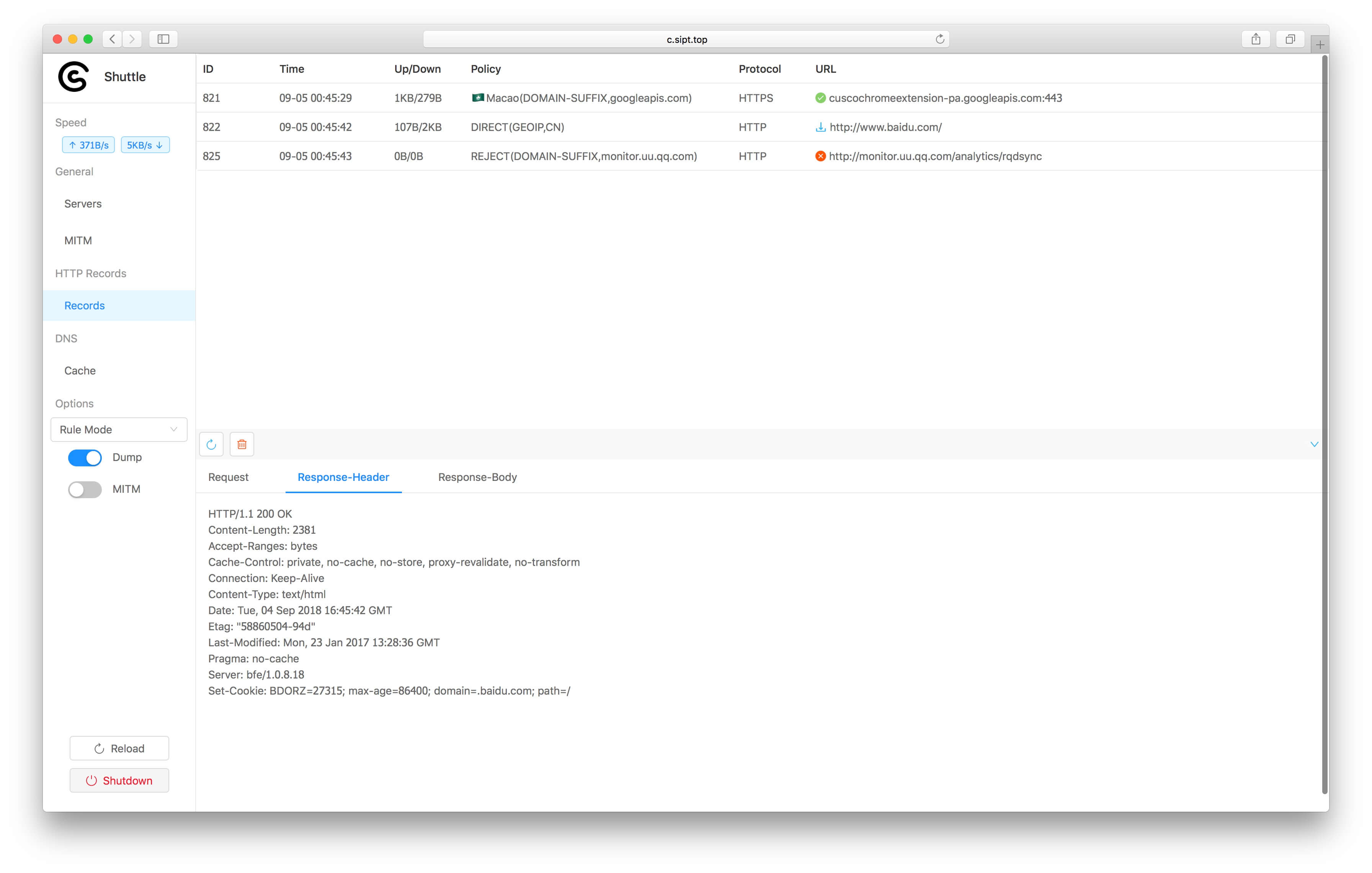
Features
- [ ] Proxy type
- [x] HTTP/HTTPS request extension
- [x] Remote servers management
- [x] Outbound Mode
- [x] DNS parsing type
- [x] External module
Installation & Launch
macOS
Preparation
Download the zip file from release and unzip it. The Folder structure is shown below.
shuttle
   ├── RespFiles/ #mock file directory
   ├── shuttle  #shuttle main executable
   ├── shuttle.yaml #config file
   └── start.sh #launch script
Open the config file, shuttle.yaml. Make sure all the ports are all configured correctly before launching. The default ports in config file are 8080, 8081 and 8082.
General:
  http-port: "8080"  #http/https port
  socks-port: "8081" #socks port
  controller-port: "8082" #dashboard port
Launch
Go to the shuttle directory and enter the command below in terminal/CMD to launch the app.
./start.sh #no outputOpen your browser and visit http://localhost:8082 (For example, use the default settings controller-port: "8082"). The application has already run successfully if you can visit the dashboard on your browser. Otherwise check the shuttle.log for more details and new issues anytime.
System Configuration
If you can visit http://c.sipt.top on your browser, you can skip the following steps directly.
Open System Preference => Network => Advanced => Proxy,there are 3 main options:
Web Proxy(HTTP)set to127.0.0.1:8080(for example,http-port: "8080")Web Proxy(HTTPS)set to127.0.0.1:8080(for example,http-port: "8080")SOCKS Proxyset to127.0.0.1:8080(for example,socks-port: "8081")
OK and click Apply. The proxy settings are working if you can see the dashboard by visiting http://c.sipt.top on browser.
Enter the following commands to make Terminal.app go through proxies:
export https_proxy="http://127.0.0.1:8080"
export http_proxy="http://127.0.0.1:8080"
export all_proxy="socks5://127.0.0.1:8081"
Windows
Preparation
Download the zip file from release and unzip it. The Folder structure is shown below.
shuttle
   ├── RespFiles/ #mock file directory
   ├── shuttle  #shuttle main executable
   ├── shuttle.yaml #config file
   └── startup.bat #launch script
Open the config file, shuttle.yaml. Make sure all the ports are all configured correctly before launching. The default ports in config file are 8080, 8081 and 8082.
General:
  http-port: "8080"  #http/https port
  socks-port: "8081" #socks port
  controller-port: "8082" #dashboard port
Launch
Double-click startup.bat, there will be no output on screen. Open your browser and visit http://localhost:8082 (For example, use the default settings controller-port: "8082"). The application has already run successfully if you can visit the dashboard on your browser. Otherwise check the shuttle.log for more details and new issues anytime.
System Configuration
If you could open http://c.sipt.top in your browser, you can skip the following steps directly.
Open System Preference => Network => Proxy, set to 127.0.0.1:8080(for example: http-port: "8080"). The proxy settings are working if you can see the dashboard by visiting http://c.sipt.top on browser.
Linux
Preparation
Download the zip file from release and unzip it. The Folder structure is shown below.
shuttle
   ├── RespFiles/ #mock file directory
   ├── shuttle  #shuttle main executable
   ├── shuttle.yaml #config file
   └── start.sh #launch script
Open the config file, shuttle.yaml. Make sure all the ports are all configured correctly before launching. The default ports in config file are 8080, 8081 and 8082.
General:
  http-port: "8080"  #http/https port
  socks-port: "8081" #socks port
  controller-port: "8082" #dashboard port
Launch
Go to the shuttle directory and enter the command below in terminal/CMD to launch the app.
./start.sh #no outputOpen your browser and visit http://localhost:8082 (For example, use the default settings controller-port: "8082"). The application has already run successfully if you can visit the dashboard on your browser. Otherwise check the shuttle.log for more details and new issues anytime.
Configuration
Version
ver: v1.0.1Current config file only supports v1.0.1. Don't edit yourself.
General Settings
General:
  loglevel: "info"
  dns-server:
  - "114.114.114.114"
  - "223.5.5.5"
  http-port: "8080"
  http-interface: "0.0.0.0"
  socks-port: "8081"
  socks-interface: "0.0.0.0"
  controller-port: "8082"
  controller-interface: "0.0.0.0"
| Name | Description | Value | | -------------------- | ------------------------------------------------- | ---------------------- | | loglevel | Log output level, better use level: info or error | trace,debug,info,error | | dns-server | DNS server address | IP address | | http-port | HTTP/HTTPS port | | | http-interface | HTTP/HTTPS port | | | socks-port | SOCKS port | | | socks-interface | SOCKS control | | | controller-port | dashboard port | | | controller-interface | dashboard control | |
Proxy Settings
Server name and server group name should not be repeating. DIRECT, REJECT and GLOBAL are reserved name.
Server
Proxy:
  "🇯🇵JP_a": ["ss", "jp.a.example.com", "12345", "rc4-md5", "123456"]
  "🇯🇵JP_b": ["ss", "jp.b.example.com", "12345", "rc4-md5", "123456"]
  "🇯🇵JP_c": ["ss", "jp.c.example.com", "12345", "rc4-md5", "123456"]
  "🇭🇰HK_a": ["ss", "hk.a.example.com", "12345", "rc4-md5", "123456"]
  "🇭🇰HK_b": ["ss", "hk.b.example.com", "12345", "rc4-md5", "123456"]
  "🇭🇰HK_c": ["ss", "hk.c.example.com", "12345", "rc4-md5", "123456"]
  "🇺🇸US_a": ["ss", "us.a.example.com", "12345", "rc4-md5", "123456"]
  "🇺🇸US_b": ["ss", "us.b.example.com", "12345", "rc4-md5", "123456"]
  "🇺🇸US_c": ["ss", "hk.c.example.com", "12345", "rc4-md5", "123456"]
  "socks": ["socks", "localhost", "12345"]
  "socks-tls": ["socks-tls", "localhost", "12345", "skip-verify"]
  "socks-auth": ["socks", "localhost", "12345", "user", "password"]
  "socks-tls-auth": ["socks-tls", "localhost", "12345", "skip-verify", "user", "password"]
  ...
Server protocols:
- ss: shadowsocks;
"server name": ["ss", "domain/IP", "port", "cipher", "password"]Current supported encryption methods:
* [x] aes-128-cfb * [x] aes-192-cfb * [x] aes-256-cfb * [x] aes-128-ctr * [x] aes-192-ctr * [x] aes-256-ctr * [x] des-cfb * [x] bf-cfb * [x] cast5-cfb * [x] rc4-md5 * [x] chacha20 * [x] chacha20-ietf * [x] salsa20 * [x] aes-256-gcm * [x] aes-192-gcm * [x] aes-128-gcm * [x] chacha20-ietf-poly1305
- socks: SOCKS5;
"server name": ["socks", "domain/IP", "port"]
"server name": ["socks", "domain/IP", "port", "username", "password"]- socks-tls: SOCKS5 over TLS;
skip-verify or verify for checking server's certificate.
"server name": ["socks-tls", "domain/IP", "ca check or not", "port"]
  "server name": ["socks-tls", "domain/IP", "ca check or not", "port", "username", "password"]
Server Group
Proxy-Group:
  "Auto": ["rtt", "🇭🇰HKa", "🇭🇰HKb", "🇭🇰HKc", "🇯🇵JPa", "🇯🇵JPb", "🇯🇵JPc", "🇺🇸USa", "🇺🇸USb", "🇺🇸US_c"]
  "HK": ["select", "🇭🇰HKa", "🇭🇰HKb", "🇭🇰HK_c"]
  "JP": ["select", "🇯🇵JPa", "🇯🇵JPb", "🇯🇵JP_c"]
  "US": ["select", "🇺🇸USa", "🇺🇸USb", "🇺🇸US_c"]
  "Proxy": ["select", "Auto", "HK", "JP", "US"]
  "nProxy": ["select", "DIRECT"]
Format
"group name": ["option", "server name/server group name", ... ]| Option | Description | | ------ | ------------------------------------------------------------ | | select | manual select | | rtt | select the server that has the shortest transaction time between local(through remote server) to www.gstatic.com |
DNS
Local-DNS:
- ["DOMAIN", "localhost", "static", "127.0.0.1"]
- ["DOMAIN-KEYWORD", "google", "remote", ""]
- ["DOMAIN-SUFFIX", "baidu.com", "direct", "114.114.114.114"]
- ["match option", "value", "resolve method", "parameter"]| Match Option | Description | Value | | -------------- | -------------------- | ------------- | | DOMAIN-SUFFIX | match domain suffix | domain suffix | | DOMAIN | match domain | domain | | DOMAIN-KEYWORD | match domain keyword | keyword |
| Resolve Option | Description | Parameter | | -------------- | ---------------------------- | ----------------------- | | static | static resolve | corresponding IP adress | | direct | use DNS to resolve | DNS address | | remote | use remote server to resolve | N/A |
Request/Response Modification & URL Rewrite
HTTPS(turn the MitM on)
Http-Map:
  Req-Map: #request modification config
    - url-rex: "^http://www.zhihu.com"
      type: "UPDATE"
      items:
        - ["HEADER", "Scheme", "http"]
  Resp-Map: #response modification config
      - url-rex: "^http://www.zhihu.com"
      type: "UPDATE"
      items:
         - ["STATUS", "", "301"]
         - ["HEADER", "Location", "http://www.jianshu.com"]
| Name | Description | | ------- | ------------------------------------------------------------ | | url-rex | Use regex to match requested URL | | type | UPDATE(modification)and MOCK(local data return),(Resp-Maponly supportsUPDATE) | | items | An array: ["modify type", "Key", "Value"] (details on the following table) |
| Modify Type | Description | Condition | | ----------- | ------------------------------------------------------------ | ----------------------------------------------- | | HEADER | Add/modify header (Example) | (Req-MaporResp-Map) type:(UPDATEorMOCK) | | STATUS | Modify return status code (Example) | (Resp-Map) type:(UPDATEorMOCK) | | BODY | Response Body(Example)
(HTTPS domain must exists and supports HTTPS) | (Resp-Map) type:(MOCK) | | URL | Use url-rex to replace URL,
Currently, HTTPS is not supported (URL Rewrite) | (Req-Map) type:(UPDATE) |
Examples:
Header Modify
Add Scheme: http to every request that matches ^http://www.zhihu.com
Http-Map:
  Req-Map:
      - url-rex: "^http://www.zhihu.com"
      type: "UPDATE"
      items:
        - ["HEADER", "Scheme", "http"]
Request Mapping
If the type is MOCK, all HTTP domains are good to go but HTTPS domains must exist and support HTTPS
For every request that matches ^http://www.baidu.com/$, return directly.
{
  "name": "Shuttle",
  "github-link": "https://github.com/sipt/shuttle",
  "data": "response mock"
}
Create a file called mocks.json to write in the data above under RespFiles directory.
Config:
Http-Map:
  Req-Map:
    - url-rex: "^http://www.wogaoxing.abcascb" #all HTTP domains are good to go
      type: "MOCK"
      items:
        - ["STATUS", "", "200"] #return status code:200 OK
        - ["HEADER", "Content-Type", "application/json"] #add header
        - ["BODY", "", "mock.json"] #return data matches RespFiles/mock.json
    - url-rex: "^https://www.baidu.com" #For HTTPS, domains must exist and support HTTPS
      type: "MOCK"
      items:
        - ["STATUS", "", "200"] #return status code:200 OK
        - ["HEADER", "Content-Type", "application/json"] #add header
        - ["BODY", "", "mock.json"] #return data matches RespFiles/mock.json
URL Rewrite
HTTPS is not supported currently
For every request that matches ^http://www.baidu.com, use reverse proxy to redirect to http://www.zhihu.com:
Http-Map:
  Req-Map:
    - url-rex: "^http://www.baidu.com"
      type: "UPDATE"
      items:
       - ["URL", "", "http://www.zhihu.com"]
MitM
MITM:
  rules: [".baidu.com", ".zhihu.com"] #Domains allowed for MitM
  ca: (base64) # CA certificate and private key, no need for configuration, Shuttle will generate them automatically and store here
  key: (base64)
Rule Configuration
Rule: # Proxy rules
- ["DOMAIN-SUFFIX", "gitlab.anjian.com", "DIRECT", ""]
- [Match full domain,domain,go through Proxy group,]
- ["DOMAIN", "sipt.top", "Proxy", ""]
- [keyword match,keyword,connection reject,]
- ["DOMAIN-KEYWORD", "zjtoolbar", "REJECT", ""]
- [IP range match,IP range,direct connection,]
- ["IP-CIDR", "127.0.0.0/8", "DIRECT", ""]
- [GEOIP match,China, go through nProxy group,]
- ["GEOIP", "CN", "nProxy", ""]
- [match none of above,, go through Proxy group,]
- ["FINAL", "", "Proxy", ""]
- ["match option","value","connection type","memo"]| Match Option | Description | Value | | -------------- | ---------------------- | ------------- | | DOMAIN-SUFFIX | match domain suffix | domain suffix | | DOMAIN | match full domain name | domain | | DOMAIN-KEYWORD | match domain keyword | keyword | | IP-CIDR | match IP range | IP range | | GEOIP | GEOIP match | country code | | FINAL | match none of above | N/A |
| Connection Type | Description | | ----------------- | ---------------------------------- | | DIRECT | connect designated server directly | | REJECT | connection rejected | | Server name | | | Server group name | |
Web Dashboard
http://c.sipt.top
Servers
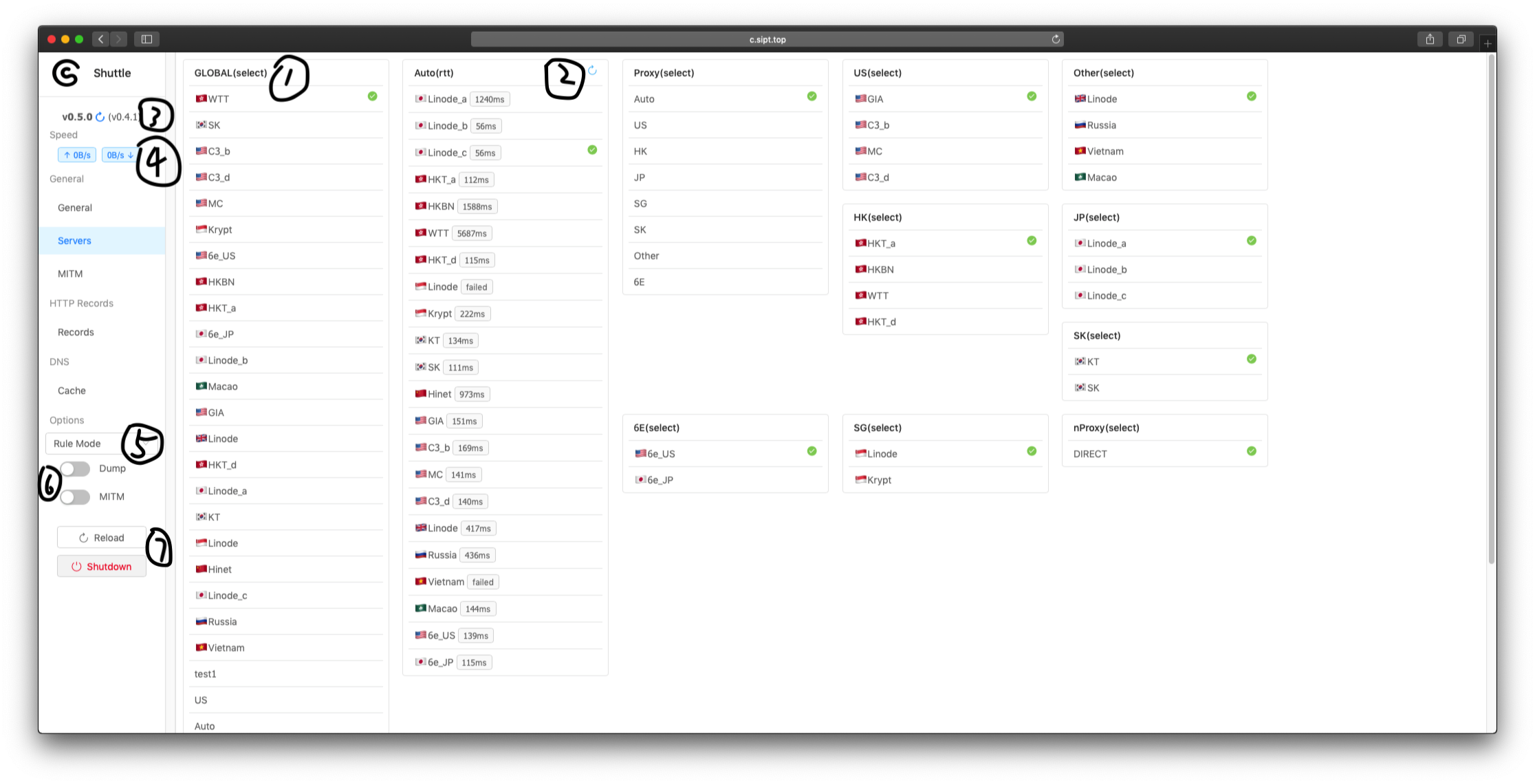
- GLOBAL group was created by Shuttle. It will be selected in "Remote Mode".
- Refresh RTT-Time.
- Check new.
- Up/Down speed.
- Outbound Mode: Rule Mode, Remote Mode, Direct Mode, Reject Mode.
- Dump: Capturing HTTP requests; MitM: Man-in-the-MiddleAttack.
- Reload the config file. Shutdown the Shuttle.
DNS Cache
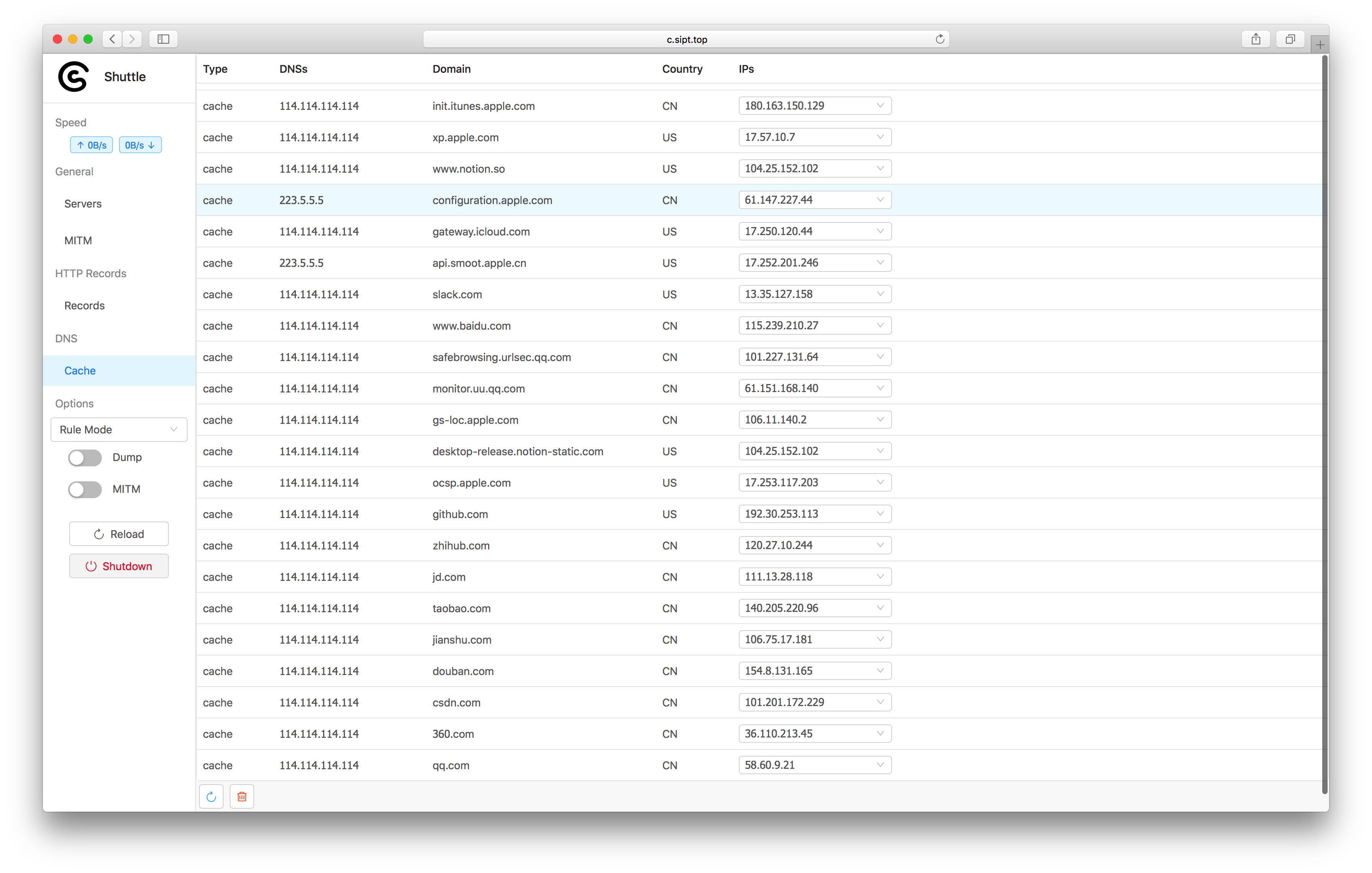 Check all DNS records The Refresh button and Clear button is on the left-hand corner. The Refresh button currently only support all records refresh.
Records
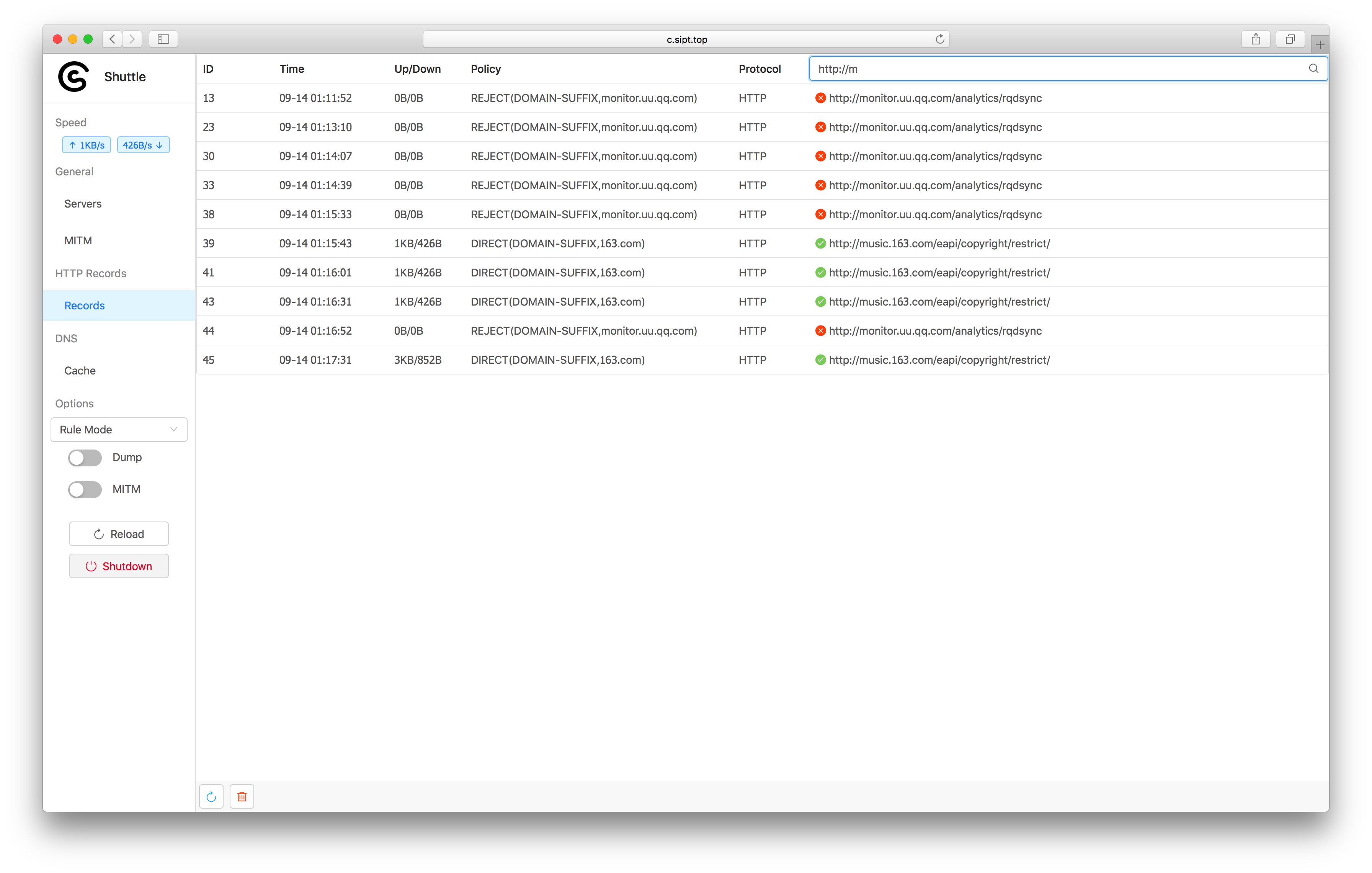 Check all request, and the corresponding rule. Currently, only the latest 500 entries will be stored, and keyword filter is supported
Traffic Capture
You can enable Dump for HTTP traffic capture. All the Dumped Data would show the DOWNLOAD icon the every records. You can click and see for more detail.
It's a little bit complicated for HTTPS traffic capture. You can follow the steps to try it out.
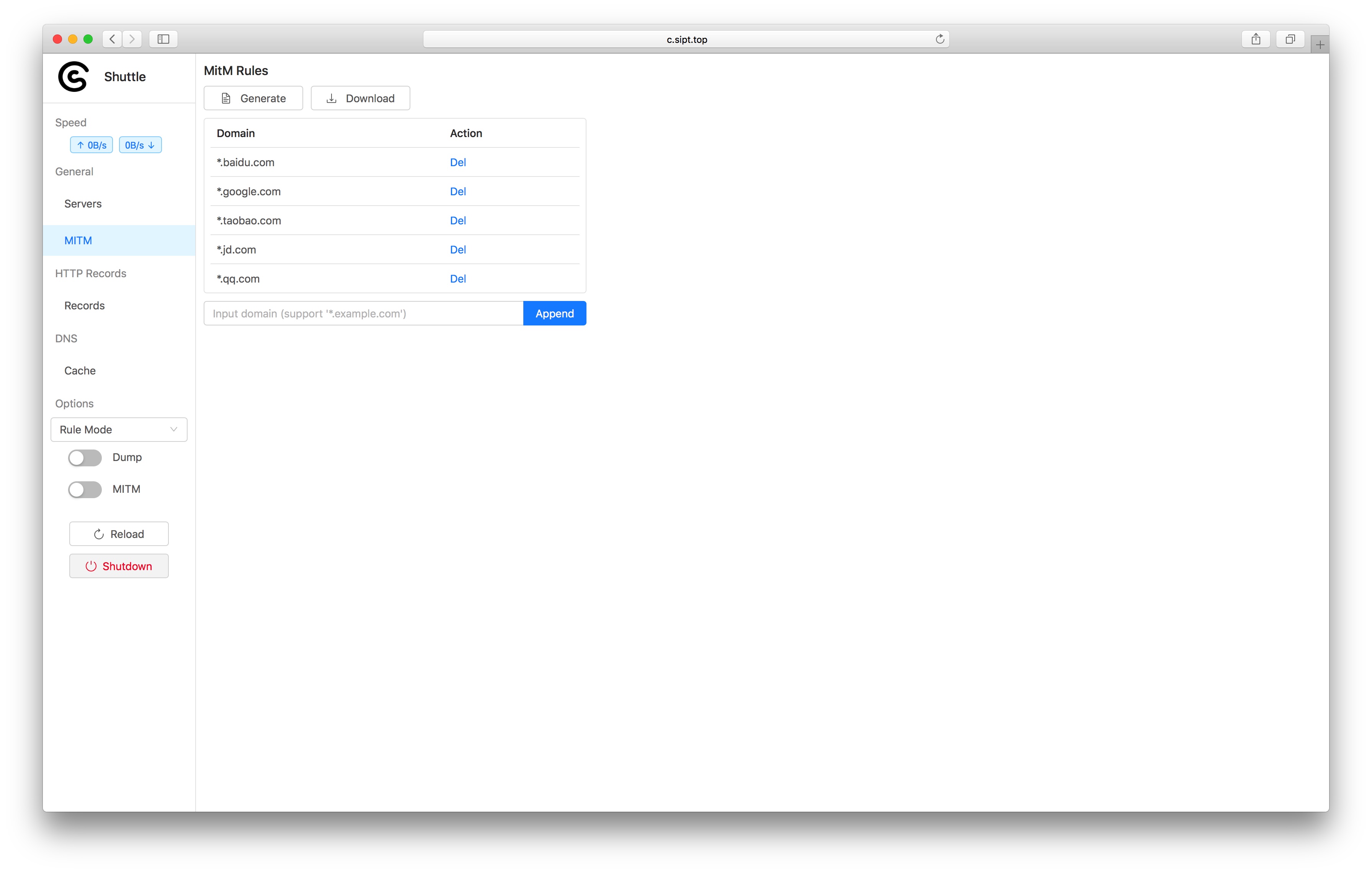
- Generate a certificate. A new CA would be generated and stored in the config file when you click the GENERATE button each time.
- Click DOWNLOAD button to download the CA.
- Add the CA to system and trust the CA.
- The table above will list all HTTPS traffic that could be captured based on rules. You can add yourt own rules. Shuttle will not capture the HTTPS traffic matched no rules..
- You should enable both Dump and MitM to make HTTPS traffic capture available.

Enter the file name in the input filed, then click download.
The dumped data just shows "The file is too large" instead of data detail for the better webpage performance when the file data size is over 2MB. You can download it for more details.
Build from source
go get -d github.com/sipt/shuttle
cd $GOPATH/src/github.com/sipt/shuttle/assets
go generate # package html and GeoLite2-Country.mmdb resources into assets/assets.go
cd $GOPATH/src/github.com/sipt/shuttle/cmd
go build -tags release


