
Pretty, minimal and fast ZSH prompt
Pure
Pretty, minimal and fast ZSH prompt
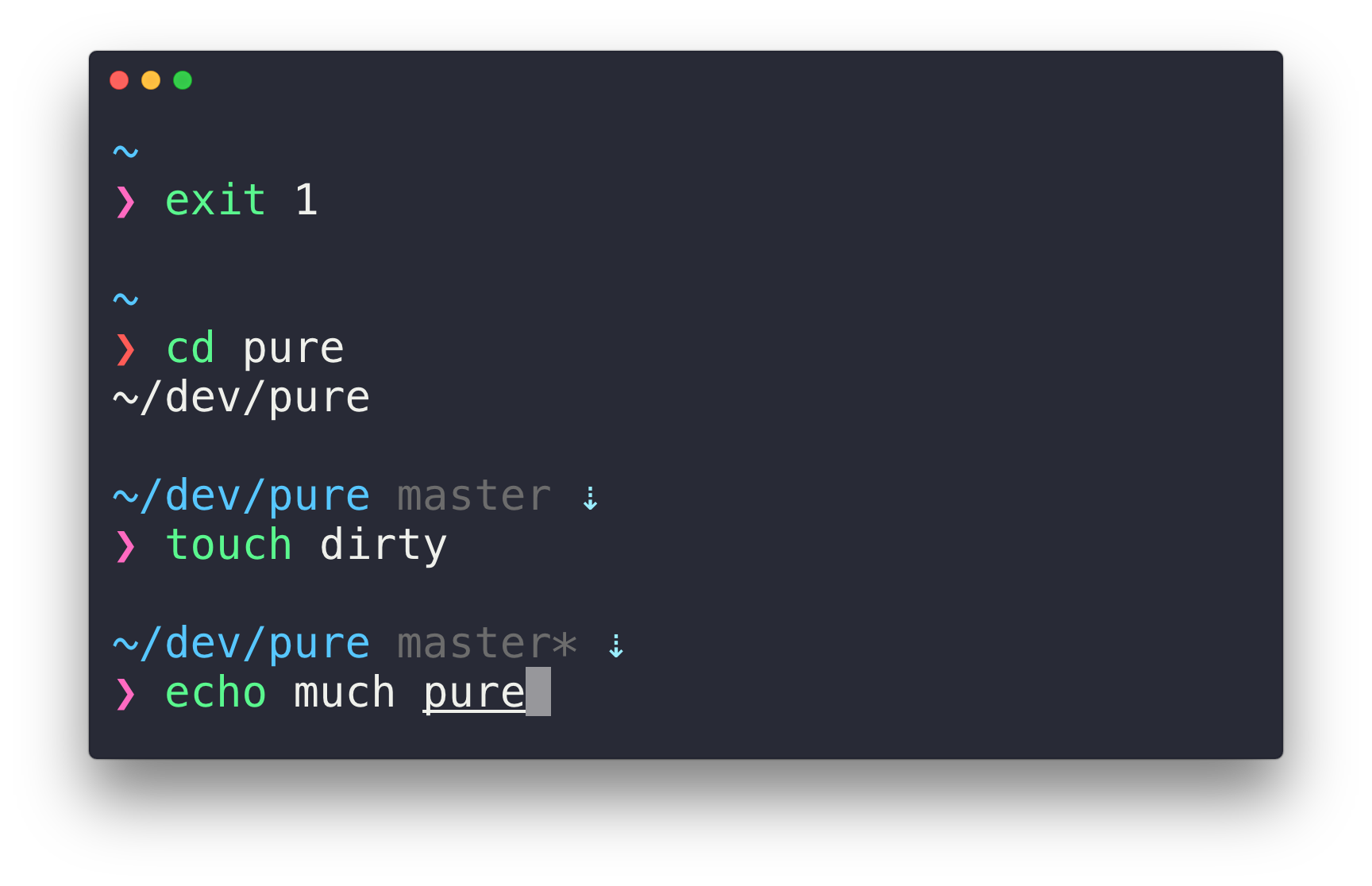
Overview
Most prompts are cluttered, ugly and slow. We wanted something visually pleasing that stayed out of our way.
Why?
- Comes with the perfect prompt character.
- Shows
gitbranch and whether it's dirty (with a*). - Indicates when you have unpushed/unpulled
gitcommits with up/down arrows. (Check is done asynchronously!) - Prompt character turns red if the last command didn't exit with
0. - Command execution time will be displayed if it exceeds the set threshold.
- Username and host only displayed when in an SSH session or a container.
- Shows the current path in the title and the current folder & command when a process is running.
- Support VI-mode indication by reverse prompt symbol (Zsh 5.3+).
- Makes an excellent starting point for your own custom prompt.
Install
Can be installed with npm (not yarn) or manually. Requires Git 2.15.2+ and ZSH 5.2+. Older versions of ZSH are known to work, but they are not recommended.
npm
npm install --global pure-promptThat's it. Skip to Getting started.
If prompt -l does not list pure, add this to your .zshrc before promptinit:
fpath+=("$(npm root -g)/pure-prompt")Homebrew
brew install pureIf you're not using ZSH from Homebrew (brew install zsh and $(brew --prefix)/bin/zsh), you must also add the site-functions to your fpath in $HOME/.zshrc:
fpath+=("$(brew --prefix)/share/zsh/site-functions")Manually
- Clone this repo somewhere. Here we'll use
$HOME/.zsh/pure.
mkdir -p "$HOME/.zsh"
git clone https://github.com/sindresorhus/pure.git "$HOME/.zsh/pure"- Add the path of the cloned repo to
$fpathin$HOME/.zshrc.
# .zshrc
fpath+=($HOME/.zsh/pure)
Getting started
Initialize the prompt system (if not so already) and choose pure:
# .zshrc
autoload -U promptinit; promptinit
prompt pure
Options
| Option | Description | Default value | | :------------------------------- | :--------------------------------------------------------------------------------------------- | :------------- | | PURECMDMAXEXECTIME | The max execution time of a process before its run time is shown when it exits. | 5 seconds | | PUREGITPULL | Prevents Pure from checking whether the current Git remote has been updated. | 1 | | PUREGITUNTRACKED_DIRTY | Do not include untracked files in dirtiness check. Mostly useful on large repos (like WebKit). | 1 | | PUREGITDELAYDIRTYCHECK | Time in seconds to delay git dirty checking when git status takes > 5 seconds. | 1800 seconds | | PUREPROMPTSYMBOL | Defines the prompt symbol. | ❯ | | PUREPROMPTVICMD_SYMBOL | Defines the prompt symbol used when the vicmd keymap is active (VI-mode). | ❮ | | PURESUSPENDEDJOBS_SYMBOL | Defines the symbol that indicates that jobs are running in the background. Set to empty to disable. | ✦ | | PUREGITDOWN_ARROW | Defines the git down arrow symbol. | ⇣ | | PUREGITUP_ARROW | Defines the git up arrow symbol. | ⇡ | | PUREGITSTASH_SYMBOL | Defines the git stash symbol. Set to empty to disable. | ≡ |
Zstyle options
Showing git stash status as part of the prompt is not activated by default. To activate this you'll need to opt in via zstyle:
zstyle :prompt:pure:git:stash show yes
You can set Pure to only git fetch the upstream branch of the current local branch. In some cases, this can result in faster updates for Git arrows, but for most users, it's better to leave this setting disabled. You can enable it with:
zstyle :prompt:pure:git:fetch only_upstream yes
Node.js version display shows the current major node version when inside a directory tree containing a package.json. It is not enabled by default. You can enable it with:
zstyle :prompt:pure:environment:node_version show yes
You can change the symbol shown before the Node.js version (default ⬢) with:
zstyle :prompt:pure:environment:node_version symbol ⬡
nix-shell integration adds the shell name to the prompt when used from within a nix shell. It is enabled by default, you can disable it with:
zstyle :prompt:pure:environment:nix-shell show no
Virtualenv integration shows the current Python virtualenv or Conda environment name. It is enabled by default, you can disable it with:
zstyle :prompt:pure:environment:virtualenv show no
Git integration is enabled by default, you can disable it with:
zstyle :prompt:pure:git show no
Detailed dirty indicators differentiate between unstaged (), staged (+), and untracked (?) changes instead of showing a single . It is not enabled by default. You can enable it with:
zstyle :prompt:pure:git:dirty detailed yes
Path separator dimming makes / characters in the path visually dimmer to help distinguish path components. It is not enabled by default. You can enable it with:
zstyle :prompt:pure:path:separator dim yes
Hostname display is enabled by default when in an SSH session or container. You can disable it while still showing the username with:
zstyle :prompt:pure:host show no
Automatic terminal title management can be disabled if you want to set your own tab or window titles:
zstyle :prompt:pure:title show no
Customization
Pure supports a hook function for adding custom content to the prompt. Define a function called promptpureprecustom in your .zshrc (after prompt pure) to set custom prefix and suffix segments on the preprompt line:
psvar[22]— Custom prefix, rendered before all built-in segments.psvar[23]— Custom suffix, rendered after all built-in segments.
precmd hook and read the cached value in promptpureprecustom.
# .zshrc
Cache expensive calls in precmd (runs once per command, not on async redraws).
mykubecontext=
my_precmd() {
	mykubecontext=$(kubectl config current-context 2>/dev/null)
}
add-zsh-hook precmd my_precmd
promptpureprecustom() { 	psvar[22]=$mykubecontext 	psvar[23]=$(date +%H:%M) }
The colors can be customized with zstyle:
zstyle :prompt:pure:custom:prefix color cyan
zstyle :prompt:pure:custom:suffix color yellow
Colors
As explained in ZSH's manual, color values can be:
- A decimal integer corresponding to the color index of your terminal. If your
$TERMisxterm-256color, see this chart. - The name of one of the following nine colors:
black,red,green,yellow,blue,magenta,cyan,white, anddefault(the terminal’s default foreground) #followed by an RGB triplet in hexadecimal format, for example#424242. Only if your terminal supports 24-bit colors (true color) or when thezsh/nearcolormodule is loaded.
zstyle with a pattern of the form :prompt:pure:$color_name and style color. The color names, their default, and what part they affect are: custom:prefix(242) - Custom prefix set viapromptpureprecustom.custom:suffix(242) - Custom suffix set viapromptpureprecustom.executiontime(yellow) - The execution time of the last command when exceedingPURECMDMAXEXEC_TIME.git:arrow(cyan) - ForPUREGITUPARROWandPUREGITDOWNARROW.git:stash(cyan) - ForPUREGITSTASH_SYMBOL.git:branch(242) - The name of the current branch when in a Git repository.git:branch:cached(red) - The name of the current branch when the data isn't fresh.git:action(yellow) - The current action in progress (cherry-pick, rebase, etc.) when in a Git repository.git:dirty(218) - The asterisk showing the branch is dirty.host(242) - The hostname when on a remote machine.node_version(green) - The current major Node.js version in directories withpackage.json.path(blue) - The current path, for example,PWD.prompt:error(red) - ThePUREPROMPTSYMBOLwhen the previous command has failed.prompt:success(magenta) - ThePUREPROMPTSYMBOLwhen the previous command has succeeded.prompt:continuation(242) - The color for showing the state of the parser in the continuation prompt (PS2). It's the pink part in this screenshot, it appears in the same spot asvirtualenv. You could for example matching both colors so that Pure has a uniform look.suspendedjobs(red) - ThePURESUSPENDEDJOBSSYMBOL.user(242) - The username when on remote machine.user:root(default) - The username when the user is root.virtualenv(242) - The name of the Pythonvirtualenvwhen in use.
┌──────────────────────────────────────────────────────────────────────── custom:prefix
│      ┌─────────────────────────────────────────────────────────────────── suspended_jobs
│      │ ┌───────────────────────────────────────────────────────────────── user
│      │ │      ┌────────────────────────────────────────────────────────── host
│      │ │      │           ┌────────────────────────────────────────────── path
│      │ │      │           │          ┌─────────────────────────────────── git:branch
│      │ │      │           │          │   ┌────────────────────────────── git:dirty
│      │ │      │           │          │   │ ┌──────────────────────────── git:action
│      │ │      │           │          │   │ │        ┌─────────────────── git:arrow
│      │ │      │           │          │   │ │        │ ┌───────────────── git:stash
│      │ │      │           │          │   │ │        │ │ ┌─────────────── node_version
│      │ │      │           │          │   │ │        │ │ │   ┌─────────── execution_time
│      │ │      │           │          │   │ │        │ │ │   │   ┌────── custom:suffix
│      │ │      │           │          │   │ │        │ │ │   │   │
prefix ✦ zaphod@heartofgold ~/dev/pure main* rebase-i ⇡ ≡ ⬢22 42s suffix
venv ❯
│    │
│    └───────────────────────────────────────────────────────────────────── prompt
└────────────────────────────────────────────────────────────────────────── virtualenv (or prompt:continuation)
Preview
Run promptpurepreview to display a sample prompt with all components rendered in their current colors. This is useful for testing color customizations.
RGB colors
There are two ways to use RGB colors with the hexadecimal format. The correct way is to use a terminal that support 24-bit colors and enable this feature as explained in the terminal's documentation.
If you can't use such terminal, the module zsh/nearcolor can be useful. It will map any hexadecimal color to the nearest color in the 88 or 256 color palettes of your terminal, but without using the first 16 colors, since their values can be modified by the user. Keep in mind that when using this module you won't be able to display true RGB colors. It only allows you to specify colors in a more convenient way. The following is an example on how to use this module:
# .zshrc
zmodload zsh/nearcolor
zstyle :prompt:pure:path color '#FF0000'
Example
# .zshrc
autoload -U promptinit; promptinit
optionally define some options
PURECMDMAXEXECTIME=10
change the path color
zstyle :prompt:pure:path color white
change the color for both prompt:success and prompt:error
zstyle ':prompt:pure:prompt:*' color cyan
turn on git stash status
zstyle :prompt:pure:git:stash show yes
prompt pure
Tips
In the screenshot you see Pure running in Hyper with the hyper-snazzy theme and Menlo font.
The Tomorrow Night Eighties theme with the Droid Sans Mono font (15pt) is also a nice combination.
Just make sure you have anti-aliasing enabled in your terminal.
To have commands colorized as seen in the screenshot, install zsh-syntax-highlighting.
AI coding agents
Most AI coding agents (Claude Code, Codex, …) run commands in a non-interactive shell where Pure's prompt never renders, so its git work never runs there anyway. Agents that render the prompt in an interactive terminal do run it, but you can skip it since git fetch can stall in a sandbox and no human sees the prompt. You can gate git integration on the agent marker environment variables in your .zshrc:
# Just an example. Add whichever markers apply to the agents you use.
Pull requests to expand this list will not be accepted.
if [[ -n $AIAGENT$CLAUDECODE$CURSORAGENT$GEMINI_CLI$OPENCODE ]]; then
	zstyle :prompt:pure:git show no
fi
Integration
oh-my-zsh
- Set
ZSH_THEME=""in your.zshrcto disable oh-my-zsh themes. - Follow the Pure Install instructions.
- Do not enable the following (incompatible) plugins:
vi-mode,virtualenv.
oh-my-zsh overrides the prompt so Pure must be activated after source $ZSH/oh-my-zsh.sh.
prezto
Pure is bundled with Prezto. No need to install it.
Add prompt pure to your ~/.zpreztorc.
zim
Add zmodule sindresorhus/pure --source async.zsh --source pure.zsh to your .zimrc and run zimfw install.
zplug
Update your .zshrc file with the following two lines:
zplug mafredri/zsh-async, from:github
zplug sindresorhus/pure, use:pure.zsh, from:github, as:theme
zinit
Update your .zshrc file with the following two lines (order matters):
zinit ice compile'(pure|async).zsh' pick'async.zsh' src'pure.zsh'
zinit light sindresorhus/pure
zi
Update your .zshrc file with the following line:
zi light-mode for @sindresorhus/pureSee the ZI wiki for more.
FAQ
Prompt is corrupted when using tab completion
If the prompt displays incorrectly during tab completion (ghost characters, misaligned cursor), your shell is likely missing a UTF-8 locale. Pure uses Unicode characters (like ❯) that require UTF-8 to calculate display width correctly. Add this to your .zshrc:
export LANG=en_US.UTF-8See FAQ Archive for previous FAQs.
Ports
- ZSH
- Bash
- Fish
- Rust
- Go
- PowerShell
Team
 |
|  ---|--- Sindre Sorhus | Mathias Fredriksson


