
Self-hosted AI workspace built around context management. Works solo, scales to teams.
🧶 loopat
Self-hosted AI workspace built around context management — works solo, scales to teams



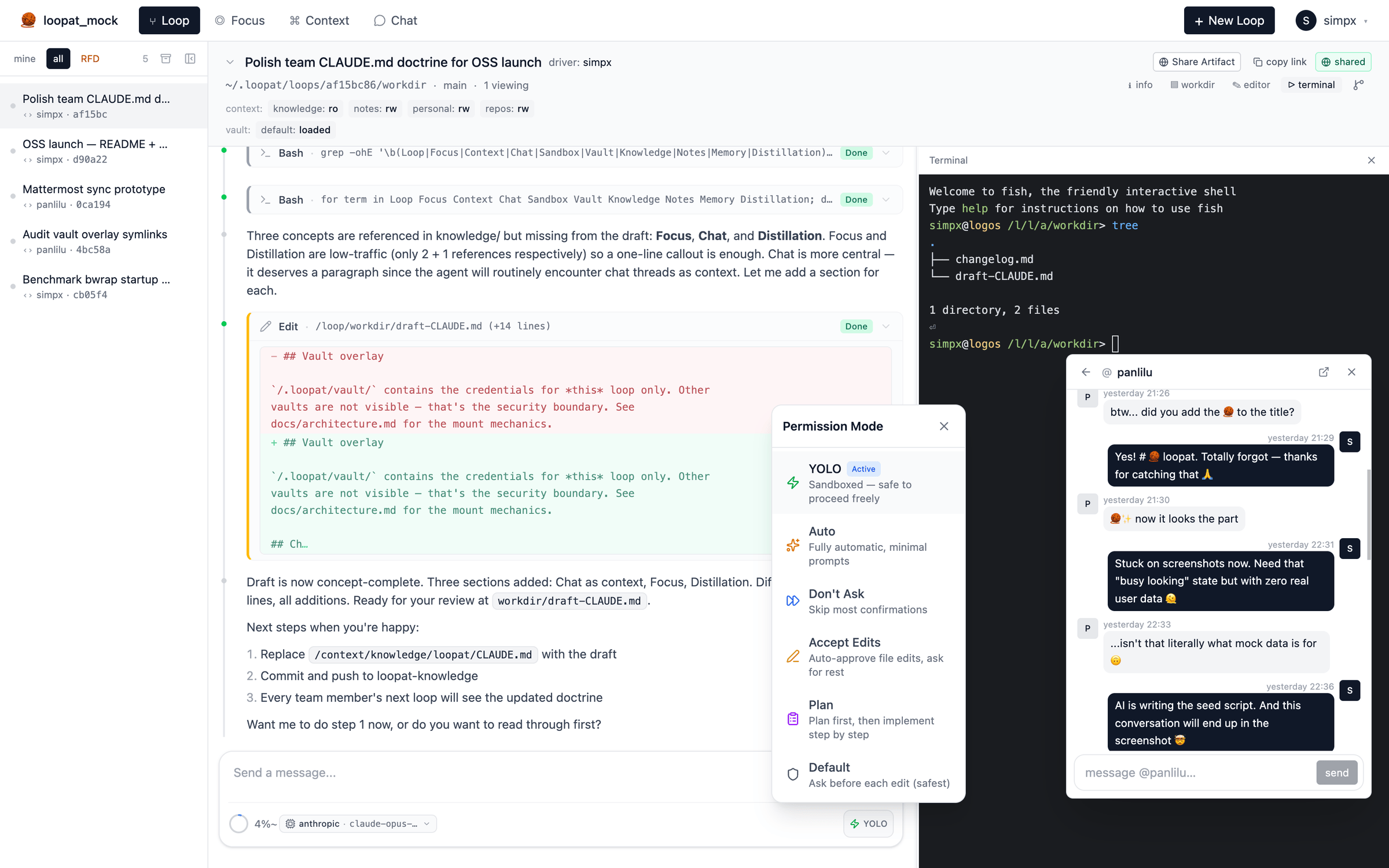
⭐ Star on GitHub · 🚀 Quick start · 📖 Architecture
When humans collaborate with AI, three things only humans can bring:
- Drive — pushing the work forward. AI has no desires, no
- Attention — what matters now, what to ignore. AI doesn't know
- Entropy reduction — turning noise into structured knowledge.
loopat is built around managing these three as first-class concepts: Loop (drive) · Focus (attention) · Context (entropy reduction). A fourth concept — Chat — coordinates the team on the sync axis.
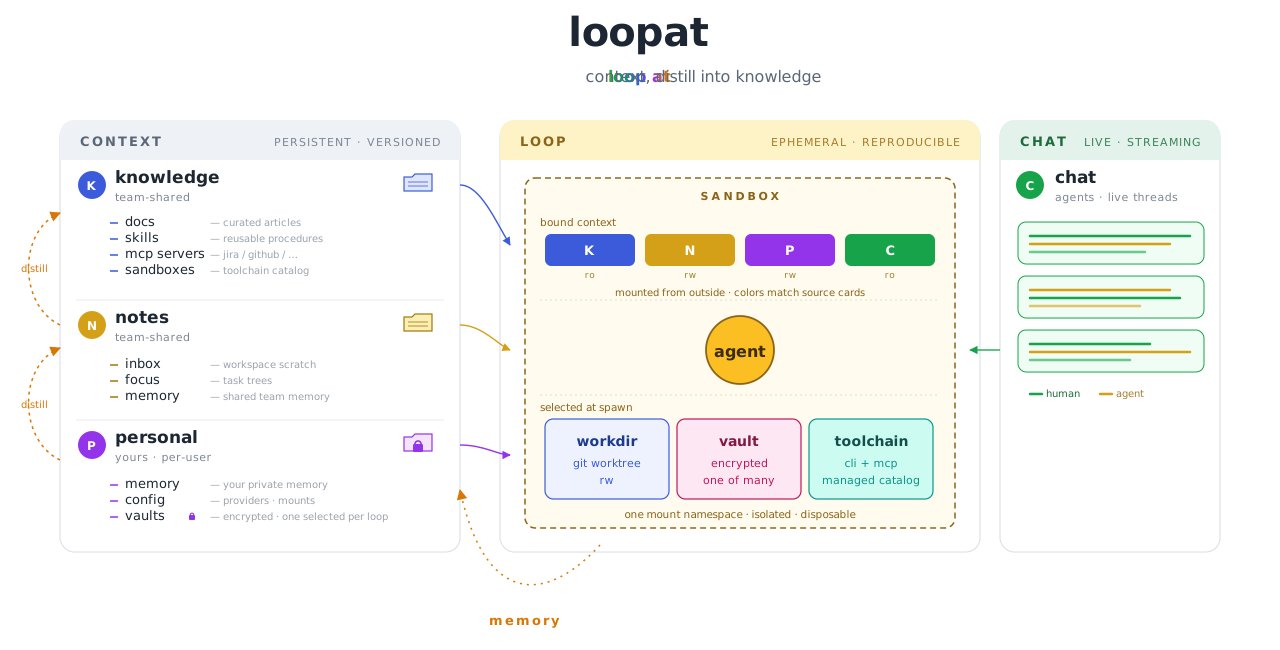
The agent itself is the [Claude Agent SDK][sdk]; what makes loopat distinct is the context architecture around it — how chat, code, memory, and knowledge interlock so context doesn't get lost across sessions or teammates.
[sdk]: https://github.com/anthropics/claude-agent-sdk
What makes loopat different
- End-to-end context management. Team chat (IM) threads, code
- Works solo, scales to teams. Same workspace whether you're
knowledge/ and notes/ git repos sync across
members, loops auto-commit their work, and observations promote
upward through a distillation pipeline. Most AI tools force you to
pick between solo CLI and team SaaS — loopat is one tool at any scale.
- Reproducible loops. Every loop runs in its own sandbox with a
- Self-hosted, data you own. All artifacts live in plain git
How loopat compares
| | Claude Code | Cursor | opencode | Codex | loopat | |---|---|---|---|---|---| | Form factor | CLI | IDE | TUI | Web (hosted) | Web (self-hosted) | | License | proprietary | proprietary | MIT | proprietary | Apache 2.0 | | Team IM integration | external (manual paste) | external (manual paste) | external (manual paste) | external (manual paste) | built-in, threads ingested into loop context | | Memory management | personal (CLAUDE.md) | personal (rules + memories) | personal (AGENTS.md) | none | personal + team-shared, with distillation pipeline | | Multi-user | single user | per-seat | single user | per-account | shared workspace | | Shared team knowledge | individual config | individual config | individual config | individual config | git-synced across team | | Per-session sandbox | process-level | process-level | process-level | OpenAI-managed | bwrap (default) · Docker (planned) | | Toolchain pinning | host runtime | host runtime | host runtime | fixed (hosted env) | per-loop versioned | | Per-task credential isolation | shared (env vars) | shared (subscription) | shared (env vars) | account-managed | per-loop vault overlay | | Data location | local files | cloud | local files | OpenAI servers | git repos you control | | Secrets storage | env vars (plaintext) | cloud-managed | env vars (plaintext) | platform-managed | git-crypt encrypted vault | | Agent engine | proprietary (Anthropic) | proprietary (multi-model) | pluggable | proprietary (OpenAI) | Claude Agent SDK |
Quick start
npx loopatOpen ~/.loopat/, prints a checklist, and prompts you to set your API key in ~/.loopat/config.json. Restart — done.
Needs: [Node][node] to launch — the [Bun][bun] runtime is fetched
automatically, so you don't install it yourself. The terminal / chat
sandbox additionally needs a Linux host with [podman][podman]. Change
the port with PORT=8080 npx loopat. macOS / Windows is via Docker
(see below).
From source (for development)
git clone https://github.com/simpx/loopat.git
cd loopat && bun install
bun run dev
Needs [bun][bun] + [bubblewrap][bwrap] + [mise][mise] on the host. For
team setups with shared knowledge/notes git repos and full bootstrap
details, see the installation guide.
Setup guides
Loopat splits configuration along role lines — read whichever applies:
- Admin setup — provision the workspace:
- User setup — join an existing workspace:
[bwrap]: https://github.com/containers/bubblewrap [mise]: https://mise.jdx.dev/ [bun]: https://bun.sh/ [node]: https://nodejs.org/ [podman]: https://podman.io/
Deployment
Docker (recommended)
Pull the prebuilt image from GHCR:
docker run -d --privileged -p 20001:10001 ghcr.io/simpx/loopat:latestOr, to build from source and persist the workspace in a named volume:
docker compose up -dOpen docker-compose.yml). Workspace persists in the loopat-data volume. Needs SYS_ADMIN + unconfined AppArmor for bwrap mount namespaces.
From source (Linux)
bun run build                     # installs deps + builds frontend → web/dist/
PORT=10001 bun run server/src/index.ts
Single Hono process serves API + static SPA + websocket on one port. Put a reverse proxy in front and proxy /api + /ws to the server.
Documentation
- Admin setup — workspace config, knowledge /
- User setup — personal repo, providers,
- Installation guide — host install, system deps,
- Architecture — the read/write path, layered
- Context flow — the horizontal working model: a
main, and loops exchange it over
two edges — pull and promote.
- Identity — who a loop acts as: the credential chain
- .claude composition — how team / profile /
.claude/ tiers merge into the loop runtime, and what
you can put in each tier.
- Sandbox — bwrap mount mechanics, three-tier mount
- Troubleshooting — chat won't start, banner
Contributing
Issues and PRs welcome. Before opening a non-trivial PR, please skim docs/architecture.md so the change lands in the right layer (sandbox / vault / loop / chat).
Contributors are asked to sign the Contributor License Agreement on their first PR — the [CLA Assistant][cla-assistant] bot prompts you with a one-click link. This keeps future licensing options open (e.g. moving to a business-friendly license) without having to re-collect permission from every contributor.
[cla-assistant]: https://cla-assistant.io/
Acknowledgments
loopat is built on top of:
- [Claude Agent SDK][sdk] — the agent runtime
- assistant-ui — React
- Hono — the HTTP + WebSocket server
- bubblewrap — sandbox mount
- mise — per-loop toolchain installs
License
Apache License 2.0. See NOTICE for required attributions and CLA.md for contribution terms.


