
Monkey365 is an open-source security assessment tool for Microsoft 365, Azure, and Microsoft Entra ID. It helps security professionals identify misconfigurations, review cloud security posture, and evaluate environments against industry security best practices and compliance standards.









Monkey365 is an open-source security assessment framework for Microsoft 365, Azure, and Microsoft Entra ID. It helps security professionals, consultants, administrators, and incident responders identify misconfigurations, review cloud security posture, and evaluate environments against industry security best practices and compliance standards.
Monkey365 simplifies Microsoft cloud security assessments without requiring users to learn complex APIs, install multiple Microsoft modules, or navigate multiple administration portals.
Features
- Self-contained PowerShell module with bundled dependencies
- No dependency on external Microsoft modules or tools, including ExchangeOnlineManagement, Az PowerShell / Azure CLI, or the Microsoft Graph PowerShell SDK
- Security posture assessment for:
- Coverage for major Microsoft 365 workloads including:
- Supports multiple authentication methods including:
- CIS benchmark and compliance checks
- Structured HTML, JSON, and CSV reporting for automation and analysis workflows
- Support for Azure Public, China, and Government cloud environments
- Collector-based and extensible architecture
- Easy deployment across workstations, jump boxes, automation pipelines, and assessment environments
Get Started
Install the Monkey365 PowerShell module and start assessing your environment.
Zero configuration and no external Microsoft modules are required.
Install-Module -Name monkey365 -Scope CurrentUser
Import-Module monkey365
$options = @{     Instance        = 'Microsoft365'     Collect         = @('ExchangeOnline', 'SharePointOnline')     PromptBehavior  = 'SelectAccount'     IncludeEntraID  = $true     ExportTo        = 'HTML' }
Invoke-Monkey365 @options
[!NOTE]
Monkey365 includes bundled dependencies and does not require additional Microsoft PowerShell modules.
Introduction
Monkey365 is a collector-based PowerShell security assessment framework distributed as a self-contained module that helps assess the security posture of cloud environments. It scans Microsoft 365, Azure, and Microsoft Entra ID for potential security issues, configuration weaknesses, and deviations from security best practices.
The framework provides recommendations to help organizations strengthen cloud security posture and improve compliance readiness.
Authentication
Monkey365 supports multiple authentication methods for both interactive and automated assessments.
Supported authentication workflows include:
- Interactive authentication
- MFA-enabled authentication
- Service principals
- Certificate-based authentication
- Direct access token authentication
- Authentication overview
- Access token authentication
Basic Usage
Display available command options:
Get-Help Invoke-Monkey365Display usage examples:
Get-Help Invoke-Monkey365 -ExamplesDisplay detailed help information:
Get-Help Invoke-Monkey365 -DetailedExample assessment:
$options = @{
    Instance        = 'Microsoft365'
    Collect         = @('ExchangeOnline','MicrosoftFabric','MicrosoftTeams','SharePointOnline')
    PromptBehavior  = 'SelectAccount'
    IncludeEntraID  = $true
    ExportTo        = 'HTML'
}
Invoke-Monkey365 @options
If credentials are not supplied, Monkey365 prompts for authentication.
Running Monkey365 in National or Government Cloud Environments
Use the -Environment parameter with Invoke-Monkey365 to specify the target cloud environment.
Supported environments:
AzurePublic(default)AzureChinaAzureUSGovernment
$options = @{
    Environment     = 'AzureUSGovernment'
    Instance        = 'Microsoft365'
    Collect         = @('ExchangeOnline', 'SharePointOnline')
    PromptBehavior  = 'SelectAccount'
    IncludeEntraID  = $true
    ExportTo        = @('JSON', 'HTML')
}
Invoke-Monkey365 @options
Regulatory Compliance Checks
Monkey365 includes hundreds of built-in checks aligned with industry security best practices and compliance frameworks for Microsoft cloud environments.
The framework helps organizations:
- Identify security gaps
- Review cloud configuration posture
- Validate tenant hardening
- Analyze identity and access controls
- Assess compliance readiness
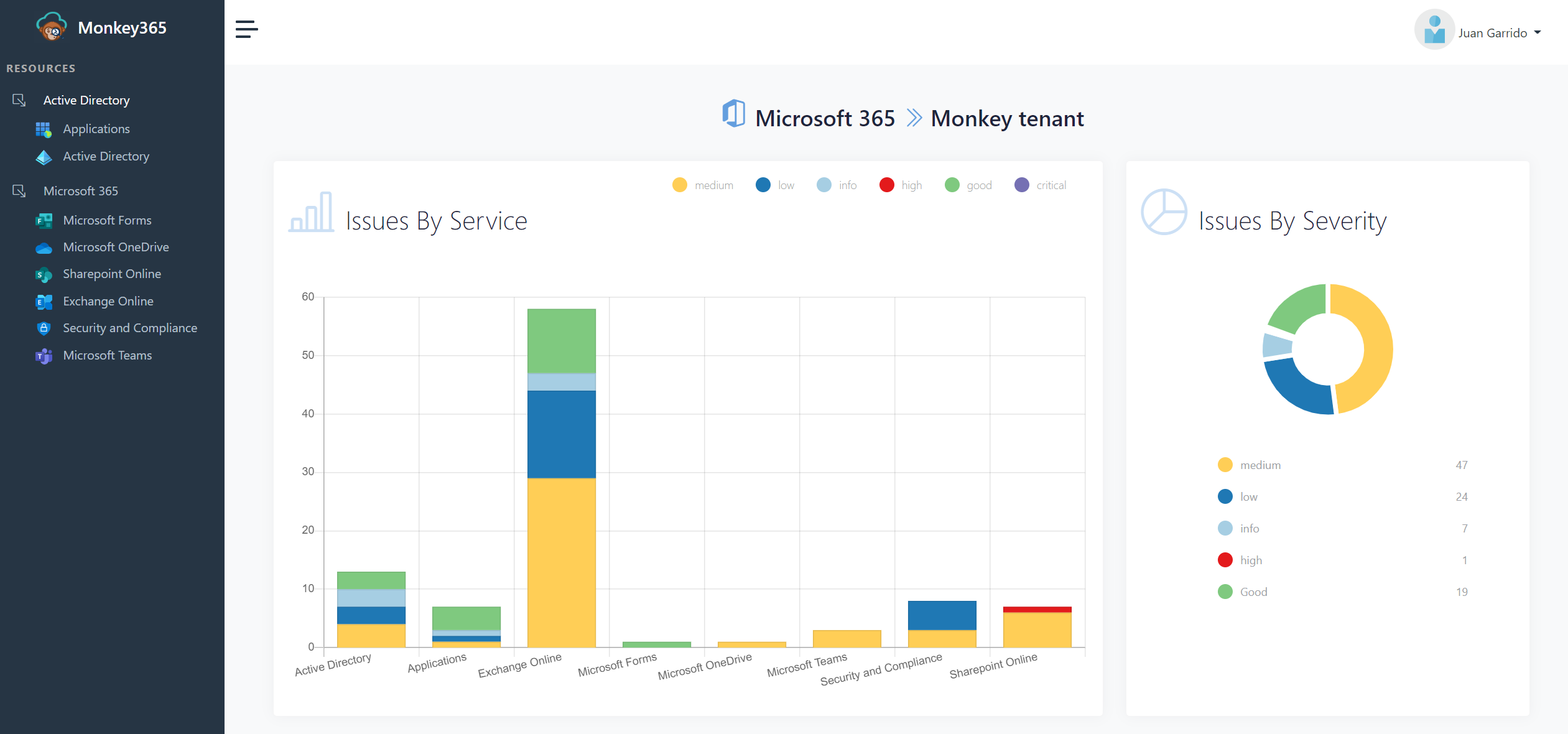
Supported Standards
By default, the HTML report displays CIS (Center for Internet Security) benchmark mappings for Microsoft Azure and Microsoft 365 environments.
Currently supported standards include:
- CIS Microsoft Azure Foundations Benchmark v3.0.0
- CIS Microsoft Azure Database Services Benchmark v2.0.0
- CIS Microsoft Azure Compute Services Benchmark v2.0.0
- CIS Microsoft 365 Foundations Benchmark v3.0.0
- CIS Microsoft 365 Foundations Benchmark v4.0.0
- CIS Microsoft 365 Foundations Benchmark v5.0.0
- NIST
- HIPAA
- GDPR
- PCI-DSS
Documentation
Detailed installation guides, advanced usage examples, configuration references, and additional documentation are available at:
https://silverhack.github.io/monkey365/
[!TIP]
Give us a Star! If you find Monkey365 useful, please consider starring the repository on GitHub. It helps improve visibility and supports ongoing development.
Star History


