
🚀 A sleek, cross-platform cryptocurrency monitoring app with Fluent Design. Track real-time prices, visualize trends with mini charts, and stay informed with powerful alerts.
Last updated Jul 9, 2026
29
Stars
4
Forks
2
Issues
+2
Stars/day
Attention Score
59
Topics
Language breakdown
No language data available.
▸ Files
click to expand
README
Crypto Monitor


 A modern, elegant, and cross-platform cryptocurrency price monitor built with Python and PyQt6, featuring a stunning Fluent Design interface.
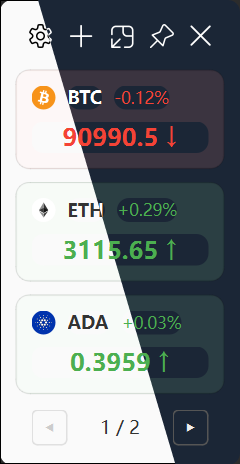
Note: This application has only been tested on Windows. MacOS and Linux compatibility hasn't been verified yet. We welcome your feedback and testing on these platforms!
Features
- Fluent Design UI: A beautiful, modern interface with Acrylic effects, supporting both Light and Dark themes.
- Real-time Monitoring: Live price updates from OKX/Binance via WebSocket connection.
- DEX Token Support: Monitor on-chain tokens from decentralized exchanges across multiple chains (Solana, Ethereum, BSC, etc.) via DexScreener.
- Advanced Alert System: Powerful price alert features with native system notifications and optional sounds, including:
- Mini Chart: Quick-view chart for monitoring price changes at a glance.
- Customization:
Usage
- Installing the App:
uv run main.py- Managing Pairs:
- Click
+to add a new trading pair (e.g.,BTC-USDT).
- Right-click a card to access the context menu:
- Double-click a card to open the trading page in your browser.
- Pin to Top:
- Click the Pin icon (Pin) to pin/unpin the window to the top of the screen.
- Settings:
- Click the Settings icon (Gear) to configure.
Technology Stack
- Python 3.10+
- PyQt6: Cross-platform GUI toolkit.
- QFluentWidgets: Modern Fluent Design components for PyQt.
Credits
- QFluentWidgets for the amazing UI components.
- Data Providers:


