
Chepy is a python lib/cli equivalent of the awesome CyberChef tool.







Chepy

Chepy is a python library with a handy cli that is aimed to mirror some of the capabilities of CyberChef. A reasonable amount of effort was put behind Chepy to make it compatible to the various functionalities that CyberChef offers, all in a pure Pythonic manner. There are some key advantages and disadvantages that Chepy has over Cyberchef. The Cyberchef concept of stacking_ different modules is kept alive in Chepy.
There is still a long way to go for Chepy as it does not offer every single ability of Cyberchef.
Feel free to give the project a ⭐️!
Docs
Refer to the docs for full usage informationExample
For all usage and examples, see the docs.Chepy has a stacking mechanism similar to Cyberchef. For example, this in Cyberchef:
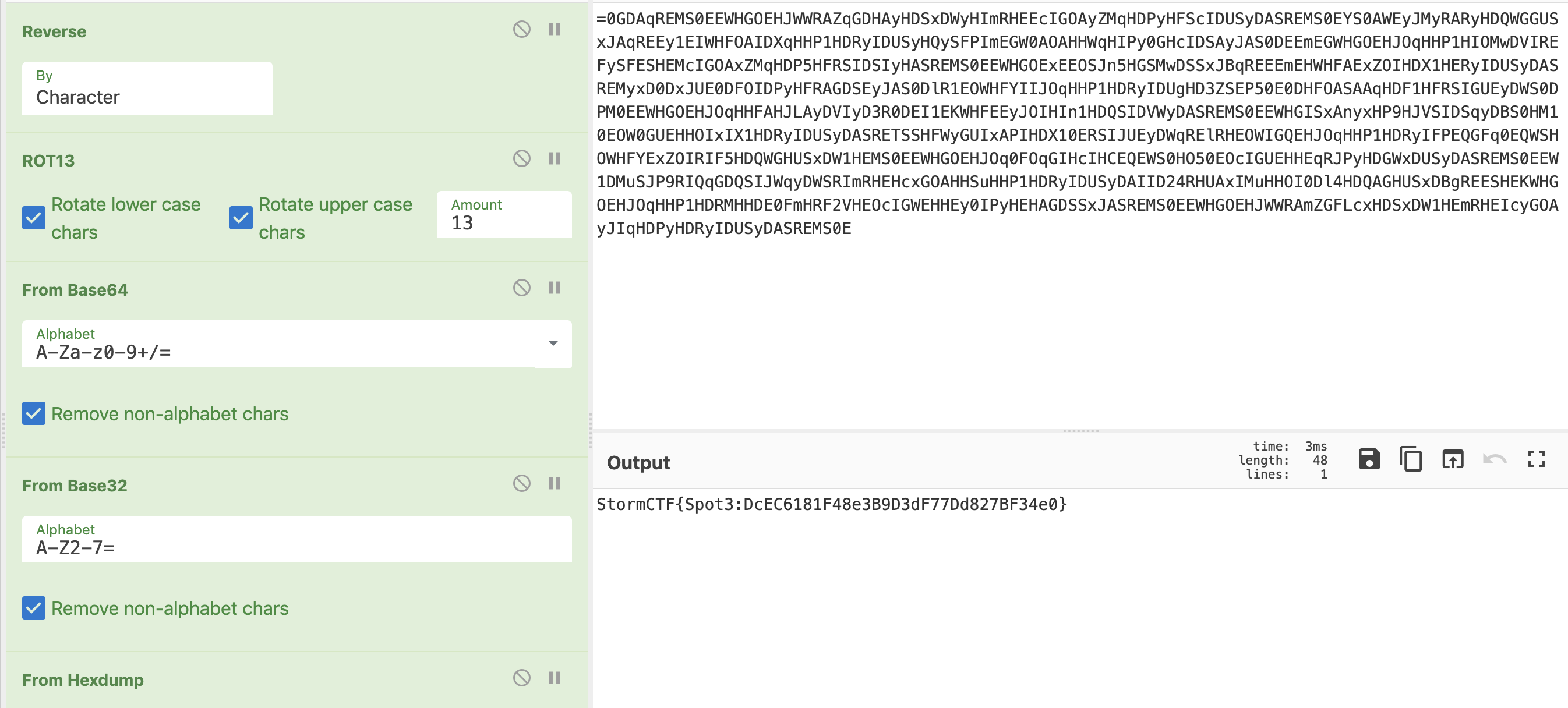
This is equivalent to
from chepy import Chepy
file_path = "/tmp/demo/encoding"
print(     Chepy(file_path)     .load_file()     .reverse()     .rot_13()     .from_base64()     .from_base32()     .hexdumptostr()     .o )
Chepy vs Cyberchef
Advantages
- Chepy is pure python with a supporting and accessible python api
- Chepy has a CLI
- Chepy CLI has full autocompletion.
- Supports pe, elf, and other various file format specific parsing.
- Extendable via plugins
- Infinitely scalable as it can leverage the full Python library.
- Chepy can interface with the full Cyberchef web app to a certain degree. It is easy to move from Chepy to Cyberchef if need be.
- The Chepy python library is significantly faster than the Cyberchef Node library.
- Works with HTTP/S requests without CORS issues.
magicsupport via the Chepy ML plugin.
Disadvantages
- Chepy does not offer every single thing that Cyberchef does
Installation
Chepy can be installed in a few ways.Pypi
pip3 install chepy
optionally with extra requirements
pip3 install chepy[extras]
Git
git clone --recursive https://github.com/securisec/chepy.git
cd chepy
pip3 install -e .
I use -e here so that if I update later with git pull, I dont have it install it again (unless dependencies have changed)
Standalone binary
One can build Chepy to be a standalone binary also. This includes packaging all the dependencies together.git clone https://github.com/securisec/chepy.git
cd chepy
pip install .
pip install pyinstaller
pyinstaller cli.py --name chepy --onefilePlugins
Check here for plugins docsUsed by
Remnux linux.. toctree::
:maxdepth: 3
:caption: Contents:
usage.md examples.md cli.rst chepy.md core.md modules.rst extras.rst plugins.md pullrequest.md config.md faq.md
Indices and tables ==================
- :ref:
genindex
- :ref:
modindex
- :ref:
search


