
A basic tool to check security headers of a website
shcheck - Security Header Check



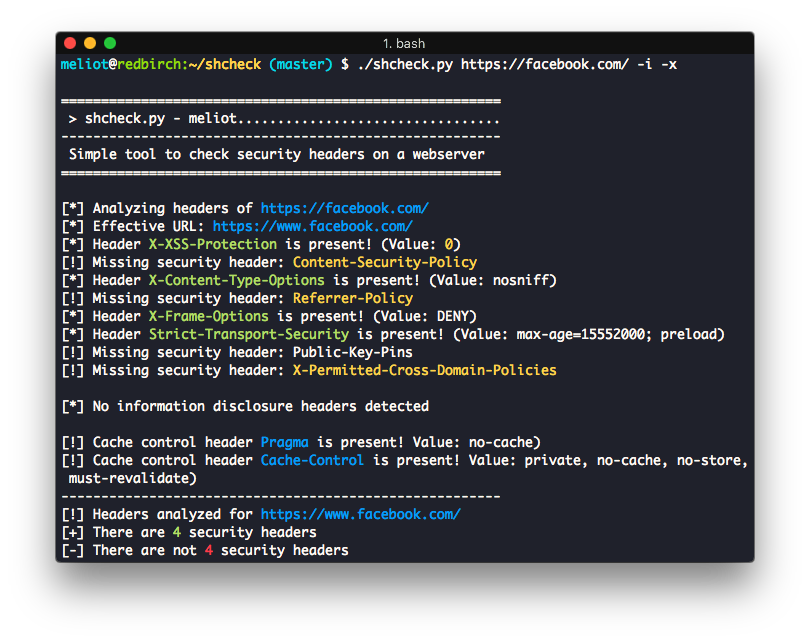
Check security headers on a target website
I did this tool to help me to check which security headers are enabled on certain websites.
The tool is very simple and it's the result of few minutes of coding.
It just check headers and print a report about which are enabled and which not
I think there is a lot to improve, and I will be grateful if somebody wants to help
How to run:
Pypi
pip3 install shcheck
shcheck.py https://insecurity.blog
Docker
First build your docker container using something like this:docker build -t shcheck .
Then simply run your docker container using something like this where you specify which website you want to check headers on:
docker run -it --rm shcheck https://insecurity.blog
From source
git clone https://github.com/santoru/shcheck && cd shcheck
./shcheck.py https://insecurity.blog
Standalone script
If you want to run shcheck as a standalone script, just grab theshcheck.py script from the shcheck module/folder and copy it around.
Usage
Usage: ./shcheck.py [options] <target>
Options:   -h, --help            show this help message and exit   -p PORT, --port=PORT  Set a custom port to connect to   -c COOKIESTRING, --cookie=COOKIESTRING                         Set cookies for the request   -a HEADERSTRING, --add-header=HEADERSTRING                         Add headers for the request e.g. 'Header: value'   -d, --disable-ssl-check                         Disable SSL/TLS certificate validation   -g, --use-get-method  Use GET method instead HEAD method   -j, --json-output     Print the output in JSON format   -i, --information     Display information headers   -x, --caching         Display caching headers   -k, --deprecated      Display deprecated headers   --no-follow           Do not follow HTTP redirects   --proxy=PROXY_URL     Set a proxy (Ex: http://127.0.0.1:8080)   --hfile=PATHTOFILE  Load a list of hosts from a flat file   --colours=COLOURS     Set up a colour profile [dark/light/none]   --colors=COLOURS      Alias for colours for US English


