
Rapidly apply hundreds of security controls in Azure
Azure Guardrails
Azure Guardrails allows you to rapidly cherry-pick cloud security guardrails by generating Terraform files that create Azure Policy Initiatives.



Table of contents
- Example: No Parameters - Example: Single Service - Example: Parameters - Setup - Other tasksOverview
Azure Policies - similar to AWS Service Control Policies (SCPs) - allows Azure customers to enforce organizational standards and enforce security policies at scale. You can use Azure Policies to evaluate the overall state of your environment, and drill down to the security status per resource and per policy. For example, you can prevent users from creating any unencrypted resources or security group rules that allow SSH/RDP Access to 0.0.0.0/0.
Azure provides 400+ built-in security policies. This presents an incredible opportunity for customers who want to enforce preventative security guardrails from the start. However, deciding which of the 400+ built-in policies you want to enforce, and which stages you want to roll them out in can be a bit intimidating at the start.
To help maximize coverage and ease the rollout process, I created this tool so that you can:
- Cherry-pick and bulk-select the security policies you want according to your specific criteria
- Enforce low-friction policies within minutes
- Easily roll back policies that you don't want
Cheatsheet
Quick start
# Install Terraform (prerequisite)
brew install tfenv
tfenv install 0.12.31
Install via pip
pip3 install cloud-guardrails --user
Generate Terraform to create security guardrails (audit mode only)
cloud-guardrails generate-terraform --no-params --subscription example
Generate Terraform to prevent insecure resources from being created (deny mode)
cloud-guardrails generate-terraform --no-params --subscription example --enforce
Log into Azure and set your subscription
az login
az account set --subscription example
Apply the policies
terraform init
terraform plan
terraform apply -auto-approve
Writing Policies
# No Parameters
cloud-guardrails generate-terraform --no-params --subscription example
Optional Parameters (i.e., all the policies have default parameter values)
cloud-guardrails generate-terraform --params-optional --subscription example
Required Parameters
cloud-guardrails generate-terraform --params-required \
    --service Kubernetes \
    --subscription example
Create Config file
cloud-guardrails create-config-file --output config.yml
Create Parameters file
cloud-guardrails create-parameters-file --output parameters.yml
Querying Policy Data
# list-services: List all the services supported by Azure built-in Policies
cloud-guardrails list-services
list-policies: List all the existing built-in Azure Policies
cloud-guardrails list-policies --service "Kubernetes" --all-policies
cloud-guardrails list-policies --service "Kubernetes" --no-params
cloud-guardrails list-policies --service "Kubernetes" --audit-only
describe-policy: Describe a specific policy based on display name or the short policy ID
cloud-guardrails describe-policy --id 7c1b1214-f927-48bf-8882-84f0af6588b1
cloud-guardrails describe-policy --name "Storage accounts should use customer-managed key for encryption"
Installation
Option 1: Homebrew
brew tap salesforce/cloud-guardrails https://github.com/salesforce/cloud-guardrails
brew install cloud-guardrails
Option 2: Pip3
pip3 install --user cloud-guardrailsTerraform
- Install Terraform if you haven't already. I recommend using tfenv, a Terraform version manager:
brew install tfenv
tfenv install 0.12.31
Now you can follow the rest of the tutorial.
Tutorial
Example: No Parameters
- First, log into Azure and set your subscription
az login
az account set --subscription my-subscription- Then generate the Terraform files:
cloud-guardrails generate-terraform --no-params \
--subscription example- Navigate to the Terraform directory and apply the policies:
cd examples/terraform-demo/
terraform init
terraform plan
terraform apply -auto-approve
The output will look like this:
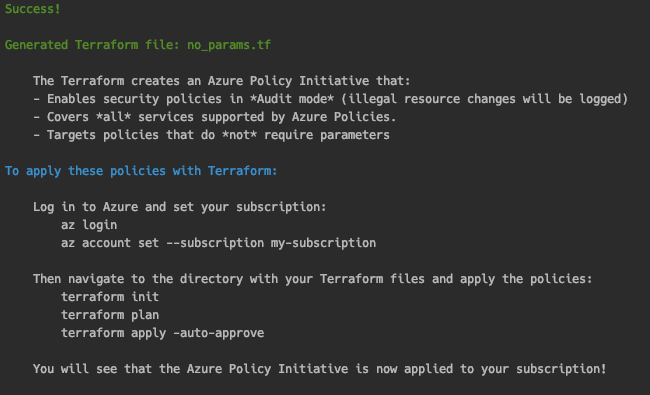
It will generate a file called noparams.tf. The file contents will look like this: examples/terraform-demo-no-params/main.tf.
Example: Single Service
You can also generate policies for a single service. Consider the example below where we generate Terraform for Key Vault only:
cloud-guardrails generate-terraform --no-params \
    --service "Key Vault" \
--subscription example] } locals { noparamspolicy_definitions = flatten([tolist([ for definition in data.azurermpolicydefinition.no_params.*.id : map("policyDefinitionId", definition) ]) ]) } locals { noparamsscope = local.managementgroupnoparams != "" ? data.azurermmanagementgroup.noparams[0].id : element(data.azurermsubscriptions.noparams[0].subscriptions.*.id, 0) } output "noparamsscope" { value = local.noparamsscope description = "The target scope - either the management group or subscription, depending on which parameters were supplied" } output "noparamspolicysetdefinition_id" { value = azurermpolicysetdefinition.noparams.id description = "The ID of the Policy Set Definition." } output "noparamscountofpolicies_applied" { description = "The number of Policies applied as part of the Policy Initiative" value = length(local.policyidsno_params) }Click to expand!
locals {
namenoparams = "exampleNPAudit"
subscriptionnameno_params = "example"
managementgroupno_params = ""
enforcementmodeno_params = false
policyidsno_params = [
# -----------------------------------------------------------------------------------------------------------------
# Key Vault
# -----------------------------------------------------------------------------------------------------------------
"c39ba22d-4428-4149-b981-70acb31fc383", # Azure Key Vault Managed HSM should have purge protection enabled
"0b60c0b2-2dc2-4e1c-b5c9-abbed971de53", # Key vaults should have purge protection enabled
"1e66c121-a66a-4b1f-9b83-0fd99bf0fc2d", # Key vaults should have soft delete enabled
"55615ac9-af46-4a59-874e-391cc3dfb490", # Firewall should be enabled on Key Vault
"152b15f7-8e1f-4c1f-ab71-8c010ba5dbc0", # Key Vault keys should have an expiration date
"98728c90-32c7-4049-8429-847dc0f4fe37", # Key Vault secrets should have an expiration date
"587c79fe-dd04-4a5e-9d0b-f89598c7261b", # Keys should be backed by a hardware security module (HSM)
"5f0bc445-3935-4915-9981-011aa2b46147", # Private endpoint should be configured for Key Vault
"75262d3e-ba4a-4f43-85f8-9f72c090e5e3", # Secrets should have content type set
---------------------------------------------------------------------------------------------------------------------
Azure Policy name lookups:
Because the policies are built-in, we can just look up their IDs by their names.
---------------------------------------------------------------------------------------------------------------------
data "azurermpolicydefinition" "no_params" {
count = length(local.policyidsno_params)
name = element(local.policyidsno_params, count.index)
}
---------------------------------------------------------------------------------------------------------------------
Conditional data lookups: If the user supplies management group, look up the ID of the management group
---------------------------------------------------------------------------------------------------------------------
data "azurermmanagementgroup" "no_params" {
count = local.managementgroupno_params != "" ? 1 : 0
displayname = local.managementgroupnoparams
}
If the user supplies subscription, look up the ID of the subscription
data "azurermsubscriptions" "noparams" {
count = local.subscriptionnameno_params != "" ? 1 : 0
displaynamecontains = local.subscriptionnameno_params
}
---------------------------------------------------------------------------------------------------------------------
Policy Initiative
---------------------------------------------------------------------------------------------------------------------
resource "azurermpolicysetdefinition" "noparams" {
name = local.namenoparams
policy_type = "Custom"
displayname = local.nameno_params
description = local.namenoparams
managementgroupname = local.managementgroupnoparams == "" ? null : local.managementgroupnoparams
policydefinitions = tostring(jsonencode(local.noparamspolicydefinitions))
metadata = tostring(jsonencode({
category = local.namenoparams
}))
}
---------------------------------------------------------------------------------------------------------------------
Azure Policy Assignments
Apply the Policy Initiative to the specified scope
---------------------------------------------------------------------------------------------------------------------
resource "azurermpolicyassignment" "no_params" {
name = local.namenoparams
policydefinitionid = azurermpolicysetdefinition.noparams.id
scope = local.noparamsscope
enforcementmode = local.enforcementmodenoparams
}
---------------------------------------------------------------------------------------------------------------------
Outputs
---------------------------------------------------------------------------------------------------------------------
output "noparamspolicyassignmentids" {
value = azurermpolicyassignment.no_params.id
description = "The IDs of the Policy Assignments."
}
Example: Parameters
Background and Motivation
Azure Parameters are similar to fields on a form - name, address, city, state. These parameters always stay the same, however their values change based on the individual filling out the form. Parameters work the same way when building policies. By including parameters in a policy definition, you can reuse that policy for different scenarios by using different values.
However, the process that Microsoft lays out for managing Policy as Code workflows is less preferable to some, due to the amount of policy files and the lack of a single view of parameters. Their documentation suggests this file structure for laying out your policy files and parameters.
.
|
|- policies/  __ # Root folder for policy resources
|  |- policy1/  __ # Subfolder for a policy
|     |- policy.json _ # Policy definition
|     |- policy.parameters.json  # Policy definition of parameters
|     |- policy.rules.json _ # Policy rule
|     |- assign.<name1>.json _ # Assignment 1 for this policy definition
|     |- assign.<name2>.json _ # Assignment 2 for this policy definition
|  |- policy2/  __ # Subfolder for a policy
|     |- policy.json _ # Policy definition
|     |- policy.parameters.json  # Policy definition of parameters
|     |- policy.rules.json _ # Policy rule
|     |- assign.<name1>.json _ # Assignment 1 for this policy definition
|     |- assign.<name2>.json _ # Assignment 2 for this policy definition
|
That's a lot of JSON, and a lot of clicks.
cloud-guardrails offers a more elegant solution. You can specify your paramters in the form of a YAML file. The YAML file allows you to modify the parameters per policy in a fine-grained manner. Additionally, you don't have to write the parameters file yourself! Just run the create-parameters-file command, and it will create the file for you. You just have to fill in the values like a form.
Let's take a tour.
Parameters tutorial
- Generate the parameters file:
cloud-guardrails create-parameters-file \
    --optional-only \
    -o parameters-optional.yml
The generated parameters-optional.yml file will only contain policies that have parameters with default values. The policies are sorted by service for improved readability. Consider the snippet below from the Key Vault section:
# ---------------------------------------------------------------------------------------------------------------------
Key Vault
---------------------------------------------------------------------------------------------------------------------
Key Vault:
  "Resource logs in Key Vault should be enabled":
    effect: AuditIfNotExists  # Allowed: ["AuditIfNotExists", "Disabled"]
    requiredRetentionDays: 365
"[Preview]: Certificates should be issued by the specified integrated certificate authority":     allowedCAs:         - DigiCert         - GlobalSign # Allowed: ["DigiCert", "GlobalSign"]     effect: audit  # Allowed: ["audit", "deny", "disabled"]
"[Preview]: Certificates should have the specified maximum validity period":     maximumValidityInMonths: 12     effect: audit  # Allowed: ["audit", "deny", "disabled"]
Notice how some parameters only allow specific values. For example, the policy named "Certificates should be issued by the specified integrated certificate authority" has a parameter called allowedCAs. However, you can't just provide any value to that parameter - it has to be one of two allowed values. cloud-guardrails simplifies this process by including the allowed values in the comments - # Allowed: ["DigiCert", "GlobalSign"].
- Now let's generate Terraform using this parameters file. Run the following command:
cloud-guardrails generate-terraform --params-optional \
    -s "Key Vault" \
    --subscription example \
-p parameters-optional.yml- Observe that the output will include the parameters that you supplied in your config file:
Click to expand!
locals {
  nameexamplePOAudit = "examplePO_Audit"
  subscriptionnameexamplePOAudit = "example"
  managementgroupexamplePOAudit = ""
  categoryexamplePO_Audit = "Testing"
  enforcementmodeexamplePOAudit = false
  policyidsexamplePOAudit = [
    # -----------------------------------------------------------------------------------------------------------------
    # Key Vault
    # -----------------------------------------------------------------------------------------------------------------
    "a2a5b911-5617-447e-a49e-59dbe0e0434b", # Resource logs in Azure Key Vault Managed HSM should be enabled
    "cf820ca0-f99e-4f3e-84fb-66e913812d21", # Resource logs in Key Vault should be enabled
    "8e826246-c976-48f6-b03e-619bb92b3d82", # Certificates should be issued by the specified integrated certificate authority
    "0a075868-4c26-42ef-914c-5bc007359560", # Certificates should have the specified maximum validity period
    "1151cede-290b-4ba0-8b38-0ad145ac888f", # Certificates should use allowed key types
    "bd78111f-4953-4367-9fd5-7e08808b54bf", # Certificates using elliptic curve cryptography should have allowed curve names
    "75c4f823-d65c-4f29-a733-01d0077fdbcb", # Keys should be the specified cryptographic type RSA or EC
    "ff25f3c8-b739-4538-9d07-3d6d25cfb255", # Keys using elliptic curve cryptography should have the specified curve names
]   policydefinitionmap = {     "Resource logs in Azure Key Vault Managed HSM should be enabled" = "/providers/Microsoft.Authorization/policyDefinitions/a2a5b911-5617-447e-a49e-59dbe0e0434b",     "Resource logs in Key Vault should be enabled" = "/providers/Microsoft.Authorization/policyDefinitions/cf820ca0-f99e-4f3e-84fb-66e913812d21",     "Certificates should be issued by the specified integrated certificate authority" = "/providers/Microsoft.Authorization/policyDefinitions/8e826246-c976-48f6-b03e-619bb92b3d82",     "Certificates should have the specified maximum validity period" = "/providers/Microsoft.Authorization/policyDefinitions/0a075868-4c26-42ef-914c-5bc007359560",     "Certificates should use allowed key types" = "/providers/Microsoft.Authorization/policyDefinitions/1151cede-290b-4ba0-8b38-0ad145ac888f",     "Certificates using elliptic curve cryptography should have allowed curve names" = "/providers/Microsoft.Authorization/policyDefinitions/bd78111f-4953-4367-9fd5-7e08808b54bf",     "Keys should be the specified cryptographic type RSA or EC" = "/providers/Microsoft.Authorization/policyDefinitions/75c4f823-d65c-4f29-a733-01d0077fdbcb",     "Keys using elliptic curve cryptography should have the specified curve names" = "/providers/Microsoft.Authorization/policyDefinitions/ff25f3c8-b739-4538-9d07-3d6d25cfb255",     } }
---------------------------------------------------------------------------------------------------------------------
Conditional data lookups: If the user supplies management group, look up the ID of the management group
---------------------------------------------------------------------------------------------------------------------
data "azurermmanagementgroup" "examplePOAudit" {
  count = local.managementgroupexamplePOAudit != "" ? 1 : 0
  displayname  = local.managementgroupexamplePO_Audit
}
If the user supplies subscription, look up the ID of the subscription
data "azurermsubscriptions" "examplePO_Audit" {
  count                 = local.subscriptionnameexamplePOAudit != "" ? 1 : 0
  displaynamecontains = local.subscriptionnameexamplePOAudit
}
locals {   scope = local.managementgroupexamplePOAudit != "" ? data.azurermmanagementgroup.examplePOAudit[0].id : element(data.azurermsubscriptions.examplePO_Audit[0].subscriptions.*.id, 0) }
---------------------------------------------------------------------------------------------------------------------
Azure Policy Definition Lookups
---------------------------------------------------------------------------------------------------------------------
data "azurermpolicydefinition" "examplePOAuditdefinitionlookups" {   count = length(local.policyidsexamplePOAudit)   name  = local.policyidsexamplePOAudit[count.index] }
---------------------------------------------------------------------------------------------------------------------
Azure Policy Initiative Definition
---------------------------------------------------------------------------------------------------------------------
resource "azurermpolicysetdefinition" "examplePO_Audit" {   name                  = local.nameexamplePO_Audit   policy_type           = "Custom"   displayname          = local.nameexamplePOAudit   description           = local.nameexamplePO_Audit   managementgroupname = local.managementgroupexamplePOAudit == "" ? null : local.managementgroupexamplePOAudit   metadata = tostring(jsonencode({     category = local.categoryexamplePO_Audit   }))   policydefinitionreference {     policydefinitionid = lookup(local.policydefinitionmap, "Resource logs in Azure Key Vault Managed HSM should be enabled")     parameter_values = jsonencode({         effect = { "value" : "AuditIfNotExists" }         requiredRetentionDays = { "value" : "365" }     })     reference_id = null   }
policydefinitionreference {     policydefinitionid = lookup(local.policydefinitionmap, "Resource logs in Key Vault should be enabled")     parameter_values = jsonencode({         effect = { "value" : "AuditIfNotExists" }         requiredRetentionDays = { "value" : "365" }     })     reference_id = null   }
policydefinitionreference {     policydefinitionid = lookup(local.policydefinitionmap, "Certificates should be issued by the specified integrated certificate authority")     parameter_values = jsonencode({         allowedCAs = { "value" : ["DigiCert", "GlobalSign"] }         effect = { "value" : "audit" }     })     reference_id = null   }
policydefinitionreference {     policydefinitionid = lookup(local.policydefinitionmap, "Certificates should have the specified maximum validity period")     parameter_values = jsonencode({         maximumValidityInMonths = { "value" : 12 }         effect = { "value" : "audit" }     })     reference_id = null   }
policydefinitionreference {     policydefinitionid = lookup(local.policydefinitionmap, "Certificates should use allowed key types")     parameter_values = jsonencode({         allowedKeyTypes = { "value" : ["RSA", "RSA-HSM"] }         effect = { "value" : "audit" }     })     reference_id = null   }
policydefinitionreference {     policydefinitionid = lookup(local.policydefinitionmap, "Certificates using elliptic curve cryptography should have allowed curve names")     parameter_values = jsonencode({         allowedECNames = { "value" : ["P-256", "P-256K", "P-384", "P-521"] }         effect = { "value" : "audit" }     })     reference_id = null   }
policydefinitionreference {     policydefinitionid = lookup(local.policydefinitionmap, "Keys should be the specified cryptographic type RSA or EC")     parameter_values = jsonencode({         allowedKeyTypes = { "value" : ["RSA", "RSA-HSM", "EC", "EC-HSM"] }         effect = { "value" : "Audit" }     })     reference_id = null   }
policydefinitionreference {     policydefinitionid = lookup(local.policydefinitionmap, "Keys using elliptic curve cryptography should have the specified curve names")     parameter_values = jsonencode({         allowedECNames = { "value" : ["P-256", "P-256K", "P-384", "P-521"] }         effect = { "value" : "Audit" }     })     reference_id = null   } }
---------------------------------------------------------------------------------------------------------------------
Azure Policy Assignments
Apply the Policy Initiative to the specified scope
---------------------------------------------------------------------------------------------------------------------
resource "azurermpolicyassignment" "examplePOAudit" {
  name                 = local.nameexamplePO_Audit
  policydefinitionid = azurermpolicysetdefinition.examplePO_Audit.id
  scope                = local.scope
  enforcementmode     = local.enforcementmodeexamplePO_Audit
}
---------------------------------------------------------------------------------------------------------------------
Outputs
---------------------------------------------------------------------------------------------------------------------
output "examplePOAuditpolicyassignment_ids" {
  value       = azurermpolicyassignment.examplePOAudit.id
  description = "The IDs of the Policy Assignments."
}
output "examplePOAudit_scope" {   value       = local.scope   description = "The target scope - either the management group or subscription, depending on which parameters were supplied" }
output "examplePOAuditpolicysetdefinitionid" {   value       = azurermpolicysetdefinition.examplePO_Audit.id   description = "The ID of the Policy Set Definition." }
Tutorial: Selecting Policies using the Config File
Let's say that you want more granular control over which policies to apply. You can create a config file to manage this.
To create the config file, run the following command:
# Create Config file
cloud-guardrails create-config-file --output config.yml
This generates a file called config.yml with the following contents:
exclude_keywords: - "" - "virtual network service endpoint" #- "private link" #- "API Management" #- "API for FHIR" #- "App Configuration" #- "App Platform" #- "App Service" #- "Attestation" #- "Automanage" #- "Automation" #- "Azure Active Directory" #- "Azure Data Explorer" #- "Azure Stack Edge" #- "Backup" #- "Batch" #- "Bot Service" #- "Cache" #- "Cognitive Services" #- "Compute" #- "Container Instance" #- "Container Registry" #- "Cosmos DB" #- "Custom Provider" #- "Data Box" #- "Data Factory" #- "Data Lake" #- "Event Grid" #- "Event Hub" #- "General" #- "HDInsight" #- "Internet of Things" #- "Key Vault" #- "Kubernetes" #- "Kubernetes service" #- "Lighthouse" #- "Logic Apps" #- "Machine Learning" #- "Managed Application" #- "Media Services" #- "Migrate" #- "Monitoring" #- "Network" #- "Portal" #- "SQL" #- "Search" #- "Security Center" #- "Service Bus" #- "Service Fabric" #- "SignalR" #- "Site Recovery" #- "Storage" #- "Stream Analytics" #- "Synapse" #- "Tags" #- "VM Image Builder" #- "Web PubSub" API for FHIR: - "" App Configuration: - "" App Service: - "" Attestation: - "" Automanage: - "" Automation: - "" Azure Active Directory: - "" Azure Data Explorer: - "" Azure Stack Edge: - "" Backup: - "" Batch: - "" Bot Service: - "" Cache: - "" Cognitive Services: - "" Compute: - "" Container Instance: - "" Container Registry: - "" Cosmos DB: - "" Custom Provider: - "" Data Box: - "" Data Factory: - "" Data Lake: - "" Event Grid: - "" Event Hub: - "" HDInsight: - "" Internet of Things: - "" Key Vault: - "" Kubernetes: - "" Kubernetes service: - "" Lighthouse: - "" Logic Apps: - "" Machine Learning: - "" Managed Application: - "" Media Services: - "" Migrate: - "" Monitoring: - "" Portal: - "" SQL: - "" Search: - "" Security Center: - "" Service Bus: - "" Service Fabric: - "" SignalR: - "" Site Recovery: - "" Storage: - "" Stream Analytics: - "" Synapse: - "" VM Image Builder: - "" Web PubSub: - ""Click to expand!
####
matchonlykeywords: Use this to only apply policies that match any of these keywords
exclude_keywords: Use this to skip policies that have any of these keywords in the display name
exclude_services: Specify services that you want to exclude entirely.
exclude_policies: Specify Azure Policy Definition displayNames that you want to exclude from the results, sorted by service
####
Use this to only apply policies that match any of these keywords
Example: "encrypt", "SQL", "HTTP"
matchonlykeywords:
- ""
Specify services that you want to exclude entirely.
Uncomment the services mentioned below if you want to exclude them.
exclude_services:
- ""
- "Guest Configuration"
Specify Azure Policy Definition displayNames that you want to exclude from the results
exclude_policies:
General:
- "Allow resource creation only in Asia data centers"
- "Allow resource creation only in European data centers"
- "Allow resource creation only in India data centers"
- "Allow resource creation only in United States data centers"
Tags:
- "Allow resource creation if 'department' tag set"
- "Allow resource creation if 'environment' tag value in allowed values"
API Management:
# This collides with the same one from App Platform
- "API Management services should use a virtual network"
App Platform:
# This collides with the same one from API Management
- "Azure Spring Cloud should use network injection"
Guest Configuration:
# This outputs a parameter called "Cert:" that breaks the parameter yaml format
- "Audit Windows machines that contain certificates expiring within the specified number of days"
Network:
# This one is overly cumbersome for most organizations
- "Network interfaces should not have public IPs"
It has a few different sections, which we cover below.
Matching Keywords
If you want to select policies based on the keywords of the policy name, you can insert those keywords in the matchonlykeywords list in the config.yml file. For example, let's say you only want to apply the SQL-related policies:
matchonlykeywords:
  - "SQL"
Don't know the names of the policies? If you want to show the names of all the policies, you can use the list-policies command to list all of them. You can also filter the results based on which service or whether parameters are required, optional, or not required:
cloud-guardrails list-policies --service "Kubernetes" --all-policies
cloud-guardrails list-policies --service "Kubernetes" --no-params
cloud-guardrails list-policies --service "Kubernetes" --audit-only
Excluding Policies based on Keywords
Let's say that you don't want to apply any of the policies that mention Private Link or Virtual Network Service Endpoints. You can insert those keywords in the exclude_keywords list to skip policies that have any of these keywords in the display name:
exclude_keywords:
  - "virtual network service endpoint"
  - "private link"
Don't know the names of the policies? If you want to show the names of all the policies, you can use the list-policies command to list all of them. You can also filter the results based on which service or whether parameters are required/optional/not required:
cloud-guardrails list-policies --service "Kubernetes" --all-policies
cloud-guardrails list-policies --service "Kubernetes" --no-params
cloud-guardrails list-policies --service "Kubernetes" --audit-only
Excluding specific policies
If you want to exclude specific policies entirely, you can specify the display names for those policies that you want to exclude using the exclude_policies list, like below:
exclude_policies:
  General:
    - "Allow resource creation only in Asia data centers"
    - "Allow resource creation only in European data centers"
    - "Allow resource creation only in India data centers"
    - "Allow resource creation only in United States data centers"
Don't know the names of the policies? If you don't know the names of the services to include, you can use the list-policies command to list all the services supported by Azure built-in Policies:
cloud-guardrails list-policies --service "Kubernetes" --all-policies
cloud-guardrails list-policies --service "Kubernetes" --no-params
cloud-guardrails list-policies --service "Kubernetes" --audit-only
Policy Characteristics and Support Statuses
| Characteristic | Support | Description |
|---|---|---|
Parameters |
||
| Policies with No Parameters | ✅ | These policies do not require any parameters. These are the easiest policies to apply. |
| Policies with Optional Parameters | ✅ | These policies allow the use of parameters, but the parameters have default values. These are easy to apply at first, but you will likely want to adjust the parameters throughout the lifecycle. |
| Policies with Required Parameters | ✅ | These policies require parameters which do not have default values. While rollout is significantly less time consuming than the Azure recommended workflow, finding the best values for your environment requires careful thinking. |
Effects |
||
| Policies with "Deny" Effects | ✅ | These Policies block bad actions, acting as true guardrails. |
| Policies with "Audit" Effects | ✅ | These Policies do not actually prevent bad actions, even if “enforcement mode” is set to True - they just flag the bad actions. |
| Policies with "Deploy" Effects | ❌ | Some Azure Policies have DeployIfNotExists effects, which create resources via an ARM Template when the condition is met. For example, the policy "Deploy network watcher when virtual networks are created" will create a resource group called networkWatcherRG. |
| Policies with "Modify" Effects | ❌ | Some Azure Policies have Policy Effects that allow the modification of resources, such as the "Modify" or "Append" effects. |
Built-in vs. Custom |
||
| Built-in Policies | ✅ | Microsoft provides 400+ built-in policy definitions. cloud-guardrails leverages these Built-in Policy definitions so you can get rapidly started and maximize your coverage. |
| Custom Policies | ❌ | cloud-guardrails does not support creation of Custom Policies. Consider leveraging Custom Policies after you have built out your process and workflow using cloud-guardrails. |
Contributing
Setup
- Set up the virtual environment
# Set up the virtual environment
python3 -m venv ./venv && source venv/bin/activate
pip3 install -r requirements.txt- Build the package
# To build only
make build
To build and install
make install
To run tests
make test
To clean local dev environment
make clean
Other tasks
- Update with the latest Azure Compliance data
make update-data- Update the policy summary tables
make update-policy-table- Update the Azure Policy Git submodule and merge it
# Without merge
make update-submodule
With merge
make update-submodule-with-merge
Authors and Contributors
- Kinnaird McQuade (@kmcquade3), Salesforce - Author


