
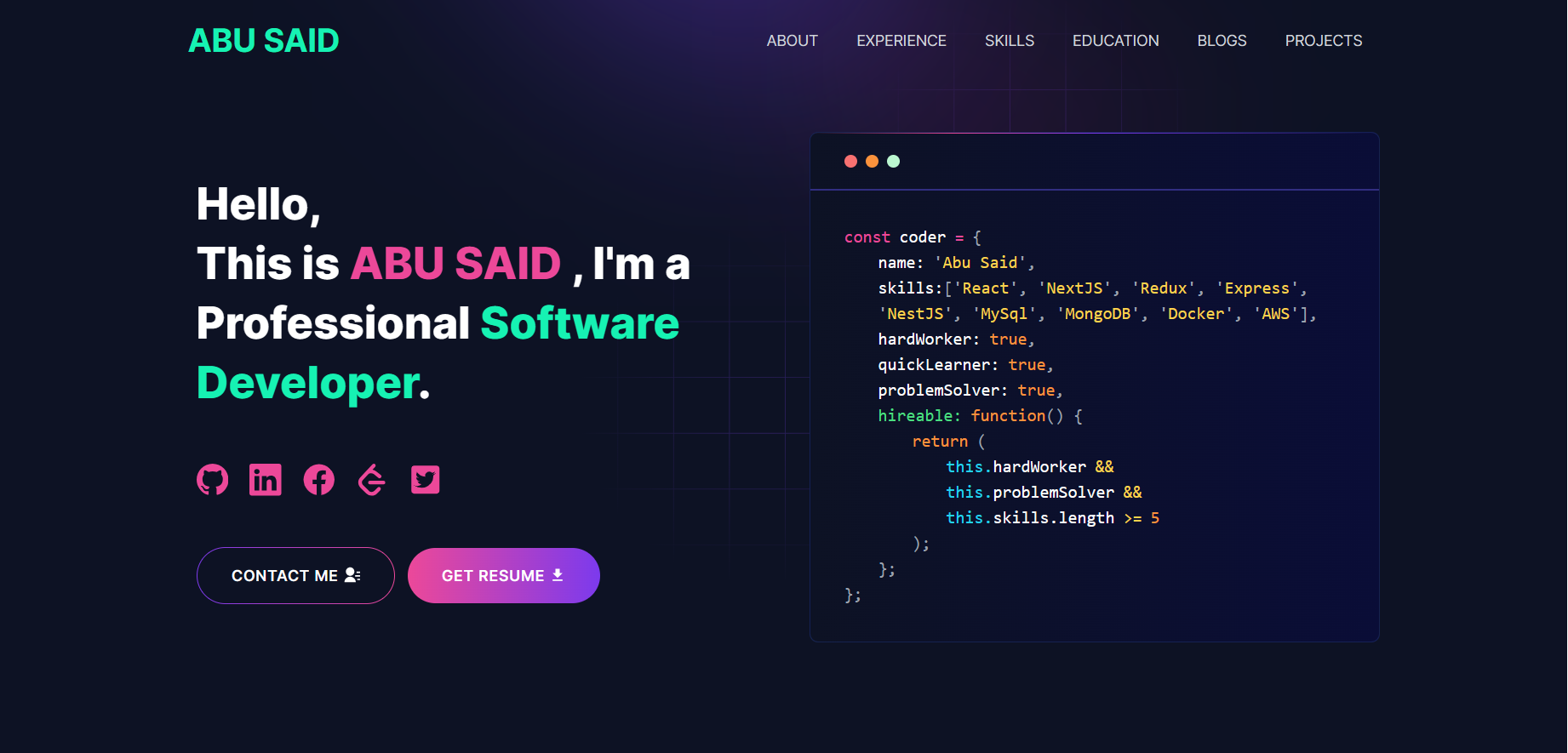
Software Developer Portfolio Website built with next.js and tailwind CSS that helps you showcase your work and skills as a software developer.
Developer Portfolio
A modern, responsive, and customizable portfolio template for developers and freelancers




Demo • Features • Installation • Usage • Deployment • Tutorials
Overview
A professional portfolio template built with Next.js 16, React 19, and Tailwind CSS 4. Features a modern App Router architecture, server components, and data-driven configuration for easy customization.
Demo :movie_camera:
Features :sparkles:
- ✅ Cutting-Edge Tech Stack: Built with Next.js 16, React 19, and Tailwind CSS 4
- ✅ Fully Responsive: Optimized for all devices and screen sizes
- ✅ SEO Optimized: Better visibility on search engines with Next.js metadata API
- ✅ Blazing Fast Performance: Leverages Next.js 16 server components and streaming
- ✅ App Router: Uses the modern Next.js App Router architecture
- ✅ Easy Customization: Simple data-driven configuration
- ✅ Contact Form: Integrated email and Telegram notifications
- ✅ Blog Integration: Automatically fetch posts from dev.to
- ✅ Dark Theme: Beautiful gradient design with Lottie animations
- ✅ Docker Support: Easy containerized deployment
- ✅ Google Analytics: Track visitor insights with GTM support
Next.js 16 Features Used :rocket:
This portfolio leverages the latest Next.js 16 and React 19 capabilities:
| Feature | Benefit | | ------------------------ | ------------------------------------------------------------ | | App Router | Modern routing with layouts and nested routes | | Server Components | Improved performance with zero JavaScript for static content | | Server Actions | Simplified form handling in contact page | | Metadata API | Enhanced SEO with type-safe metadata | | Image Optimization | Automatic image optimization with next/image | | Font Optimization | Automatic font loading with next/font | | Streaming & Suspense | Better loading states and progressive rendering | | React 19 Features | Actions, use hook, and improved hydration |
Sections :bookmark:
| Section | Description | | ----------------- | --------------------------------------------------- | | 🦸 Hero | Eye-catching introduction with animated elements | | 👤 About Me | Personal information and professional summary | | 💼 Experience | Work history and professional accomplishments | | 🛠️ Skills | Technical skills with animated marquee display | | 🚀 Projects | Showcase your best work with descriptions and links | | 🎓 Education | Academic background and certifications | | 📝 Blog | Latest articles from dev.to (auto-fetched) | | 📧 Contact | Get in touch form with email/Telegram integration |
Table of Contents :scroll:
- Gmail App Password Setup - Create a Telegram Bot - Fetching Blog from dev.toTech Stack :computer:
| Technology | Version | Purpose | | ---------------- | ------- | ----------------------------------------- | | Next.js | 16.0.1 | React framework with App Router | | React | 19.2.0 | UI component library with latest features | | Tailwind CSS | 4.x | Utility-first CSS framework | | SASS | Latest | CSS preprocessor | | Lottie | Latest | Lightweight animations | | Nodemailer | Latest | Email sending functionality | | Axios | Latest | HTTP client for API requests | | Docker | - | Containerization platform |
Installation :arrow_down:
Prerequisites
Before you begin, ensure you have the following installed on your machine:
| Tool | Minimum Version | Download Link | | ---------------------- | --------------- | ------------------------------------------- | | Node.js | v18.17.0+ | Download | | Git | Latest | Download | | pnpm (recommended) | Latest | Install |
Note: Next.js 16 requires Node.js 18.17 or later. Node.js 20+ is recommended for optimal performance.
Verify Installation
Check your installations with these commands:
node --version
git --version
pnpm --version  # or npm --version
Getting Started :dart:
1. Fork and Clone the Repository
git clone https://github.com/<YOURGITHUBUSERNAME>/developer-portfolio.git
cd developer-portfolio
2. Install Dependencies
# Using pnpm (recommended)
pnpm install
Using npm
npm install
Using yarn
yarn install
3. Set Up Environment Variables
cp .env.example .envEdit the .env file with your values (see Usage section).
4. Run the Development Server
pnpm dev
or
npm run dev
or
yarn dev
Open http://localhost:3000 in your browser.
🐳 Docker Deployment (Alternative)
Option 1: Using Docker Compose (Recommended)
docker-compose up --build
Run in detached mode
docker-compose up -d --build
Stop
docker-compose down
Option 2: Using Docker Directly
For Development:
# Build the development image
docker build -t developer-portfolio:dev -f Dockerfile.dev .
Run the container
docker run -p 3000:3000 --name portfolio-dev developer-portfolio:dev
Stop and remove container
docker stop portfolio-dev && docker rm portfolio-dev
For Production:
# Build the production image
docker build -t developer-portfolio:prod -f Dockerfile.prod .
Run the production container
docker run -p 3000:3000 --name portfolio-prod developer-portfolio:prod
Usage :joystick:
Environment Variables Configuration
Create a .env file in the root directory with the following variables:
# Google Tag Manager (Optional - for analytics)
NEXTPUBLICGTM=GTM-XXXXXXX
Your deployed app URL
NEXTPUBLICAPP_URL=https://your-domain.com
Telegram Bot Configuration (for contact form notifications)
TELEGRAMBOTTOKEN=yourbottoken_here
TELEGRAMCHATID=yourchatid_here
Gmail Configuration (for contact form emails)
GMAILPASSKEY=yourgmailapppassword
EMAILADDRESS=youremail@gmail.com
Variable Descriptions:
| Variable | Required | Description | | --------------------- | -------- | -------------------------------------------- | | NEXTPUBLICGTM | No | Google Tag Manager ID for analytics tracking | | NEXTPUBLICAPP_URL | Yes | Your portfolio's public URL | | TELEGRAMBOTTOKEN | No | Token for Telegram bot notifications | | TELEGRAMCHATID | No | Your Telegram chat ID for receiving messages | | GMAIL_PASSKEY | No | Gmail app password for email notifications | | EMAIL_ADDRESS | No | Your Gmail address for sending emails |
Note: Contact form features require either Telegram or Gmail configuration (or both).
Customize Your Portfolio Data
All portfolio content is managed through data files in the utils/data/ folder:
📝 Personal Information (personal-data.js)
export const personalData = {
  name: "YOUR NAME",
  profile: "/profile.png", // Path to your profile image
  designation: "Software Developer", // Your job title
  description: "Your bio and introduction...", // About yourself
  email: "your.email@example.com",
  phone: "+1234567890",
  address: "City, Country",
  github: "https://github.com/yourusername",
  facebook: "https://www.facebook.com/yourprofile",
  linkedIn: "https://www.linkedin.com/in/yourprofile",
  twitter: "https://twitter.com/yourusername",
  stackOverflow: "https://stackoverflow.com/users/your-id",
  leetcode: "https://leetcode.com/yourusername/",
  devUsername: "yourusername", // dev.to username for blog integration
  resume: "https://link-to-your-resume.pdf",
};
💼 Additional Data Files
| File | Purpose | | ------------------ | ---------------------------------------------- | | experience.js | Your work experience and job history | | projects-data.js | Portfolio projects with descriptions and links | | skills.js | Technical skills and competencies | | educations.js | Academic background and certifications | | contactsData.js | Contact form configuration |
🎨 Adding Your Profile Image
Place your profile picture in the public/ directory and update the profile field in personal-data.js:
profile: "/your-image-name.png"; // or .jpg, .webpDeployment :rocket:
🚀 Deploy to Vercel (Recommended)
Manual Deployment:
- Sign up at Vercel
- Import your GitHub repository
- Add environment variables in Settings → Environment Variables
- Deploy
- Native Next.js 16 support
- Automatic deployments on push
- Preview deployments for PRs
- Edge runtime support
- Global CDN and free SSL
🌐 Deploy to Netlify

Manual Deployment:
- Sign up at Netlify
- Import your GitHub repository
- Build command:
npm run build - Publish directory:
.next - Add environment variables in Site Settings → Environment
🐳 Deploy with Docker
# Build production image
docker build -t developer-portfolio:prod -f Dockerfile.prod .
Run
docker run -d -p 80:3000 --name portfolio developer-portfolio:prod
Or use Docker Compose
docker-compose -f docker-compose.prod.yml up -d
Tutorials :wrench:
📧 Gmail App Password Setup
- Go to https://myaccount.google.com/
- Navigate to Security → 2-Step Verification (enable if not already)
- Go to Security → App Passwords
- Select app: Mail, device: Other (Custom name)
- Generate and copy the 16-character password
- Add to
.envfile:
GMAIL_PASSKEY=abcd efgh ijkl mnop
EMAIL_ADDRESS=your.email@gmail.com
🤖 Create a Telegram Bot
- Open Telegram and search for
@BotFather - Send
/newbotcommand - Set bot name and username (must end with
bot) - Copy the bot token
- Send a message to your bot
- Get chat ID from:
https://api.telegram.org/bot<BOT_TOKEN>/getUpdates - Add to
.envfile:
TELEGRAMBOTTOKEN=123456789:ABCdefGHIjklMNOpqrsTUVwxyz
TELEGRAMCHATID=123456789
📝 Fetching Blog from dev.to
- Create a dev.to account
- Open
utils/data/personal-data.js - Set your dev.to username:
export const personalData = {
  // ... other fields
  devUsername: "yourusername",
};
The portfolio automatically fetches and displays your latest public articles. No API key required.
Packages Used :package:
Core Dependencies
| Package | Version | Purpose | | --------------- | ------- | ------------------------------------------------------------ | | next | ^16.0.1 | Latest React framework with App Router and Server Components | | react | ^19.2.0 | JavaScript library with improved concurrent rendering | | react-dom | ^19.2.0 | React package for working with the DOM | | tailwindcss | ^4.1.16 | Modern utility-first CSS framework | | sass | Latest | CSS preprocessor for styling |
UI & Animations
| Package | Purpose | | ---------------------- | ------------------------------------------ | | lottie-react | Lightweight animations with Lottie files | | react-fast-marquee | Smooth scrolling marquee component | | react-icons | Popular icon library with easy integration | | react-toastify | Beautiful notification toasts |
Functionality
| Package | Purpose | | -------------------------- | --------------------------------- | | axios | Promise-based HTTP client | | nodemailer | Email sending functionality | | @emailjs/browser | Client-side email service | | react-google-recaptcha | Google reCAPTCHA integration | | sharp | High-performance image processing | | @next/third-parties | Third-party script optimization |
Troubleshooting :wrench:
Common Issues and Solutions
❌ "next is not recognized as an internal or external command"
Solution:
# Option 1: Install Next.js globally
npm install -g next
Option 2: Use npx (recommended)
npx next dev
Option 3: Use package manager scripts
npm run dev
❌ Port 3000 is already in use
Solution:
# Find and kill the process using port 3000
On macOS/Linux:
lsof -ti:3000 | xargs kill -9
On Windows:
netstat -ano | findstr :3000
taskkill /PID <PID> /F
Or use a different port:
PORT=3001 npm run dev
❌ Module not found or dependency errors
Solution:
# Clear cache and reinstall dependencies
rm -rf node_modules package-lock.json
npm cache clean --force
npm install
Or with pnpm:
rm -rf node_modules pnpm-lock.yaml
pnpm store prune
pnpm install
❌ Environment variables not working
Solution:
- Ensure
.envfile is in the root directory - Restart the development server after changing
.env - Check that variables starting with
NEXTPUBLICare used for client-side code - Server-side variables should NOT start with
NEXTPUBLIC
❌ Images not loading
Solution:
- Verify images are in the
public/directory - Use paths starting with
/(e.g.,/profile.png) - Check image file extensions match the code
- Ensure image files are committed to your repository
❌ Contact form not sending emails
Solution:
- Verify Gmail App Password is correct (16 characters)
- Check that 2-Step Verification is enabled on your Google account
- Ensure
EMAIL_ADDRESSmatches the Gmail account - Test Telegram bot token and chat ID separately
- Check browser console for error messages
Contributing :handshake:
- Fork the repository
- Create a feature branch:
git checkout -b feature/AmazingFeature - Commit changes:
git commit -m 'Add some AmazingFeature' - Push to branch:
git push origin feature/AmazingFeature - Open a Pull Request
License :pagewithcurl:
This project is licensed under the MIT License - see the LICENSE file for details.
Support :coffee:





