
Collection of python functions that can be used to run GitHub Action Workflow Commands
GitHub Action Utils


This package is a collection of python functions that can be used to run GitHub Action Workflow Commands from a python script inside an action workflow run.
Requirements
Python: 3.6, 3.7, 3.8, 3.9, 3.10, 3.11
Installation
Install github-action-utils using pip:
pip install github-action-utilsExample
Example Code
import githubactionutils as gha_utils
with gha_utils.group("My Group"):     ghautils.setoutput("testvar", "testvalue")     ghautils.savestate("state", "val")
gha_utils.debug("Debug message")
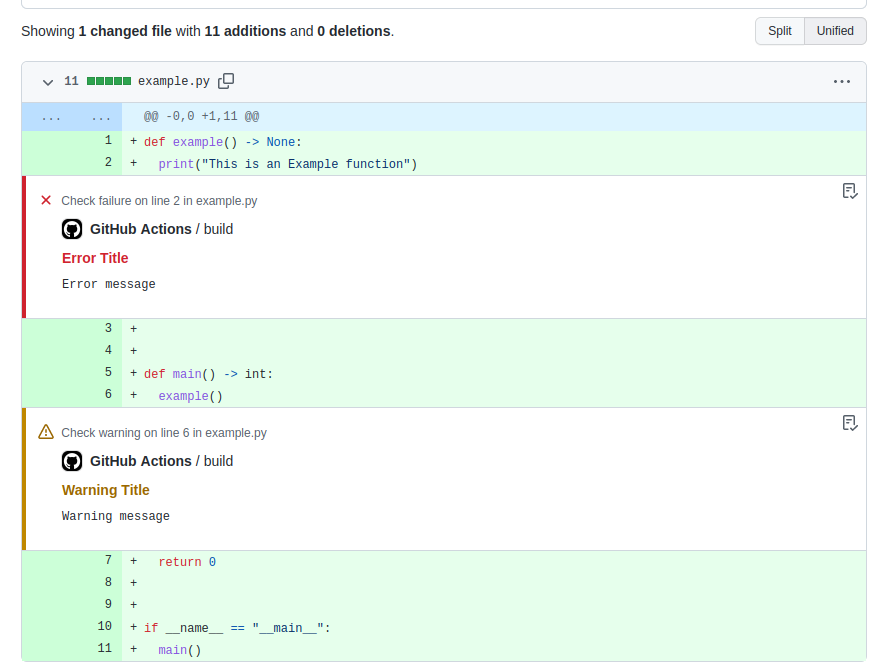
gha_utils.warning(         "Warning message", title="Warning Title", file="example.py",         col=1, endcolumn=2, line=5, endline=6,     )     gha_utils.warning("Another warning message")
gha_utils.error(         "Error message", title="Error Title", file="example.py",         col=1, endcolumn=2, line=1, endline=2,     )     gha_utils.notice("Another notice message")
ghautils.appendjob_summary("# Hello World")     ghautils.appendjob_summary("- Point 1")     ghautils.appendjob_summary("- Point 2")
Can be used inside a Workflow
name: run-python-script
on:   pull_request:     branches: [ "main" ]
jobs:   build:
runs-on: ubuntu-latest
steps:     - uses: actions/checkout@v3
- name: Set up Python 3.10       uses: actions/setup-python@v3       with:         python-version: "3.10"
- name: Install dependencies       run: python -m pip install github-action-utils
- name: Run Python Script       shell: python       run: |         import githubactionutils as gha_utils
with gha_utils.group("My Group"):             gha_utils.error(                 "Error message", title="Error Title", file="example.py",                 col=1, endcolumn=2, line=1, endline=2,             )             gha_utils.notice("Another notice message")             ghautils.appendjob_summary("# Hello World")
Colorful Grouped Build Log Output

Log Annotations and Build Summery

Log Annotations Associated with a File
Available Functions
This section documents all the functions provided by github-action-utils. The functions in the package should be used inside a workflow run.
Note: You can run the commands using python's subprocess module by using usesubprocess function parameter or COMMANDSUSE_SUBPROCESS environment variable.
echo(message, use_subprocess=False)
Prints specified message to the action workflow console.
example:
>> from githubactionutils import echo
>> echo("Hello World")
Output:
Hello World
debug(message, use_subprocess=False)
Prints colorful debug message to the action workflow console. GitHub Actions Docs: debug
example:
>> from githubactionutils import debug
>> debug("Hello World")
Output:
::debug ::Hello World
notice(message, title=None, file=None, col=None, endcolumn=None, line=None, endline=None, use_subprocess=False)
Prints colorful notice message to the action workflow console. GitHub Actions Docs: notice
example:
>> from githubactionutils import notice
>> notice(     "test message",     title="test title",     file="abc.py",     col=1,     end_column=2,     line=4,     end_line=5, )
Output:
::notice title=test title,file=abc.py,col=1,endColumn=2,line=4,endLine=5::test message=
warning(message, title=None, file=None, col=None, endcolumn=None, line=None, endline=None, use_subprocess=False)
Prints colorful warning message to the action workflow console. GitHub Actions Docs: warning
example:
>> from githubactionutils import warning
>> warning(     "test message",     title="test title",     file="abc.py",     col=1,     end_column=2,     line=4,     end_line=5, )
Output:
::warning title=test title,file=abc.py,col=1,endColumn=2,line=4,endLine=5::test message
error(message, title=None, file=None, col=None, endcolumn=None, line=None, endline=None, use_subprocess=False)
Prints colorful error message to the action workflow console. GitHub Actions Docs: error
example:
>> from githubactionutils import error
>> error(     "test message",     title="test title",     file="abc.py",     col=1,     end_column=2,     line=4,     end_line=5, )
Output:
::error title=test title,file=abc.py,col=1,endColumn=2,line=4,endLine=5::test message
set_output(name, value)
Sets a step's output parameter by writing to GITHUB_OUTPUT environment file. Note that the step will need an id to be defined to later retrieve the output value. GitHub Actions Docs: setoutput
example:
>> from githubactionutils import set_output
>> setoutput("myoutput", "test value")
save_state(name, value)
Creates an environment variable by writing this to the GITHUB_STATE environment file which is available to workflow's pre: or post: actions. GitHub Actions Docs: savestate
example:
>> from githubactionutils import save_state
>> savestate("mystate", "test value")
get_state(name)
Gets state environment variable from running workflow.
example:
>> from githubactionutils import get_state
>> getstate("testname")
Output:
test_value
getuserinput(name)
Gets user input from running workflow.
example:
>> from githubactionutils import getuserinput
>> getuserinput("my_input")
Output:
my value
beginstopcommands(token=None, usesubprocess=False) and endstopcommands(token, usesubprocess=False)
Stops processing any workflow commands. This special command allows you to log anything without accidentally running a workflow command. GitHub Actions Docs: stopcommands
example:
>> from githubactionutils import echo, beginstopcommands, endstopcommands, stop_commands
>> beginstopcommands(token="my_token") >> echo("Hello World") >> endstopcommands("my_token")
Output:
::stop-commands ::my_token
Hello World
::my_token::
====================
Using Stop Commands Context Manager
====================
>> with stopcommands(token="mytoken"): ...   echo("Hello World")
Output:
::stop-commands ::my_token
Hello World
::my_token::
startgroup(title, usesubprocess=False) and endgroup(usesubprocess=False)
Creates an expandable group in the workflow log. GitHub Actions Docs: group
example:
>> from githubactionutils import echo, startgroup, endgroup, group
>> start_group("My Group Title") >> echo("Hello World") >> end_group()
Output:
::group ::My Group Title
Hello World
::endgroup::
====================
Using Group Context Manager
====================
>> with group("My Group Title"): ...   echo("Hello World")
Output:
::group ::My Group Title
Hello World
::endgroup::
addmask(value, usesubprocess=False)
Masking a value prevents a string or variable from being printed in the workflow console. GitHub Actions Docs: addmask
example:
>> from githubactionutils import add_mask
>> add_mask("test value")
Output:
::add-mask ::test value
set_env(name, value)
Creates an environment variable by writing this to the GITHUB_ENV environment file which is available to any subsequent steps in a workflow job. GitHub Actions Docs: setenv
example:
>> from githubactionutils import set_env
>> setenv("myenv", "test value")
getworkflowenvironment_variables()
Gets all environment variables from the GITHUB_ENV environment file which is available to the workflow. GitHub Actions Docs: setenv
example:
>> from githubactionutils import getworkflowenvironment_variables
>> getworkflowenvironment_variables()
Output:
{"my_env": "test value"}
get_env(name)
Gets all environment variables from os.environ or the GITHUB_ENV environment file which is available to the workflow. This can also be used to get environment variables set by GitHub Actions. GitHub Actions Docs: setenv
example:
>> from githubactionutils import get_env
>> getenv("myenv") >> getenv("GITHUBAPI_URL")
Output:
test value
https://api.github.com
appendjobsummary(markdown_text)
Sets some custom Markdown for each job so that it will be displayed on the summary page of a workflow run. GitHub Actions Docs: appendjob_summary
example:
>> from githubactionutils import appendjobsummary
>> appendjobsummary("# test summary")
overwritejobsummary(markdown_text)
Clears all content for the current step, and adds new job summary. GitHub Actions Docs: overwritejob_summary
example:
>> from githubactionutils import overwritejobsummary
>> overwritejobsummary("# test summary")
removejobsummary()
completely removes job summary for the current step. GitHub Actions Docs: removejob_summary
example:
>> from githubactionutils import removejobsummary
>> removejobsummary()
addsystempath(path)
Prepends a directory to the system PATH variable (GITHUB_PATH) and automatically makes it available to all subsequent actions in the current job. GitHub Actions Docs: addsystem_path
example:
>> from githubactionutils import addsystempath
>> addsystempath("var/path/to/file")
event_payload()
Get GitHub Event payload that triggered the workflow.
More details: GitHub Actions Event Payload
example:
>> from githubactionutils import event_payload
>> event_payload()
Output:
{"action": "opened", "number": 1, "pull_request": {"url": "https://api.github.com/repos/octocat/Hello-World/pulls/1"}, "repository": {"url": "https://api.github.com/repos/octocat/Hello-World"}, "sender": {"login": "octocat"}...}
License
The code in this project is released under the MIT License.


