
Demo showing the capabilities of Istio
Kubernetes with Istio demo

Full asciinema demo can be found here: https://asciinema.org/a/226632
Slides: https://slides.com/ruzickap/k8s-istio-demo
Requirements
(kubernetes-client package) or justInstall Kubernetes
The following sections will show you how to install k8s to OpenStack or how to use Minikube.
Use Minikube to start the Kubernetes cluster
Install Minikube if needed: https://kubernetes.io/docs/tasks/tools/install-minikube/
Start Minikube
KUBERNETES_VERSION=$(curl -s https://storage.googleapis.com/kubernetes-release/release/stable.txt | tr -d v)
sudo minikube start --vm-driver=none --bootstrapper=kubeadm --kubernetes-version=v${KUBERNETES_VERSION}
Install kubernetes-client package (kubectl):
curl -s https://packages.cloud.google.com/apt/doc/apt-key.gpg | apt-key add -
echo "deb https://apt.kubernetes.io/ kubernetes-xenial main" | tee -a /etc/apt/sources.list.d/kubernetes.list
apt-get update -qq
apt-get install -y kubectl socat
Install Kubernetes to OpenStack
Install k8s to OpenStack using Terraform.
You will need to have Docker installed.
Prepare the working environment inside Docker
You can skip this part if you have kubectl, Helm, Siege and Terraform installed.
Run Ubuntu docker image and mount the directory there:
mkdir /tmp/test && cd /tmp/test
docker run -it -rm -e DISPLAY=$DISPLAY -v /tmp/.X11-unix:/tmp/.X11-unix -v $PWD:/mnt ubuntu
Install necessary software into the Docker container:
apt update -qq
apt-get install -y -qq apt-transport-https curl firefox git gnupg jq openssh-client psmisc siege sudo unzip vim > /dev/null
Install kubernetes-client package - (kubectl):
curl -s https://packages.cloud.google.com/apt/doc/apt-key.gpg | apt-key add -
echo "deb https://apt.kubernetes.io/ kubernetes-xenial main" > /etc/apt/sources.list.d/kubernetes.list
apt-get update -qq
apt-get install -y -qq kubectl
Install Terraform:
TERRAFORMLATESTVERSION=$(curl -s https://checkpoint-api.hashicorp.com/v1/check/terraform | jq -r -M ".current_version")
curl --silent --location "https://releases.hashicorp.com/terraform/${TERRAFORMLATESTVERSION}/terraform${TERRAFORMLATESTVERSION}linuxamd64.zip" --output /tmp/terraformlinux_amd64.zip
unzip -o /tmp/terraformlinuxamd64.zip -d /usr/local/bin/
Change directory to /mnt where the git repository is mounted:
cd /mntProvision VMs in OpenStack
Start 3 VMs (one master and 2 workers) where the k8s will be installed.
Generate ssh keys if not exists:
test -f "${HOME}/.ssh/idrsa" || (install -m 0700 -d "${HOME}/.ssh" && ssh-keygen -b 2048 -t rsa -f "${HOME}/.ssh/idrsa" -q -N "")
ssh-agent must be running...
test -n "$SSHAUTHSOCK" || eval ssh-agent
if [ "ssh-add -l" = "The agent has no identities." ]; then ssh-add; fi
Clone this git repository:
git clone https://github.com/ruzickap/k8s-istio-demo
cd k8s-istio-demo
Modify the Terraform variable file if needed:
OPENSTACKPASSWORD=${OPENSTACKPASSWORD:-default}
cat > terraform/openstack/terraform.tfvars << EOF openstackauthurl                          = "https://ic-us.ssl.mirantis.net:5000/v3" openstackinstanceflavor_name              = "compact.dbs" openstackinstanceimage_name               = "bionic-server-cloudimg-amd64-20190119" openstacknetworkingsubnetdnsnameservers = ["172.19.80.70"] openstackpassword                          = "$OPENSTACKPASSWORD" openstacktenantname                       = "mirantis-services-team" openstackusername                         = "pruzicka" openstackuserdomainname                  = "ldapmirantis" prefix                                      = "pruzicka-k8s-istio-demo" EOF
Download Terraform components:
terraform init -var-file=terraform/openstack/terraform.tfvars terraform/openstackCreate VMs in OpenStack:
terraform apply -auto-approve -var-file=terraform/openstack/terraform.tfvars terraform/openstackShow Terraform output:
terraform outputOutput:
vms_name = [
    pruzicka-k8s-istio-demo-node01.01.localdomain,
    pruzicka-k8s-istio-demo-node02.01.localdomain,
    pruzicka-k8s-istio-demo-node03.01.localdomain
]
vmspublicip = [
    172.16.240.185,
    172.16.242.218,
    172.16.240.44
]
At the end of the output you should see 3 IP addresses which should be accessible by ssh using your public key ~/.ssh/id_rsa.pub.
Install k8s to the VMs
Install k8s using kubeadm to the provisioned VMs:
./install-k8s-kubeadm.shCheck if all nodes are up:
export KUBECONFIG=$PWD/kubeconfig.conf
kubectl get nodes -o wide
Output:
NAME                             STATUS   ROLES    AGE   VERSION   INTERNAL-IP      EXTERNAL-IP   OS-IMAGE             KERNEL-VERSION      CONTAINER-RUNTIME
pruzicka-k8s-istio-demo-node01   Ready    master   2m    v1.13.3   192.168.250.11   <none>        Ubuntu 18.04.1 LTS   4.15.0-43-generic   docker://18.6.1
pruzicka-k8s-istio-demo-node02   Ready    <none>   45s   v1.13.3   192.168.250.12   <none>        Ubuntu 18.04.1 LTS   4.15.0-43-generic   docker://18.6.1
pruzicka-k8s-istio-demo-node03   Ready    <none>   50s   v1.13.3   192.168.250.13   <none>        Ubuntu 18.04.1 LTS   4.15.0-43-generic   docker://18.6.1
View services, deployments, and pods:
bash
kubectl get svc,deploy,po --all-namespaces -o wide
Output:
NAMESPACE     NAME                 TYPE        CLUSTER-IP   EXTERNAL-IP   PORT(S)         AGE     SELECTOR
default       service/kubernetes   ClusterIP   10.96.0.1    <none>        443/TCP         2m16s   <none>
kube-system   service/kube-dns     ClusterIP   10.96.0.10   <none>        53/UDP,53/TCP   2m11s   k8s-app=kube-dns
NAMESPACE     NAME                            READY   UP-TO-DATE   AVAILABLE   AGE     CONTAINERS   IMAGES                     SELECTOR kube-system   deployment.extensions/coredns   2/2     2            2           2m11s   coredns      k8s.gcr.io/coredns:1.2.6   k8s-app=kube-dns
NAMESPACE     NAME                                                         READY   STATUS    RESTARTS   AGE    IP               NODE                             NOMINATED NODE   READINESS GATES kube-system   pod/coredns-86c58d9df4-tlmvh                                 1/1     Running   0          116s   10.244.0.2       pruzicka-k8s-istio-demo-node01   <none>           <none> kube-system   pod/coredns-86c58d9df4-zk685                                 1/1     Running   0          116s   10.244.0.3       pruzicka-k8s-istio-demo-node01   <none>           <none> kube-system   pod/etcd-pruzicka-k8s-istio-demo-node01                      1/1     Running   0          79s    192.168.250.11   pruzicka-k8s-istio-demo-node01   <none>           <none> kube-system   pod/kube-apiserver-pruzicka-k8s-istio-demo-node01            1/1     Running   0          72s    192.168.250.11   pruzicka-k8s-istio-demo-node01   <none>           <none> kube-system   pod/kube-controller-manager-pruzicka-k8s-istio-demo-node01   1/1     Running   0          65s    192.168.250.11   pruzicka-k8s-istio-demo-node01   <none>           <none> kube-system   pod/kube-flannel-ds-amd64-cvpfq                              1/1     Running   0          65s    192.168.250.13   pruzicka-k8s-istio-demo-node03   <none>           <none> kube-system   pod/kube-flannel-ds-amd64-ggqmv                              1/1     Running   0          60s    192.168.250.12   pruzicka-k8s-istio-demo-node02   <none>           <none> kube-system   pod/kube-flannel-ds-amd64-ql6g6                              1/1     Running   0          117s   192.168.250.11   pruzicka-k8s-istio-demo-node01   <none>           <none> kube-system   pod/kube-proxy-79mx8                                         1/1     Running   0          117s   192.168.250.11   pruzicka-k8s-istio-demo-node01   <none>           <none> kube-system   pod/kube-proxy-f99q2                                         1/1     Running   0          65s    192.168.250.13   pruzicka-k8s-istio-demo-node03   <none>           <none> kube-system   pod/kube-proxy-w4tbd                                         1/1     Running   0          60s    192.168.250.12   pruzicka-k8s-istio-demo-node02   <none>           <none> kube-system   pod/kube-scheduler-pruzicka-k8s-istio-demo-node01            1/1     Running   0          78s    192.168.250.11   pruzicka-k8s-istio-demo-node01   <none>           <none>
Install Helm
Install Helm binary locally:
export DESIRED_VERSION="v2.13.0"
curl -s https://raw.githubusercontent.com/helm/helm/master/scripts/get | bash
Install Tiller (the Helm server-side component) into the Kubernetes cluster:
kubectl create serviceaccount tiller --namespace kube-system
kubectl create clusterrolebinding tiller-cluster-rule --clusterrole=cluster-admin --serviceaccount=kube-system:tiller
helm init --wait --service-account tiller
helm repo update
Check if the tiller was installed properly:
kubectl get pods -l app=helm --all-namespacesOutput:
NAMESPACE     NAME                            READY   STATUS    RESTARTS   AGE
kube-system   tiller-deploy-dbb85cb99-z4c47   1/1     Running   0          28s
Install Rook
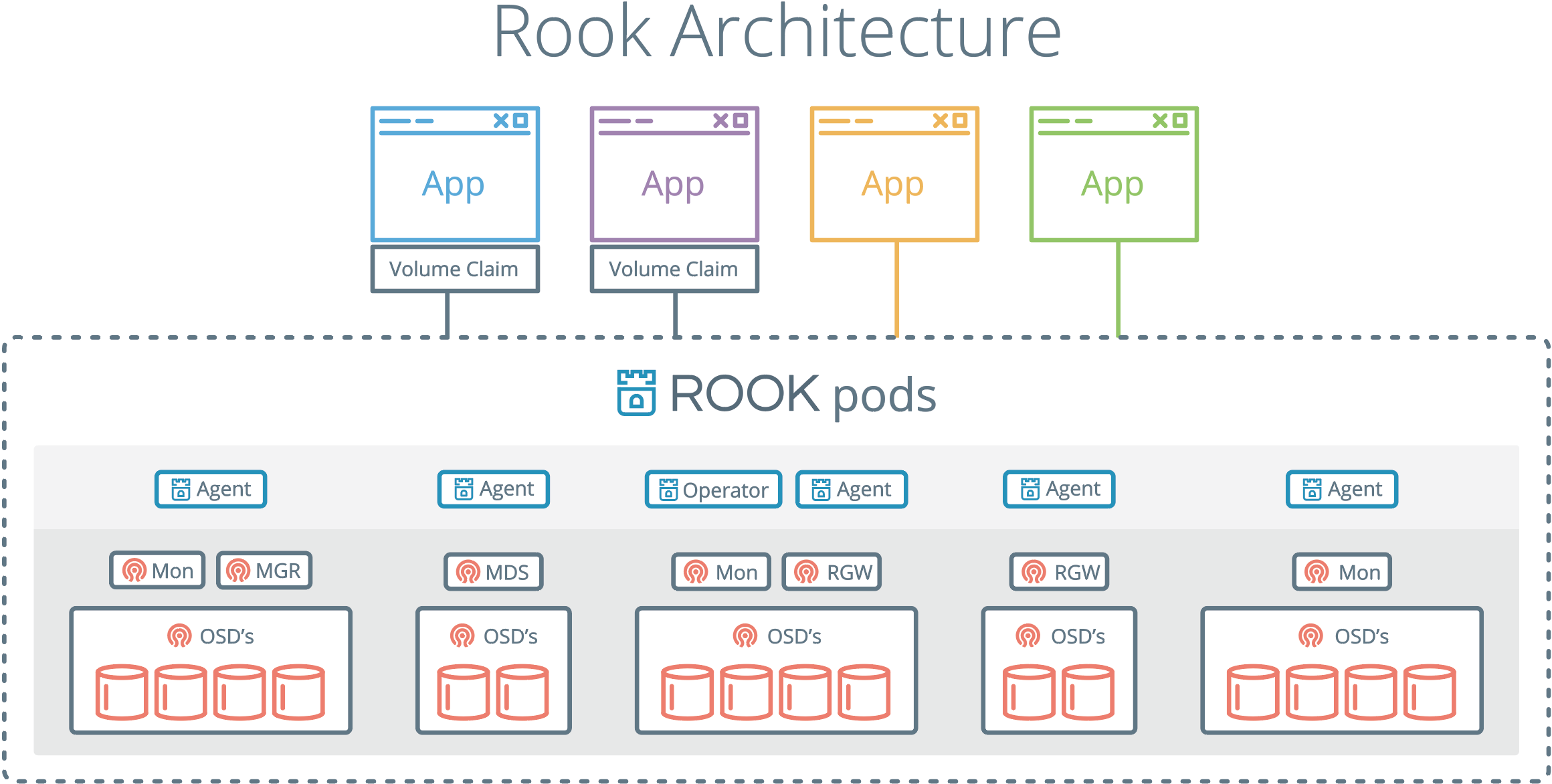
Install Rook Operator (Ceph storage for k8s):
helm repo add rook-stable https://charts.rook.io/stable
helm install --wait --name rook-ceph --namespace rook-ceph-system rook-stable/rook-ceph
sleep 110
See how the rook-ceph-system should look like:
kubectl get svc,deploy,po --namespace=rook-ceph-system -o wideOutput:
NAME                                       READY   UP-TO-DATE   AVAILABLE   AGE     CONTAINERS           IMAGES             SELECTOR
deployment.extensions/rook-ceph-operator   1/1     1            1           3m36s   rook-ceph-operator   rook/ceph:v0.9.2   app=rook-ceph-operator
NAME                                      READY   STATUS    RESTARTS   AGE     IP               NODE                             NOMINATED NODE   READINESS GATES pod/rook-ceph-agent-2bxhq                 1/1     Running   0          2m14s   192.168.250.12   pruzicka-k8s-istio-demo-node02   <none>           <none> pod/rook-ceph-agent-8h4p4                 1/1     Running   0          2m14s   192.168.250.11   pruzicka-k8s-istio-demo-node01   <none>           <none> pod/rook-ceph-agent-mq69r                 1/1     Running   0          2m14s   192.168.250.13   pruzicka-k8s-istio-demo-node03   <none>           <none> pod/rook-ceph-operator-7478c899b5-px2hc   1/1     Running   0          3m37s   10.244.2.3       pruzicka-k8s-istio-demo-node02   <none>           <none> pod/rook-discover-8ffj8                   1/1     Running   0          2m14s   10.244.2.4       pruzicka-k8s-istio-demo-node02   <none>           <none> pod/rook-discover-l56jj                   1/1     Running   0          2m14s   10.244.1.2       pruzicka-k8s-istio-demo-node03   <none>           <none> pod/rook-discover-q9xwp                   1/1     Running   0          2m14s   10.244.0.4       pruzicka-k8s-istio-demo-node01   <none>           <none>
Create your Rook cluster:
kubectl create -f https://raw.githubusercontent.com/rook/rook/v0.9.3/cluster/examples/kubernetes/ceph/cluster.yaml
sleep 100
Get the Toolbox with Ceph commands:
kubectl create -f https://raw.githubusercontent.com/rook/rook/v0.9.3/cluster/examples/kubernetes/ceph/toolbox.yaml
sleep 300
Check what was created in rook-ceph namespace:
kubectl get svc,deploy,po --namespace=rook-ceph -o wideOutput:
NAME                              TYPE        CLUSTER-IP      EXTERNAL-IP   PORT(S)    AGE     SELECTOR
service/rook-ceph-mgr             ClusterIP   10.103.36.128   <none>        9283/TCP   8m45s   app=rook-ceph-mgr,rook_cluster=rook-ceph
service/rook-ceph-mgr-dashboard   ClusterIP   10.99.173.58    <none>        8443/TCP   8m45s   app=rook-ceph-mgr,rook_cluster=rook-ceph
service/rook-ceph-mon-a           ClusterIP   10.102.39.160   <none>        6790/TCP   12m     app=rook-ceph-mon,cephdaemonid=a,mon=a,moncluster=rook-ceph,rookcluster=rook-ceph
service/rook-ceph-mon-b           ClusterIP   10.102.49.137   <none>        6790/TCP   11m     app=rook-ceph-mon,cephdaemonid=b,mon=b,moncluster=rook-ceph,rookcluster=rook-ceph
service/rook-ceph-mon-c           ClusterIP   10.96.25.143    <none>        6790/TCP   10m     app=rook-ceph-mon,cephdaemonid=c,mon=c,moncluster=rook-ceph,rookcluster=rook-ceph
NAME                                    READY   UP-TO-DATE   AVAILABLE   AGE     CONTAINERS        IMAGES             SELECTOR deployment.extensions/rook-ceph-mgr-a   1/1     1            1           9m33s   mgr               ceph/ceph:v13      app=rook-ceph-mgr,cephdaemonid=a,instance=a,mgr=a,rook_cluster=rook-ceph deployment.extensions/rook-ceph-mon-a   1/1     1            1           12m     mon               ceph/ceph:v13      app=rook-ceph-mon,cephdaemonid=a,mon=a,moncluster=rook-ceph,rookcluster=rook-ceph deployment.extensions/rook-ceph-mon-b   1/1     1            1           11m     mon               ceph/ceph:v13      app=rook-ceph-mon,cephdaemonid=b,mon=b,moncluster=rook-ceph,rookcluster=rook-ceph deployment.extensions/rook-ceph-mon-c   1/1     1            1           10m     mon               ceph/ceph:v13      app=rook-ceph-mon,cephdaemonid=c,mon=c,moncluster=rook-ceph,rookcluster=rook-ceph deployment.extensions/rook-ceph-osd-0   1/1     1            1           8m34s   osd               ceph/ceph:v13      app=rook-ceph-osd,ceph-osd-id=0,rook_cluster=rook-ceph deployment.extensions/rook-ceph-osd-1   1/1     1            1           8m33s   osd               ceph/ceph:v13      app=rook-ceph-osd,ceph-osd-id=1,rook_cluster=rook-ceph deployment.extensions/rook-ceph-osd-2   1/1     1            1           8m33s   osd               ceph/ceph:v13      app=rook-ceph-osd,ceph-osd-id=2,rook_cluster=rook-ceph deployment.extensions/rook-ceph-tools   1/1     1            1           12m     rook-ceph-tools   rook/ceph:master   app=rook-ceph-tools
NAME                                                             READY   STATUS      RESTARTS   AGE     IP               NODE                             NOMINATED NODE   READINESS GATES pod/rook-ceph-mgr-a-669f5b47fc-sjvrr                             1/1     Running     0          9m33s   10.244.1.6       pruzicka-k8s-istio-demo-node03   <none>           <none> pod/rook-ceph-mon-a-784f8fb5b6-zcvjr                             1/1     Running     0          12m     10.244.0.5       pruzicka-k8s-istio-demo-node01   <none>           <none> pod/rook-ceph-mon-b-6dfbf486f4-2ktpm                             1/1     Running     0          11m     10.244.2.5       pruzicka-k8s-istio-demo-node02   <none>           <none> pod/rook-ceph-mon-c-6c85f6f44-j5wwv                              1/1     Running     0          10m     10.244.1.5       pruzicka-k8s-istio-demo-node03   <none>           <none> pod/rook-ceph-osd-0-6dd9cdc946-7th52                             1/1     Running     0          8m34s   10.244.1.8       pruzicka-k8s-istio-demo-node03   <none>           <none> pod/rook-ceph-osd-1-64cdd77897-9vdrh                             1/1     Running     0          8m33s   10.244.2.7       pruzicka-k8s-istio-demo-node02   <none>           <none> pod/rook-ceph-osd-2-67fcc446bd-skq52                             1/1     Running     0          8m33s   10.244.0.7       pruzicka-k8s-istio-demo-node01   <none>           <none> pod/rook-ceph-osd-prepare-pruzicka-k8s-istio-demo-node01-z29hj   0/2     Completed   0          8m39s   10.244.0.6       pruzicka-k8s-istio-demo-node01   <none>           <none> pod/rook-ceph-osd-prepare-pruzicka-k8s-istio-demo-node02-q8xqx   0/2     Completed   0          8m39s   10.244.2.6       pruzicka-k8s-istio-demo-node02   <none>           <none> pod/rook-ceph-osd-prepare-pruzicka-k8s-istio-demo-node03-vbwxv   0/2     Completed   0          8m39s   10.244.1.7       pruzicka-k8s-istio-demo-node03   <none>           <none> pod/rook-ceph-tools-76c7d559b6-s6s4l                             1/1     Running     0          12m     192.168.250.12   pruzicka-k8s-istio-demo-node02   <none>           <none>
Create a storage class based on the Ceph RBD volume plugin:
kubectl create -f https://raw.githubusercontent.com/rook/rook/v0.9.3/cluster/examples/kubernetes/ceph/storageclass.yaml
sleep 10
Set rook-ceph-block as default Storage Class:
kubectl patch storageclass rook-ceph-block -p "{\"metadata\": {\"annotations\":{\"storageclass.kubernetes.io/is-default-class\":\"true\"}}}"Check the Storage Classes:
kubectl describe storageclassOutput:
Name:                  rook-ceph-block
IsDefaultClass:        Yes
Annotations:           storageclass.kubernetes.io/is-default-class=true
Provisioner:           ceph.rook.io/block
Parameters:            blockPool=replicapool,clusterNamespace=rook-ceph,fstype=xfs
AllowVolumeExpansion:  <unset>
MountOptions:          <none>
ReclaimPolicy:         Delete
VolumeBindingMode:     Immediate
Events:                <none>
See the CephBlockPool:
kubectl describe cephblockpool --namespace=rook-cephOutput:
Name:         replicapool
Namespace:    rook-ceph
Labels:       <none>
Annotations:  <none>
API Version:  ceph.rook.io/v1
Kind:         CephBlockPool
Metadata:
  Creation Timestamp:  2019-02-04T09:51:55Z
  Generation:          1
  Resource Version:    3171
  Self Link:           /apis/ceph.rook.io/v1/namespaces/rook-ceph/cephblockpools/replicapool
  UID:                 8163367d-2862-11e9-a470-fa163e90237a
Spec:
  Replicated:
    Size:  1
Events:    <none>
Check the status of your Ceph installation:
kubectl -n rook-ceph exec $(kubectl -n rook-ceph get pod -l "app=rook-ceph-tools" -o js) -- ceph statusOutput:
cluster:
    id:     1f4458a6-f574-4e6c-8a25-5a5eef6eb0a7
    health: HEALTH_OK
services:     mon: 3 daemons, quorum c,a,b     mgr: a(active)     osd: 3 osds: 3 up, 3 in
data:     pools:   1 pools, 100 pgs     objects: 0  objects, 0 B     usage:   13 GiB used, 44 GiB / 58 GiB avail     pgs:     100 active+clean
Ceph status:
kubectl -n rook-ceph exec $(kubectl -n rook-ceph get pod -l "app=rook-ceph-tools" -o js) -- ceph osd statusOutput:
+----+--------------------------------+-------+-------+--------+---------+--------+---------+-----------+
| id |              host              |  used | avail | wr ops | wr data | rd ops | rd data |   state   |
+----+--------------------------------+-------+-------+--------+---------+--------+---------+-----------+
| 0  | pruzicka-k8s-istio-demo-node03 | 4302M | 15.0G |    0   |     0   |    0   |     0   | exists,up |
| 1  | pruzicka-k8s-istio-demo-node02 | 4455M | 14.8G |    0   |     0   |    0   |     0   | exists,up |
| 2  | pruzicka-k8s-istio-demo-node01 | 4948M | 14.3G |    0   |     0   |    0   |     0   | exists,up |
+----+--------------------------------+-------+-------+--------+---------+--------+---------+-----------+
Check the cluster usage status:
kubectl -n rook-ceph exec $(kubectl -n rook-ceph get pod -l "app=rook-ceph-tools" -o js) -- ceph dfOutput:
GLOBAL:
    SIZE       AVAIL      RAW USED     %RAW USED
    58 GiB     44 GiB       13 GiB         23.22
POOLS:
    NAME            ID     USED     %USED     MAX AVAIL     OBJECTS
    replicapool     1       0 B         0        40 GiB           0
Install ElasticSearch, Kibana, FluentBit
Add ElasticSearch operator to Helm:
helm repo add es-operator https://raw.githubusercontent.com/upmc-enterprises/elasticsearch-operator/master/charts/Install ElasticSearch operator:
helm install --wait --name elasticsearch-operator es-operator/elasticsearch-operator --set rbac.enabled=True --namespace es-operator
sleep 50
Check how the operator looks like:
kubectl get svc,deploy,po --namespace=es-operator -o wideOutput:
NAME                                           READY   UP-TO-DATE   AVAILABLE   AGE    CONTAINERS               IMAGES                                          SELECTOR
deployment.extensions/elasticsearch-operator   1/1     1            1           106s   elasticsearch-operator   upmcenterprises/elasticsearch-operator:0.0.12   name=elasticsearch-operator,release=elasticsearch-operator
NAME                                          READY   STATUS    RESTARTS   AGE    IP           NODE                             NOMINATED NODE   READINESS GATES pod/elasticsearch-operator-5dc59b8cc5-6946l   1/1     Running   0          106s   10.244.1.9   pruzicka-k8s-istio-demo-node03   <none>           <none>
Install ElasticSearch cluster:
helm install --wait --name=elasticsearch --namespace logging es-operator/elasticsearch \
  --set kibana.enabled=true \
  --set cerebro.enabled=true \
  --set storage.class=rook-ceph-block \
  --set clientReplicas=1,masterReplicas=1,dataReplicas=1
sleep 350
Show ElasticSearch components:
kubectl get svc,deploy,po,pvc,elasticsearchclusters --namespace=logging -o wideOutput:
NAME                                                    TYPE        CLUSTER-IP       EXTERNAL-IP   PORT(S)    AGE   SELECTOR
service/cerebro-elasticsearch-cluster                   ClusterIP   10.105.197.151   <none>        80/TCP     18m   role=cerebro
service/elasticsearch-discovery-elasticsearch-cluster   ClusterIP   10.111.76.241    <none>        9300/TCP   18m   component=elasticsearch-elasticsearch-cluster,role=master
service/elasticsearch-elasticsearch-cluster             ClusterIP   10.104.103.49    <none>        9200/TCP   18m   component=elasticsearch-elasticsearch-cluster,role=client
service/es-data-svc-elasticsearch-cluster               ClusterIP   10.98.179.244    <none>        9300/TCP   18m   component=elasticsearch-elasticsearch-cluster,role=data
service/kibana-elasticsearch-cluster                    ClusterIP   10.110.19.242    <none>        80/TCP     18m   role=kibana
NAME                                                    READY   UP-TO-DATE   AVAILABLE   AGE   CONTAINERS                        IMAGES                                                    SELECTOR deployment.extensions/cerebro-elasticsearch-cluster     1/1     1            1           18m   cerebro-elasticsearch-cluster     upmcenterprises/cerebro:0.6.8                             component=elasticsearch-elasticsearch-cluster,name=cerebro-elasticsearch-cluster,role=cerebro deployment.extensions/es-client-elasticsearch-cluster   1/1     1            1           18m   es-client-elasticsearch-cluster   upmcenterprises/docker-elasticsearch-kubernetes:6.1.3_0   cluster=elasticsearch-cluster,component=elasticsearch-elasticsearch-cluster,name=es-client-elasticsearch-cluster,role=client deployment.extensions/kibana-elasticsearch-cluster      1/1     1            1           18m   kibana-elasticsearch-cluster      docker.elastic.co/kibana/kibana-oss:6.1.3                 component=elasticsearch-elasticsearch-cluster,name=kibana-elasticsearch-cluster,role=kibana
NAME                                                    READY   STATUS    RESTARTS   AGE   IP            NODE                             NOMINATED NODE   READINESS GATES pod/cerebro-elasticsearch-cluster-64888cf977-dgb8g      1/1     Running   0          18m   10.244.0.9    pruzicka-k8s-istio-demo-node01   <none>           <none> pod/es-client-elasticsearch-cluster-8d9df64b7-tvl8z     1/1     Running   0          18m   10.244.1.11   pruzicka-k8s-istio-demo-node03   <none>           <none> pod/es-data-elasticsearch-cluster-rook-ceph-block-0     1/1     Running   0          18m   10.244.2.11   pruzicka-k8s-istio-demo-node02   <none>           <none> pod/es-master-elasticsearch-cluster-rook-ceph-block-0   1/1     Running   0          18m   10.244.2.10   pruzicka-k8s-istio-demo-node02   <none>           <none> pod/kibana-elasticsearch-cluster-7fb7f88f55-6sl6j       1/1     Running   0          18m   10.244.2.9    pruzicka-k8s-istio-demo-node02   <none>           <none>
NAME                                                                              STATUS   VOLUME                                     CAPACITY   ACCESS MODES   STORAGECLASS      AGE persistentvolumeclaim/es-data-es-data-elasticsearch-cluster-rook-ceph-block-0     Bound    pvc-870ad81a-2863-11e9-a470-fa163e90237a   1Gi        RWO            rook-ceph-block   18m persistentvolumeclaim/es-data-es-master-elasticsearch-cluster-rook-ceph-block-0   Bound    pvc-86fcb9ce-2863-11e9-a470-fa163e90237a   1Gi        RWO            rook-ceph-block   18m
NAME                                                              AGE elasticsearchcluster.enterprises.upmc.com/elasticsearch-cluster   18m
Install FluentBit:
# https://github.com/fluent/fluent-bit/issues/628
helm install --wait stable/fluent-bit --name=fluent-bit --namespace=logging \
  --set metrics.enabled=true \
  --set backend.type=es \
  --set backend.es.time_key='@ts' \
  --set backend.es.host=elasticsearch-elasticsearch-cluster \
  --set backend.es.tls=on \
  --set backend.es.tls_verify=off
Configure port forwarding for Kibana:
# Kibana UI - https://localhost:5601
kubectl -n logging port-forward $(kubectl -n logging get pod -l role=kibana -o js) 5601:5601 &
Configure ElasticSearch:
- Navigate to the Kibana UI and click the
- Select @timestamp as the Time Filter field name, and click
Check FluentBit installation:
kubectl get -l app=fluent-bit svc,pods --all-namespaces -o wideOutput:
NAMESPACE   NAME                                    TYPE        CLUSTER-IP     EXTERNAL-IP   PORT(S)    AGE   SELECTOR
logging     service/fluent-bit-fluent-bit-metrics   ClusterIP   10.97.33.162   <none>        2020/TCP   80s   app=fluent-bit,release=fluent-bit
NAMESPACE   NAME                              READY   STATUS    RESTARTS   AGE   IP            NODE                             NOMINATED NODE   READINESS GATES logging     pod/fluent-bit-fluent-bit-426ph   1/1     Running   0          80s   10.244.0.10   pruzicka-k8s-istio-demo-node01   <none>           <none> logging     pod/fluent-bit-fluent-bit-c6tbx   1/1     Running   0          80s   10.244.1.12   pruzicka-k8s-istio-demo-node03   <none>           <none> logging     pod/fluent-bit-fluent-bit-zfkqr   1/1     Running   0          80s   10.244.2.12   pruzicka-k8s-istio-demo-node02   <none>           <none>
Istio architecture and features
Istio is an open platform-independent service mesh that provides traffic management, policy enforcement, and telemetry collection (layer 7 firewall + loadbalancer, ingress, blocking outgoing traffic, tracing, monitoring, logging).
Policies and Telemetry: Prometheus, StatsD, FluentD and many others...
- Istio architecture
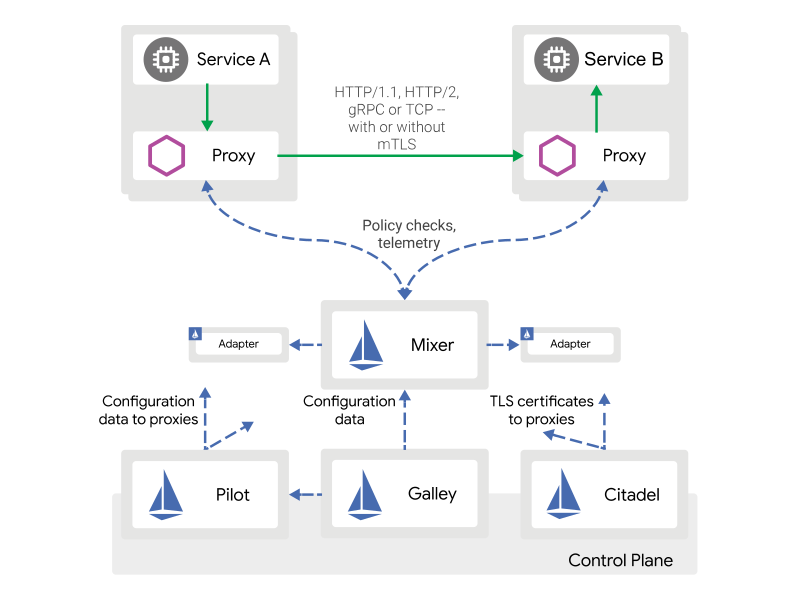
* Envoy - is a high-performance proxy to mediate all inbound and outbound traffic for all services in the service mesh. * Pilot - provides service discovery for the Envoy sidecars, traffic management capabilities for intelligent routing. * Mixer - enforces access control and usage policies across the service mesh, and collects telemetry data from the Envoy proxy and other services. * Citadel - provides strong service-to-service and end-user authentication with built-in identity and credential management.
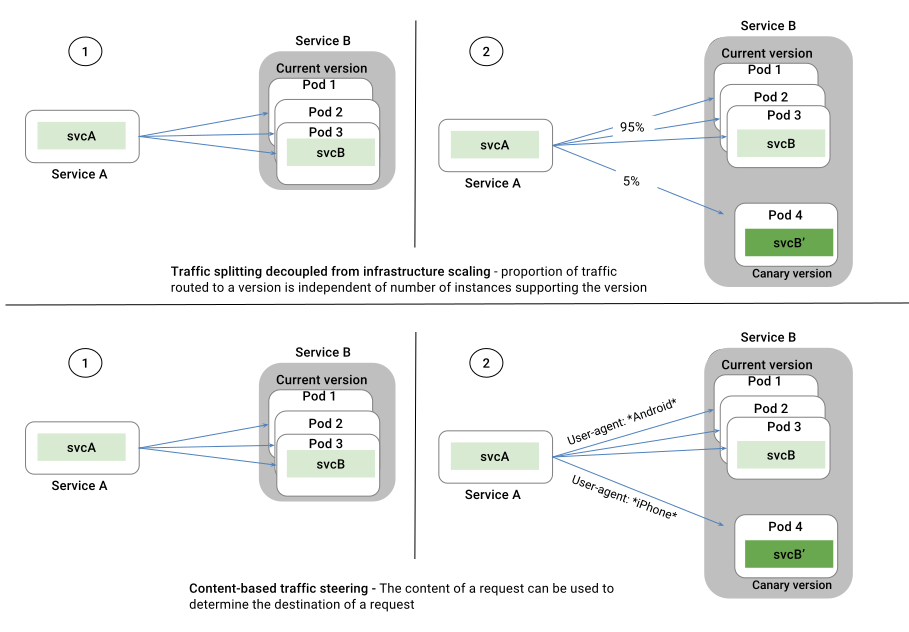
- Blue-green deployment and content based traffic steering
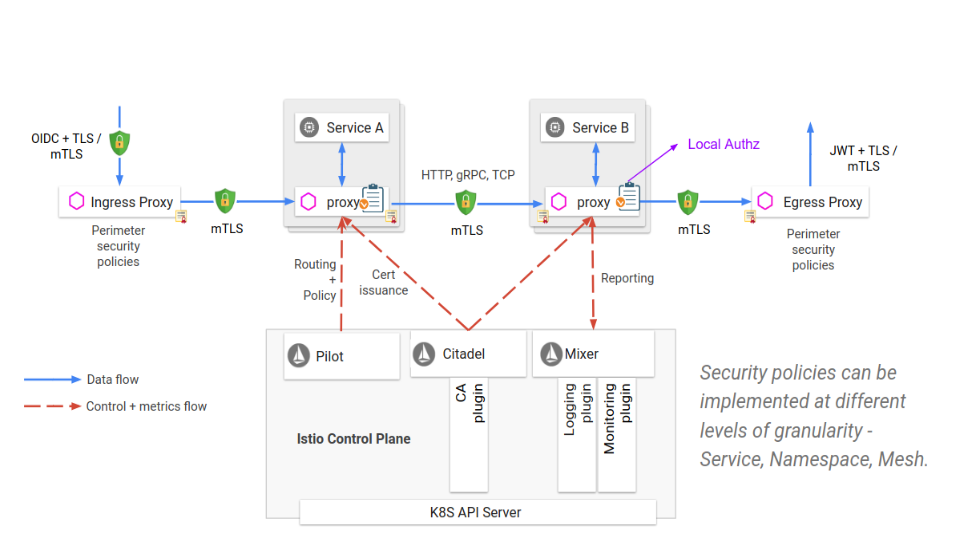
- Istio Security Architecture
 non-Kubernetes services (running on VMs and/or physical machines) can be
added to an Istio mesh on a Kubernetes cluster.
(Istio mesh expansion on IBM Cloud Private)
non-Kubernetes services (running on VMs and/or physical machines) can be
added to an Istio mesh on a Kubernetes cluster.
(Istio mesh expansion on IBM Cloud Private)

Istio types
defines the rules that control how requests for a service are routed within an Istio service mesh. configures the set of policies to be applied to a request after VirtualService routing has occurred. is commonly used to enable requests to services outside of an Istio service mesh. configures a load balancer for HTTP/TCP traffic, most commonly operating at the edge of the mesh to enable ingress traffic for an application.Install Istio

[ -f $PWD/kubeconfig.conf ] && export KUBECONFIG=${KUBECONFIG:-$PWD/kubeconfig.conf}
kubectl get nodes -o wide
Either download Istio directly from https://github.com/istio/istio/releases or get the latest version by using curl:
export ISTIO_VERSION="1.0.6"
test -d files || mkdir files
cd files
curl -sL https://git.io/getLatestIstio | sh -
Change the directory to the Istio installation files location:
cd istio*Install istioctl:
sudo mv bin/istioctl /usr/local/bin/Install Istio using Helm:
helm install --wait --name istio --namespace istio-system install/kubernetes/helm/istio \
  --set gateways.istio-ingressgateway.type=NodePort \
  --set gateways.istio-egressgateway.type=NodePort \
  --set grafana.enabled=true \
  --set kiali.enabled=true \
  --set kiali.dashboard.grafanaURL=http://localhost:3000 \
  --set kiali.dashboard.jaegerURL=http://localhost:16686 \
  --set servicegraph.enabled=true \
  --set telemetry-gateway.grafanaEnabled=true \
  --set telemetry-gateway.prometheusEnabled=true \
  --set tracing.enabled=true
sleep 30
See the Istio components:
kubectl get --namespace=istio-system svc,deployment,pods -o wideOutput:
NAME                             TYPE        CLUSTER-IP       EXTERNAL-IP   PORT(S)                                                                                                                   AGE   SELECTOR
service/grafana                  ClusterIP   10.101.117.126   <none>        3000/TCP                                                                                                                  15m   app=grafana
service/istio-citadel            ClusterIP   10.99.235.151    <none>        8060/TCP,9093/TCP                                                                                                         15m   istio=citadel
service/istio-egressgateway      NodePort    10.105.213.174   <none>        80:31610/TCP,443:31811/TCP                                                                                                15m   app=istio-egressgateway,istio=egressgateway
service/istio-galley             ClusterIP   10.110.154.0     <none>        443/TCP,9093/TCP                                                                                                          15m   istio=galley
service/istio-ingressgateway     NodePort    10.101.212.170   <none>        80:31380/TCP,443:31390/TCP,31400:31400/TCP,15011:31814/TCP,8060:31435/TCP,853:31471/TCP,15030:30210/TCP,15031:30498/TCP   15m   app=istio-ingressgateway,istio=ingressgateway
service/istio-pilot              ClusterIP   10.96.34.157     <none>        15010/TCP,15011/TCP,8080/TCP,9093/TCP                                                                                     15m   istio=pilot
service/istio-policy             ClusterIP   10.98.185.215    <none>        9091/TCP,15004/TCP,9093/TCP                                                                                               15m   istio-mixer-type=policy,istio=mixer
service/istio-sidecar-injector   ClusterIP   10.97.47.179     <none>        443/TCP                                                                                                                   15m   istio=sidecar-injector
service/istio-telemetry          ClusterIP   10.103.23.55     <none>        9091/TCP,15004/TCP,9093/TCP,42422/TCP                                                                                     15m   istio-mixer-type=telemetry,istio=mixer
service/jaeger-agent             ClusterIP   None             <none>        5775/UDP,6831/UDP,6832/UDP                                                                                                15m   app=jaeger
service/jaeger-collector         ClusterIP   10.110.10.174    <none>        14267/TCP,14268/TCP                                                                                                       15m   app=jaeger
service/jaeger-query             ClusterIP   10.98.172.235    <none>        16686/TCP                                                                                                                 15m   app=jaeger
service/kiali                    ClusterIP   10.111.114.225   <none>        20001/TCP                                                                                                                 15m   app=kiali
service/prometheus               ClusterIP   10.111.132.151   <none>        9090/TCP                                                                                                                  15m   app=prometheus
service/servicegraph             ClusterIP   10.109.59.250    <none>        8088/TCP                                                                                                                  15m   app=servicegraph
service/tracing                  ClusterIP   10.96.59.251     <none>        80/TCP                                                                                                                    15m   app=jaeger
service/zipkin                   ClusterIP   10.107.168.128   <none>        9411/TCP                                                                                                                  15m   app=jaeger
NAME                                           READY   UP-TO-DATE   AVAILABLE   AGE   CONTAINERS                 IMAGES                                                      SELECTOR deployment.extensions/grafana                  1/1     1            1           15m   grafana                    grafana/grafana:5.2.3                                       app=grafana deployment.extensions/istio-citadel            1/1     1            1           15m   citadel                    docker.io/istio/citadel:1.0.5                               istio=citadel deployment.extensions/istio-egressgateway      1/1     1            1           15m   istio-proxy                docker.io/istio/proxyv2:1.0.5                               app=istio-egressgateway,istio=egressgateway deployment.extensions/istio-galley             1/1     1            1           15m   validator                  docker.io/istio/galley:1.0.5                                istio=galley deployment.extensions/istio-ingressgateway     1/1     1            1           15m   istio-proxy                docker.io/istio/proxyv2:1.0.5                               app=istio-ingressgateway,istio=ingressgateway deployment.extensions/istio-pilot              1/1     1            1           15m   discovery,istio-proxy      docker.io/istio/pilot:1.0.5,docker.io/istio/proxyv2:1.0.5   app=pilot,istio=pilot deployment.extensions/istio-policy             1/1     1            1           15m   mixer,istio-proxy          docker.io/istio/mixer:1.0.5,docker.io/istio/proxyv2:1.0.5   app=policy,istio=mixer,istio-mixer-type=policy deployment.extensions/istio-sidecar-injector   1/1     1            1           15m   sidecar-injector-webhook   docker.io/istio/sidecar_injector:1.0.5                      istio=sidecar-injector deployment.extensions/istio-telemetry          1/1     1            1           15m   mixer,istio-proxy          docker.io/istio/mixer:1.0.5,docker.io/istio/proxyv2:1.0.5   app=telemetry,istio=mixer,istio-mixer-type=telemetry deployment.extensions/istio-tracing            1/1     1            1           15m   jaeger                     docker.io/jaegertracing/all-in-one:1.5                      app=jaeger deployment.extensions/kiali                    1/1     1            1           15m   kiali                      docker.io/kiali/kiali:v0.10                                 app=kiali deployment.extensions/prometheus               1/1     1            1           15m   prometheus                 docker.io/prom/prometheus:v2.3.1                            app=prometheus deployment.extensions/servicegraph             1/1     1            1           15m   servicegraph               docker.io/istio/servicegraph:1.0.5                          app=servicegraph
NAME                                          READY   STATUS      RESTARTS   AGE   IP            NODE                             NOMINATED NODE   READINESS GATES pod/grafana-59b8896965-pmwd2                  1/1     Running     0          15m   10.244.1.16   pruzicka-k8s-istio-demo-node03   <none>           <none> pod/istio-citadel-856f994c58-8r8nr            1/1     Running     0          15m   10.244.1.17   pruzicka-k8s-istio-demo-node03   <none>           <none> pod/istio-egressgateway-5649fcf57-sv8wf       1/1     Running     0          15m   10.244.1.14   pruzicka-k8s-istio-demo-node03   <none>           <none> pod/istio-galley-7665f65c9c-8sjmm             1/1     Running     0          15m   10.244.1.18   pruzicka-k8s-istio-demo-node03   <none>           <none> pod/istio-grafana-post-install-kw74d          0/1     Completed   0          10m   10.244.1.19   pruzicka-k8s-istio-demo-node03   <none>           <none> pod/istio-ingressgateway-6755b9bbf6-f7pnx     1/1     Running     0          15m   10.244.1.13   pruzicka-k8s-istio-demo-node03   <none>           <none> pod/istio-pilot-56855d999b-6zq86              2/2     Running     0          15m   10.244.0.11   pruzicka-k8s-istio-demo-node01   <none>           <none> pod/istio-policy-6fcb6d655f-4zndw             2/2     Running     0          15m   10.244.2.13   pruzicka-k8s-istio-demo-node02   <none>           <none> pod/istio-sidecar-injector-768c79f7bf-74wbc   1/1     Running     0          15m   10.244.2.18   pruzicka-k8s-istio-demo-node02   <none>           <none> pod/istio-telemetry-664d896cf5-smz7w          2/2     Running     0          15m   10.244.2.14   pruzicka-k8s-istio-demo-node02   <none>           <none> pod/istio-tracing-6b994895fd-vb58q            1/1     Running     0          15m   10.244.2.17   pruzicka-k8s-istio-demo-node02   <none>           <none> pod/kiali-67c69889b5-sw92h                    1/1     Running     0          15m   10.244.1.15   pruzicka-k8s-istio-demo-node03   <none>           <none> pod/prometheus-76b7745b64-kwzj5               1/1     Running     0          15m   10.244.2.15   pruzicka-k8s-istio-demo-node02   <none>           <none> pod/servicegraph-5c4485945b-j9bp2             1/1     Running     0          15m   10.244.2.16   pruzicka-k8s-istio-demo-node02   <none>           <none>
Configure Istio with a new log type and send those logs to the FluentD:
kubectl apply -f ../../yaml/fluentd-istio.yamlIstio example
Check how Istio can be used and how it works...
Check + Enable Istio in default namespace
Let the default namespace to use Istio injection:
kubectl label namespace default istio-injection=enabledCheck namespaces:
kubectl get namespace -L istio-injectionOutput:
NAME               STATUS   AGE   ISTIO-INJECTION
default            Active   70m   enabled
es-operator        Active   41m
istio-system       Active   16m
kube-public        Active   70m
kube-system        Active   70m
logging            Active   38m
rook-ceph          Active   59m
rook-ceph-system   Active   63m
Configure port forwarding for Istio services:
# Jaeger - http://localhost:16686
kubectl port-forward -n istio-system $(kubectl get pod -n istio-system -l app=jaeger -o js) 16686:16686 &
Prometheus - http://localhost:9090/graph
kubectl -n istio-system port-forward $(kubectl -n istio-system get pod -l app=prometheus -o js) 9090:9090 &
Grafana - http://localhost:3000/dashboard/db/istio-mesh-dashboard
kubectl -n istio-system port-forward $(kubectl -n istio-system get pod -l app=grafana -o js) 3000:3000 &
Kiali - http://localhost:20001
kubectl -n istio-system port-forward $(kubectl -n istio-system get pod -l app=kiali -o js) 20001:20001 &
Servicegraph - http://localhost:8088/force/forcegraph.html
kubectl -n istio-system port-forward $(kubectl -n istio-system get pod -l app=servicegraph -o js) 8088:8088 &
Deploy application into the default namespace where Istio is enabled
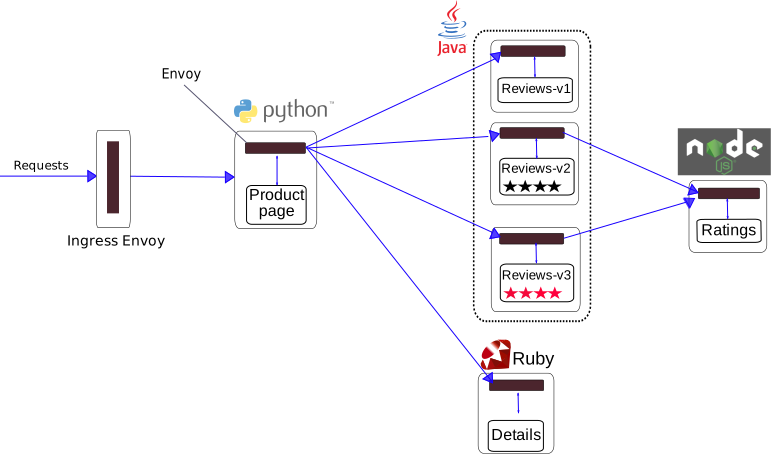
The Bookinfo application is broken into four separate microservices:
productpage- the productpage microservice calls the details and reviews
details- the details microservice contains book information.reviews- the reviews microservice contains book reviews. It also calls
ratings- the ratings microservice contains book ranking information that
There are 3 versions of the reviews microservice:
- Version
v1- doesn’t call the ratings service. - Version
v2- calls the ratings service, and displays each rating as 1 to
- Version
v3- calls the ratings service, and displays each rating as 1 to
Bookinfo application architecture
Deploy the demo of Bookinfo application:
kubectl apply -f samples/bookinfo/platform/kube/bookinfo.yaml
sleep 400
Confirm all services and pods are correctly defined and running:
kubectl get svc,deployment,pods -o wideOutput:
NAME                  TYPE        CLUSTER-IP       EXTERNAL-IP   PORT(S)    AGE     SELECTOR
service/details       ClusterIP   10.103.142.153   <none>        9080/TCP   4m21s   app=details
service/kubernetes    ClusterIP   10.96.0.1        <none>        443/TCP    75m     <none>
service/productpage   ClusterIP   10.111.62.53     <none>        9080/TCP   4m17s   app=productpage
service/ratings       ClusterIP   10.110.22.215    <none>        9080/TCP   4m20s   app=ratings
service/reviews       ClusterIP   10.100.73.81     <none>        9080/TCP   4m19s   app=reviews
NAME                                   READY   UP-TO-DATE   AVAILABLE   AGE     CONTAINERS    IMAGES                                         SELECTOR deployment.extensions/details-v1       1/1     1            1           4m21s   details       istio/examples-bookinfo-details-v1:1.8.0       app=details,version=v1 deployment.extensions/productpage-v1   1/1     1            1           4m16s   productpage   istio/examples-bookinfo-productpage-v1:1.8.0   app=productpage,version=v1 deployment.extensions/ratings-v1       1/1     1            1           4m20s   ratings       istio/examples-bookinfo-ratings-v1:1.8.0       app=ratings,version=v1 deployment.extensions/reviews-v1       1/1     1            1           4m19s   reviews       istio/examples-bookinfo-reviews-v1:1.8.0       app=reviews,version=v1 deployment.extensions/reviews-v2       1/1     1            1           4m18s   reviews       istio/examples-bookinfo-reviews-v2:1.8.0       app=reviews,version=v2 deployment.extensions/reviews-v3       1/1     1            1           4m18s   reviews       istio/examples-bookinfo-reviews-v3:1.8.0       app=reviews,version=v3
NAME                                      READY   STATUS    RESTARTS   AGE     IP            NODE                             NOMINATED NODE   READINESS GATES pod/details-v1-68c7c8666d-pvrx6           2/2     Running   0          4m21s   10.244.1.20   pruzicka-k8s-istio-demo-node03   <none>           <none> pod/elasticsearch-operator-sysctl-297j8   1/1     Running   0          45m     10.244.2.8    pruzicka-k8s-istio-demo-node02   <none>           <none> pod/elasticsearch-operator-sysctl-bg8rn   1/1     Running   0          45m     10.244.1.10   pruzicka-k8s-istio-demo-node03   <none>           <none> pod/elasticsearch-operator-sysctl-vwvbl   1/1     Running   0          45m     10.244.0.8    pruzicka-k8s-istio-demo-node01   <none>           <none> pod/productpage-v1-54d799c966-2b4ss       2/2     Running   0          4m16s   10.244.1.23   pruzicka-k8s-istio-demo-node03   <none>           <none> pod/ratings-v1-8558d4458d-ln99n           2/2     Running   0          4m20s   10.244.1.21   pruzicka-k8s-istio-demo-node03   <none>           <none> pod/reviews-v1-cb8655c75-hpqfg            2/2     Running   0          4m19s   10.244.1.22   pruzicka-k8s-istio-demo-node03   <none>           <none> pod/reviews-v2-7fc9bb6dcf-snshx           2/2     Running   0          4m18s   10.244.2.19   pruzicka-k8s-istio-demo-node02   <none>           <none> pod/reviews-v3-c995979bc-wcql9            2/2     Running   0          4m18s   10.244.0.12   pruzicka-k8s-istio-demo-node01   <none>           <none>
Check the container details - you should see also container istio-proxy next to productpage:
kubectl describe pod -l app=productpage
kubectl logs $(kubectl get pod -l app=productpage -o js) istio-proxy --tail=5
Define the Istio gateway for the application:
cat samples/bookinfo/networking/bookinfo-gateway.yaml
kubectl apply -f samples/bookinfo/networking/bookinfo-gateway.yaml
sleep 5
Confirm the gateway has been created:
kubectl get gateway,virtualserviceOutput:
NAME                                           AGE
gateway.networking.istio.io/bookinfo-gateway   11s
NAME                                          AGE virtualservice.networking.istio.io/bookinfo   12s
Determining the ingress IP and ports when using a node port:
export INGRESS_PORT=$(kubectl -n istio-system get service istio-ingressgateway -o jshttp2\")].nodePort}")
export SECUREINGRESSPORT=$(kubectl -n istio-system get service istio-ingressgateway -o jshttps\")].nodePort}")
export INGRESS_HOST=$(kubectl get po -l istio=ingressgateway -n istio-system -o "jsonpath={.items[0].status.hostIP}")
if test -f ../../terraform.tfstate && grep -q vmspublicip ../../terraform.tfstate; then
  export INGRESSHOST=$(terraform output -json -state=../../terraform.tfstate | jq -r ".vmspublic_ip.value[0]")
fi
export GATEWAYURL=$INGRESSHOST:$INGRESS_PORT
echo "$INGRESSPORT | $SECUREINGRESSPORT | $INGRESSHOST | $GATEWAYURL | http://$GATEWAYURL/productpage"
Output:
31380 | 31390 | 172.16.242.170 | 172.16.242.170:31380Confirm the app is running:
curl -o /dev/null -s -w "%{httpcode}\n" -A "Mozilla/5.0 (iPhone; U; CPU iPhone OS 433 like Mac OS X; en-us) AppleWebKit/533.17.9 (KHTML, like Gecko) Version/5.0.2 Mobile/8J2 Safari/6533.18.5" http://${GATEWAYURL}/productpageOutput:
200Create default destination rules (subsets) for the Bookinfo services:
kubectl apply -f samples/bookinfo/networking/destination-rule-all.yamlDisplay the destination rules:
kubectl get destinationrules -o yamlGenerate some traffic for next 5 minutes to gather some data:
siege --log=/tmp/siege --concurrent=1 -q --internet --time=5M $GATEWAY_URL/productpage &Open the browser with these pages:
- http://localhost:8088/force/forcegraph.html
- http://localhost:8088/dotviz
- http://localhost:20001 (admin/admin)
- http://localhost:16686
- https://localhost:5601/app/kibana
- http://localhost:3000 (Grafana -> Home -> Istio ->
- Open the Bookinfo site in your browser
http://$GATEWAY_URL/productpageand

- Check the flows in Kiali graph

Configuring Request Routing
https://istio.io/docs/tasks/traffic-management/request-routing/
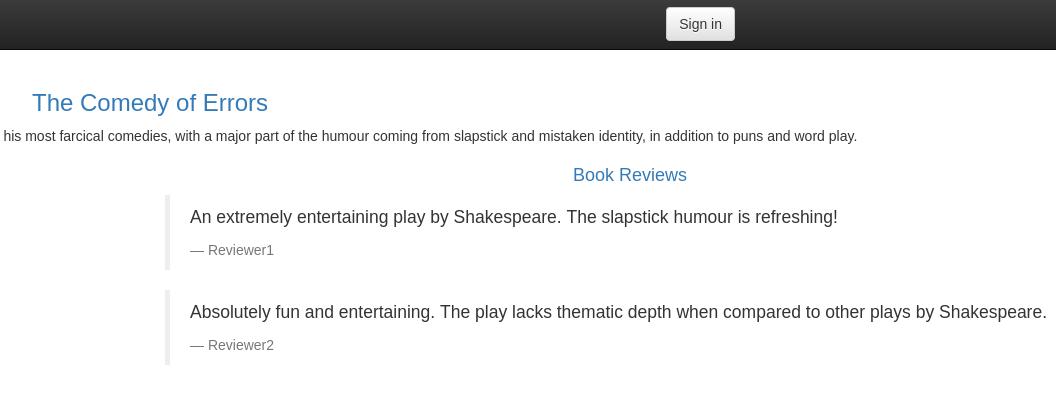
Apply the virtual services which will route all traffic to v1 of each microservice:
kubectl apply -f samples/bookinfo/networking/virtual-service-all-v1.yamlDisplay the defined routes:
kubectl get virtualservices -o yamlOutput:
apiVersion: networking.istio.io/v1alpha3
kind: VirtualService
metadata:
  name: details
  ...
spec:
  hosts:
  - details
  http:
  - route:
    - destination:
        host: details
        subset: v1

apiVersion: networking.istio.io/v1alpha3
kind: VirtualService
metadata:
  name: productpage
  ...
spec:
  gateways:
  - bookinfo-gateway
  - mesh
  hosts:
  - productpage
  http:
  - route:
    - destination:
        host: productpage
        subset: v1

apiVersion: networking.istio.io/v1alpha3
kind: VirtualService
metadata:
  name: ratings
  ...
spec:
  hosts:
  - ratings
  http:
  - route:
    - destination:
        host: ratings
        subset: v1

apiVersion: networking.istio.io/v1alpha3
kind: VirtualService
metadata:
  name: reviews
  ...
spec:
  hosts:
  - reviews
  http:
  - route:
    - destination:
        host: reviews
subset: v1- Open the Bookinfo site in your browser
http://$GATEWAY_URL/productpageand
Route based on user identity
https://istio.io/docs/tasks/traffic-management/request-routing/#route-based-on-user-identity
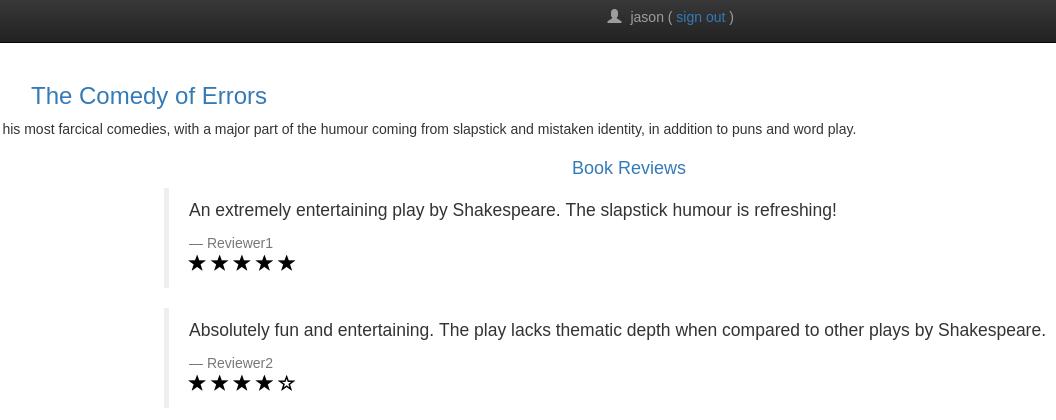
All traffic from a user named jason will be routed to the service reviews:v2 by forwarding HTTP requests with custom end-user header to the appropriate reviews service.
Enable user-based routing:
kubectl apply -f samples/bookinfo/networking/virtual-service-reviews-test-v2.yamlConfirm the rule is created:
kubectl get virtualservice reviews -o yamlOutput:
apiVersion: networking.istio.io/v1alpha3
kind: VirtualService
metadata:
  name: reviews
  ...
spec:
  hosts:
  - reviews
  http:
  - match:
    - headers:
        end-user:
          exact: jason
    route:
    - destination:
        host: reviews
        subset: v2
  - route:
    - destination:
        host: reviews
subset: v1- On the
/productpageof the Bookinfo app, log in as userjasonand refresh
- Log in as another user (pick any name you wish) and refresh the browser
You can do the same with user-agent header or URI for example:
...
  http:
    - match:
      - headers:
        user-agent:
          regex: '.Firefox.'
  ...
  http:
    - match:
      - uri:
        prefix: /api/v1
  ...
Injecting an HTTP delay fault
https://istio.io/docs/tasks/traffic-management/fault-injection/#injecting-an-http-delay-fault
Inject a 7 seconds delay between the reviews:v2 and ratings microservices for user jason:
kubectl apply -f samples/bookinfo/networking/virtual-service-ratings-test-delay.yamlConfirm the rule was created:
kubectl get virtualservice ratings -o yamlOutput:
apiVersion: networking.istio.io/v1alpha3
kind: VirtualService
metadata:
  name: ratings
  ...
spec:
  hosts:
  - ratings
  http:
  - fault:
      delay:
        fixedDelay: 7s
        percent: 100
    match:
    - headers:
        end-user:
          exact: jason
    route:
    - destination:
        host: ratings
        subset: v1
  - route:
    - destination:
        host: ratings
subset: v1- On the
/productpage, log in as userjasonand you should see:
Error fetching product reviews!
Sorry, product reviews are currently unavailable for this book.
- Open the Developer Tools menu (F12) -> Network tab - web page actually loads
The following example introduces a 5 second delay in 10% of the requests to the v1 version of the ratings microservice:
apiVersion: networking.istio.io/v1alpha3
kind: VirtualService
metadata:
  name: ratings
spec:
  hosts:
  - ratings
  http:
  - fault:
      delay:
        percent: 10
        fixedDelay: 5s
    route:
    - destination:
        host: ratings
        subset: v1
Injecting an HTTP abort fault
https://istio.io/docs/tasks/traffic-management/fault-injection/#injecting-an-http-abort-fault
Let's introduce an HTTP abort to the ratings microservices for the test user jason.
Create a fault injection rule to send an HTTP abort for user jason:
kubectl apply -f samples/bookinfo/networking/virtual-service-ratings-test-abort.yamlConfirm the rule was created:
kubectl get virtualservice ratings -o yamlOutput:
apiVersion: networking.istio.io/v1alpha3
kind: VirtualService
metadata:
  name: ratings
  ...
spec:
  hosts:
  - ratings
  http:
  - fault:
      abort:
        httpStatus: 500
        percent: 100
    match:
    - headers:
        end-user:
          exact: jason
    route:
    - destination:
        host: ratings
        subset: v1
  - route:
    - destination:
        host: ratings
subset: v1- On the
/productpage, log in as userjason- the page loads immediately

- Check the flows in Kiali graph

The following example returns an HTTP 400 error code for 10% of the requests to the ratings service v1:
apiVersion: networking.istio.io/v1alpha3
kind: VirtualService
metadata:
  name: ratings
spec:
  hosts:
  - ratings
  http:
  - fault:
      abort:
        percent: 10
        httpStatus: 400
    route:
    - destination:
        host: ratings
        subset: v1
Weight-based routing
https://istio.io/docs/tasks/traffic-management/traffic-shifting/#apply-weight-based-routing
In Canary Deployments, newer versions of services are incrementally rolled out to users to minimize the risk and impact of any bugs introduced by the newer version.
Route a percentage of traffic to one service or another - send %50 of traffic to reviews:v1 and %50 to reviews:v3 and finally complete the migration by sending %100 of traffic to reviews:v3.
Route all traffic to the `rev
README truncated. View on GitHub


