A hosted disposable email telegram bot; Extremely privacy friendly; Proudly hosted for community.











tl;dr
TrashEmail is hosted Telegram bot that can save your private email address by offering disposable email address. It can create, manage, disposable email address and link them with your telegram bot chat.- Where is the bot? - @trashemail_bot
- How can I create dispoable mail id? - Decide a username & ask the bot :smile:
- How many email ids can I own at a time? - Right now, the count is 8.
- How can I access my emails? - If there is an email for you, it will come to telegram :smile: Easy right.
- Do I need to setup and remember any password? - No Sir, that's the trick.
- Why am I maintaining and hosting this? - This is my first such tool for community :smile: I wanted to give something back to community. If you like the idea and wanted to contribute then you can BuyMeACoffee
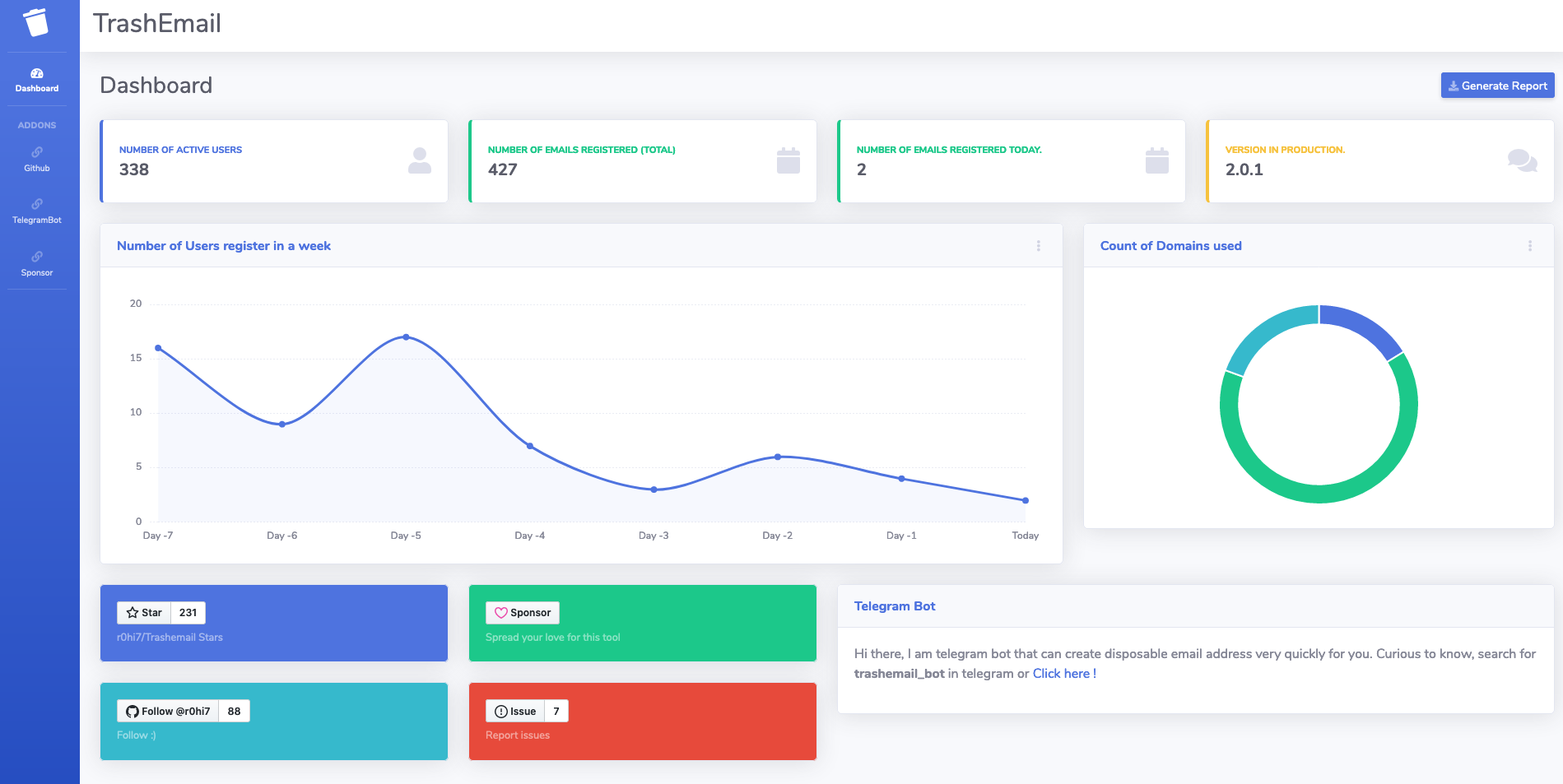
- How many users are currently using it? - The information about active registered users and latest version of this service can be found here: https://trashemail.in
How can I use this hosted service:
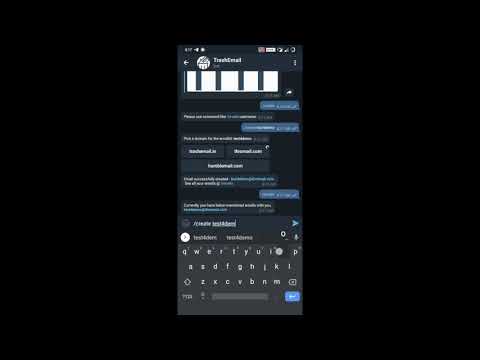
- Its super easy, just see the demo below.
What is Disposable Temporary E-mail? And How am I different?
Forget about spam, advertising mailings, hacking and attacking robots. Keep your real mailbox clean and secure.Trashemail provides temporary(or permanent), secure, anonymous, free, disposable email address. Want to get one ? its here : @trashemail_botDisposable email - is a service that allows to receive email at a temporary(Here in case, the temporary factor is upto you) address that self-destructed after a certain time elapses. It is also known by names like : tempmail, 10minutemail, throwaway email, fake-mail or trash-mail. Many forums, Wi-Fi owners, websites and blogs ask visitors to register before they can view content, post comments or download something.
Trashemail is not most advanced throwaway email service but a reliable service that helps you avoid spam, stay safe and get emails delivered directly to your @trashemail_bot Telegram bot. And in case you are getting too many such mails, just delete the email Id :) with one click(oops command, since this is telegram bot).
There are websites that offers such sort of functionalities (like https://temp-mail.org/en/ etc) but the certain issues with such platforms:
- Your information is safe or not you can't audit.
- The domain keeps changing as soon as they are identified as temp-mail domains.
- Everytime you have to visit site to get one, you can't keep the same temporary mail for long.
- And, their business model which makes you see lot of ads in website.
- The entire source code is open for audit, I am not interested in your data at all.
- Right now I own a domain trashemail.in and you will get emailIds from this domain only. (Easy for you to remember).
- The temporary time for your emailId to be alive is on you, not on the server, you can keep it permanently as well, or as long as I am able to maintain the @trashemail_bot.
- This project is out of passion, so I don't have motive of earning anything, so No Ads.(I am serious, I hate them too, like you)
- I am always open to suggestion, feedback & Issues to work on.
Let's talk about the Source.
TrashEmail is Java spring-boot microservice that anyone can build locally currently with few setting to tune in and then have the entire setup running locally. All you need to own is mail server(SMTP and IMAP), telegram bot token andmvn locally to build it.
Few requirements with the mailserver:
1. SMTP host should allow Alias creation.
2. IMAP server should support IDLE.
I have to update the config slightly, and will do it quickly. :)
All you need to do is clone the source, build and run, and just tell telegram that you are listening here.
script git clone https://github.com/r0hi7/Trashemail.git cd Trashemail
Copy EmailsToTelegramServiceConfig-sample.yml and
TrashEmailServiceConfig-sample.yml files
according to your environemnt
Let's say you want to deploy it for dev env
Then copy these files like
cp EmailsToTelegramServiceConfig-sample.yml EmailsToTelegramServiceConfig-dev.yml cp TrashEmailServiceConfig-sample.yml TrashEmailServiceConfig-dev.yml
Now modify the respective copied files with your configs
Similarly, it can be deployed be "qa", "prod" environments
Finally, run the script build-and-run.sh with env as an argument
bash build-and-run.sh dev
If you dont want to deploy it in docker-compose, then
Use Makefile directly
It will create targets for EmailsToTelegramService and TrashEmailService respectively
make dev
EmailsToTelegramServiceConfig-dev.yml # Email Server IMAP and SMTP configuration SMTP server should support Alias creation and deletion
IMAP server should support IDLE
trashemail: host: trash-email-service port: 9090 path: /getChatId/
imap-client-service: telegram: url: https://api.telegram.org/bot bot-token: xxxxxxxxxxxxxxxxxxxxxx size: 4096 imap: host: trashemail.in port: 993 email: demo@trashemail.in password: changeme emails: hostPath: http://127.0.0.1:8000/ downloadPath: /opt/EmailsToTelegramService/mails/
main will specify springboot application to
no start any tomcat server, which is not even
required for emailservice.
spring:
application:
name: EmailsToTelegramService
main:
web-application-type: noneTrashEmailServiceConfig-dev.yml
# Tomcat server settings server:   port: 9090
#Email server configuration for SMTP alias creation email-server:   hosts:     - trashemail.in     - thromail.com     - humblemail.com   admin-email: contact@trashemail.in   admin-password: sample   add-url: https://trashemail.in/admin/mail/aliases/add   remove-url: https://trashemail.in/admin/mail/aliases/remove   target-alias: demo@trashemail.in
Sample config for connecting with mysql-docker
spring:
  datasource:
    url: jdbc:mysql://mysql:3306/trashemail
    username: root
    password: changeme
    driver-class-name: com.mysql.jdbc.Driver
  jpa:
    database-platform: org.hibernate.dialect.MySQL5InnoDBDialect
    hibernate:
      ddl-auto: update
    show-sql: true
  application:
    name: Trashemail

Trashemail app server settings
trashemail:
  max-emails-per-user: 4
Logger settings
logging:
  level:
    io:
      github:
trashemail: debug- This code will spin up the service at
localhost:9090/telegram/new-messageendpoint. - Now will have to expose this service to internet, and there are options like :
ngrok,dataplicity,localtunneletc.
ngrokwith http on port 9090
* Get the ngrok https url
- DB is taken care by
mysql - Get a bot for you from, Telegram Bot Father
- The last step is important, tell telegram that where you are listening :). Set up the
webhook, thiswebhookwill tell telegram where to send the bot incoming requests
script
curl -F "url=https://<YOURDOMAIN>/telegram/new-message" https://api.telegram.org/bot<BOTTOKEN>/setWebhook- And you are done.
How It Works
- For this bot to work, you need existing SMTP, IMAP setup.
- As user, requests for creation,
- It fools the user, that it created an email Id rather it creates an alias to exiting ID.
- Runs a background async service to poll IMAP server.
- As soon as mail is fetched, the target is identified and telegram message is sent.
Sponsors
- Two domains thromail.com & humblemail.com are proudly donated by zlipa.com. Zlipa offers domains names for startups, bootstrapper etc with 10X lesser market price. Exciting right? Just checkout once.
- If you like the idea, then buy me a coffee, I will get caffine in my blood and to spend extra nights to make this product secure, up and running :smile:

- Or you can drop in a :star:, this motivates me.
Credits
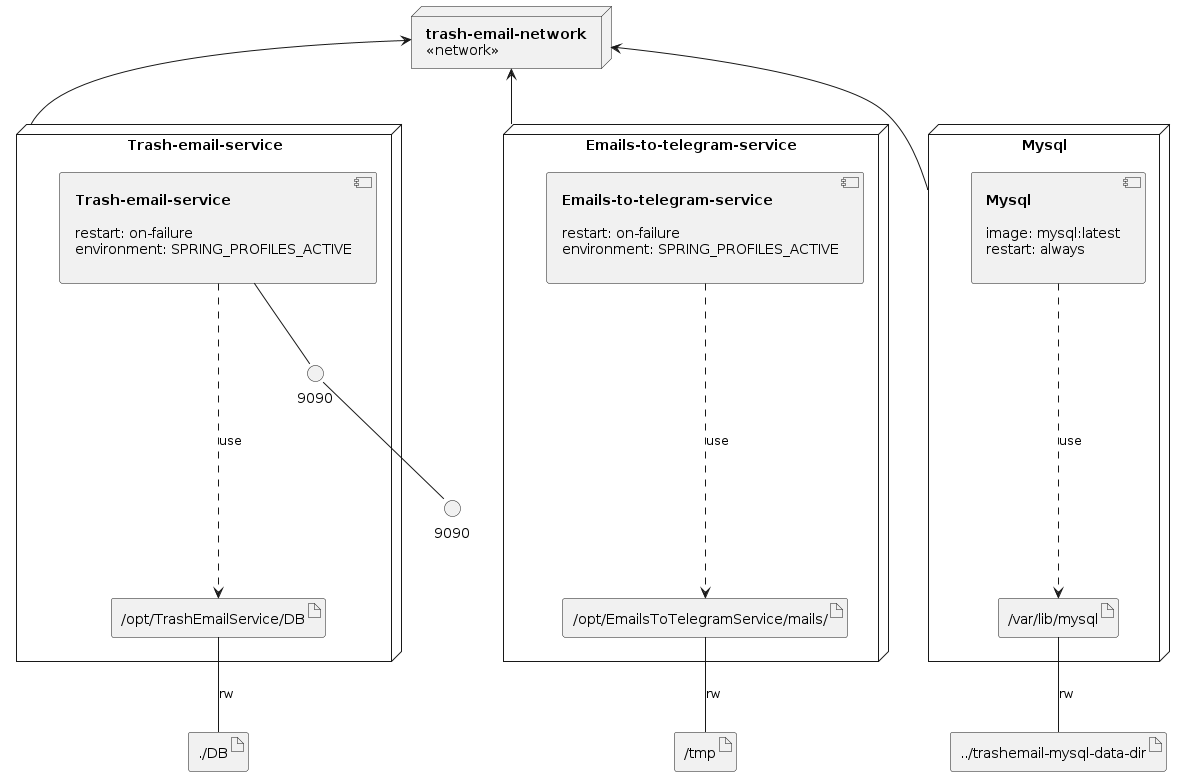
Infrastructure model