
Windows API and GUI in idiomatic Go.


Windigo
Win32 API and GUI in idiomatic Go.
Windigo is designed to be familiar to C/C++ Win32 programmers, using the same concepts, and an API as close as possible to the original Win32 API. This allows most C/C++ Win32 tutorials and examples to be translated to Go.
Notably, Windigo is written 100% in pure Go – CGo is not used, just native syscalls.
Install
go get -u github.com/rodrigocfd/windigoCurrent status
Native FFI items currently implemented:
| Native FFI item | Count | | - | -: | | Handles | 32 | | Functions | 676 | | COM interfaces | 78 | | COM methods | 534 | | Const types | 417 | | Const values | 11,113 |
Examples
In the examples below, error checking is ommited for brevity.
GUI window
GUI window
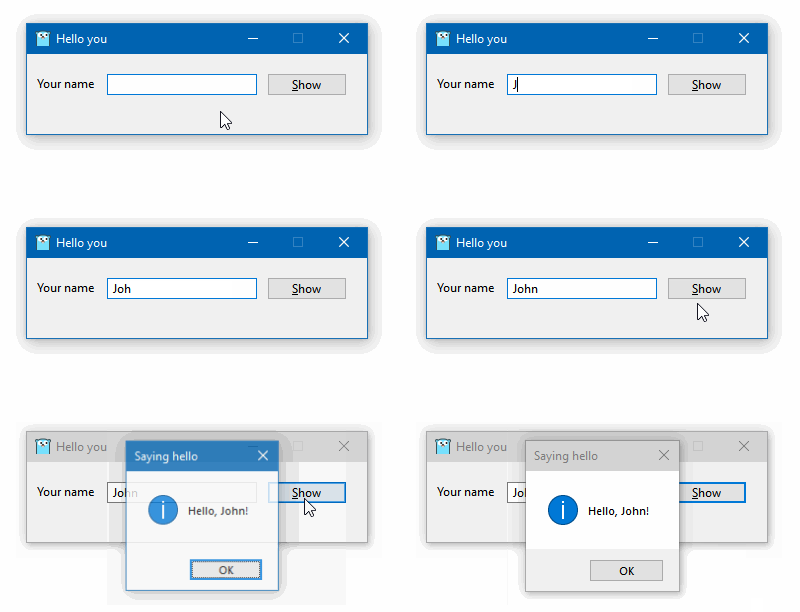
The example below creates a window programmatically, and handles the button click. Also, it uses the minimal.syso provided in the _resources folder.
package main
import ( 	"fmt" 	"runtime"
"github.com/rodrigocfd/windigo/co" 	"github.com/rodrigocfd/windigo/ui" )
func main() { 	runtime.LockOSThread() // important: Windows GUI is single-threaded
ShowMainWindow() }
// This struct represents our main window. type MyWindow struct { 	wnd     *ui.Main 	lblName *ui.Static 	txtName *ui.Edit 	btnShow *ui.Button }
// Displays the main window, blocking until it is closed. func ShowMainWindow() int { 	wnd := ui.NewMain( // create the main window 		ui.OptsMain(). 			Title("Hello you"). 			Size(ui.Dpi(340, 80)). 			ClassIconId(101), // ID of icon resource, see _resources folder 	)
lblName := ui.NewStatic( // create the child controls 		wnd, 		ui.OptsStatic(). 			Text("Your name"). 			Position(ui.Dpi(10, 22)), 	) 	txtName := ui.NewEdit( 		wnd, 		ui.OptsEdit(). 			Position(ui.Dpi(80, 20)). 			Width(ui.DpiX(150)), 	) 	btnShow := ui.NewButton( 		wnd, 		ui.OptsButton(). 			Text("&Show"). 			Position(ui.Dpi(240, 19)), 	)
me := &MyWindow{wnd, lblName, txtName, btnShow} 	me.events() 	return wnd.RunAsMain() }
func (me *MyWindow) events() { 	me.btnShow.On().BnClicked(func() { 		msg := fmt.Sprintf("Hello, %s!", me.txtName.Text()) 		me.wnd.Hwnd().MessageBox(msg, "Saying hello", co.MB_ICONINFORMATION) 	}) }
To compile the final .exe file, run the command:
go build -trimpath -ldflags "-s -w -H=windowsgui"Registry access
Registry access
package main
import ( 	"github.com/rodrigocfd/windigo/co" 	"github.com/rodrigocfd/windigo/win" )
func main() { 	// Open a registry key
hKey,  := win.HKEYCURRENT_USER.RegOpenKeyEx( 		"Control Panel\\Mouse", 		co.REGOPTIONNONE, 		co.KEY_READ) // open key as read-only 	defer hKey.RegCloseKey()
// Read a single value from this key
regVal, _ := hKey.RegQueryValueEx("Beep") // data can be string, uint32, etc.
if strVal, ok := regVal.Sz(); ok { // try to extract a string value 		println("Beep is", strVal) 	}
// Enumerate all values under this key
namesVals, _ := hKey.RegEnumValue() 	for _, nameVal := range namesVals { 		if str, ok := nameVal.Val.Sz(); ok { // does it contain a string? 			println("Value str", nameVal.Name, str) 		} else if num, ok := nameVal.Val.Dword(); ok { // does it contain an uint32? 			println("Value int", nameVal.Name, num) 		} else { 			println("Value other", nameVal.Name) 		} 	} }
Enumerating running processes
Enumerating running processes
The example below takes a process snapshot to list the running processes:
package main
import ( 	"github.com/rodrigocfd/windigo/co" 	"github.com/rodrigocfd/windigo/win" )
func main() { 	hSnap,  := win.CreateToolhelp32Snapshot(co.TH32CSSNAPPROCESS, 0) 	defer hSnap.CloseHandle()
processes, _ := hSnap.EnumProcesses() 	for _, nfo := range processes { 		println("PID:", nfo.Th32ProcessID, "name:", nfo.SzExeFile()) 	}
println(len(processes), "found") }
Taking a screenshot
Taking a screenshot
This complex example takes a screenshot using GDI and saves it to a BMP file.
package main
import ( 	"unsafe"
"github.com/rodrigocfd/windigo/co" 	"github.com/rodrigocfd/windigo/win" )
func main() { 	cxScreen := win.GetSystemMetrics(co.SM_CXSCREEN) 	cyScreen := win.GetSystemMetrics(co.SM_CYSCREEN)
hdcScreen, _ := win.HWND(0).GetDC() 	defer win.HWND(0).ReleaseDC(hdcScreen)
hBmp, _ := hdcScreen.CreateCompatibleBitmap(int(cxScreen), int(cyScreen)) 	defer hBmp.DeleteObject()
hdcMem, _ := hdcScreen.CreateCompatibleDC() 	defer hdcMem.DeleteDC()
hBmpOld, _ := hdcMem.SelectObjectBmp(hBmp) 	defer hdcMem.SelectObjectBmp(hBmpOld)
_ = hdcMem.BitBlt( 		win.POINT{X: 0, Y: 0}, 		win.SIZE{Cx: cxScreen, Cy: cyScreen}, 		hdcScreen, 		win.POINT{X: 0, Y: 0}, 		co.ROP_SRCCOPY, 	)
bi := win.BITMAPINFO{ 		BmiHeader: win.BITMAPINFOHEADER{ 			Width:       cxScreen, 			Height:      cyScreen, 			Planes:      1, 			BitCount:    32, 			Compression: co.BI_RGB, 		}, 	} 	bi.BmiHeader.SetBiSize()
bmpObj, _ := hBmp.GetObject() 	bmpSize := bmpObj.CalcBitmapSize(bi.BmiHeader.BitCount)
rawMem,  := win.GlobalAlloc(co.GMEMFIXED|co.GMEM_ZEROINIT, bmpSize) 	defer rawMem.GlobalFree()
bmpSlice, _ := rawMem.GlobalLockSlice() 	defer rawMem.GlobalUnlock()
,  = hdcScreen.GetDIBits( 		hBmp, 		0, 		int(cyScreen), 		bmpSlice, 		&bi, 		co.DIBCOLORSRGB, 	)
var bfh win.BITMAPFILEHEADER 	bfh.SetBfType() 	bfh.SetBfOffBits(uint32(unsafe.Sizeof(bfh) + unsafe.Sizeof(bi.BmiHeader))) 	bfh.SetBfSize(bfh.BfOffBits() + uint32(bmpSize))
fout, _ := win.FileOpen( 		"C:\\Temp\\screenshot.bmp", 		co.FOPENRWOPENORCREATE, 	) 	defer fout.Close()
,  = fout.Write(bfh.Serialize()) 	,  = fout.Write(bi.BmiHeader.Serialize()) 	,  = fout.Write(bmpSlice) }
Component Object Model (COM)
Component Object Model (COM)
Windigo has full support for C++ COM objects. The cleanup is performed by a win.OleReleaser object, which calls Release on multiple COM objects at once, much like an arena allocator. Every function which produces a COM object requires a win.OleReleaser to take care of its lifetime.
The example below uses COM objects to display the system native Open File window:
package main
import ( 	"github.com/rodrigocfd/windigo/co" 	"github.com/rodrigocfd/windigo/win" )
func main() { 	runtime.LockOSThread() // important: Windows GUI is single-threaded
,  := win.CoInitializeEx( 		co.COINITAPARTMENTTHREADED | co.COINITDISABLE_OLE1DDE) 	defer win.CoUninitialize()
releaser := win.NewOleReleaser() // will release all COM objects created here 	defer releaser.Release()
var fod *win.IFileOpenDialog 	_ = win.CoCreateInstance( 		releaser, 		&co.CLSID_FileOpenDialog, 		nil, 		co.CLSCTXINPROCSERVER, 		&fod, 	)
defOpts, _ := fod.GetOptions() 	_ = fod.SetOptions(defOpts | 		co.FOS_FORCEFILESYSTEM | 		co.FOS_FILEMUSTEXIST, 	)
 = fod.SetFileTypes([]win.COMDLGFILTERSPEC{ 		{Name: "Text files", Spec: "*.txt"}, 		{Name: "All files", Spec: "."}, 	}) 	_ = fod.SetFileTypeIndex(1)
if ok, _ := fod.Show(win.HWND(0)); ok { // in real applications, pass the parent HWND 		item, _ := fod.GetResult(releaser) 		fileName,  := item.GetDisplayName(co.SIGDNFILESYSPATH) 		println(fileName) 	} }
COM Automation
COM Automation
Windigo has bindings to IDispatch COM interface and VARIANT parameters, allowing you to invoke Automation methods.
The example below manipulates an Excel spreadsheet, saving a copy of it:
package main
import ( 	"github.com/rodrigocfd/windigo/co" 	"github.com/rodrigocfd/windigo/win" )
func main() { 	,  = win.CoInitializeEx( 		co.COINITAPARTMENTTHREADED | co.COINITDISABLE_OLE1DDE) 	defer win.CoUninitialize()
rel := win.NewOleReleaser() 	defer rel.Release()
clsId, _ := win.CLSIDFromProgID("Excel.Application")
var excel *win.IDispatch 	_ = win.CoCreateInstance( 		rel, 		&clsId, 		nil, 		co.CLSCTXLOCALSERVER, 		&excel, 	)
books, _ := excel.InvokeGetIDispatch(rel, "Workbooks") 	file, _ := books.InvokeMethodIDispatch(rel, "Open", "C:\\Temp\\foo.xlsx") 	,  = file.InvokeMethod(rel, "SaveAs", "C:\\Temp\\foo copy.xlsx") 	,  = file.InvokeMethod(rel, "Close") }
Architecture
The library is divided in four packages:
| Package | Description | | - | - | | co | Native Win32 constants, all typed. | | ui | High-level UI windows and controls. | | win | Native Win32 structs, handles and functions. | | wstr | String and UTF-16 wide string management. |
Package dependency:
flowchart BT
    internal/utl([internal/utl]) --> co
    ui --> win
    win --> internal/dll([internal/dll])
    win --> internal/utl
    win --> wstr
License
Licensed under MIT license, see LICENSE.md for details.


