
curl statistics made simple
httpstat
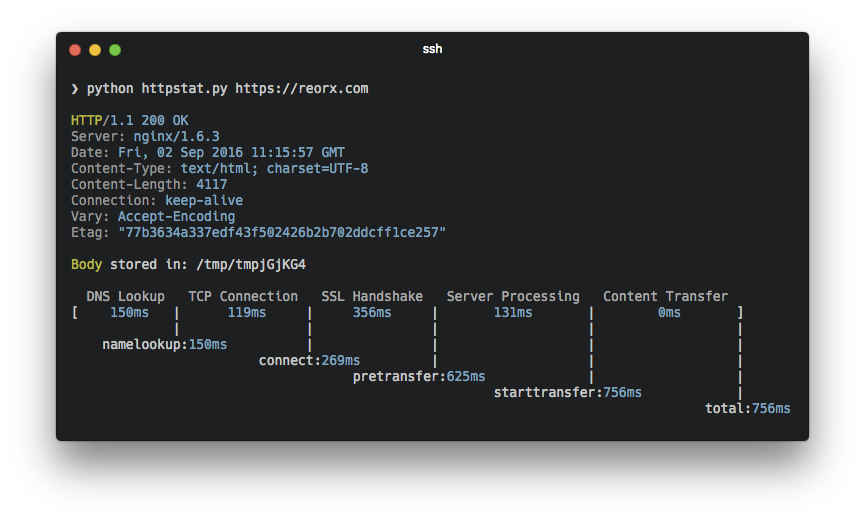
httpstat visualizes curl(1) statistics in a way of beauty and clarity.
It is a single file🌟 Python script that has no dependency👏 and is compatible with Python 3🍻.
Features
- Beautiful terminal output — timing breakdown of DNS, TCP, TLS, server processing, and content transfer
- Structured JSON output —
--format json/jsonlfor machine consumption with a stable v1 schema - SLO threshold checking —
--slo total=500,connect=100exits with code 4 on violation - Save results to file —
--save path.jsonfor multi-step workflows - NOCOLOR support — respects the NO_COLOR convention
- Agent skill — built-in skill for agent-assisted HTTP performance diagnostics
Installation
There are three ways to get httpstat:
- Download the script directly:
wget https://raw.githubusercontent.com/reorx/httpstat/master/httpstat.py
- Through pip:
pip install httpstat
- Through homebrew (macOS only):
brew install httpstat
For Windows users, @davecheney's Go version is suggested. → download link
Skills
httpstat ships with an agent skill that teaches AI coding assistants (Claude Code, Cursor, etc.) how to use httpstat for HTTP performance diagnostics — automatic installation, bottleneck identification, and actionable fix suggestions.
Install the skill into your project:
npx skills add reorx/httpstatOnce installed, your agent will automatically use httpstat when you ask questions like "why is this API slow?" or "debug this endpoint's latency".
Usage
Simply:
python httpstat.py httpbin.org/getIf installed through pip or brew, you can use httpstat as a command:
httpstat httpbin.org/getcURL Options
Because httpstat is a wrapper of cURL, you can pass any cURL supported option after the url (except for -w, -D, -o, -s, -S which are already used by httpstat):
httpstat httpbin.org/post -X POST --data-urlencode "a=b" -vStructured Output
Use --format (-f) to get machine-readable output:
httpstat httpbin.org/get --format json{
"schema_version": 1,
"url": "httpbin.org/get",
"ok": true,
"exit_code": 0,
"response": {
"status_line": "HTTP/2 200",
"status_code": 200,
"remote_ip": "...",
"remote_port": "443",
"headers": {"Content-Type": "application/json", "Server": "nginx", "...": "..."}
},
"timings_ms": {
"dns": 5, "connect": 10, "tls": 15,
"server": 50, "transfer": 20, "total": 100,
"namelookup": 5, "initial_connect": 15,
"pretransfer": 30, "starttransfer": 80
},
"speed": { "downloadkbs": 1234.5, "uploadkbs": 0.0 },
"slo": null
}Use --format jsonl for compact single-line JSON (useful for log pipelines).
SLO Thresholds
Check response times against thresholds. Exits with code 4 on violation:
httpstat httpbin.org/get --slo total=500,connect=100,ttfb=200Supported keys: total, connect, ttfb (time to first byte), dns, tls.
In pretty mode, violations are printed in red at the end of the output. In JSON mode, violations appear in the slo field:
{
  "slo": {
    "pass": false,
    "violations": [
      { "key": "total", "thresholdms": 500, "actualms": 823 }
    ]
  }
}
Save Results
Write structured JSON output to a file (works with any --format):
httpstat httpbin.org/get --save result.json
httpstat httpbin.org/get --format json --save result.json
Environment Variables
httpstat has a bunch of environment variables to control its behavior. Here are some usage demos, you can also run httpstat --help to see full explanation.
HTTPSTATSHOWBODY
true to show response body in the output, note that body length
is limited to 1023 bytes, will be truncated if exceeds. Default is false.
HTTPSTATSHOWIP
false to disable this feature. Default is true.
HTTPSTATSHOWSPEED
true to show download and upload speed. Default is false.
HTTPSTATSHOWSPEED=true httpstat http://cachefly.cachefly.net/10mb.test

  ...
speeddownload: 3193.3 KiB/s, speedupload: 0.0 KiB/sHTTPSTATSAVEBODY
false to disable this feature. Default is true
HTTPSTATCURLBIN
curl from current shell $PATH.
This exampe uses brew installed cURL to make HTTP2 request:
HTTPSTATCURLBIN=/usr/local/Cellar/curl/7.50.3/bin/curl httpstat https://http2.akamai.com/ --http2

  HTTP/2 200
  ...
> cURL must be compiled with nghttp2 to enable http2 feature > (#12).
HTTPSTATMETRICSONLY
true, httpstat will only output metrics in json format,
this is useful if you want to parse the data instead of reading it.
> Note: This is kept for backward compatibility. Prefer --format json instead.
HTTPSTAT_DEBUG
true to see debugging logs. Default is false
NO_COLOR
NO_COLOR=1 httpstat httpbin.org/getFor convenience, you can export these environments in your .zshrc or .bashrc, example:
export HTTPSTATSHOWIP=false
export HTTPSTATSHOWSPEED=true
export HTTPSTATSAVEBODY=false
Related Projects
Here are some implementations in various languages:
This is the Go alternative of httpstat, it's written in pure Go and relies no external programs. Choose it if you like solid binary executions (actually I do).- Go (library): tcnksm/go-httpstat
- Bash: b4b4r07/httpstat
- Node: yosuke-furukawa/httpstat
Some code blocks in httpstat are copied from other projects of mine, have a look:
- reorx/python-terminal-color Drop-in single file library for printing terminal color.
- reorx/getenv Environment variable definition with type.


