
Automatic time tracking for macOS




SimplyTrack
A simple, elegant macOS productivity tracking app that helps you monitor your application and website usage patterns.
| App Overview | MCP Demo with Claude Desktop | |:---:|:---:| |  |
|  |
|
| Daily Activity View with Bar Chart | Daily Activity View with Pie Chart | |:---:|:---:| |  |
|  |
|
| Weekly Activity Overview | AI-Powered Usage Summary Notifications | |:---:|:---:| |  |
| 
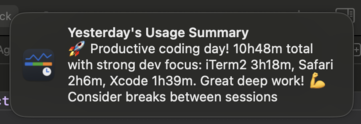 |
|
Motivation
I created SimplyTrack out of a personal need to understand and improve my productivity. Like many developers and professionals, I wanted to track my app and website usage to identify patterns, time-wasters, and productivity trends.
After trying several existing solutions, I found they were either:
- Too complex - Loaded with features I didn't need
- Too limited - Missing key functionality I required
- Too expensive - Overkill for simple usage tracking
- Privacy concerns - Sending data to external servers
✨ Features
- 📊 App & Website Tracking - Monitor time spent in applications and websites (Safari, Chrome, Edge, Arc, Brave, Vivaldi, Dia, Firefox experimental)
- 📈 Visual Analytics - Charts showing daily/weekly activity patterns
- 🔔 Smart Notifications - Optional AI-powered daily summary notifications with usage insights
- 🤖 AI Integration - Built-in MCP server for seamless integration with Claude and other AI assistants
- 📥 CSV Export - Export usage data as CSV via UI or MCP for analysis in spreadsheets
- 🔒 Privacy-First - All data stored locally, secure keychain storage for API keys, optional private browsing tracking
- 🚀 Menu Bar Interface - Clean popover UI, native macOS integration
- 🔍 Smart Detection - Automatic idle detection, session management, and private browsing detection
🛠️ Installation
Requirements
- macOS 15.0 (Sequoia) or later
- Apple Silicon Mac
Download
Or manually:
- Go to the Releases page
- Download the latest
SimplyTrack.dmgfile - Open the DMG and drag SimplyTrack to your Applications folder
- Launch SimplyTrack and follow the permission setup guide
Building from Source
git clone https://github.com/renjfk/SimplyTrack.git
cd SimplyTrack
open SimplyTrack.xcodeproj
Build and run in Xcode 15.0 or later.
Setup & Permissions
SimplyTrack requires several macOS permissions to function properly:
Required Permissions
- Automation Permission: To track browser activity
- System Events Permission: For Safari and Firefox browser integration
- Accessibility Permission: For Safari and Firefox browser integration
- Firefox Additional Setup: Firefox does not expose tab URLs through its scripting interface, so
about:config
2. Accept the risk warning if prompted
3. Search for accessibility.force_disabled
4. Set the value to -1
- Notifications (Optional): For update notifications
Permission Setup
The app provides helpful banners and direct links to the appropriate system preference panes when permissions are needed.
🤖 AI Integration (MCP)
SimplyTrack includes a built-in Model Context Protocol (MCP) server that allows AI assistants like Claude to access your usage data for insights and analysis.
Features
- Usage Data Access: AI assistants can retrieve your app/website usage statistics
- Smart Analysis: Get personalized productivity insights from your data
- Privacy-Focused: Data never leaves your machine - AI connects directly to your local SimplyTrack instance
- Easy Setup: One-click configuration for Claude Desktop
Setup with Claude Desktop
- Open SimplyTrack Settings → AI tab
- In the "AI Tool Integration" section, click "Auto-Configure"
- Select your Claude Desktop configuration file when prompted
- Restart Claude Desktop to activate the integration
Available Tools
getusageactivity- Retrieve detailed usage statistics for any date
exportusagecsv- Export usage sessions as CSV
Example Usage
Ask Claude: "What were my top 3 most used apps yesterday?" or "Analyze my productivity patterns this week"
The MCP server provides real-time access to your usage data while maintaining complete privacy and control.
Contributing
SimplyTrack is open to contributions and ideas! Whether you're a developer wanting to add features or a user with suggestions, your input is valuable.
Issue Conventions
When creating issues, please follow our simple naming convention:
Format: type: brief description
Issue Types
feat:- New features or functionalityfix:- Bug fixesenhance:- Improvements to existing featureschore:- Maintenance tasks, dependencies, cleanupdocs:- Documentation updatesbuild:- Build system, CI/CD changes
Examples
feat: add CSV export functionalityfix: app crashes when importing large filesenhance: improve data loading performancechore: update dependencies to latest versionsdocs: update README with installation instructionsbuild: update Xcode project settings
Guidelines
- Use lowercase for the description
- Be specific and actionable
- Keep under 60 characters
- No period at the end
Development
Release Process
Manual releases with GitHub MCP integration - see RELEASE_PROCESS.md.
For planned improvements and testing infrastructure, see issue #9.
License
This project is licensed under the MIT License.


