
LSP signature hint as you type
lsp_signature.nvim
Show function signature when you type
- This nvim plugin is made for completion plugins that do not support signature help. Need neovim-0.10+. (check
- Inspired by completion-nvim, which does have lots of cool features.
- Fully asynchronous lsp buf request.
- Virtual text available
Golang with markdown
Highlight with "Search"
https://user-images.githubusercontent.com/1681295/122633027-a7879400-d119-11eb-95ff-d06e6aeeb0b2.mov
Lua
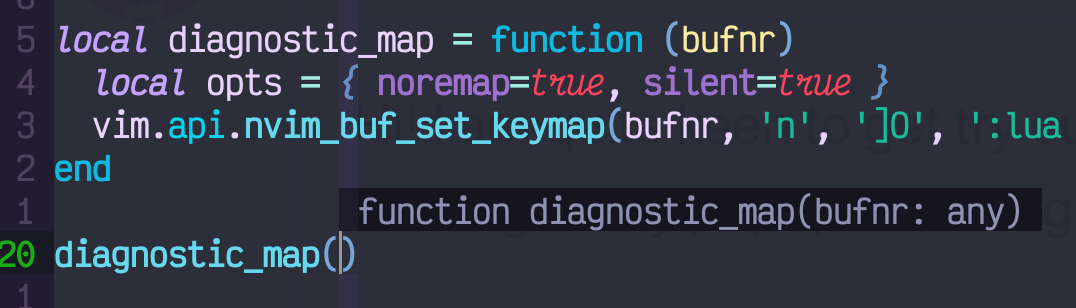
The plugin also re-write the builtin lsp signature allow the parameter highlight

Using virtual text to show the next parameter
 virtualtext"" alt="virtualhint" loading="lazy">
Virtual text only mode
(from @fdioguardi)

Multiple signatures
In case some of the languages allow function overload, the plugin will show all available signatures


To switch between the signatures, use selectsignaturekey
Install:
" dein
dein#add('ray-x/lsp_signature.nvim')
" plug Plug 'ray-x/lsp_signature.nvim'
" Packer use {   "ray-x/lsp_signature.nvim", }
" Lazy {   "ray-x/lsp_signature.nvim",   event = "InsertEnter",   opts = {     -- cfg options   }, }
Setup / Attach the plugin
In your init.lua, call setup()
local cfg = {…}  -- add your config here
require "lsp_signature".setup(cfg)
Alternatively, call on_attach(cfg, bufnr) when the LSP client attaches to a buffer
e.g. gopls:
local golang_setup = {
  on_attach = function(client, bufnr)
    …
    require "lspsignature".onattach(signature_setup, bufnr)  -- Note: add in lsp client on-attach
    …
  end,
  …
}
require'lspconfig'.gopls.setup(golang_setup)
If you using Lazy.nvim, you can pass the config in the opts table:
{
  "ray-x/lsp_signature.nvim",
  event = "InsertEnter",
  opts = {
    bind = true,
    handler_opts = {
      border = "rounded"
    }
  },
  -- or use config
  -- config = function(, opts) require'lspsignature'.setup({you options}) end
}
Configure
Floating window borders
If you have a recent enough build of Neovim, you can configure borders in the signature help floating window(Thanks @Gabriel Sanches for the PR):
local example_setup = {
  on_attach = function(client, bufnr)
    …
    require "lspsignature".onattach({
      bind = true,
      handler_opts = {
        border = "rounded"
      }
    }, bufnr)
    …
  end,
  …
}
Or:
require'lspconfig'.gopls.setup()
require "lsp_signature".setup({
  bind = true,
  handler_opts = {
    border = "rounded"
  }
})
Keymaps
No default keymaps are provided. Following are keymaps available in config:
- togglekey: Toggle the signature help window. It manual toggle config.floatingwindows on/off
- selectsignaturekey: Select the current signature when multiple signature is available.
- move floating window: movecursorkey, array of two keymaps, if set, you can use these keymaps to move floating
Customize the keymap in your config:
- To toggle floating windows in
Normalmode, you need either define a keymap tovim.lsp.buf.signature_help()or
require('lspsignature').togglefloat_win()
e.g.
vim.keymap.set({ 'n' }, '<C-k>', function()       require('lspsignature').togglefloat_win()
    end, { silent = true, noremap = true, desc = 'toggle signature' })
vim.keymap.set({ 'n' }, '<Leader>k', function()      vim.lsp.buf.signature_help()     end, { silent = true, noremap = true, desc = 'toggle signature' })
Full configuration (with default values)
cfg = {
  debug = false, -- set to true to enable debug logging
  logpath = vim.fn.stdpath("log") .. "/lspsignature.log", -- log dir when debug is true
  -- default is  ~/.cache/nvim/lsp_signature.log
  verbose = false, -- show debug line number
bind = true, -- This is mandatory, otherwise border config won't get registered.                -- If you want to hook lspsaga or other signature handler, pls set to false   doc_lines = 10, -- will show two lines of comment/doc(if there are more than two lines in doc, will be truncated);                  -- set to 0 if you DO NOT want any API comments be shown                  -- This setting only take effect in insert mode, it does not affect signature help in normal                  -- mode, 10 by default
maxheight = 12, -- max height of signature floatingwindow, include borders   max_width = function()     return vim.api.nvimwinget_width(0) * 0.8   end, -- maxwidth of signature floatingwindow, line will be wrapped if exceed max_width                   -- the value need >= 40                   -- if max_width is function, it will be called   wrap = true, -- allow doc/signature text wrap inside floating_window, useful if your lsp return doc/sig is too long   floating_window = true, -- show hint in a floating window, set to false for virtual text only mode
floatingwindowabovecurline = true, -- try to place the floating above the current line when possible Note:   -- will set to true when fully tested, set to false will use whichever side has more space   -- this setting will be helpful if you do not want the PUM and floating win overlap
floatingwindowoff_x = 1, -- adjust float windows x position.                              -- can be either a number or function   floatingwindowoff_y = 0, -- adjust float windows y position. e.g -2 move window up 2 lines; 2 move down 2 lines                               -- can be either number or function, see examples   ignore_error = func(err, ctx, config), -- this scilence errors, check init.lua for more details
close_timeout = 4000, -- close floating window after ms when laster parameter is entered   fix_pos = false,  -- set to true, the floating window will not auto-close until finish all parameters   hint_enable = true, -- virtual hint enable   hint_prefix = "🐼 ",  -- Panda for parameter, NOTE: for the terminal not support emoji, might crash   -- or, provide a table with 3 icons   -- hint_prefix = {   --     above = "↙ ",  -- when the hint is on the line above the current line   --     current = "← ",  -- when the hint is on the same line   --     below = "↖ "  -- when the hint is on the line below the current line   -- }   hint_scheme = "String",   hint_inline = function() return false end,  -- should the hint be inline(nvim 0.10 only)?  default false   -- return true | 'inline' to show hint inline, return false | 'eol' to show hint at end of line   -- return one of: true|false|virttextpos: 'eol', 'eolrightalign', 'overlay', 'right_align', 'inline'   hi_parameter = "LspSignatureActiveParameter", -- how your parameter will be highlight   handler_opts = {     border = "rounded"   -- double, rounded, single, shadow, none, or a table of borders   },
always_trigger = false, -- sometime show signature on new line or in middle of parameter can be confusing, set it to false for #58
autocloseafter = nil, -- autoclose signature float win after x sec, disabled if nil.   extratriggerchars = {}, -- Array of extra characters that will trigger signature completion, e.g., {"(", ","}   zindex = 200, -- by default it will be on top of all floating windows, set to <= 50 send it to bottom
padding = '', -- character to pad on left and right of signature can be ' ', or '|'  etc
transparency = nil, -- disabled by default, allow floating win transparent value 1~100   shadow_blend = 36, -- if you using shadow as border use this set the opacity   shadow_guibg = 'Black', -- if you using shadow as border use this set the color e.g. 'Green' or '#121315'   timer_interval = 200, -- default timer check interval set to lower value if you want to reduce latency   togglekey = nil, -- toggle signature on and off in insert mode,  e.g. togglekey = '<M-x>'   togglekeyflipfloatwinsetting = false, -- true: toggle floating_windows: true|false setting after toggle key pressed      -- false: floatingwindows setup will not change, togglekey will pop up signature helper, but signature      -- may not popup when typing depends on floating_window setting
selectsignaturekey = nil, -- cycle to next signature, e.g. '<M-n>' function overloading   movesignaturewindow_key = nil, -- move the floating window, e.g. {'<M-k>', '<M-j>'} to move up and down, or     -- table of 4 keymaps, e.g. {'<M-k>', '<M-j>', '<M-h>', '<M-l>'} to move up, down, left, right   movecursorkey = nil, -- imap, use nvimsetcurrent_win to move cursor between current win and floating window   -- e.g. movecursorkey = '<M-p>',   -- once moved to floating window, you can use <M-d>, <M-u> to move cursor up and down   keymaps = {}  -- relate to movecursorkey; the keymaps inside floating window with arguments of bufnr   -- e.g. keymaps = function(bufnr) vim.keymap.set(...) end   -- it can be function that set keymaps   -- e.g. keymaps = { { 'j', '<C-o>j' }, } this map j to <C-o>j in floating window   -- <M-d> and <M-u> are default keymaps to move cursor up and down }
-- recommended: require'lspsignature'.setup(cfg) -- no need to specify bufnr if you don't use togglekey
-- You can also do this inside lsp on_attach -- note: on_attach deprecated require'lspsignature'.onattach(cfg, bufnr) -- no need to specify bufnr if you don't use toggle_key
Signature in status line
Sample config
API
require("lspsignature").statusline(max_width)return a table
{
  label = 'func fun_name(arg1, arg2…)'
  hint = 'arg1',
  range = {start = 13, ['end'] = 17 }
  doc = 'func_name return arg1 + arg2 …'
}
In your statusline or winbar
local current_signature = function(width)
  if not pcall(require, 'lsp_signature') then return end
  local sig = require("lspsignature").statusline(width)
  return sig.label .. "🐼" .. sig.hint
end
set floating windows position based on cursor position
-- cfg = {…}  -- add you config here
local cfg = {
  floatingwindowoff_x = 5, -- adjust float windows x position.
  floatingwindowoff_y = function() -- adjust float windows y position. e.g. set to -2 can make floating window move up 2 lines
    local linenr = vim.api.nvimwinget_cursor(0)[1] -- buf line number
    local pumheight = vim.o.pumheight
    local winline = vim.fn.winline() -- line number in the window
    local winheight = vim.fn.winheight(0)
-- window top     if winline - 1 < pumheight then       return pumheight     end
-- window bottom     if winheight - winline < pumheight then       return -pumheight     end     return 0   end, } require "lsp_signature".setup(cfg)
Should signature floating windows fixed
fix_pos can be a function, it took two element, first is the signature result for your signature, second is lsp client.
You can provide a function.
e.g.
fix_pos = function(signatures, lspclient)
   if signatures[1].activeParameter >= 0 and #signatures[1].parameters == 1 then
     return false
   end
   if lspclient.name == 'sumneko_lua' then
     return true
   end
   return false
end
Sample config with cmp, luasnipet and autopair
Q&A:
Q: What is the default colorscheme in screenshot:
A: aurora
Q: I can not see border after enable border = "single"/"rounded"
A: Try another colorscheme (e.g. colorscheme aurora, or colorscheme luna). If issue persists, please submit an issue
Q: It is not working 😡
A: Here is some trouble shooting: https://github.com/ray-x/lsp_signature.nvim/issues/1
If you are using JDTLS, please read this: issue #97
Q:I do not like the pop window background highlight, how to change it?
A: Redefine your NormalFloat and FloatBorder, esp if your colorscheme dose not define it.
Q: How to change parameter highlight
A: By default, the highlight is using "LspSignatureActiveParameter" defined in your colorscheme, you can either override "LspSignatureActiveParameter" or define, e.g. use IncSearch setup({ hi_parameter = "IncSearch"})
Q: I can not see 🐼 in virtual text
A: It is emoji, not nerdfont. Please check how to enable emoji for your terminal.
Q: Working with cmp/coq. The floating windows block cmp/coq
A: A few options here, z-index, floatingwindowabovecurline, floatingwindowoffx/y, togglekey. You can find the best setup for your workflow.


