
G'day Nvimer, Joyful Gopher: Explore the Feature-Packed Go Plugin for Neovim
go.nvim
A modern go neovim plugin based on treesitter, gopls, dap debugger and AI. It is written in Lua and async as much as possible. PR & Suggestions are welcome.
The plugin covers most features required for a gopher.
LSP & Navigation
- gopls commands: fillstruct, organize imports, list modules/packages, gc_details, generate, change signature, etc.
- All GoToXxx (reference, implementation, definition, doc, peek code/doc, etc.) via gopls/lspconfig.
- Show interface implementations with virtual text
- Inlay hints (gopls 0.9+; enabled by default in 0.10+)
- CodeLens & CodeAction support
- Async build/make/test with libuv job wrapper
- Test with
go test, gotestsum, or ginkgo — including floaterm support - Generate unit tests with gotests (table-driven, testify)
- Test coverage: run coverage, display signs, and show function metrics
- Smart build-tag detection for debug/test runs (e.g.
//go:build integration)
GoIfErr,GoFillStruct,GoFillSwitch,GoFixPlurals,GoGenReturn— powered by treesitter/go ASTGoImpl— generate interface method stubsGoEnum— generate enum helpersGoJson2Struct— convert JSON/YAML to Go structsGoMockGen— generate mocks with mockgenGoNew— create files/projects from templates (includinggonew)- GoFix - Run
go fix - Struct tag management with
gomodifytags
- Format via LSP (gopls) or CLI (
gofumpt,goimports) - Lint with golangci-lint (v2) — LSP diagnostics or async background checks
- Dlv debug with nvim-dap and nvim-dap-ui — zero-config Go adapter included
- Load VSCode
launch.jsonconfigurations
GoAI— natural-language command dispatcher (translates natural-language into go.nvim commands via Copilot/OpenAI).GoCmtAI— generate doc comments with AI for the declaration at cursorGoDocAI— AI-powered documentation: find symbols by vague name and generate rich docs from sourceGoCodeReview— AI code review for files, selections, or diffs; results populate the quickfix listGoAIChat— ask questions about Go code with AI; auto-includes function context and LSP references
GoDoc/GoDocBrowser— view docs in a float or browserGoCheat— cheat sheets from cheat.shGoAlt/GoAltV/GoAltS— switch between test and implementation filesGoPkgOutline/GoPkgSymbols— package-level symbol outlines
- Auto-generate doc comments for packages, functions, structs, and interfaces (suppresses golint warnings)
GoModTidy,GoModVendor,GoGet,GoWork, etc.Gomvp— rename/move packagesGoVulnCheck— run govulncheck for vulnerability scanning
- Treesitter-based syntax highlighting and textobjects
- Treesitter highlight injection for SQL, JSON,
go template, andgohtmltmpl - Feature-rich LuaSnip snippets included
- Per-project setup via
.gonvim/init.luaorlaunch.json - Async jobs with libuv throughout
Installation
Use your favorite package manager to install. The dependency nvim-treesitter main branch (and optionally, treesitter-objects) should be installed the first time you use it. Also Run TSInstall go to install the go parser if not installed yet. sed is recommended to run this plugin.
[!NOTE]
The 13K stars nvim-treesitter was archived when I was refactoring the code to its main branch. This plugin no longer
requires nvim-treesitter but requires neovim 0.12 if you use master version. I do not guarantee the behavior of nvim
0.11 will still be correct. To use nvim 0.11 pls use go.nvim v0.11 release
lazy.nvim
{
  "ray-x/go.nvim",
  dependencies = {  -- optional packages
    "ray-x/guihua.lua",
    "neovim/nvim-lspconfig",
    -- { "nvim-treesitter/nvim-treesitter", branch = 'main' } -- optional for master version
  },
  opts = function()
require("go").setup(opts)     local formatsyncgrp = vim.api.nvimcreateaugroup("GoFormat", {})     vim.api.nvimcreateautocmd("BufWritePre", {       pattern = "*.go",       callback = function()       require('go.format').goimports()       end,       group = formatsyncgrp,     })     return {       -- lsp_keymaps = false,       -- other options     }   end,   event = {"CmdlineEnter"},   ft = {"go", 'gomod'},   build = ':lua require("go.install").updateallsync()' -- if you need to install/update all binaries }
The go.nvim load speed is fast and you can enable it by default 
Make sure the $GOPATH/bin path is added to your $PATH environment variable. To check this you can run
echo $PATH | grep "$GOPATH/bin"If nothing shows up, you can add the following to your shell config file:
export PATH=$PATH:$GOPATH/binAdd format in your vimrc (or lazy.nvim config function).
lua <<EOF
local formatsyncgrp = vim.api.nvimcreateaugroup("GoFormat", {})
vim.api.nvimcreateautocmd("BufWritePre", {
  pattern = "*.go",
  callback = function()
   require('go.format').goimports()
  end,
  group = formatsyncgrp,
})
EOF
To startup/setup the plugin
require('go').setup()Refer to advance-setup on more installation info.
Screenshots
Add comments
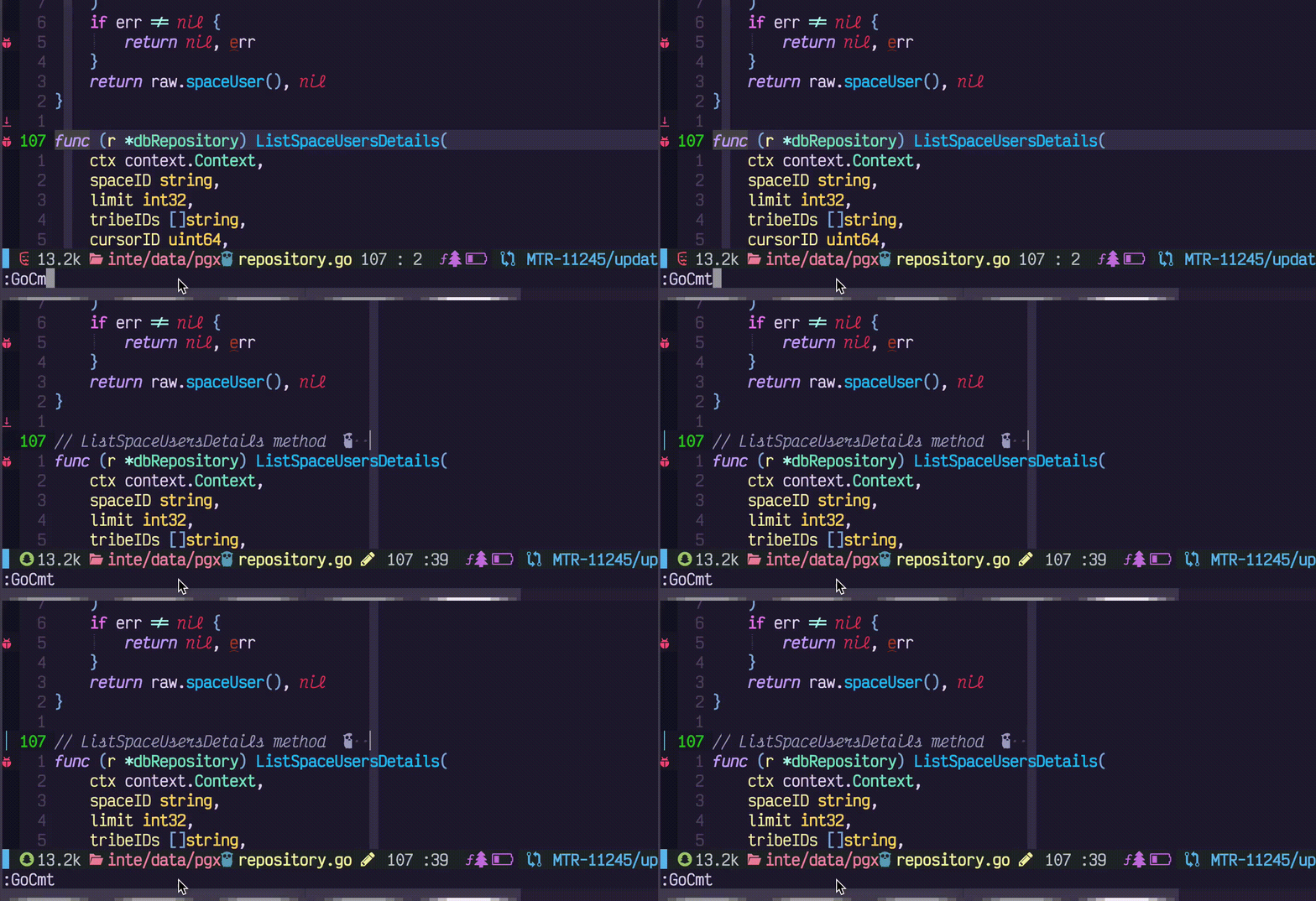
Add/Remove tags

GoTest in floating term

Use:
:GoTermCloseTo close the floating term.
SQL/JSON Highlight injection

Inlay hints

Usage & Demo
For detailed command usage, demos, screenshots, and examples, see the Usage Guide.
Quick links: Code Format | Build & Test | Debug | AI Code Review | AI Chat | GoImpl | GoDoc | Tags | Mock | All commands
Commands
Check commands.lua on all the commands provided
Gopls commands
Check gopls.lua on all the gopls commands provided, some of them are not exposed to user, but you can still use it in your lua setup.
- list_imports
- add_import
- list_packages
- tidy
- change_signature
- ...
Configuration
For the full default configuration with all options, see the Default Configuration in the Advanced Setup guide.
Minimal setup:
require('go').setup()To enable AI features:
require('go').setup({
  ai = {
    enable = true,
    provider = 'copilot', -- or 'openai'
  },
})
To use gopls setup provided by go.nvim:
require('go').setup({
  lsp_cfg = true,
})
Project setup
go.nvim allow you override your setup by a project file. Put .gonvim/init.lua in your root folder. It is a small lua script and will be run durning go.setup(). The return value is used to override go.nvim setup. The sample project setup. You can check the youtube video here on how to use this feature.
-- .gonvim/init.lua project config
return {   go = "go", -- set to go1.18beta1 if necessary   goimports = "gopls", -- if set to 'gopls' will use gopls format, also goimports   gofmt = "gofumpt", -- if set to gopls will use gopls format   nulllsdocumentformattingdisable = true }
This will override your global go.nvim setup
Advanced Setup
For LSP/gopls configuration, text objects, LuaSnip snippets, mason-lspconfig integration, null-ls, treesitter highlighting, and sample vimrc, see the Advanced Setup Guide.
Other plugins that you may like
Running plugin test / github action locally
If you'd like to commit to this project, and would like to run unit tests, you can run the following command:
XDGCONFIGHOME=/tmp/nvim-test make localtestfilethis will run the following commands in headless mode
make setup # install plenary etc
nvim --headless --noplugin -u lua/tests/init.vim -c "PlenaryBustedFile lua/tests/gofixpluralsspec.lua"
This runs test spec file lua/tests/gofixpluralsspec.lua in headless mode.
Please check Makefile for more details
Q & A
Q: What is Toggle gc annotation details
A: This is a codelens message, please run codelens GoCodeLenAct and get more info


