
In your Kubernetes, upgrading your nodes
System Upgrade Controller
Introduction
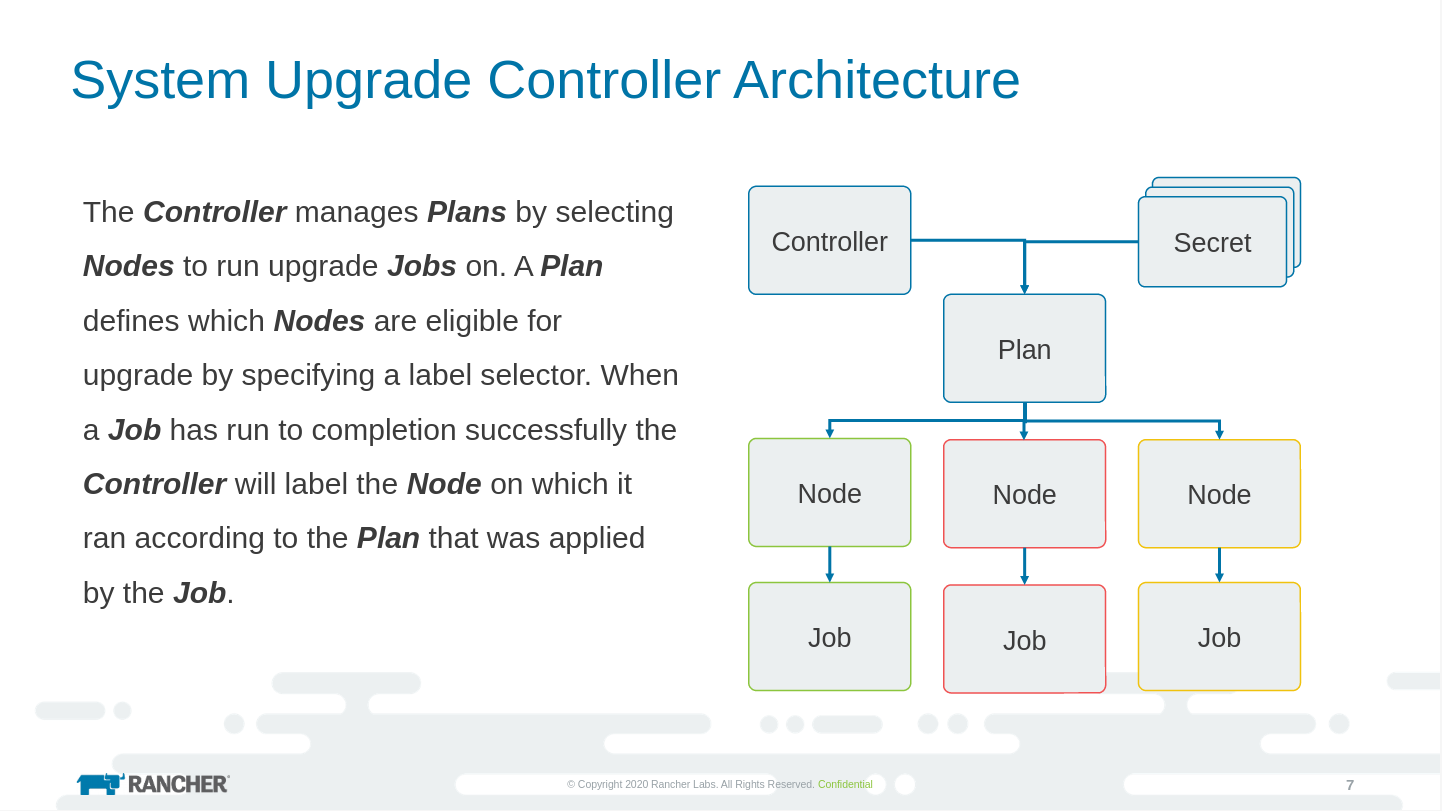
This project aims to provide a general-purpose, Kubernetes-native upgrade controller (for nodes). It introduces a new CRD, the Plan, for defining any and all of your upgrade policies/requirements. A Plan is an outstanding intent to mutate nodes in your cluster. For up-to-date details on defining a plan please review v1/types.go.
Presentations and Recordings
April 14, 2020
CNCF Member Webinar: Declarative Host Upgrades From Within KubernetesMarch 4, 2020
Rancher Online Meetup: Automating K3s Cluster UpgradesConsiderations
Purporting to support general-purpose node upgrades (essentially, arbitrary mutations) this controller attempts minimal imposition of opinion. Our design constraints, such as they are:
- content delivery via container image a.k.a. container command pattern
- operator-overridable command(s)
- a very privileged job/pod/container:
/host (read/write)
- optional opt-in/opt-out via node labels
- optional cordon/drain a la
kubectl
Deploying
The most up-to-date manifest is usually manifests/system-upgrade-controller.yaml but since release v0.4.0 a manifest specific to the release has been created and uploaded to the release artifacts page. See releases/download/v0.4.0/system-upgrade-controller.yaml
But in the time-honored tradition of curl ${script} | sudo sh - here is a nice one-liner:
script
Y.O.L.O.
kubectl apply -k github.com/rancher/system-upgrade-controller
API Documentation
Autogenerated API docs for upgrade.cattle.io/v1 Plan are available at doc/plan.md
Example Plans
- Demonstrates upgrading k3s itself. - Demonstrates upgrading, apt-get style, arbitrary packages at pinned versions. - Demonstrates upgrading the kernel on Ubuntu 18.04 EC2 instances on AWS. - Demonstrates upgrading the kernel on Ubuntu 18.04 (to the HWE version) on generic virtual machines.Below is an example Plan developed for k3OS that implements something like an rsync of content from the container image to the host, preceded by a remount if necessary, immediately followed by a reboot.
---
apiVersion: upgrade.cattle.io/v1
kind: Plan
metadata:   # This name should be short but descriptive.   name: k3os-latest
# The same namespace as is used for the system-upgrade-controller Deployment.   namespace: k3os-system
spec:   # The maximum number of concurrent nodes to apply this update on.   concurrency: 1
# The value for channel is assumed to be a URL that returns HTTP 302 with the last path element of the value   # returned in the Location header assumed to be an image tag (after munging "+" to "-").   channel: https://github.com/rancher/k3os/releases/latest
# Providing a value for version will prevent polling/resolution of the channel if specified.   version: v0.10.0
# Select which nodes this plan can be applied to.   nodeSelector:     matchExpressions:       # This limits application of this upgrade only to nodes that have opted in by applying this label.       # Additionally, a value of disabled for this label on a node will cause the controller to skip over the node.       # NOTICE THAT THE NAME PORTION OF THIS LABEL MATCHES THE PLAN NAME. This is related to the fact that the       # system-upgrade-controller will tag the node with this very label having the value of the applied plan.status.latestHash.       - {key: plan.upgrade.cattle.io/k3os-latest, operator: Exists}       # This label is set by k3OS, therefore a node without it should not apply this upgrade.       - {key: k3os.io/mode, operator: Exists}       # Additionally, do not attempt to upgrade nodes booted from "live" CDROM.       - {key: k3os.io/mode, operator: NotIn, values: ["live"]}
# The service account for the pod to use. As with normal pods, if not specified the default service account from the namespace will be assigned.   # See https://kubernetes.io/docs/tasks/configure-pod-container/configure-service-account/   serviceAccountName: k3os-upgrade
# Specify which node taints should be tolerated by pods applying the upgrade.   # Anything specified here is appended to the default of:   # - {key: node.kubernetes.io/unschedulable, effect: NoSchedule, operator: Exists}   tolerations:   - {key: kubernetes.io/arch, effect: NoSchedule, operator: Equal, value: amd64}   - {key: kubernetes.io/arch, effect: NoSchedule, operator: Equal, value: arm64}   - {key: kubernetes.io/arch, effect: NoSchedule, operator: Equal, value: s390x}
# The prepare init container, if specified, is run before cordon/drain which is run before the upgrade container.   # Shares the same format as the upgrade container.   prepare:     # If not present, the tag portion of the image will be the value from .status.latestVersion a.k.a. the resolved version for this plan.     image: alpine:3.18     command: [sh, -c]     args: ["echo '### ENV ###'; env | sort; echo '### RUN ###'; find /run/system-upgrade | sort"]
# If left unspecified, no drain will be performed.   # See:   # - https://kubernetes.io/docs/tasks/administer-cluster/safely-drain-node/   # - https://kubernetes.io/docs/reference/generated/kubectl/kubectl-commands#drain   drain:     # deleteLocalData: true  # default     # ignoreDaemonSets: true # default     force: true     # Use disableEviction == true and/or skipWaitForDeleteTimeout > 0 to prevent upgrades from hanging on small clusters.     # disableEviction: false # default, only available with kubectl >= 1.18     # skipWaitForDeleteTimeout: 0 # default, only available with kubectl >= 1.18
# If drain is specified, the value for cordon is ignored.   # If neither drain nor cordon are specified and the node is marked as schedulable=false it will not be marked as schedulable=true when the apply job completes.   cordon: true
upgrade:     # If not present, the tag portion of the image will be the value from .status.latestVersion a.k.a. the resolved version for this plan.     image: rancher/k3os     command: [k3os, --debug]     # It is safe to specify --kernel on overlay installations as the destination path will not exist and so the     # upgrade of the kernel component will be skipped (with a warning in the log).     args:       - upgrade       - --kernel       - --rootfs       - --remount       - --sync       - --reboot       - --lock-file=/host/run/k3os/upgrade.lock       - --source=/k3os/system       - --destination=/host/k3os/system
Building
script
make
Running
Use ./bin/system-upgrade-controller.
Also see manifests/system-upgrade-controller.yaml that spells out what a "typical" deployment might look like with default environment variables that parameterize various operational aspects of the controller and the resources spawned by it.
Testing
Integration tests are bundled as a Sonobuoy plugin that expects to be run within a pod. To verify locally:
script
make e2e
This will, via Dapper, stand up a local cluster (using docker-compose) and then run the Sonobuoy plugin against/within it. The Sonobuoy results are parsed and a Status: passed results in a clean exit, whereas Status: failed exits non-zero.
Alternatively, if you have a working cluster and Sonobuoy installation, provided you've pushed the images (consider building with something like make REPO=dweomer TAG=dev), then you can run the e2e tests thusly:
script
sonobuoy run --plugin dist/artifacts/system-upgrade-controller-e2e-tests.yaml --wait
sonobuoy results $(sonobuoy retrieve)
License
Copyright (c) 2019-2022 Rancher Labs, Inc.Licensed under the Apache License, Version 2.0 (the "License"); you may not use this file except in compliance with the License. You may obtain a copy of the License at
http://www.apache.org/licenses/LICENSE-2.0
Unless required by applicable law or agreed to in writing, software distributed under the License is distributed on an "AS IS" BASIS, WITHOUT WARRANTIES OR CONDITIONS OF ANY KIND, either express or implied. See the License for the specific language governing permissions and limitations under the License.


