
A cross-platform python based utility to download courses from udemy for personal offline use.


udemy-dl
A cross-platform python based utility to download courses from udemy for personal offline use.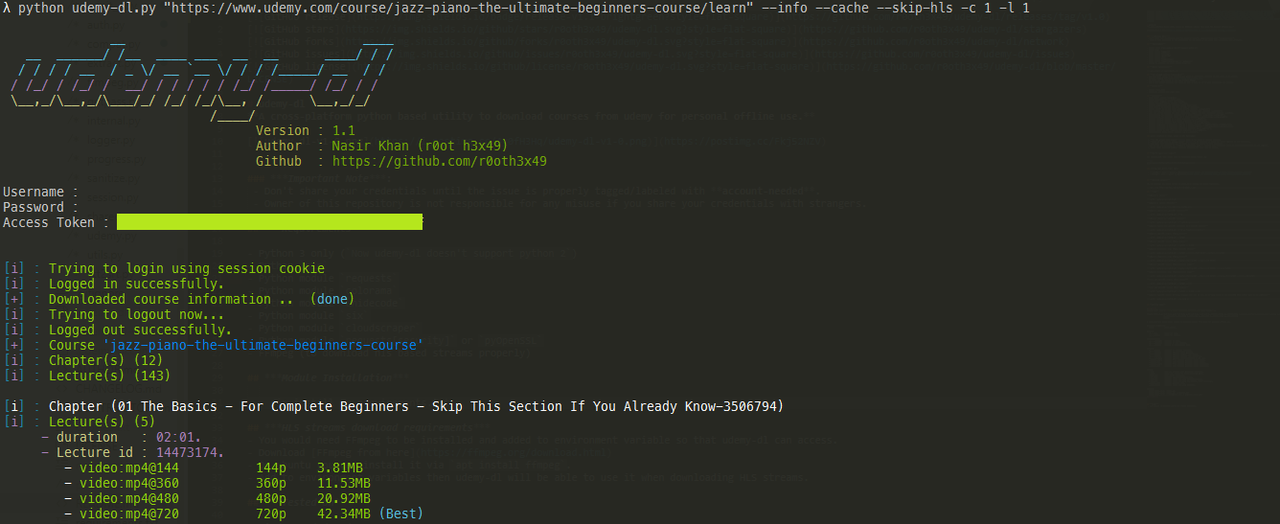
Warning
Udemy has started to encrypt many of the course videos, so downloading them may be impossible/illegal because it involves decrypting DRM'd videos which opens up the author to DMCA takedowns/lawsuits. If you use udemy-dl and some/all videos are skipped, please don't open a new issue or comment that the issue still exists. All requests to bypass DRM/encryption will be ignored.
If you'd like to see the full context, then read issue 627.
Important Note:
- Don't share your credentials until the issue is properly tagged/labeled with account-needed. - Owner of this repository is not responsible for any misuse if you share your credentials with strangers.Requirements
- Python 3 only (
Now udemy-dl doesn't support python 2) - Python
pip - Python module
requests - Python module
colorama - Python module
unidecode - Python module
six - Python module
cloudscraper - Python module
requests[security]orpyOpenSSL - FFmpeg (to download hls based streams properly)
Module Installation
pip install -r requirements.txt
HLS streams download requirements
- You would need FFmpeg to be installed and added to environment variable so that udemy-dl can access.
- Download FFmpeg from here
- On ubuntu you can install it via
apt install ffmpeg. - Add to environment variables then udemy-dl will be able to use it when downloading HLS streams.
Tested on
- Windows 7/8/8.1/10
- Ubuntu-LTS (tested with super user)
Features
- Added proper session management.
- Resume capability for a course video.
- Added proper logging errors and warnings.
- Support multiple courses download from file.
- Supports organization and individual udemy users both.
- Added support to download hls based streams if available.
- Added functionality to reset lecture number to start from 1.
- Added switch for session caching on demand. (option:
--cache) - Convert WebVTT to SRT but donot delete WebVTT. (option:
--keep-vtt) - Skip fetching HLS streams, This will make the fetching fast. (option:
--skip-hls) - List down course contents and video resolution, suggest the best resolution (option:
--info). - Download/skip all available subtitles for a video (options:
--sub-only, --skip-sub). - Download/skip all available assets for a video (options:
--assets-only, --skip-assets). - Download specific chapter in a course (option:
-c / --chapter). - Download specific lecture in a chapter (option:
-l / --lecture). - Download specific subtitle for a lecture (option:
-s / --sub-lang). - Download chapter(s) by providing range in a course (option:
--chapter-start, --chapter-end). - Download lecture(s) by providing range in a chapter (option:
--lecture-start, --lecture-end). - Download lecture(s) in requested resolution (option:
-q / --quality). - Download course to user requested path (option:
-o / --output). - Authentication using cookies (option:
-k / --cookies).
Before creating an issue, please do the following:
1. Use the GitHub issue search — check if the issue is already reported. 2. Check if the issue is already fixed — try to reproduce it using the latest master in the repository. 3. Make sure, that information you are about to report is related to this repository and not the one available on Python's repository, PyPi, Because this repository cannot be downloaded/installed via pip command. 4. Follow issue reporting template properly otherwise the issue will be closed.
How to login with cookie
The cookies.txt file should have the following simple format, eg:
access_token=JKU9QNs2IQDBKoYKvOBclSPXN97baf32o1Jo2L9vXFinding your access token value
- Firefox users : guide by @01ttouch - Chrome users : guide by @01ttouch
Download udemy-dl
You can download the latest version of udemy-dl by cloning the GitHub repository.
git clone https://github.com/r0oth3x49/udemy-dl.git
Usage
Download a course
python udemy-dl.py COURSE_URL
Download a courses from file
python udemy-dl.py FILE-CONTAINING-COURSE-URLs Download course with specific resolution
python udemy-dl.py COURSE_URL -q 720 Download course to a specific location
python udemy-dl.py COURSE_URL -o "/path/to/directory/" Download course with specific resolution to a specific location
python udemy-dl.py COURSE_URL -q 720 -o "/path/to/directory/"
Download specific chapter from a course
python udemy-dl.py COURSE_URL -c NUMBER
Download specific lecture from a chapter
python udemy-dl.py COURSE_URL -c NUMBER -l NUMBER
Download lecture(s) range from a specific chapter
python udemy-dl.py COURSE_URL -c NUMBER --lecture-start NUMBER --lecture-end NUMBER
Download chapter(s) range from a course
python udemy-dl.py COURSE_URL --chapter-start NUMBER --chapter-end NUMBER
Download specific lecture from chapter(s) range
python udemy-dl.py COURSE_URL --chapter-start NUMBER --chapter-end NUMBER --lecture NUMBER
Download lecture(s) range from chapter(s) range
python udemy-dl.py COURSE_URL --chapter-start NUMBER --chapter-end NUMBER --lecture-start NUMBER --lecture-end NUMBER
List down specific chapter from a course
python udemy-dl.py COURSE_URL -c NUMBER --info
List down specific lecture from a chapter
python udemy-dl.py COURSE_URL -c NUMBER -l NUMBER --info
Download specific subtite by using language code such as (en, es) if lang switch is not specified then default will be all subtitles
python udemy-dl.py COURSE_URL --sub-lang en
Advanced Usage
Author: Nasir khan (r0ot h3x49)
usage: udemy-dl.py [-h] [-v] [-u] [-p] [-k] [-o] [-q] [-c] [-l] [-s] [--chapter-start] [--chapter-end] [--lecture-start] [--lecture-end] [--info] [--cache]                    [--keep-vtt] [--sub-only] [--skip-sub] [--skip-hls] [--assets-only] [--skip-assets]                    course
A cross-platform python based utility to download courses from udemy for personal offline use.
positional arguments:   course            Udemy course.
General:   -h, --help        Shows the help.   -v, --version     Shows the version.
Authentication:   -u , --username   Username in udemy.   -p , --password   Password of your account.   -k , --cookies    Cookies to authenticate with.
Advance:   -o , --output     Download to specific directory.   -q , --quality    Download specific video quality.   -c , --chapter    Download specific chapter from course.   -l , --lecture    Download specific lecture from chapter(s).   -s , --sub-lang   Download specific subtitle/caption (e.g:- en).   --chapter-start   Download from specific position within course.   --chapter-end     Download till specific position within course.   --lecture-start   Download from specific position within chapter(s).   --lecture-end     Download till specific position within chapter(s).
Others:   --info            List all lectures with available resolution.   --cache           Cache your session to avoid providing again.   --keep-vtt        Keep WebVTT caption(s).   --sub-only        Download captions/subtitle only.   --skip-sub        Download course but skip captions/subtitle.   --skip-hls        Download course but skip hls streams. (fast fetching).   --assets-only     Download asset(s) only.   --skip-assets     Download course but skip asset(s).
Example:   python udemy-dl.py  COURSE_URL   python udemy-dl.py  COURSE_URL -k cookies.txt   python udemy-dl.py -u user@domain.com -p p4ssw0rd COURSE_URL


