
A lightweight, object-oriented finite state machine implementation in Python with many extensions
transitions







A lightweight, object-oriented state machine implementation in Python with many extensions. Compatible with Python 2.7+ and 3.0+.
Installation
pip install transitions
... or clone the repo from GitHub and then:
python setup.py install
Table of Contents
- Some key concepts - Basic initialization - States - Callbacks - Checking state - Enumerations - Transitions - Triggering a transition - Automatic transitions - Transitioning from multiple states - Reflexive transitions from multiple states - Internal transitions - Ordered transitions - Queued transitions - Conditional transitions - Check transitions - Callbacks - Callable resolution - Callback execution order - Passing data - Alternative initialization patterns - Logging - (Re-)Storing machine instances - Typing support - Extensions - Hierarchical State Machine - Diagrams - Threading - Async - State features - Django - Bug reports etc.Quickstart
They say a good example is worth 100 pages of API documentation, a million directives, or a thousand words.
Well, "they" probably lie... but here's an example anyway:
from transitions import Machine
import random
class NarcolepticSuperhero(object):
# Define some states. Most of the time, narcoleptic superheroes are just like     # everyone else. Except for...     states = ['asleep', 'hanging out', 'hungry', 'sweaty', 'saving the world']
def init(self, name):
# No anonymous superheroes on my watch! Every narcoleptic superhero gets         # a name. Any name at all. SleepyMan. SlumberGirl. You get the idea.         self.name = name
# What have we accomplished today?         self.kittens_rescued = 0
# Initialize the state machine         self.machine = Machine(model=self, states=NarcolepticSuperhero.states, initial='asleep')
# Add some transitions. We could also define these using a static list of         # dictionaries, as we did with states above, and then pass the list to         # the Machine initializer as the transitions= argument.
# At some point, every superhero must rise and shine.         self.machine.addtransition(trigger='wakeup', source='asleep', dest='hanging out')
# Superheroes need to keep in shape.         self.machine.addtransition('workout', 'hanging out', 'hungry')
# Those calories won't replenish themselves!         self.machine.add_transition('eat', 'hungry', 'hanging out')
# Superheroes are always on call. ALWAYS. But they're not always         # dressed in work-appropriate clothing.         self.machine.addtransition('distresscall', '*', 'saving the world',                          before='changeintosupersecretcostume')
# When they get off work, they're all sweaty and disgusting. But before         # they do anything else, they have to meticulously log their latest         # escapades. Because the legal department says so.         self.machine.addtransition('completemission', 'saving the world', 'sweaty',                          after='update_journal')
# Sweat is a disorder that can be remedied with water.         # Unless you've had a particularly long day, in which case... bed time!         self.machine.addtransition('cleanup', 'sweaty', 'asleep', conditions=['is_exhausted'])         self.machine.addtransition('cleanup', 'sweaty', 'hanging out')
# Our NarcolepticSuperhero can fall asleep at pretty much any time.         self.machine.add_transition('nap', '*', 'asleep')
def update_journal(self):         """ Dear Diary, today I saved Mr. Whiskers. Again. """         self.kittens_rescued += 1
@property     def is_exhausted(self):         """ Basically a coin toss. """         return random.random() < 0.5
def changeintosupersecretcostume(self):         print("Beauty, eh?")
There, now you've baked a state machine into NarcolepticSuperhero. Let's take him/her/it out for a spin...
>>> batman = NarcolepticSuperhero("Batman")
>>> batman.state
'asleep'
>>> batman.wake_up() >>> batman.state 'hanging out'
>>> batman.nap() >>> batman.state 'asleep'
>>> batman.clean_up() MachineError: "Can't trigger event clean_up from state asleep!"
>>> batman.wake_up() >>> batman.work_out() >>> batman.state 'hungry'
Batman still hasn't done anything useful...
>>> batman.kittens_rescued
0
We now take you live to the scene of a horrific kitten entreement...
>>> batman.distress_call()
'Beauty, eh?'
>>> batman.state
'saving the world'
Back to the crib.
>>> batman.complete_mission()
>>> batman.state
'sweaty'
>>> batman.clean_up() >>> batman.state 'asleep'   # Too tired to shower!
Another productive day, Alfred.
>>> batman.kittens_rescued
1
While we cannot read the mind of the actual batman, we surely can visualize the current state of our NarcolepticSuperhero.
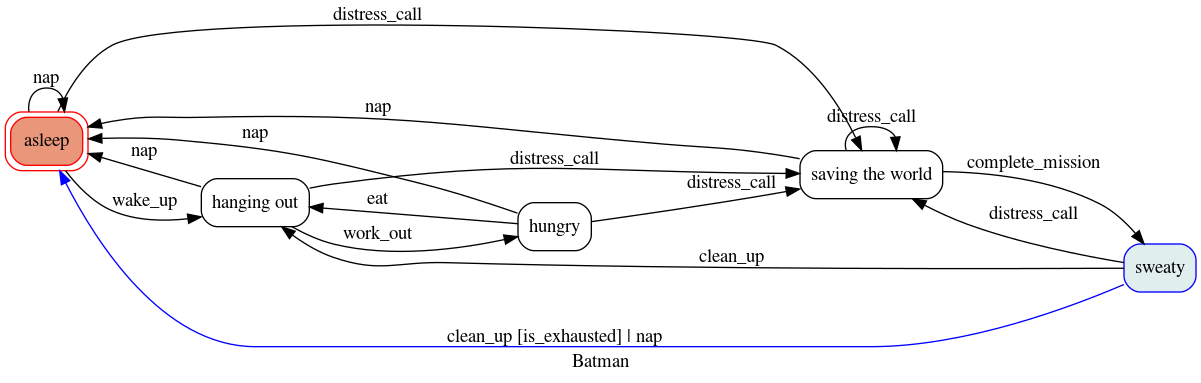
Have a look at the Diagrams extensions if you want to know how.
The non-quickstart
A state machine is a model of behavior composed of a finite number of states and transitions between those states. Within each state and transition some action can be performed. A state machine needs to start at some initial state. When using transitions, a state machine may consist of multiple objects where some (machines) contain definitions for the manipulation of other (models). Below, we will look at some core concepts and how to work with them.
Some key concepts
- State. A state represents a particular condition or stage in the state machine. It's a distinct mode of behavior or phase in a process.
- Transition. This is the process or event that causes the state machine to change from one state to another.
- Model. The actual stateful structure. It's the entity that gets updated during transitions. It may also define actions that will be executed during transitions. For instance, right before a transition or when a state is entered or exited.
- Machine. This is the entity that manages and controls the model, states, transitions, and actions. It's the conductor that orchestrates the entire process of the state machine.
- Trigger. This is the event that initiates a transition, the method that sends the signal to start a transition.
- Action. Specific operation or task that is performed when a certain state is entered, exited, or during a transition. The action is implemented through callbacks, which are functions that get executed when some event happens.
Basic initialization
Getting a state machine up and running is pretty simple. Let's say you have the object lump (an instance of class Matter), and you want to manage its states:
class Matter(object):
    pass
lump = Matter()
You can initialize a (minimal) working state machine bound to the model lump like this:
from transitions import Machine
machine = Machine(model=lump, states=['solid', 'liquid', 'gas', 'plasma'], initial='solid')
Lump now has a new state attribute!
lump.state
>>> 'solid'
An alternative is to not explicitly pass a model to the Machine initializer:
machine = Machine(states=['solid', 'liquid', 'gas', 'plasma'], initial='solid')
The machine instance itself now acts as a model
machine.state
>>> 'solid'
Note that this time I did not pass the lump model as an argument. The first argument passed to Machine acts as a model. So when I pass something there, all the convenience functions will be added to the object. If no model is provided then the machine instance itself acts as a model.
When at the beginning I said "minimal", it was because while this state machine is technically operational, it doesn't actually do anything. It starts in the 'solid' state, but won't ever move into another state, because no transitions are defined... yet!
Let's try again.
# The states
states=['solid', 'liquid', 'gas', 'plasma']
And some transitions between states. We're lazy, so we'll leave out
the inverse phase transitions (freezing, condensation, etc.).
transitions = [
    { 'trigger': 'melt', 'source': 'solid', 'dest': 'liquid' },
    { 'trigger': 'evaporate', 'source': 'liquid', 'dest': 'gas' },
    { 'trigger': 'sublimate', 'source': 'solid', 'dest': 'gas' },
    { 'trigger': 'ionize', 'source': 'gas', 'dest': 'plasma' }
]
Initialize
machine = Machine(lump, states=states, transitions=transitions, initial='liquid')
Now lump maintains state...
lump.state
>>> 'liquid'
And that state can change...
Either calling the shiny new trigger methods
lump.evaporate()
lump.state
>>> 'gas'
Or by calling the trigger method directly
lump.trigger('ionize')
lump.state
>>> 'plasma'
Notice the shiny new methods attached to the Matter instance (evaporate(), ionize(), etc.). Each method triggers the corresponding transition. Transitions can also be triggered dynamically by calling the trigger() method provided with the name of the transition, as shown above. More on this in the Triggering a transition section.
States
The soul of any good state machine (and of many bad ones, no doubt) is a set of states. Above, we defined the valid model states by passing a list of strings to the Machine initializer. But internally, states are actually represented as State objects.
You can initialize and modify States in a number of ways. Specifically, you can:
- pass a string to the
Machineinitializer giving the name(s) of the state(s), or - directly initialize each new
Stateobject, or - pass a dictionary with initialization arguments
# import Machine and State class
from transitions import Machine, State
Create a list of 3 states to pass to the Machine
initializer. We can mix types; in this case, we
pass one State, one string, and one dict.
states = [
    State(name='solid'),
    'liquid',
    { 'name': 'gas'}
    ]
machine = Machine(lump, states)
This alternative example illustrates more explicit
addition of states and state callbacks, but the net
result is identical to the above.
machine = Machine(lump)
solid = State('solid')
liquid = State('liquid')
gas = State('gas')
machine.add_states([solid, liquid, gas])
States are initialized once when added to the machine and will persist until they are removed from it. In other words: if you alter the attributes of a state object, this change will NOT be reset the next time you enter that state. Have a look at how to extend state features in case you require some other behaviour.
Callbacks
But just having states and being able to move around between them (transitions) isn't very useful by itself. What if you want to do something, perform some action when you enter or exit a state? This is where callbacks come in.
A State can also be associated with a list of enter and exit callbacks, which are called whenever the state machine enters or leaves that state. You can specify callbacks during initialization by passing them to a State object constructor, in a state property dictionary, or add them later.
For convenience, whenever a new State is added to a Machine, the methods onenter«state name» and onexit«state name» are dynamically created on the Machine (not on the model!), which allow you to dynamically add new enter and exit callbacks later if you need them.
# Our old Matter class, now with  a couple of new methods we
can trigger when entering or exit states.
class Matter(object):
    def say_hello(self): print("hello, new state!")
    def say_goodbye(self): print("goodbye, old state!")
lump = Matter()
Same states as above, but now we give StateA an exit callback
states = [
    State(name='solid', onexit=['saygoodbye']),
    'liquid',
    { 'name': 'gas', 'onexit': ['saygoodbye']}
    ]
machine = Machine(lump, states=states) machine.add_transition('sublimate', 'solid', 'gas')
Callbacks can also be added after initialization using
the dynamically added onenter and onexit methods.
Note that the initial call to add the callback is made
on the Machine and not on the model.
machine.onentergas('say_hello')
Test out the callbacks...
machine.set_state('solid')
lump.sublimate()
>>> 'goodbye, old state!'
>>> 'hello, new state!'
Note that onenter«state name» callback will not fire when a Machine is first initialized. For example if you have an onenterA() callback defined, and initialize the Machine with initial='A', onenterA() will not be fired until the next time you enter state A. (If you need to make sure onenterA() fires at initialization, you can simply create a dummy initial state and then explicitly call to_A() inside the init method.)
In addition to passing in callbacks when initializing a State, or adding them dynamically, it's also possible to define callbacks in the model class itself, which may increase code clarity. For example:
class Matter(object):
    def say_hello(self): print("hello, new state!")
    def say_goodbye(self): print("goodbye, old state!")
    def onenterA(self): print("We've just entered state A!")
lump = Matter() machine = Machine(lump, states=['A', 'B', 'C'])
Now, any time lump transitions to state A, the onenterA() method defined in the Matter class will fire.
You can make use of on_final callbacks which will be triggered when a state with final=True is entered.
from transitions import Machine, State
states = [State(name='idling'),           State(name='rescuing_kitten'),           State(name='offender_gone', final=True),           State(name='offender_caught', final=True)]
transitions = [["called", "idling", "rescuing_kitten"],  # we will come when  called                {"trigger": "intervene",                 "source": "rescuing_kitten",                 "dest": "offender_gone",  # we                 "conditions": "offenderisfaster"},  # unless they are faster                ["intervene", "rescuingkitten", "offendercaught"]]
class FinalSuperhero(object):
def init(self, speed):         self.machine = Machine(self, states=states, transitions=transitions, initial="idling", )         self.speed = speed
def offenderisfaster(self, offender_speed):         return self.speed < offender_speed
def claim_success(self, **kwargs):         print("The kitten is safe.")
hero = FinalSuperhero(speed=10)  # we are not in shape today hero.called() assert hero.isrescuingkitten() hero.intervene(offender_speed=15) >>> 'The kitten is safe' assert hero.machine.get_state(hero.state).final  # it's over assert hero.isoffendergone()  # maybe next time ...
Checking state
You can always check the current state of the model by either:
- inspecting the
.stateattribute, or - calling
is_«state name»()
State object for the current state, you can do that through the Machine instance's get_state() method.
lump.state
>>> 'solid'
lump.is_gas()
>>> False
lump.is_solid()
>>> True
machine.get_state(lump.state).name
>>> 'solid'
If you'd like you can choose your own state attribute name by passing the modelattribute argument while initializing the Machine. This will also change the name of is«state name»() to is«modelattribute»«state name»() though. Similarly, auto transitions will be named to«modelattribute»«state name»() instead of to_«state name»(). This is done to allow multiple machines to work on the same model with individual state attribute names.
lump = Matter()
machine = Machine(lump, states=['solid', 'liquid', 'gas'],  modelattribute='matterstate', initial='solid')
lump.matter_state
>>> 'solid'
with a custom 'model_attribute', states can also be checked like this:
lump.ismatterstate_solid()
>>> True
lump.tomatterstate_gas()
>>> True
Enumerations
So far we have seen how we can give state names and use these names to work with our state machine. If you favour stricter typing and more IDE code completion (or you just can't type 'sesquipedalophobia' any longer because the word scares you) using Enumerations might be what you are looking for:
import enum  # Python 2.7 users need to have 'enum34' installed
from transitions import Machine
class States(enum.Enum):     ERROR = 0     RED = 1     YELLOW = 2     GREEN = 3
transitions = [['proceed', States.RED, States.YELLOW],                ['proceed', States.YELLOW, States.GREEN],                ['error', '*', States.ERROR]]
m = Machine(states=States, transitions=transitions, initial=States.RED) assert m.is_RED() assert m.state is States.RED state = m.get_state(States.RED)  # get transitions.State object print(state.name)  # >>> RED m.proceed() m.proceed() assert m.is_GREEN() m.error() assert m.state is States.ERROR
You can mix enums and strings if you like (e.g. [States.RED, 'ORANGE', States.YELLOW, States.GREEN]) but note that internally, transitions will still handle states by name (enum.Enum.name). Thus, it is not possible to have the states 'GREEN' and States.GREEN at the same time.
Transitions
Some of the above examples already illustrate the use of transitions in passing, but here we'll explore them in more detail.
As with states, each transition is represented internally as its own object – an instance of class Transition. The quickest way to initialize a set of transitions is to pass a dictionary, or list of dictionaries, to the Machine initializer. We already saw this above:
transitions = [
    { 'trigger': 'melt', 'source': 'solid', 'dest': 'liquid' },
    { 'trigger': 'evaporate', 'source': 'liquid', 'dest': 'gas' },
    { 'trigger': 'sublimate', 'source': 'solid', 'dest': 'gas' },
    { 'trigger': 'ionize', 'source': 'gas', 'dest': 'plasma' }
]
machine = Machine(model=Matter(), states=states, transitions=transitions)
Defining transitions in dictionaries has the benefit of clarity, but can be cumbersome. If you're after brevity, you might choose to define transitions using lists. Just make sure that the elements in each list are in the same order as the positional arguments in the Transition initialization (i.e., trigger, source, destination, etc.).
The following list-of-lists is functionally equivalent to the list-of-dictionaries above:
transitions = [
    ['melt', 'solid', 'liquid'],
    ['evaporate', 'liquid', 'gas'],
    ['sublimate', 'solid', 'gas'],
    ['ionize', 'gas', 'plasma']
]
Alternatively, you can add transitions to a Machine after initialization:
machine = Machine(model=lump, states=states, initial='solid')
machine.add_transition('melt', source='solid', dest='liquid')
Triggering a transition
For a transition to be executed, some event needs to trigger it. There are two ways to do this:
- Using the automatically attached method in the base model:
>>> lump.melt()
    >>> lump.state
    'liquid'
    >>> lump.evaporate()
    >>> lump.state
'gas'Machine initializer (in this case, lump). This also means that your model should not already contain methods with the same name as event triggers since transitions will only attach convenience methods to your model if the spot is not already taken. If you want to modify that behaviour, have a look at the FAQ.
- Using the
triggermethod, now attached to your model (if it hasn't been there before). This method lets you execute transitions by name in case dynamic triggering is required:
>>> lump.trigger('melt')
    >>> lump.state
    'liquid'
    >>> lump.trigger('evaporate')
    >>> lump.state
    'gas'
Triggering invalid transitions
By default, triggering an invalid transition will raise an exception:
>>> lump.to_gas()
>>> # This won't work because only objects in a solid state can melt
>>> lump.melt()
transitions.core.MachineError: "Can't trigger event melt from state gas!"
This behavior is generally desirable, since it helps alert you to problems in your code. But in some cases, you might want to silently ignore invalid triggers. You can do this by setting ignoreinvalidtriggers=True (either on a state-by-state basis, or globally for all states):
>>> # Globally suppress invalid trigger exceptions
>>> m = Machine(lump, states, initial='solid', ignoreinvalidtriggers=True)
>>> # ...or suppress for only one group of states
>>> states = ['newstate1', 'newstate2']
>>> m.addstates(states, ignoreinvalid_triggers=True)
>>> # ...or even just for a single state. Here, exceptions will only be suppressed when the current state is A.
>>> states = [State('A', ignoreinvalidtriggers=True), 'B', 'C']
>>> m = Machine(lump, states)
>>> # ...this can be inverted as well if just one state should raise an exception
>>> # since the machine's global value is not applied to a previously initialized state.
>>> states = ['A', 'B', State('C')] # the default value for 'ignoreinvalidtriggers' is False
>>> m = Machine(lump, states, ignoreinvalidtriggers=True)
If you need to know which transitions are valid from a certain state, you can use get_triggers:
m.get_triggers('solid')
>>> ['melt', 'sublimate']
m.get_triggers('liquid')
>>> ['evaporate']
m.get_triggers('plasma')
>>> []
you can also query several states at once
m.get_triggers('solid', 'liquid', 'gas', 'plasma')
>>> ['melt', 'evaporate', 'sublimate', 'ionize']
If you have followed this documentation from the beginning, you will notice that gettriggers actually returns more triggers than the explicitly defined ones shown above, such as toliquid and so on. These are called auto-transitions and will be introduced in the next section.
Automatic transitions for all states
In addition to any transitions added explicitly, a to_«state»() method is created automatically whenever a state is added to a Machine instance. This method transitions to the target state no matter which state the machine is currently in:
lump.to_liquid()
lump.state
>>> 'liquid'
lump.to_solid()
lump.state
>>> 'solid'
If you desire, you can disable this behavior by setting auto_transitions=False in the Machine initializer.
Transitioning from multiple states
A given trigger can be attached to multiple transitions, some of which can potentially begin or end in the same state. For example:
machine.add_transition('transmogrify', ['solid', 'liquid', 'gas'], 'plasma')
machine.add_transition('transmogrify', 'plasma', 'solid')
This next transition will never execute
machine.add_transition('transmogrify', 'plasma', 'gas')
In this case, calling transmogrify() will set the model's state to 'solid' if it's currently 'plasma', and set it to 'plasma' otherwise. (Note that only the first matching transition will execute; thus, the transition defined in the last line above won't do anything.)
You can also make a trigger cause a transition from all states to a particular destination by using the '*' wildcard:
machine.addtransition('toliquid', '*', 'liquid')Note that wildcard transitions will only apply to states that exist at the time of the add_transition() call. Calling a wildcard-based transition when the model is in a state added after the transition was defined will elicit an invalid transition message, and will not transition to the target state.
Reflexive transitions from multiple states
A reflexive trigger (trigger that has the same state as source and destination) can easily be added specifying = as destination. This is handy if the same reflexive trigger should be added to multiple states. For example:
machine.addtransition('touch', ['liquid', 'gas', 'plasma'], '=', after='changeshape')This will add reflexive transitions for all three states with touch() as trigger and with change_shape executed after each trigger.
Internal transitions
In contrast to reflexive transitions, internal transitions will never actually leave the state. This means that transition-related callbacks such as before or after will be processed while state-related callbacks exit or enter will not. To define a transition to be internal, set the destination to None.
machine.addtransition('internal', ['liquid', 'gas'], None, after='changeshape')Ordered transitions
A common desire is for state transitions to follow a strict linear sequence. For instance, given states ['A', 'B', 'C'], you might want valid transitions for A → B, B → C, and C → A (but no other pairs).
To facilitate this behavior, Transitions provides an addorderedtransitions() method in the Machine class:
states = ['A', 'B', 'C']
 # See the "alternative initialization" section for an explanation of the 1st argument to init
machine = Machine(states=states, initial='A')
machine.addorderedtransitions()
machine.next_state()
print(machine.state)
>>> 'B'
We can also define a different order of transitions
machine = Machine(states=states, initial='A')
machine.addorderedtransitions(['A', 'C', 'B'])
machine.next_state()
print(machine.state)
>>> 'C'
Conditions can be passed to 'addorderedtransitions' as well
If one condition is passed, it will be used for all transitions
machine = Machine(states=states, initial='A')
machine.addorderedtransitions(c)
If a list is passed, it must contain exactly as many elements as the
machine contains states (A->B, ..., X->A)
machine = Machine(states=states, initial='A')
machine.addorderedtransitions(conditions=['checkA2B', ..., 'checkX2A'])
Conditions are always applied starting from the initial state
machine = Machine(states=states, initial='B')
machine.addorderedtransitions(conditions=['checkB2C', ..., 'checkA2B'])
With loop=False, the transition from the last state to the first state will be omitted (e.g. C->A)
When you also pass conditions, you need to pass one condition less (len(states)-1)
machine = Machine(states=states, initial='A')
machine.addorderedtransitions(loop=False)
machine.next_state()
machine.next_state()
machine.nextstate() # transitions.core.MachineError: "Can't trigger event nextstate from state C!"
Queued transitions
The default behaviour in Transitions is to process events instantly. This means events within an onenter method will be processed before_ callbacks bound to after are called.
def gotoC():
    global machine
    machine.to_C()
def after_advance():     print("I am in state B now!")
def entering_C():     print("I am in state C now!")
states = ['A', 'B', 'C'] machine = Machine(states=states, initial='A')
we want a message when state transition to B has been completed
machine.addtransition('advance', 'A', 'B', after=afteradvance)
call transition from state B to state C
machine.onenterB(gotoC)
we also want a message when entering state C
machine.onenterC(entering_C)
machine.advance()
>>> 'I am in state C now!'
>>> 'I am in state B now!' # what?
The execution order of this example is
prepare -> before -> onenterB -> onenterC -> after.If queued processing is enabled, a transition will be finished before the next transition is triggered:
machine = Machine(states=states, queued=True, initial='A')
...
machine.advance()
>>> 'I am in state B now!'
>>> 'I am in state C now!' # That's better!
This results in
prepare -> before -> onenterB -> queue(toC) -> after -> onenter_C.Important note: when processing events in a queue, the trigger call will always return True, since there is no way to determine at queuing time whether a transition involving queued calls will ultimately complete successfully. This is true even when only a single event is processed.
machine.add_transition('jump', 'A', 'C', c)
...
queued=False
machine.jump()
>>> False
queued=True
machine.jump()
>>> True
When a model is removed from the machine, transitions will also remove all related events from the queue.
class Model:
    def onenterB(self):
        self.to_C()  # add event to queue ...
        self.machine.remove_model(self)  # aaaand it's gone
Conditional transitions
Sometimes you only want a particular transition to execute if a specific condition occurs. You can do this by passing a method, or list of methods, in the conditions argument:
# Our Matter class, now with a bunch of methods that return booleans.
class Matter(object):
    def is_flammable(self): return False
    def isreallyhot(self): return True
machine.add_transition('heat', 'solid', 'gas', c) machine.addtransition('heat', 'solid', 'liquid', conditions=['isreally_hot'])
In the above example, calling heat() when the model is in state 'solid' will transition to state 'gas' if isflammable returns True. Otherwise, it will transition to state 'liquid' if isreally_hot returns True.
For convenience, there's also an 'unless' argument that behaves exactly like conditions, but inverted:
machine.addtransition('heat', 'solid', 'gas', unless=['isflammable', 'isreallyhot'])In this case, the model would transition from solid to gas whenever heat() fires, provided that both isflammable() and isreally_hot() return False.
Note that condition-checking methods will passively receive optional arguments and/or data objects passed to triggering methods. For instance, the following call:
lump.heat(temp=74)
equivalent to lump.trigger('heat', temp=74)
... would pass the temp=74 optional kwarg to the is_flammable() check (possibly wrapped in an EventData instance). For more on this, see the Passing data section below.
Check transitions
If you want to make sure a transition is possible before you go ahead with it, you can use the may<triggername> functions that have been added to your model. Your model also contains the may_trigger function to check a trigger by name:
# check if the current temperature is hot enough to trigger a transition
if lump.may_heat():
if lump.may_trigger("heat"):
    lump.heat()
This will execute all prepare callbacks and evaluate the conditions assigned to the potential transitions. Transition checks can also be used when a transition's destination is not available (yet):
machine.add_transition('elevate', 'solid', 'spiritual')
assert not lump.may_elevate()  # not ready yet :(
assert not lump.may_trigger("elevate")  # same result for checks via trigger name
Callbacks
You can attach callbacks to transitions as well as states. Every transition has 'before' and 'after' attributes that contain a list of methods to call before and after the transition executes:
class Matter(object):
    def makehissingnoises(self): print("HISSSSSSSSSSSSSSSS")
    def disappear(self): print("where'd all the liquid go?")
transitions = [     { 'trigger': 'melt', 'source': 'solid', 'dest': 'liquid', 'before': 'makehissingnoises'},     { 'trigger': 'evaporate', 'source': 'liquid', 'dest': 'gas', 'after': 'disappear' } ]
lump = Matter() machine = Machine(lump, states, transitions=transitions, initial='solid') lump.melt() >>> "HISSSSSSSSSSSSSSSS" lump.evaporate() >>> "where'd all the liquid go?"
There is also a 'prepare' callback that is executed as soon as a transition starts, before any 'conditions' are checked or other callbacks are executed.
class Matter(object):
    heat = False
    attempts = 0
    def count_attempts(self): self.attempts += 1
    def heat_up(self): self.heat = random.random() < 0.25
    def stats(self): print('It took you %i attempts to melt the lump!' %self.attempts)
@property     def isreallyhot(self):         return self.heat
states=['solid', 'liquid', 'gas', 'plasma']
transitions = [     { 'trigger': 'melt', 'source': 'solid', 'dest': 'liquid', 'prepare': ['heatup', 'countattempts'], 'conditions': 'isreallyhot', 'after': 'stats'}, ]
lump = Matter() machine = Machine(lump, states, transitions=transitions, initial='solid') lump.melt() lump.melt() lump.melt() lump.melt() >>> "It took you 4 attempts to melt the lump!"
Note that prepare will not be called unless the current state is a valid source for the named transition.
Default actions meant to be executed before or after every transition can be passed to Machine during initialization with beforestatechange and afterstatechange respectively:
class Matter(object):
    def makehissingnoises(self): print("HISSSSSSSSSSSSSSSS")
    def disappear(self): print("where'd all the liquid go?")
states=['solid', 'liquid', 'gas', 'plasma']
lump = Matter() m = Machine(lump, states, beforestatechange='makehissingnoises', afterstatechange='disappear') lump.to_gas() >>> "HISSSSSSSSSSSSSSSS" >>> "where'd all the liquid go?"
There are also two keywords for callbacks which should be executed independently a) of how many transitions are possible, b) if any transition succeeds and c) even if an error is raised during the execution of some other callback. Callbacks passed to Machine with prepareevent will be executed once_ before processing possible transitions (and their individual prepare callbacks) takes place. Callbacks of finalize_event will be executed regardless of the success of the processed transitions. Note that if an error occurred it will be attached to eventdata as error and can be retrieved with sendevent=True.
from transitions import Machine
class Matter(object):     def raise_error(self, event): raise ValueError("Oh no")     def prepare(self, event): print("I am ready!")     def finalize(self, event): print("Result: ", type(event.error), event.error)
states=['solid', 'liquid', 'gas', 'plasma']
lump = Matter() m = Machine(lump, states, prepareevent='prepare', beforestatechange='raiseerror',             finalizeevent='finalize', sendevent=True) try:     lump.to_gas() except ValueError:     pass print(lump.state)
>>> I am ready!
>>> Result:  <class 'ValueError'> Oh no
>>> initial
Sometimes things just don't work out as intended and we need to handle exceptions and clean up the mess to keep things going. We can pass callbacks to on_exception to do this:
from transitions import Machine
class Matter(object):     def raise_error(self, event): raise ValueError("Oh no")     def handle_error(self, event):         print("Fixing things ...")         del event.error  # it did not happen if we cannot see it ...
states=['solid', 'liquid', 'gas', 'plasma']
lump = Matter() m = Machine(lump, states, beforestatechange='raiseerror', , sendevent=True) try:     lump.to_gas() except ValueError:     pass print(lump.state)
>>> Fixing things ...
>>> initial
Callable resolution
As you have probably already realized, the standard way of passing callables to states, conditions and transitions is by name. When processing callbacks and conditions, transitions will use their name to retrieve the related callable from the model. If the method cannot be retrieved and it contains dots, transitions will treat the name as a path to a module function and try to import it. Alternatively, you can pass names of properties or attributes. They will be wrapped into functions but cannot receive event data for obvious reasons. You can also pass callables such as (bound) functions directly. As mentioned earlier, you can also pass lists/tuples of callables names to the callback parameters. Callbacks will be executed in the order they were added.
from transitions import Machine
from mod import imported_func
import random
class Model(object):
def a_callback(self):         imported_func()
@property     def a_property(self):         """ Basically a coin toss. """         return random.random() < 0.5
an_attribute = False
model = Model() machine = Machine(model=model, states=['A'], initial='A') machine.addtransition('byname', 'A', 'A', c, after='a_callback') machine.addtransition('byreference', 'A', 'A', unless=['aproperty', 'anattribute'], after=model.a_callback) machine.addtransition('imported', 'A', 'A', after='mod.importedfunc')
model.by_name() model.by_reference() model.imported()
The callable resolution is done in Machine.resolve_callable. This method can be overridden in case more complex callable resolution strategies are required.
Example
class CustomMachine(Machine):
    @staticmethod
    def resolvecallable(func, eventdata):
        # manipulate arguments here and return func, or super() if no manipulation is done.
        super(CustomMachine, CustomMachine).resolvecallable(func, eventdata)
Callback execution order
In summary, there are currently three ways to trigger events. You can call a model's convenience functions like lump.melt(), execute triggers by name such as lump.trigger("melt") or dispatch events on multiple models with machine.dispatch("melt") (see section about multiple models in alternative initialization patterns). Callbacks on transitions are then executed in the following order:
| Callback | Current State | Comments | |---------------------------------| :------------------: |---------------------------------------------------------------------------------------------| | 'machine.prepareevent' | source | executed once_ before individual transitions are processed | | 'transition.prepare' | source | executed as soon as the transition starts | | 'transition.conditions' | source | conditions may fail and halt the transition | | 'transition.unless' | source | conditions may fail and halt the transition | | 'machine.beforestatechange' | source | default callbacks declared on model | | 'transition.before' | source | | | 'state.on_exit' | source | callbacks declared on the source state | | <STATE CHANGE> | | | | 'state.on_enter' | destination | callbacks declared on the destination state | | 'transition.after' | destination | | | 'machine.on_final' | destination | callbacks on children will be called first | | 'machine.afterstatechange' | destination | default callbacks declared on model; will also be called after internal transitions | | 'machine.on_exception' | source/destination | callbacks will be executed when an exception has been raised | | 'machine.finalize_event' | source/destination | callbacks will be executed even if no transition took place or an exception has been raised |
If any callback raises an exception, the processing of callbacks is not continued. This means that when an error occurs before the transition (in state.onexit or earlier), it is halted. In case there is a raise after the transition has been conducted (in state.onenter or later), the state change persists and no rollback is happening. Callbacks specified in machine.finalize_event will always be executed unless the exception is raised by a finalizing callback itself. Note that each callback sequence has to be finished before the next stage is executed. Blocking callbacks will halt the execution order and therefore block the trigger or dispatch call itself. If you want callbacks to be executed in parallel, you could have a look at the extensions AsyncMachine for asynchronous processing or LockedMachine for threading.
Passing data
Sometimes you need to pass the callback functions registered at machine initialization some data that reflects the model's current state. Transitions allows you to do this in two different ways.
First (the default), you can pass any positional or keyword arguments directly to the trigger methods (created when you call add_transition()):
class Matter(object):
    def init(self): self.set_environment()
    def set_environment(self, temp=0, pressure=101.325):
        self.temp = temp
        self.pressure = pressure
    def print_temperature(self): print("Current temperature is %d degrees celsius." % self.temp)
    def print_pressure(self): print("Current pressure is %.2f kPa." % self.pressure)
lump = Matter() machine = Machine(lump, ['solid', 'liquid'], initial='solid') machine.addtransition('melt', 'solid', 'liquid', before='setenvironment')
lump.melt(45)  # positional arg; equivalent to lump.trigger('melt', 45) lump.print_temperature() >>> 'Current temperature is 45 degrees celsius.'
machine.set_state('solid')  # reset state so we can melt again lump.melt(pressure=300.23)  # keyword args also work lump.print_pressure() >>> 'Current pressure is 300.23 kPa.'
You can pass any number of arguments you like to the trigger.
There is one important limitation to this approach: every callback function triggered by the state transition must be able to handle all of the arguments. This may cause problems if the callbacks each expect somewhat different data.
To get around this, Transitions supports an alternate method for sending data. If you set send_event=True at Machine initialization, all arguments to the triggers will be wrapped in an EventData instance and passed on to every callback. (The EventData object also maintains internal references to the source state, model, transition, machine, and trigger associated with the event, in case you need to access these for anything.)
class Matter(object):
def init(self):         self.temp = 0         self.pressure = 101.325
# Note that the sole argument is now the EventData instance.     # This object stores positional arguments passed to the trigger method in the     # .args property, and stores keywords arguments in the .kwargs dictionary.     def set_environment(self, event):         self.temp = event.kwargs.get('temp', 0)         self.pressure = event.kwargs.get('pressure', 101.325)
def print_pressure(self): print("Current pressure is %.2f kPa." % self.pressure)
lump = Matter() machine = Machine(lump, ['solid', 'liquid'], send_event=True, initial='solid') machine.addtransition('melt', 'solid', 'liquid', before='setenvironment')
lump.melt(temp=45, pressure=1853.68)  # keyword args lump.print_pressure() >>> 'Current pressure is 1853.68 kPa.'
Alternative initialization patterns
In all of the examples so far, we've attached a new Machine instance to a separate model (lump, an instance of class Matter). While this separation keeps things tidy (because you don't have to monkey patch a whole bunch of new methods into the Matter class), it can also get annoying, since it requires you to keep track of which methods are called on the state machine, and which ones are called on the model that the state machine is bound to (e.g., lump.onenterStateA() vs. machine.add_transition()).
Fortunately, Transitions is flexible, and supports two other initialization patterns.
First, you can create a standalone state machine that doesn't require another model at all. Simply omit the model argument during initialization:
machine = Machine(states=states, transitions=transitions, initial='solid')
machine.melt()
machine.state
>>> 'liquid'
If you initialize the machine this way, you can then attach all triggering events (like evaporate(), sublimate(), etc.) and all callback functions directly to the Machine instance.
This approach has the benefit of consolidating all of the state machine functionality in one place, but can feel a little bit unnatural if you think state logic should be contained within the model itself rather than in a separate controller.
An alternative (potentially better) approach is to have the model inherit from the Machine class. Transitions is designed to support inheritance seamlessly. (just be sure to override class Machine's init method!):
class Matter(Machine):
    def say_hello(self): print("hello, new state!")
    def say_goodbye(self): print("goodbye, old state!")
def init(self):         states = ['solid', 'liquid', 'gas']         Machine.init(self, states=states, initial='solid')         self.add_transition('melt', 'solid', 'liquid')
lump = Matter() lump.state >>> 'solid' lump.melt() lump.state >>> 'liquid'
Here you get to consolidate all state machine functionality into your existing model, which often feels more natural than sticking all of the functionality we want in a separate standalone Machine instance.
A machine can handle multiple models which can be passed as a list like Machine(model=[model1, model2, ...]). In cases where you want to add models as well as the machine instance itself, you can pass the class variable placeholder (string) Machine.selfliteral during initialization like Machine(model=[Machine.selfliteral, model1, ...]). You can also create a standalone machine, and register models dynamically via machine.add_model by passing model=None to the constructor. Furthermore, you can use machine.dispatch to trigger events on all currently added models. Remember to call machine.remove_model if machine is long-lasting and your models are temporary and should be garbage collected:
class Matter():
    pass
lump1 = Matter() lump2 = Matter()
setting 'model' to None or passing an empty list will initialize the machine without a model
machine = Machine(model=None, states=states, transitions=transitions, initial='solid')
machine.add_model(lump1) machine.add_model(lump2, initial='liquid')
lump1.state >>> 'solid' lump2.state >>> 'liquid'
custom events as well as auto transitions can be dispatched to all models
machine.dispatch("to_plasma")
lump1.state >>> 'plasma' assert lump1.state == lump2.state
machine.remove_model([lump1, lump2]) del lump1  # lump1 is garbage collected del lump2  # lump2 is garbage collected
If you don't provide an initial state in the state machine constructor, transitions will create and add a default state called 'initial'. If you do not want a default initial state, you can pass initial=None. However, in this case you need to pass an initial state every time you add a model.
machine = Machine(model=None, states=states, transitions=transitions, initial=None)
machine.add_model(Matter()) >>> "MachineError: No initial state configured for machine, must specify when adding model." machine.add_model(Matter(), initial='liquid')
Models with multiple states could attach multiple machines using different modelattribute values. As mentioned in Checking state, this will add custom is/to<modelattribute><state_name> functions:
lump = Matter()
matter_machine = Machine(lump, states=['solid', 'liquid', 'gas'], initial='solid') add a second machine to the same model but assign a different state attribute shipmentmachine = Machine(lump, states=['delivered', 'shipping'], initial='delivered', modelattribute='shipping_state')
lump.state >>> 'solid' lump.is_solid()  # check the default field >>> True lump.shipping_state >>> 'delivered' lump.isshippingstate_delivered()  # check the custom field. >>> True lump.toshippingstate_shipping() >>> True lump.isshippingstate_delivered() >>> False
Logging
Transitions includes very rudimentary logging capabilities. A number of events – namely, state changes, transition triggers, and conditional checks – are logged as INFO-level events using the standard Python logging module. This means you can easily configure logging to standard output in a script:
# Set up logging; The basic log level will be DEBUG
import logging
logging.basicConfig(level=logging.DEBUG)
Set transitions' log level to INFO; DEBUG messages will be omitted
logging.getLogger('transitions').setLevel(logging.INFO)
Business as usual
machine = Machine(states=states, transitions=transitions, initial='solid')
...
(Re-)Storing machine instances
Machines are picklable and can be stored and loaded with pickle. For Python 3.3 and earlier dill is required.
import dill as pickle # only required for Python 3.3 and earlier
m = Machine(states=['A', 'B', 'C'], initial='A') m.to_B() m.state >>> B
store the machine
dump = pickle.dumps(m)
load the Machine instance again
m2 = pickle.loads(dump)
m2.state >>> B
m2.states.keys() >>> ['A', 'B', 'C']
Typing support
As you probably noticed, transitions uses some of Python's dynamic features to give you handy ways to handle models. However, static type checkers don't like model attributes and methods not being known before runtime. Historically, transitions also didn't assign convenience methods already defined on models to prevent accidental overrides.
But don't worry! You can use the machine constructor parameter modeloverride to change how models are decorated. If you set modeloverride=True, transitions will only override already defined methods. This prevents new methods from showing up at runtime and also allows you to define which helper methods you want to use.
from transitions import Machine
Dynamic assignment
class Model:
    pass
model = Model() default_machine = Machine(model, states=["A", "B"], transitions=[["go", "A", "B"]], initial="A") print(model.dict.keys())  # all convenience functions have been assigned >> dictkeys(['trigger', 'toA', 'maytoA', 'toB', 'maytoB', 'go', 'maygo', 'isA', 'isB', 'state']) assert model.isA()  # Unresolved attribute reference 'isA' for class 'Model'
Predefined assigment: We are just interested in calling our 'go' event and will trigger the other events by name
class PredefinedModel:
    # state (or another parameter if you set 'model_attribute') will be assigned anyway
    # because we need to keep track of the model's state
    state: str
def go(self) -> bool:         raise RuntimeError("Should be overridden!")
def trigger(self, trigger_name: str) -> bool:         raise RuntimeError("Should be overridden!")
model = PredefinedModel() overridemachine = Machine(model, states=["A", "B"], transitions=[["go", "A", "B"]], initial="A", modeloverride=True) print(model.dict.keys()) >> dict_keys(['trigger', 'go', 'state']) model.trigger("to_B") assert model.state == "B"
If you want to use all the convenience functions and throw some callbacks into the mix, defining a model can get pretty complicated when you have a lot of states and transitions defined. The method generatebasemodel in transitions can generate a base model from a machine configuration to help you out with that.
from transitions.experimental.utils import generatebasemodel
simple_config = {
    "states": ["A", "B"],
    "transitions": [
        ["go", "A", "B"],
    ],
    "initial": "A",
    "beforestatechange": "call_this",
    "model_override": True,
}
classdefinition = generatebasemodel(simpleconfig) with open("base_model.py", "w") as f:     f.write(class_definition)
... in another file
from transitions import Machine
from base_model import BaseModel
class Model(BaseModel):  #  call_this will be an abstract method in BaseModel
def call_this(self) -> None:         # do something
model = Model() machine = Machine(model, **simple_config)
Defining model methods that will be overridden adds a bit of extra work. It might be cumbersome to switch back and forth to make sure event names are spelled correctly, especially if states and transitions are defined in lists before or after your model. You can cut down on the boilerplate and the uncertainty of working with strings by defining states as enums. You can also define transitions right in your model class with the help of add_transitions and event. It's up to you whether you use the function decorator add_transitions or event to assign values to attributes depends on your preferred code style. They both work the same way, have the same signature, and should result in (almost) the same IDE type hints. As this is still a work in progress, you'll need to create a custom Machine class and use withmodeldefinitions for transitions to check for transitions defined that way.
from enum import Enum
from transitions.experimental.utils import withmodeldefinitions, event, add_transitions, transition from transitions import Machine
class State(Enum):     A = "A"     B = "B"     C = "C"
class Model:
state: State = State.A
@add_transitions(transition(source=State.A, dest=State.B), [State.C, State.A])     @add_transitions({"source": State.B,  "dest": State.A})     def foo(self): ...
bar = event(         {"source": State.B, "dest": State.A, "conditions": lambda: False},         transition(source=State.B, dest=State.C)     )
@withmodeldefinitions  # don't forget to define your model with this decorator! class MyMachine(Machine):     pass
model = Model() machine = MyMachine(model, states=State, initial=model.state) model.foo() model.bar() assert model.state == State.C model.foo() assert model.state == State.A
Extensions
Even though the core of transitions is kept lightweight, there are a variety of MixIns to extend its functionality. Currently supported are:
- Hierarchical State Machines for nesting and reuse
- Diagrams to visualize the current state of a machine
- Threadsafe Locks for parallel execution
- Async callbacks for asynchronous execution
- Custom States for extended state-related behaviour
factory with the four parameters graph, nested, locked or asyncio set to True if the feature is required:
from transitions.extensions import MachineFactory
create a machine with mixins
diagramcls = MachineFactory.getpredefined(graph=True)
nestedlockedcls = MachineFactory.get_predefined(nested=True, locked=True)
asyncmachinecls = MachineFactory.get_predefined(asyncio=True)
create instances from these classes
instances can be used like simple machines
machine1 = diagram_cls(model, state, transitions)
machine2 = nestedlockedcls(model, state, transitions)
This approach targets experimental use since in this case the underlying classes do not have to be known. However, classes can also be directly imported from transitions.extensions. The naming scheme is as follows:
| | Diagrams | Nested | Locked | Asyncio | | -----------------------------: | :------: | :----: | :----: | :-----: | | Machine | ✘ | ✘ | ✘ | ✘ | | GraphMachine | ✓ | ✘ | ✘ | ✘ | | HierarchicalMachine | ✘ | ✓ | ✘ | ✘ | | LockedMachine | ✘ | ✘ | ✓ | ✘ | | HierarchicalGraphMachine | ✓ | ✓ | ✘ | ✘ | | Locked
README truncated. View on GitHub


