
Web Extension for sniffing and downloading HTTP Live streams (HLS)
HLS Downloader
Capture and download HTTP Live Streams (HLS) straight from your browser.
Free • Open Source • MIT Licensed


📖 Table of Contents
✨ Features
- Automatic stream discovery
- Fine-grained quality control
- 100% local merge with
ffmpeg.wasm
- Works everywhere you browse
📦 Get It
| Browser | Download / availability | | :------------------------------------------------------------------------------------------------------------------------------------------------------------------------- | :---------------------------------------------------------------------------------------------------------------------------------- | |  Google Chrome | Experimental MV3 build available from source (see Development section). | |
  Firefox | Get it on Firefox Add-ons or use manual installation | |
  Microsoft Edge | Get it from Edge Add-ons | |
  Brave | Use manual installation | |
  Arc | Use manual installation | |
  Opera | Use manual installation |
*For Brave/Arc/etc. download the ZIP from the latest release and follow the manual-install steps below.
🛠️ Installation
Newer versions (≥ 4.1.2) ship only a ZIP archive.
Older versions can still be installed from the CRX (see the collapsible notes).
Manual install for versions < 4.1.2 (CRX)
- Grab
hls-downloader.crxfrom the corresponding legacy release. - Open
chrome://extensions/, enable Developer mode. - Drag and drop the CRX onto the extensions page.
- Confirm any prompts.
Chrome
- Download
extension-mv3-chrome.zipfrom the latest release. - Extract the ZIP to a convenient folder.
- Open
chrome://extensions/and enable Developer mode. - Click Load unpacked and select the extracted folder (the one that contains
manifest.json). - Enjoy 🎉
Brave
- Download
extension-mv3-chrome.zipfrom the latest release. - Extract the ZIP to a convenient folder.
- Open
brave://extensions/and enable Developer mode. - Click Load unpacked and select the extracted folder (the one that contains
manifest.json). - Enjoy 🎉
Arc
- Download
extension-mv3-chrome.zipfrom the latest release. - Extract the ZIP to a convenient folder.
- Open Arc Menu → Extensions → Manage Extensions (or press Command+T or Ctrl+T and type Manage Extensions), then enable Developer mode.
- Click Load unpacked and select the extracted folder (the one that contains
manifest.json). - Enjoy 🎉
Opera
- Download
extension-mv3-chrome.zipfrom the latest release. - Extract the ZIP to a convenient folder.
- Open
opera://extensions/and enable Developer mode. - Click Load unpacked and select the extracted folder (the one that contains
manifest.json). - Enjoy 🎉
Firefox
- Opem
about:debugging#/runtime/this-firefox. - Click Load Temporary Add-on... and pick the XPI.
🎬 Usage
- Browse to a page that plays an HLS video and start playback.
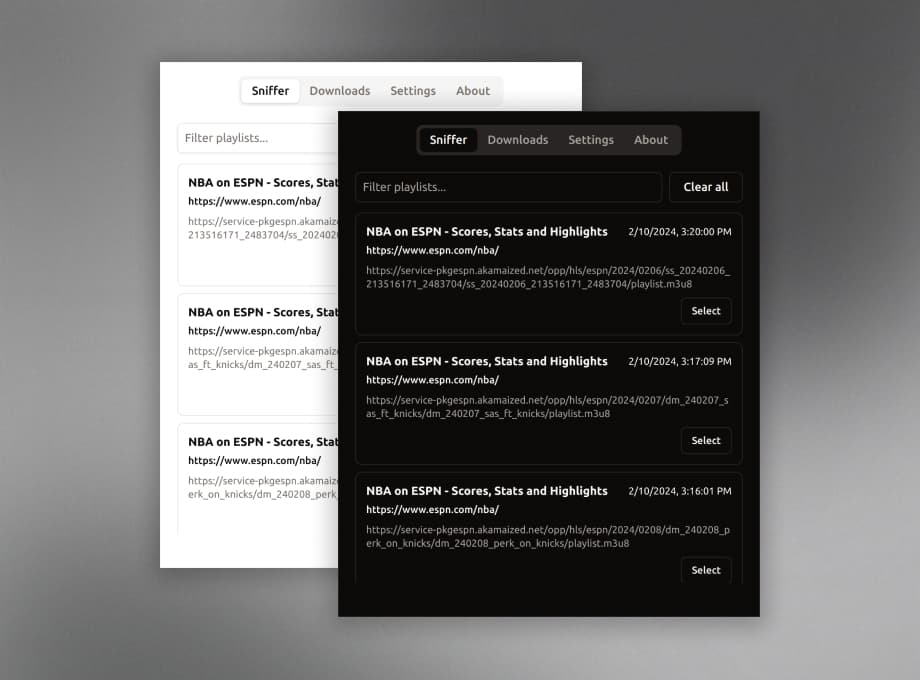
- Click the HLS Downloader icon – detected playlists appear in the Sniffer tab.
- Choose Select next to a playlist.
- Pick your video & audio streams, then press Download.
- Grab a coffee ☕ –
ffmpeg.wasmmerges everything and your browser prompts you to save the MP4 when done.
🧑💻 Development
Clone & Build
Requires Node.js 20+ (includes Corepack) and the zip command.
git clone https://github.com/puemos/hls-downloader.git
cd hls-downloader
install the pinned pnpm version
corepack enable
corepack prepare pnpm@10.11.0 --activate
pnpm install --frozen-lockfile pnpm run build    # outputs → ./dist/, extension-chrome.zip, extension-firefox.xpi
verify build artifacts then clean up
pnpm run clean
MV2 vs MV3 builds
The default build targets Manifest V2 (Firefox and legacy Chromium workflows). To produce a Manifest V3 bundle for Chromium-based browsers (Firefox does not fully support MV3 background service workers yet):
MV_TARGET=mv3 pnpm run build   # writes manifest v3 + offscreen page to dist/
pnpm run clean                 # optional: remove artifacts after testing
You can generate both flavors at once with pre-named artifacts:
pnpm run build:all          # outputs dist/mv2 + dist/mv3
zips: extension-mv2-chrome.zip / extension-mv2-firefox.xpi  (MV2 contents at archive root)
      extension-mv3-chrome.zip                            (MV3 contents at archive root; Chromium only)
For Firefox Add-ons source review, use the exact reproduction steps in AMOSOURCE_REVIEW.md. Do not upload a stale local source-code.zip; pnpm run publish:firefox creates a fresh source archive from the committed release revision.
Tip: If pnpm is missing, run corepack enable && corepack prepare pnpm@10.11.0 --activate to match the locked toolchain.
Run tests & generate coverage badge:
pnpm test          # unit tests
pnpm test:coverage # combined coverage + badge
Run the local browser e2e smoke test:
pnpm test:e2e:localThis builds the MV3 extension, launches Brave on macOS with the unpacked extension, opens a real online HLS stream with audio/video/WebVTT subtitles, verifies Sniffer, preview, playlist selection, download, and saved .mkv or equivalent media-container output, then removes generated extension artifacts. The downloaded media file stays in a temp directory and the script prints its path so you can review it manually. It is intentionally not part of CI and skips when CI=true. Set E2E_BROWSER=/path/to/Brave Browser for a custom Brave binary path, E2EHLSURL=https://.../playlist.m3u8 to override the stream, or E2ECLEANDOWNLOAD=1 to delete the downloaded file after the run.
Live Development
pnpm dev        # watches & rebuilds into dist/
pnpm storybook  # preview popup & design-system components
Project Structure
src/
├─ assets/          # extension manifest & icons
├─ background/      # background scripts
├─ core/            # shared logic & Redux store
├─ design-system/   # UI component library
└─ popup/           # React popup UI
🤝 Contributing
We ♥ PRs! See the contributing guide and automation guide.
git checkout -b feature/my-awesome-idea
...code...
git commit -am "feat: add awesome idea"
git push origin feature/my-awesome-idea
open PR 🎉
📜 Code of Conduct
TLDR: Be kind This project follows the Contributor Covenant.
🚧 Build Variants
HLS Downloader is available in multiple build variants to accommodate different distribution requirements:
Store Builds (Firefox Add-ons / Edge Add-ons)
Official store releases include a blocklist that respects copyright holder opt-out requests. This version complies with distribution platform policies and content owner preferences.
Independent Builds
Alternative builds are available for advanced users who prefer complete local control. These "experimental" variants contain no blocklist and allow unrestricted operation:
# MV2 without blocklist (Firefox/Edge manual install)
pnpm run build:mv2:no-blocklist
MV3 without blocklist (Chrome/Brave/Arc manual install)
pnpm run build:mv3:no-blocklist
Build all variants at once
pnpm run build:all-variants
Non-blocklist builds are named "experimental unstable nightly beta alpha hls-downloader" and are intended for personal use only—not for redistribution on official stores.
🤚 Disclaimer
This extension is designed for downloading video content that you own or have authorization to access. It is prohibited to use this tool for downloading copyrighted content without permission. Users are solely responsible for their actions, and the developer assumes no liability for user behavior. This tool is provided "as-is" without warranty of any kind.
🚫 Copyright Protection and Opt-Out Policy
We respect the intellectual property rights and legitimate interests of all websites and content operators.
If you do not wish this tool to operate on your website, you may submit an opt-out request. We will add verified domains to the project's blocklist in subsequent releases.
How to Submit an Opt-Out Request
- Create a new Issue using the "Opt-Out Request" template
- Use the title format:
[Opt-Out Request] YourDomain.com - Provide the following information for verification:
example.com)
- Contact Email (for identity verification if necessary)
We commit to honoring legitimate requests and will include verified domains in the blocklist for store-distributed versions. Please note that as an open-source project, update cycles may vary. Thank you for your understanding and cooperation.
📝 License
MIT License – click to expand
The MIT License (MIT)
Copyright (c) 2025 Shy Alter
More: https://github.com/puemos/hls-downloader/blob/master/LICENSE
Made with ♥ by puemos


