
A multi-exchange, multi-symbol grid trading bot for crypto futures. Supports Binance & OKX & Gate.io, dual-side hedging, risk control, and Docker deployment.
AS Grid Trading Bot



Advanced Grid Trading Bot with Multi-Exchange Support
Intelligent bidirectional grid trading with real-time risk control and multi-currency support
🚀 Quick Start • 📋 Features • 🏗️ Architecture • 🔧 Configuration • 📊 Monitoring • ⚠️ Security
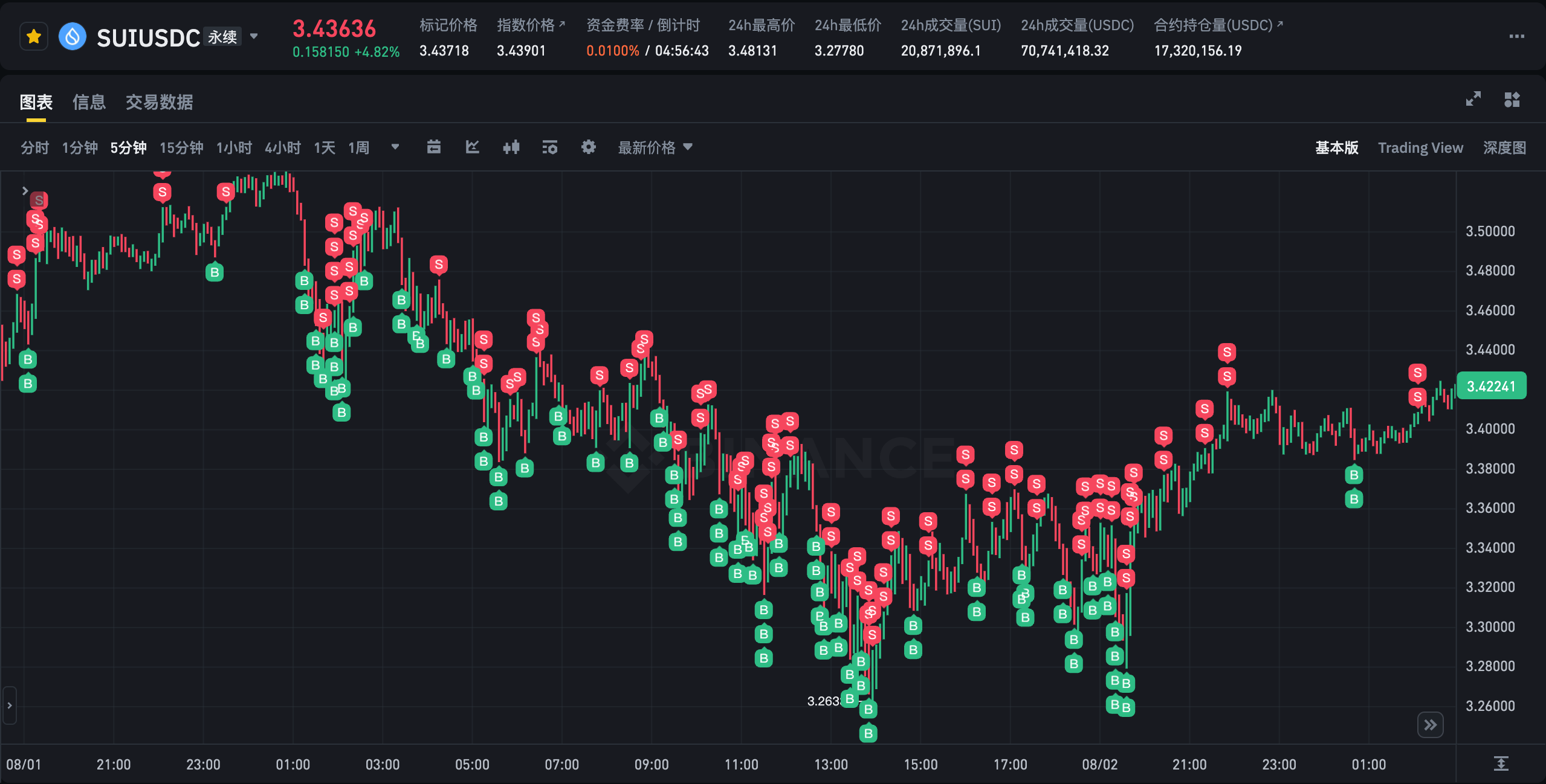
SUI/USDC Perpetual Contract Real-time Trading Demo - Intelligent Grid Trading Strategy
⭐ If you like AS-Grid, consider giving it a star! It helps more traders discover this project.




📋 Features
🎯 Core Trading Strategy
| Feature | Description | Benefit | |---------|-------------|---------| | Bidirectional Grid Trading | Simultaneous long/short positions with dynamic adjustment | Enhanced market adaptability and risk distribution | | Multi-Currency Support | Trade multiple currencies simultaneously | Diversified portfolio and higher potential returns | | Intelligent Risk Control | Real-time position monitoring with automatic thresholds | Prevents over-exposure and manages drawdowns | | Spread Monitoring | Automatic grid realignment when spreads exceed thresholds | Maintains optimal grid efficiency |🛡️ Risk Management
- Position Threshold Management: Automatic position limits with
POSITIONTHRESHOLDandPOSITIONLIMIT - Inventory Risk Control: Partial position closing when bidirectional positions reach thresholds
- Order Timeout Management: Automatic cancellation of pending orders exceeding 300 seconds
- Real-time Monitoring: WebSocket data streams for instant market response
🚨 Emergency Position Reduction System
| Feature | Description | Benefit | |---------|-------------|---------| | Emergency Trigger | Automatically triggers when both long/short positions ≥ 0.8× threshold | Prevents excessive risk exposure during market volatility | | Dynamic Thresholds | Adjusts to 0.75× threshold during extreme volatility | Enhanced protection during market crashes | | Batched Reduction | Executes reduction in configurable batches with millisecond intervals | Minimizes market impact and ensures execution | | Smart Order Types | Prioritizes limit orders with slippage tolerance, falls back to market orders | Optimizes execution price while ensuring completion | | Cooldown Protection | 60-second cooldown prevents rapid re-triggering | Avoids excessive trading during volatile periods | | Daily Circuit Breaker | Halts new positions after 3 daily triggers | Ultimate risk protection for extreme market conditions |🔒 Lockdown Mode (装死模式)
| Feature | Description | Benefit | |---------|-------------|---------| | Single-Side Protection | Activates when single direction exceeds 1× threshold | Prevents excessive exposure in one direction | | Fixed Take-Profit | Uses calculated take-profit price instead of dynamic adjustment | Maintains profit targets during high-risk periods | | Order Management | Stops opening new positions, only maintains take-profit orders | Reduces risk while preserving profit opportunities | | Smart Exit | Automatically exits when position returns below threshold | Dynamic risk management based on market conditions |🔧 Smart Features
- Dynamic Grid Adjustment: Grid spacing optimization based on market conditions
- Automatic Spread Correction: Grid realignment when price spreads exceed thresholds
- Order Cooldown Mechanism: Prevents excessive trading frequency
- Precision Adaptation: Automatic acquisition of trading pair precision requirements
🏗️ Architecture
System Architecture Overview
flowchart TB
    subgraph UI["🖥️ User & Config"]
        A[User Configuration]
        B[Symbols Config]
        C[Multi-Currency Setup]
        D[Environment Variables]
    end
subgraph Core["🔥 Core Trading Engine"]         E[Grid Trading Engine]         F[Position Manager]         G[Order Manager]         H[Risk Controller]         I[Spread Monitor]     end
subgraph Exchange["🌐 Exchange Layer"]         J[Exchange API]         K[WebSocket Streams]         L[REST API Calls]     end
subgraph Notify["📢 Notification & Monitoring"]         M[Telegram Bot]         N[Status Monitor]         O[Performance Metrics]     end
subgraph Deploy["🐳 Deployment"]         P[Docker Container]         Q[Python Runtime]         R[Logging System]     end
%% Connections     UI --> Core     Exchange --> Core     E --> F --> G --> H --> I     Core --> Notify     Deploy --> Core
Single Currency vs Multi-Currency Architecture
Single Currency Mode
flowchart LR
    subgraph Single["Single Currency Bot"]
        A1[Config Loader] --> B1[GridBot Instance]
        B1 --> C1[WebSocket Handler]
        C1 --> D1[Grid Loop]
        D1 --> E1[Order Manager]
        E1 --> F1[Risk Controller]
    end
subgraph External["External Systems"]         G1[Exchange API]         H1[WebSocket Streams]         I1[Telegram Notification]     end
B1 --> G1     C1 --> H1     F1 --> I1
Multi-Currency Mode
flowchart TB
    subgraph Controller["Multi-Currency Controller"]
        A2[Config Parser] --> B2[Symbol Manager]
        B2 --> C2[Bot Factory]
        C2 --> D2[Thread/Async Pool]
    end
subgraph Bots["Individual Bots"]         E2[Bot 1: BTCUSDT]         F2[Bot 2: ETHUSDT]         G2[Bot N: XXXUSDT]     end
subgraph Shared["Shared Resources"]         H2[Log Manager]         I2[Status Aggregator]         J2[Error Handler]     end
D2 --> Bots     E2 --> Shared     F2 --> Shared     G2 --> Shared
Trading Flow Architecture
sequenceDiagram
    participant User
    participant Bot
    participant Exchange
    participant WS as WebSocket
    participant TG as Telegram
User->>Bot: Load Config & Start Bot     Bot->>Exchange: Init API     Bot->>Exchange: Enable Hedge Mode     Bot->>WS: Subscribe to Price & Orders     WS-->>Bot: Real-time Updates
loop Grid Trading Loop         WS-->>Bot: Price/Order Update         Bot->>Bot: Check Positions & Orders         alt No Position             Bot->>Exchange: Place Entry Orders         else With Position             Bot->>Exchange: Place Take-Profit Orders             Bot->>Exchange: Place Averaging Orders         end         Bot->>Bot: Execute Risk Control         Bot->>TG: Send Status Update         Bot->>TG: Risk/Warning Notification     end
Bot->>TG: Error Notifications     Bot->>Exchange: Cancel Pending Orders
🏆 Supported Exchanges
| Exchange | Single Currency | Multi Currency | Risk Control | Recommendation | |----------|----------------|----------------|--------------|----------------| | Binance | ✅ | ✅ | Advanced | 🏆 Recommended | | Gate.io | ✅ | ❌ | Basic | 🥈 Alternative | | OKX | ✅ | ❌ | Basic | 🥉 Legacy |
Exchange Comparison
🏆 Binance (Recommended)
- ✅ Most comprehensive features with extensive optimization
- ✅ Supports both single and multi-currency modes
- ✅ Advanced bidirectional position management
- ✅ Real-time spread monitoring and automatic correction
- ✅ Intelligent profit-taking and risk management
- ✅ Supports USDT and USDC contracts
- ✅ Relatively comprehensive features
- ❌ Single currency mode only
- ✅ Basic grid trading functionality
- ✅ Suitable for simple usage scenarios
- ⚠️ Basic features only
- ❌ Located in legacy directory, no longer maintained
- ⚠️ Recommended for learning reference only
🚀 Quick Start
Prerequisites
- Docker and Docker Compose installed
- API keys from supported exchanges
- Basic understanding of grid trading strategies
1. Clone Repository
git clone <your-repo-url>
cd grid-trading-bot
2. Configure Environment
Single Currency Mode
# Copy and configure environment file
cp config/env.example .env
nano .env
Multi-Currency Mode
# Configure environment and symbols
cp config/env.example .env
cp config/symbols.yaml config/symbols.yaml.backup
nano .env
nano config/symbols.yaml
3. Start Trading Bot
Single Currency Mode
# Build and start
./scripts/deploy.sh start
Or step by step
./scripts/deploy.sh build    # Build image
./scripts/deploy.sh start    # Start container
Multi-Currency Mode
# Start multi-currency mode
./scripts/deploy.sh multi-start
View logs
./scripts/deploy.sh multi-logs
🔧 Configuration
Environment Variables
Exchange Configuration
EXCHANGE=binance          # Exchange: binance, gate
CONTRACT_TYPE=USDT        # Contract type: USDT, USDC (Binance only)
API Configuration (Required)
APIKEY=yourapikeyhere
APISECRET=yourapisecrethere
Trading Configuration
COIN_NAME=X               # Trading currency
GRID_SPACING=0.004       # Grid spacing (0.4%)
INITIAL_QUANTITY=1       # Initial trading quantity
LEVERAGE=20              # Leverage multiplier
Advanced Configuration (Optimized Defaults)
# Risk Control Thresholds (Auto-calculated)
POSITION_THRESHOLD=10     # Position lock threshold
POSITION_LIMIT=5         # Position quantity threshold
Time Controls
ORDERCOOLDOWNTIME=60   # Reverse order cooldown (seconds)
SYNC_TIME=3             # Data synchronization interval (seconds)
Spread Monitoring
PRICESPREADTHRESHOLD=0.0004  # Spread threshold (10% of grid spacing)
PRICESPREADCHECK_INTERVAL=30 # Spread check interval (seconds)
Emergency Position Reduction Configuration
# Emergency Reduction Thresholds
EMGENTERRATIO=0.80     # Emergency trigger ratio (0.8× threshold)
EMGEXITRATIO=0.75      # Emergency exit ratio (0.75× threshold)
EMGCOOLDOWNS=60        # Cooldown period after trigger (seconds)
EMG_BATCHES=2            # Number of reduction batches
EMGBATCHSLEEP_MS=300   # Interval between batches (milliseconds)
EMGSLIPCAP_BP=15       # Slippage tolerance for limit orders (basis points)
EMGDAILYFUSE_COUNT=3   # Daily circuit breaker trigger count
Grid Pause
GRIDPAUSEAFTEREMGS=90    # Grid pause duration after emergency (seconds)
Multi-Currency Configuration
Create config/symbols.yaml for multi-currency mode:
symbols:
  - name: BTCUSDT
    grid_spacing: 0.004
    initial_quantity: 0.001
    leverage: 20
    contract_type: USDT

  - name: ETHUSDT
    grid_spacing: 0.005
    initial_quantity: 0.01
    leverage: 20
    contract_type: USDT
📊 Monitoring & Management
Management Commands
# View help
./scripts/deploy.sh help
Single currency mode
./scripts/deploy.sh start          # Start service
./scripts/deploy.sh stop           # Stop service
./scripts/deploy.sh restart        # Restart service
./scripts/deploy.sh logs           # View logs
./scripts/deploy.sh status         # View status
Multi-currency mode
./scripts/deploy.sh multi-start    # Start multi-currency service
./scripts/deploy.sh multi-logs     # View summary logs
./scripts/deploy.sh bot-logs       # View detailed logs
General commands
./scripts/deploy.sh build          # Build image
./scripts/deploy.sh cleanup        # Clean up resources
Real-time Monitoring
# View real-time logs
./scripts/deploy.sh logs
View local log files
tail -f log/grid_BN.log           # Binance single currency
tail -f log/multigridBN.log     # Multi-currency main log
tail -f log/status_summary.log    # Status summary
Key Monitoring Metrics
- Position Status: Long/short position quantities
- Order Status: Quantities and prices of various order types
- Spread Monitoring: Bid-ask price difference percentage
- Risk Indicators: Position threshold proximity
- System Status: WebSocket connection and data sync status
🧠 Trading Logic
Grid Strategy Overview
- Initialization: Place entry orders when positions are zero
- Position Management: Place profit-taking and averaging orders when positions exist
- Risk Control: Enable double profit-taking when position exceeds
POSITION_LIMIT - Spread Control: Realign grids when spread exceeds threshold
- Safety Measures: Partial position closing and order timeout management
Risk Management Features
- Position Thresholds: Automatic position limits with configurable thresholds
- Spread Monitoring: Real-time monitoring with automatic correction
- Order Management: Timeout handling and cooldown mechanisms
- Inventory Control: Bidirectional position balance management
🚨 Emergency Position Reduction Logic
- Trigger Conditions:
POSITION_THRESHOLD
- Extreme Volatility: Automatically adjusts to 0.75× threshold during high volatility periods
- Volatility Detection: Monitors price changes over 60 periods to identify extreme conditions
- Execution Process:
- Post-Reduction Actions:
🔒 Lockdown Mode Logic
- Activation Conditions:
POSITION_THRESHOLD
- Take-Profit Calculation: Computes optimal take-profit price based on position ratios
- Price Constraints: Applies min/max constraints to prevent extreme take-profit levels
- Operation Mode:
- Exit Conditions:
🐳 Docker Architecture
- Base Image: Python 3.9 Slim
- Runtime User: Non-root user (trader)
- Resource Limits: Memory 512M, CPU 0.5 cores
- Health Check: Program status check every 30 seconds
- Auto Restart: Automatic restart on abnormal exit
📁 Project Structure
.
├── config/                # Configuration files
│   ├── symbols.yaml       # Multi-currency configuration
│   ├── symbols.json       # JSON format configuration
│   └── env.example        # Environment variables template
├── scripts/               # Management scripts
│   ├── deploy.sh          # Deployment and management
│   ├── start.sh           # Startup script
│   └── health_check.py    # Health check script
├── docker/                # Docker configuration
│   ├── Dockerfile         # Docker image build
│   ├── docker-compose.yml # Docker Compose config
│   └── .dockerignore      # Docker ignore file
├── src/                   # Source code
│   ├── single_bot/        # Single currency bots
│   │   ├── binance_bot.py # Binance single currency
│   │   └── gate_bot.py    # Gate.io single currency
│   └── multi_bot/         # Multi-currency bots
│       ├── binancemultibot.py # Binance multi-currency
│       └── multi_bot.py   # Multi-currency entry
├── docs/                  # Documentation
├── legacy/                # Legacy code
├── log/                   # Log directory (persistent)
├── requirements.txt        # Python dependencies
└── README.md              # Documentation
⚠️ Security & Risk Management
API Security
- Permission Settings: Enable only necessary contract trading permissions
- IP Whitelist: Set API IP whitelist in exchange
- Key Protection: Never commit
.envfile to version control
Risk Control Recommendations
- Test Environment: Run on testnet or small capital environment first
- Parameter Tuning: Adjust grid spacing and quantities based on currency characteristics
- Position Monitoring: Regularly check position status to avoid over-concentration
- Market Adaptation: Consider pausing bot during extreme market conditions
System Security
- Network Isolation: Containers run in isolated network environment
- Log Management: Regular log file cleanup to prevent disk space issues
- Permission Control: Non-root user execution to reduce security risks
🔧 Troubleshooting
Common Issues
- API Connection Failure
# Check API configuration
   grep API_KEY .env

   # View error logs
   ./scripts/deploy.sh logs

   # Test connectivity
curl -I https://fapi.binance.com- Container Startup Issues
# Check configuration
   docker-compose config

   # View container status
   docker ps -a

   # Check resources
docker stats- Permission Issues
# Fix log directory permissions
   chmod 755 log/
   sudo chown 1000:1000 log/
Performance Optimization
- Adjust
SYNC_TIMEto balance real-time performance and efficiency - Monitor memory usage and restart container when necessary
- Adjust container resource limits based on server performance
📞 Support
For issues and questions:
- Check log files for detailed error information
- Verify configuration parameters are correct
- Confirm exchange API permission settings
- Test network connectivity and exchange service status
Performance Recommendations
- Use Binance for most comprehensive features and best performance
- Start with single currency mode for beginners
- Gradually scale to multi-currency mode for experienced users
- Monitor system resources and adjust container limits accordingly
📈 Risk Warning
⚠️ Important Disclaimer: This software is for educational and research purposes only. Users bear all trading risks. Grid trading may face significant losses in trending markets. Please use with caution based on your risk tolerance.
Key Risk Factors:
- Grid trading is suitable for sideways markets, trending markets carry higher risks
- Leveraged trading is extremely risky and may result in total capital loss
- Ensure full understanding of trading mechanisms before use
- Consider setting stop-loss mechanisms to avoid major losses in extreme situations
- Emergency Reduction: May trigger during high volatility, resulting in position closures
- Lockdown Mode: Can pause trading in one direction, affecting overall strategy performance
- Daily Circuit Breaker: Extreme protection may halt all new positions for extended periods
- Start with small amounts and gradually increase
- Monitor positions regularly and adjust parameters as needed
- Consider market conditions when deciding to run the bot
- Always maintain adequate account balance for margin requirements
Made with ❤️ for the crypto trading community


