
Next-Gen AI-Ready Real-time Command Suggestions. Learn your history, fuzzy-match commands, and auto-suggest in real-time (Bash, Zsh, PowerShell)

HintShell
Local, Context-Aware Real-time Command Suggestions for Your Terminal





HintShell is a local command-suggestion engine that embeds into your existing shell (PowerShell, Bash, or Zsh). It combines your command history with bounded context from the current directory and workspace, then presents suggestions without replacing native shell completion. Built with Rust for a small, responsive footprint.
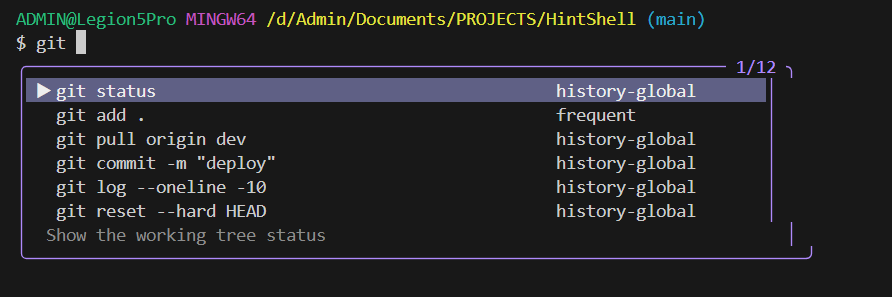
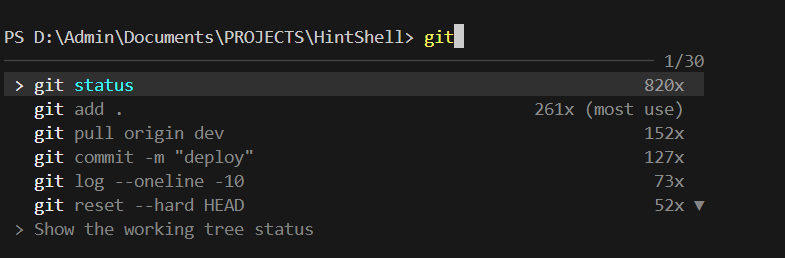
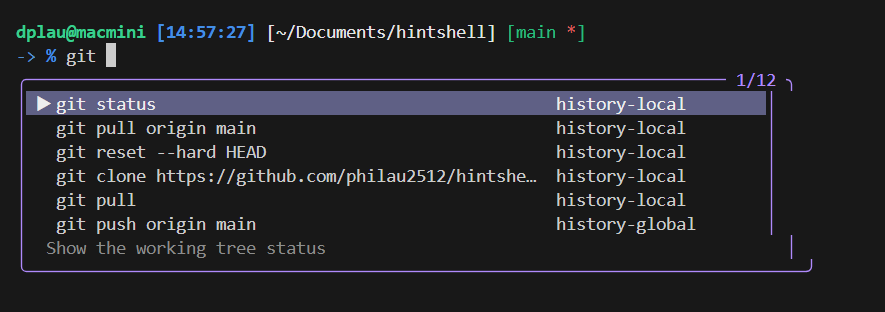
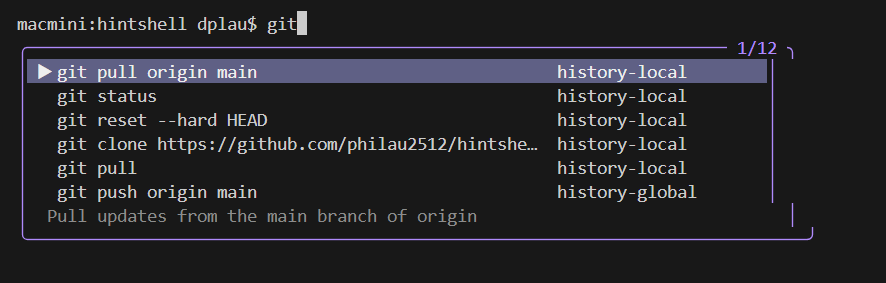
⚡ Why HintShell?
Most shells offer basic, single-line autocomplete. HintShell adds a smart, interactive suggestion panel while keeping each shell authoritative for its own completion behavior: Bash and PSReadLine still own path and flag completion, and HintShell only supplies advisory command suggestions.
| Feature | HintShell | PowerShell
(PSReadLine) | Zsh
(zsh-autosuggestions) | Bash | Git Bash | Fish | |---|:---:|:---:|:---:|:---:|:---:|:---:| | Suggestion UI | Scrollable list | Single inline ghost | Single inline ghost | None | None | Single inline ghost | | Prefix matching | ✅ | ✅ | ✅ | ✅ | ❌ | ✅ | | Frequency ranking | ✅ | ❌ | ❌ | ❌ | ❌ | ✅ | | Smart ranking | ✅ Recent → Default → Most Used → Others | ❌ | ❌ | ❌ | ❌ | ❌ | | Command descriptions | ✅ | ❌ | ❌ | ❌ | ❌ | ❌ | | Cross-shell | ✅ | PowerShell only | Zsh only | Bash only | — | Fish only | | Learns from history | ✅ | ✅ | ✅ | ❌ | ❌ | ✅ | | Auto-start daemon | ✅ | N/A | N/A | N/A | N/A | N/A | | 600+ built-in commands | ✅ | ❌ | ❌ | ❌ | ❌ | ❌ | | Works with any terminal | ✅ | ✅ | ✅ | ✅ | ✅ | ✅ |
🚀 Installation (Recommended)
Follow these steps in order to get HintShell running on your machine.
1. Install Dependencies (macOS / Linux / Git Bash)
HintShell usesfzf to render the suggestion picker on Bash/Zsh (including Git Bash on Windows).
- macOS:
brew install fzf - Linux (Ubuntu/Debian):
sudo apt install fzf - Windows (Git Bash):
winget install junegunn.fzf(or install fzf another way). PowerShell overlay does not require fzf. - Windows PowerShell: No extra dependencies for the real-time overlay.
2. Install HintShell
Install via npm to get the latest pre-built binaries for your platform. Add--foreground-scripts to show the binary download, extraction, and setup output (this is also what hs update uses):
npm install -g hintshell@latest --foreground-scripts3. Initialize Shell Integration
Run the init command to automatically configure your shell (.zshrc, .bashrc, or PowerShell profile):
hs init4. Restart Terminal
Restart your terminal or reload your shell config to activate the hooks:# Zsh
source ~/.zshrc
Bash
source ~/.bashrc
PowerShell
. $PROFILE📖 Usage
Git Bash / WSL2 Bash
After hs init, opening a normal interactive Git Bash or WSL2 Bash session automatically starts hintshell bash, which renders a local live overlay as you type. fzf is not required for this live mode.
- ↑ / ↓ navigate HintShell suggestions; Esc closes the overlay; Enter executes through Bash.
- Tab accepts only a compatible command suggestion. Path input such as
cd src/comp, flags such asgit --ver, and empty overlays are forwarded to Bash's native completion. - The overlay adapts near the bottom of the terminal: it shows fewer rows when space is limited and stays hidden when a complete frame would scroll the terminal.
- To bypass the wrapper for one shell, run:
HINTSHELLDISABLEAUTO_BASH=1 bash- Git Bash keeps its existing Windows ConPTY backend. WSL2 uses a separate Unix pseudo-terminal backend and preserves the terminal's current working directory; neither changes PowerShell integration.
- Native Linux Bash retains the existing
Tab/fzfpicker instead of starting the live wrapper. - Set
HINTSHELLBASHto an explicitbash.exepath on Git Bash. SetHINTSHELLDISABLELIVEOVERLAY=1to reject the wrapper in unsupported terminals.
Preview limitation: the live wrapper requires an ANSI-capable terminal. For full-screen terminal applications, bypass the wrapper and open them from a normal Bash session.
macOS Bash / Zsh live overlay
On macOS, hs init configures the realtime overlay automatically for interactive Bash and Zsh sessions. For Bash login shells, it also adds a managed block to ~/.bash_profile that loads ~/.bashrc, so the overlay starts in macOS Terminal and iTerm2 without manual profile edits.
hs initOpen a new terminal after initialization. The wrapper starts the same shell as a child through the Unix pseudo-terminal backend. It preserves the opening directory and synchronizes the current directory after each prompt, so contextual suggestions follow cd changes.
- Tab keeps native Bash/Zsh path and flag completion authoritative; HintShell accepts only compatible command-prefix suggestions.
- Interactive programs such as
gh auth login,fzf,vim, andnanoreceive raw terminal input while running; the overlay resumes automatically at the next prompt. - Bash escape hatch:
HINTSHELLDISABLEAUTO_BASH=1 bash - Zsh escape hatch:
HINTSHELLDISABLEAUTO_ZSH=1 zsh - Run
hs uninstallto remove both the shell hook and the managed Bash login block. - Use an escape hatch for full-screen terminal applications or any profile whose startup plugins are not compatible with a PTY wrapper.
Zsh / Bash (macOS/Linux)
Tab-to-Suggest uses fzf when available. Type git and press Tab to open a ranked command picker; Enter fills the command line. If fzf is unavailable, HintShell uses the top matching command without emitting an executable-path error.
Context-aware suggestions
Each request includes the current working directory and shell. HintShell merges bounded contextual candidates with local and global history, then ranks the combined list once.
- Paths for supported argument positions, including
cd,pushd,mkdir,rmdir,cat,rg,git add, anddocker build. - Git branches/remotes, npm-family scripts, Docker entities, SSH hosts, and zoxide directories when the command and local runtime are available.
- Local-history matches are boosted only for the active directory; prefix quality remains more important than contextual or fuzzy matches.
- Filesystem scans, workspace detection, and external commands are bounded, cached where appropriate, and fail closed. Context candidates never write themselves to command history.
PowerShell (Windows/Unix)
Real-time Overlay: Suggestions appear automatically as a floating panel beneath your cursor as you type.- ↑ / ↓ : Navigate
- Tab : Accept
- Esc : Close
✨ What's new in 0.3.4
hs initautomatically enables the live overlay for macOS Bash and Zsh; no opt-in environment variable is required.- macOS Bash login sessions load
.bashrcthrough a HintShell-managed block in.bash_profile, so the overlay works in Terminal and iTerm2. hs uninstallremoves both the shell hook and HintShell's managed Bash login block.- Git Bash and WSL2 retain their live-overlay backends; Linux Bash/Zsh outside WSL2 continue using Tab/fzf.
🔄 Updating
While the daemon is running, Windows locks hintshell-core.exe. Use:
# Recommended
hs update
Or raw npm — postinstall stops the daemon and runs init
npm i -g hintshell@latest
If you still hit a file lock (os error 32 / "being used by another process"):
hs stop
or: taskkill /F /IM hintshell-core.exe
npm i -g hintshell@latest
hintshell init
🗑️ Uninstallation
If you need to remove HintShell, it now comes with a clean uninstaller that handles everything for you:
# 1. Run the official uninstaller
hs uninstall
2. (Optional) Remove the NPM package
npm uninstall -g hintshellhs uninstall stops the daemon, removes hook lines from your shell configs, and deletes binaries from ~/.hintshell/bin, but keeps your history database (history.db) safe.
🏗️ CLI Reference
hs status      # Check if the daemon is running and see stats
hs start       # Manually start the daemon
hs stop        # Stop the daemon
hs update      # Stop daemon, npm install -g, init, restart
hs uninstall   # Completely remove shell integration and binaries
🏗️ Architecture
HintShell is a client-daemon system. It does not replace your terminal or shell. It plugs in via a thin hook.
┌─────────────────────────────────┐
│  Your Terminal                  │
│  (Windows Terminal, iTerm2,     │
│   Alacritty, any terminal)      │
│                                 │
│  ┌───────────────────────────┐  │
│  │  Your Shell               │  │
│  │  (PowerShell / Bash / Zsh)│  │
│  │       ▲                   │  │
│  │       │ hook / module     │  │
│  │       ▼                   │  │
│  │  ┌─────────┐    IPC    ┌──────────────┐
│  │  │   hs    │◄─────────►│ hintshell    │
│  │  │  (CLI)  │ Named Pipe│ -core        │
│  │  └─────────┘  or UDS   │ (Daemon)     │
│  │                        │ SQLite+Fuzzy │
│  │                        └──────────────┘
│  └───────────────────────────┘  │
└─────────────────────────────────┘
🤝 Contributing & License
Contributions are welcome! Built with 🦀 Rust for speed and safety. Licensed under MIT.
Stop memorizing commands. Let HintShell remember for you.


