
Sequence & table data comparison between 2 PostgresQL databases
Rust PGDataDiff
rust-pgdatadiff is a re-write of the Python version of pgdatadiff
What makes it different?
- It is schema aware right from the get-go, as when we had to use the original
pgdatadiff we ended up having different schemas that we needed to perform checks on.
- It runs DB operations in a parallel fashion,
pgdatadiff which performs the checks sequentially.
- It is written in Rust, which means that it is memory safe and has a very low overhead.
- It provides both a library and a client, which means that you can use it as a standalone tool
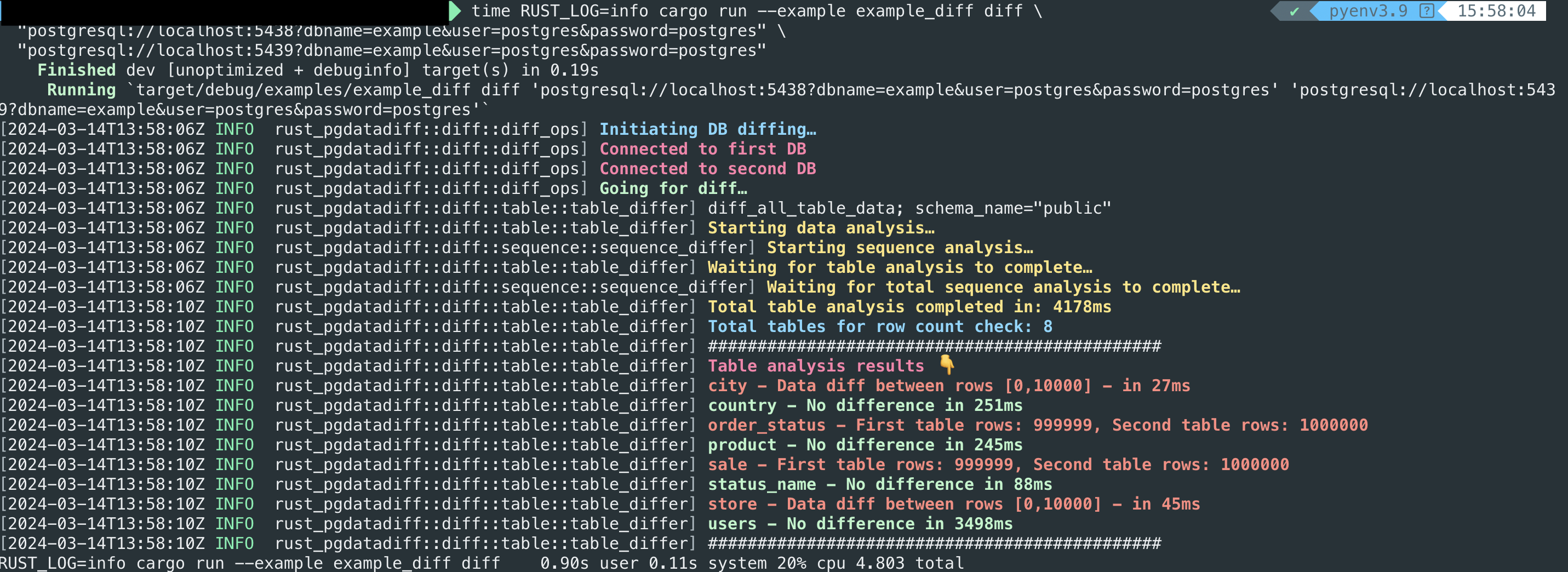
The benchmarks below are based on DBs with 5 tables and 1M rows each. The results are as follows:
Python (sequential)

Rust (parallel)
Installation (Client)
In case you want to use this as a client you can install it through cargo:
Client supports two features that allow you to choose between Clap or Inquire for running it.

Clap
cargo install rust-pgdatadiff-client --features with-clapInquire
cargo install rust-pgdatadiff-client //or with --features with-inquireInstallation (Library)
In case you want to use this as a library you can add it to your Cargo.toml:
cargo add rust-pgdatadiffor
[dependencies]
rust-pgdatadiff = "0.1"
Usage (Client)
Clap
Usage: rust-pgdatadiff-client diff [OPTIONS] <FIRSTDB> <SECONDDB>
Arguments:   <FIRST_DB>   postgres://postgres:postgres@localhost:5438/example   <SECOND_DB>  postgres://postgres:postgres@localhost:5439/example
Options:       --only-tables                           Only compare data, exclude sequences       --only-sequences                        Only compare sequences, exclude data       --only-count                            Do a quick test based on counts alone       --chunk-size <CHUNK_SIZE>               The chunk size when comparing data [default: 10000]       --start-position <START_POSITION>       The start position for the comparison [default: 0]       --max-connections <MAX_CONNECTIONS>     Max connections for Postgres pool [default: 100]   -i, --include-tables [<INCLUDE_TABLES>...]  Tables included in the comparison   -e, --exclude-tables [<EXCLUDE_TABLES>...]  Tables excluded from the comparison       --schema-name <SCHEMA_NAME>             Schema name [default: public]   -h, --help                                  Print help   -V, --version                               Print version
Inquire
rust-pgdatadiff-clientUsage (Library)
use rustpgdatadiff::diff::diffops::Differ;
use rustpgdatadiff::diff::diffpayload::DiffPayload;
#[tokio::main] async fn main() -> Result<()> {   let first_db = "postgres://postgres:postgres@localhost:5438/example";   let second_db = "postgres://postgres:postgres@localhost:5439/example";
let payload = DiffPayload::new(     firstdb.toowned(),     seconddb.toowned(),     false, //only-tables     false, //only-sequences     false, //only-count     10_000, //chunk-size     0, //start-position     100, //max-connections     vec!["table1", "table2"], //include-tables (mutually exclusive with exclude-tables)     vec!["table3", "table4"], //exclude-tables (mutually exclusive with include-tables)     "public", //schema   );   let diffresult = Differ::diffdbs(payload).await;   // Handle diff_result in any way it fits your use case   Ok(()) }
Examples
You can spin up two databases already prefilled with data through Docker Compose.
docker compose up --buildPrefilled databases include a considerable amount of data + rows, so you can run benchmarks against them to check the performance of it. You can modify a few of the generated data in order to see it in action.
You can find an example of using it as a library in the examples directory.
Run the example with the following command, after Docker Compose has started:
cargo run --example example_diff diff \
  "postgresql://localhost:5438?dbname=example&user=postgres&password=postgres" \
  "postgresql://localhost:5439?dbname=example&user=postgres&password=postgres"
You can also enable Rust related logs by exporting the following:
export RUSTLOG=rustpgdatadiff=infoSwitching from info to debug will give you more detailed logs. Also since we are utilizing sqlx under the hood, you can enable sqlx logs by exporting the following:
export RUSTLOG=rustpgdatadiff=info,sqlx=debugAuthors
If you like my work, consider buying me a coffee 😄


