
Secure and scalable way to delegate work to AI agents from anywhere. Build a team of agents that work for you.
agent-worker
An autonomous worker agent that picks up tasks from your issue tracker and completes them — without you in the loop.
Thesis
The way to scale with AI agents is to get out of the loop. Stop babysitting. Stop copy-pasting tickets into chat windows. Define the work, assign it to the agent, and walk away.
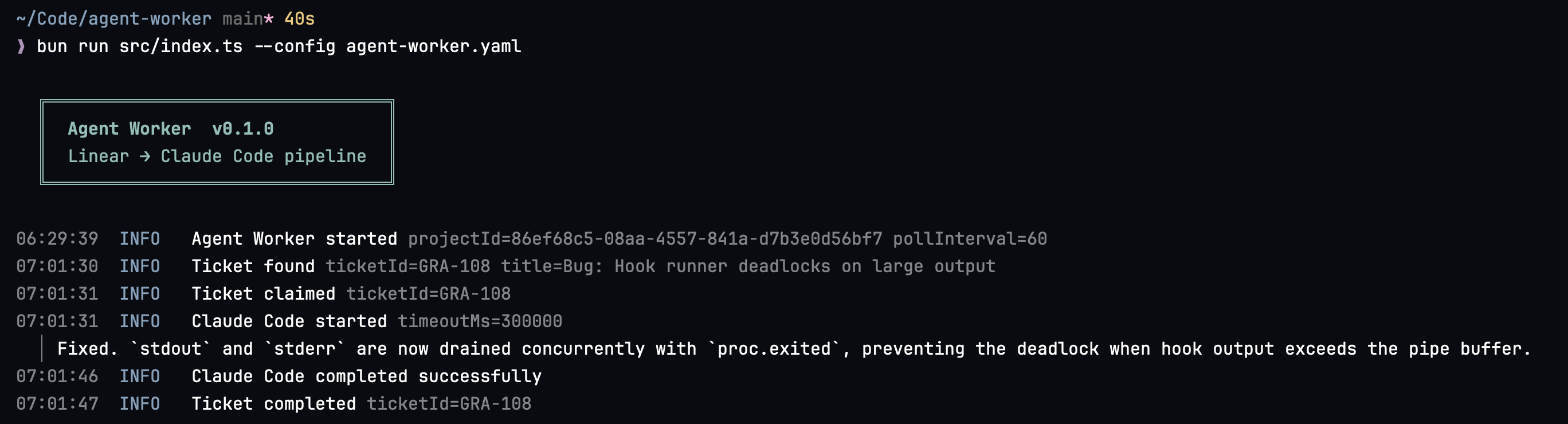
agent-worker is a polling-based worker that watches your issue tracker for assigned tasks, claims them, executes an agent harness to do the work, and reports results back. You stay out of the loop entirely.
Why polling?
Webhook-based agent orchestrators like OpenClaw require you to expose ports and endpoints to the internet. That's a security surface you don't need. The polling pattern is simpler and more secure — your agent reaches out on its own schedule, nothing reaches in. This scales from a single agent on your laptop to hundreds of workers across many repos and projects without any additional infrastructure.
Hooks: deterministic guardrails around non-deterministic agents
Agents are powerful but non-deterministic. Pre and post hooks let you wrap agent execution with deterministic, auditable steps — checking out a branch, running tests, linting, pushing code. The agent does the creative work; hooks enforce the process.
Agent-harness agnostic
agent-worker is not tied to a single agent. It supports any agent harness that can accept a prompt and return a result. Currently supported:
- Claude Code — Anthropic's CLI agent
- Codex — OpenAI's CLI agent
Prerequisites
- Bun 1.0+
- An agent harness installed and authenticated (Claude Code or Codex)
- A Linear account with a personal API key
Installation
Download a pre-built binary from the releases page, or build from source:
git clone https://github.com/owainlewis/agent-worker
cd agent-worker
bun install
bun run build
The compiled binary is written to dist/agent-worker.
Configuration
Copy the example config and edit it:
cp agent-worker.example.yaml agent-worker.yamlSet your Linear API key as an environment variable:
export LINEARAPIKEY=linapi...Configuration reference
linear:
  project_id: "your-project-uuid"     # Linear project UUID (required)
  pollintervalseconds: 60           # How often to check for new tickets
statuses:     ready: "Todo"                     # Status that marks a ticket ready for pickup     in_progress: "In Progress"        # Status set when the agent claims a ticket     done: "Done"                      # Status set on success     failed: "Canceled"                # Status set on failure
repo:   path: "/path/to/your/repo"          # Absolute path to the working repository
hooks:   # When using the Claude executor, a git worktree is created automatically —   # you don't need branch/checkout commands here.   # Codex manages its own worktrees, so hooks run in the original repo path.   pre: []                             # Commands to run before the agent (optional)
post:                               # Commands to run after the agent succeeds (optional)     - "git add -A"     - "git commit -m '{id}: {raw_title}'"     - "git push origin {branch}"     - "gh pr create --title '{id}: {raw_title}' --body 'Fixes {id}. Implemented by Agent Worker.' --base main"
executor:   type: claude                        # Agent harness: "claude" or "codex"   timeout_seconds: 300                # Max time for the agent to complete   retries: 0                          # Retry attempts on failure (0–3)
log:   file: "./agent-worker.log"          # Log file path (omit for stdout only)
Hook commands support variable interpolation:
| Variable | Value | |---|---| | {id} | Linear ticket identifier (e.g. ENG-42) | | {title} | Slugified ticket title (e.g. add-login-page) | | {raw_title} | Original ticket title, sanitized for shell safety (e.g. Add login page) | | {branch} | Generated branch name (agent/task-{id}) |
Usage
agent-worker --config ./agent-worker.yamlThe worker runs as a foreground process and handles SIGINT/SIGTERM for graceful shutdown.
How it works
- Poll — Watch Linear for tickets in the
readystatus on a configurable interval. - Claim — Transition the ticket to
in_progressso no other worker picks it up. - Worktree isolation — For executors that set
needsWorktree: true(Claude), the pipeline creates an isolated git worktree for the ticket on a fresh branch (agent/task-{id}). This keeps each ticket's work fully isolated from the main repo and from other in-flight tickets. - Pre-hooks — Run deterministic setup commands in the worktree directory (optional).
- Agent execution — Hand the ticket to your configured agent harness. The agent reads the task description and does the work autonomously.
- Post-hooks — Run deterministic verification commands (e.g. commit, push, open PR).
- Report — On success, mark the ticket
done. On failure, mark itfailedand post a comment with the failure details.
Git worktree isolation
When using the Claude executor, the pipeline automatically creates a dedicated git worktree for each ticket before invoking the agent:
- A new branch
agent/task-{id}is created from the currentHEADof the main repo. - The agent runs inside that worktree, so its changes are fully isolated.
- Multiple agent-worker processes can run against the same repository in parallel without conflicting — each works in its own branch and directory.
git checkout or branch commands when using Claude:
# Claude executor — worktree is created automatically
hooks:
  pre: []
  post:
    - "git add -A"
    - "git commit -m '{id}: {raw_title}'"
    - "git push origin {branch}"
    - "gh pr create --title '{id}: {raw_title}' --body 'Fixes {id}.' --base main"
Codex manages its own worktrees internally, so the pipeline skips automatic worktree creation for Codex; hooks run in the original repo path.
This behaviour is controlled by the needsWorktree flag on the CodeExecutor interface (src/pipeline/executor.ts). Set it to true in a custom executor to opt in to automatic worktree isolation, or false to manage isolation yourself.
Running multiple agents in parallel
Because each ticket gets its own isolated worktree and branch, you can safely run multiple agent-worker processes pointing at the same repository:
# Terminal 1
agent-worker --config ./agent-worker.yaml
Terminal 2
agent-worker --config ./agent-worker.yaml
Each process claims different tickets (the in_progress status transition acts as a distributed lock) and works in a separate worktree, so there are no conflicts.
Claude executor
The Claude executor invokes Claude Code as a headless subprocess:
claude --print --dangerously-skip-permissions -p "<ticket prompt>"--print— non-interactive mode; Claude reads the prompt, does the work, and exits.--dangerously-skip-permissions— suppresses interactive permission prompts so the agent can run fully autonomously.-p— passes the ticket title and description as the initial prompt.
0.
Worktree isolation
When executor.type is claude, the pipeline automatically creates an isolated git worktree before invoking the agent (see Git worktree isolation). The agent runs inside that worktree so its changes are fully isolated from main and from other in-flight tickets.
CLAUDE.md — project-specific instructions
Claude Code reads a CLAUDE.md file from the root of the worktree if one exists. Use this file to give the agent project-specific context it needs to do the work correctly:
# My Project
Stack
- Runtime: Bun
- Language: TypeScript
- Testing:
bun test
Conventions
- No classes — use plain functions and interfaces
- All API routes under /api/v1/
CLAUDE.md in the root of your repository. It is checked in alongside your code and is inherited by every worktree the agent runs in. The agent reads it on startup and follows its instructions throughout the task.
Timeout and retry configuration
Control how long the agent is allowed to run and how many times to retry on failure:
executor:
  type: claude
  timeout_seconds: 300   # Kill the agent if it hasn't finished within this many seconds (default: 300)
  retries: 0             # Retry attempts on non-zero exit or timeout (0–3, default: 0)
If timeout_seconds is exceeded the process is killed and the ticket is marked failed. If retries is greater than 0, the full pipeline (pre-hooks → agent → post-hooks) is retried up to that many times before giving up.
Full example config
linear:
  project_id: "your-project-uuid"
  pollintervalseconds: 60
  statuses:
    ready: "Todo"
    in_progress: "In Progress"
    done: "Done"
    failed: "Canceled"
repo:   path: "/path/to/your/repo"
hooks:   pre: []                             # Worktree + branch are created automatically   post:     - "git add -A"     - "git commit -m '{id}: {raw_title}'"     - "git push origin {branch}"     - "gh pr create --title '{id}: {raw_title}' --body 'Fixes {id}.' --base main"
executor:   type: claude   timeout_seconds: 300   retries: 0
log:   file: "./agent-worker.log"
Development
bun install       # Install dependencies
bun test          # Run tests
bun run build     # Compile binary to dist/agent-worker
Cross-platform builds:
bun run build:darwin-arm64
bun run build:darwin-x64
bun run build:linux-x64
License
MIT


