
📊 📊 📊 Monitors the health and web traffic of servers, microservices, Kubernetes/Kafka clusters, containers, and AWS services with real-time data monitoring and receive automated notifications over Slack or email.


Chronos
⭐️ Star us on GitHub! ⭐️
Visit our website at chronoslany.com.
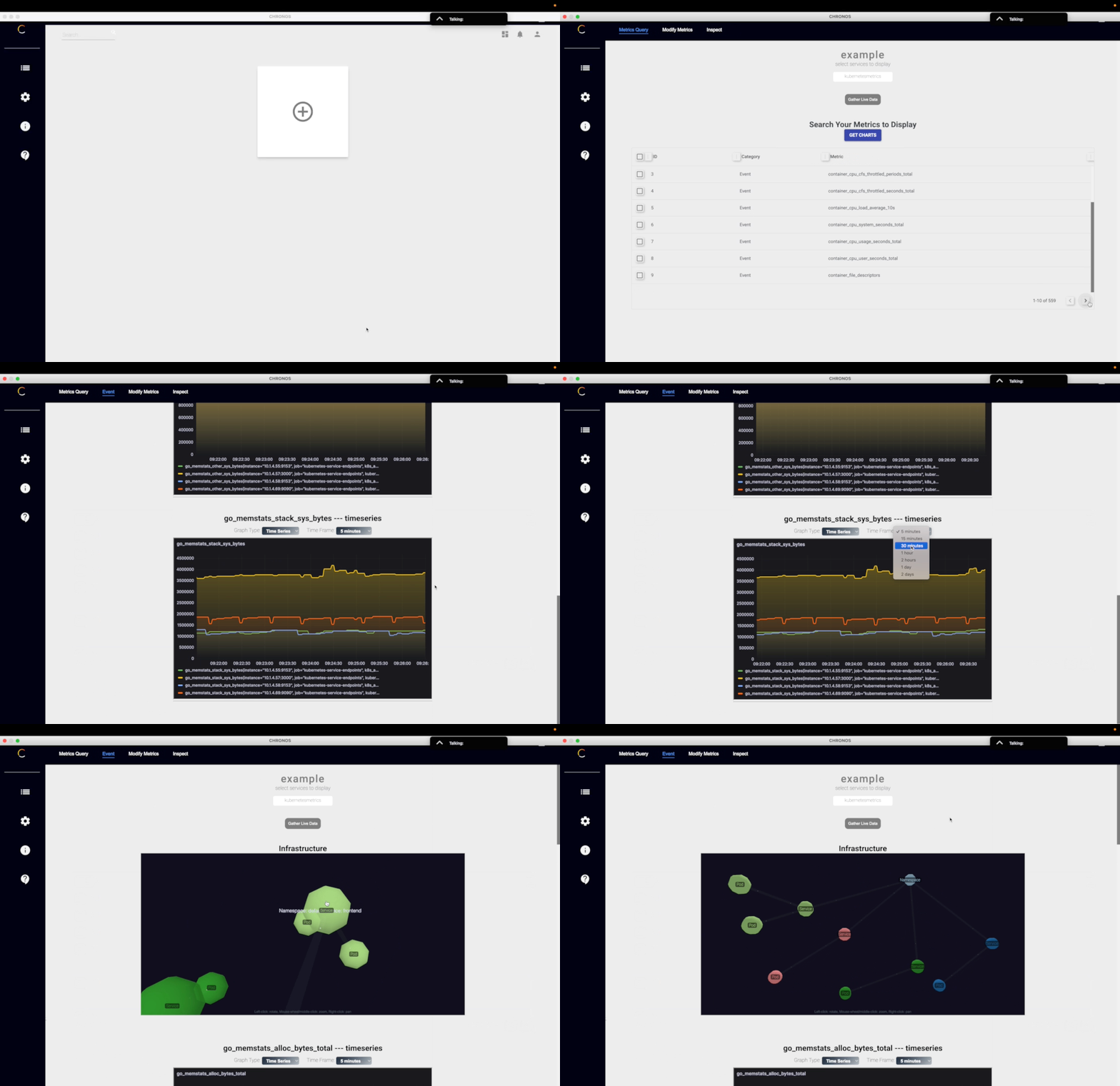
Chronos is a comprehensive developer tool that monitors the health and web traffic for containerized (Docker & Kubernetes) and non-containerized microservices communicated via REST APIs or gRPC, whether hosted locally or on Amazon Web Services (AWS). Use Chronos to see real-time data monitoring and receive automated notifications over Slack or email.
What's New?
Chronos 15.0
Contributors: Arnold Pinkhasov, Ashley Bisram, Fridchard Chery, Peter Toussaint
- Improved runtime by incorporating esbuild-loader, removing deprecated syntax/unused node modules, and other bundling optimizations.
- Refactored SASS by updating deprecated syntax and import statements.
- Grafana dashboard updates include deprecated syntax removal and a more intuitive layout, making it simpler for users to visualize key metrics in the newest version of Grafana.
- TypeScript migration allows contributors and users to catch errors early and work with a more robust codebase, making the app more reliable.
- Introduced ChroNotes, full documentation of our file structure and their purposes.
- Refactored the UI of the app to give it a more intuitive appearance regarding where/how to initialize network monitoring.
Iteration Log
Chronos 14.0
- Implemented a new visualization button (example) to expedite data rendering processes.
- Refactored microservices example, switched over to community version of MongoDB for easier URI implementation.
- Modularized cluttered components into modular units to improve code readability and reusability.
- Optimized startup scripts to reduce application load time and streamline environment configuration.
- Upgraded Material-UI from version 4 to version 5, adapting to new API changes and improving UI responsiveness.
- Refactored portions of the electron app
- Refactored data parsing logic to reduce unnecessary rerenders and improve app performance
- Fixed data bottle necks in the local npm packages, data is now able to flow to microservices for data visualization
Contributors: Michael Tagg, Ted Pham, Sofia Sarhiri, Stephen Yang
Contributors: Elsa Holmgren, Mckenzie Morris, Kelly Chandler, Sean Simpson, Zhongyan LiangChronos 13.0
Contributors: Haoyu Liu, Edwin Leong, Eisha Kaushal, Tyler CoryellChronos 12.0
Contributors: Brisa Zhu, Lucie Seidler, Justin Poirier, Jeffrey Na, Kelsi WebbChronos 11.0
Contributors: Brian Lim, Claire Tischuk, Lennon Stewart, Victor Ye,Chronos 10.0
Contributors: Brian Lim, Claire Tischuk, Lennon Stewart, Victor YeChronos 9.0
Contributors: Vince Ho, Matt Giant, Derek Lam, Kit Loong YeeChronos 8.0
Contributors: Yang Song, Giovanni Floreslovo, James Edwards, Alex KolbChronos 7.0
With Chronos 15.0
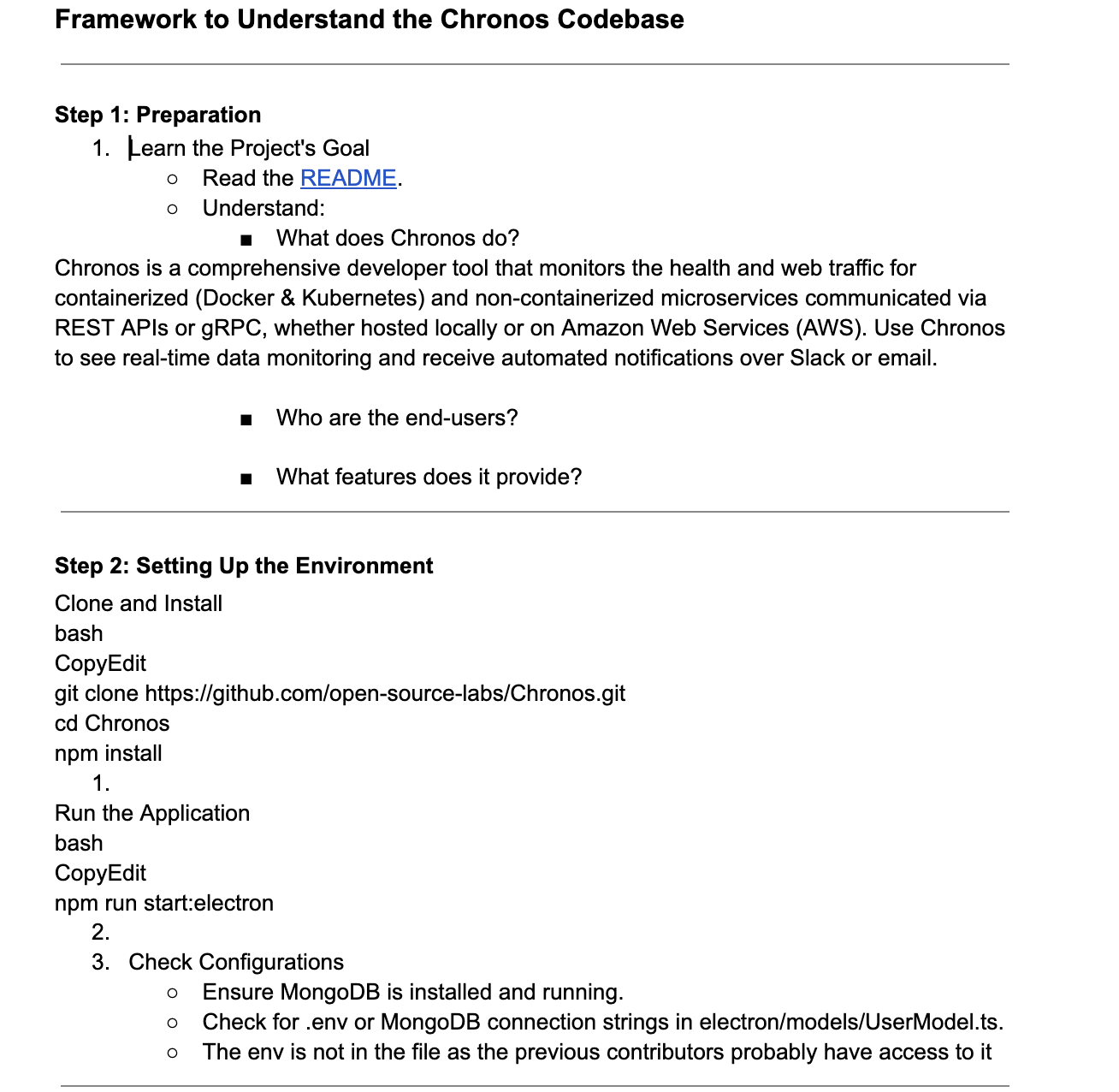
Overview of the CodeBase
- In our ChroNotes, we have a full overview of all the files in the codebase, and their purpose.
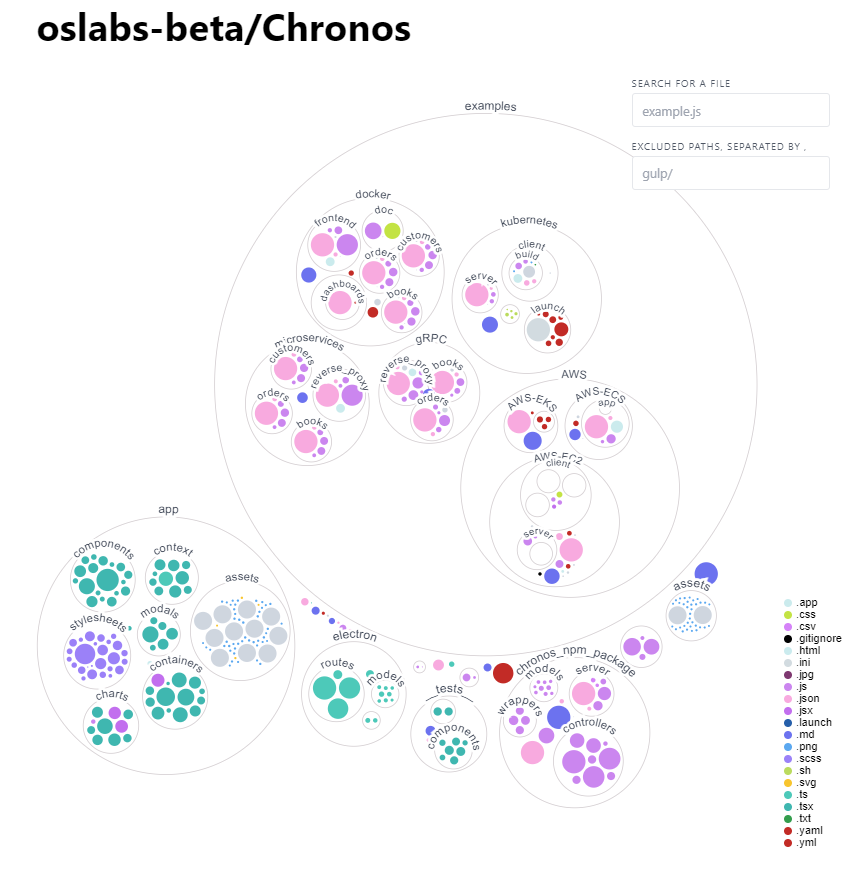
- If you want to visualize the way the files in the app are connected, we suggest using this data visualizer. Below, it's showing the same repository, but instead of a directory structure, each file and folder as a circle: the circle’s color is the type of file, and the circle’s size represents the size of the file. See live demo
Features
- Cloud-Based Instances:

- Local instances utilitizing
@chronosmicro/trackerNPM package:
 - Monitor an
  cluster via the JMX Prometheus Exporter
- Supports
cluster via the JMX Prometheus Exporter
- Supports  and
and  databases
Installation
This is for the latest Chronos version 15.0 release.
NPM Package
In order to use Chronos within your own application, you must have the @chronosmicro/tracker dependency installed.
The @chronosmicro/tracker package tracks your application's calls and scrapes metrics from your system.
- NOTE: The Chronos tracker code is included in the chronosnpmpackage folder for ease of development, but the published NPM package can be downloaded by running
npm install @chronosmicro/tracker.
#
Chronos Desktop Application
Running the Chronos desktop app in development mode (WSL Incompatible)
- From the root directory, run
npm install - Run
npm run start:electronto start the electron app. - Run
npm audit fixornpm audit fix --forceif prompted - Refer to
Examplessections below to spin up example applications.
npm run start:microservices to start populating database with server data(more detail in Microservices Example section).
#
Packing the Chronos desktop app into an executable
- From the root directory, run
npm run build - Run
npm run package - Find the
chronos.appexecutable inside the newly createdrelease-buildsfolder in the root directory.
Creating User Database
NOTE: You must create your own user database for extended features
- Create a MongoDB database in which to store user information and insert it within a root .env file based on .env.example .env.example (.env.example_) file.
- Once this is set up, you can create new users, log in, and have your data persist between sessions.
Examples
We provide eight example applications for you to test out both the Chronos NPM package and the Chronos desktop application:
- AWS
- Docker
- gRPC
- Kubernetes
- Microservices
Additional documentation on how Chronos is used in each example can be found in the Chronos NPM Package README.
AWS
The AWS folder includes 3 example applications with instructions on how to deploy them in AWS platforms. Note that using AWS services may cause charges.
- The ECS folder includes an web application ready to be containerized using Docker. The instruction shows how to deploy application to ECS using Docker CLI command, and it will be managed by Fargate services.
- The EC2 folder includes a React/Redux/SQL web application ready to be containerized using Docker. The instruction shows how to deploy application using AWS Beanstalk and connect application to RDS database. Beanstalk service will generate EC2 instance.
- The EKS folder includes a containerized note taking app that uses a Mongo database as its persistent volume. The instructions show how to deploy this application on EKS, how to monitor with Prometheus & Opencost, and how to use Grafana to grab visualizations.
#
Docker
In the  folder within the
 master branch, we provide a sample dockerized microservices application to test out Chronos and to apply distributed tracing across different containers for your testing convenience.
The docker folder includes individual files in their respective directories. A docker-compose.yml is in the root directory in case you'd like to deploy all services together.
Refer to the Docker README in the docker folder for more details.
#
gRPC
The gRPC folder includes an HTML frontend and an Express server backend, as well as proto files necessary to build package definitions and make gRPC calls. The reverseproxy_ folder contains the server that requires in the clients, which contain methods and services defined by proto files.
Refer to the gRPC README in the gRPC folder for more details.
#
Kubernetes
The kubernetes folder includes a React frontend and an Express server backend, and the Dockerfiles needed to containerize them for Kubernetes deployment. The launch folder includes the YAML files needed to configure the deployments, services, and configurations of the frontend, backend, Prometheus server, and Grafana.
Refer to the Kubernetes README in the kubernetes folder for more details.
#
Microservices
In the microservices folder, we provide a sample microservice application that successfully utilizes Chronos to apply all the powerful, built-in features of our monitoring tool. You can then visualize the data with the  app.
app.
Refer to the microservices README in the microservices folder for more details.
#
Testing
We've created testing suites for Chronos with React Testing, Jest, and Selenium for unit, integration, and end-to-end tests - instructions on running them can be found in the testing README.
#
Contributing
Development of Chronos is open source on GitHub through the tech accelerator OS Labs, and we are grateful to the community for contributing bug fixes and improvements.
Read our contributing README to learn how you can take part in improving Chronos.
Past Contributors
#
Technologies
























License
#


