
This repo covers Terraform (Infrastructure as Code) with LABs using AWS and AWS Sample Projects: Resources, Variables, Meta Arguments, Provisioners, Dynamic Blocks, Modules, Provisioning AWS Resources (EC2, EBS, EFS, VPC, IAM Policies, Roles, ECS, ECR, Fargate, EKS, Lambda, API-Gateway, ELB, S3, etc.
Last updated Jul 7, 2026
416
Stars
179
Forks
0
Issues
+1
Stars/day
Attention Score
53
Topics
Language breakdown
HCL 100.0%
▸ Files
click to expand
README
Fast-Terraform (with AWS)
This repo covers Terraform with Hands-on LABs and Samples using AWS (comprehensive, but simple):- Resources, Data Sources, Variables, Meta Arguments, Provisioners, Dynamic Blocks, Modules, Workspaces, Templates, Remote State.
- Provisioning AWS Components (EC2, EBS, EFS, IAM Roles, IAM Policies, Key-Pairs, VPC with Network Components, Lambda, ECR, ECS with Fargate, EKS with Managed Nodes, ASG, ELB, API Gateway, S3, CloudFront CodeCommit, CodePipeline, CodeBuild, CodeDeploy), use cases and details. Possible usage scenarios are aimed to update over time.
- Shows Terraform details in short with simple, clean demos and Hands-on LABs
- Shows Terraform AWS Hands-on Samples, Use Cases
Quick Look (How-To): Terraform Hands-on LABs
These LABs focus on Terraform features, help to learn Terraform:- LAB-00: Installing Terraform, AWS Configuration with Terraform
- LAB-01: Terraform Docker => Pull Docker Image, Create Docker Container on Local Machine
- LAB-02: Resources => Provision Basic EC2 (Ubuntu 22.04)
- LAB-03: Variables, Locals, Output => Provision EC2s
- LAB-04: Meta Arguments (Count, ForEach, Map) => Provision IAM Users, Groups, Policies, Attachment Policy-User
- LAB-05: Dynamic Blocks => Provision Security Groups, EC2, VPC
- LAB-06: Data Sources with Dependson => Provision EC2
- LAB-07: Provisioners (file, remote-exec), Null Resources (local-exec) => Provision Key-Pair, SSH Connection
- LAB-08: Modules => Provision EC2
- LAB-09: Workspaces => Provision EC2 with Different tfvars Files
- LAB-10: Templates => Provision IAM User, User Access Key, Policy
- LAB-11: Backend - Remote States => Provision EC2 and Save State File on S3
- Terraform Cheatsheet
Quick Look (How-To): AWS Terraform Hands-on Samples
These samples focus on how to create and use AWS components (EC2, EBS, EFS, IAM Roles, IAM Policies, Key-Pairs, VPC with Network Components, Lambda, ECR, ECS with Fargate, EKS with Managed Nodes, ASG, ELB, API Gateway, S3, CloudFront, CodeCommit, CodePipeline, CodeBuild, CodeDeploy) with Terraform:- SAMPLE-01: Provisioning EC2s (Windows 2019 Server, Ubuntu 20.04) on VPC (Subnet), Creating Key-Pair, Connecting Ubuntu using SSH, and Connecting Windows Using RDP
- SAMPLE-02: Provisioning Lambda Function, API Gateway and Reaching HTML Page in Python Code From Browser
- SAMPLE-03: EBS (Elastic Block Storage: HDD, SDD) and EFS (Elastic File System: NFS) Configuration with EC2s (Ubuntu and Windows Instances)
- SAMPLE-04: Provisioning ECR (Elastic Container Repository), Pushing Image to ECR, Provisioning ECS (Elastic Container Service), VPC (Virtual Private Cloud), ELB (Elastic Load Balancer), ECS Tasks and Service on Fargate Cluster
- SAMPLE-05: Provisioning ECR, Lambda Function and API Gateway to run Flask App Container on Lambda
- SAMPLE-06: Provisioning EKS (Elastic Kubernetes Service) with Managed Nodes using Blueprint and Modules
- SAMPLE-07: CI/CD on AWS => Provisioning CodeCommit and CodePipeline, Triggering CodeBuild and CodeDeploy, Running on Lambda Container
- SAMPLE-08: Provisioning S3 and CloudFront to serve Static Web Site
- SAMPLE-09: Running Gitlab Server using Docker on Local Machine and Making Connection to Provisioned Gitlab Runner on EC2 in Home Internet without Using VPN
Table of Contents
- Providers - Resources - Variables (tfvar) - Values (Locals, Outputs) - Meta Arguments - Dynamic Blocks - Data Sources - Provisioners (file, remoteexec, localexec), Null Resource - Modules - Workspaces - Templates - Backends and Remote States - SAMPLE-01: EC2s (Windows 2019 Server, Ubuntu 20.04), VPC, Key-Pairs for SSH, RDP connections - SAMPLE-02: Provisioning Lambda Function, API Gateway and Reaching HTML Page in Python Code From Browsers - SAMPLE-03: EBS (Elastic Block Storage: HDD, SDD) and EFS (Elastic File System: NFS) Configuration with EC2s (Ubuntu and Windows Instances) - SAMPLE-04: Provisioning ECR (Elastic Container Repository), Pushing Image to ECR, Provisioning ECS (Elastic Container Service), VPC (Virtual Private Cloud), ELB (Elastic Load Balancer), ECS Tasks and Service on Fargate Cluster - SAMPLE-05: Provisioning ECR, Lambda Function and API Gateway to run Flask App Container on Lambda - SAMPLE-06: Provisioning EKS (Elastic Kubernetes Service) with Managed Nodes using Blueprint and Modules - SAMPLE-07: CI/CD on AWS => Provisioning CodeCommit and CodePipeline, Triggering CodeBuild and CodeDeploy, Running on Lambda Container - SAMPLE-08: Provisioning S3 and CloudFront to serve Static Web Site - SAMPLE-09: Running Gitlab Server using Docker on Local Machine and Making Connection to Provisioned Gitlab Runner on EC2 in Home Internet without Using VPNMotivation
Why should we use / learn Terraform?- Terraform is cloud-agnostic and popular tool to create/provision Cloud Infrastructure resources/objects (e.g. Virtual Private Cloud, Virtual Machines, Lambda, etc.)
- It is free, open source (https://github.com/hashicorp/terraform) and has a large community with enterprise support options.
- Commands, tasks, codes turn into the IaC.
- Agentless: Terraform doesn’t require any software to be installed on the managed infrastructure
- It has well-designed documentation:
- Terraform uses a modular structure.
- Terraform tracks your infrastructure with TF state file.
 (ref: Redis)
What is Terraform?
- Terraform is cloud-independent provisioning tool to create Cloud infrastructure.
- Creating infrastructure code with HCL (Hashicorp Language) that is similar to YAML, JSON, Python.
- Terraform Basic Tutorial for AWS:
- Reference and Details:
 (ref: Terraform)
How Terraform Works?
- Terraform works with different providers (AWS, Google CLoud, Azure, Docker, K8s, etc.)
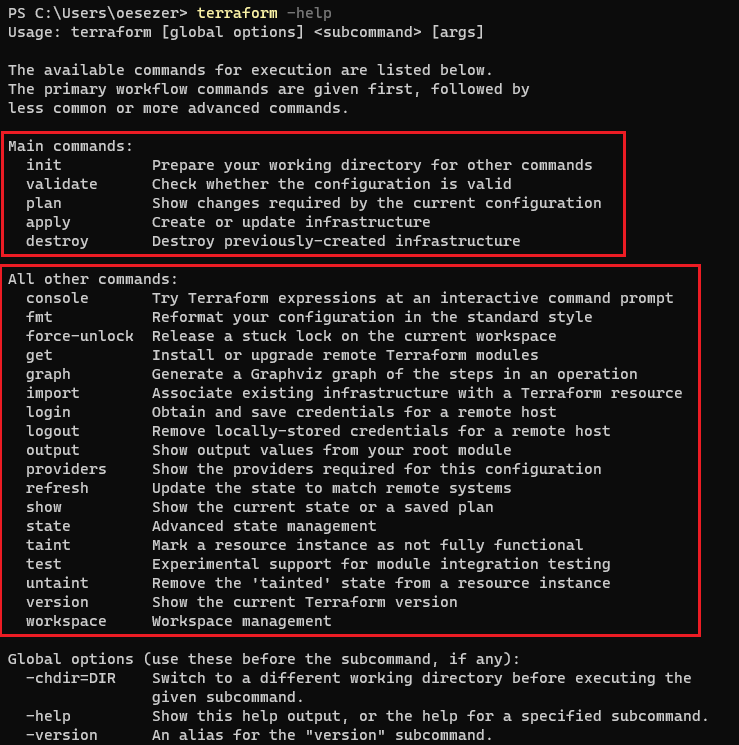
- After creating Terraform Files (tf), terraform commands:
- Main Commands:
terraform init
terraform validate
terraform plan            # ask for confirmation (yes/no), after running command
terraform apply           # ask for confirmation (yes/no), after running command
terraform destroy # ask for confirmation (yes/no), after running command- Command Variants:
terraform plan --var-file="terraform-dev.tfvars"            # specific variable files
terraform apply -auto-approve                               # no ask for confirmation
terraform apply --var-file="terraform-prod.tfvars"          # specific variable files
terraform destroy --var-file="terraform-prod.tfvars" # specific variable files- Terraform Command Structure:
- Terraform Workflow:
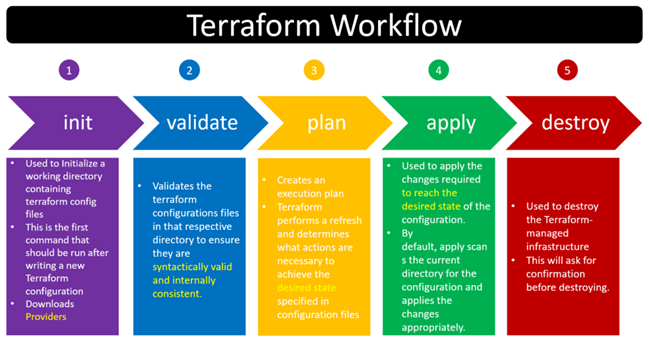
- TF state file stores the latest status of the infrastructure after running "apply" command.
- TF state file deletes the status of the infrastructure after running "destroy" command.
- TF state files are stored:
- Please have a look LABs and SAMPLEs to learn how Terraform works in real scenarios.
Terraform File Components
- Terraform file has different components to define infrastructure for different purposes.
Providers
- Terraform supposes for different providers (AWS, Google Cloud, Azure).
- Terraform downloads required executable files from own cloud to run IaC (code) for the corresponding providers.
- AWS (https://registry.terraform.io/providers/hashicorp/aws/latest/docs):

- Google Cloud (GCP) (https://registry.terraform.io/providers/hashicorp/google/latest/docs):

- Azure (https://registry.terraform.io/providers/hashicorp/azurerm/latest/docs):
 - Docker (https://registry.terraform.io/providers/kreuzwerker/docker/latest/docs/resources/container):

Resources
- Resources are used to define for different cloud components and objects (e.g. EC2 instances, VPC, VPC Compoenents: Router Tables, Subnets, IGW, .., Lambda, API Gateway, S3 Buckets, etc.).
- To learn the details, features of the cloud components, you should know how the cloud works, which components cloud have, how to configure the cloud components.
- Syntax:

- Important part is to check the usage of the resources (shows which arguments are optional, or required) from Terraform Registry page by searching the "Object" terms like "instance", "vpc", "security groups"
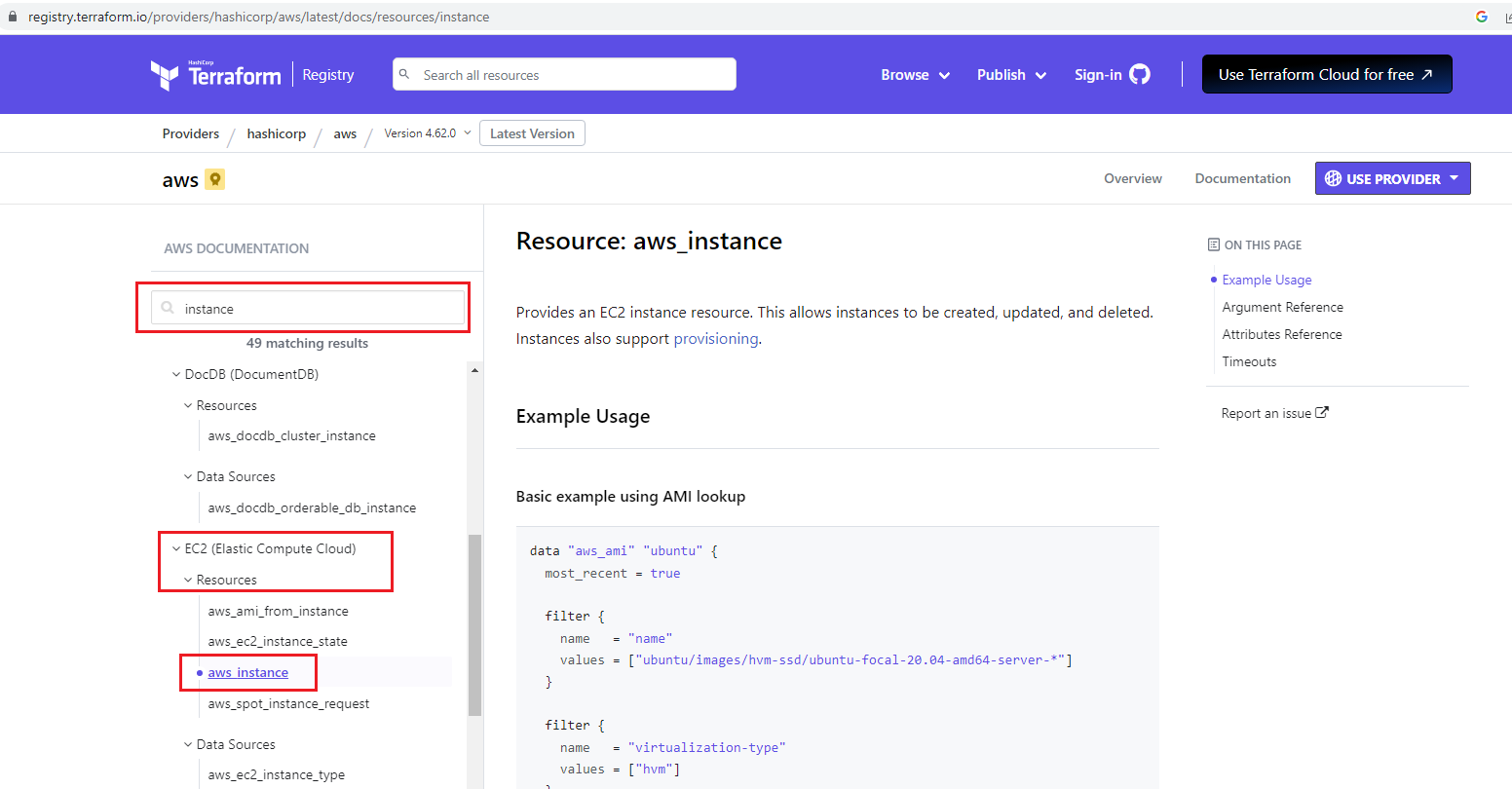
- There are different parts:
- Go to LAB to learn resources:
Variables (tfvar)
- Variables help to avoid hard coding on the infrastructure code.
- The Terraform language uses the following types for its values:
- Normally, if you define variables, after running "terraform apply" command, on the terminal, stdout requests from the user to enter variables.
- But, if the "tfvar" file is defined, variables in the "tfvar" file are entered automatically in the corresponding variable fields.
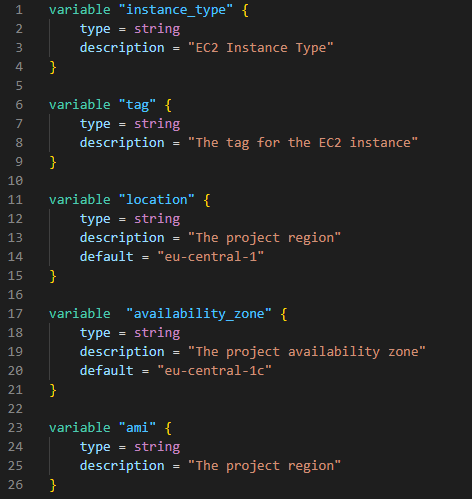
- Tfvar files for development ("DEV") environment:

- Tfvar files for production ("PROD") environment:

- Go to LAB to learn variables and tfvar file, and provisioning EC2 for different environments:
Values (Locals, Outputs)
- "Locals" are also the variables that are mostly used as place-holder variables.
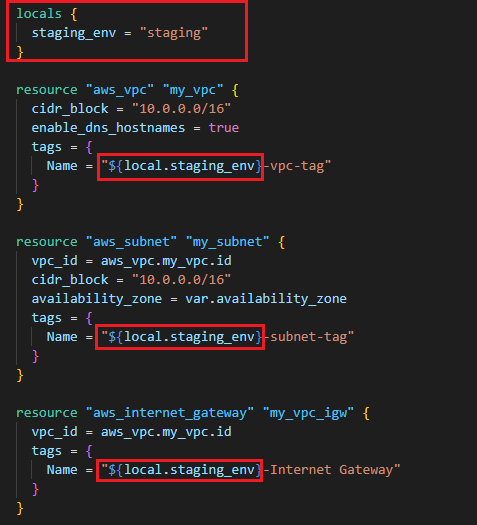
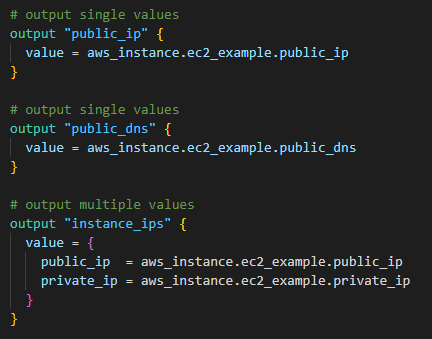
- "Outputs" are used to put the cloud objects' information (e.g. public IP, DNS, detailed info) out as stdout.
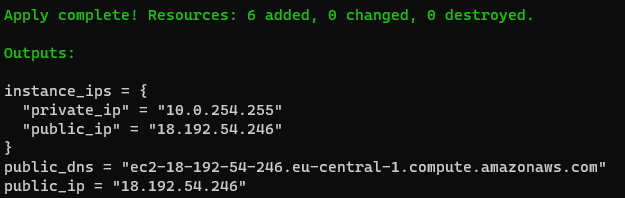
- "Outputs" after running "terraform apply" command on the terminal stdout:
- Go to LAB to learn more about variables, locals, outputs and provisioning EC2:
Meta Arguments
- Different meta arguments are used for different purposes:
- Count:

- For_each, For:

- Go to LAB to learn:
Dynamic Blocks
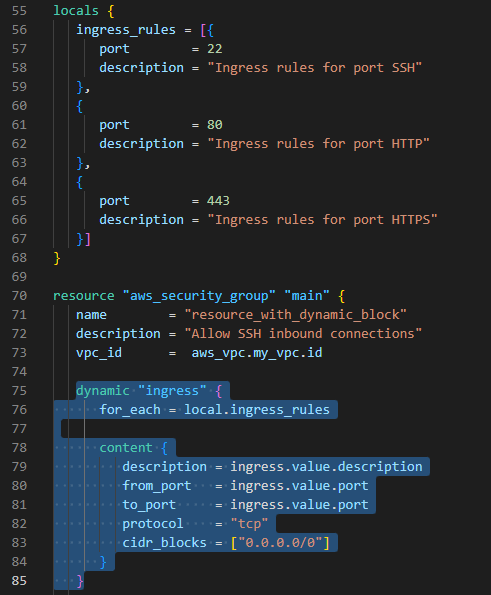
- "Dynamic blocks" creates small code template that reduces the code repetition.
- In the example below, it isn't needed to create parameters (description, fromport, toport, protocol, cidr_blocks) for each ingress ports:
- Go to LAB to learn:
Data Sources
- "Data Sources" helps to retrieve/fetch/get data/information from previously created/existed cloud objects/resources.
- In the example below:

- Go to LAB to learn:
Provisioners
- "Provisioners" provides to run any commands on the remote instance/virtual machine, or on the local machine.
- "Provisioners" in the resource block runs only once while creating the resource on remote instance. If the resource is created/provisioned before, "provisioner" block in the resource block doesn't run again.
- With "null_resource":
- Provisioners in the "null_resource" run multiple times and it doesn't depend on the resource.
- With provisioner "file", on the remote instance, new file can be created
- With provisioner "remote-exec", on the remote instance, any command can be run
- With provisioner "local-exec", on the local PC, any command can be run on any shell (bash, powershell)
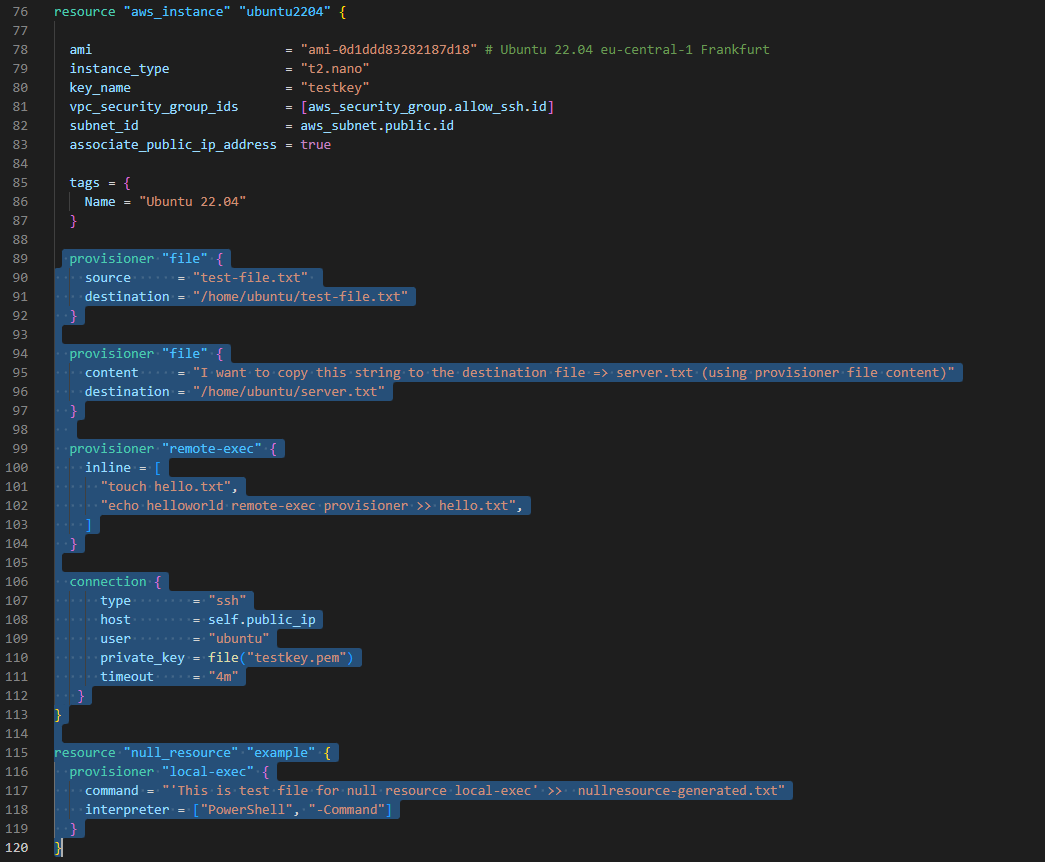
- Go to LAB to learn about different provisioners:
Modules
- "Modules" helps organize configuration, encapsulation, re-usability and consistency.
- "Modules" is the structure/container for multiple resources that are used together.
- Each modules usually have variables.tf that is configured from the parent tf file.
- Details: https://developer.hashicorp.com/terraform/language/modules
- AWS modules for different components (VPC, IAM, SG, EKS, S3, Lambda, RDS, etc.)

- Go to LAB to learn:
Workspaces
- With "Workspaces":
- Workspace commands:
terraform workspace help                       # help for workspace commands
terraform workspace new [WorkspaceName]        # create new workspace
terraform workspace select [WorkspaceName]     # change/select another workspace
terraform workspace show                       # show current workspace
terraform workspace list                       # list all workspaces
terraform workspace delete [WorkspaceName] # delete existed workspace- "dev" and "prod" workspaces are created:

- Go to LAB to learn:
Templates
- With "Templates" (.tftpl files):
- In the example below, templates fields are filled with list in the resource code block:
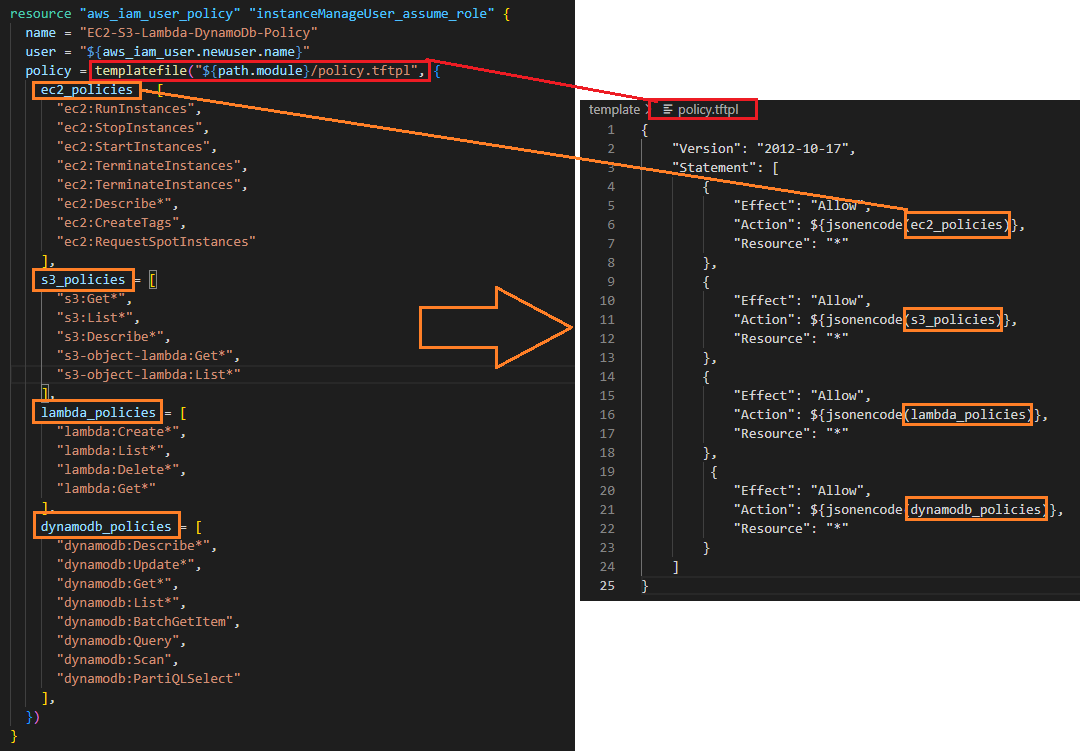
- Go to LAB to learn "Templates":
Backend and Remote States
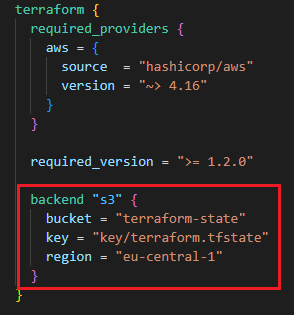
- With enabling remote state file using backend:
- With backend part ("s3"), state file is stored on S3:
- On AWS S3 Bucket, terraform.tfstate file is saved:
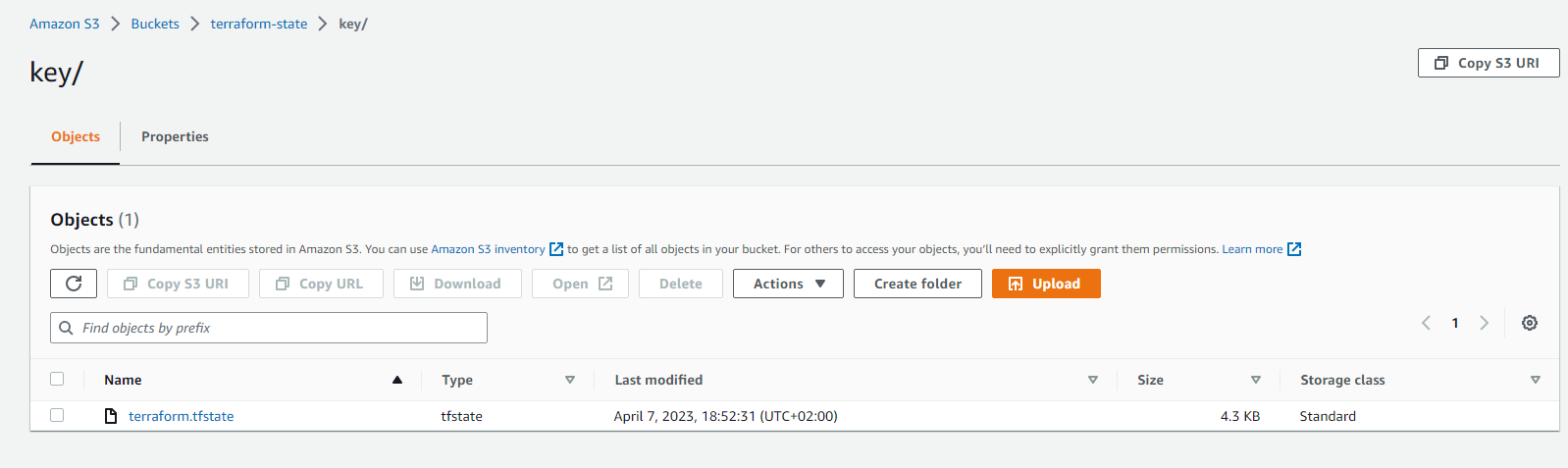
- Go to LAB to learn:
Terraform Best Practices
- Don't change/edit anything on state file manually. Manipulate state file only through TF commands (e.g. terraform apply, terraform state).
- Use remote state file to share the file with other users. Keep state file on the Cloud (S3, Terraform Cloud, etc.)
- To prevent concurrent changes, state locking is important. Hence concurrent change from multiple user can be avoided.
- Backing up state file is also important to save the status. S3 enables versioning. Versioning state file can provide you backing up the state file.
- If you use multiple environment (dev, test, staging, production), use 1 state file per environment. Terraform workspace provide multiple state files for different environments.
- Use Git repositories (Github, Gitlab) to host TF codes to share other users.
- Behave your Infrastructure code as like your application code. Create CI pipeline/process for your TF Code (review tf code, run automated tests). This will shift your infrastructure code high quality.
- Execute Terraform only in an automated build, CD pipeline/process. This helps to run code automatically and run from one/single place.
- For naming conventions: https://www.terraform-best-practices.com/naming
AWS Terraform Hands-on Samples
SAMPLE-01: EC2s (Windows 2019 Server, Ubuntu 20.04), VPC, Key-Pairs for SSH, RDP connections
- This sample shows:
- Code: https://github.com/omerbsezer/Fast-Terraform/tree/main/samples/ec2-vpc-ubuntu-win-ssh-rdp
- Go to the Hands-On Sample:

SAMPLE-02: Provisioning Lambda Function, API Gateway and Reaching HTML Page in Python Code From Browsers
- This sample shows:
- Code: https://github.com/omerbsezer/Fast-Terraform/tree/main/samples/lambda-role-policy-apigateway-python
- Go to the Hands-On Sample:

SAMPLE-03: EBS (Elastic Block Storage: HDD, SDD) and EFS (Elastic File System: NFS) Configuration with EC2s (Ubuntu and Windows Instances)
- This sample shows:
- Code: https://github.com/omerbsezer/Fast-Terraform/tree/main/samples/ec2-ebs-efs
- Go to the Hands-On Sample:

SAMPLE-04: Provisioning ECR (Elastic Container Repository), Pushing Image to ECR, Provisioning ECS (Elastic Container Service), VPC (Virtual Private Cloud), ELB (Elastic Load Balancer), ECS Tasks and Service on Fargate Cluster
- This sample shows:
- Code: https://github.com/omerbsezer/Fast-Terraform/tree/main/samples/ecr-ecs-elb-vpc-ecsservice-container
- Go to the Hands-On Sample:
 ### SAMPLE-05: Provisioning ECR, Lambda Function and API Gateway to run Flask App Container on Lambda
- This sample shows:
- Code: https://github.com/omerbsezer/Fast-Terraform/tree/main/samples/lambda-container-apigateway-flaskapp
- Go to the Hands-On Sample:


SAMPLE-06: Provisioning EKS (Elastic Kubernetes Service) with Managed Nodes using Blueprint and Modules
- This sample shows:
- Code: https://github.com/omerbsezer/Fast-Terraform/tree/main/samples/eks-managed-node-blueprint
- Go to the Hands-On Sample:


### SAMPLE-07: CI/CD on AWS => Provisioning CodeCommit and CodePipeline, Triggering CodeBuild and CodeDeploy, Running on Lambda Container
- This sample shows:
- Source code is pulled from:
- Some of the fields are updated.
- It works with 'hashicorp/aws ~> 4.15.1', 'terraform >= 0.15'
- Code: https://github.com/omerbsezer/Fast-Terraform/tree/main/samples/codecommit-codepipeline-codebuild-codedeploy-lambda-container
- Go to the Hands-On Sample:
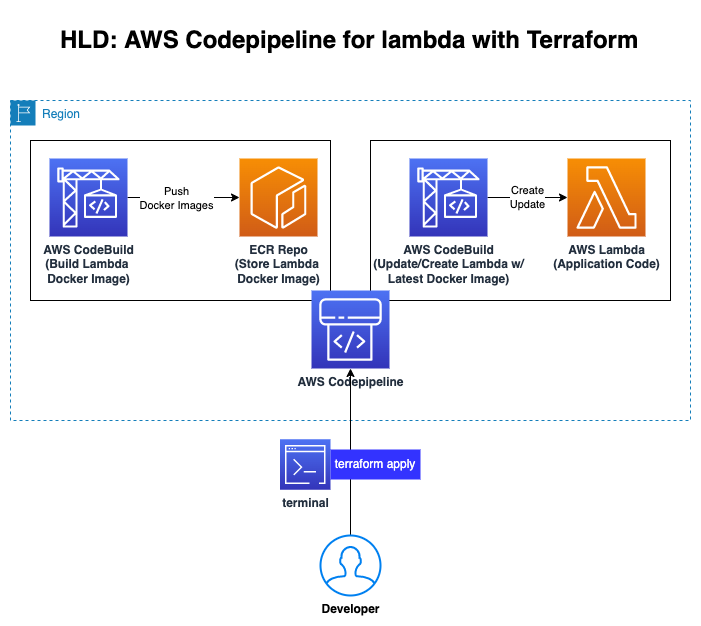
### SAMPLE-08: Provisioning S3 and CloudFront to serve Static Web Site
- This sample shows:
- Code: https://github.com/omerbsezer/Fast-Terraform/blob/main/samples/s3-cloudfront-static-website/
- Go to the Hands-On Sample:

### SAMPLE-09: Running Gitlab Server using Docker on Local Machine and Making Connection to Provisioned Gitlab Runner on EC2 in Home Internet without Using VPN
- This sample shows:
- Code: https://github.com/omerbsezer/Fast-Terraform/blob/main/samples/gitlabserver-on-premise-runner-on-EC2/
- Go to the Hands-On Sample:
Details
- To validate the Terraform files:
- For dry-run:
- For formatting:
- For debugging:
- For debug logging:
Terraform Cheatsheet
Other Useful Resources Related Terraform
- AWS Samples (Advanced):
- AWS Samples with Terraform (Advanced):
- AWS Integration and Automation (Advanced):
- Reference Guide: Terraform Registry Documents
References
- Redis: https://developer.redis.com/create/aws/terraform/
- https://developer.hashicorp.com/terraform/intro
- https://github.com/aws-samples
- https://github.com/orgs/aws-samples/repositories?q=Terraform&type=all&language=&sort=
- https://github.com/aws-ia/terraform-aws-eks-blueprints
- https://github.com/aws-ia


