
A Python SDK to use the Binance Websocket API`s (com+testnet, com-margin+testnet, com-isolated_margin+testnet, com-futures+testnet, com-coin_futures, com-vanilla-options+testnet, us, tr) in a simple, fast, flexible, robust and fully-featured way.








UNICORN Binance WebSocket API
Description | Installation | Documentation | Examples | Change Log | Wiki | Social | Notifications | Bugs | Contributing | Disclaimer
A Python SDK to use the Binance Websocket APIs (com+testnet, com-margin+testnet, com-isolated_margin+testnet, com-futures+testnet, com-coin_futures, com-vanilla-options+testnet, us, tr) in a simple, fast, flexible, robust and fully-featured way.
Part of 'UNICORN Binance Suite'.
Receive Data from Binance WebSockets
Create a multiplex websocket connection to Binance with a stream_buffer with just 3 lines of code
from unicornbinancewebsocket_api import BinanceWebSocketApiManager
ubwa = BinanceWebSocketApiManager(exchange="binance.com") ubwa.createstream(channels=['trade', 'kline1m'], markets=['btcusdt', 'bnbbtc', 'ethbtc'])
And 4 more lines to print out the data
while True:
    oldestdatafromstreambuffer = ubwa.popstreamdatafromstream_buffer()
    if oldestdatafromstreambuffer:
        print(oldestdatafromstreambuffer)
Or with a callback function just do
from unicornbinancewebsocket_api import BinanceWebSocketApiManager
def processnewreceives(stream_data):     print(str(stream_data))
ubwa = BinanceWebSocketApiManager(exchange="binance.com") ubwa.createstream(channels=['trade', 'kline1m'],                     markets=['btcusdt', 'bnbbtc', 'ethbtc'],                     processstreamdata=processnewreceives)
Or with an async callback function just do
from unicornbinancewebsocket_api import BinanceWebSocketApiManager
import asyncio
async def processnewreceives(stream_data):     print(stream_data)     await asyncio.sleep(1)
ubwa = BinanceWebSocketApiManager() ubwa.createstream(channels=['trade', 'kline1m'],                    markets=['btcusdt', 'bnbbtc', 'ethbtc'],                    processstreamdataasync=processnew_receives)
Or await the stream data in an asyncio coroutine
All the methods of data collection presented have their own advantages and disadvantages. However, this is the generally recommended method for processing data from streams.
from unicornbinancewebsocket_api import BinanceWebSocketApiManager
import asyncio
async def main():     async def processasyncioqueue(stream_id=None):         print(f"Start processing the data from stream '{ubwa.getstreamlabel(stream_id)}':")         while ubwa.isstoprequest(stream_id) is False:             data = await ubwa.getstreamdatafromasyncioqueue(streamid)             print(data)             ubwa.asyncioqueuetaskdone(streamid)     ubwa.create_stream(channels=['trade'],                        markets=['ethbtc', 'btcusdt'],                        stream_label="TRADES",                        processasyncioqueue=processasyncioqueue)     while not ubwa.ismanagerstopping():         await asyncio.sleep(1)
with BinanceWebSocketApiManager(exchange='binance.com') as ubwa:     try:         asyncio.run(main())     except KeyboardInterrupt:         print("\r\nGracefully stopping ...")     except Exception as e:         print(f"\r\nERROR: {e}\r\nGracefully stopping ...")
Basically that's it, but there are more options.
Receive private UserData Streams
Create a private !userData stream to receive account updates like order fills, balance changes and position updates in real time. A valid apikey and apisecret is required.
Set the credentials globally on the manager
All streams created on this manager inherit the credentials:
from unicornbinancewebsocket_api import BinanceWebSocketApiManager
async def processuserdata(streamdata):     print(stream_data)
ubwa = BinanceWebSocketApiManager(exchange="binance.com",                                   apikey="YOURBINANCEAPIKEY",                                   apisecret="YOURBINANCEAPISECRET") ubwa.create_stream(channels='arr',                    markets='!userData',                    processstreamdataasync=processuserdata)
Or pass the credentials per stream
Useful when running multiple !userData streams with different API keys on the same manager:
ubwa = BinanceWebSocketApiManager(exchange="binance.com")
ubwa.create_stream(channels='arr',                    markets='!userData',                    apikey="APIKEYACCOUNTA",                    apisecret="APISECRETACCOUNTA",                    streamlabel="ACCOUNTA",                    processstreamdataasync=processuserdata)
ubwa.create_stream(channels='arr',                    markets='!userData',                    apikey="APIKEYACCOUNTB",                    apisecret="APISECRETACCOUNTB",                    streamlabel="ACCOUNTB",                    processstreamdataasync=processuserdata)
Per-stream credentials override the manager defaults. Isolated Margin additionally requires the symbols parameter:
ubwaim = BinanceWebSocketApiManager(exchange="binance.com-isolatedmargin")
ubwaim.createstream(channels='arr',
                      markets='!userData',
                      symbols='btcusdt',
                      apikey="YOURBINANCEAPIKEY",
                      apisecret="YOURBINANCEAPISECRET",
                      processstreamdataasync=processuserdata)
See also examplemultipleuserdatastreams.py.
Convert received stream data into well-formed Python dictionaries with UnicornFy
unicornfiedstreamdata = UnicornFy.binancecom_websocket(data)or
ubwa.create_stream(['trade'], ['btcusdt'], output="UnicornFy")Subscribe / unsubscribe new markets and channels
markets = ['engbtc', 'zileth']
channels = ['kline5m', 'kline15m', 'kline30m', 'kline1h', 'kline_12h', 'depth5']
ubwa.subscribetostream(streamid=streamid, channels=channels, markets=markets)
ubwa.unsubscribefromstream(streamid=streamid, markets=markets)
ubwa.unsubscribefromstream(streamid=streamid, channels=channels)
Send Requests to Binance WebSocket API
Place orders, cancel orders or send other requests via WebSocket
from unicornbinancewebsocket_api import BinanceWebSocketApiManager
apikey = "YOURBINANCEAPIKEY" apisecret = "YOURBINANCEAPISECRET"
async def processapiresponses(stream_id=None):     while ubwa.isstoprequest(streamid=streamid) is False:         data = await ubwa.getstreamdatafromasyncioqueue(streamid=stream_id)         print(data)         ubwa.asyncioqueuetaskdone(streamid=stream_id)
ubwa = BinanceWebSocketApiManager(exchange="binance.com") apistream = ubwa.createstream(api=True,                                 apikey=apikey,                                 apisecret=apisecret,                                 output="UnicornFy",                                 processasyncioqueue=processapiresponses)
response = ubwa.api.spot.getservertime(return_response=True) print(f"Binance serverTime: {response['result']['serverTime']}")
origclientorderid = ubwa.api.spot.createorder(order_type="LIMIT",                                                   price = 1.1,                                                   quantity = 15.0,                                                   side = "SELL",                                                   symbol = "BUSDUSDT")
ubwa.api.spot.cancelorder(origclientorderid=origclientorder_id, symbol="BUSDUSDT")
All available methods:
Here you can find a complete guide on how to process requests via the Binance WebSocket API!
Stop ubwa after usage to avoid memory leaks
When you instantiate UBWA with with, ubwa.stop_manager() is automatically executed upon exiting the with-block.
with BinanceWebSocketApiManager() as ubwa:
    ubwa.createstream(channels="trade", markets="btcusdt", streamlabel="TRADES")
Without with, you must explicitly execute ubwa.stop_manager() yourself.
ubwa.stop_manager()stream_signals - know the state of your streams
Usually you want to know when a stream is working and when it is not. This can be useful to know that your own system is
currently "blind" and you may want to close open positions to be on the safe side, know that indicators will now provide
incorrect values or that you have to reload the missing data via REST as an alternative.
For this purpose, the UNICORN Binance WebSocket API provides so-called stream_signals, which are used to tell your code in real time when a stream is connected, when it received its first data record, when it was disconnected and stopped, and when the stream cannot be restored.
from unicornbinancewebsocket_api import BinanceWebSocketApiManager
import time
def processstreamsignals(signaltype=None, streamid=None, datarecord=None, errormsg=None):     print(f"Received streamsignal for stream '{ubwa.getstreamlabel(streamid=stream_id)}': "           f"{signaltype} - {streamid} - {datarecord} - {errormsg}")
with BinanceWebSocketApiManager(processstreamsignals=processstreamsignals) as ubwa:     ubwa.createstream(channels="trade", markets="btcusdt", streamlabel="TRADES")     print(f"Waiting a few seconds and then stopping the stream ...")     time.sleep(7)
More?
Discover even more possibilities, use this script to stream everything from "binance.com" or try our examples!
This should be known by everyone using this lib:
Description
The Python package UNICORN Binance WebSocket API provides an API to the Binance Websocket APIs of
Binance
(+Testnet),
Binance Margin
(+Testnet),
Binance Isolated Margin
(+Testnet),
Binance Futures
(+Testnet),
Binance COIN-M Futures,
Binance European Options
(+Testnet),
Binance US and
Binance TR and supports sending requests
to the Binance Websocket API and the streaming
of all public streams like trade, kline, ticker, depth, bookTicker, forceOrder, compositeIndex etc. and
also all private userData streams which needs to be used with a valid
apikey and api_secret
from the Binance Exchange www.binance.com,
testnet.binance.vision or
www.binance.us.
Use the UNICORN Binance REST API in combination.
What are the benefits of the UNICORN Binance WebSocket API?
- Fully managed websockets and 100% auto-reconnect! Also handles maintenance windows!
- No memory leaks from Python version 3.9 to 3.14!
- The full UBS stack is delivered as a compiled C extension for
maximum performance.
- Support for Binance Websocket API, send
requests like createorder,
cancelopenorders
and many more directly over websocket!
| Exchange | Exchange string | WS | WS API |
|--------------------------------------------------------------------|---------------------------------------|--------------------------------------------------------------------------------------------------------------------------------------|--------------------------------------------------------------------------------------------------------------------------------------|
| Binance | binance.com |  | |
| Binance Testnet |
| |
| Binance Testnet | binance.com-testnet | | |
| Binance Margin | binance.com-margin | |  |
| Binance Margin Testnet |
|
| Binance Margin Testnet | binance.com-margin-testnet | | |
| Binance Isolated Margin | binance.com-isolatedmargin | | |
| Binance Isolated Margin Testnet | binance.com-isolatedmargin-testnet | | |
| Binance USD-M Futures | binance.com-futures | | |
| Binance USD-M Futures Testnet | binance.com-futures-testnet | | |
| Binance Coin-M Futures | binance.com-coinfutures | | |
| Binance European Options | binance.com-vanilla-options | | |
| Binance European Options Testnet | binance.com-vanilla-options-testnet | | |
| Binance Portfolio Margin* | binance.com-portfoliomargin | | |
| Binance US | binance.us | | |
| Binance TR | trbinance.com | | |
\* Portfolio Margin support is currently limited to the user data stream (
!userData), see the Portfolio Margin example and issue #452.
- Streams are processing asynchronous/concurrent (Python asyncio) and each stream is started in a separate thread, so
you don't need to deal with asyncio in your code! But you can consume with
await
, if you want!
- Supports
subscribe/unsubscribe
on all exchanges! (Take a look to the max supported subscriptions per stream in the endpoint configuration overview!)
- UNICORN Binance WebSocket API respects Binance's API guidelines and protects you from avoidable reconnects and bans.
- Support for multiple private
!userData streams with different apikey and apisecret.
(examplemultipleuserdatastreams.py)
streambuffer (FIFO or LIFO) -
if you can not store your data in cause of a temporary technical issue, you can
kick back the data to the stream_buffer
which stores the receives in the RAM till you are able to process the data in the normal way again.
Learn more!
- Use separate
stream_buffers for
specific streams
or
users!
- Watch the
streamsignals to receive CONNECT, FIRSTRECEIVED_DATA, DISCONNECT, STOP and
STREAMUNREPAIRABLE signals from your streams! Learn more!
- Get the received data unchanged as received, as Python dictionary or converted with
UnicornFy into well-formed Python dictionaries. Use the output
parameter of
createstream()
to control the output format.
- Helpful management features like
clearasyncio_queue(),
clearstream_buffer(),
getbinanceapi_status(),
getcurrentreceiving_speed(),
geterrorsfrom_endpoints(),
getlimitofsubscriptionsper_stream(),
getrequest_id(),
getresultbyrequest_id(),
getresultsfrom_endpoints(),
getstreambuffer_length(),
getstream_info(),
getstream_list(),
getstreamidby_label(),
getstream_statistic(),
getstream_subscriptions(),
get_version(),
isupdate_available(),
getstreamdatafromasyncio_queue(),
popstreamdatafromstream_buffer(),
print_summary(),
replace_stream(),
setstream_label(),
setringbuffererrormax_size(),
subscribeto_stream(),
stop_stream(),
unsubscribefrom_stream(),
waittillstreamhas_started()
and many more! Explore them here.
- Monitor the status of the created
BinanceWebSocketApiManager() instance within your code with
getmonitoringstatus_plain()
and specific streams with
getstream_info().
- Available as a package via
pip and conda as precompiled C extension with stub files for improved Intellisense
functions and source code for easier debugging of the source code. To the installation.
- Nice to use with iPython:
"IPython (Interactive Python) is a command shell for interactive computing that offers introspection,
rich media, shell syntax, tab completion, and history."
(exampleinteractivemode.py)
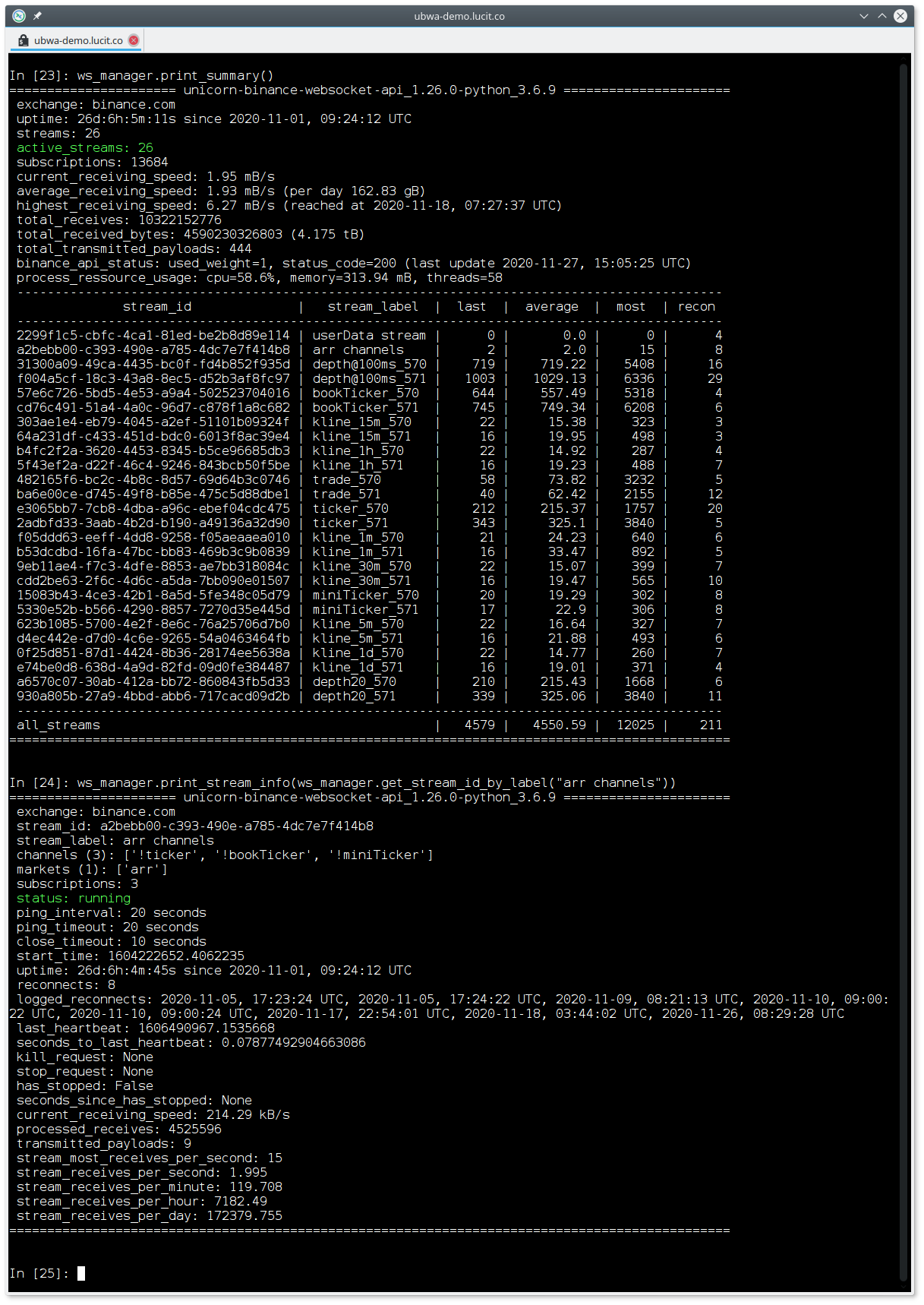
- Also, nice to use with the Jupyter Notebook :)
- Integration of test cases and examples.
- Customizable base URL.
- Socks5 Proxy support:
<pre><code class="lang-">ubwa = BinanceWebSocketApiManager(exchange="binance.com", socks5proxyserver="127.0.0.1:9050")</code></pre>
Read the docs
or this how to
for more information or try
examplesocks5proxy.py.
- Excessively tested on Linux, Mac and Windows on x86, arm32, arm64, ...
If you like the project, please  it on
GitHub!
it on
GitHub!
Installation and Upgrade
The module requires Python 3.9 and runs smoothly up to and including Python 3.14.
PyPy wheels are available for all supported Python versions.
conda-forge note: Conda packages are provided for Python 3.10 – 3.14. Python 3.9 is not available on conda-forge — it was dropped from the global pinning after reaching end-of-life in October 2025. For Python 3.9, use
pip install.
The current dependencies are listed here.
If you run into errors during the installation take a look here.
Packages are created automatically with GitHub Actions
When a new release is created, the
Build and Publish GH+PyPi
workflow spins up virtual Windows/Linux/Mac runners, compiles the Cython extensions, builds the
wheels and publishes them on GitHub and PyPI. The conda-forge feedstock
conda-forge/unicorn-binance-websocket-api-feedstock
picks up the new PyPI release automatically and builds the Conda packages on its own infrastructure.
This is a transparent method that makes it possible to trace the source code behind a compilation.
A Cython binary, PyPy or source code based CPython wheel of the latest version with
pip from PyPI
Our Cython and PyPy Wheels are available on PyPI,
these wheels offer significant advantages for Python developers:
- Performance Boost with Cython Wheels: Cython is a programming language that supplements Python with static typing and C-level performance. By compiling
Python code into C, Cython Wheels can significantly enhance the execution speed of Python code, especially in
computationally intensive tasks. This means faster runtimes and more efficient processing for users of our package.
- PyPy Wheels for Enhanced Efficiency: PyPy is an alternative Python interpreter known for its speed and efficiency. It uses Just-In-Time (JIT) compilation,
which can dramatically improve the performance of Python code. Our PyPy Wheels are tailored for compatibility with
PyPy, allowing users to leverage this speed advantage seamlessly.
Both Cython and PyPy Wheels on PyPI make the installation process simpler and more straightforward. They ensure that you get the optimized version of our package with minimal setup, allowing you to focus on development rather than configuration.
On Raspberry Pi and other architectures for which there are no pre-compiled versions, the package can still be installed with PIP. PIP then compiles the package locally on the target system during installation. Please be patient, this may take some time!
Installation
pip install unicorn-binance-websocket-api
Update
pip install unicorn-binance-websocket-api --upgrade
conda
<pre><code class="lang-">conda install -c conda-forge unicorn-binance-websocket-api</code></pre>
From source of the latest release with PIP from GitHub
Linux, macOS, ...
Run in bash:
pip install https://github.com/oliver-zehentleitner/unicorn-binance-websocket-api/archive/$(curl -s https://api.github.com/repos/oliver-zehentleitner/unicorn-binance-websocket-api/releases/latest | grep -oP '"tag_name": "\K(.*)(?=")').tar.gz --upgrade
Windows
Use the below command with the version (such as 2.15.0) you determined
here:
pip install https://github.com/oliver-zehentleitner/unicorn-binance-websocket-api/archive/2.15.0.tar.gz --upgrade From the latest source (dev-stage) with PIP from GitHub
This is not a release version and can not be considered to be stable!
pip install https://github.com/oliver-zehentleitner/unicorn-binance-websocket-api/tarball/master --upgrade
Change Log
https://oliver-zehentleitner.github.io/unicorn-binance-websocket-api/changelog.html
Documentation
Examples
Related Articles
- The Complete Binance Python API Guide 2026
- How to create a Binance API Key and API Secret?
- Create and Cancel Orders via WebSocket on Binance
- How to Download Klines from Binance using Python?
- Passing Binance Market Data to Apache Kafka in Python with aiokafka
- How to Connect to binance.com Websockets using Python via a Socks5 Proxy
- When IP Whitelisting Isn't What It Seems: A Real-World Case Study from the Binance API
- UBDCC Deep Dive: Building a Trust Layer for Binance Order Books
- UNICORN Binance Suite Article Series
Project Homepage
https://github.com/oliver-zehentleitner/unicorn-binance-websocket-api
Wiki
https://github.com/oliver-zehentleitner/unicorn-binance-websocket-api/wiki
Social
Receive Notifications
To receive notifications on available updates you can
 the repository on GitHub, write your
own script
with using
the repository on GitHub, write your
own script
with using
isupdate_available()
or you use getmonitoringstatus_plain().
To receive news (like inspection windows/maintenance) about the Binance API
s subscribe to their telegram groups:
- https://t.me/binanceapi_announcements
- https://t.me/binanceapi_english
- https://t.me/Binance_USA
- https://t.me/TRBinanceTR
- https://t.me/BinanceExchange
How to report Bugs or suggest Improvements?
List of planned features - click if you need one of them or suggest a new feature!
Before you report a bug, try the latest release. If the issue still exists, provide the error trace, OS and Python version and explain how to reproduce the error. A demo script is appreciated.
If you don't find an issue related to your topic, please open a new issue!
Contributing
UNICORN Binance WebSocket API is an open source project which welcomes contributions which can be anything from simple documentation fixes and reporting dead links to new features. To contribute follow this guide.Contributors
We  open source!
AI Integration
This project provides a llms.txt file for AI tools (ChatGPT, Claude, Copilot, etc.) with structured usage instructions, code examples and module routing.
Disclaimer
This project is for informational purposes only. You should not construe this information or any other material as legal, tax, investment, financial or other advice. Nothing contained herein constitutes a solicitation, recommendation, endorsement or offer by us or any third party provider to buy or sell any securities or other financial instruments in this or any other jurisdiction in which such solicitation or offer would be unlawful under the securities laws of such jurisdiction.If you intend to use real money, use it at your own risk!
Under no circumstances will we be responsible or liable for any claims, damages, losses, expenses, costs or liabilities of any kind, including but not limited to direct or indirect damages for loss of profits.
SOCKS5 Proxy / Geoblocking
We would like to explicitly point out that in our opinion US citizens are exclusively authorized to trade on Binance.US and that this restriction must not be circumvented!The purpose of supporting a SOCKS5 proxy in the UNICORN Binance Suite and its modules is to allow non-US citizens to use US services. For example, GitHub actions with UBS will not work without a SOCKS5 proxy, as they will inevitably run on servers in the US and be blocked by Binance.com. Moreover, it also seems justified that traders, data scientists and companies from the US analyze binance.com market data - as long as they do not trade there.


