
Easily turn your Python functions into GUI applications
FuncToGUI
Easily turn your Python functions into GUI applications. Perfect for internal tools, quick testing, or prototypes. FuncToGUI is cross-platform, updates in real-time, and requires no additional UI code. Implemented in 1500 lines of code!
FuncToGUI is built on top of Kivy and pyler for file handling.
Looking for a web-based version? Check out FuncToWeb - same concept, but generates web interfaces instead of desktop GUIs. FuncToWeb
Quick Start
Normal function (no data limits):
from functogui import App
def is_even(number: int = 4) -> bool:     return number % 2 == 0
App(is_even)
Function with UI types (limits the input data):
from functogui import App, intUi, intReturn from typing import Annotated
def timetoseconds(hours: Annotated[int, intUi(max_value=24)] = 1,                     minutes: Annotated[int, intUi(max_value=59)] = 30                     ) -> int:     return (hours  3600) + (minutes  60)
App(timetoseconds)
Function with manual execution (add a "Run" button):
from functogui import App, floatUi from typing import Annotated
def divide(a: float = 3.0,            b: Annotated[float, floatUi(max_value=10.0)] = 2.0            ) -> float:     return a / b  # 0 division is handled by the UI
App(divide, auto_update=False)
auto_update=False, the function does not execute automatically when a parameter changes. Instead, a Run button will appear.
Key Features
- Function-to-GUI Transformation: Turn your function parameters into a GUI interface with minimal setup.
- No Complex Configuration: Just define your function with the desired
ui_typesand let FuncToGUI generate the window. - Supports Various Parameter Types:
intUi
- boolUi
- strUi
- passwordUi
- listUi
- selectedUi
- floatUi
- fileUi
- folderUi
- colorUi
- timeUi
- dateUi
- Supports Various Return Types:
boolReturn
- intReturn
- strReturn
- floatReturn
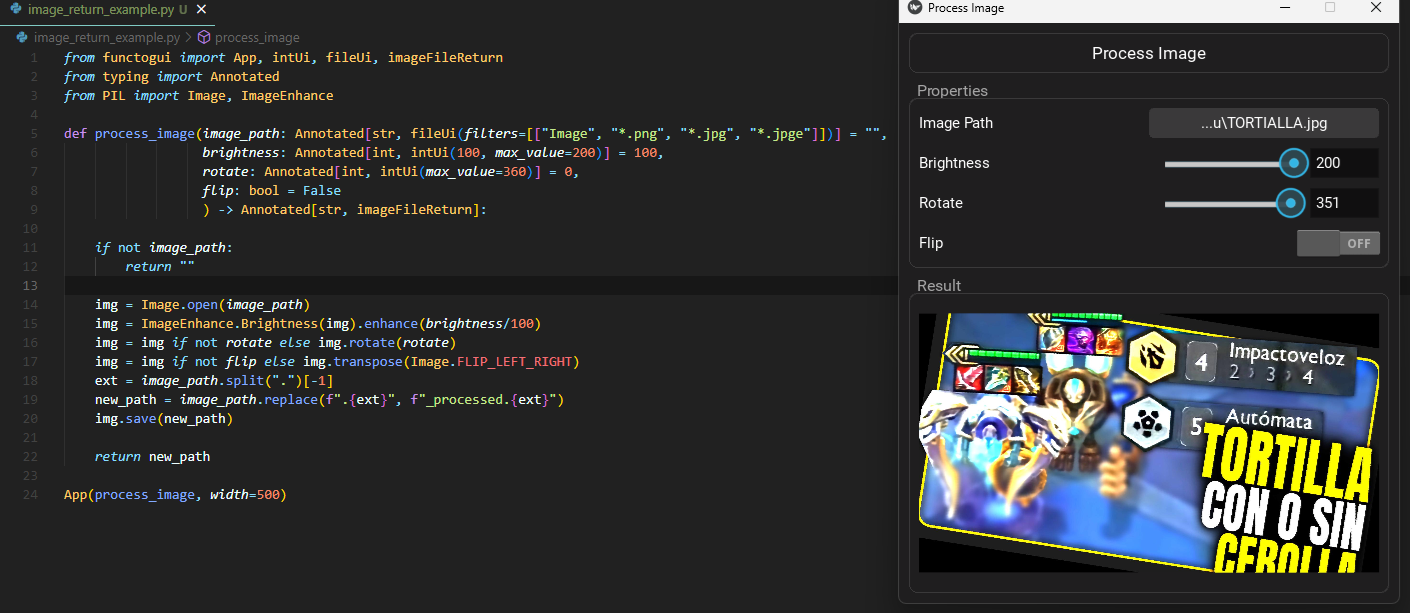
- imageFileReturn
- Error Handling: FuncToGUI treats the exceptions already for you.
Installation
git clone https://github.com/offerrall/FuncToGUI
cd FuncToGUI
pip install .


